
Aisle Planner
Aisle Planner is all-in-one software for wedding and event pros, bundling CRM, seating, guest lists, budgets and a client portal. Strong wedding-specific tools, but a closed system with no native app.

A wedding-specific all-in-one with genuinely strong seating, guest and budget tools, held back by a closed ecosystem, no native app and a card-first signup.
Should you use Aisle Planner?
US wedding and event planners who want seating, guest lists, budgets and client portals in one wedding-specific workspace instead of five separate tools.
You run your business across outside apps you want wired in . Aisle Planner connects only through Zapier, with no native app marketplace to pull in your stack.
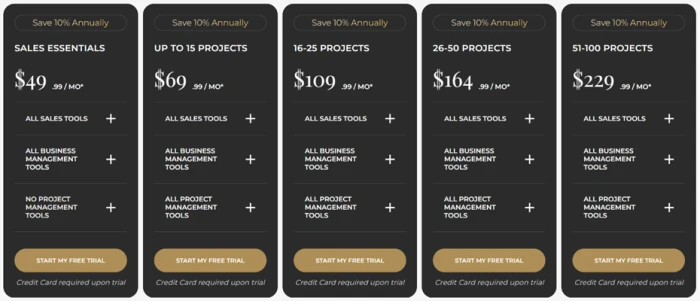
Tiers run by active project count, from $49.99/mo for Essentials to $229.99/mo for 51 to 100 projects, with 10% off annually. No free version exists.
Signup demands a credit card before you see a single tool , and there is no native iOS or Android app, only a mobile browser view.
Key features & how they perform
Each feature rated from a full hands-on event build and aggregated review sentiment.
Layout & seating canvas
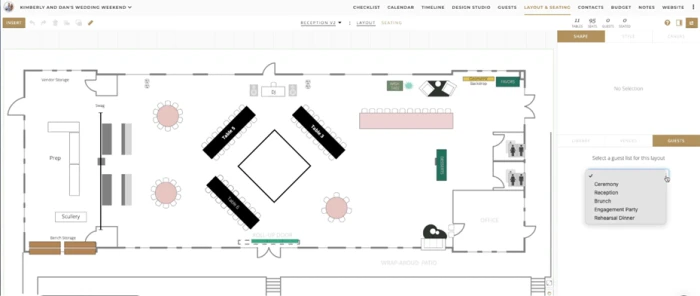
Draw the room with fixed features, place and label tables, and watch a live table and seat counter. Closer to drafting software than drag-a-box seating.
Guest list & RSVP
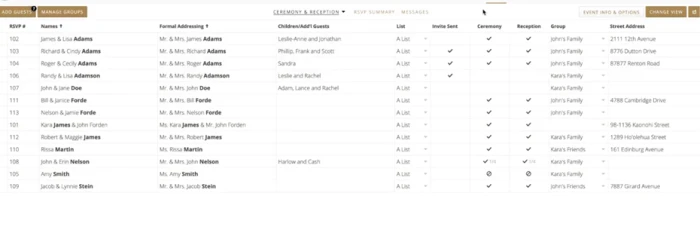
Formal addressing is pre-formatted, with separate ceremony and reception checkmarks, list tiers, children and mailing addresses. Built for US wedding etiquette.
Budget tracker
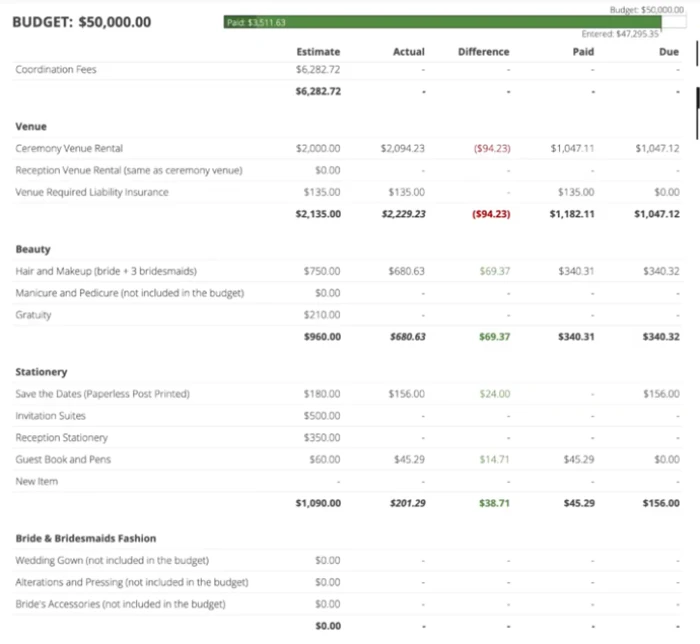
Every line splits into estimate, actual, difference, paid and due, with overages in red and savings in green. It behaves like a finance tool, not a checklist.
Design studio & style guides
Themed boards for mood, palettes, place settings and cake design, with templates to start from. Keeps visual work in-house instead of a second Canva tab.
Client portal & vendor threads
Each vendor gets a contact card with contracts, invoices and insurance terms attached beside a shared message thread. Organized, but a closed loop.
Integrations & mobile
Calendars sync for scheduling, but connections thin out fast: Zapier only, QuickBooks through Zapier, no native app. The weakest corner by a distance.
Feature ratings blended from G2, Trustpilot & a full hands-on event build.
Building a full wedding, from card-gated signup to a venue-ready floor plan
I walked through signup and the core tools the way a US wedding planner would, from the first screen to a finished event build.
Signup puts a card before the product
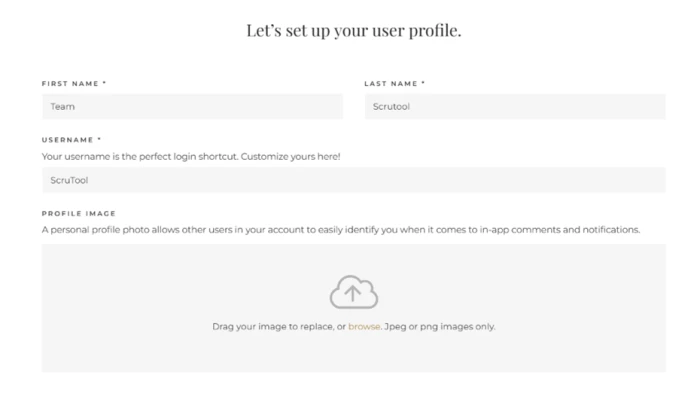
Onboarding runs across seven steps. The first collects your name and username, with an optional profile photo.
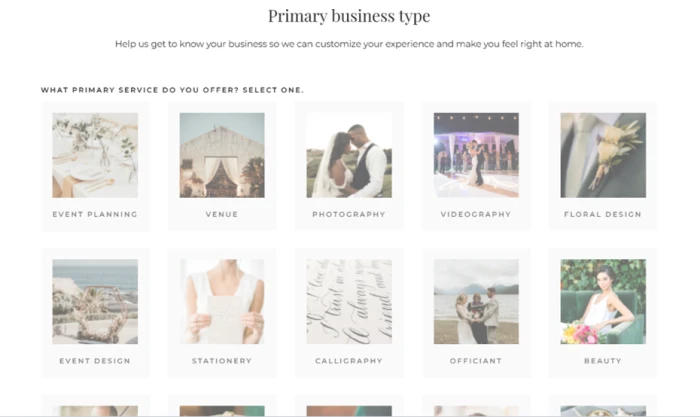
Step four asks for your primary business type from a grid (Event Planning, Venue, Photography, Videography, Floral Design and more). The choice shapes how the workspace is set up for you.
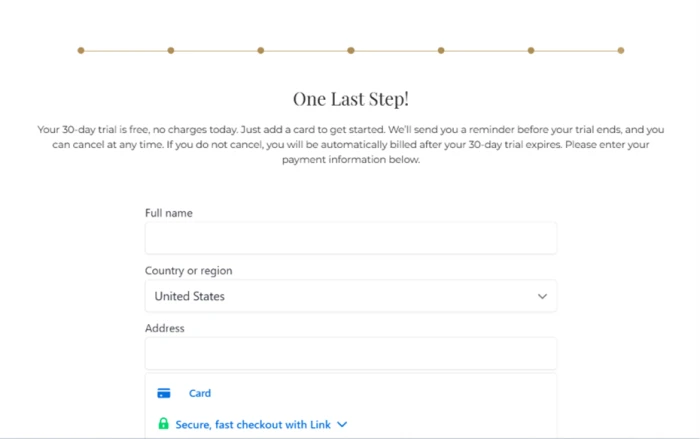
The final step is a wall. Before I could open a single planning tool, Aisle Planner asked for a credit card. The copy promises no charge for 30 days, a reminder before billing starts, and cancellation at any time.
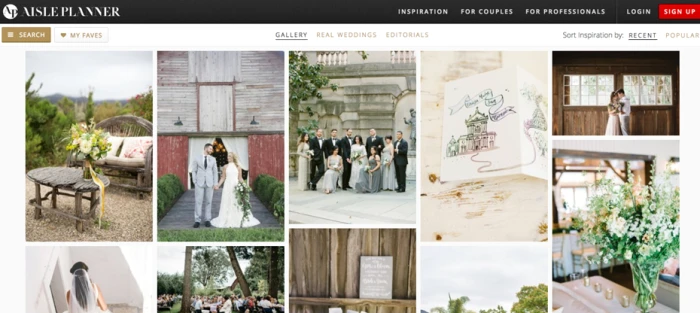
The public gallery is the couple-facing front door
The Inspiration gallery is the side couples see without logging in. It runs real weddings and editorial imagery.
It feeds planner visibility rather than doing any planning work itself, so treat it as marketing reach, not a tool.
Layout and seating is the standout
I built a reception layout inside a project. The canvas handled the room outline and its fixed features (DJ booth, dessert station, bar and wrap-around patio) and let me place and label tables on top. A live counter in the corner tracked 11 tables and 95 seats as I worked, so capacity stayed visible the whole time.
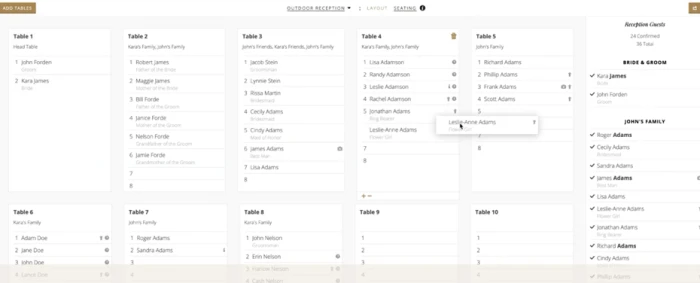
The companion Seating view assigns real guests to each of those tables. I dropped named guests into Table 1 through Table 10, and each name carried its role underneath (Bride, Groom, Best Man, Maid of Honor, Flower Girl). The sidebar counted 24 confirmed against 36 total.
Guest list and RSVP tracking built for US weddings
The guest manager tracks each party with formal addressing already formatted ("Mr. & Mrs. James Adams"), children and additional guests, list tier, invite-sent status and a mailing address.
Ceremony and reception each get their own checkmark, so a guest invited to one event and not the other is handled with no workaround. One row even showed a partial count against a family still finalizing its headcount.
The budget tool does the math for you
I loaded a $50,000 wedding budget. Every line splits into Estimate, Actual, Difference, Paid and Due. Overages print in red (a ceremony venue rental landed $94.23 over its estimate) and savings print in green. A bar across the top tracked $3,511.63 already paid against the full figure.
Design studio and shared vendor threads
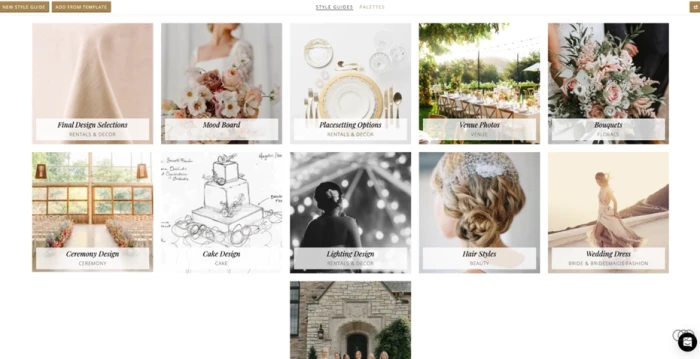
Style Guides let me build themed boards for a client (Mood Board, Placesetting Options, Venue Photos, Bouquets, Cake Design and more), with a Palettes tab alongside and templates to start from. No second browser tab open to Canva or Pinterest.
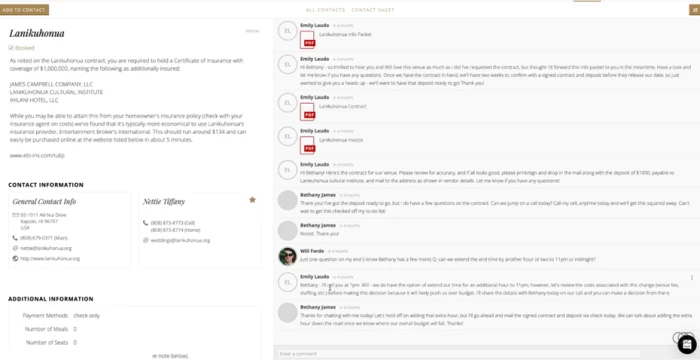
Each vendor also gets a full contact card. The booked venue card showed insurance requirements and deposit terms next to a running message thread, with the signed contract, invoice and venue info packet attached as PDFs inside a thread the planner and couple shared while the venue replied inline.
Scheduling works, wider integrations do not
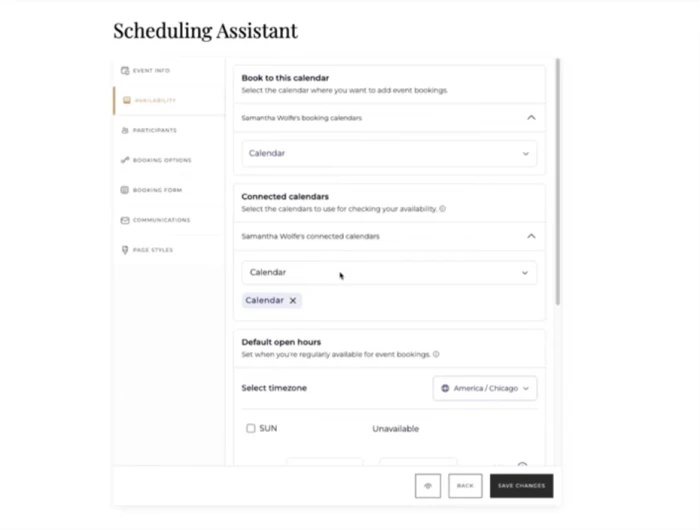
The Scheduling Assistant connects external calendars to check availability and set booking hours, with a timezone selector that defaulted to America/Chicago. Calendars sync cleanly.
Aisle Planner pricing
Figures taken from the official Aisle Planner pricing page. All plans take 10% off when billed annually.
| Plan | Price | What's included |
|---|---|---|
| Essentials | $49.99 /mo | Sales and lead tools plus business management, with no project management tools included |
| Up to 15 Projects Popular | $69.99 /mo | All sales, business management and project management tools, capped at 15 active projects |
| 16 to 25 Projects | $109.99 /mo | All tools, for 16 to 25 active projects running at once |
| 26 to 50 Projects | $164.99 /mo | All tools, for 26 to 50 active projects running at once |
| 51 to 100 Projects | $229.99 /mo | All tools, for 51 to 100 active projects; contact sales for anything larger |
Pricing is accurate as of 15 October 2026 and was captured from the official Aisle Planner website. Plans, prices and project limits change often, so check the official Aisle Planner pricing page for the current figures before you subscribe.
Pros & cons
Drawn from real user reviews on G2 and Trustpilot, paraphrased, not from our testing.
✅ Pros
- CRM, budgets, timelines, guest lists and floor plans live in one workspace
- Client-facing experience looks polished and professional to couples
- Support rated 8.5 of 10 on G2, with onboarding help called out
- Built specifically for wedding and event pros, not a retrofitted generic CRM
⛔ Cons
- Reviewers report a real learning curve before the tools click
- Users ask for Zola, HoneyBook and AllSeated links that do not exist
- No native iOS or Android app, only a responsive browser view
Synthesized from verified reviews on G2 (21 reviews) & Trustpilot · paraphrased, not quoted. Review volume on both is limited, so these are the patterns that hold.
Aisle Planner alternatives
How Aisle Planner lines up against the planner and client-management tools buyers cross-shop it with. Figures are from each vendor's public information.
| Aisle PlannerReviewed | HoneyBook | Dubsado | Planning Pod | |
|---|---|---|---|---|
| Entry price | $49.99/mo | ~$36/mo | ~$20/mo | ~$19/mo |
| Free trial | 30 days, card required | 7 days, no card | Free until 3 clients | Free trial, no card |
| Pricing model | By active project count | Flat tiers | Flat tiers | By count of events |
| Wedding-specific tools | Seating, guest list, style guides | General, not wedding-built | General, not wedding-built | Seating and floor plans |
| Native mobile app | No, browser only | Yes, iOS and Android | Yes, iOS and Android | No, browser only |
| Best for | Wedding planners wanting one workspace | Freelancers and small studios | Service pros who customize workflows | Venues and event teams |
Who Should Use Aisle Planner, and Who Should Avoid It?
Aisle Planner is a strong wedding-specific workspace, but its closed ecosystem, missing app and card-first trial make it a poor fit for some businesses.
Who Should Use Aisle Planner?
Best suited for these businesses
US Wedding Planners
Formal addressing, per-event RSVP tracking and a drafting-grade seating canvas are built around US wedding etiquette, not bolted onto a generic CRM.
Planners Tired of Juggling Tools
CRM, budgets, timelines, guest lists, floor plans and design boards sit in one workspace, so there is no second tab open to Canva, Pinterest or a spreadsheet.
Teams That Share With Couples
The client portal and shared vendor threads keep contracts, invoices and messages in one place that looks polished to the couple on the other side.
Planners Who Want Exposure
The public Inspiration gallery runs real weddings and editorial imagery, giving planners a marketing front door that most back-office tools do not offer.
Who Should Avoid Aisle Planner?
Consider an alternative if you need
A Connected Software Stack
Integrations run through Zapier only, with no app marketplace. Reviewers specifically ask for Zola, HoneyBook and AllSeated links that do not exist.
A Real Mobile App
There is no native iOS or Android app. Working from a phone means a responsive browser view, which is not the same as a built-for-mobile experience.
To Try Before Paying
There is no free version, and the trial puts a mandatory credit card wall before any planning tool, so you commit payment details on day one.
A Gentle Start
Reviewers describe a learning curve before the tools click, so budget time for setup rather than expecting to run a live event in the first week.
Our Recommendation
Aisle Planner is worth it for a US wedding or event planner who wants the whole job in one wedding-built workspace and is happy to work inside it. If you run your business across outside apps, or you need a true mobile app, a more open rival fits better. Before you commit, use the 30-day trial to build a real event end to end, and test the built-in payments with a small transaction before any client money flows through them.
Aisle Planner scorecard
Rated against what an all-in-one wedding and event planning platform is actually built to do.
| Dimension | Verdict | Score |
|---|---|---|
| Layout & seating tools Floor plans and guest assignment | Excellent |
8.5
|
| Guest list & RSVP US addressing and per-event tracking | Good |
8.0
|
| Budget tool Estimate, actual and overage tracking | Good |
8.0
|
| Design studio & style guides Mood boards and palettes | Good |
7.5
|
| Client portal & vendor threads Shared files and messaging | Good |
7.5
|
| CRM & lead tools Inquiry capture and sales pipeline | Good |
7.0
|
| Ease of use & onboarding Setup and learning curve | Average |
6.5
|
| Pricing & trial friction Value, tiers and card-first signup | Average |
6.0
|
| Mobile access Native app versus browser only | Weak |
5.0
|
| Integrations & ecosystem Connections to outside apps | Weak |
4.5
|
| Scrutool Score Equal-weight average of all 10 dimensions |
6.9
|
Excellent at the wedding itself, walled off from everything around it
Aisle Planner is the rare tool that was clearly built by people who understand weddings. The seating canvas produces floor plans you would hand a venue untouched, the guest list speaks fluent US etiquette, and the budget tracker behaves like real finance software rather than a checklist. Put those next to design boards, a client portal and shared vendor threads, and a planner really can run the whole job in one place. The limits are all at the edges. Signup forces a credit card before you see a single tool, there is no native mobile app, and the software runs as a closed system that connects to the outside world only through Zapier, which is why reviewers keep asking for integrations that are not there. A US wedding or event planner who wants one wedding-built workspace and will live inside it will get a lot of value here. Anyone who needs their software to plug into an existing stack, or to work properly from a phone, should look at a more open rival first.
Discussion
Join the discussion and share your perspective.