
Akool AI
Akool bundles AI avatars, face swap, text to video, image generation and 155-language translation into one credit-based workspace. Capable output, but the free plan watermarks everything.

Strong avatar output and the widest tool spread in the category, undone by a free tier that watermarks everything and a credit system that hides its costs until you press generate.
Should you use Akool?
Marketing and training teams making talking-head video who want avatars, face swap, translation and stills under one login and one credit pool.
You need legible on-screen text in generated video , or a predictable monthly bill. Credit burn varies by more than 10x depending on the model you pick.
Free output is unusable, so real work starts at Starter $12/seat/mo billed yearly and most creators land on Pro at $21 yearly or $30 monthly.
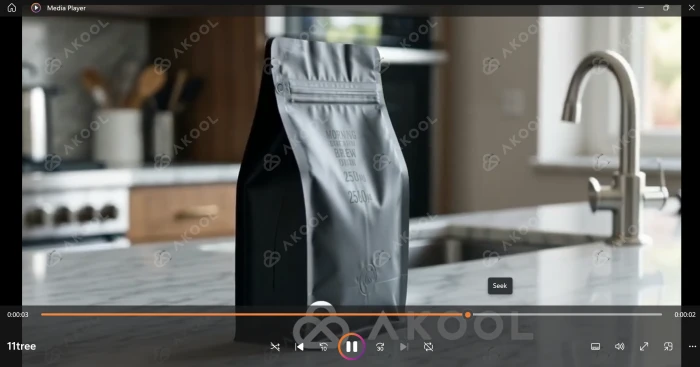
The exported file is not the file you previewed . On the free plan the preview shows one logo and the download carries a tiled watermark mesh.
What is Akool?
Before anything else, know what the free plan lets you keep: nothing you can publish. Every video and image that leaves a Basic account carries a full-screen watermark, caps at 720p, and comes with no commercial license attached. Akool is a paid product with a demo mode, and the demo mode is honest about being one only after you download a file.
What you are paying for is range. Akool bundles talking avatars, text to video, image generation, face swap, video translation across 155 languages, voice cloning and a timeline editor into a single workspace, routed through more than 30 third-party models including Seedance, Kling, Veo and Sora. Everything draws from one credit balance rather than a minutes allowance. It runs in the browser, on iOS, and through an API from the Pro Max tier upward, and it is aimed squarely at marketing, sales and training teams rather than filmmakers.
Key features & how they perform
Each feature rated from hands-on testing and aggregated review sentiment.
Talking avatar video
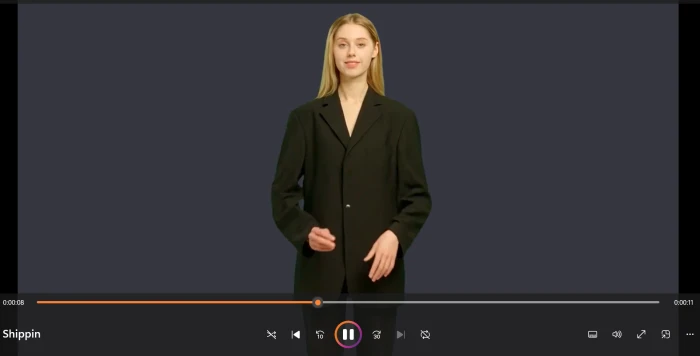
The strongest thing on the platform. Mouth shapes tracked spoken numerals correctly across an 11-second clip and the hands avoided the looping gesture cycle rival tools fall into.
Tool and model library
More than 30 models and roughly the same number of tools, from head swap to holographic display, all sharing one balance so you never juggle separate subscriptions.
Image generator
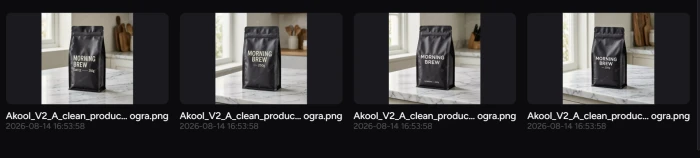
Four variants for 4 credits in about a minute, with product packaging text readable in all four. The wording differed between them, which matters for brand work.
Text to video
Scene craft and lighting are convincing. On-screen text broke apart into misspellings within three seconds, and the subject shifted color despite a static-subject instruction.
AI video editor
Trims, crops and stacks clips fine, but three of the four AI tools in its panel only operate on stills and cannot touch anything sitting on the timeline.
Translation & face swap
The features reviewers rate highest, covering 155 languages with lip-sync and re-age options, though voice clone quality draws repeated criticism.
Feature ratings blended from G2, Capterra, Trustpilot & App Store review patterns + hands-on testing.
Putting Akool AI into Practice
An avatar clip, four product images, one video generation, and the file that actually landed on my disk.
Sign up and check what the free balance actually is
Akool asks for an email and stops there. No card, no billing details, no trial countdown running in the background.
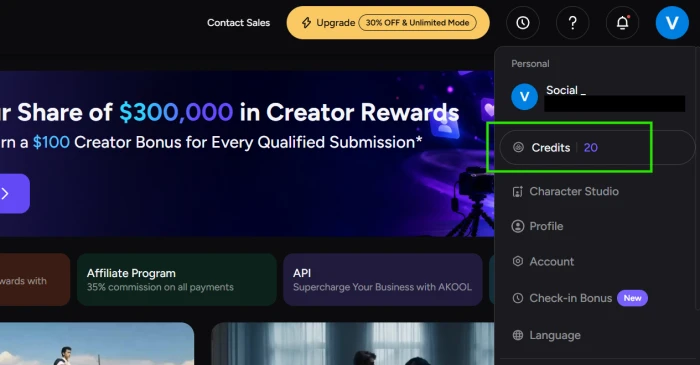
The balance lives in the account menu at the top right rather than anywhere on the dashboard, so most people will not see it until they go looking.
That number is the entire free tier. Akool prices in credits rather than minutes, and different tools burn them at wildly different rates.
Build a talking avatar with a script designed to break it
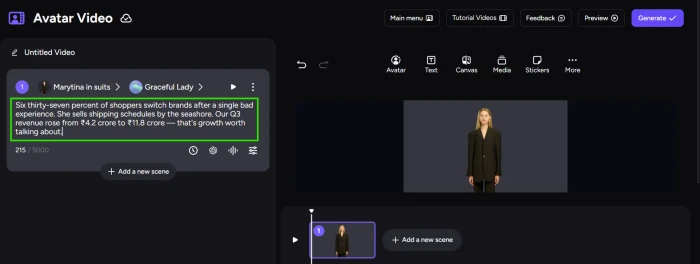
Avatar Video is the tool Akool leads with, and the editor borrows its layout from slide software: script panel on the left, avatar preview in the middle, scene timeline along the bottom.
Spoken numerals and repeated sibilants are where lip-sync engines usually fall apart, so the script was built out of both rather than out of marketing copy.
"Six thirty-seven percent of shoppers switch brands after a single bad experience. She sells shipping schedules by the seashore. Our Q3 revenue rose from Rs 4.2 crore to Rs 11.8 crore."
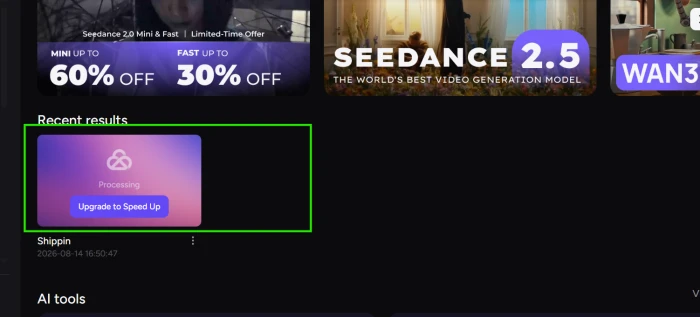
Once the job entered the render queue, the wait itself turned into a sales pitch. The upsell is placed on the processing tile, not tucked into a settings menu.
The finished clip is a different story, and it is the best thing Akool produced in the whole session.
Ask the image generator for readable packaging text
Legible text on a product is still the standard failure case for image models, which makes it the fastest way to find out whether a generator is usable for commercial work.
Akool lets you pick the model before generating. This run used Akool V2, with the credit cost printed on the generate button itself rather than anywhere earlier in the flow.
"A clean product photograph of a matte black coffee packet standing on a marble countertop, soft window light from the left, the words 'MORNING BREW 250g' printed clearly on the front of the packet, shallow depth of field, photorealistic."
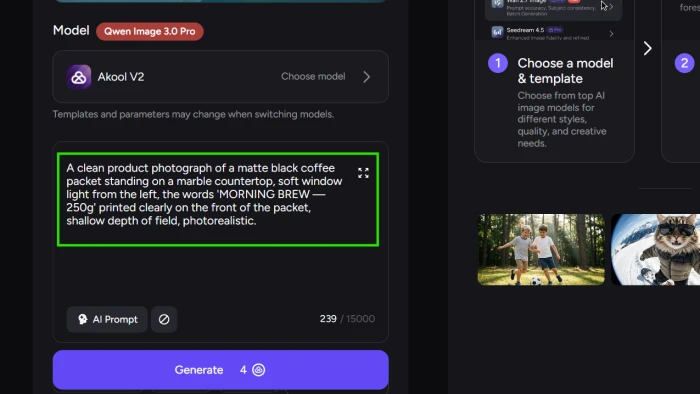
Four variants came back from that single generation. Read the packets left to right and the wording changes on each one.
Hit the paywall on the upload, not the download
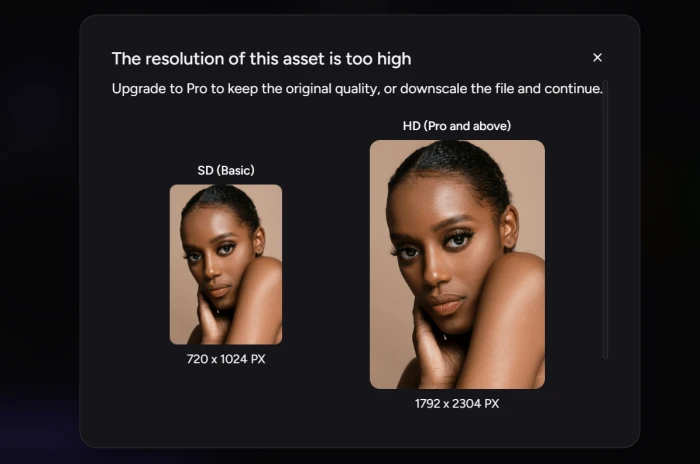
Most free tiers restrict what you can export. Akool also restricts what you can bring in.
Uploading a high-resolution portrait triggers a modal offering two routes: let Akool shrink the file, or pay to keep the pixels you already own.
Spend 15 of 20 credits on one 5-second clip
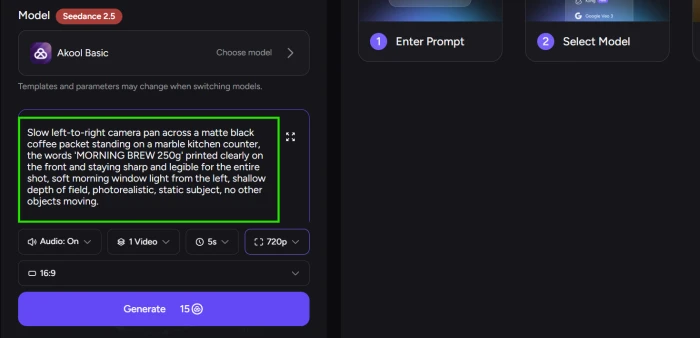
Text to video is where the free tier shows its teeth. The quote appears on the generate button, after model, duration, resolution and aspect ratio are already set.
This run used Seedance 2.5 at 720p for five seconds with audio on, and the prompt asked in plain terms for the packaging text to stay sharp for the entire shot, on a subject that does not move.
"Slow left-to-right camera pan across a matte black coffee packet standing on a marble kitchen counter, the words 'MORNING BREW 250g' printed clearly on the front and staying sharp and legible for the entire shot, soft morning window light from the left, shallow depth of field, photorealistic, static subject, no other objects moving."
Open the editor, then compare the export against the preview
Akool ships its own AI Video Editor, and dropping a generated clip onto its timeline is the obvious next move when a result comes back flawed.
The AI Tools panel lists Text to Image, Image to Image, Remove Background and Image Upscaling. Three of those four operate on stills only.
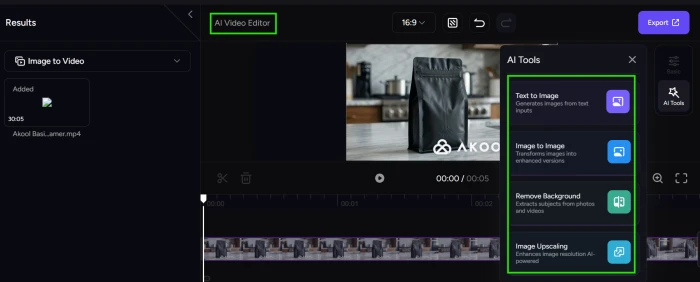
Look at the timeline thumbnails above and the watermark is already repeating on every frame, which means it is baked into the generated file rather than applied at export. Then compare that in-app view against what actually downloaded.
Akool pricing
Plan prices reflect the yearly billing toggle on Akool's official pricing page. Feature limits come from the same page's full comparison table.
| Plan | Price | What's included |
|---|---|---|
| Basic (Free) | $0 | 720p output · full-screen watermark · slow processing · 5 GB storage · no commercial license · 5 text to speech uses total |
| Starter | $12 /seat /mo | 200 credits · up to 1080p · watermark removed · personal license · medium speed · billed yearly at $144 |
| Pro Popular | $21 /seat /mo | 600 to 2,400 credits · up to 4K · all video and image models · 6 concurrent videos · billed yearly at $252 ($30 monthly) |
| Pro Max | $41.30 /seat /mo | 1,200 to 9,600 credits · up to 8K · API access · workspace collaboration · billed yearly at $495.60 ($59 monthly) |
| Business | $174.30 /seat /mo | 6,000 to 50,000 credits · up to 16K · business license · 1 studio avatar · billed yearly at $2,091.60 ($249 monthly) |
| Enterprise | Custom | Credits do not expire · SSO · VIP processing · dedicated success manager · contact sales for a quote |
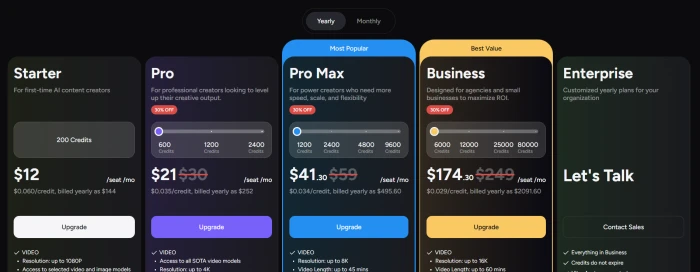
The 30% discount badges on Pro, Pro Max and Business are a promotional offer tied to the yearly toggle.
Pros & cons
Specific conclusions from testing and real user reviews, not generic filler.
✅ Pros
- Avatar lip-sync tracked spoken numerals across an 11-second clip
- Avatar hands avoided the looping gesture cycle rival tools show
- Four image variants returned in about a minute for 4 credits
- Packaging text came back readable in all four image outputs
- Avatar editor setup took under a minute with no tutorial
- One login covers avatars, face swap, translation and stills
- Over 30 models on tap, including Seedance, Kling, Veo and Sora
- Video translation covers 155 languages with lip-sync
⛔ Cons
- Exported free MP4 carried over 25 watermarks per frame
- In-app preview showed one logo, the download showed dozens
- Watermark is burned into the file, so no crop removes it
- Text to video printed "MORNNG" and "BR.EW" by 0:03
- Bag drifted black to grey despite a static-subject prompt
- One 5-second 720p clip cost 15 of my 20 free credits
- Credit cost appears only on the generate button, never earlier
- Free uploads downscale to 720 x 1024 unless you upgrade
- Credits expire each cycle on every plan below Enterprise
- Trustpilot displays a notice that it removed fake Akool reviews
Synthesized from real reviews on G2, Capterra, Trustpilot, the App Store & Reddit · paraphrased, not quoted
Akool scorecard
Rated against what a multi-tool AI video and image suite is actually sold to do.
| Dimension | Verdict | Score |
|---|---|---|
| Tool & model breadth Range of tools and models per login | Excellent |
9.0
|
| Avatar video quality Lip-sync, gesture and facial stability | Excellent |
8.5
|
| Ease of use & onboarding Signup, editor layout, learning curve | Good |
8.0
|
| Image generation quality Detail, text rendering, variant consistency | Good |
7.0
|
| Text to video output Scene craft versus on-screen text | Average |
5.0
|
| Prompt adherence Following explicit instructions | Average |
5.0
|
| Editing & post-production What the timeline editor can fix | Average |
5.0
|
| Billing trust & support Charging accuracy, refunds, responsiveness | Average |
4.5
|
| Credit transparency & cost control Knowing a price before you commit | Average |
4.0
|
| Free tier & watermark policy What a free account can actually keep | Average |
2.5
|
| Scrutool Score Equal-weight average of all 10 dimensions |
5.9
|
What users say about Akool
The themes reviewers raise most often, by share of analysed reviews.
% = share of analysed reviews mentioning each theme (G2, Capterra, Trustpilot, App Store, Reddit)
The avatars are worth paying for, the payment system is worth watching
Akool is two products sharing a login. One of them is very good: the talking avatar held lip-sync through spoken numerals and repeated sibilants, moved its hands like a person, and took under a minute to set up. That, plus face swap and 155-language translation, is why marketing and training teams keep it. The other product is the money. A single 5-second 720p clip consumed 15 of 20 free credits with the price shown only on the generate button, the resulting video misspelled the brand name the still generator had rendered correctly an hour earlier, and the exported file came back blanketed in more than 25 watermarks that the preview never showed. Credits expire monthly, invited teammates are billed at full seat rate, and duplicate-charge complaints recur across G2 and Trustpilot. Teams producing avatar-led video who will pay from day one and monitor their statements will get real value. Anyone hoping to evaluate seriously on the free plan, or needing legible text inside generated video, should look elsewhere.
Discussion
Join the discussion and share your perspective.