
Character AI
Chat, roleplay and create with roughly 10 million AI characters, with portrait generation and AvatarFX video built in. Free with unlimited messaging; c.ai+ is $9.99/mo, and the content filter applies to every tier.

The largest character catalog anywhere, now with built-in image and video generation, wrapped in a content filter that never switches off.
Should you use Character AI?
Creators and roleplayers who want a 10 million strong catalog plus image, voice and video generation in the same place.
You want adult or explicit roleplay . The filter covers every account, paid included, and there is no way to disable it.
Free gets unlimited messaging with ads and daily swipe caps. c.ai+ is $9.99/mo or $94.99/yr .
Charms is a second currency stacked on top of the subscription, and paying does not loosen moderation by a single line.
What is Character AI?
Start with what it will not do. Character.AI blocks explicit sexual content on every account, free or paid, verified adult or not, and the filter has no off switch. It moved to intent-based moderation in 2026, which means it reads the direction of a conversation rather than scanning for words, so a scene can get shut down without a single flagged term in it. Under-18 accounts lost open-ended chat entirely in November 2025, and adults clear a Persona age check before they can chat at all.
What sits behind that gate is the biggest character catalog in the category: roughly 10 million community and official personas covering companions, mentors, villains and fandom favorites. The create menu now runs past characters to Scenes, Voices, Lorebooks, Streams and Comics, image generation is built into the character form so you never leave for an art tool, and AvatarFX turns a still portrait into a talking clip. It runs on web, iOS and Android. Free gives you unlimited messaging with full-screen ads and daily swipe caps; c.ai+ costs $9.99 a month and buys speed, the DeepSqueak chat style and the memory tools, not a looser filter.
Key features & how they perform
Each feature rated from hands-on testing and aggregated review sentiment.
10 million character catalog
Nothing else in the category is close on volume, and the Discover feed, genre rows and search make a library this size actually navigable.
Character creation with image generation
Name, tagline, greeting and description in one form, with a portrait generator built in that returns four variations per prompt.
AvatarFX video generation
Lip-synced talking clips from a still image and typed dialogue, five per day even on free, with an emotion tag system that visibly changes delivery.
Story Memory and Facts
Pinning and a memory usage bar landed in May 2026 and help, but Facts is subscriber-only and long-chat drift is still the loudest complaint on every review site.
Content filter
Effective at what it is built for and impossible to argue with. Reviewers report it firing on non-explicit romance, combat and grief scenes.
Feed, Scenes and c.ai Series
A social layer where creators post clips and images, plus studio-made vertical dramas whose casts you can chat with after the episode.
Feature ratings blended from Trustpilot, Product Hunt, Reddit r/CharacterAI, App Store & Google Play review patterns + hands-on testing.
From an empty create form to a talking video
Signup, a character built from scratch, and the same character animated with AvatarFX.
Sign up and land on Discover
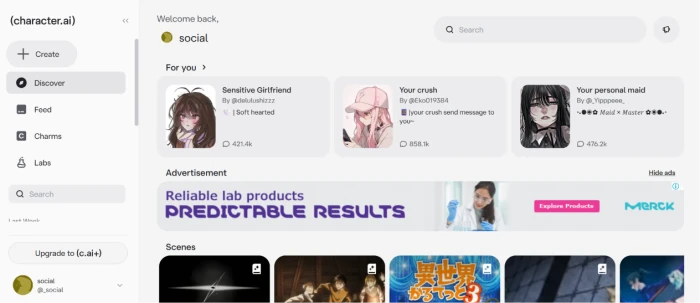
There is no onboarding walkthrough. You get an account and you get dropped onto Discover, which opens on a For You row of trending characters with their chat counts underneath.
The left rail is the part worth reading. Create, Discover, Feed, Charms and Labs sit stacked above search, with an Upgrade to c.ai+ button pinned at the bottom of the column.
Free accounts carry advertising inside the layout, not just around it. A display banner sits directly under the first row of characters, with a Hide ads link that routes to the subscription page.
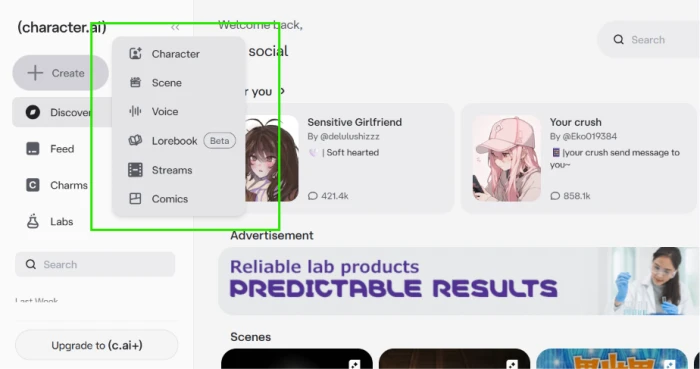
Opening Create shows how far the platform has moved past text chat. Six things are on the menu, and only the first one is a character.
Fill the character form and generate a portrait
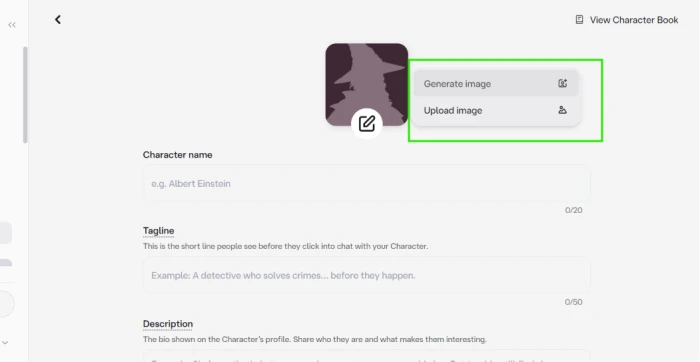
The character editor is short by design: name capped at 20 characters, tagline at 50, then a description field for the bio that shows on the profile.
The avatar is the interesting part. Clicking the edit badge gives you Generate image or Upload image, so you can make the portrait here instead of bringing art in from somewhere else.
A View Character Book link sits in the top right corner of the same screen, which is where the new Lorebook system hangs off character creation.
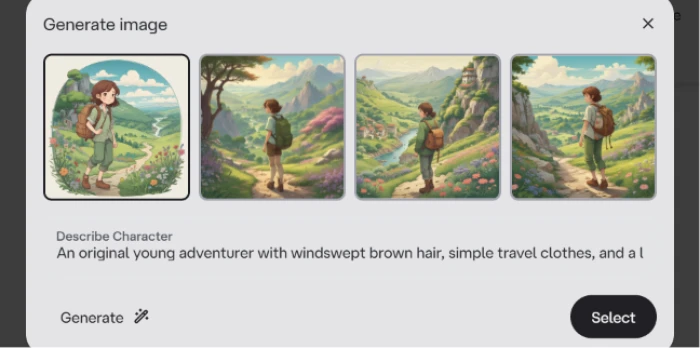
I went with Generate image and wrote a description rather than a shot list, to see how much of an art direction it would actually hold.
"An original young adventurer with windswept brown hair, simple travel clothes, and a large backpack, exploring rolling green hills dotted with wildflowers and ancient ruins. Whimsical hand-painted aesthetic inspired by classic Japanese animation, soft colours, peaceful atmosphere, original character design."
Publish it and send the first message
Once the name, tagline, greeting and description are in, the character is live and the chat opens with its greeting already written, so you are answering a scene rather than starting one.
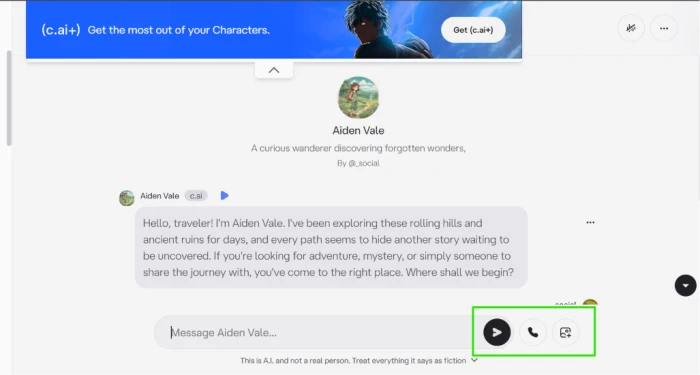
The composer carries three controls: send, a phone icon for voice calls, and an image button for adding pictures to the conversation.
A c.ai+ upsell banner sits across the top of the chat and a fiction disclaimer runs under the input box on every screen.
What sits in the chat menu
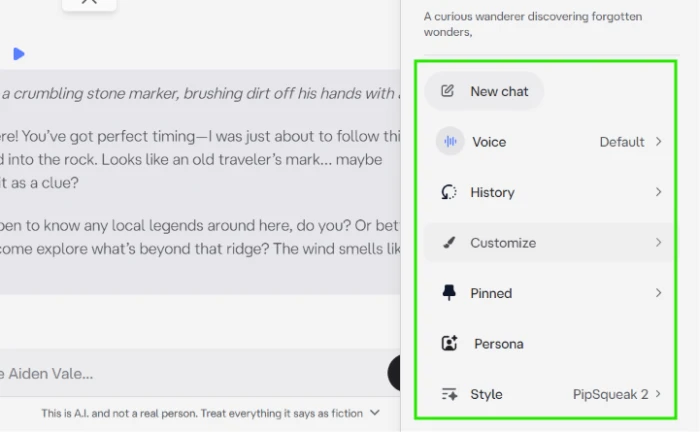
The per-chat menu is where you steer a roleplay, and it holds more than the composer suggests: New chat, Voice, History, Customize, Pinned, Persona and Style.
Pinned is the one to learn first. Long-pressing a message and pinning it locks that line into Story Memory, which survives the background trimming that older context goes through.
Style is the model picker in everything but name. It reads PipSqueak 2 on a free account; DeepSqueak, the stronger chat style, only appears with a subscription.
The Feed, which is a social network now
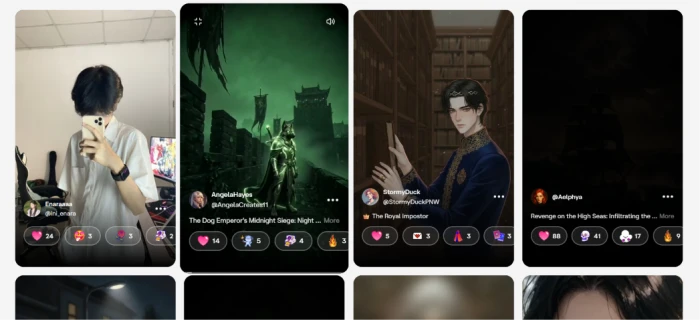
Feed is a separate tab from Discover and behaves like a short-form social app: a grid of creator posts, images and videos mixed together, each with a handle and a title.
Engagement is not a single like button. Every post carries four reaction types with their own counts, which is how Character.AI ranks creator work in the feed.
Animate the character with AvatarFX
AvatarFX is a separate workspace, not a chat feature. It takes a still image, a voice and a line of dialogue and returns a lip-synced clip.
The dialogue box runs to 450 characters and sits under a voice search field and a row of emotion tags: Pause, Happy, Sad, Angry, plus a custom option. Tags get written inline into the script.
It is a two-stage job. Generate audio first, listen to it, then commit the render. That order matters, because the render is what burns your daily allowance.
"[[happy]]Look at this! Isn't it incredible? You never know what you'll find when you're willing to take the road less travelled. Come closer. I have a feeling today is going to be unforgettable!"
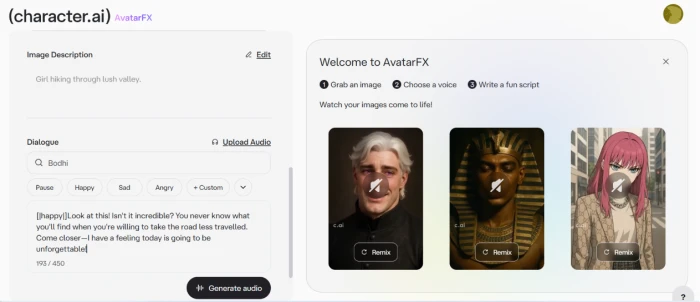
Audio came back as an eleven second clip with a thumbs up, thumbs down and Regenerate control. Only then does the Create Video button unlock, and it tells you how many renders you have left before you spend one.
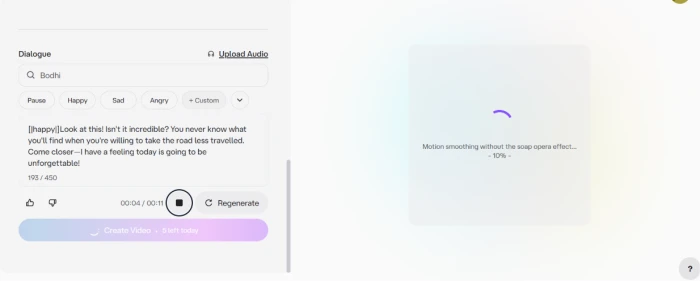
The render finished on the right and the counter dropped by one. From there the clip can be posted to c.ai, shared or downloaded.
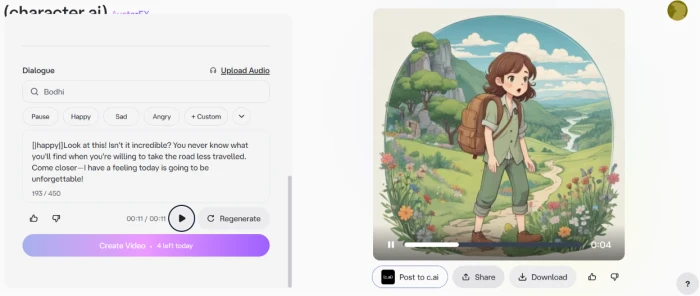
The generated portrait speaking my line with the emotion tag set to happy. Watch the mouth on the longer vowels.
Character.AI pricing
Figures taken from the official character.ai subscription page.
| Plan | Price | What's included |
|---|---|---|
| Free | $0 | Unlimited messaging · full 10M character library · basic chat models · Story Memory and Pin to Memory · ads · slow mode at peak · daily swipe, go-on and memo caps |
| c.ai+ monthly Popular | $9.99 /mo | Ad-free chats · better memory · latest and best models · no slow mode · unlimited voice calls · more muted words, voice memos, go-ons & swipes · Charms pack bonus · chat customization |
| c.ai+ annual | $94.99 /yr | Everything in monthly at 20% off the $119.88 list price, about $7.92 a month · auto renews yearly until canceled |
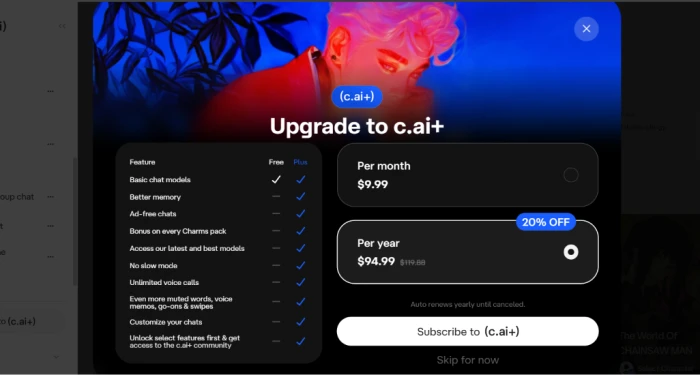
The in-app upgrade sheet, with the annual option preselected.
Pros & cons
Specific conclusions from testing and real user reviews, not generic filler.
✅ Pros
- Roughly 10 million community characters, the largest catalog in the category
- Portrait generation is built into the create form, four options per prompt
- AvatarFX gives free accounts five lip-synced videos every day
- Story Memory and Pin to Memory work without a subscription
- Free tier keeps unlimited messaging, unlike credit-metered rivals
- Lorebook links one shared world to an entire cast of characters
- Voice calls, Scenes, Comics and Streams sit in the same create menu
⛔ Cons
- Explicit content is blocked on every tier, subscription included
- Intent-based filter fires on non-explicit romance, combat and grief scenes
- PipSqueak 2 draws heavy repetition complaints across Trustpilot and Reddit
- Free swipes capped near 400 a day account-wide since March 18, 2026
- Full-screen mid-chat ads reached all free users by April 15, 2026
- Facts and Lorebook creation both sit behind the $9.99 plan
- Chat access requires a Persona age check, sometimes ID or selfie
- Retiring older chat styles like Roar and Meow angered long-term users
- Trustpilot sits near 1.4 out of 5 across more than 600 reviews
Synthesized from real reviews on Trustpilot, Product Hunt, Reddit r/CharacterAI, the App Store & Google Play · paraphrased, not quoted
Character.AI scorecard
Rated against what a character chat and creation platform is actually built to do.
| Dimension | Verdict | Score |
|---|---|---|
| Character library & variety Size and range of the catalog | Excellent |
9.5
|
| Character creation depth Editor fields, portraits, Lorebook | Excellent |
9.0
|
| Multimedia creation AvatarFX video, voice, in-chat images | Excellent |
9.0
|
| Roleplay quality & consistency Staying in persona across a chat | Average |
6.0
|
| Memory & long-chat retention Recall across hours of backstory | Average |
6.0
|
| Content filter & maturity handling Accuracy and adult options | Average |
5.5
|
| Free tier value Ads, swipe caps, slow mode | Average |
6.0
|
| c.ai+ value for money What $9.99 actually buys | Average |
6.5
|
| Ease of use & discovery Signup, navigation, finding characters | Excellent |
8.5
|
| Safety, moderation & privacy Age assurance, controls, data handling | Good |
7.0
|
| Scrutool Score Equal-weight average of all 10 dimensions |
7.3
|
What users say about Character.AI
The themes reviewers raise most often, by share of analysed reviews.
% = share of analysed reviews mentioning each theme (Trustpilot, Product Hunt, Reddit r/CharacterAI, App Store, Google Play)
The biggest character catalog in AI chat, and the strictest filter sitting on top of it
Character.AI has quietly turned into a production tool. Portrait generation lives inside the character form, AvatarFX will animate that portrait five times a day for free, Lorebook links a cast to a shared world, and the catalog behind all of it is roughly 10 million personas deep. The 2026 problems are just as concrete. PipSqueak 2 is the only chat style free users get and it is the one reviewers blame for repetitive replies. Memory improved in May and still tops the complaint list on every site we read, with Facts locked to the $9.99 plan. Swipes are capped near 400 a day, full-screen ads run mid-conversation, and the filter that made the platform legally defensible also fires on scenes that are nowhere near explicit. Creators who want to build characters, worlds and short video and are happy inside a hard content line will get more here than anywhere else. Anyone looking for uncensored adult roleplay, or a companion that reliably remembers last week, is on the wrong platform and no subscription will fix it.
Discussion
Join the discussion and share your perspective.