
Clipfly AI
Browser-based AI suite for generating images, videos and music, with a free editor attached. Everything generative runs on credits; trimming and export do not.

Strong still images and a genuinely free editor, tied to a credit meter that empties after one video and AI edits that rewrite more than you asked.
Should you use Clipfly?
Social creators who mostly need stills and a free timeline for trimming, captions and audio, with the occasional short AI clip on top.
You need precise local edits or motion that holds up on playback. Masks get ignored and fast movement collapses.
The free credit grant is one-time and buys a single video. Regular use starts at Pro, $49.99 a year for 200 monthly credits.
Plan prices display per month but bill for a year , and a generation that misses your prompt still spends the credits.
What is Clipfly?
Everything on Clipfly is priced in credits, and the number in the top bar decides what kind of product you are using. An image is 2 credits. A five second video is 10. Trimming, captions, transitions and export cost nothing at all. That split is the whole design: a browser based generator for text to image, text to video, image to video and AI music, bolted onto a free timeline editor that never touches your balance.
It runs on the web plus iOS and Android apps, and the generator hands you a model picker rather than a single house engine, with Veo 3.1, Kling 3.0, Seedance 2.0, Wan 2.7, Pixverse V6 and Clipfly's own Lumen all selectable per job. Exports carry no watermark on any tier, including free, and commercial use is permitted throughout. It is aimed at social creators and small marketing teams who want generation and finishing in one tab.
Key features & how they perform
Each feature rated from hands-on testing and aggregated review sentiment.
Text to image at 2 credits
The strongest thing here. My coffee prompt landed on the first attempt with correct light direction, wet glass refraction and steam that held its shape.
Text to video, six engines
Stills from the clip look cinematic. Playback is where it slips: on Lumen my running wolf trotted, with legs blurring together instead of resolving.
Free standard editor
Trim, resize, reposition, add audio and captions without spending a credit. No keyframes, no color wheels, no masking layers, no nested sequences.
AI Replace object swap
Painted a mask over bread dough and got a full regeneration back. Wood grain, flour pattern and hand position all changed outside the masked area.
Background remover
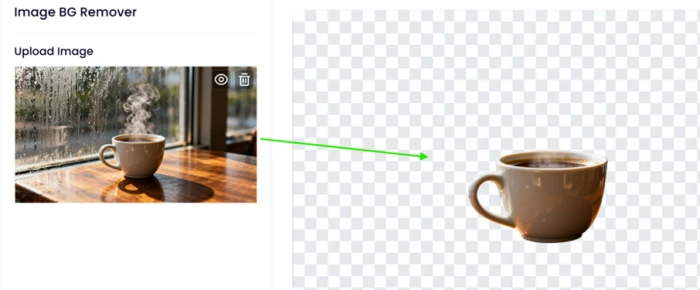
Clean edges and a correctly punched handle hole with no rim halo. Semi-transparent detail does not survive, so the steam disappeared with the background.
Watermark-free export
My free-tier video downloaded clean at 1080p with commercial rights attached, which several rivals reserve for paying accounts.
Feature ratings blended from Trustpilot, App Store, Google Play & GeniusFirms review patterns + hands-on testing.
What 17 free credits bought me inside Clipfly
One image, one video, and four tools tested until the balance ran out.
Text to image, the cheapest thing on the platform
The generator opens on a two-tab panel: Generate Image and Generate Video. Image sits on the left at 2 credits per run.
A Number of Images stepper sits under the prompt box, and the price on the Generate button moves with it. There is also an AI Optimize toggle that rewrites your prompt before sending it.
I wrote a prompt designed to be fair rather than difficult, testing light behavior and fine detail instead of trying to break the model.
"A cup of coffee on a wooden table beside a rain-streaked window, steam rising slowly, warm morning light, static camera, cinematic."
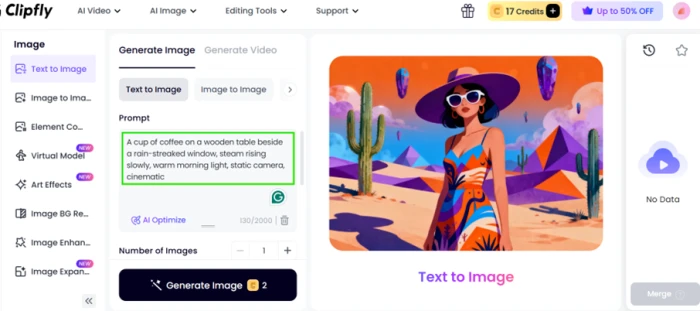
The desert artwork on the right of that panel is Clipfly's demo placeholder, not my output. Here is what actually came back.

Text to video on the Lumen model
Switching to Generate Video adds a Model selector above the prompt box. Lumen is Clipfly's own engine and the default.
The price jumps from 2 credits to 10 the moment you cross that tab. Veo 3.1, Kling 3.0, Seedance 2.0, Wan 2.7 and Pixverse V6 sit in the same picker at higher rates.
I asked for motion this time, and specifically for a gait, a fur texture and a color, so there would be three separate things to check on playback.
"A majestic white wolf running through a snowy forest at sunrise, cinematic camera movement, soft golden light, realistic fur, dramatic atmosphere, ultra-realistic 4K."
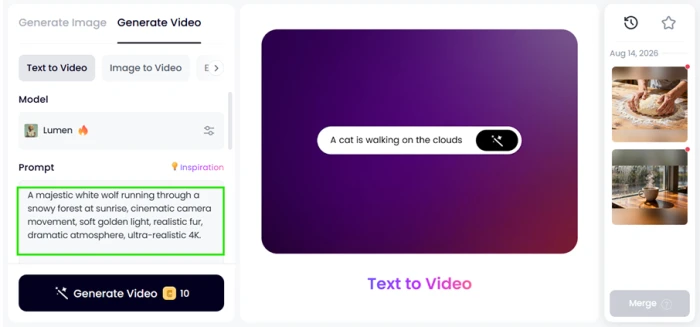
The clip came back at five seconds. A single frame from it is the most flattering way to look at this tool.
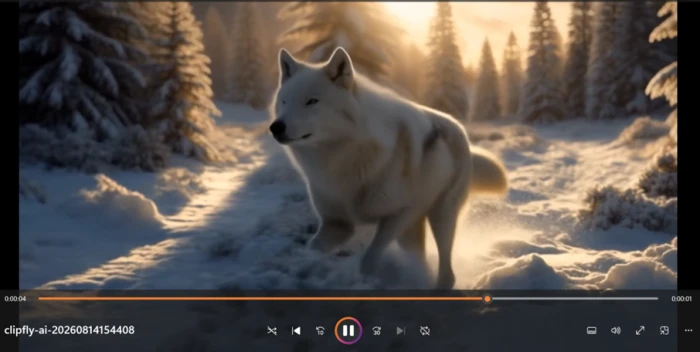
What the credits actually buy
My new account opened with 17 credits. That number is the entire free tier of the generator, and it does not refill daily.
Here is what the balance covers if you spend it on one thing at a time.
| Action | Credit cost | Runs on a 17-credit balance |
|---|---|---|
| Text to image | 2 | 8 images |
| Text to video (5 seconds) | 10 | 1 video |
| Standard editing and export | 0 | Unlimited |
One video. That is the whole free balance gone.
The standard editor, where nothing costs credits
The editing suite sits apart from the AI tools and runs on a normal timeline with an upload panel, a preview window and a clip properties column on the right.
Nothing in here spends credits, which is the reason to keep a free account open even if you never generate anything.
I loaded a clip and opened the properties panel to see how far the controls go.
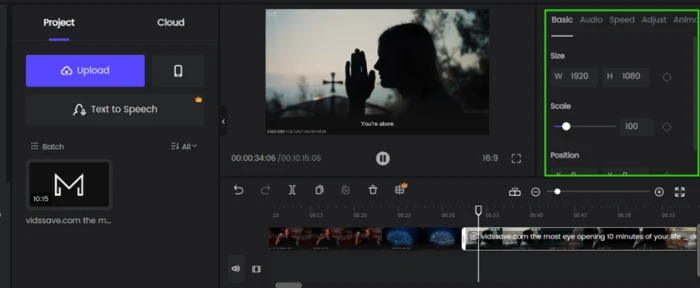
The object replacer and what a mask is supposed to protect
AI Replace works the way inpainting tools usually do: paint over the region you want changed, describe the replacement, and everything outside the mask is meant to stay exactly as it was.
I took a bread-dough image the platform had generated earlier and masked the dough alone, leaving hands, table and flour outside the selection.
"replace it with something else"
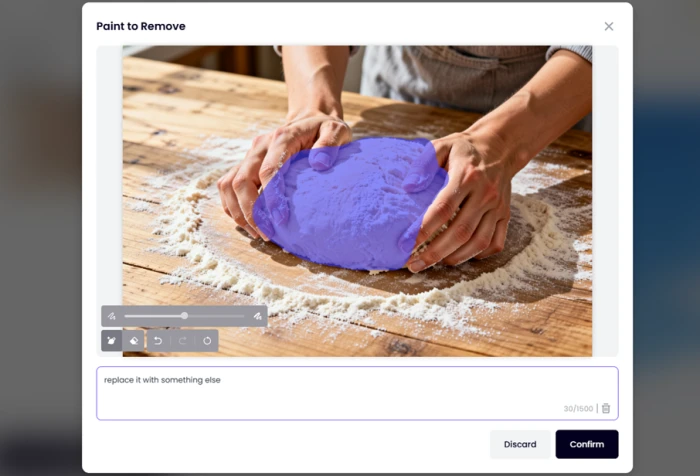
The purple area is the mask. Now compare it against what came back, paying attention to the wood, the flour and the hands rather than the dough.

Background remover on my own coffee shot
Image BG Remover is a single upload box with a before and after view, no brush controls and no edge refinement slider.
I fed it the coffee image from the first test, which was a deliberate choice: a ceramic handle to cut around and a column of steam to see whether soft detail survives.
Clipfly pricing
Figures taken from the official Clipfly plan picker, shown on the yearly toggle.
| Plan | Price | What's included |
|---|---|---|
| Free | $0 | One-time credit grant (17 on my account) · full editing suite · watermark-free 1080p export · commercial use |
| Pro Popular | $4.17 /mo | $49.99 billed yearly (listed from $99.99) · 200 credits/month · 4 GB storage · 1 license · all video and image models · 10% off credit packs |
| Pro+ | $15.83 /mo | $189.99 billed yearly (listed from $379.98) · 1,000 credits/month · 20 GB storage · 2 licenses · adds AI Movie · 12% off credit packs |
| Business | $32.50 /mo | $389.99 billed yearly (listed from $779.98) · 3,000 credits/month · 100 GB storage · 5 licenses · AI Movie · 15% off credit packs |
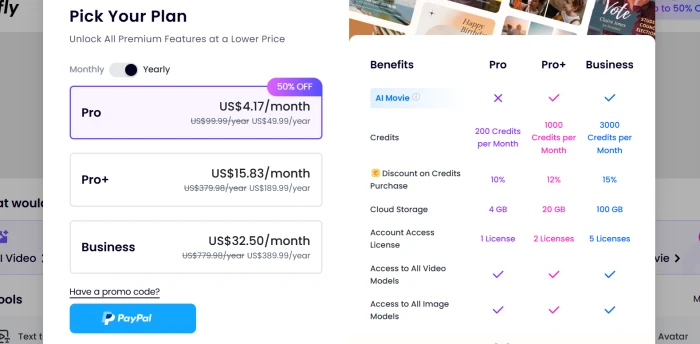
The plan picker with the yearly toggle active and a 50% off badge on Pro. A monthly toggle sits to the left of it.
Pros & cons
Specific conclusions from testing and real user reviews, not generic filler.
✅ Pros
- Text to image hit my coffee prompt on the first 2 credit attempt
- Free tier exports downloaded clean with no watermark at 1080p
- Model picker covers Veo 3.1, Kling 3.0, Seedance 2.0 and Wan 2.7
- Trimming, captions, audio and export cost zero credits, unlimited
- Background remover punched the handle hole through with no rim halo
- Pro works out to $4.17 a month on annual billing
- Commercial use permitted on every plan, free included
⛔ Cons
- Video costs 10 credits, so the 17 credit grant buys one clip
- Lumen turned my running wolf into a trotting wolf
- Fur came back smooth and grey against a white, realistic prompt
- AI Replace rewrote wood grain, flour and hands outside my mask
- Background remover deleted the steam along with the background
- Editor has no keyframes, color wheels, masks or nested sequences
- Text to Speech is paywalled inside the otherwise free editor
- Failed generations consume credits with no re-roll allowance
- Reviewers report credits not syncing between the app and website
- Play Store reviews report video costs rising from 30 to 80 coins
Synthesized from real reviews on Trustpilot, Google Play, the App Store & GeniusFirms · paraphrased, not quoted
Clipfly scorecard
Rated against what an all-in-one AI generation and editing platform is built to do.
| Dimension | Verdict | Score |
|---|---|---|
| AI model range Engines available in the picker | Excellent |
8.5
|
| Ease of use Panel layout, model switching, upload | Excellent |
8.5
|
| Image generation quality Light, texture and detail in stills | Good |
8.0
|
| Export & licensing Watermarks, resolution, commercial rights | Good |
8.0
|
| Background removal Edge quality and transparency handling | Average |
6.5
|
| Video motion realism Gait, blur and coherence on playback | Average |
5.5
|
| Prompt adherence Following stated color, texture and action | Average |
5.5
|
| Credit value & free tier What the balance buys per plan | Weak |
5.5
|
| Standard editor depth Timeline controls beyond trimming | Weak |
5.5
|
| AI editing precision Masked replace and local edits | Weak |
4.0
|
| Scrutool Score Equal-weight average of all 10 dimensions |
6.6
|
What users say about Clipfly
The themes reviewers raise most often, by share of analysed reviews.
% = share of analysed reviews mentioning each theme (Trustpilot, Google Play, App Store, GeniusFirms). Note that Clipfly's 4.5 Trustpilot average rests heavily on very short reviews, so weight it accordingly.
A capable image generator and a free editor, let down by the video and the AI edits
Clipfly is at its best when it is still. My coffee prompt came back correct on the first 2 credit attempt, with light, refraction and shadow all behaving, and the background remover cut around a ceramic handle without leaving a halo. The editor costs nothing to use and the exports carry no watermark, which is more than most rivals give away. The problems start where the money goes. A five second clip costs 10 credits, my wolf trotted when the prompt said run, and AI Replace regenerated an entire image while presenting itself as a masked local edit. Creators who need stills, quick social cutdowns and a free timeline will get real value here, especially at $49.99 a year. Anyone whose work depends on controlled motion, precise retouching or a real grading and keyframe toolset should keep a proper editor open alongside it, or skip this one entirely.
Discussion
Join the discussion and share your perspective.