Craiyon AI
Craiyon is the browser-based AI image generator formerly known as DALL-E mini, now with a layered Studio editor, background remover and reverse image search. The output has improved since 2022, but the free tier now needs a Google sign-in and stamps a watermark on everything.

The output is far better than its 2022 reputation suggests, and the free tier is far more restricted than its own homepage implies.
Should you use Craiyon?
Flat-shape illustration and quick visual ideas : retro posters, concept art, social graphics and anything where limited fine detail is part of the look.
You need clean exports without paying , or you write exclusions into the prompt sentence and expect the model to honor them. It does not.
Free stops early and watermarks what it gives you. Supporter is $10/mo on yearly billing , $12 month to month, and privacy starts at $20.
Free accounts are locked to square images published publicly , and Google sign-in is now required before the first generation runs.
What is Craiyon?
Two things about Craiyon are commonly repeated and both are now wrong. The first is that it produces the mangled, smeared output it became a meme for in 2022. The second is that it runs free and uncapped with no account. Today it is a browser-based text to image platform with six style presets, a layered editor called Studio, a background remover, upscale and vectorize tools, specialist generators for logos, anime, tattoos, posters and home design, and a searchable library of community images you can query by uploading a photo.
It suits people making flat-shape illustration, concept visuals and social graphics rather than brand-critical assets, and it runs in the browser only, with a mobile app still listed as coming soon. The company's own FAQ states that free users get a limited number of images and limited functionality, which is a fairer description than the wording on the homepage. Commercial use is permitted on every tier, though free users must credit craiyon.com and live with a watermark.
Key features & how they perform
Each feature rated from hands-on testing and aggregated review sentiment.
Stylised illustration output
Period palettes and print grain land convincingly on flat-shape work, which is the territory this model handles best.
Prompt handling
Counts objects accurately when asked for a specific number, then ignores any exclusion written into the same sentence.
Craiyon Studio
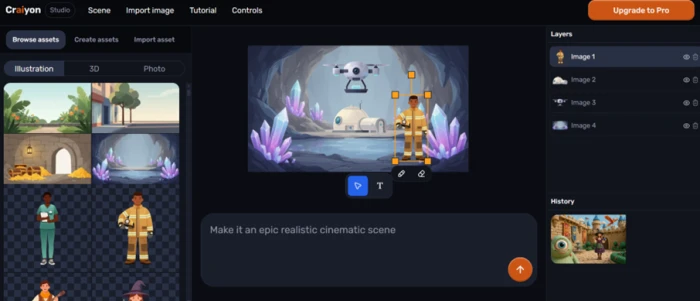
A layered editor with an asset browser, scene controls, edit history and a chat bar for describing changes in plain language.
Background remover
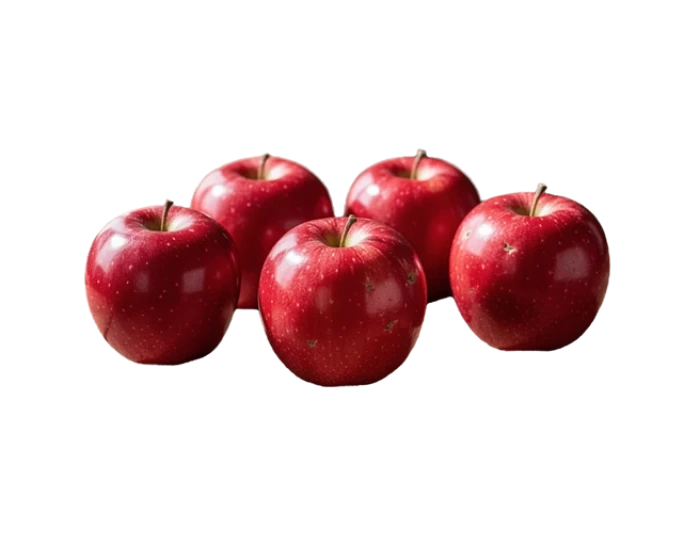
Cut a photorealistic subject with no fringing along thin edges or under contact shadows, which is where most free removers fail.
Reverse image search
Upload a picture and the library returns visually matched community work tagged by style, which doubles as a prompt reference tool.
Specialist generators
Separate front ends for logo, anime, tattoo, poster and home design, though they draw on the same account allowance rather than their own.
Feature ratings blended from Trustpilot, G2, Capterra, AlternativeTo & Reddit review patterns + hands-on testing.
Four images, a watermark, and a sign-in nobody mentions
Two prompts, the editing tools, and the exact point where the free account stops working.
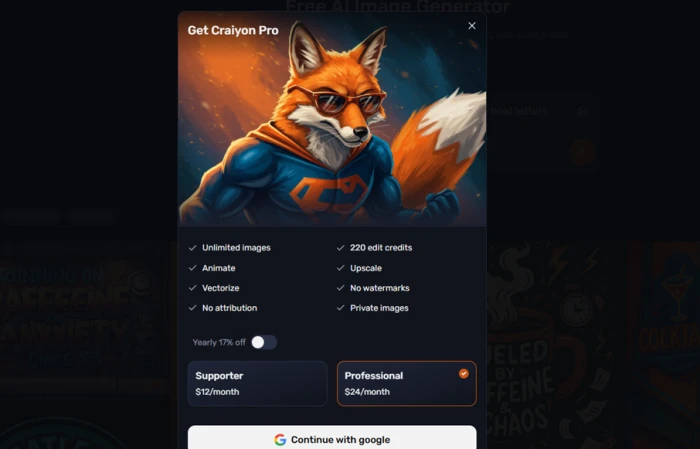
The sign-in wall, before a single image
Craiyon is still described across tool roundups as a generator that needs no account. That description is out of date.
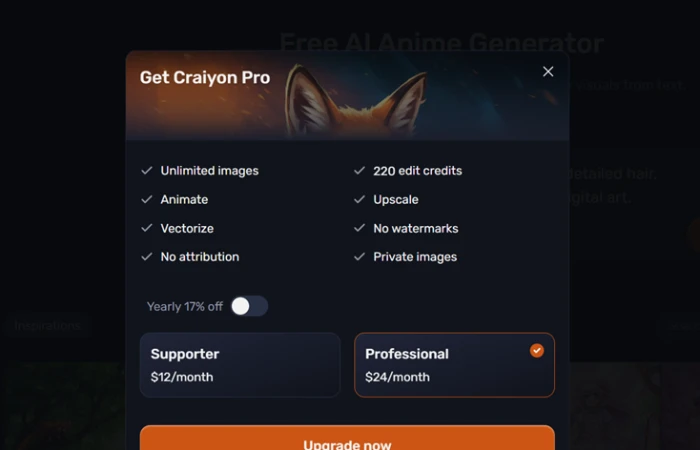
Typing a prompt while signed out produced an upgrade modal with exactly one action available, and no visible route past it.
The same panel lists unlimited images as a Pro feature, which sits awkwardly against the widely repeated claim that free generation runs uncapped.
A retro poster, and the ratio you cannot pick
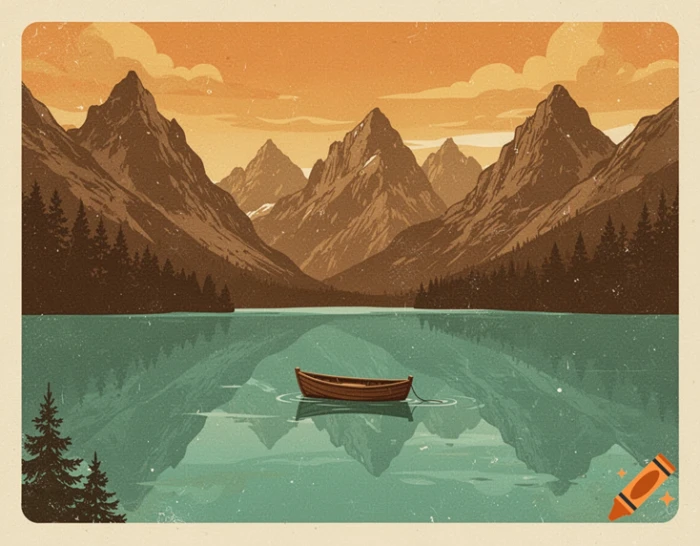
The opening prompt went after flat-shape illustration with visible print texture, which is the kind of work this model is supposed to be suited to.
The prompt bar carries controls for a reference image, public or private output, style, aspect ratio and an Excluded field. Two of those are decided for you on a free account.
"retro 1970s travel poster of a mountain lake, flat colours, grainy print texture"
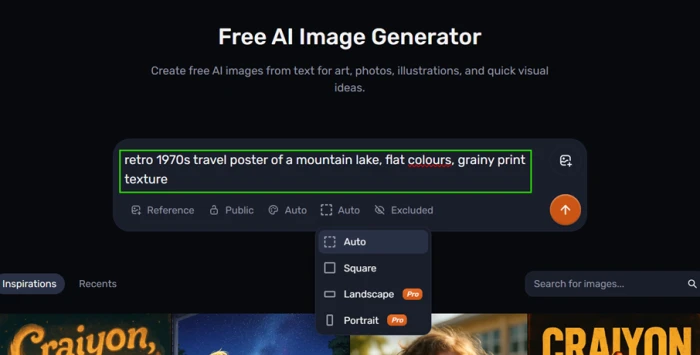
Look at the open dropdown rather than the prompt. Landscape and Portrait both carry Pro badges, which leaves square as the only free option. A blog header or a phone wallpaper is already behind the paywall.
The result came back stronger than the tool's reputation would predict.
Counting works, exclusion does not
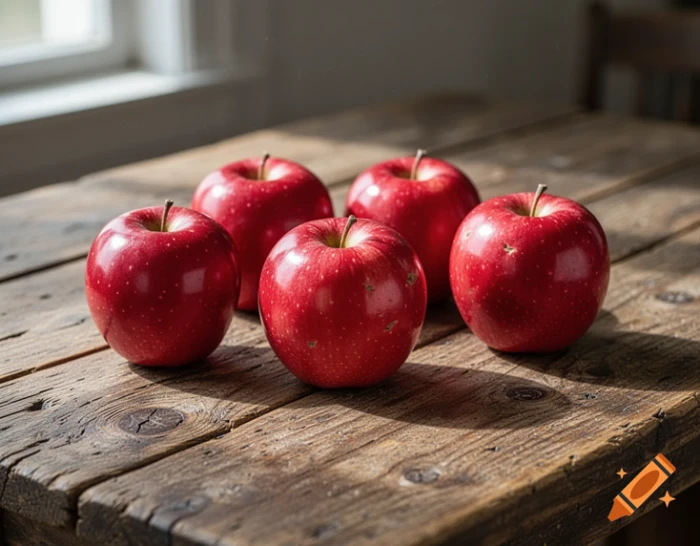
The second prompt tested two things at once: whether the model can count, and whether it honors a negation written into the sentence.
Small image models are widely assumed to fail at numeracy, so the number was the interesting half.
"exactly five red apples on a wooden table, nothing else"
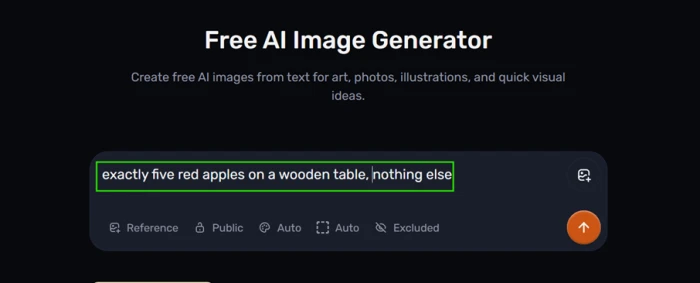
Count the apples in the result before reading the note.
Studio and the background remover
Craiyon carries a wider feature set than most coverage of it suggests, and Studio is the part nobody mentions.
It opens a layered editor with an asset library down the left, a history panel on the right, and a chat bar for describing edits in plain language. I dropped a firefighter character into a crystal cave scene and asked for a cinematic treatment.
The background remover sits in the same suite and runs on a straight upload, so I fed it the apple image from the previous test.
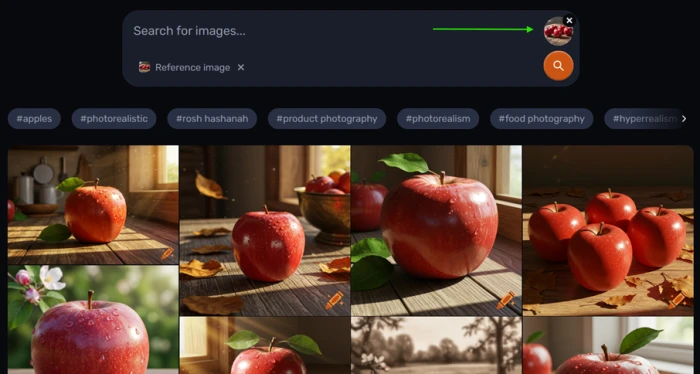
Searching the library with a picture
The search bar accepts an uploaded image as a reference instead of a text query, which is unusual at this price point.
Results come back grouped under style tags, so it works as a way of reverse engineering prompts as much as finding pictures.
Where the free account stops
Generation stopped after four images.
The anime generator is presented as a separate free tool with its own page and its own prompt box, so I opened it expecting a separate allowance.
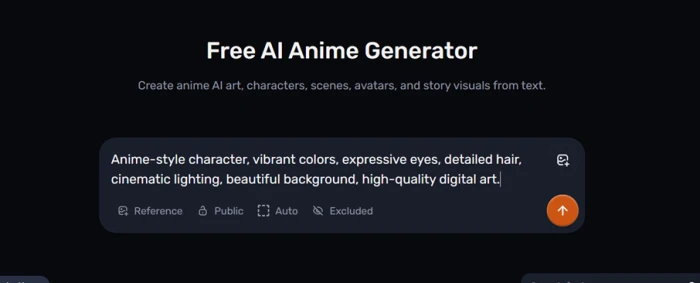
What arrived instead was the same upgrade panel from the sign-in wall, listing what a free account does not get.
Craiyon pricing
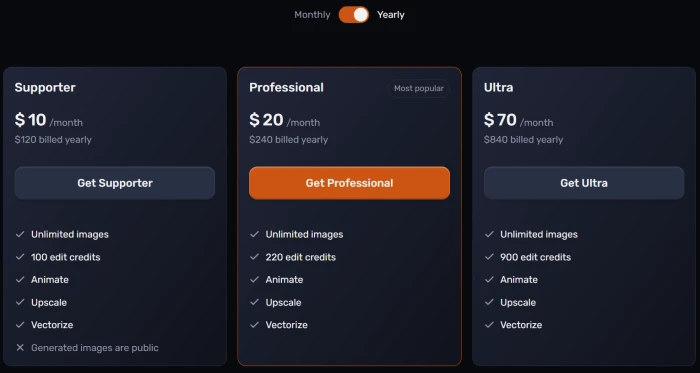
Figures taken from the official Craiyon pricing page.
| Plan | Price | What's included |
|---|---|---|
| Free | $0 | Google sign-in required · limited images and functionality · base quality model · watermark and attribution · square only · public output · queue at peak times |
| Supporter | $10 /mo | $120 billed yearly ($12 monthly) · unlimited images · 100 edit credits · animate, upscale, vectorize · no watermark · HD downloads · images still public |
| Professional Popular | $20 /mo | $240 billed yearly ($24 monthly) · 220 edit credits · private images · fastest priority queue · early access to new features |
| Ultra | $70 /mo | $840 billed yearly · 900 edit credits · everything in Professional · aimed at heavy retouching volume |
Pros & cons
Specific conclusions from testing and real user reviews, not generic filler.
✅ Pros
- Retro poster came back with period palette and print grain intact
- Counted exactly five apples from a numeric prompt
- Background remover cut stems and shadows with no fringing
- Studio tracks each dropped element as a separate layer
- Reverse image search matches uploads and exposes the prompt used
- Commercial use permitted on every tier, free included
- Supporter at $10 a month undercuts most rivals
⛔ Cons
- Google sign-in now required before the first generation
- Free generation stopped after four images on my account
- Landscape and portrait ratios are Pro-only, free output is square
- Free images carry an orange crayon watermark
- Negation written into the prompt sentence is ignored
- The Excluded field is never explained to a new user
- Supporter images stay public, privacy starts at $20
- Free users must credit craiyon.com when publishing
- No public API and no mobile app yet
Synthesized from real reviews on Trustpilot, G2, Capterra, AlternativeTo & Reddit · paraphrased, not quoted
Craiyon scorecard
Rated against what a free-first image generator is actually built to do.
| Dimension | Verdict | Score |
|---|---|---|
| Stylised illustration quality Flat shapes, palette, texture | Good |
8.0
|
| Image search & discovery Library, tags, reverse lookup | Good |
7.5
|
| Editing suite Studio, background remover, upscale | Good |
7.0
|
| Ease of use Interface clarity and onboarding | Good |
7.0
|
| Photorealistic output Detail, texture, faces and hands | Average |
6.5
|
| Value for money Plan pricing and edit credits | Average |
6.5
|
| Prompt adherence Counting, negation, control fields | Average |
6.0
|
| Output rights & watermarking Watermark, attribution, licensing | Weak |
5.0
|
| Privacy & content control Public defaults and private output | Weak |
5.0
|
| Free tier usability What you can do without paying | Weak |
3.0
|
| Scrutool Score Equal-weight average of all 10 dimensions |
6.2
|
What users say about Craiyon
The themes reviewers raise most often, by share of analysed reviews.
% = share of analysed reviews mentioning each theme (Trustpilot, G2, Capterra, AlternativeTo, Reddit) · review volume for this tool is small, so treat shares as indicative
Better than its 2022 reputation, and less free than its 2026 wording
The model has moved on more than the memes have. A retro travel poster came back with a convincing period palette, grain that sat in the paper rather than over it, and a composition that held together, and a numeric prompt produced exactly five apples when small models are supposed to fail at counting. The editing side is genuinely useful too: Studio keeps dropped elements on separate layers, and the background remover cut around stems and contact shadows without fringing. What has also moved on is the business model. Google sign-in is now required before the first image, generation stopped after four on my account, landscape and portrait ratios carry Pro badges, everything published publicly by default, and both outputs came out stamped with an orange crayon mark. Negation inside a prompt sentence is ignored outright, and nothing tells you the Excluded field is where it belongs. Anyone making flat-shape illustration and quick concept work, who is willing to pay $10 a month for clean square exports, will get more here than the tool's reputation promises. Anyone planning to work seriously on the free tier, or who needs private client work and any ratio other than square, should budget for Professional at $20 or look elsewhere.
Discussion
Join the discussion and share your perspective.