
CutoutPro AI
Cutout Pro is a credit-based AI photo and video editor built around fast automatic background removal, retouch, enhancement and image generation. Capable output, but shadowed by a verified 2024 data breach and billing complaints.

Fast, capable background removal and a deep tool stack, undercut by a verified 20-million-record breach the company never owned and widespread refund complaints.
Should you use Cutout Pro?
E-commerce sellers and batch editors who need fast, clean cutouts on simple shots and are not uploading sensitive personal photos.
You care about data privacy or reliable billing . A verified breach and repeated refund failures make this a real risk for personal accounts.
Free gets you 5 credits and low-res previews. Regular use starts at $9.90/mo for 170 credits , or pay-as-you-go from $0.047 per credit.
The 14-day refund is capped at 50 downloads , and users report months-long waits and auto-renewals with no reply from support.
What is CutoutPro AI?
The file you screenshot for free is not the file you can publish. Cutout Pro shows every result on a 612 x 408 preview and charges a credit to unlock full resolution, so the free tier is a demo, not a workflow. That framing matters more than any feature list, because it decides who the tool actually serves: people processing volume who will pay per image, not casual users hoping for a few free HD downloads.
Underneath the paywall sits a genuinely broad platform. Automatic background removal is the flagship, joined by object retouch, photo enhancement, colorizing, passport photos, an AI image generator running models like GPT Image 2, and image-to-video. It runs on web, iOS, Android and desktop, and an API targets developers doing bulk work. The company, operating under Winroad Holdings Limited in Hong Kong, has been around since 2018, but its reputation now carries a February 2024 data breach that exposed roughly 20 million user records.
Key features & how they perform
Each feature rated from hands-on testing and aggregated review sentiment.
Background removal
Pulls subjects off the background in seconds with clean edges on simple shots. Full resolution costs a credit; the free preview caps at 612 x 408.
Retouch & object removal
Brush over unwanted items and the fill logic rebuilds the surface behind them. Reliable on flat backgrounds, less certain on busy scenes.
AI image generation
Multiple models including GPT Image 2. Text rendering is now sharp, but human anatomy like hands still breaks under a stress-test prompt.
Photo enhancer & upscaler
Sharpening, colorizing and restoration tools cost 2 credits per image and target old or low-quality photos rather than fine-detail retouching.
Image to video
Newer models like Seedance and Veo turn stills into short clips, billed per second on a separate video pricing table that runs steeply higher than images.
Bulk API
The API is built for volume processing and is the strongest fit for developers and stores, though the same leaked API keys featured in the 2024 breach.
Feature ratings blended from Trustpilot, Scam Detector, Capterra & independent review patterns + hands-on testing.
Pushing Cutout.Pro's free tier to its limits
Background removal, object retouch, a stress-test generation, and a read through the data policy.
Remove a background and hit the resolution wall
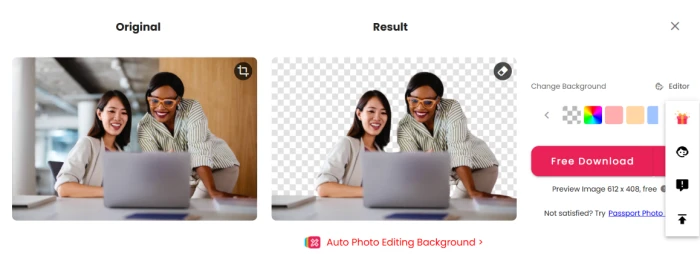
Background removal is the tool Cutout.Pro is known for, so I started there with a standard office photo of two people at a laptop.
The tool lifted both subjects off the background in a few seconds and dropped the cutout onto a transparency checkerboard, ready to recolor or export.
The catch sits in the fine print under the result. That free preview measures 612 x 408 pixels, and anything sharper costs credits.
Brush out objects with the Retouch tool
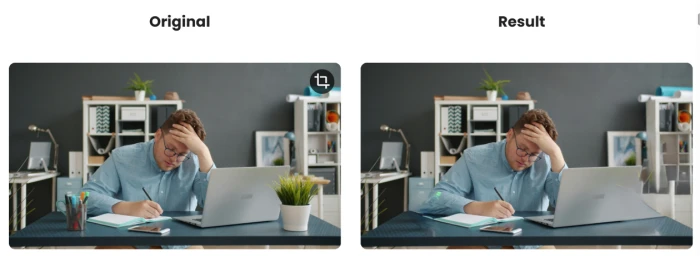
The Retouch tool wipes out unwanted items once you brush over them, so I painted across the flower pot and the pen stand sitting on the desk.
The editor gives you a smear brush with adjustable size, which is enough control for spot removal without feeling like a full masking workflow.
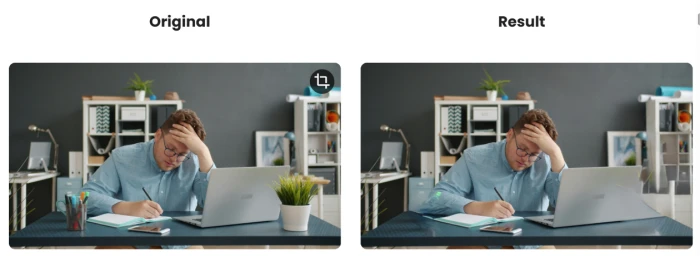
The before and after shows what the fill actually did with the space those objects left behind.
Stress-test the AI image generator
The generator is where I set out to break the tool on purpose. I aimed the prompt at two spots where AI models tend to fall apart: printed text and human hands.
I ran it on the GPT Image 2 model for 3 credits, asking for two hands typing next to a mug reading "CUTOUT" with five clear fingers on each hand.
"A close-up of two hands typing on a laptop, a coffee mug beside them with the word CUTOUT printed on it, five fingers clearly visible on each hand, photorealistic."
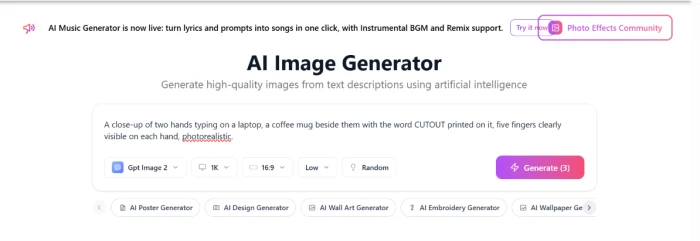
The output landed in an interesting middle ground, nailing one half of the test and failing the other.

Read what happens to your uploads
A review should account for what happens to the files you hand over, so I read the platform's own statements rather than take the marketing line.
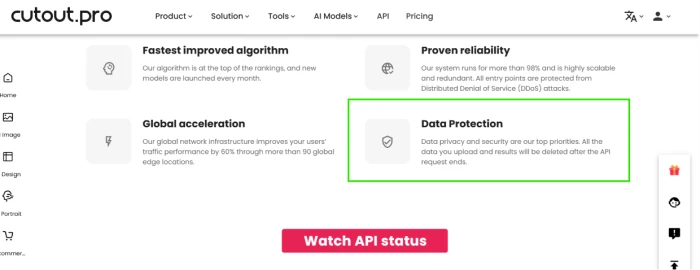
The API status page lists Data Protection among its priorities and promises that uploaded data and results are deleted once the API request ends.
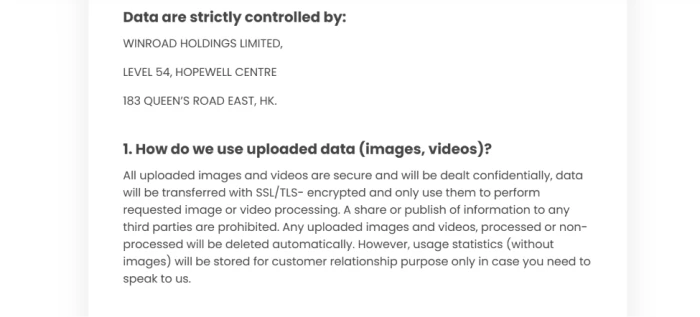
The privacy policy fills in what that headline leaves out. Your data sits under Winroad Holdings Limited, registered in Hong Kong, and while images are deleted, usage statistics stripped of the images stay on file.
CutoutPro pricing
Figures taken from the official Cutout.Pro image pricing page.
| Plan | Price | What's included |
|---|---|---|
| Free Account | $0 | 5 free credits at signup · unlimited low-res previews · 612 x 408 export only · +5 credits per invited friend |
| Subscription Best value | $9.90 /mo | 170 credits/month at $0.058/credit · tiers from $5 (80 credits) to $69 (1450 credits) · unused credits roll over up to 5x |
| Pay as you go | $4.99 + | 30 credits ($0.166) up to 30,000 credits ($0.047) · credits never expire · no subscription needed |
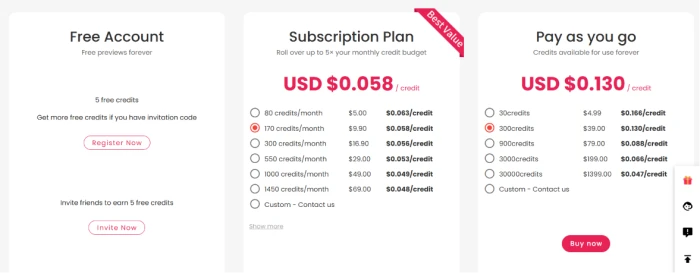
The image pricing page. Background removal and retouch cost 1 credit; cartoon selfie, passport photo, enhancer and colorizer cost 2. Video is billed separately, per second.
Pros & cons
Specific conclusions from testing and real user reviews, not generic filler.
✅ Pros
- Clean background cutouts on simple shots in 3 to 5 seconds
- Retouch rebuilds flat surfaces with no ghost outline
- GPT Image 2 renders printed text sharply and correctly spelled
- Pay-as-you-go credits never expire, from $0.047 each at volume
- Broad tool stack: enhance, colorize, passport photos, video
- Bulk API suits e-commerce processing at scale
⛔ Cons
- February 2024 breach exposed ~20M records, confirmed by Have I Been Pwned
- Company denied the breach; never notified affected users
- Trustpilot sits at 1.7 out of 5, driven by breach and billing complaints
- Refund requests reported unanswered for over a month
- Subscriptions auto-renew without warning, per multiple reviews
- Free export locked to 612 x 408; HD needs credits
- 14-day refund capped at 50 downloads
- AI-generated hands still break under a basic anatomy prompt
Synthesized from real reviews on Trustpilot, Scam Detector, Capterra, BleepingComputer & Have I Been Pwned · paraphrased, not quoted
Cutout.Pro scorecard
Rated against what an AI photo editing platform is actually built to do.
| Dimension | Verdict | Score |
|---|---|---|
| Background removal quality Edge accuracy on real photos | Excellent |
8.5
|
| Object removal & retouch Fill quality behind erased items | Good |
8.0
|
| AI image generation Prompt adherence and anatomy | Average |
6.5
|
| Speed & batch processing Turnaround and bulk API | Good |
8.0
|
| Free tier usefulness What you get without paying | Weak |
4.0
|
| Value for money Credit pricing and rollover | Good |
7.0
|
| Ease of use Signup, editor, navigation | Good |
7.5
|
| Billing & refund trust Renewals, refunds, support | Weak |
4.0
|
| Privacy & data handling Breach history and transparency | Weak |
3.0
|
| Support responsiveness Reply rate to user issues | Weak |
4.5
|
| Scrutool Score Equal-weight average of all 10 dimensions |
6.4
|
What users say about Cutout.Pro
The themes reviewers raise most often, by share of analysed reviews.
% = share of analysed reviews mentioning each theme (Trustpilot, Scam Detector, US-Reviews, BleepingComputer)
Capable editing wrapped around a trust problem it has never addressed
On pure output, Cutout.Pro earns its keep. Background removal is fast and clean on simple shots, object retouch rebuilds flat surfaces convincingly, and the newer generators handle printed text in a way older tools never could. The credit pricing is fair at volume and the tool stack is genuinely broad. The problem is everything around the editing: a February 2024 breach that exposed roughly 20 million records, confirmed by Have I Been Pwned and denied by the company, plus a steady stream of reviews about auto-renewals, unpaid refunds and silent support that have dragged Trustpilot to 1.7 out of 5. E-commerce sellers processing non-sensitive product shots at scale can still get value here if they pay through PayPal and watch their renewals. Anyone uploading personal photos, or who needs billing they can trust, should choose a platform that owned its security record instead of disputing it.
Discussion
Join the discussion and share your perspective.