
DeepAI
DeepAI is an all-in-one AI platform for images, video, music, chat and photo editing, most of it usable free in your browser with no login. Strong on quick image generation and background removal, weak on in-image text and chat accuracy.

A genuinely broad free playground with a strong background remover, undercut by weak text rendering, a badly outdated chat, and ads wedged into the free experience.
Should you use DeepAI?
Casual creators who want to sample many AI tools in one place without signing up, and anyone who needs a fast, clean background remover for free.
You need accurate text inside images , precise prompt adherence, or a chat assistant with current knowledge. All three fall short.
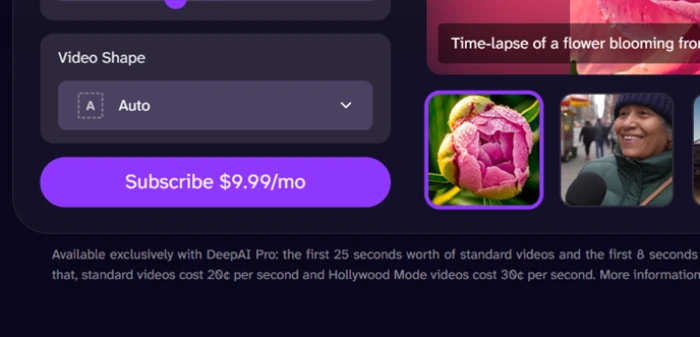
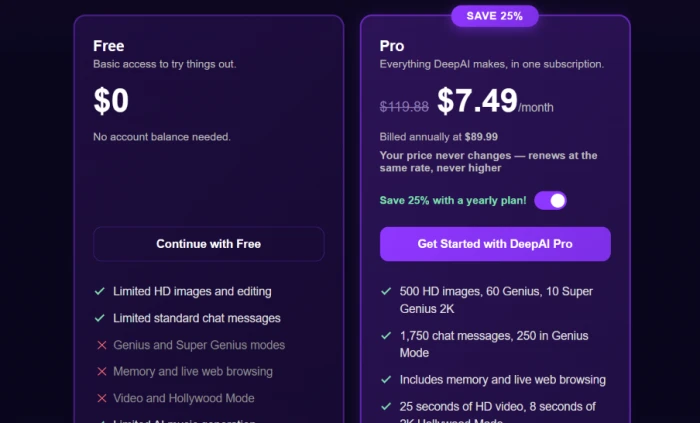
Free is usable but ad-heavy. Ad-free access and video need Pro at $9.99/mo , dropping to $7.49/mo billed annually.
Video is metered per second on top of the subscription , and the prepaid wallet auto top-up can quietly recharge itself.
What is DeepAI?
Open DeepAI and you can type a prompt and get an image back before it asks who you are. No login, no payment wall, no email confirmation. That open front door is the whole pitch: a single browser tab that holds an image generator, a photo editor, a video generator, a music maker, a chat assistant and a set of developer APIs, most of which you can poke at for free. It runs on web, iOS, Android and a Chrome extension.
The catch is that "everything in one place" comes with everything at mixed quality. The image generator and the background remover are the parts worth showing up for. The chat assistant and in-image text rendering are the parts that will send you back to a dedicated tool. DeepAI has been doing browser-based generation since 2016, and it is aimed squarely at hobbyists and light commercial users who value breadth and a free tier over best-in-class output in any single category.
Key features & how they perform
Each feature rated from hands-on testing and aggregated review sentiment.
Image generator
Fast, no-login generation with Standard, Genius and Super Genius 2K tiers. Output looks good until a prompt needs exact object counts or legible words.
Background remover & photo tools
Clean cutouts with sharp edges and a fully transparent background, plus a colorizer, super resolution and image replace in the same editor.
All-in-one tool grid
Image, video, music, photo editor, chat, an AI image detector and developer APIs sit under one account, which almost no rival packs together.
Video generator
Text-to-video with an optional 2K Hollywood Mode, but it is Pro-only and billed per second on top of the plan, so costs climb fast.
Music generator
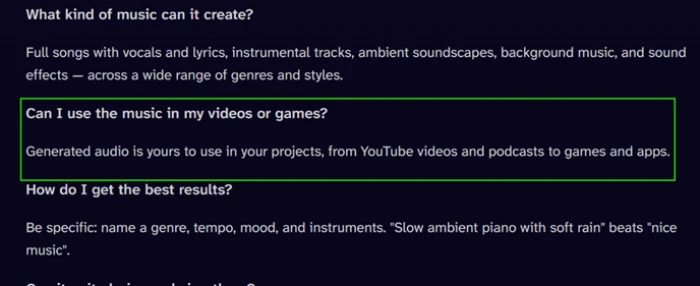
Original tracks across genres, and DeepAI states the audio is cleared for commercial use in videos, podcasts, games and apps.
Chat assistant
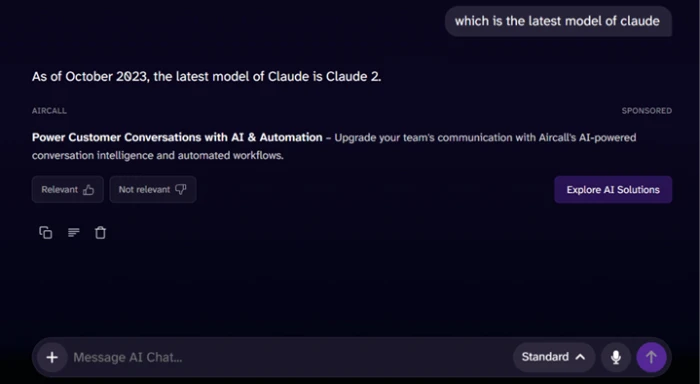
The weakest tool on the free tier. Knowledge is frozen years back and replies carry sponsored ad blocks inside the answer itself.
Feature ratings blended from Trustpilot, Product Hunt, Google Play, App Store & GeniusFirms review patterns + hands-on testing.
Running every free DeepAI tool in one sitting
Image generation, the photo tools, the chat, and where the ads and paywalls start.
Generate an image with no login
The image generator is the front door and the fastest thing to test. You type a prompt and get a result without an account, an email step or a paywall in the way.
That low barrier is the platform's real selling point for a casual user who just wants a quick visual. The trouble shows the moment a prompt asks for text or exact numbers.
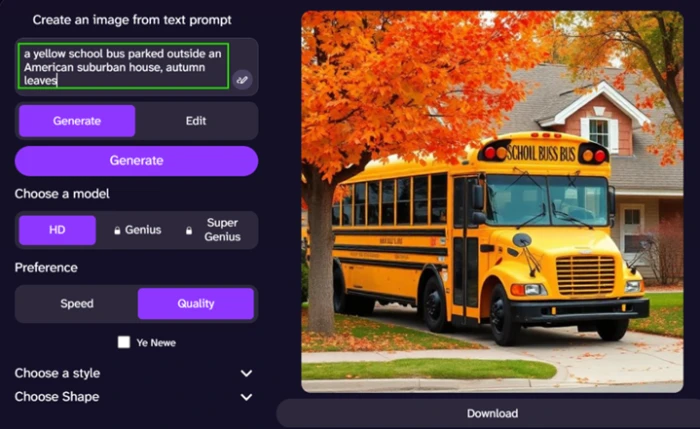
Look at the bus. The lettering came back as "SCHOIL BUSS BUS" rather than anything readable, and that garbling shows up on almost every generation that includes words.
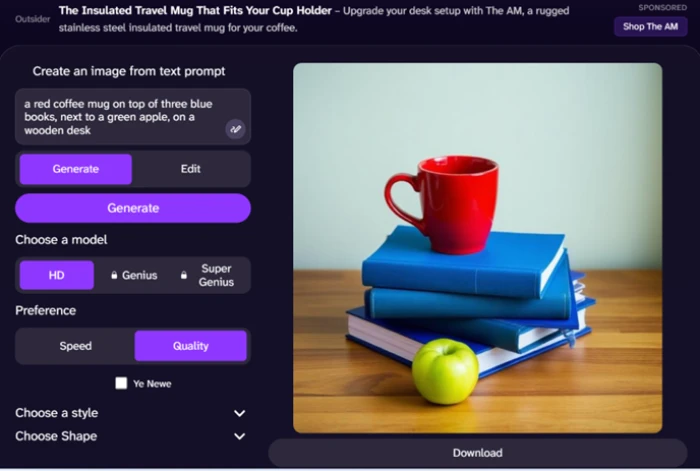
Prompt adherence is the other soft spot. I asked for a red coffee mug on three blue books beside a green apple. The mug, the apple and the desk were right. The book count was not.
Cut out a background with the photo tools
The Background Remover lives in the same photo editor as the colorizer and super resolution. It takes an uploaded image and returns a transparent PNG.
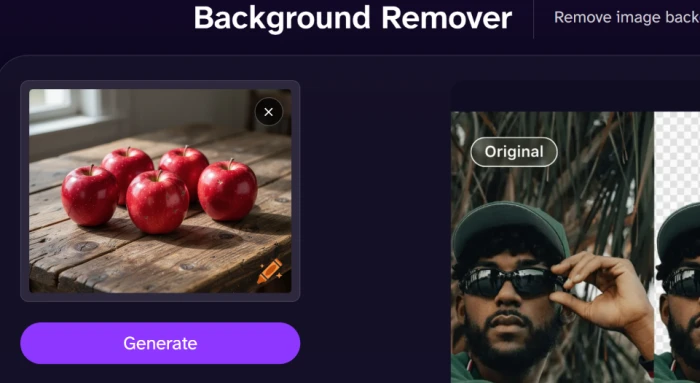
This was the standout among the free tools. I fed it a photo of five apples on a wooden table to see how it handled several separate objects and their edges.
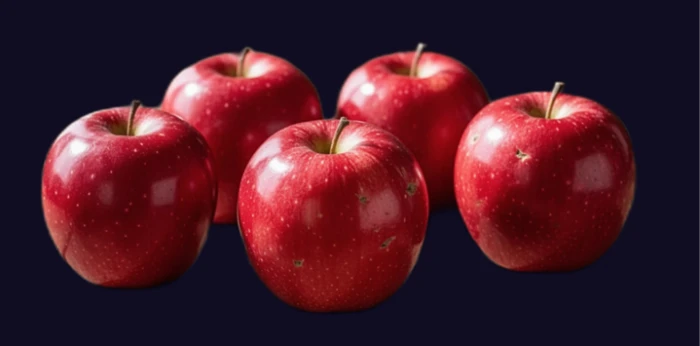
The output came back with the fruit isolated cleanly and nothing of the table left behind.
Browse the tool grid and the music licensing
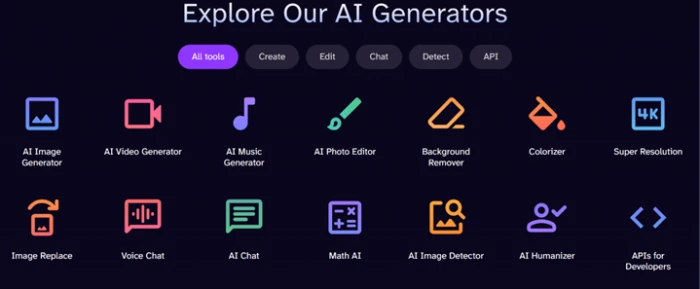
The tools menu is where the breadth becomes obvious. Image, video, music, a photo editor, chat, an AI detector and developer APIs all sit in a single grid.
For someone who wants to sample several kinds of AI output under one login, that spread has real appeal, even if no single tool is best in class.
The music side carries a licensing claim that matters for creators. DeepAI's own FAQ says generated audio is yours to use in projects from YouTube videos and podcasts to games and apps.
Ask the free chat a simple question
The chat assistant is the one tool I would tell people to avoid on the free tier. To test how current it is, I asked it a factual question with a clear, recent answer.
"which is the latest model of Claude"
Find where the ads and the paywall start
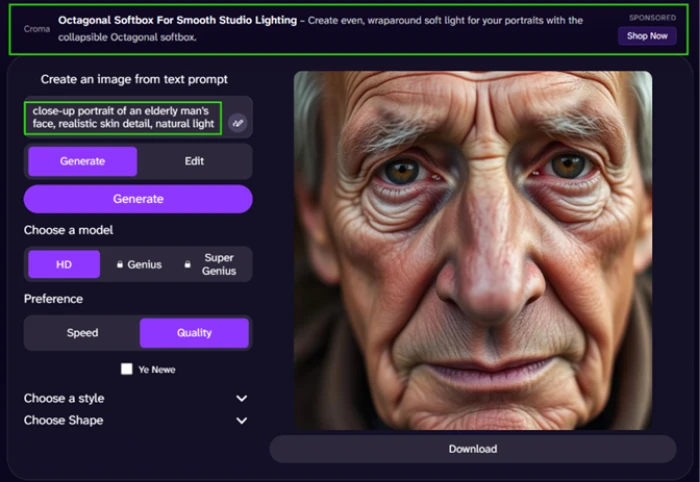
Ads are not confined to the chat. Sponsored banners also run across the top of the free image generator, so the whole free tier is ad-supported rather than just one corner of it.
The elderly-portrait test below actually produced a decent face, but the banner above it is the real story.
The video generator is a harder wall. There is no free allowance at all, and it prompts straight for a subscription before you can generate anything.
DeepAI pricing
Figures taken from the official DeepAI pricing page.
| Plan | Price | What's included |
|---|---|---|
| Free | $0 | Limited HD images & editing · limited standard chat · ads · no Genius modes · no memory or web browsing · no video |
| Pro (yearly) Best value | $7.49 /mo | Billed annually at $89.99 · 500 HD images, 60 Genius, 10 Super Genius 2K · 1,750 chat messages (250 Genius) · memory + web browsing · 25s HD video + 8s 2K Hollywood · ad-free |
| Pro (monthly) | $9.99 /mo | Same monthly allowances as yearly Pro, paid month to month · price never rises on renewal · cancel any time |
Pros & cons
Specific conclusions from testing and real user reviews, not generic filler.
✅ Pros
- Generates images with no account, email step or paywall
- Background remover returns clean transparent cutouts in one pass
- Image, video, music, editor, chat and APIs under one login
- DeepAI grants full ownership of what you create
- Documented developer APIs for wiring tools into your own product
- Browser-based since 2016, so the core generators are stable
⛔ Cons
- Text inside generated images is routinely garbled and unreadable
- Ignores exact object counts, returning four items when asked for three
- Chat knowledge is frozen years back, naming Claude 2 as current
- Sponsored ad blocks appear inside free chat replies
- Users report little quality gap between Standard, Genius and Super Genius
- Video has no free tier and bills per second on top of Pro
- Prepaid wallet auto top-up can recharge without a deliberate purchase
Synthesized from real reviews on Trustpilot, Product Hunt, Reddit, Google Play, the App Store & GeniusFirms · paraphrased, not quoted
DeepAI scorecard
Rated against what an all-in-one AI generator is actually built to do.
| Dimension | Verdict | Score |
|---|---|---|
| Tool breadth Range of generators under one account | Excellent |
8.5
|
| Photo tools Background remover, colorizer, upscaling | Good |
8.0
|
| Ease of use & access No-login generation, navigation | Good |
8.0
|
| Image quality Fidelity and detail of output | Good |
7.0
|
| Value vs paywall Free tier and Pro pricing | Average |
6.5
|
| Prompt adherence Following counts and specific details | Average |
5.5
|
| Video capability & value Quality vs per-second metering | Average |
5.5
|
| Ad & monetization experience Banners and in-reply sponsorships | Weak |
4.5
|
| Text-in-image rendering Legibility of words in generations | Weak |
3.5
|
| Chat assistant accuracy Currency and usefulness of answers | Weak |
3.0
|
| Scrutool Score Equal-weight average of all 10 dimensions |
6.0
|
What users say about DeepAI
The themes reviewers raise most often, by share of analysed reviews.
% = share of analysed reviews mentioning each theme (Trustpilot, Product Hunt, Google Play, App Store, GeniusFirms)
A generous free sampler that is stronger at pictures than at answers
DeepAI is at its best when you treat it as a fast, no-login image and photo workshop. Generation is quick, the background remover is genuinely good, and having video, music, a detector and developer APIs sitting in the same account is a real convenience for anyone who wants to experiment across formats. The weaknesses are just as clear: text inside images comes out garbled, prompts with exact counts get ignored, and the free chat is both years out of date and stuffed with ads. Pro at $9.99 a month, or $7.49 billed yearly, buys an ad-free experience and video, but the per-second video metering and the auto top-up wallet can push the real cost past the sticker. Casual creators and developers who want breadth and a free tier will get value here. Anyone who needs reliable text rendering, tight prompt control or a trustworthy chat assistant should spend their money elsewhere.
Discussion
Join the discussion and share your perspective.