
Digen AI
Digen AI routes Seedance, Grok, Real Motion and more through one login for image-to-video and text-to-image. Strong output, generous free credits, no editing timeline.

Genuinely strong output and a deep model library, undercut by watermarks, no editing, and a queue that turned a one-minute wait into two hours.
Should you use Digen AI?
Creators who want to compare many video models without subscribing to each one, and who work in short single clips rather than full edits.
You need to assemble or trim clips . There is no timeline, no trim handles, and the export caps at 1080p.
Free is watermarked with no commercial rights. Removing that and reaching premium models starts at Ultra ~$4.99/mo on the current offer.
The queue estimate is unreliable . A one-minute wait stretched past two hours in testing, then failed with a retry notice.
What is Digen AI?
Most AI video tools give you one engine and ask you to subscribe to it. Digen puts a shelf of them behind a single login. From the model selector you can route the same prompt through the Seedance family, Grok Video, the in-house Real Motion and HappyHorse engines, and several more, comparing outputs before you spend credits. That access, not any single feature, is the reason to be here.
It runs on web, iOS and Android, and it does image-to-video, text-to-video and text-to-image. What it is not is an editor. There is no timeline, no trimming, and free exports land with a DIGEN AI watermark and no commercial rights. It suits social creators making short standalone clips who want variety and a generous free tier, not anyone trying to cut a finished video end to end.
Key features & how they perform
Each feature rated from hands-on testing and aggregated review sentiment.
Multi-model access
One account routes to Seedance, Grok Video, Real Motion and more. A couple of headline engines still show Coming Soon, so the menu oversells a little.
Image to video
The feature Digen leans on hardest. A single portrait animated with believable motion and a stable background, natural rather than stiff.
Text to image
Strong atmosphere, lighting and detail on complex scenes, but readable text inside images breaks down into garbled characters.
Voice library
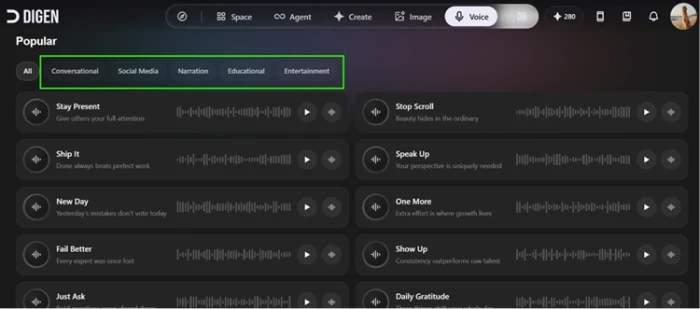
Voices grouped by use case with previews, though the 20-plus language filter the marketing pushes was nowhere on the voice screen during testing.
Generation queue
Fine under light load, but the wait estimate is not trustworthy. A promised one minute ran past two hours and ended in a failure notice.
Credit system
300 credits at signup plus a daily login reward make testing easy, though premium models like Sora 2 drain the balance fast.
Feature ratings blended from Trustpilot, GeniusFirms, App Store & Play Store review patterns + hands-on testing.
Ten tests, one dead-end queue: my session inside Digen
Signup credits, image-to-video, the model menu, a stress test, and where it fell over.
Sign up and collect the credits
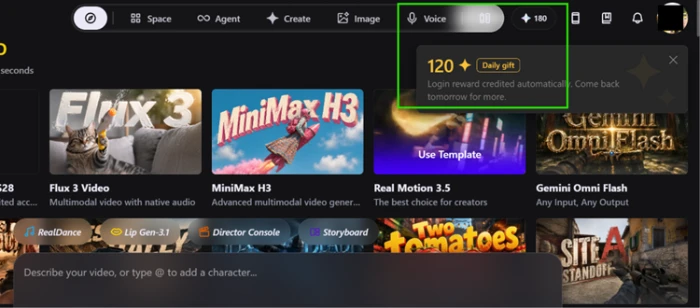
Signup drops 300 credits into your account straight away, which is enough to actually test the tool rather than run dry after one clip.
The next day the platform added another 120 as a login reward without me asking. For a tool that fronts a stack of premium models, that starting balance is genuinely generous.
Run the first image-to-video
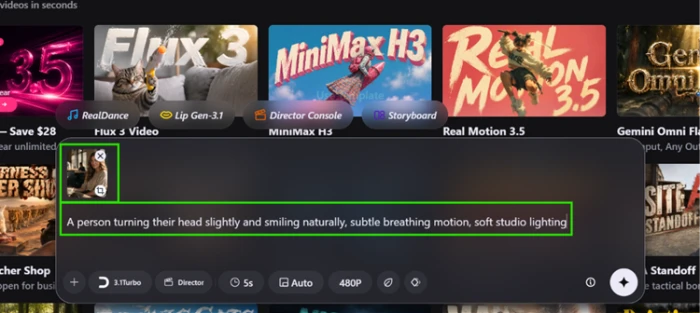
Image-to-video is the feature Digen leans on hardest, so I started there. I uploaded a single portrait and gave it a simple motion prompt to keep the engine on comfortable ground.
The composer lets you pick the model, clip length and resolution inline. I left it on the 3.1Turbo model at a 5-second, 480P output.
"A person turning their head slightly and smiling naturally, subtle breathing motion, soft studio lighting"
See the output, and the walls around it
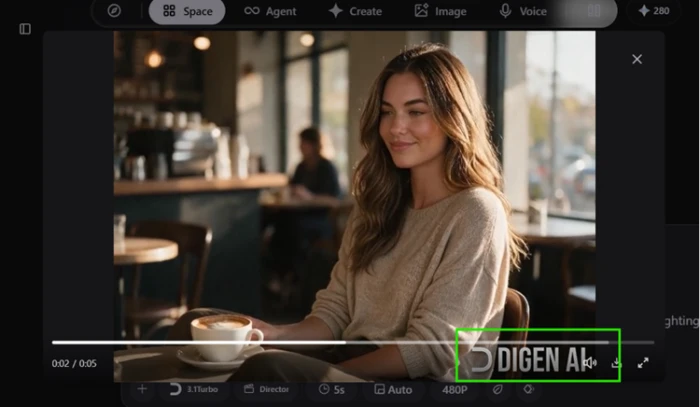
The result surprised me. The face stayed natural, the café background held together, and the subtle motion looked believable rather than stiff. This is Digen at its best.
The catch sits in the same frame. Every free-tier export carries a DIGEN AI watermark baked into the video, bottom corner, not removable without paying.
The playback screen you land on afterward is the entire editing experience. No timeline, no trim handles, no way to layer or adjust. You generate, you play, you export.
Open the model selector
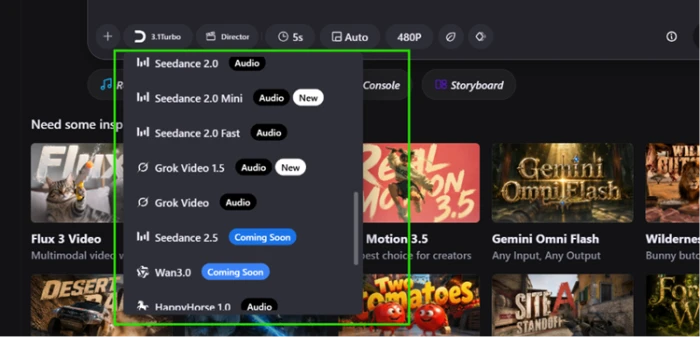
Where Digen earns its pitch is model choice. Opening the selector shows a real spread of engines under one login, from the Seedance family to Grok Video and the in-house HappyHorse.
A couple of the headline options carry Coming Soon tags, so the menu promises slightly more than you can run right now.
Check the voice library
The voice library was more of a mixed bag. Voices come grouped by use case, Conversational, Narration, Educational and Entertainment, each with a preview you can play before committing.
What I could not find anywhere on this screen was the multilingual language filter the marketing makes so much noise about. The styles are here. Proof of the 20-plus languages was not.
Stress test the engine, then queue it
Then I pushed the engine on purpose. Fast, full-body motion is where these tools usually fall apart, so I fed it a prompt built to break it.
"A person quickly waving both hands while dancing and spinning around, fast dynamic full-body motion"
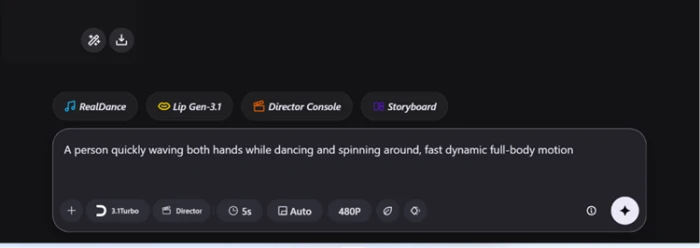
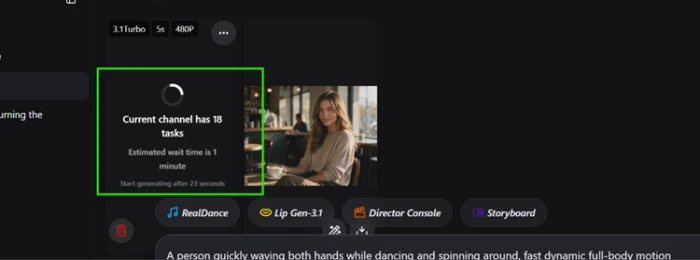
That job went into a queue estimating an 18-task backlog and a one-minute wait. Fair enough for a free plan under load, so I left it running and switched to image generation.
Test image generation with readable text
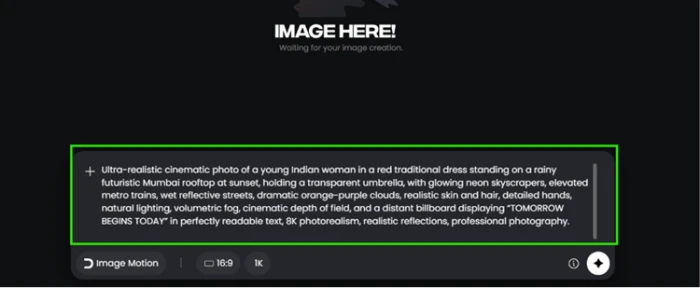
For the image test I wrote a demanding prompt: a cinematic Mumbai rooftop at sunset with a specific line of billboard text spelled out, since readable text is a known weak spot for image models.
"Ultra-realistic cinematic photo of a young Indian woman in a red traditional dress standing on a rainy futuristic Mumbai rooftop at sunset, holding a transparent umbrella, with glowing neon skyscrapers, and a distant billboard displaying 'TOMORROW BEGINS TODAY' in perfectly readable text, 8K photorealism, professional photography"
The image itself is the strongest single output of the whole session. Lighting, saree detail, wet reflections and the neon skyline all look polished.
Then look closely at the billboard. The prompt asked for "TOMORROW BEGINS TODAY" in readable text, and the render mangles it with garbled sub-text underneath.

The queue payoff, two hours later
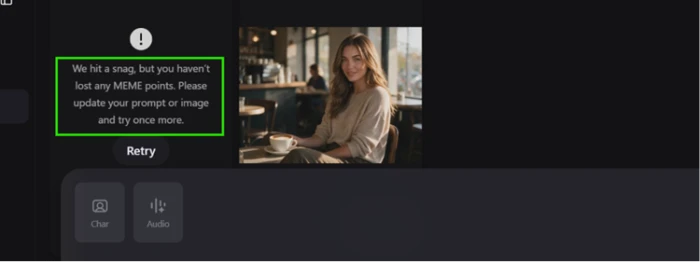
Now the payoff to that queue. The one-minute estimate turned into a wait of more than two hours, and when it finally resolved, the video had not rendered at all.
Instead I got a "We hit a snag" error asking me to update my prompt and retry. Two hours of waiting for a failure notice is the single biggest strike against Digen from my testing.
Digen AI pricing
Figures taken from the pricing screenshot captured during testing. The live pricing page renders only with JavaScript, so prices below reflect that screenshot and the current promotional offer.
| Plan | Price | What's included |
|---|---|---|
| Free | $0 | 300 signup credits + daily login reward · basic models · watermarked exports · no commercial rights |
| Ultra | $4.99 /mo | 6,000 Meme + 2,200 Pro Meme credits/mo · up to 300 videos · industry-lowest pricing · daily +200 Meme |
| Ultra Pro Popular | $9.99 /mo | 15,000 Meme + 5,600 Pro Meme credits/mo · up to 750 videos · 2.5x Ultra output · high priority · daily +330 Meme |
| Ultra Max | $19.99 /mo | 36,000 Meme + 13,000 Pro Meme credits/mo · unlimited video generation · daily +200 Meme · priority quality |
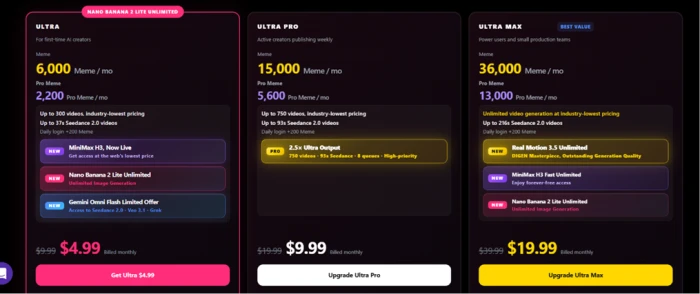
Prices shown are the discounted monthly rates on the current offer (struck-through from $9.99, $19.99 and $39.99).
Pros & cons
Specific conclusions from testing and real user reviews, not generic filler.
✅ Pros
- Routes Seedance, Grok, Real Motion and more through one login
- 300 signup credits plus an automatic daily login reward
- Image-to-video output looks natural, not stiff, at 480P
- Text-to-image nails lighting, detail and atmosphere on complex scenes
- Credits refunded automatically when a generation fails
- Promotional Ultra tier starts at $4.99/mo, undercutting rivals
⛔ Cons
- Free exports carry a burned-in DIGEN AI watermark, no commercial use
- No timeline, no trim handles, generate-and-export only
- Queue estimated one minute, then failed after 120-plus minutes
- Image text renders garbled even when the prompt spells it out
- Export capped at 1080p, no 4K
- Multilingual voice filter absent from the voice screen despite marketing
- Trustpilot flags unanswered cancellation and refund requests
- Mobile app reported buggy and crash-prone versus web
Synthesized from real reviews on Trustpilot, Reddit, GeniusFirms, the App Store & Play Store · paraphrased, not quoted
Digen AI scorecard
Rated against what a multi-model AI video and image generator is actually built to do.
| Dimension | Verdict | Score |
|---|---|---|
| Model variety Engines available under one login | Excellent |
9.0
|
| Output quality Realism of video and image results | Excellent |
8.5
|
| Credit generosity Free balance and daily rewards | Good |
8.0
|
| Image generation Detail, lighting, text rendering | Good |
7.5
|
| Value vs paywall Free tier and plan pricing | Average |
6.5
|
| Prompt adherence Following specific instructions | Average |
6.5
|
| Voice & multilingual Voice range and language support | Average |
5.5
|
| Billing & support transparency Cancellation, refunds, credit clarity | Weak |
4.5
|
| Generation speed & reliability Queue accuracy and success rate | Weak |
4.0
|
| Editing controls Timeline, trimming, export options | Weak |
3.0
|
| Scrutool Score Equal-weight average of all 10 dimensions |
6.3
|
What users say about Digen AI
The themes reviewers raise most often, by share of analysed reviews.
% = share of analysed reviews mentioning each theme (Trustpilot, GeniusFirms, App Store, Play Store)
A generous model buffet with excellent output and a queue you cannot trust
Digen does the hard part well. The image-to-video results looked natural, the Mumbai image was the best single output of the session, and routing a dozen engines through one cheap login is a real advantage over subscribing to each separately. The 300 signup credits plus daily rewards let you test properly. The problems are just as clear: free exports are watermarked with no commercial rights, there is no timeline or trimming of any kind, image text renders garbled, and the queue quietly stretched a one-minute estimate into a two-hour dead end before failing. Trustpilot piles on with cancellation and refund complaints. Social creators who want variety, cheap experimentation and short standalone clips will get value here, especially on the promotional Ultra tier. Anyone who needs to edit, export clean 1080p-plus for a client, or rely on a predictable render time should look elsewhere.
Discussion
Join the discussion and share your perspective.