
Edficiency
Edficiency (now Securly Flex) is flex-period scheduling software for middle and high schools. It auto-assigns students, tracks attendance and runs intervention time, with no public pricing.

A focused, well-liked flex-period scheduler that places and tracks every student with ease, held back by opaque pricing, a dated admin look, a confusing rebrand, and a poorly rated student app.
Should you use Edficiency?
Middle and high schools running flex, intervention or advisory periods that need every student placed and marked present each day.
You want to compare price and features before a sales call . There is no public pricing, and the few reseller figures do not match.
Quote-based. Third-party listings run from $6.99 per student per year to a $1,285 starting price , confirmed only by a demo.
The live tool still says Edficiency while the company sells it as Securly Flex , and the student app is rated about 1.2 stars.
Key features & how they perform
Each feature rated from hands-on testing and aggregated review sentiment.
Autoassign & priority placement
Before each period it places unregistered students by priority, so teacher interventions outrank open sign-ups and no seat sits empty. This is the core of the product.
Daily roster & attendance
One-click present or absent, mark-all shortcuts, QR or barcode check-in, and the reason for each placement sitting on the same screen. Exports to CSV for your SIS.
Single sign-on
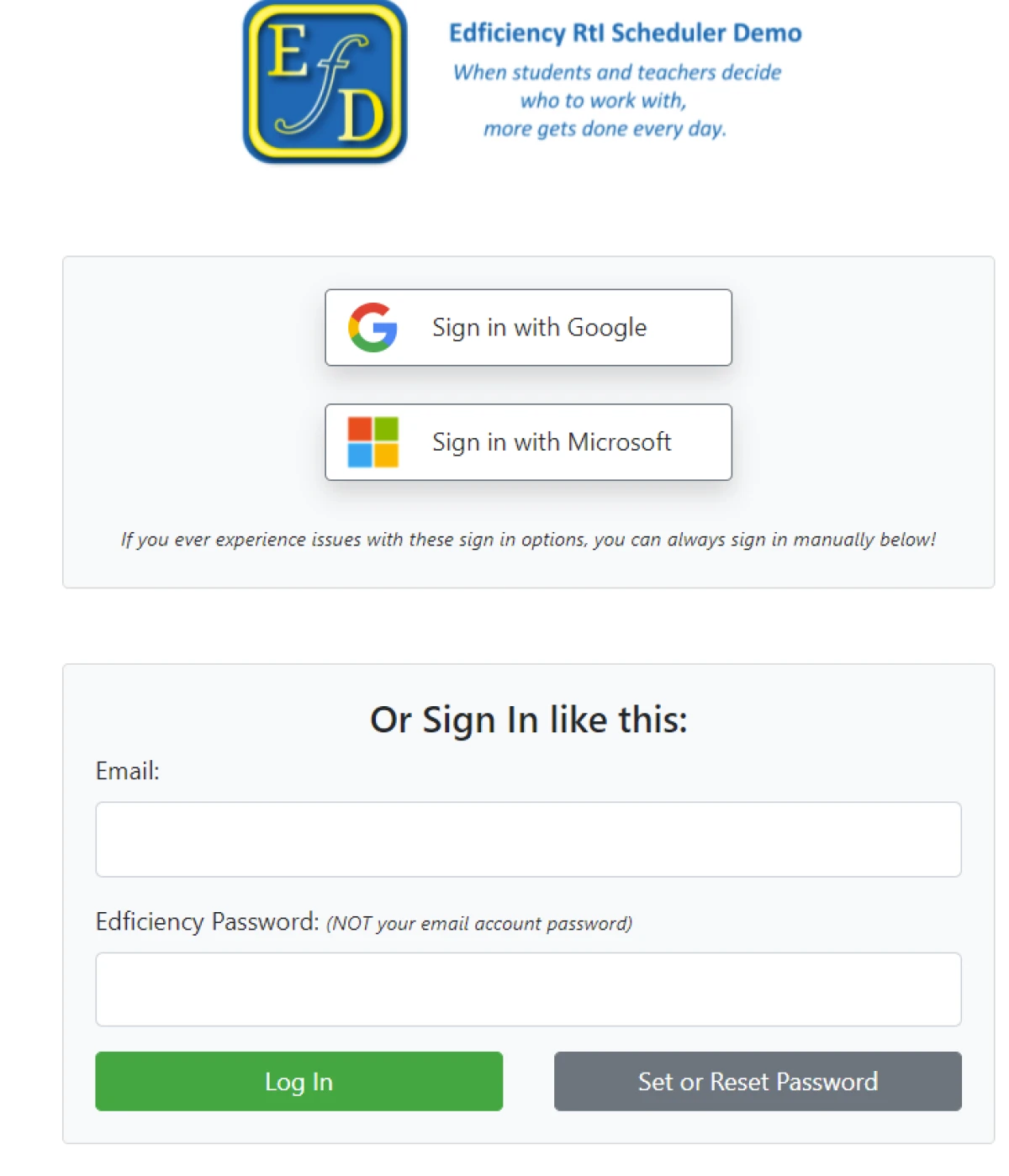
Google and Microsoft SSO sit next to a manual email and password field. Signing in with a school account dropped me on the dashboard in one step.
Session templates
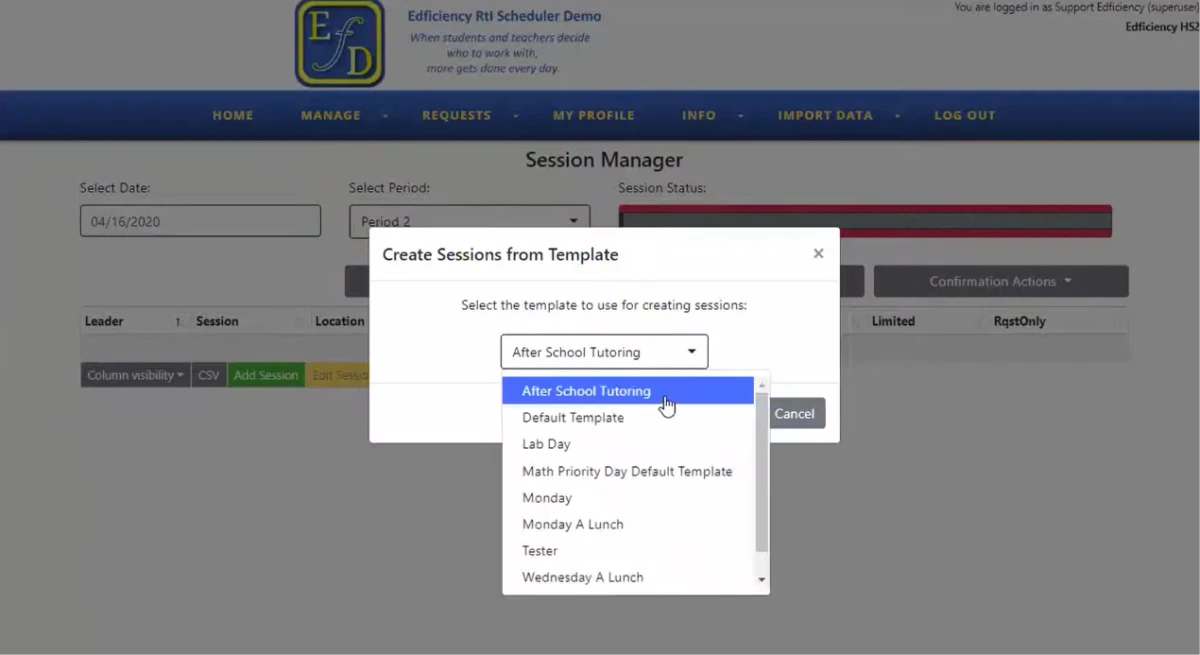
Saved templates such as "After School Tutoring" and "Lab Day" rebuild a full period of sessions in one action, which turns the daily admin build into a short routine.
Automated notifications
Daily agendas and schedule-change alerts go out by email, in-app message or mobile push, with a notify-student toggle on individual requests.
Admin interface
It does the job, but the admin screens look dated, lean on heavy gradients and plain tables, and leave some states unclear, such as an empty period reading as an error.
Feature ratings blended from hands-on testing, Capterra admin reviews and the Securly Flex app-store sentiment.
Running a full flex day in Edficiency, from login to roster
Signed in as both staff and student, across sign-in, scheduling, attendance and the admin build.
Signing in with a school account
Sign-in gave me Google and Microsoft single sign-on next to a manual email and password field.
I used the Microsoft option and landed on the dashboard in one step, with no setup screens in the way.
What a student sees
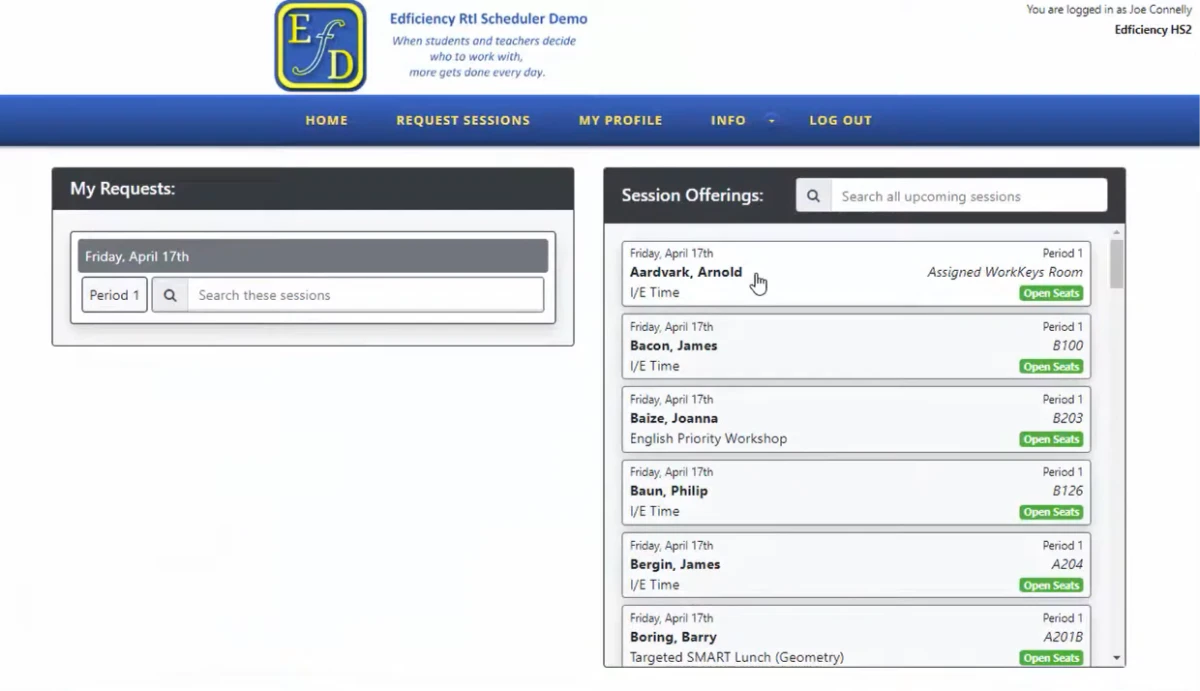
Signed in as a student, I searched the upcoming sessions and scanned the list. Each card named the teacher and room, carried a green open-seats tag, and claiming a spot took one click.
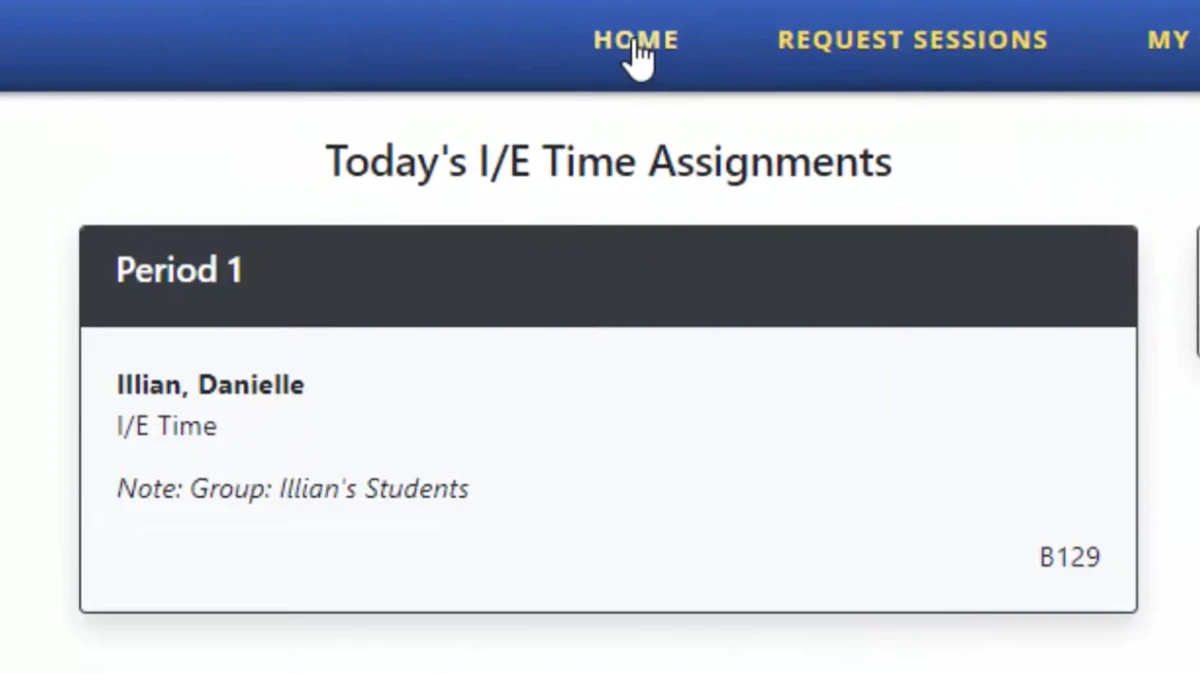
After I picked a session, the student home folded the whole day into a single card showing the teacher and room, with the group note underneath for context.
Pulling a student into a session directly
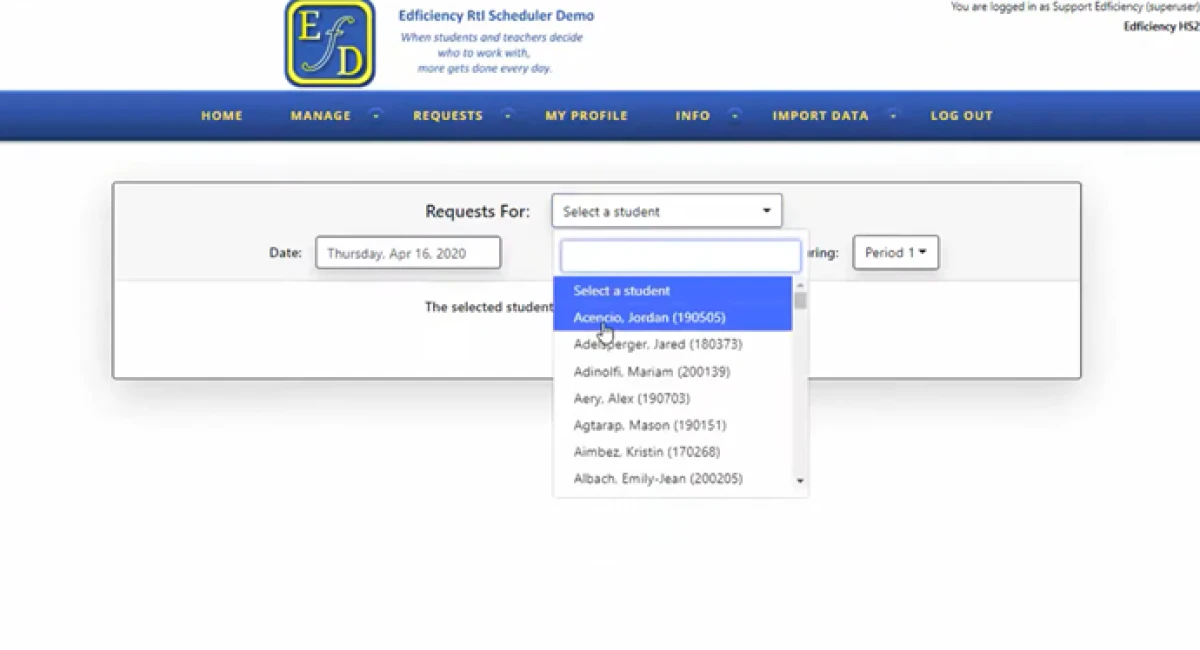
Staff can also reach for a student directly instead of waiting for them to choose.
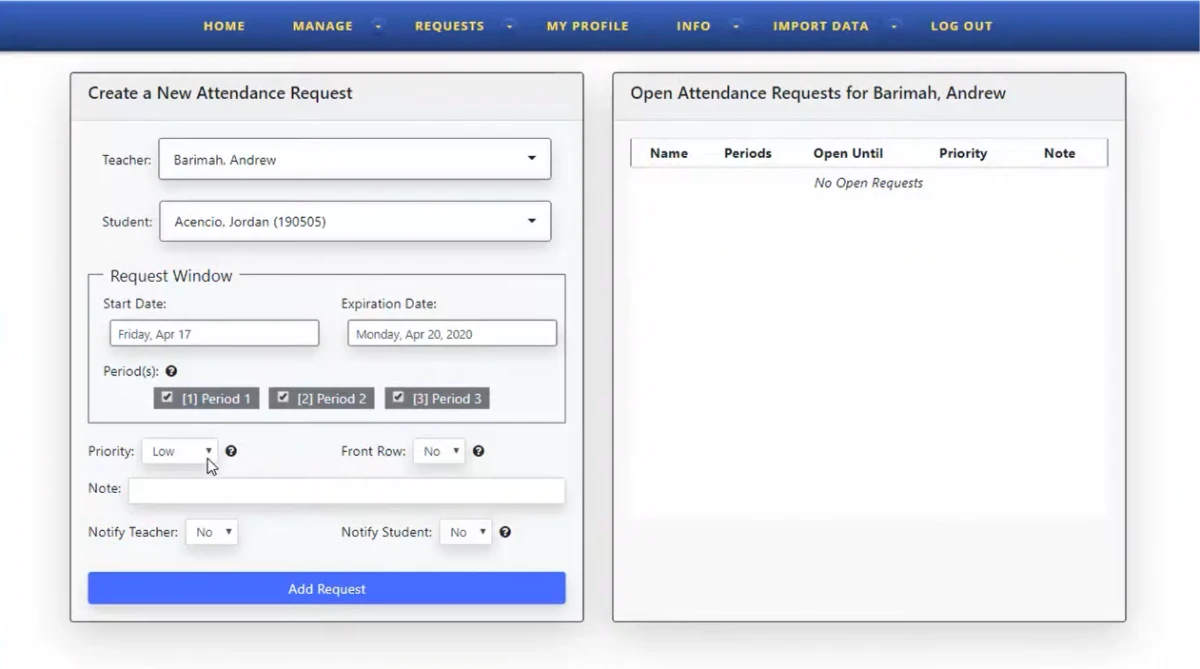
Finding one took no digging. The request screen opened a searchable dropdown where I jumped straight to any name on the roll.
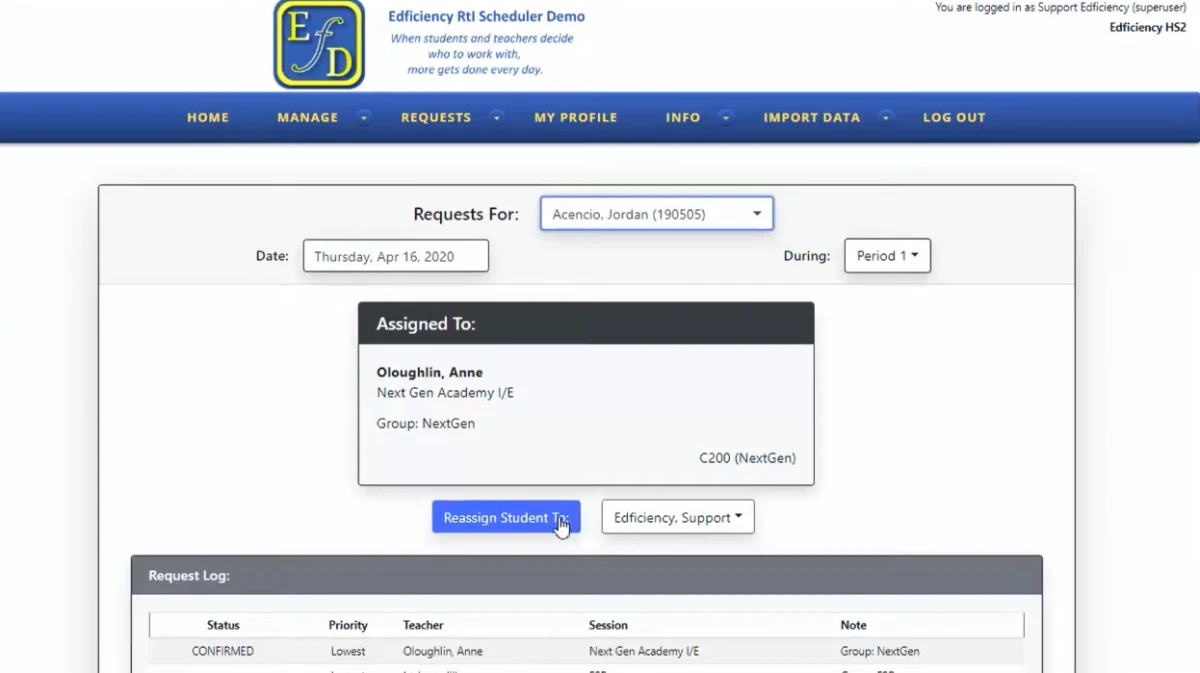
I then created an attendance request for that student. The form handed me the request window, per-period checkboxes, a priority setting, and a notify-student toggle, and saving it wrote the assignment straight onto the student's record.
Taking attendance on the daily roster
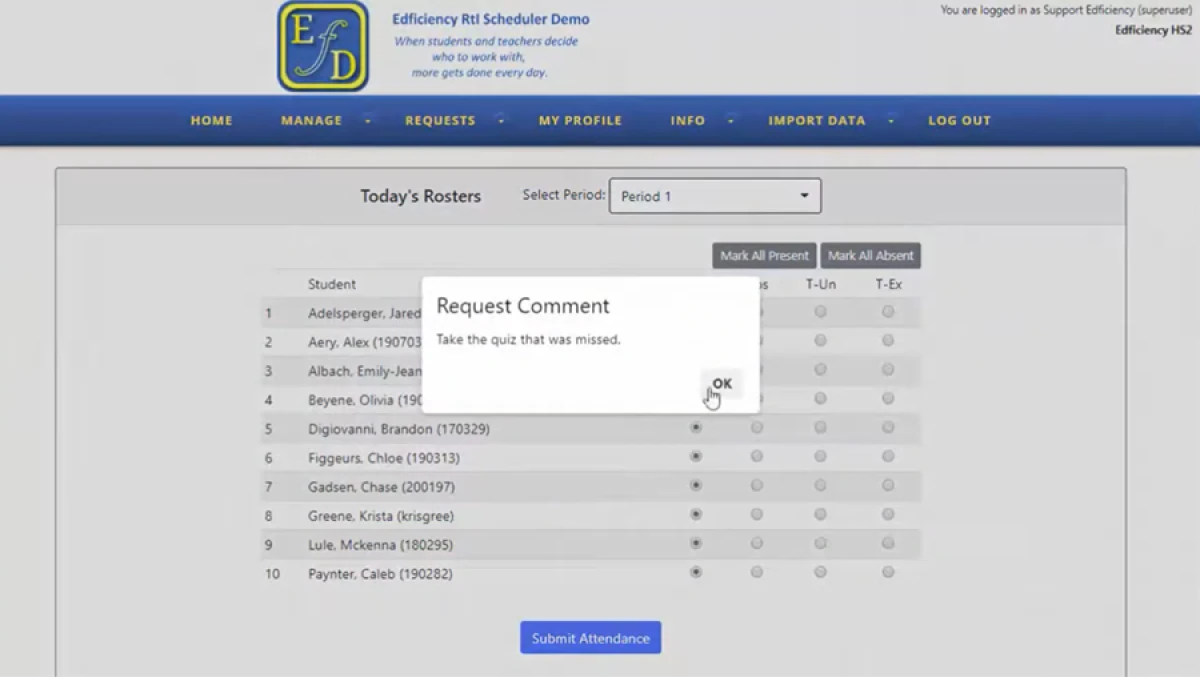
The roster is where a session leader spends the actual period. It listed every assigned student, gave me mark-all-present and mark-all-absent shortcuts, and surfaced the comment attached to each placement.
For the flagged student, the note read "Take the quiz that was missed," which told the supervising teacher exactly why that student was in the room.
Building a day of sessions from a template
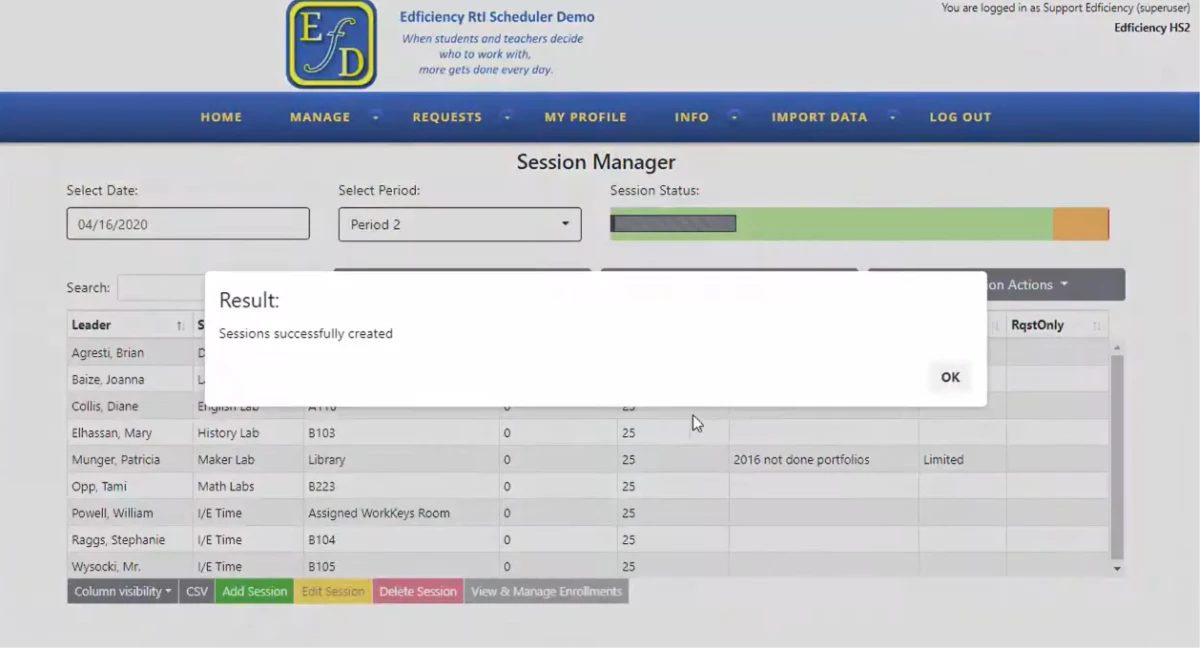
Setting up a full day of sessions is an admin job, and saved templates carried most of the weight. I opened the builder, chose a template from the list, and one action generated the period's entire set of sessions.
The confirmation came back in a second or two reading "Sessions successfully created." Run every morning, this turns a tedious manual build into a two-click routine.
Where the admin side shows its age
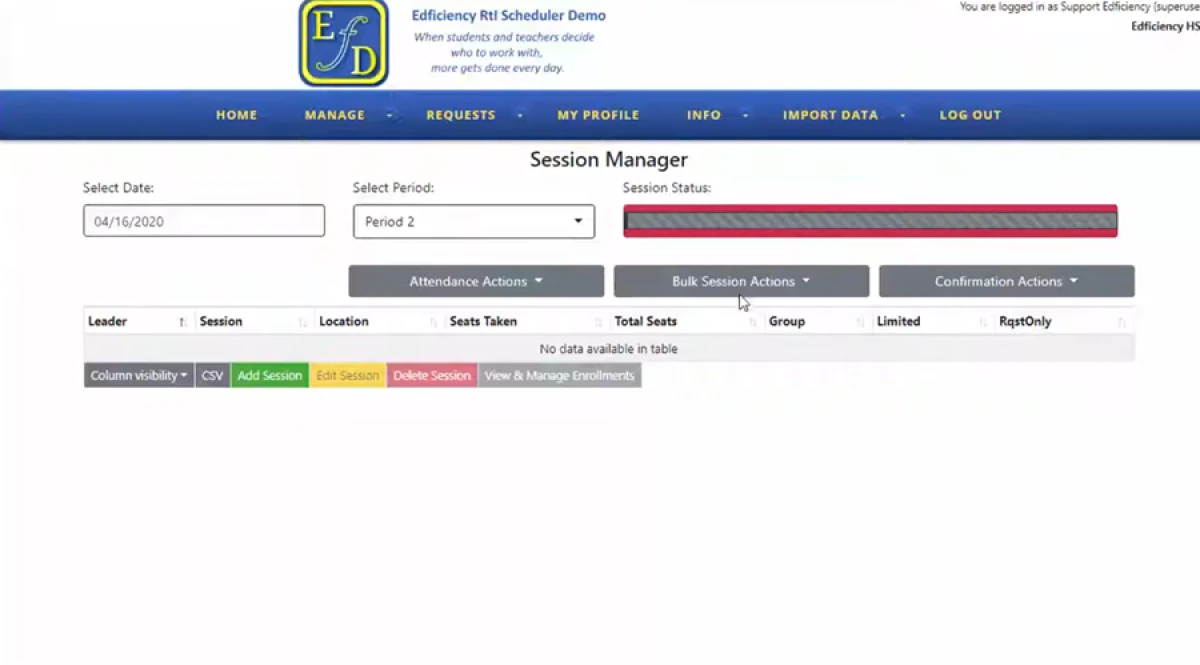
The admin side does the job, but it looks dated and some of its states are unclear. I opened a period with nothing scheduled, and the session manager answered with a red status bar over an empty table reading "No data available in table."
Nothing on the screen said whether that red meant a problem or just an empty day. A coordinator seeing it for the first time could read a blank period as a fault.
The Edficiency and Securly Flex name tangle
One tool, three names, and why that matters when you compare it.
Three names, one product
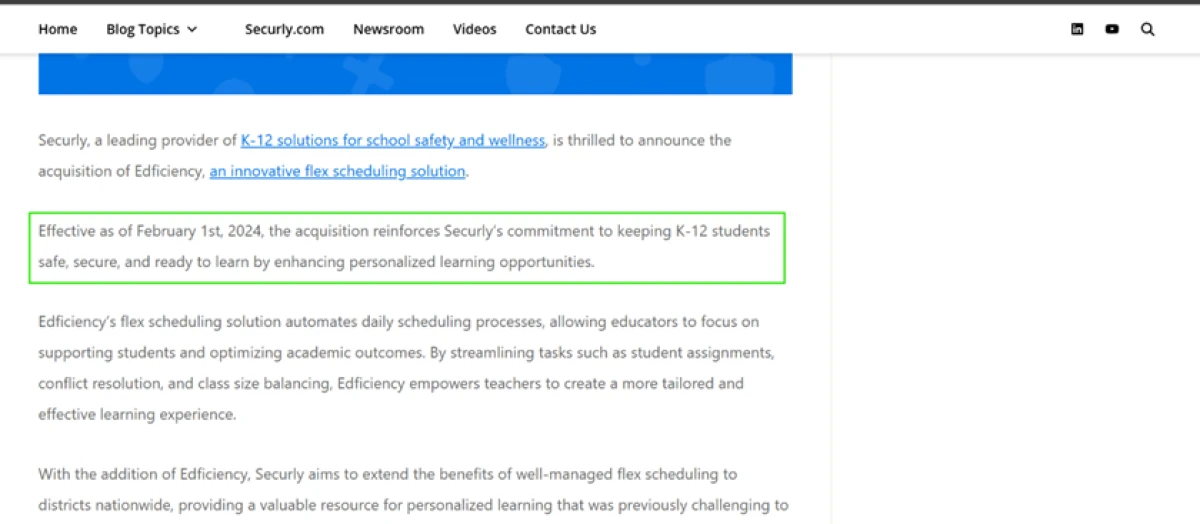
Securly bought Edficiency in February 2024 and now sells it as Securly Flex. The live product still carries the Edficiency name across every screen, so the two names point at one tool, and the mobile app adds a third, since it is listed as formerly FlexTime Manager.
For anyone researching it, that split is a small trap. Reviews, reseller listings and the vendor's own pages sit under different names, which makes it harder to line up pricing and features against a single product.
Edficiency pricing
The official site publishes no price and routes you to a demo, so the reference figures below come from third-party listings.
| Source | Price | What it covers |
|---|---|---|
| Official site | No public price | Demo request only · priced per school or district after a sales call · no figure listed anywhere on the page |
| CDW (reseller) Per student | $6.99 /student/yr | Listed as Securly Flex for the 500 to 2,499 licence band · a 500-student school lands near $3,495 a year at this rate |
| GetApp (aggregator) | $1,285 /yr | Starting price · free trial flagged · no free version · does not reconcile with the per-student reseller rate |
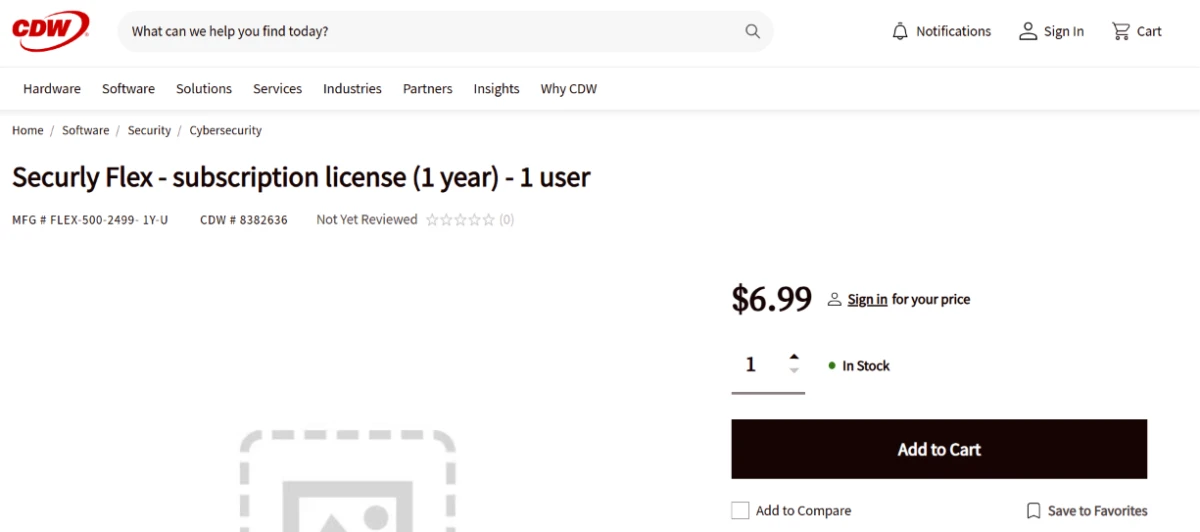
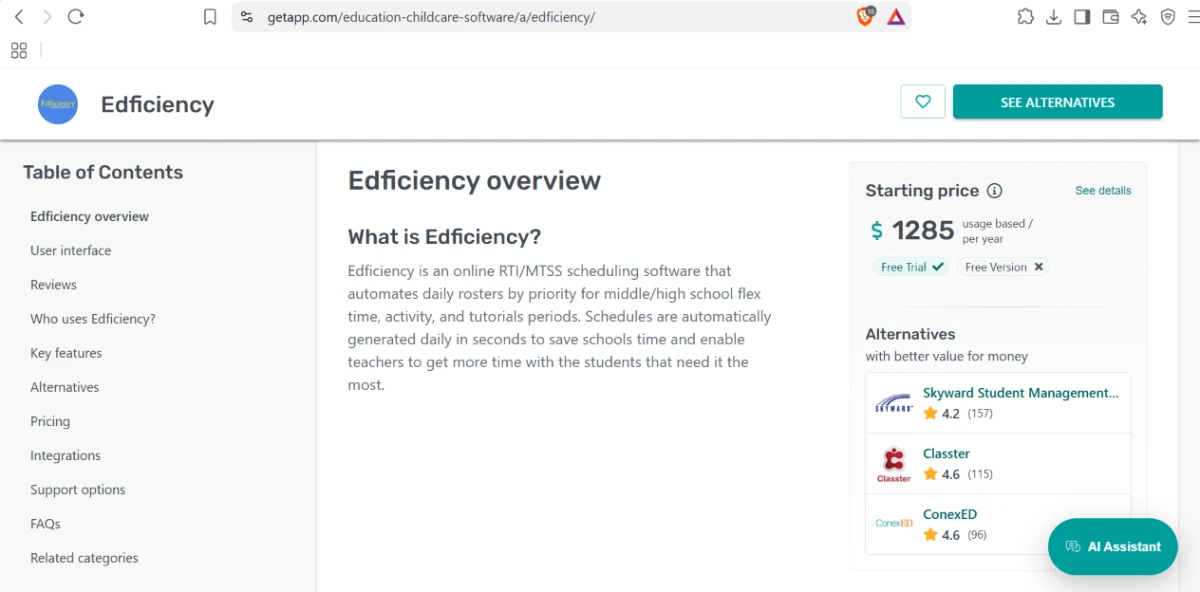
Pricing is accurate as of 13 November 2026. Edficiency (Securly Flex) publishes no public price and routes you to a demo request, so these figures come from third-party listings and do not reconcile. Confirm the current quote on the official Securly Flex page before you budget.
Pros & cons
A real split: admins and teachers rate the scheduler highly, while students pan the companion app.
✅ Pros (admins & teachers)
- Autoassign builds daily flex rosters that used to eat hours of manual scheduling
- Priority placement puts intervention students in the right room ahead of open sign-ups
- Replaces the Google Forms and spreadsheets schools ran flex time on
- Vendor helps reconfigure the rules as a school's flex model changes
- Rated 4.9 out of 5 across 45 Capterra reviews, strongest on group scheduling
⛔ Cons (student app)
- The companion app crashes and glitches repeatedly during use
- Students report it failing to load when they need to check their session
- Reviewers cite sluggish, unreliable performance on school devices
- Random ads show up inside what is meant to be a school tool
- Reviews repeatedly warn other schools off the mobile app
Pros from admin and teacher reviews on Capterra (4.9/5, 45 reviews) and G2; cons from the Securly Flex app on the Apple App Store and Google Play (about 1.2 stars from 1,100-plus ratings) · paraphrased, not quoted
Edficiency alternatives
| EdficiencyReviewed | Enriching Students | Minga FlexTime Manager | |
|---|---|---|---|
| Focus | Flex, intervention and tutorial scheduling | Flex scheduling plus digital hall pass | Flex, RTI and SEL inside a wider platform |
| Login / SSO | Google and Microsoft SSO | Single login across modules | SSO within the Minga platform |
| Autoassign | Yes, priority-based | Yes | Yes, unregistered to homeroom |
| Attendance check-in | QR or barcode plus roster | Yes, hall-pass linked | QR scan, hall pass auto-ends |
| Public pricing | No, demo only | No, demo only | No, demo only |
| Best for | Schools wanting a focused flex scheduler | Flex plus hall pass under one login | Flex inside a wider student-engagement platform |
Who Should Use Edficiency, and Who Should Avoid It?
Edficiency is strong at the core job of placing and tracking flex-time students, but its pricing, dated look and weak student app make it a poor fit for some schools.
Who Should Use Edficiency?
Best suited for these schools
Schools Running Structured Flex Time
Build and fill daily flex, intervention or advisory sessions so every student has a place and a mark by the end of the period.
MTSS and RTI Coordinators
Priority placement puts intervention students in the right room ahead of open sign-ups, with an admin override when needed.
Staff Rooms on Google or Microsoft
One-step single sign-on drops teachers onto the dashboard with no extra accounts to create or manage.
Schools Leaving Spreadsheets Behind
Autoassign and saved templates replace the Google Forms and manual rosters that flex time used to run on.
Who Should Avoid Edficiency?
Look elsewhere if you need
A Price Before a Sales Call
There is no public pricing, and the reseller figures do not reconcile, so budgeting means booking a demo first.
A Polished Student App
The student mobile app sits near 1.2 stars, with crashes, loading failures and in-app ads in the reviews.
A Modern Admin Interface
The admin screens look dated, and some states, such as an empty period, are unclear enough to read as a fault.
One Clear Product Name
The tool answers to Edficiency, Securly Flex and FlexTime Manager across different pages, which complicates research.
Our Recommendation
Edficiency, now Securly Flex, is a capable, focused flex scheduler that admins and teachers rate highly, and it does the core work of placing and tracking students well. The friction is around it: opaque pricing, a dated admin look, a weak student app and a confusing name. If your school runs structured flex time and can get past a sales call, it is worth a demo. Go in knowing the three names point at one tool, and test the student app before you commit.
Edficiency scorecard
Rated against what a K-12 flex-period scheduling tool is actually built to do.
| Dimension | Verdict | Score |
|---|---|---|
| Scheduling & autoassign Core placement by priority | Excellent |
8.5
|
| Single sign-on & onboarding Google and Microsoft login | Excellent |
8.5
|
| Attendance tracking Daily roster, QR, one-click marks | Good |
8.0
|
| Admin controls & flexibility Requests, overrides, templates | Good |
8.0
|
| Notifications & communication Agendas and schedule-change alerts | Good |
7.5
|
| Student experience Clean web view, weak mobile app | Average |
5.5
|
| Interface & visual design Dated admin screens | Average |
5.5
|
| Clarity of system states Empty period reads as an error | Weak |
5.0
|
| Brand & product clarity Edficiency, Securly Flex, FlexTime Manager | Weak |
4.5
|
| Pricing transparency No public price, figures conflict | Weak |
4.0
|
| Scrutool Score Equal-weight average of all 10 dimensions |
6.5
|
A strong flex scheduler hiding behind a confusing name and a demo wall
Edficiency does the hard part well. Autoassign and priority placement fill a day of flex sessions and leave no student unplaced, single sign-on drops staff straight onto the dashboard, and the daily roster keeps attendance and the reason behind each placement on one screen. Admins and teachers reward that with a 4.9 on Capterra, and in testing the core flow held up. The drag is everything around the core. There is no public price, and the reseller figures run from $6.99 per student to a $1,285 starting point without meeting in the middle, so you cannot budget without a sales call. The admin screens look a few years behind, an empty period reads like a fault, and the student app sits near 1.2 stars with crashes and ads in its reviews. The name does not help either, since the tool answers to Edficiency, Securly Flex and FlexTime Manager depending on where you look. If your school runs structured flex time and can get past the demo wall, this is a capable, focused tool worth a look. Schools that want clear pricing, a modern interface and a solid student app out of the box should test those three things hard before they sign.
Discussion
Join the discussion and share your perspective.