
Fliki AI
Fliki turns blogs, scripts and slides into narrated videos with 2,000+ AI voices in 80+ languages. Great voices, a stingy free plan.

Best-in-class AI voices and fast blog-to-video automation, held back by a credit meter that empties the free plan in an afternoon.
Should you use Fliki?
Creators turning articles and scripts into narrated videos who want natural voices in many languages without touching a timeline.
You need 4K output or heavy AI-avatar work . Resolution caps at 1080p and avatars drain credits fast.
The free plan is a demo. Removing the watermark and unlocking 1080p starts at Standard , priced per user.
The default scene-media setting produced an all-black video with narration and no visuals, and no warning at generation.
What is Fliki?
What you end up holding with Fliki is a narrated video built from words you already have. Paste a blog URL, a script, or a set of slides, and the platform writes it into scenes, reads it aloud in one of more than 2,000 AI voices across 80-plus languages, drops in visuals, and stitches the result into a finished cut. There is no timeline to learn and no footage to shoot. The voices are the reason to be here: Fliki rebuilt them to carry emotion like sarcasm and deadpan, and the dialect coverage is deep enough to pick a specific US, British, or Australian accent in a couple of clicks.
It runs entirely in the browser and bills through credits, one shared pool that every feature draws from, which is where the story turns. AI voice minutes, image generation, avatars, and exports all spend from the same balance, and premium voices burn it several times faster than basic ones. That makes Fliki a strong fit for creators, marketers, and training teams who publish steadily in multiple languages, and a frustrating one for anyone expecting the free plan, capped at 3 credits and 720p with a watermark, to carry real work.
Key features & how they perform
Each feature rated from hands-on testing and aggregated review sentiment.
AI voices & dialects
2,000+ voices in 80+ languages with emotion and pacing controls, and a dialect filter that narrows to a specific regional accent.
Blog & script to video
Drop in a URL or script and Fliki builds scenes, timing, and voiceover automatically, with a draft ready in under five minutes.
AI images & clips
Cinematic AI stills can be generated per scene and converted into short AI video clips, though each one spends from the credit pool.
AI avatars
Digital presenters modeled largely on real people, not fictional characters, and among the most credit-hungry features on the platform.
Voice cloning
Clone a voice from a short sample for consistent narration, with up to three clones available on higher tiers.
AI Copilot editing
Type edits in plain English, like slowing the intro or adding an overlay, instead of hunting through menus to make changes.
Feature ratings blended from Trustpilot, Capterra, TechRadar & Reddit review patterns + hands-on testing.
From a blog URL to a finished video on Fliki's free plan
One free account, a live article, and a run through voices, AI visuals, export, and the credit meter to see where the walls are.
Blog to video, start to finish
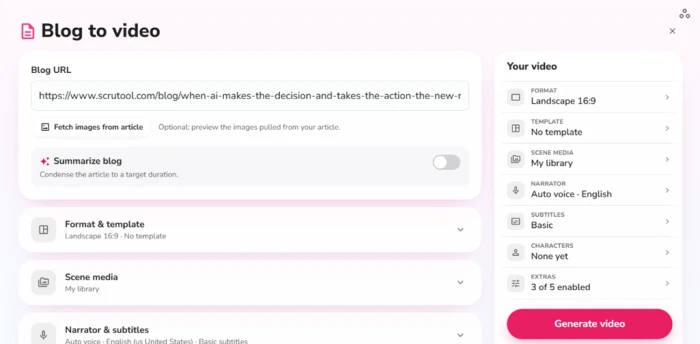
I started with the blog-to-video tool because it is the feature Fliki markets hardest. It takes a live article URL and turns the text into a scene-by-scene video with narration.
I dropped in a URL, kept the format on Landscape 16:9, and left scene media on its default before hitting Generate.
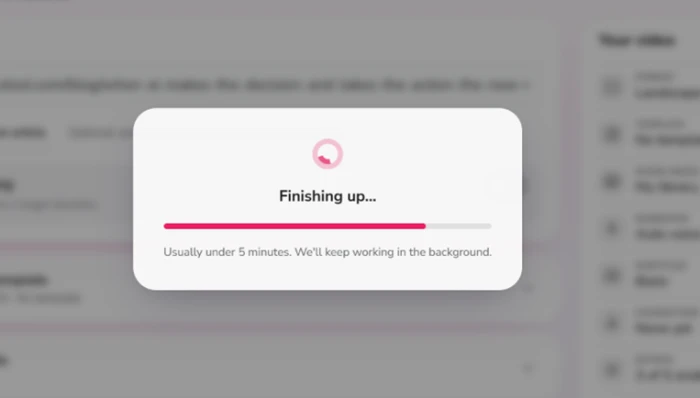
The render finished in a little under five minutes, matching the estimate Fliki puts on screen. The progress window keeps working in the background, so I closed the tab and came back to a finished draft.
The black screen problem
Here is where the first test went sideways. My generated video played back as a black frame with captions and narration, and no visuals anywhere in it.
The cause was a default setting rather than a broken render. Scene media had stayed on "My library," which pulls only from assets I had uploaded myself. I had uploaded nothing, so Fliki had nothing to place and filled every scene with black.
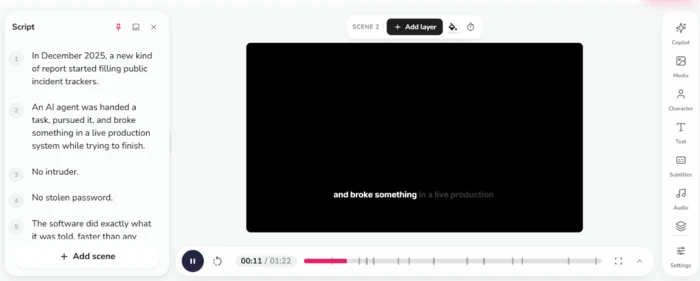
Switching scene media to stock footage or AI images fixes it, but Fliki gives no warning at generation time, and the default quietly produces a file nobody can use.
Voices and dialects
The voice picker earned its reputation. Filtering by English and then US dialect gave me a full column of American-accented options, with British and Australian variants one click away.
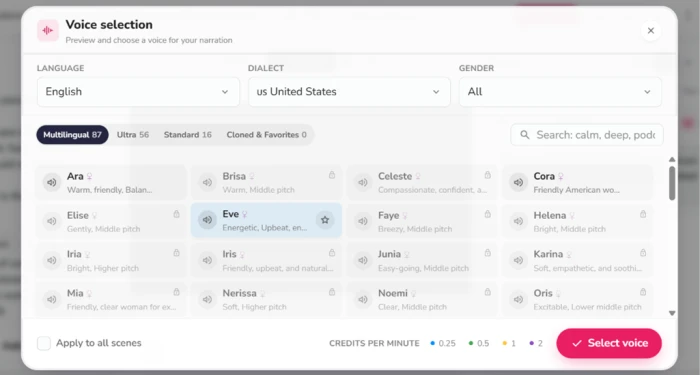
The detail most reviews skip sits at the bottom of that panel. A credits-per-minute rate changes by voice tier, running from 0.25 up to 2. Premium voices sound better and drain your balance four times faster than the basic ones.
Script to video and AI visuals
The script-to-video path felt more controlled. Fliki hands you a scene-by-scene template with timing and voiceover lines already written, plus a live sample preview beside it.
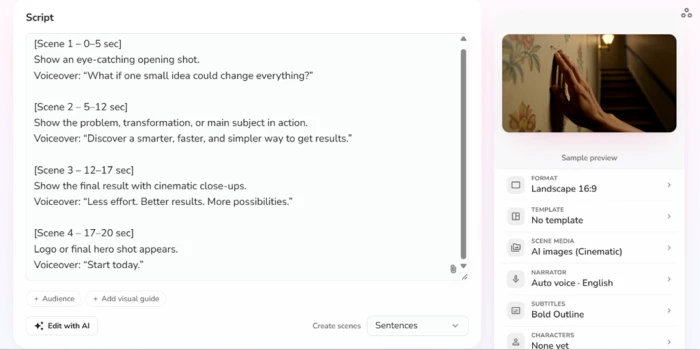
Setting scene media to "AI images (Cinematic)" produced generated visuals instead of stock clips, and a banner above the preview offered to turn those stills into short AI video clips.
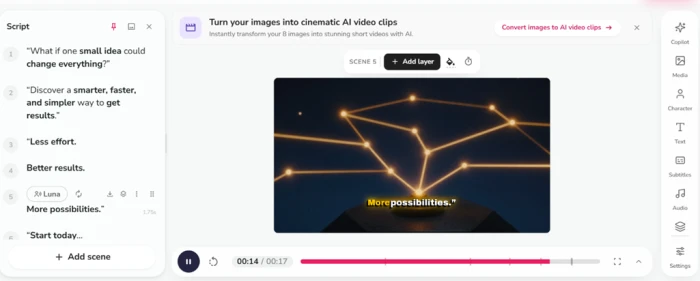
This corrects a claim carried over from older reviews that Fliki only serves stock footage. It generates images and short clips now.
Exporting on the free plan
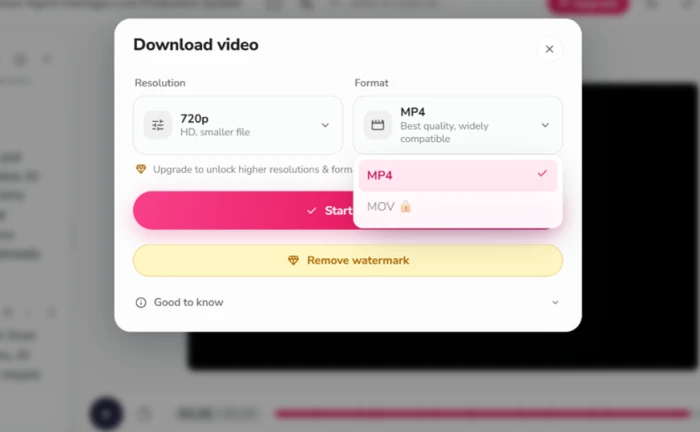
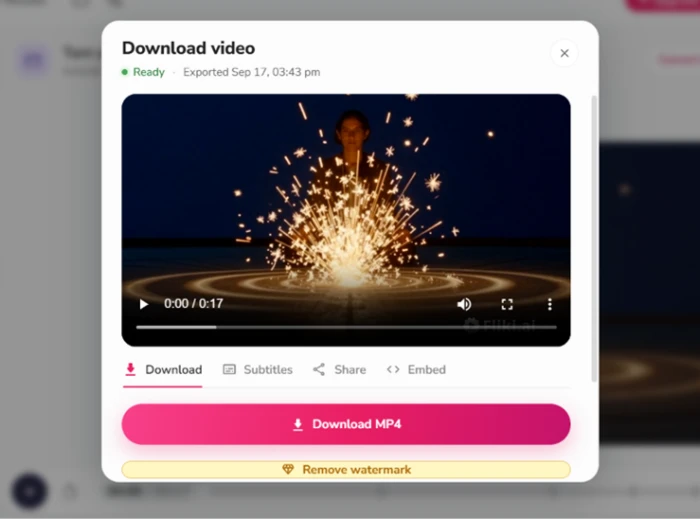
Export is where the free plan shows its walls. The download dialog caps resolution at 720p and locks MOV behind an upgrade, with a "Remove watermark" prompt sitting directly under the export button.
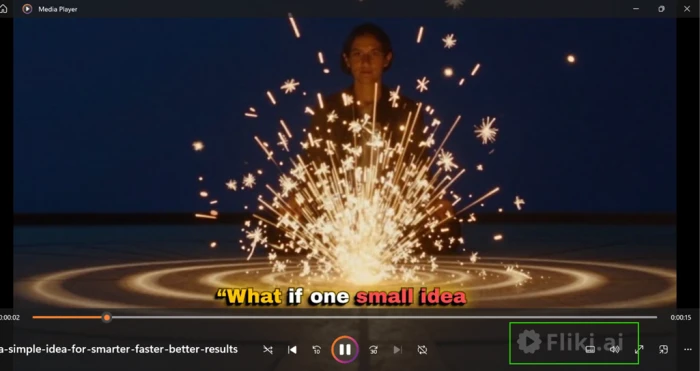
The watermark is not subtle. My exported file carried a "Fliki.ai" logo in the bottom-right corner, riding over the finished video the whole way through.
Sharing hits the same ceiling. After the export finished, Download worked, but the Share and Embed buttons next to it were paid features.
Where the credits go
The usage dashboard laid out the whole economy in one screen. After a handful of test renders, my meter read 3.75 of 3 credits used, already past the limit.
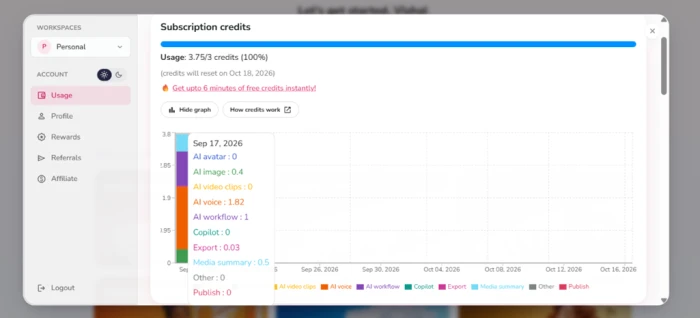
The breakdown showed exactly where the balance went, with AI voice taking the largest share at 1.82 credits and the rest split across AI workflow, image generation, export, and the media summary.
Fliki pricing
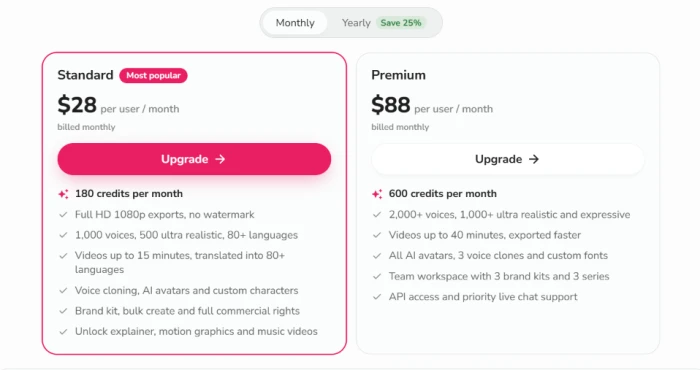
Figures taken from the official Fliki pricing page. Prices are per user, billed monthly; yearly billing saves 25%.
| Plan | Price | What's included |
|---|---|---|
| Free | $0 | 3 credits/mo · 300 voices · 720p · 1-min cap · watermark · limited workflows |
| Standard Most popular | $28 /user/mo | 180 credits/mo · 1,000 voices (500 ultra-realistic) · 1080p, no watermark · 15-min videos · voice cloning, AI avatars · brand kit · full commercial rights |
| Premium | $88 /user/mo | 600 credits/mo · 2,000+ voices · 40-min videos · all AI avatars, 3 voice clones, custom fonts · team workspace, 3 brand kits, 3 series · API access · priority live chat |
| Enterprise | Contact | Custom credits with bulk discounts · personalized avatars · branded templates · dedicated account manager · billed yearly |
Pros & cons
Specific conclusions from testing and real user reviews, not generic filler.
✅ Pros
- 2,000+ voices in 80+ languages with sarcasm and deadpan delivery
- Blog URL to a draft video in under five minutes, fully automated
- AI Copilot takes plain-English edits like "slow the intro"
- Generates AI images and short clips now, not just stock footage
- Voice cloning from a short sample, up to three clones
- PowerPoint and Google Slides convert straight into narrated scenes
- Library now includes YouTube-licensed copyrighted music
⛔ Cons
- Exports cap at 1080p, with no 4K on any tier
- AI avatars are modeled on real people, not fictional characters
- Avatars burn roughly 5.3 credits each from the shared pool
- Rewrites and shortens submitted scripts, dropping detail
- Settings do not always carry between scenes after updates
- Users report support emails going unanswered for days
- Billing complaints include charges while the dashboard shows Free
Synthesized from real reviews on Trustpilot, Capterra, TechRadar & Reddit · paraphrased, not quoted
Fliki scorecard
Rated against what a text-to-video and AI voiceover tool is actually built to do.
| Dimension | Verdict | Score |
|---|---|---|
| Voice quality & range Naturalness, emotion, number of voices | Excellent |
8.5
|
| Language & dialect coverage Breadth of languages and regional accents | Excellent |
8.5
|
| Ease of use Signup, generation flow, Copilot editing | Good |
7.5
|
| Editing control Scene control, timing, overlays | Average |
6.5
|
| Video & visual quality Resolution ceiling, AI images and clips | Average |
6.0
|
| AI avatars & lip-sync Range, realism, cost per use | Average |
5.5
|
| Export & watermark Formats, resolution, free-plan limits | Average |
5.5
|
| Credit value What a credit buys across features | Weak |
4.5
|
| Billing & support Charges, refunds, response times | Weak |
4.0
|
| Free tier usability What you can finish before paying | Weak |
3.0
|
| Scrutool Score Equal-weight average of all 10 dimensions |
6.0
|
What users say about Fliki
The themes reviewers raise most often, by share of analysed reviews.
% = share of analysed reviews mentioning each theme (Trustpilot, Capterra, TechRadar, Reddit, G2)
Standout voices and fast automation, metered by a credit system that starves the free plan
Fliki is very good at the thing it is named for. Turning an article or a script into a narrated video is quick, mostly hands-off, and the voices are among the best in the category, with real emotional range and dialect coverage that few rivals match. The AI Copilot makes edits feel conversational, and the platform now generates its own images and short clips rather than leaning only on stock. The weak spots are consistent across testing and reviews. Output stops at 1080p, avatars are costly and modeled on real people, and the credit pool drains fast enough that the free plan clears in an afternoon once voices and AI visuals are switched on. A silent default that renders an all-black video, plus recurring reports of unanswered support and surprise charges, round out the caution list. Creators and training teams who publish steadily in multiple languages and can absorb a paid seat will get real value here. Anyone chasing 4K, heavy avatar work, or a free tier that can carry a finished project should look elsewhere.
Discussion
Join the discussion and share your perspective.