
Framer AI
Framer is a design-first AI website builder with a Figma-style canvas and the best animation engine in no-code. Brilliant for designers, steep for beginners.

The best animation and layout engine in no-code, aimed squarely at designers. Beginners hit a wall, and one ambitious build can drain the free credits in an afternoon.
Should you use Framer AI?
Designers and Figma users building animated landing pages and marketing sites. The canvas logic will feel familiar within hours.
You are new to responsive layout . The Layers tree and 1fr / Fill sizing assume prior design knowledge and stall beginners fast.
Free gives roughly 500 AI credits and one ambitious build can burn through them. A custom domain needs Basic (~$10/mo) or above.
Per-run model multipliers drain credits unevenly, the AI copy is generic, and there is no refund outside the EU after 14 days.
What is Framer AI?
Framer's dividing line is who it was built for. It is a design tool first, a website builder second, and its AI agent works directly on a Figma-style canvas rather than filling in a template. Describe a page and the agent generates a real layout with editable frames, stacks and animations, then keeps every change visible and adjustable. Designers who already think in layers pick it up in hours. People new to responsive layout hit the deep Layers tree and sizing rules like 1fr and Fill, and that gap is the single biggest reason a beginner bounces off.
It runs in the browser and a desktop app, aimed at designers, marketers and agencies who want polished, animated landing pages and marketing sites with hosting, CMS, SEO and analytics built in. Two things set the terms of use. The motion engine is genuinely best in class among no-code tools, and none of the animation work touches your AI credit balance. But the AI generation runs on a monthly credit pool, uses third-party models (labeled things like GPT 5.6 Terra) that each carry a different per-run cost, and there is no way to export the code. A Framer site stays a Framer site.
Key features & how they perform
Each feature rated from hands-on testing and aggregated review sentiment.
Canvas design agent
Generates and refines layouts in place on the canvas, every change editable. Strong at structure and spacing, weak at the words it writes.
Motion & animation
Opacity, scale and spring transitions set from one canvas panel, no code and no credits spent. The clear standout against every rival.
Built-in CMS
Collections connect straight to the canvas so content and design stay in sync. Free tier includes the CMS, paid tiers raise the collection count.
Plugins & integrations
One-click connectors for Google Sheets, Notion, Airtable and more, backed by a large community marketplace of components and templates.
Figma import
Drops a Figma design in and rebuilds it as live, responsive components in about two minutes, turning half a day of layout work into small fixes.
Hosting & SEO
Instant publish, 99.99% uptime, strong Core Web Vitals and native SEO tools that WordPress refugees rate highly for skipping plugins.
Feature ratings blended from G2, Capterra, Product Hunt, TrustRadius & Trustpilot review patterns + hands-on testing.
Two builds on the free plan, until the credits ran out
A single TaskFlow landing page, then a full six-page healthcare site, testing the AI on real output rather than marketing claims.
Where the AI earned its keep: layout and structure
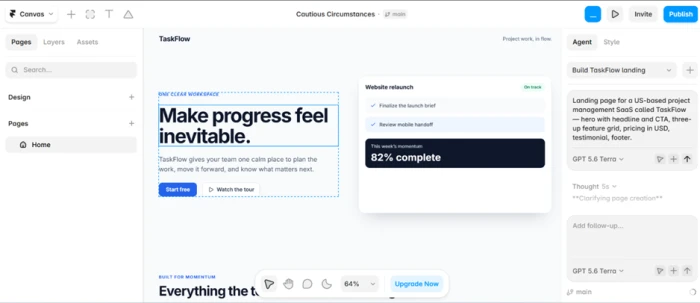
The agent takes a plain-English prompt and works directly on the canvas rather than dropping you into a template. We started with a single landing page for an invented US project management app called TaskFlow.
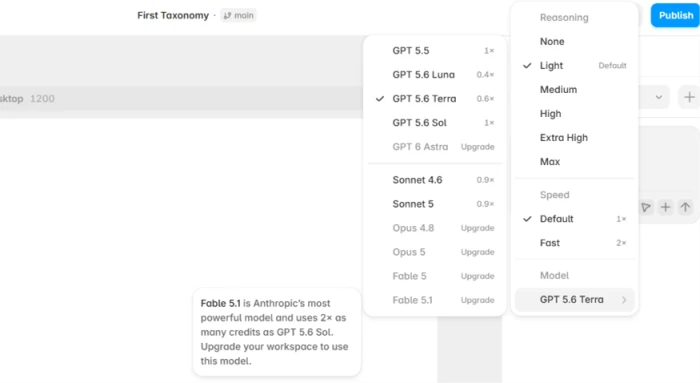
The model doing the work is labeled GPT 5.6 Terra, so Framer is wiring in third-party AI rather than something homegrown. Worth knowing when you get to the credit cost of each model later.
Motion, the part that pulls ahead of everything else
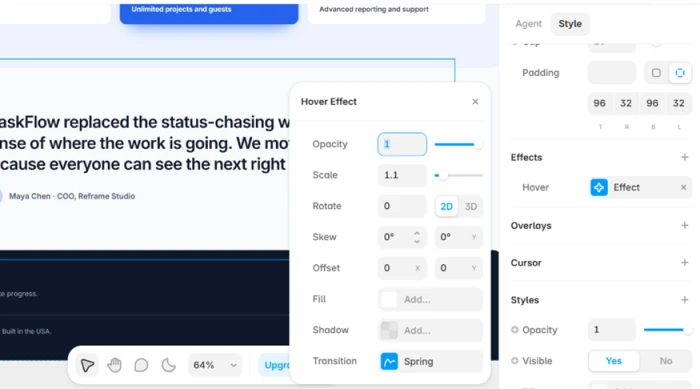
Animation is where Framer separates itself. Adding a hover effect to a card took a few clicks on the canvas, with opacity, scale and a spring transition all editable in one panel.
This is the area no other no-code builder matches, and it is worth stressing that none of it touches your AI credit balance.
CMS and plugins, both usable for free
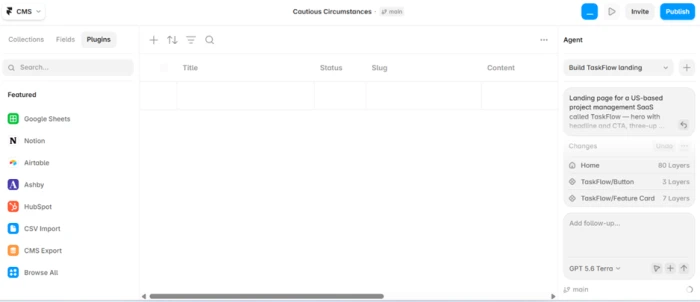
The built-in CMS and the plugin library round out the parts available without paying. Connectors for Google Sheets, Notion, Airtable and a handful of others sit one click away.
That matters if you plan to feed real content into the site later rather than hand-entering everything.
Where it slipped: generic copy and an editor that assumes you know the craft
The writing was the weakest output by a wide margin. The TaskFlow hero came back as "Make progress feel inevitable," which reads like every B2B SaaS page of the last two years. The structure underneath was fine; the words needed a full rewrite.
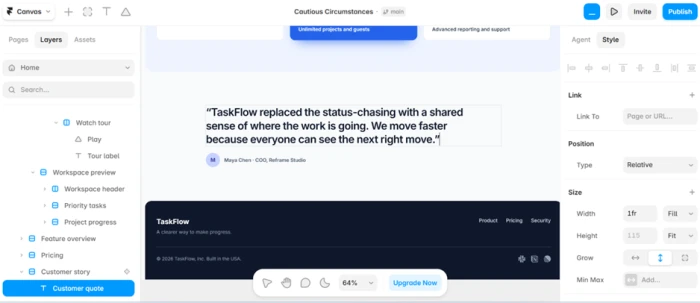
The editor also expects fluency. Opening the Layers tree on the generated page showed a deep nest of frames, stacks and sizing rules like 1fr and Fill.
The six-page test: consistent branding, thinning content
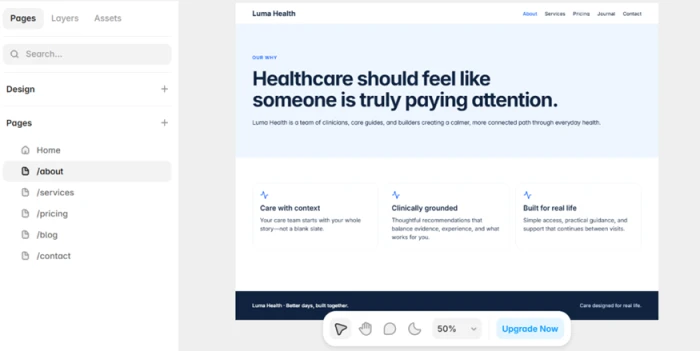
For the second project we asked for a complete six-page healthcare site in a single generation. Framer produced Luma Health with a matching logo, navigation and a blue accent carried across every page. Branding consistency was not the problem we expected.
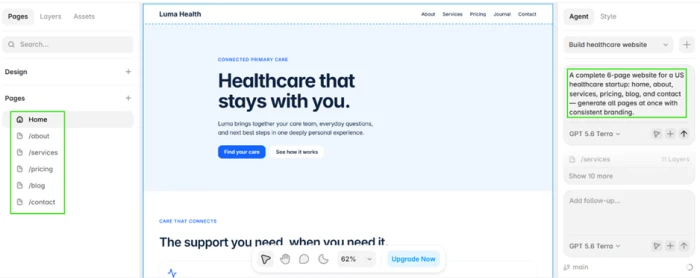
The catch showed up on the deeper pages. The home page got the attention and depth. The rest arrived thinner, leaning on short card blurbs and lighter sections.
The credit wall, and the model picker behind it
Then the free plan stopped us. That one six-page generation dropped the workspace under 200 credits, and a second pass tipped it to zero. The free tier gives roughly a thousand AI credits a month, and a single ambitious build can swallow most of them in one go.
The editor, publishing and CMS keep working after that. The AI simply pauses until the credits reset or you upgrade.
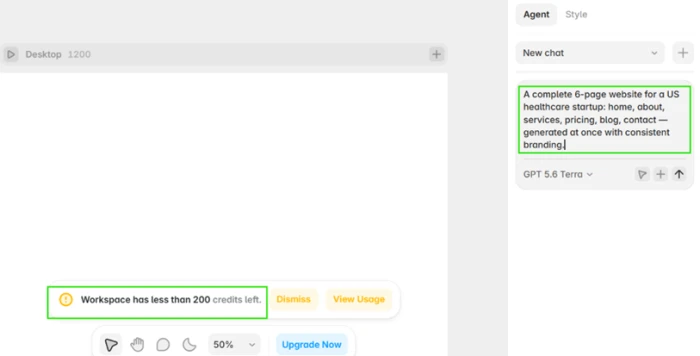
A second attempt hit the wall for real, with an upgrade prompt as the only way forward.
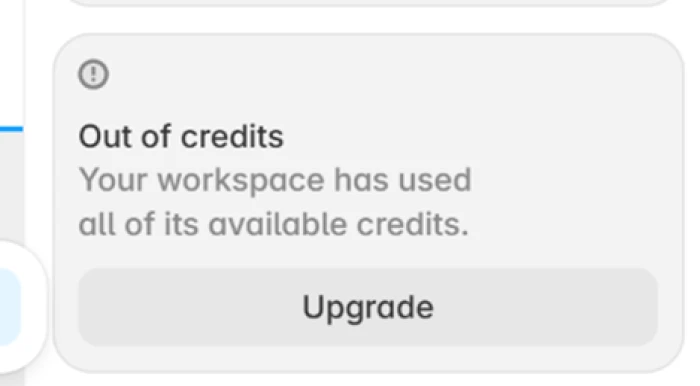
The model picker explains part of the spend. Each model carries a credit multiplier, from GPT 5.6 Luna at 0.4x up through pricier options, and the strongest models including Opus and Fable sit behind an upgrade.
Publishing free: a subdomain and a badge you cannot remove
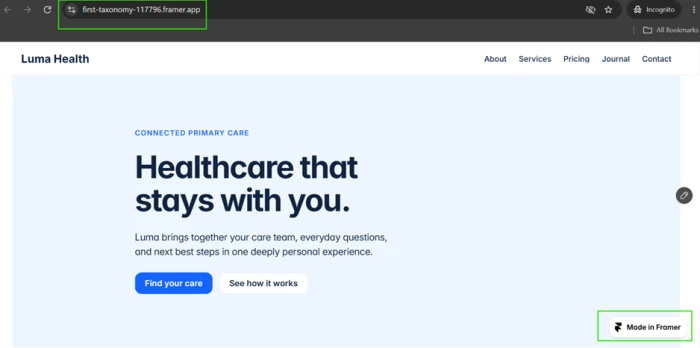
Publishing worked instantly, which is a genuine convenience. What you get for free is a framer.app subdomain and a Made in Framer badge fixed to the corner of the live site.
A custom domain and a clean, unbranded site both require a paid plan. There is also no way to export the code and take the build elsewhere.
Framer pricing
AI-credit plan figures taken from Framer's official pricing page.
| Plan | Price | What's included |
|---|---|---|
| Free | $0 | 500 AI credits to try · full editor · free Framer domain · 1 GB bandwidth · Made in Framer badge |
| Basic | $10 /mo | 1,000 AI credits/mo · free custom domain · 2 CMS collections · 50 GB bandwidth · localization add-on |
| Pro Popular | $30 /mo | 3,000 credits/mo · 10 CMS collections · 100 GB bandwidth · staging · branching with previews · site redirects |
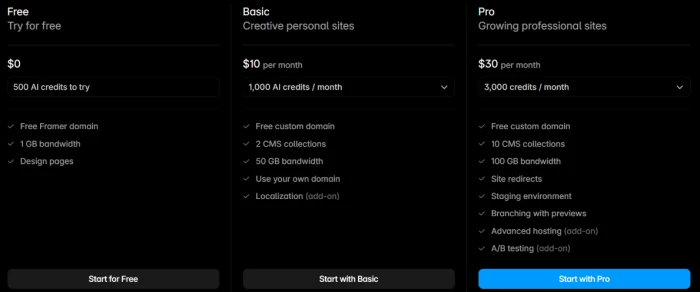
The AI-credit plan view as shown on Framer's pricing page.
Pros & cons
Specific conclusions from testing and real user reviews, not generic filler.
✅ Pros
- Best-in-class canvas animation, opacity, scale and spring, with no code
- Figma import rebuilds a design as live responsive components in about two minutes
- Per-page AI generation produces more accurate, usable layouts than whole-site tools
- Native SEO that WordPress users rate for skipping the plugin sprawl
- Strong Core Web Vitals and 99.99% hosting uptime out of the box
- Designers with Figma experience reach independent work within days
⛔ Cons
- Steep learning curve for anyone without responsive-layout knowledge
- No code export, so a Framer site cannot be moved elsewhere
- AI copy is generic B2B filler needing a full rewrite before launch
- Per-model credit multipliers make AI spend unpredictable and easy to blow through
- Deeper pages in a multi-page generation arrive noticeably thinner than the homepage
- Per-editor and per-locale add-ons make team costs scale unclearly
- No refunds outside the EU and Turkey after 14 days, a repeated billing complaint
Synthesized from real reviews on G2, Capterra, Product Hunt, TrustRadius & Trustpilot · paraphrased, not quoted
Framer AI scorecard
Rated against what a design-first AI website builder is actually built to do.
| Dimension | Verdict | Score |
|---|---|---|
| Layout & design quality Structure and spacing from a prompt | Excellent |
9.0
|
| Animation & motion Canvas transitions without code | Excellent |
9.5
|
| Hosting & performance Uptime and Core Web Vitals | Excellent |
9.0
|
| CMS & integrations Collections, connectors, plugins | Good |
8.0
|
| SEO & publishing Native tools and instant publish | Good |
8.0
|
| AI content quality Usefulness of generated copy | Average |
5.5
|
| Beginner friendliness Curve for non-designers | Average |
5.5
|
| Free AI credit generosity How far the free pool stretches | Average |
5.5
|
| Value for money Plan pricing and add-on costs | Average |
6.5
|
| Portability & lock-in Code export and site ownership | Average |
5.0
|
| Scrutool Score Equal-weight average of all 10 dimensions |
7.6
|
What users say about Framer AI
The themes reviewers raise most often, by share of analysed reviews.
% = share of analysed reviews mentioning each theme (G2, Capterra, Product Hunt, TrustRadius, Trustpilot)
A designer's tool with an AI bolted on, not the other way around
Framer is the strongest answer in no-code if your work lives in layout and motion. The agent produces clean, responsive structure from a prompt, the animation engine has no real rival among tools that skip code, and Figma import turns a static design into live components in minutes. The catches are consistent across our testing and the wider review record. The AI copy is generic B2B filler you will rewrite, deeper pages in a big generation come out thin, the free credit pool is small enough that one ambitious build empties it, and per-model multipliers make the spend hard to predict. The editor rewards design fluency and punishes the lack of it, so beginners stall on the Layers tree while Figma users feel at home in an hour. Add a code base you cannot export and refund terms that stop at the EU border, and the picture is clear. Designers, agencies and founders shipping animated marketing sites should put Framer at the top of the list. Non-designers who want a template to fill in, or anyone who needs to own and move their code later, should look elsewhere first.
Discussion
Join the discussion and share your perspective.