
Frosting AI
Frosting AI is a browser-based Stable Diffusion generator with 100 refreshable free generations, plus character chat and a separate video model. Image quality is strong; seed control, video and the useful settings all sit behind paid tiers starting at $25.

One of the most generous free image generators running, wrapped in an interface that hides its own settings and a paid ladder starting at $25.
Should you use Frosting AI?
Casual creators and hobbyists who want a browser-based Stable Diffusion setup with no install, and who are happy to keep rolling the dice until an image lands.
You need reproducible output . The Seed field is locked to Random on the free tier, so you cannot regenerate an image you liked or nudge one that came back close.
Free covers 100 image generations with a refresh button. Paid starts at Star, $25/mo , then Nebula at $55 and Galaxy at $120.
Settings persist silently between runs. A starting image left attached from earlier work turned a text prompt into image-to-image and cost a credit before I noticed.
What is Frosting AI?
The number that shapes everything here is 100. That is how many free generations a new Frosting account holds, each image costs exactly one of them regardless of prompt length or model, and a Refresh Free Gens button sits under the counter the whole time. Almost every rival meters you in seconds of anxiety. Frosting hands you a hundred rolls and gets out of the way.
Underneath is a browser-based Stable Diffusion front end with photoreal, anime and furry model families, negative prompts, aspect ratios and batch size, running under the name The Frosting Company. Adult content is permitted behind an opt-in toggle. Two things sit outside that free economy: video, which is priced in a separate currency called Stardust, and DreamChat, where any generated image becomes a chat character. Paid plans run Star at $25, Nebula at $55 and Galaxy at $120 a month.
Key features & how they perform
Each feature rated from hands-on testing and aggregated review sentiment.
100 free generations, refreshable
The strongest thing about the platform. One credit per image whatever you type, no watermark on the output, and a refresh button under the counter.
Model library & style range
Photoreal, anime and furry model families with negative prompt support. Free accounts reach a subset; the full library and ControlNet sit on paid tiers.
Prompt adherence
Holds two or three requirements comfortably, including left versus right placement. Counting and framing instructions slip once a prompt stacks five or more.
Text inside images
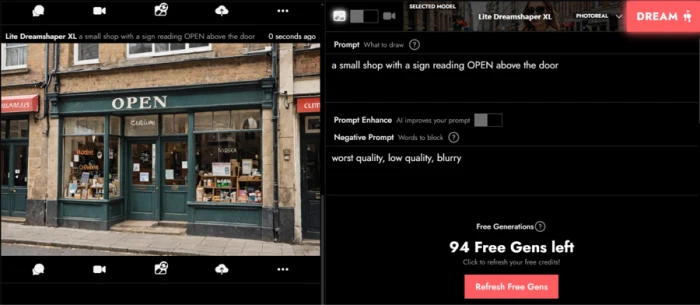
A short word you specify renders cleanly, which beats most of the Stable Diffusion family. Every sign you leave to the model comes back as imitation lettering.
DreamChat characters
Turn any generated image into a chat persona. Replies land in a second or two and hold voice, but the 4,000 token context window is small for 2026.
Lynx One video
Priced at 300 Stardust per run, a currency free generations never convert into. Closed to free accounts rather than simply expensive for them.
Feature ratings blended from hands-on testing plus Reddit, Discord and independent review patterns.
Seven test prompts, 100 free credits, and one lost to a setting I could not see
A structured adherence run on the free tier, from first generation to the video paywall.
The first generation, and what the tool adds on your behalf
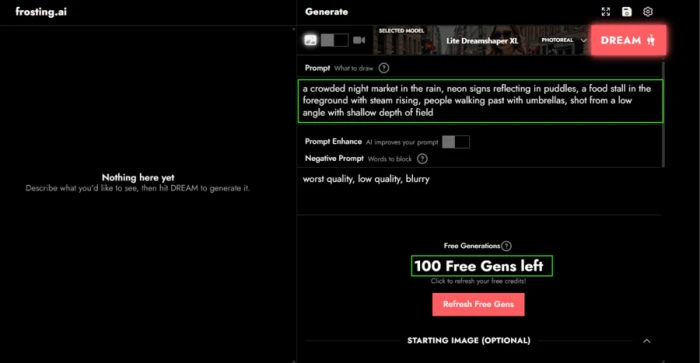
I opened with a deliberately overloaded prompt: seven separate requirements folded into one description of a rainy night market.
Two things caught my attention before I clicked DREAM. The negative prompt field arrived already populated with "worst quality, low quality, blurry", which I had not typed and did not ask for.
Directly above it sits a Prompt Enhance toggle that offers to rewrite your prompt before generation. I left it off for every run reported here. Anyone measuring output quality should check its state first, because a platform that silently improves prompts makes it impossible to tell whether you are assessing the image model or the rewriter in front of it.
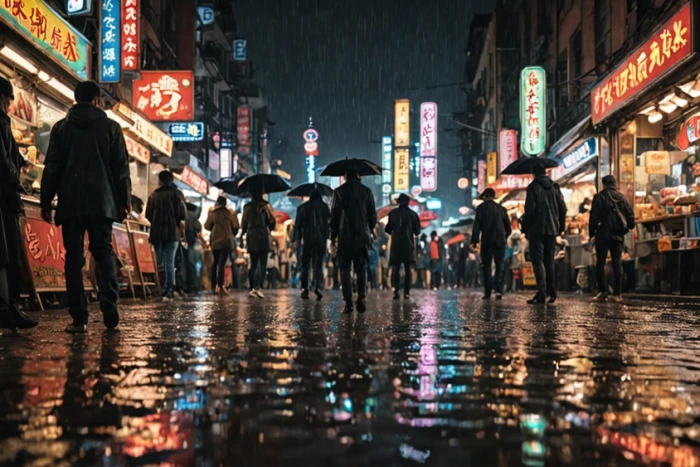
The result came back atmospheric and technically clean, and worth checking element by element against what I actually asked for.
What the free tier withholds
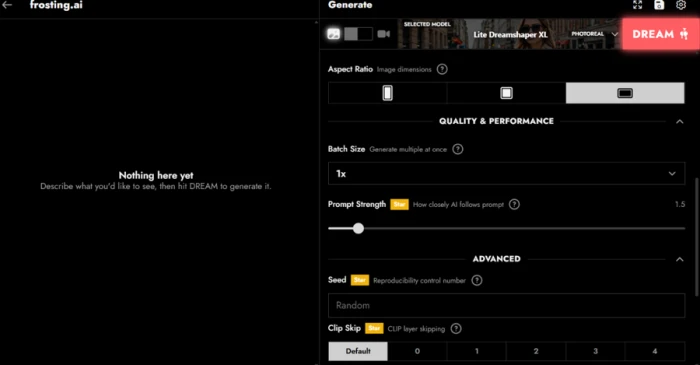
Opening the settings panel maps the paywall exactly. Aspect ratio and batch size are available to everyone.
Three controls carry a Star badge marking them as paid. Prompt Strength sits frozen at 1.5, Clip Skip stays on Default, and the Seed field is locked to Random.
The seed lock is the consequential one. Without a seed you cannot reproduce an image or make a targeted change to one you liked, so every generation is an independent roll. If a result comes back 90% right, your only recourse is to generate again and hope.
Adherence, prompt by prompt
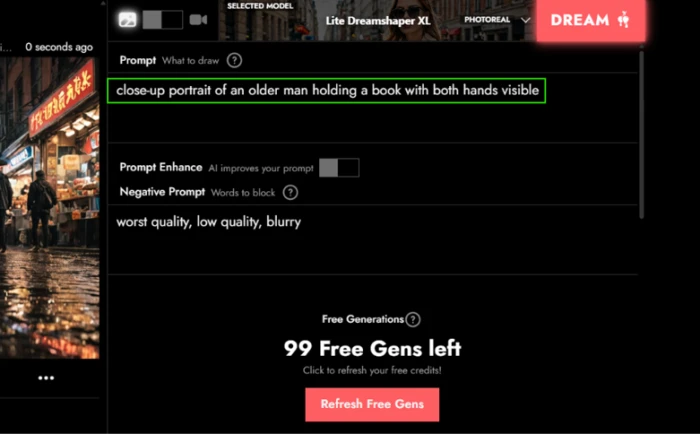
The portrait test asked for a close-up of an older man holding a book, with both hands visible.
Framing adherence rarely gets tested in reviews of these tools. It should, because it is where a technically excellent image can still miss the brief.
At full size the craft holds up better than the compliance does.
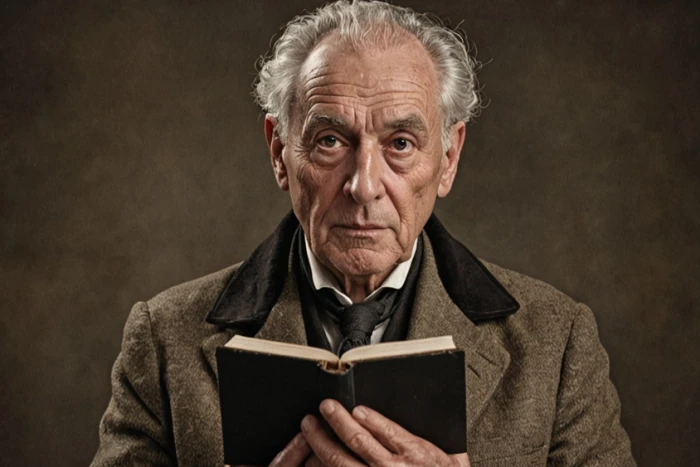
Skin texture survives inspection, the wrinkles follow plausible anatomy, and the eyes are aligned and matched. Against the prompt it is a partial: I asked for a close-up and got a half-body composition, and only one hand reads clearly.
Next came the counting test, which is where diffusion models usually come apart.
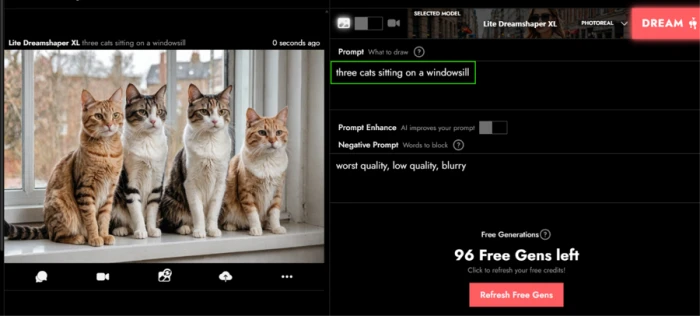
Three cats requested, four delivered. The animals themselves are convincing, with clean fur detail and consistent lighting across the group, so the failure is arithmetic rather than visual. The color test that followed produced something more useful than a straight miss.
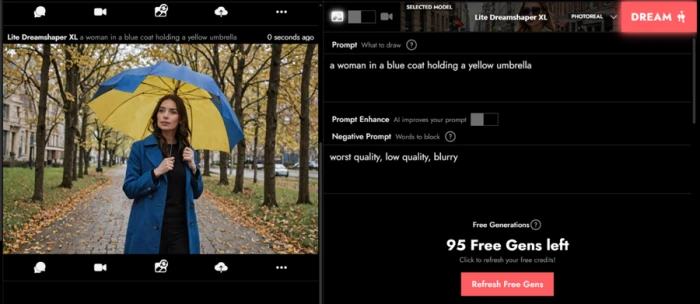
The coat came back blue as specified and the umbrella came back yellow, so both attributes bound to the correct objects. The umbrella then picked up blue panels borrowed from the coat. That is bleeding between adjacent attributes, not an inability to handle color, and the distinction is one you can actually work around. Text was the genuine surprise.
A pain point that cost me a credit
My spatial placement prompt returned my own portrait, barely altered. The metadata panel on the right explained why.
A Starting image was still loaded from work I had done several steps earlier, so the request ran as image-to-image rather than text-to-image. My prompt about a cup and a laptop moved the picture almost not at all.
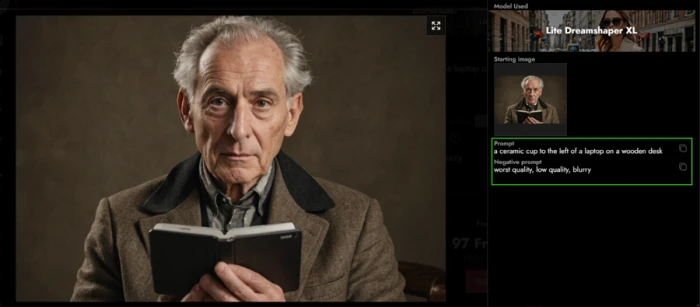
Nothing in the compose panel warned me. The Starting Image section is collapsed by default and gave no visible sign that anything sat inside it. Put that next to the negative prompt carrying over between runs and a pattern appears: settings persist silently, and you find out in the result metadata after the credit is gone.
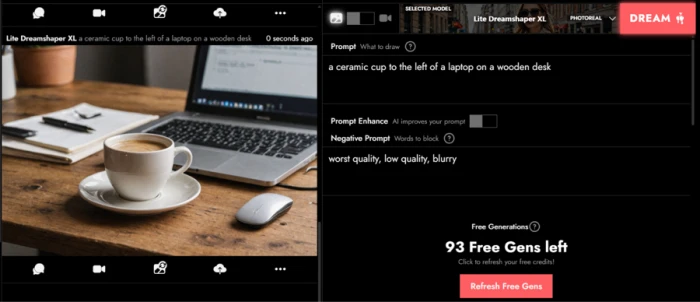
Cleared and rerun, spatial relationships passed. The cup sits to the left of the laptop on a wooden desk exactly as described, which is more than half this class of model manages on left-versus-right instructions. The screen and the open notebook beside it are covered in imitation text, a second independent confirmation of the signage finding. The baseline prompt closed the run.
What the results add up to
Seven valid prompts, each testing one thing, scored against what I asked for rather than how the picture looks.
| Prompt | What it tested | Result |
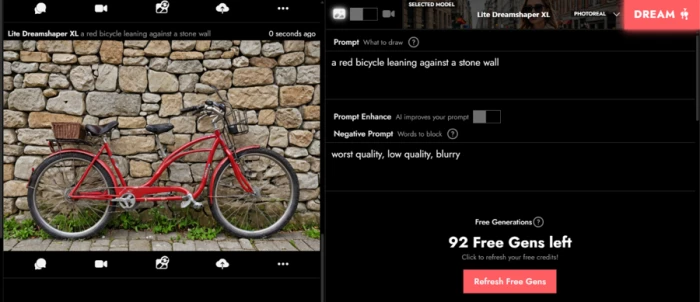
| Red bicycle against a stone wall | Baseline competence | Pass |
| Ceramic cup left of a laptop | Spatial placement | Pass |
| Shop sign reading OPEN | Text rendering | Pass on the specified word |
| Woman in a blue coat, yellow umbrella | Color binding | Partial, color bled |
| Close-up portrait, both hands visible | Framing and hands | Partial, framing missed |
| Crowded night market in the rain | Complex composition | Partial, 5 of 7 elements |
| Three cats on a windowsill | Counting | Fail, produced four |
Video sits behind a second currency
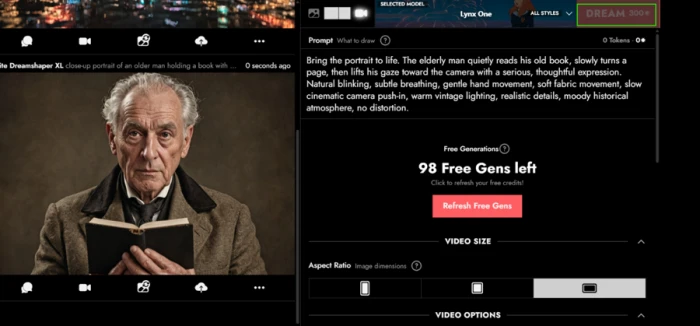
I tried to animate the portrait using Lynx One, the platform video model.
The DREAM button greyed out and quoted a price of 300 Stardust. Stardust is a currency separate from Free Gens, and free generations do not convert into it.
That distinction matters if you arrived expecting the free tier to cover video. It does not make video expensive for free accounts. It closes it.
Turning a generated image into a chat character
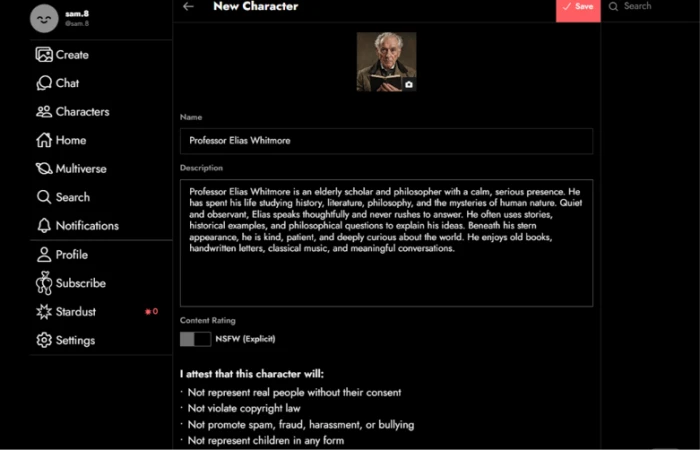
Any image you generate can be converted into a chat character, which is where the platform stops being an image generator and starts being a community product.
The creation form carries a content rating toggle for explicit material, switched off by default, sitting above an attestation covering real people, copyright, harassment and any depiction of children. For a platform that permits adult content, putting that list in front of the user at the point of creation is a reasonable design decision.
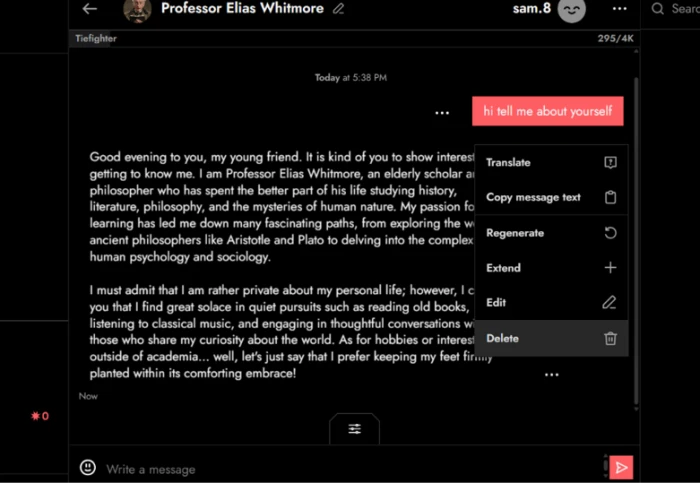
The chat window itself tells you more about the platform's priorities than the image side does.
Frosting AI pricing
Figures taken from the Frosting AI Subscribe page, monthly billing.
| Plan | Price | What's included |
|---|---|---|
| Free | $0 | 100 free generations at 1 credit per image · refresh button · aspect ratio and batch size · negative prompts · no seed, prompt strength or clip skip · no video |
| Star Popular | $25 /mo | Batch generation · higher credit allowance · paid generation controls · 4k video tokens per month |
| Nebula | $55 /mo | Everything in Star · reference image input · ControlNet · 8k video tokens per month |
| Galaxy | $120 /mo | Everything in Nebula · inpainting · fastest processing · priority queue and support · 16k video tokens per month |
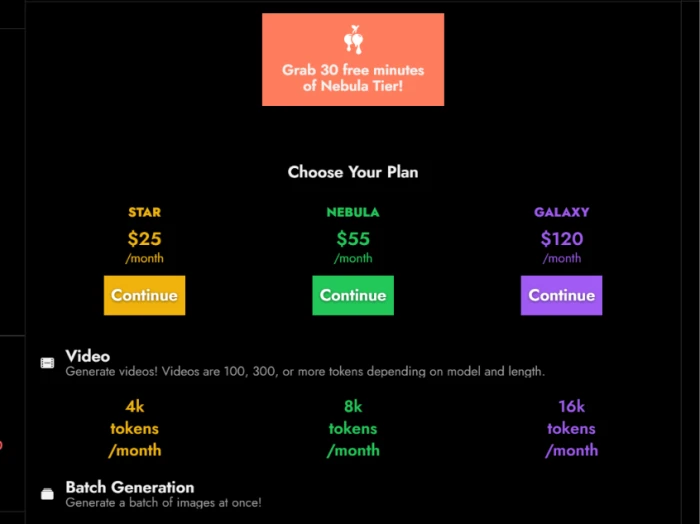
Video tokens scale 4k, 8k and 16k a month across the three tiers. A single clip costs 100, 300 or more depending on model and length.
Pros & cons
Specific conclusions from testing and real user reviews, not generic filler.
✅ Pros
- 100 free generations with a Refresh Free Gens button below the counter
- One credit per image regardless of prompt length or model
- Eight generations moved my balance from 100 to 92
- Portrait skin texture and eye alignment hold up at full size
- Spatial instructions landed: cup left of laptop, on a wooden desk
- The word OPEN rendered cleanly spelled and correctly placed
- Stone masonry escaped the repeating-texture artifact
- Character form shows the IP and minors attestation before you create
⛔ Cons
- Seed locked to Random on free, so nothing is reproducible
- Prompt Strength frozen at 1.5 and Clip Skip fixed on Default
- Negative prompt arrives pre-filled with text you never typed
- A collapsed Starting Image persisted silently and cost a credit
- Counting failed: three cats requested, four delivered
- Close-up request returned a half-body frame with one hand hidden
- Color bled from the blue coat into the yellow umbrella
- Every sign not explicitly specified renders as convincing gibberish
- Video needs 300 Stardust, which free generations never convert into
- Chat runs on Tiefighter with a 4,000 token context window
Synthesized from hands-on testing plus real user reports on Reddit, Discord & independent review sites · paraphrased, not quoted
Frosting AI scorecard
Rated against what a browser-based diffusion generator is built to do.
| Dimension | Verdict | Score |
|---|---|---|
| Free tier generosity What you can do without paying | Excellent |
9.0
|
| Image quality & detail Texture, anatomy, artifact control | Good |
7.5
|
| Model library & style range Photoreal, anime, furry, LoRA options | Good |
7.0
|
| Speed & queue performance Render time and peak-hour waits | Good |
7.0
|
| Prompt adherence Counting, framing, stacked constraints | Average |
6.0
|
| Text rendering in images Specified words vs ambient signage | Average |
5.5
|
| Pricing clarity & value Tier structure and second currency | Average |
5.5
|
| Creative control on the free tier Seed, prompt strength, clip skip | Weak |
4.5
|
| Settings persistence & error prevention Warning before a credit is spent | Weak |
4.0
|
| Video & chat extras Lynx One access, DreamChat context | Weak |
4.0
|
| Scrutool Score Equal-weight average of all 10 dimensions |
6.0
|
What users say about Frosting AI
The themes reviewers raise most often, by share of analysed reviews.
% = share of analysed reviews mentioning each theme (Reddit, Discord community, independent review sites)
An excellent free generator with a paid tier that has to argue much harder
The free side is the reason to be here. A hundred generations at one credit each, a refresh button under the counter, no watermark on the output, and image quality that holds up under inspection: the portrait's skin texture and eye alignment beat what most free tools produce, and the masonry test dodged an artifact this model family usually walks into. Adherence is the honest weak spot. Three of seven prompts passed cleanly, one failed on counting, and the pattern is consistent enough to work around: two or three requirements land, five or more start dropping. What frustrates is not the model but the interface around it. A pre-filled negative prompt I never typed, a collapsed Starting Image that quietly turned a text prompt into image-to-image, and no warning until the metadata panel explained it after the credit was gone. Add a Seed field locked to Random and a free user cannot reproduce a good result or fix a near-miss, only reroll. Video is not expensive on the free tier, it is closed, priced in Stardust that Free Gens never convert into. Casual creators, anime and illustration hobbyists, and anyone who wants a diffusion sandbox without installing one should sign up today and spend nothing. Anyone weighing $25 for Star, or $55 and $120 above it, should put Midjourney and Leonardo side by side first, because past the free tier Frosting stops being the obvious answer.
Discussion
Join the discussion and share your perspective.