
Gizmo AI
Gizmo turns PDFs, slides, YouTube videos and photographed notes into flashcard decks and quizzes, wrapped in a game of hearts, streaks and leagues. Its AI tutor explains wrong answers using the file you uploaded.

Excellent teaching engine and the widest import list in the category, pointed at cards it cannot always be trusted to write.
Should you use Gizmo?
Students working from slides, PDFs and textbooks who want a draft deck in seconds and a tutor that explains the answers they miss.
Your material is mostly recorded lectures , or you want to see and tune your review intervals the way Anki lets you.
Free covers unlimited decks and daily study. Unlimited is $77.22 a year , auto-renewing, or $5.99 a week for an exam sprint.
Video imports need a manual review pass before you trust them, and imports stalling on the loading screen is a common report.
What is Gizmo?
If you already keep decks in Quizlet or Anki, Gizmo's opening move is to import them and then take over the writing. Feed it a PDF, a PowerPoint, a YouTube link, a Google Sheet or a photo of handwritten notes, and it returns a deck of multiple choice and written questions. Get one wrong and an AI tutor explains it using the file you uploaded, not general knowledge, with buttons to make the explanation simpler or push it deeper.
Around that sits a game. Hearts act as lives during quizzing, coins buy hints and power-ups, streaks and leagues keep you returning, and Gizmo Live turns a deck into a timed match against friends. Save All Ltd builds it in London and runs it on web, iOS and Android. The thing that decides whether it works for you is the shape of your material: structured documents produce usable decks, loosely structured recordings produce decks that need pruning.
Key features & how they perform
Each feature rated from hands-on testing and aggregated review sentiment.
Magic Import
Pulls decks straight out of Quizlet and Anki, and builds new ones from PDFs, slides, videos, links and photographed notes.
AI Tutor
The strongest part of the product. Explanations are accurate, quote the uploaded source, and can be dialled simpler or more detailed on request.
Memorise quizzing
Questions are genuinely testing rather than flip-and-check, but every wrong answer costs a heart and running out pauses the session.
Spaced repetition
It schedules reviews, but shows no intervals and names no algorithm. Users with large decks report recent cards crowding out older ones.
Gizmo Live & streaks
Live multiplayer quizzes, leagues and streak mechanics that reviewers credit for getting them to open the app daily.
Page-level import control
PDFs arrive as page thumbnails with checkboxes, so filler pages can be dropped before any cards are generated. No equivalent exists for video.
Feature ratings blended from App Store, Google Play, Trustpilot & GeniusFirms review patterns + hands-on testing.
What Gizmo Actually Produced
Two sources through the same app, and two decks that barely resemble each other.
Getting started with nothing
Signup wanted my name, my university and my class before it would show me the product.
Once past that, Gizmo asked for learning material and offered Anki decks, Google Sheets, website links and a button marked "I don't have anything."
That last button matters more than it looks. Most study apps assume you arrive with files; this one has a route for the student who does not.
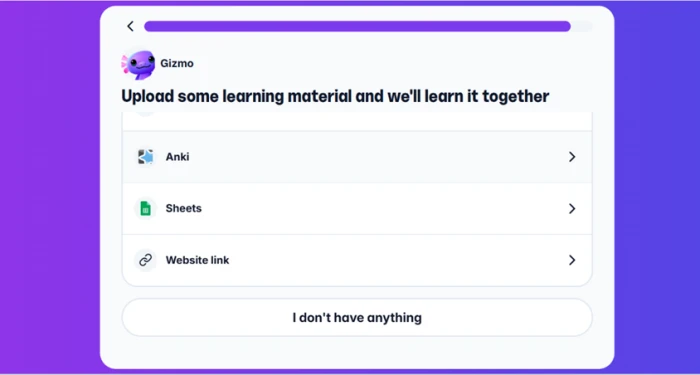
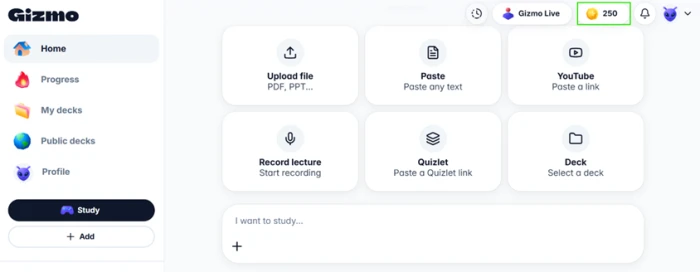
I pressed "I don't have anything" to see what a student with no files would be handed. That path drops you straight onto the dashboard.
Test one: a 76 minute lecture video
My first source was Lecture 1 of MIT OpenCourseWare 8.04, Quantum Physics I, taught by Allan Adams. The recording runs one hour and sixteen minutes.
I pasted the link and Gizmo offered flashcard generation alongside two other paths, a written note and a step-by-step lesson.
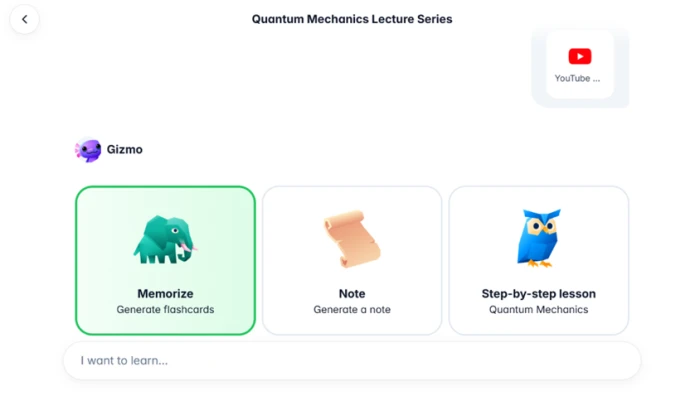
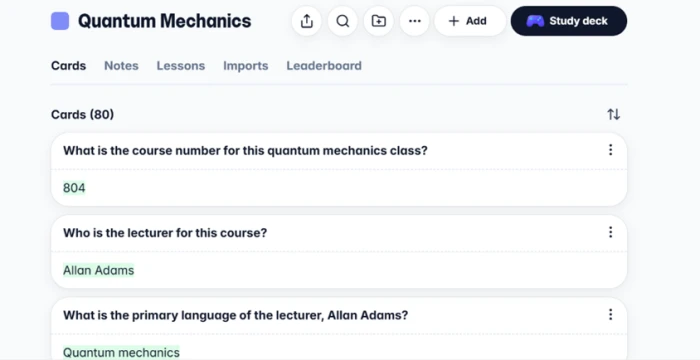
I chose Memorize. Eighty cards came back, and the deck opened with a working card list, a leaderboard tab and a study button.
Where the video deck fell apart
Then I read the cards. The first asks for the course number and answers 804. The second asks who the lecturer is and answers Allan Adams.
The third asks for "the primary language of the lecturer, Allan Adams" and answers "Quantum mechanics," a malformed question paired with an answer that does not fit its own grammar. The fourth asks where course materials will be posted and answers "Stellar website."
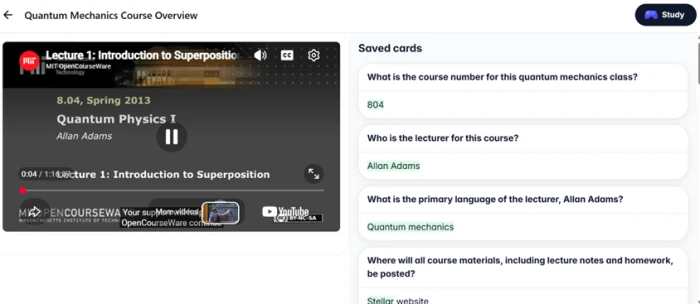
That last card is worth pausing on. MIT began moving off Stellar to Canvas in 2020, and MIT Libraries records the Stellar learning management system as retired on 15 January 2026. The lecture was recorded in 2013, so Adams did say it.
Gizmo transcribed a true statement and turned it into a flashcard that now teaches a student to memorise a system that no longer exists.
The tutor outclasses the cards it teaches
Study mode surprised me.
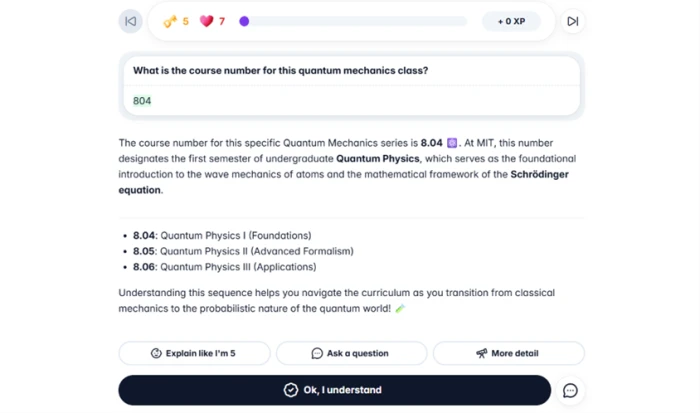
Answering the course number card produced a full explanation that placed 8.04 correctly inside MIT's sequence, naming 8.05 as Advanced Formalism and 8.06 as Applications, then connected the course to wave mechanics and the Schrödinger equation.
Buttons underneath let me ask for a simpler version or push for more detail. The writing was clear and accurate.
Test two: the same app, a PDF
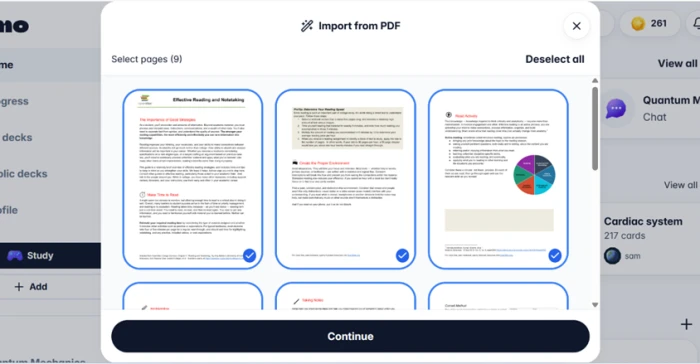
For my second source I used an OpenStax chapter on effective reading and notetaking, nine pages long.
Before generating, Gizmo showed every page as a thumbnail with a checkbox, so I could have dropped the footer pages or the pages I did not need. Most reviews of this app never mention that control exists.
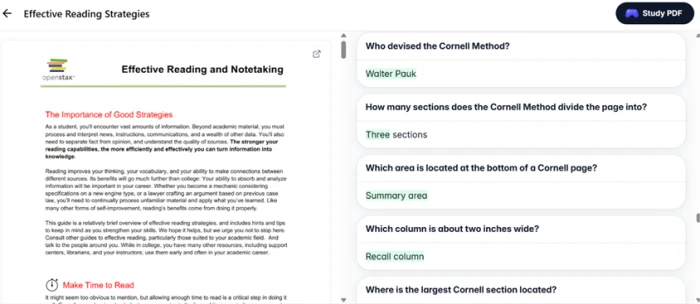
Eighty-eight cards came back, and the difference was immediate. Who devised the Cornell Method, answered Walter Pauk. How many sections the Cornell page divides into, answered three. Which area sits at the bottom of the page, answered the summary area.
Gizmo pricing
Prices from the in-app Unlimited paywall, plan limits from Gizmo's official help centre.
| Plan | Price | What's included |
|---|---|---|
| Free | $0 | Unlimited cards and decks · Memorise quizzing with 15 hearts · imports with a 20 minute wait between them · 5 AI Tutor sessions a day · hints bought with coins |
| Top of class plan Popular | $77.22 /yr | Shown as $1.48 a week · unlimited hearts · no wait between imports · unlimited AI Tutor · unlimited hints · auto-renews yearly until cancelled |
| Last minute plan | $5.99 /wk | The same Unlimited features billed week to week, aimed at a single exam period rather than a full year |
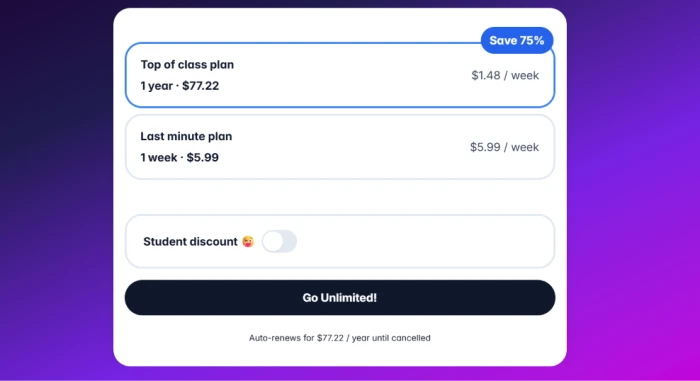
The Unlimited paywall, with the student discount toggle sitting off by default.
Pros & cons
Specific conclusions from testing and real user reviews, not generic filler.
✅ Pros
- Imports existing Quizlet and Anki decks instead of making you rebuild them
- Turns a phone photo of handwritten notes into cards
- Explanations quote the uploaded file rather than general knowledge
- Over a million public student-made decks are searchable before you build one
- Gizmo Live turns any deck into a timed multiplayer match
- Generates written answers and multiple choice from the same deck
⛔ Cons
- Review intervals are hidden, with no named algorithm to inspect or tune
- Decks past 100 cards repeat recent cards and bury older ones
- Imports stall on the loading screen, reported across both app stores
- Questions sometimes test material that was not in the uploaded file
- Gizmo Live serves identical questions when you replay one deck
- Cloud-first design leaves little that works without a connection
Synthesized from real reviews on the App Store, Google Play, Trustpilot & GeniusFirms · paraphrased, not quoted
Gizmo scorecard
Rated against what an AI flashcard and tutoring app is actually built to do.
| Dimension | Verdict | Score |
|---|---|---|
| Import source breadth Files, links, decks, photographed notes | Excellent |
9.0
|
| AI tutor & explanations Accuracy and depth control | Excellent |
8.5
|
| Gamification & motivation Streaks, leagues, live quizzes | Good |
8.0
|
| Card quality from documents PDFs, slides, structured text | Good |
7.5
|
| Free tier usability What you can do without paying | Good |
7.5
|
| Pre-generation control Choosing what gets turned into cards | Good |
7.0
|
| Billing & pricing clarity Renewal terms and refund route | Average |
6.0
|
| App stability & speed Import reliability and lag | Average |
5.5
|
| Spaced repetition transparency Visible intervals and scheduling control | Weak |
5.0
|
| Card quality from video Separating content from housekeeping | Weak |
4.0
|
| Scrutool Score Equal-weight average of all 10 dimensions |
6.8
|
What users say about Gizmo
The themes reviewers raise most often, by share of analysed reviews.
% = share of analysed reviews mentioning each theme (App Store, Google Play, Trustpilot, GeniusFirms)
A first-rate tutor attached to a card writer that cannot tell admin from physics
Gizmo reads structured text well because a textbook has already done the work of separating substance from packaging, and the decks it built from a PDF were usable revision material with only light pruning needed. The tutor is better still: accurate, sourced from the file you uploaded, and adjustable in depth on demand. A lecture recording has not done that separating work, and Gizmo cannot do it alone, which is how a quantum physics deck opens with a course number, a lecturer's name and a learning management system that was retired in January 2026. Add hidden review intervals that power users of Anki will miss immediately, plus imports that reviewers say stall on the loading screen, and the picture is a strong engine with real gaps around it. Students working from slides, textbooks and typed notes should try it and will probably keep it. Anyone whose course lives in recorded lectures needs to budget a review pass after every import, and anyone who wants to see and tune their own scheduling should stay with Anki.
Discussion
Join the discussion and share your perspective.