
GPTZero AI
GPTZero is a browser-based AI content detector for teachers, editors and writers, with plagiarism checking, hallucination detection and Google Docs authorship reports.

Near perfect at catching raw ChatGPT output, and confident enough to be dangerous when it flags writing a human actually wrote.
Should you use GPTZero?
Editors and hiring teams screening unedited AI drafts , and writers who want a Google Docs record of how a document was actually typed.
You need a verdict that can survive being challenged . Original human writing gets flagged at 100% AI with no route to appeal it.
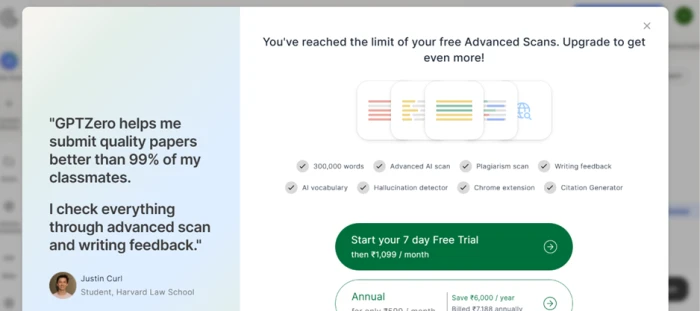
Free covers 10,000 words a month. Advanced Scan ran out after three uses, and Premium starts at $9.09/mo on annual billing during the current promotion.
The 100% figure is confidence, not composition . It does not mean the document is entirely AI, and almost nobody reads it that way.
What is GPTZero?
GPTZero will tell you how confident it is that a passage came from a language model. It will not tell you who wrote it, it cannot prove anything on its own, and the company says so in its own FAQ. That boundary matters more than any feature on the page, because the product is used mainly by teachers and institutions deciding what to do about a student, and a confidence score is not evidence.
What you get is a browser-based scanner that accepts pasted text or file uploads, returns an AI, Mixed and Human split with sentence-level highlighting, and supports English, German, French, Spanish and Portuguese. Around it sits a plagiarism checker, a hallucination detector, a grammar and feedback editor, AI Vision for flagging AI content in social feeds, a Chrome extension that records typing behaviour inside Google Docs, and an API with sample code in 17 languages. Superhuman acquired the company in June 2026, and it still runs as a standalone product.
Key features & how they perform
Each feature rated from hands-on testing and aggregated review sentiment.
Detection on raw model output
Paste unedited ChatGPT, Claude or Gemini text and it lands at maximum confidence with every sentence highlighted. This is the job it does well.
Reliability on human writing
The weakest part of the product by a distance. Novel chapters, decade-old papers and original essays keep coming back flagged across user reports.
Writing Report and Origin
Records keystrokes, pastes and edit counts inside Google Docs, then replays them. It points at behaviour rather than guessing from style.
LMS and workflow integrations
Canvas, Google Classroom, Zapier, a Chrome extension and a documented API keep detection inside tools institutions already run.
Hallucination detector and AI Vision
Checks sourcing on claims and marks AI content in social feeds in real time. Useful additions, still rougher than the core scanner.
Proofread and grammar feedback
Clarity and grammar passes sit beside the scanner, but they smooth voice out of a draft and do not move an AI verdict.
Feature ratings blended from Trustpilot, G2, Capterra, Reddit & Chrome Web Store review patterns + hands-on testing.
Nine scans, one machine, and an essay I wrote myself
Model output, a 1981 technical spec, a typing report, and what happened when I fed it my own writing.
Machine text was flagged without difficulty
The scanner takes pasted text or an uploaded file and returns three numbers: AI, Mixed and Human.
Underneath the split it highlights individual sentences, so you can see which lines pushed the verdict rather than reading a bare percentage.
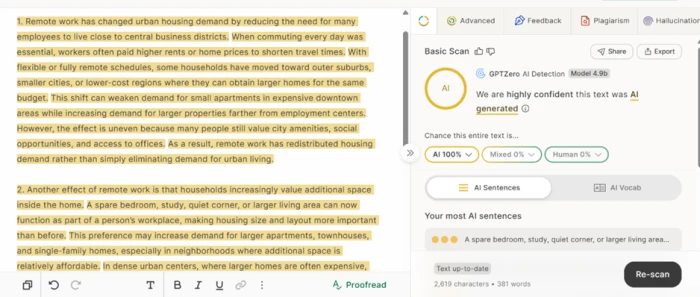
I asked ChatGPT for two paragraphs on remote work and urban housing demand, then pasted 381 words in.
"two paragraphs on remote work and urban housing demand"
A 1981 specification passed as human
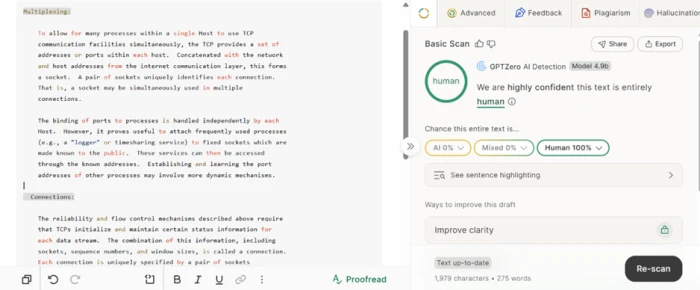
Technical writing is the standard example of what trips detectors up, because it carries little variation in sentence length and sticks to a formal register.
GPTZero's stated method leans on perplexity and burstiness, which is precisely what flat, uniform prose lacks.
So I pasted 275 words from RFC 793, the original TCP specification.
The Writing Report caught a paste
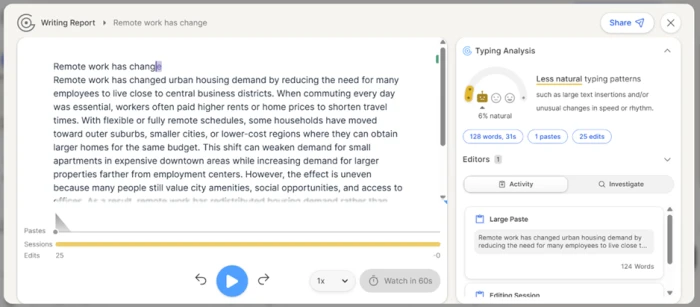
The authorship tool works on a different principle to the scanner. It records typing behaviour inside Google Docs instead of analysing finished text.
That means edits, pauses and paste events are logged as they happen, and the whole session can be replayed.
I pasted 124 words into a document and opened the report.
My own writing came back 100% AI
Here is where it fell apart.
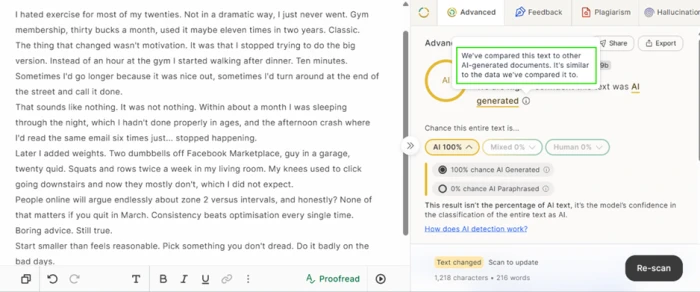
I wrote 216 words about giving up on gym membership in my twenties, in my own voice, with no assistance, and ran it through Advanced Scan.
The method GPTZero describes looks for low burstiness, meaning little variation in sentence length and rhythm. My passage swings between three-word fragments and forty-word sentences.
Accepting every suggestion changed nothing
The same editor ships a Proofread pass and a grammar checker.
For a writer who has just been flagged, this is the remedy the product itself offers, so I took it at its word and accepted everything.
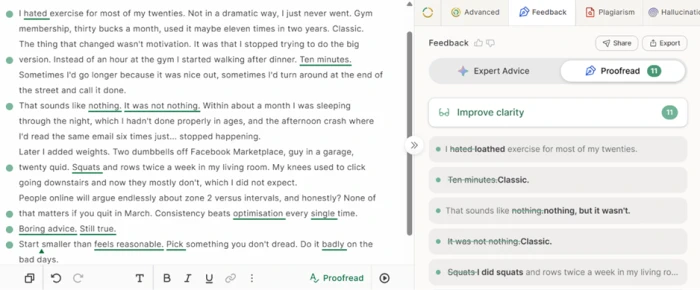
Proofread returned 11 clarity suggestions. The grammar checker, run separately on the same draft, added another layer.
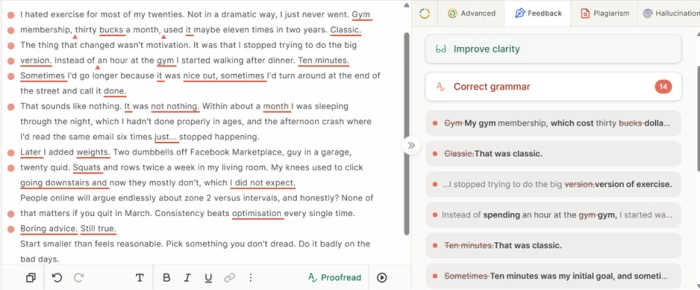
That brought the total to 25 accepted edits. I rescanned the finished version.
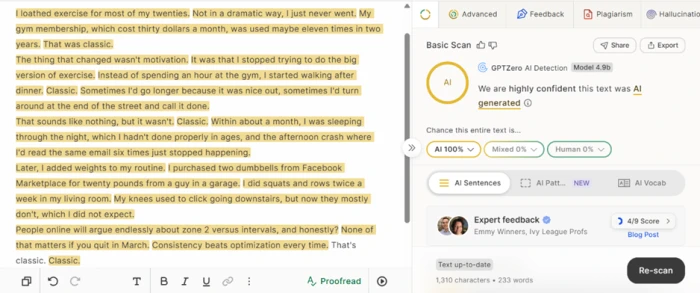
A caution and maximum confidence in one panel
GPTZero states that accuracy improves with longer inputs, and the interface enforces that with a short-text warning.
I cut the essay down to its opening 86 words to see how the warning and the verdict sit together.
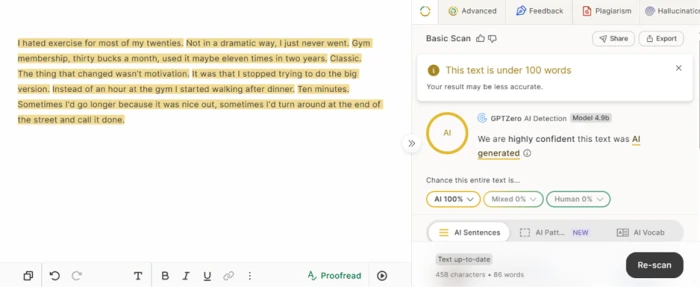
Three scans, then a subscription
Basic Scan and Advanced Scan are separate things on a free account.
Basic runs against the monthly word allowance. Advanced is metered by the scan, and it runs out quickly.
GPTZero pricing
Figures taken from the official GPTZero pricing page.
| Plan | Price | What's included |
|---|---|---|
| Free | $0 | 10,000 words/month · Basic Scan · sentence highlighting · Writing Report · no card required |
| Premium Popular | $9.09 /mo | 300,000 words/month · Advanced AI Scan · multilingual detection · downloadable AI reports · AI Highlights in Chrome extension |
| Professional | $17.49 /mo | Everything in Premium · 500,000 words/month · up to 2 million words overage · 250 files per batch · page by page scanning · LMS integration |
| Teams & Enterprise | Contact sales | Multiple seats · shared team credits · unified billing · developer API priced separately |
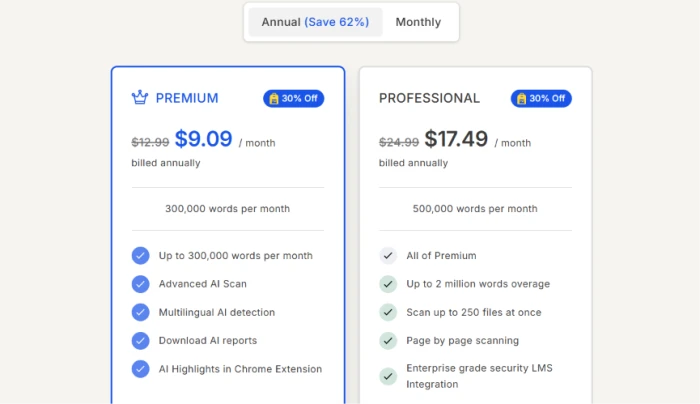
Premium and Professional rates shown on annual billing with the 30% promotion applied. List annual rates are $12.99 and $24.99.
Pros & cons
Specific conclusions from testing and real user reviews, not generic filler.
✅ Pros
- Detected 95.7% of AI texts on the independent RAID benchmark
- Sentence-level highlights show which lines triggered the verdict
- Origin extension logs pastes, edits and typing rhythm in Google Docs
- Handles mixed human and AI documents, which most detectors skip
- Detection trained beyond English, covering German, French, Spanish and Portuguese
- Canvas, Google Classroom and Zapier connections plus an API in 17 languages
- Hallucination detector checks sourcing rather than just style
⛔ Cons
- Users report novels and decade-old papers returning as AI written
- Independent testing lands near 62 to 88%, far below the advertised 99%
- Studies show non-native English writing is misclassified more often
- Reviewers report the same text scoring differently across repeat scans
- No support for PPTX, XLS or spreadsheet files
- Refund and cancellation requests draw repeated complaints about slow support
- Nothing in the product lets a flagged writer contest a verdict
Synthesized from real reviews on Trustpilot, G2, Capterra, Reddit & the Chrome Web Store · paraphrased, not quoted
GPTZero scorecard
Rated against what an AI detector is actually asked to do in a classroom or an editing desk.
| Dimension | Verdict | Score |
|---|---|---|
| AI detection on model output Catching unedited ChatGPT, Claude, Gemini text | Excellent |
9.0
|
| False positives on human text How often original writing is flagged | Weak |
3.0
|
| Sentence-level reporting Highlighting, splits, downloadable reports | Good |
7.5
|
| Explainability of verdicts Whether a result can be understood or challenged | Weak |
4.5
|
| Authorship verification Writing Report, replay, paste and edit logging | Excellent |
8.5
|
| Writing feedback tools Proofread, grammar checker, clarity passes | Weak |
5.0
|
| Free tier usefulness Word allowance and Advanced Scan limits | Average |
6.0
|
| Integrations & API Canvas, Classroom, Chrome, Zapier, developer API | Excellent |
8.5
|
| Value for money What the paid tiers add over free | Average |
5.5
|
| Transparency & trust Accuracy claims measured against outside testing | Weak |
4.0
|
| Scrutool Score Equal-weight average of all 10 dimensions |
6.2
|
What users say about GPTZero
The themes reviewers raise most often, by share of analysed reviews.
% = share of analysed reviews mentioning each theme (Trustpilot, G2, Capterra, Reddit, Chrome Web Store)
Sharp on machine text, and far too sure of itself about everything else
Judged narrowly, GPTZero is good at its job. Raw model output gets caught at maximum confidence, the sentence highlighting is the clearest in the category, a 1981 technical spec passed cleanly, and the Writing Report is the only part of any detector that rests on recorded behaviour instead of a statistical guess about style. The problem is what happens when it is wrong. An original 216 word essay came back at 100% AI, running its own Proofread and grammar fixes did not shift the verdict, and an 86 word extract drew a low-confidence warning and a maximum-confidence accusation in the same panel. Independent testing puts real accuracy well below the advertised 99%, and Trustpilot is full of writers describing the same experience. Use it as a first filter on submissions you already suspect, and install the Chrome extension if you want a record of your own drafting. Do not use it, and do not accept it being used, as the basis for accusing anyone of anything.
Discussion
Join the discussion and share your perspective.