
Grammarly AI
Grammarly is a freemium AI writing assistant that checks grammar, spelling and tone in real time across almost any app, plus paid rewrites, plagiarism and AI detection. Accurate on the basics, formal by default, and best used with an eye on the renewal date.

A fast, accurate real-time checker that works everywhere, undercut by a stiff tone, a paywall that interrupts mid-sentence, and an AI detector that scores its own output too kindly.
Should you use Grammarly?
Non-native writers, students and professionals who want fast, accurate error catching inside Gmail, Docs and the browser without switching tools.
You write in a casual or creative voice that a formal-leaning checker will flatten, or you need a plagiarism and AI detector you can fully trust.
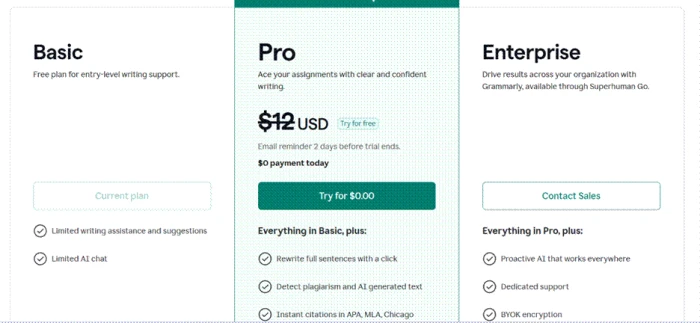
The free tier handles everyday corrections. Rewrites, plagiarism and AI detection need Pro at $12/mo billed annually ($30 month to month).
Reviewers report auto-renewal charges and strict refunds , and Grammarly's own AI detector scored its own humanized text at 0 percent.
What is Grammarly?
The pitch has always been that Grammarly follows you everywhere. Install the browser extension and it sits inside Gmail, Google Docs, Slack and almost any text box on the web, underlining grammar, spelling, punctuation and tone problems as you type. In testing it caught six planted errors in a Gmail draft in real time, then the identical set inside a Google Doc a minute later, same speed and same fixes. That reliability across apps is the reason 40 million people keep it running in the background.
What has changed is the surface area. Grammarly is now part of Superhuman, and the product has grown from a spell checker into a suite with full-sentence rewrites, a plagiarism checker, an AI Humanizer and an AI Detector. The free tier still covers real-time grammar, spelling and tone plus 100 AI prompts a month, which is enough for daily use. The heavier features sit behind the Pro plan, and two of them, the plagiarism checker and the AI tools, are where the product gets harder to trust. It runs on web, Windows, Mac, iOS, Android and as an extension across major browsers.
Key features & how they perform
Each feature rated from hands-on testing and aggregated review sentiment.
Real-time grammar & spelling
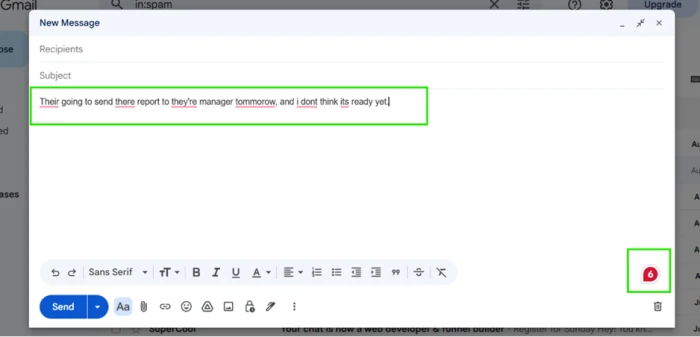
Catches errors as you type and offered fixes before I clicked anything, flagging all six planted mistakes in a Gmail draft instantly.
Cross-app coverage
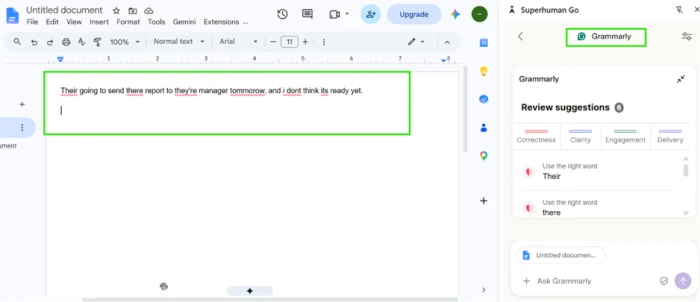
The same checks ran identically in Gmail and Google Docs through the browser extension, sorted into Correctness, Clarity, Engagement and Delivery.
Rule explanations
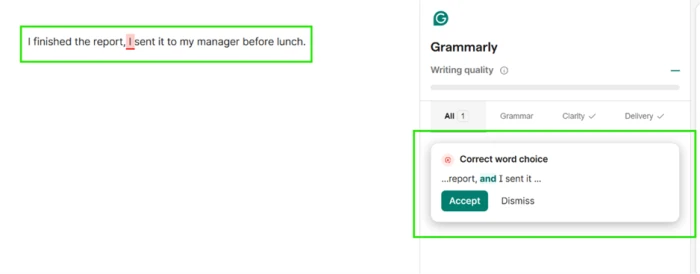
Click a flag and it names the rule behind the fix, like the comma splice it caught, instead of silently applying a correction.
Tone & style rewrites
Full-sentence rewrites live on Pro, but the defaults lean formal. It rewrote a casual line into stiff textbook grammar that lost the intended voice.
Plagiarism & AI detection
Both sit behind Pro. The AI Detector scored its own humanized text at 0 percent while an outside checker flagged the same text at 26.
Multilingual checks
It caught three of four planted Spanish errors with correct labels, but one slipped through and the tool is still built English-first.
Feature ratings blended from Trustpilot, G2, App Store & Reddit review patterns + hands-on testing.
A dozen tests against Grammarly's own claims
Real-time checks in Gmail and Docs, the complaints that did not hold up, the friction that did, and an experiment on Grammarly's AI detector.
Real-time correction across Gmail and Google Docs
Real-time correction is the feature Grammarly built its name on, and the browser extension is what makes it portable.
I typed one sentence loaded with deliberate mistakes into a fresh Gmail draft: wrong homophones and dropped capitalization throughout. It underlined each problem and offered a fix before I touched anything.
Then I pasted the identical sentence into a Google Doc to check whether the extension behaves the same way outside Gmail. It did, with the sidebar sorting flags into Correctness, Clarity, Engagement and Delivery.
The explanation card behind a fix
Most checkers just apply a correction and move on. Grammarly does something more useful when you click a flag.
I wrote a comma splice on purpose, expecting a plain red underline, and clicked the flagged word.
"I finished the report, I sent it to my manager before lunch."
Testing two complaints that come up constantly
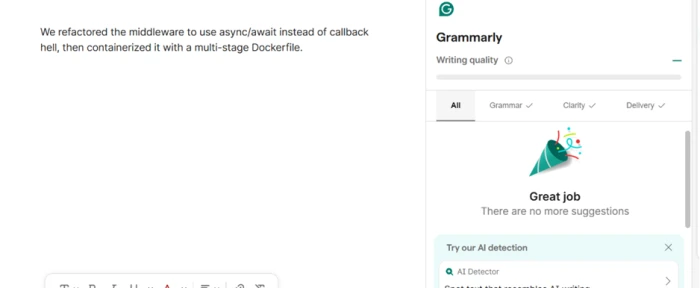
Two criticisms show up in almost every Grammarly review: that it only works in English, and that it flags technical vocabulary as errors. I tried to reproduce both.
First I wrote a Spanish sentence with four deliberate mistakes built in.
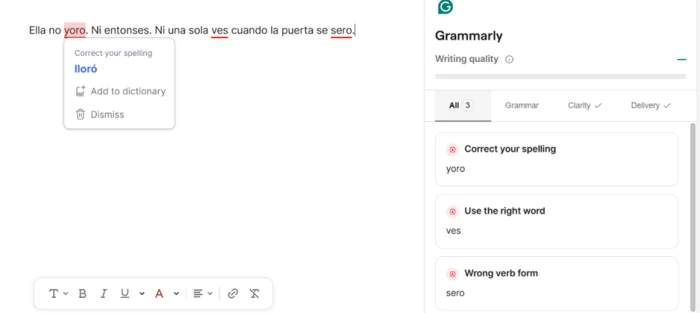
It caught three of the four and labeled each one correctly rather than throwing a generic red line. Then I tested the jargon complaint with a sentence built entirely out of developer shorthand.
Where the corrections turned rigid
Accuracy is not the same as good judgment. The stiffness showed up as soon as I wrote in a casual voice.
I asked it to check a line that reads fine in casual writing, and it pushed a formal rewrite.
"Me and my brother built this from scratch, just the two of us."
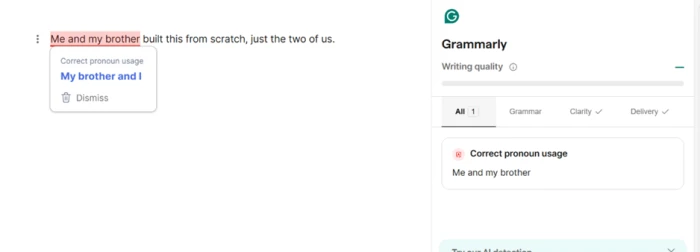
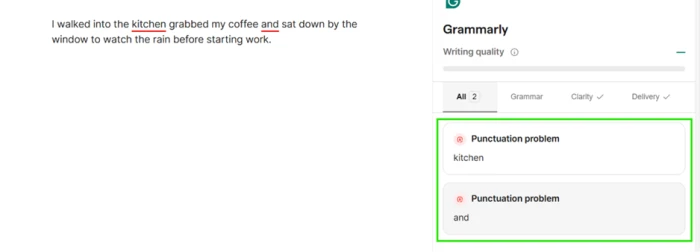
It corrected the line to "My brother and I," accurate grammar and a poor fit for the tone. Punctuation showed the same stiffness on a plain sentence about walking into the kitchen for coffee.
The paywall shows up mid-sentence
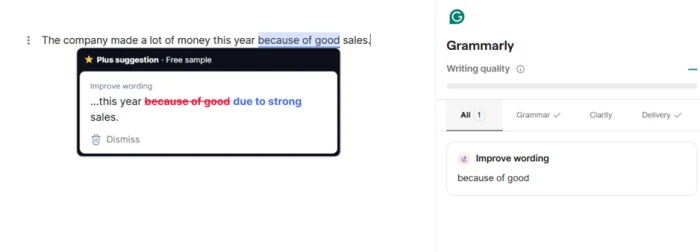
On the free tier the upsell is not just a banner along the side. It arrives inside the suggestions themselves.
I wrote a bland line about company sales, and the wording fix came locked behind a "Plus suggestion" tag I could not apply without upgrading.
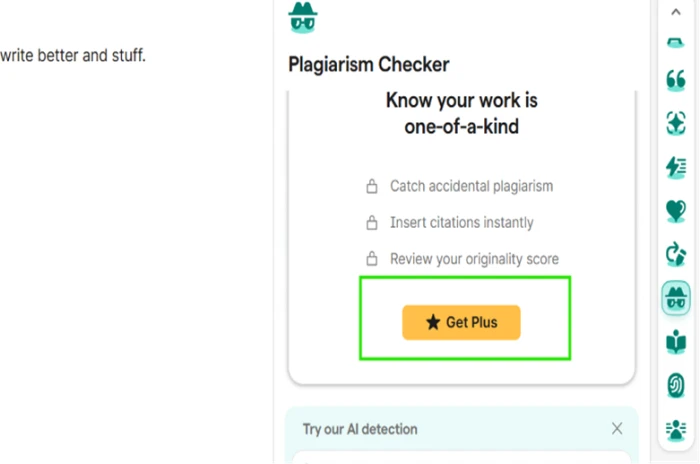
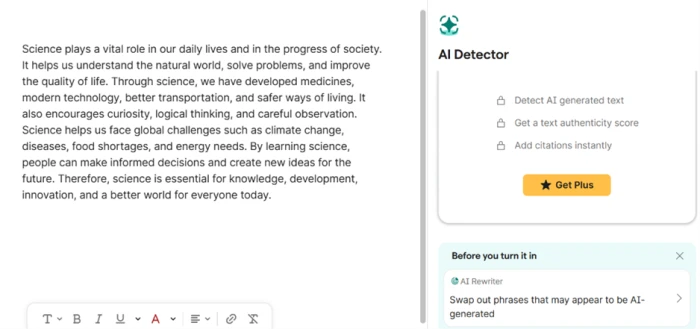
The plagiarism checker sits behind the same wall, gated behind a Get Plus prompt rather than a free preview.
Turning the AI detector on Grammarly's own rewrite
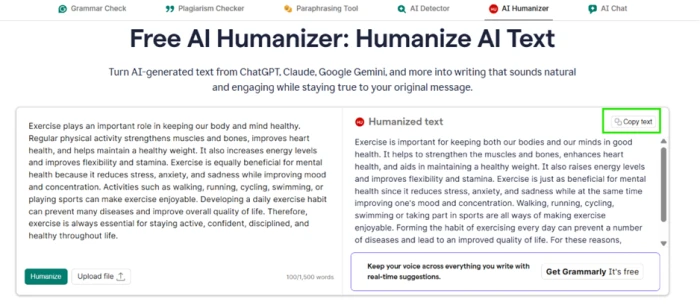
This is where the testing stopped being a checklist and became an experiment. Grammarly ships an AI Humanizer and an AI Detector on the same site, so I pointed one at the other.
I pasted a flat, AI-written paragraph about exercise into the AI Humanizer and let it rewrite the text.
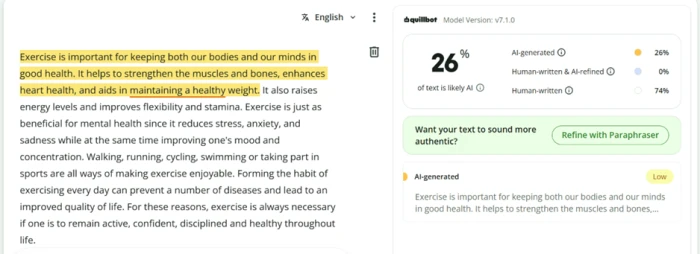
I took that humanized output to QuillBot's AI detector as an outside check. It scored 26 percent AI-generated, with specific sentences flagged as still reading like machine output.
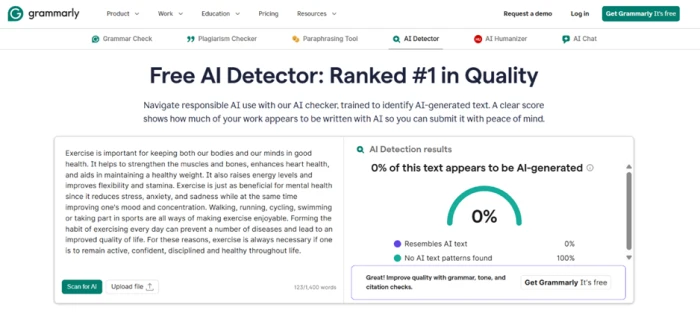
Then I ran the exact same paragraph through Grammarly's own AI Detector.
The incentive sitting on the results page
The last screenshot makes the gap hard to read as accidental.
Right below the detection score, on the same page, sits a card prompting you to reword any phrasing that resembles AI writing before you submit the document.
Grammarly pricing
Figures taken from the official Grammarly plans page.
| Plan | Price | What's included |
|---|---|---|
| Free | $0 | Real-time grammar, spelling & tone · writing tone detection · 100 AI prompts/month |
| Pro Popular | $12 /mo | Everything in Free · full-sentence rewrites · tone adjustment · plagiarism & AI detection · 2,000 AI prompts/month · billed annually ($30 monthly) · 7-day free trial |
| Enterprise | Contact sales | Everything in Pro · unlimited AI prompts · BYOK encryption · SSO · data loss prevention · admin roles & controls |
Pros & cons
Specific conclusions from testing and real user reviews, not generic filler.
✅ Pros
- Caught all six planted errors in Gmail and Docs in real time
- Extension behaves identically across Gmail, Google Docs and the browser
- Names the grammar rule behind a fix instead of correcting silently
- Left developer jargon (async/await, Dockerfile) untouched, no false flags
- Flagged three of four planted Spanish errors with correct labels
- Free tier covers daily grammar, spelling, tone and 100 AI prompts
⛔ Cons
- Rewrote casual "Me and my brother" into stiff formal grammar
- Added two rhythm-breaking commas to a clean sentence
- Its AI Detector scored its own humanized text at 0% vs QuillBot's 26%
- Plagiarism checker and rewrites locked behind the Pro paywall
- "Plus suggestion" upsell interrupts mid-sentence on the free tier
- Reviewers report surprise auto-renewals and refuse-to-refund policy
- Desktop app reported to lag, crash and slow down Microsoft Word
Synthesized from real reviews on Trustpilot, G2, the App Store, Reddit & Wikipedia · paraphrased, not quoted
Grammarly scorecard
Rated against what an AI writing assistant is actually built to do.
| Dimension | Verdict | Score |
|---|---|---|
| Grammar & spelling accuracy Catching real errors in real time | Excellent |
9.0
|
| Cross-app coverage Consistency across Gmail, Docs, browser | Excellent |
8.5
|
| Explanation & learning value Naming the rule behind a fix | Good |
8.0
|
| Multilingual support Non-English error detection | Average |
6.5
|
| Tone & style flexibility Respecting a casual or creative voice | Average |
5.5
|
| Value vs paywall What free covers before Pro is forced | Average |
5.5
|
| AI detector reliability Trustworthiness of the AI Detector | Average |
4.5
|
| Plagiarism checker Accuracy and access | Average |
5.0
|
| App stability & performance Lag, crashes, impact on other apps | Average |
6.0
|
| Billing & refund transparency Renewals, notice, refund terms | Average |
5.0
|
| Scrutool Score Equal-weight average of all 10 dimensions |
6.4
|
What users say about Grammarly
The themes reviewers raise most often, by share of analysed reviews.
% = share of analysed reviews mentioning each theme (Trustpilot, G2, App Store, Reddit)
A superb error catcher wrapped in a paywall and an AI detector you should not fully trust
On the core job, Grammarly still earns its reputation. It caught every planted error in Gmail and Google Docs in real time, ran identically across apps, named the rule behind a comma splice, and left developer jargon alone where cheaper checkers would have flagged it. For a non-native writer or anyone who wants clean, correct communication without switching tools, the free tier alone does real work. The problems sit around that core. The default voice is formal to a fault, rewriting casual lines into textbook stiffness and forcing commas that break a sentence's rhythm. The paywall interrupts mid-suggestion, the plagiarism checker draws false positives in user reports, and the AI Detector scored Grammarly's own humanized text at 0 percent while an outside tool flagged the same text at 26, with a "reword AI-sounding phrases" prompt sitting one click away. Add the steady complaints about surprise renewals and a no-refund policy, and the picture is a strong checker you use carefully. Keep it for grammar and cross-app corrections. Do not lean on its plagiarism or AI verdicts, and cancel before the renewal date lands.
Discussion
Join the discussion and share your perspective.