
Hypernatural AI
Hypernatural turns scripts into narrated video with reusable characters, styles and logos that stay consistent across shots. Paid subscription required to generate anything.

A thoughtfully built reference-first video engine sitting behind a door that will not open: a new account gets zero credits while three of Hypernatural's own channels still advertise a free start.
Should you use Hypernatural?
Brand and content teams producing recurring narrated video who need the same faces, style and logo across dozens of clips and will commit to a subscription up front.
You want to evaluate before paying . A new account carries zero credits and cannot render a single frame, whatever the store listings say.
Entry is $29/mo on Starter billed annually for 12,000 credits a year. Hypernatural's own example puts one fully animated minute at up to 508 credits.
The documentation contradicts itself . The help centre says paid plans only, the pricing page says start for free, and Google Play promises four free videos.
What is Hypernatural?
Hypernatural will not invent a person for you. Name a character in your script and the tool stops, asks who that is, and refuses to build anything until you point it at a specific reference from your roster. That single rule is the product: characters, styles, logos and products get defined once as reusable ingredients, then every shot in every video pulls from them. It is why faces hold their appearance between scenes, and it is also why there is no such thing as a quick throwaway result here.
Around that sits a script-to-storyboard workflow with a chat agent, a timeline editor, AI narration and captions, routed through third-party animation models including LTX, Seedance, Wan and PixVerse at published per-clip credit costs. It runs on the web, iOS and Android, with an API and MCP integration, and it is built for brand and marketing teams making long-form narrated video rather than six-second clips. Access is by paid subscription, a point the help centre now states plainly and the rest of the marketing has not caught up with.
Key features & how they perform
Rated from what a zero credit account could exercise, plus aggregated review sentiment on the generation features it could not.
Character references
Resolving every named character to a fixed reference before rendering is what keeps faces stable across shots. Reviewers rate this as the platform's real advantage.
Model picker with prices
Five animation models from 4 to 10 credits per use, each labelled for audio support, with the cost shown at the moment you choose. The most honest screen in the product.
Script to storyboard
The composer took a full script without truncating it and offers @ mentions for saved assets, aspect ratio, file attachment and a storyboard or timeline view.
Brand ingredients
Logos and custom styles saved instantly on a free account. The style builder rewrote the name I gave it and supplied its own description in place of mine.
Narration & custom voices
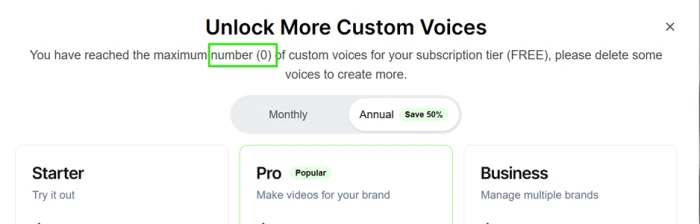
Standard narration runs 1 credit per 30 seconds and premium doubles that. Custom voice slots are capped at zero until you subscribe.
Export & framing
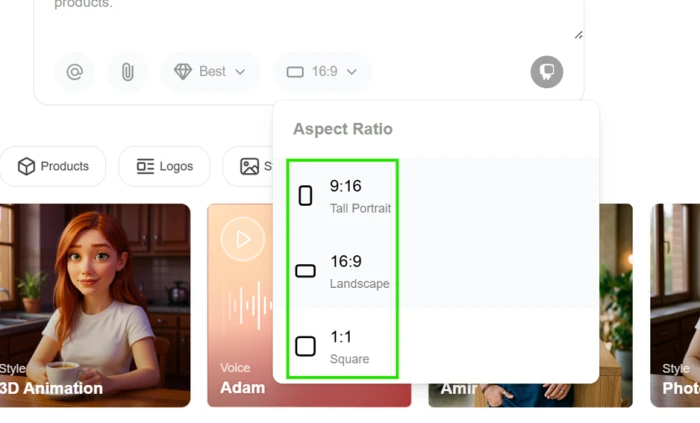
Up to 4K exports and direct posting to YouTube and TikTok on paid plans, but the aspect ratio menu stops at three options with no 4:5 for Instagram feed.
Feature ratings blended from App Store & Google Play review patterns, published hands-on reviews, and direct testing of the unlocked areas.
Hands-on testing with Hypernatural AI
A script, two stops, a support transcript that contradicts the manual, and everything a zero credit account can still build.
Paste a script and check the balance
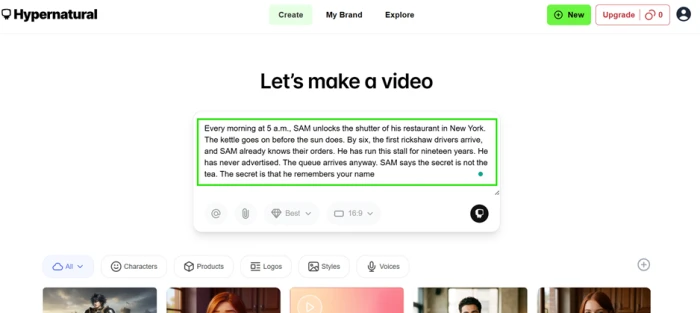
The Create screen is a single composer box. There is no template gallery to work through first and no wizard, which is a deliberate choice: paste the words and the tool works backwards to the shots.
Under the box sit a model selector, an aspect ratio control, a file attachment button and an @ mention system for pulling in characters, styles and products you have already saved.
The number that mattered was in the top right corner, next to the Upgrade button.
"Every morning at 5 a.m., SAM unlocks the shutter of his restaurant in New York. The kettle goes on before the sun does. By six, the first rickshaw drivers arrive, and SAM already knows their orders. He has run this stall for nineteen years. He has never advertised. The queue arrives anyway. SAM says the secret is not the tea. The secret is that he remembers your name."
Meet the two stops between a script and a video
Rather than generating, the tool stopped and asked me to define my narrator. It would not invent a person on its own.
This is a design choice rather than a bug, and it explains how the product keeps faces stable between shots: the character is resolved before any frame gets built. The cost is that you cannot pull a fast throwaway result to judge the tool by.
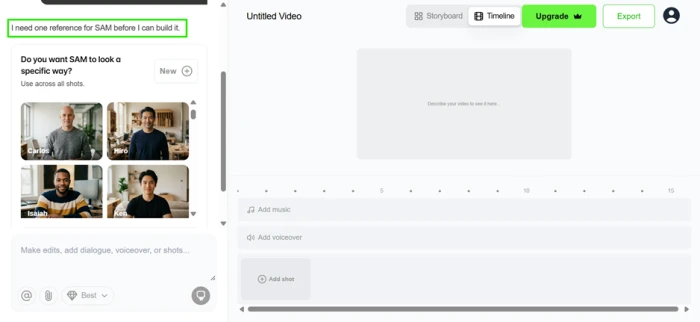
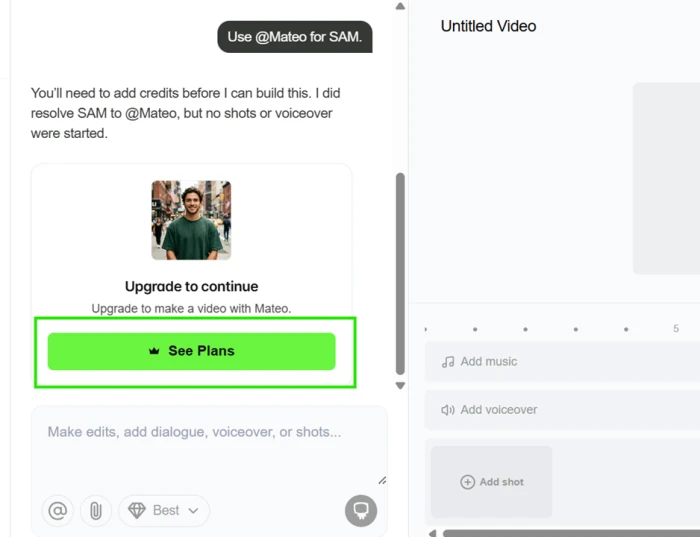
I picked Mateo from the built in roster. The reply confirmed the character had been resolved, then stopped a second time, this time for money.
Ask support where the free credits went
Two of Hypernatural's own listings had led me to expect a free run. The Google Play description advertises up to four videos free with no commitments, and the help centre has described a Free plan carrying 100 credits, enough for roughly three to five one minute videos.
The in-app widget is Intercom's Fin bot, labelled Hn Agent, AI Agent in the transcript. Its answer was that signup credits only exist through a referral programme paying 100 credits to both parties.
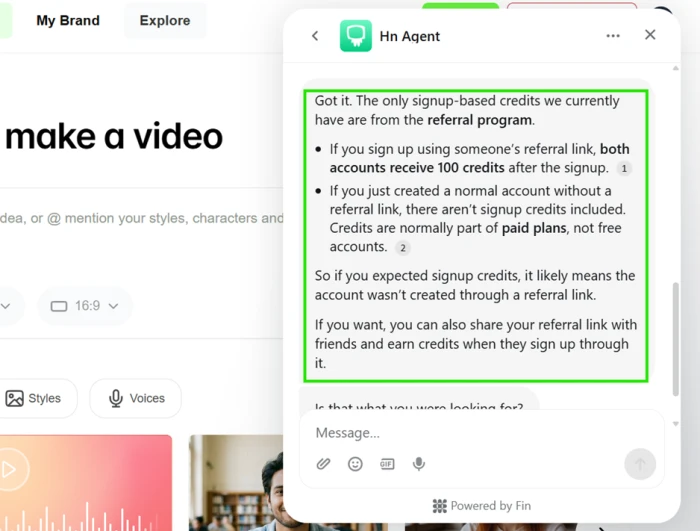
My profile had no invite section at all, so I asked where to find one. The answer introduced a condition I had not seen written down anywhere.
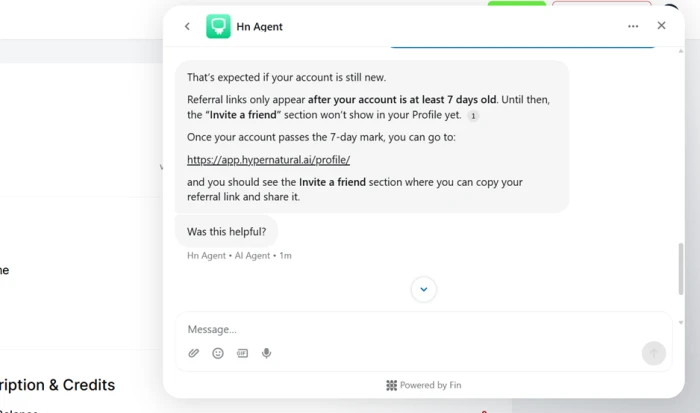
So I checked a second account I have held for over two months, well past that threshold. No invite section there either. Asked whether the programme was restricted to paying customers, the agent said it was not.
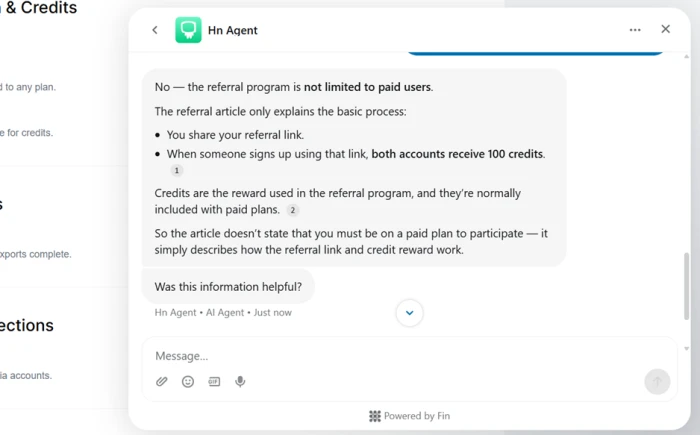
Check the bot against the published documentation
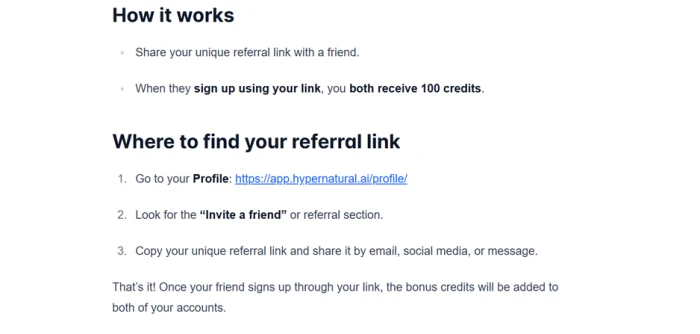
Hypernatural's referral help article agrees with the bot on the reward and contradicts it on the condition.
It lists no account age requirement whatsoever, and it directs readers to a profile section that neither of my accounts displays.
Build a logo on a zero credit account
Asset creation turned out to be open. Only generation is locked, which makes the free account a workspace you can furnish but not use.
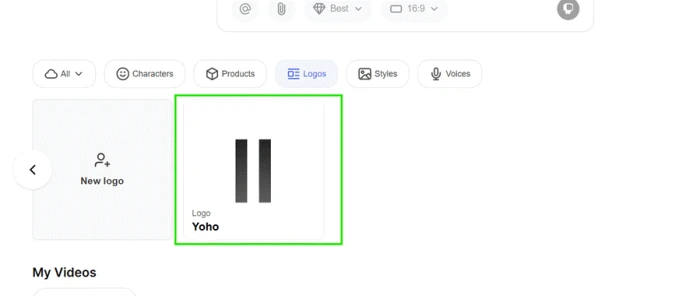
Logos are one of the reusable ingredients that a Brand pulls from, alongside characters, products, styles and voices. Creating one asks for a name and an image file, and nothing else.
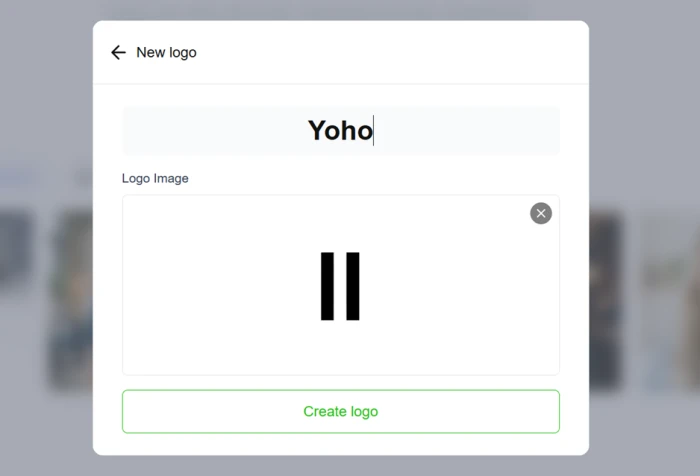
It appeared in the Logos panel straight away, sitting in the same row the composer draws from.
Build a custom style and watch it get renamed
Custom styles are the other half of the brand system. You can build one from a text prompt or from uploaded images, and the result sits alongside the 16 built in presets.
I took the image route, naming it Realistic and uploading six reference portraits.
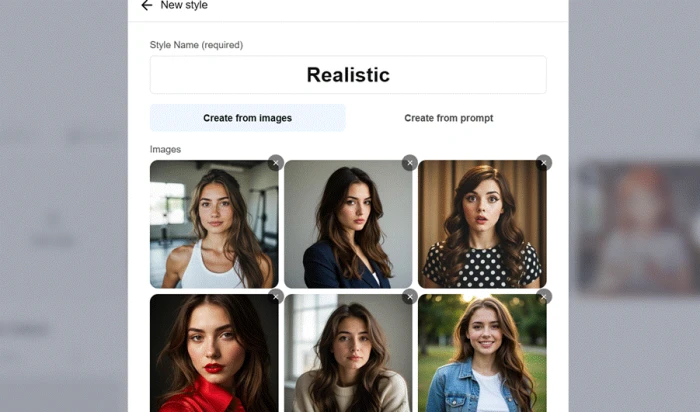
What came back was not what I typed. The system had read the images, written its own description, and replaced my name with one of its own.
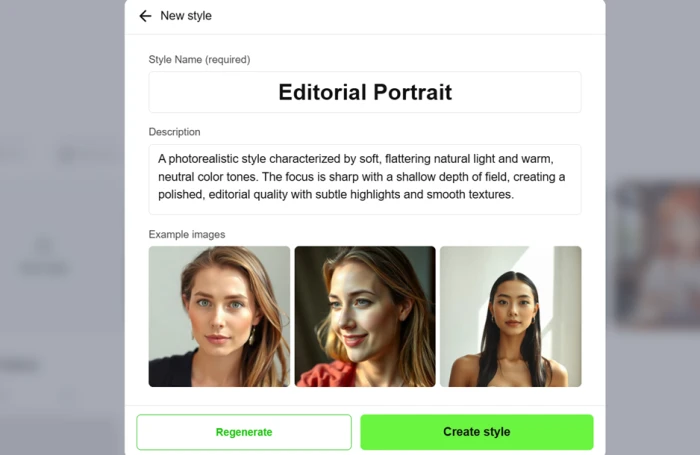
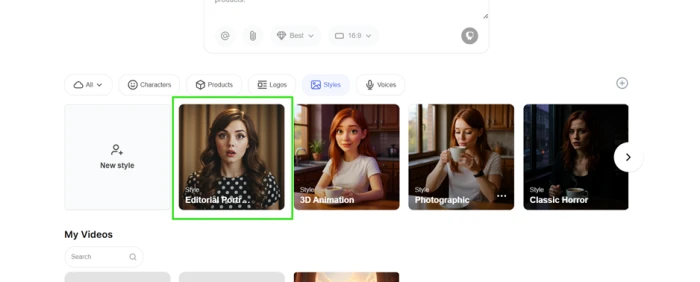
It saved correctly either way, and now sits in the Styles panel next to 3D Animation, Photographic and Classic Horror.
Find where the free account actually stops
Logos and styles saved freely, so the gating is not uniform across the ingredient panels. Products is closed off entirely, replaced by an upgrade prompt where the panel contents should be.
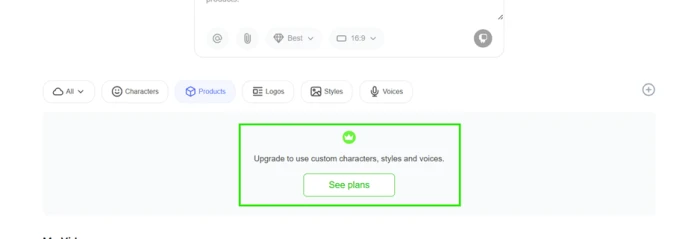
Custom voices are gated differently again, and the wording is worth reading twice.
Read the model picker for the real economics
Opening the model dropdown gave the clearest view of how this product charges. Each animation model carries its own per use credit cost, displayed at the moment you pick it.
| Animation model | Credits | Notes |
|---|---|---|
| LTX-2 19B | 4 | Includes audio |
| Seedance 1.0 Pro Fast | 4 | No audio |
| Seedance 1.5 Pro | 6 | Includes audio |
| Wan 2.2 | 8 | Cinema grade, no audio |
| PixVerse v5 | 10 | Up to 1080p, no audio |
Pricing the choice at the point of choice is sound practice, and it was the most transparent part of the session. The list also reveals what sits underneath the product: LTX, Seedance, Wan and PixVerse are third party generators, so what Hypernatural sells is an orchestration layer around other companies' models wrapped in a script to storyboard workflow.
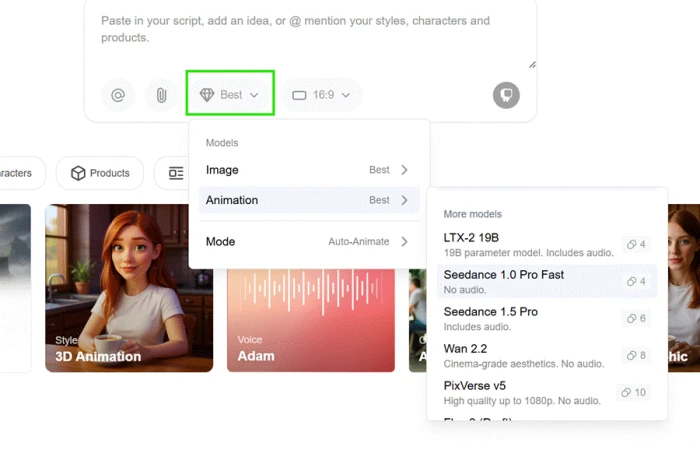
Separate controls sit alongside it for image models and for an Auto Animate mode. The aspect ratio menu next to them is thinner than the model list.
Hypernatural pricing
Plan prices reflect the annual billing toggle on Hypernatural's official pricing page. Credit rules come from the official help centre.
| Plan | Price | What's included |
|---|---|---|
| No plan | $0 | Account, composer and asset building only · 0 credits at signup · no generation of any kind |
| Starter | $29 /mo | 12,000 credits per year · 2 custom references · HD exports · no watermark · no custom voices · no brands |
| Pro Popular | $69 /mo | 30,000 credits per year · 15 custom references · 1 brand · custom voices · HD exports · no watermark |
| Business | $149 /mo | 66,000 credits per year · 75 custom references · 5 brands · custom voices · HD exports · no watermark |
| Custom | Contact | Shared teams · additional seats · enterprise support · quoted by Hypernatural on request |
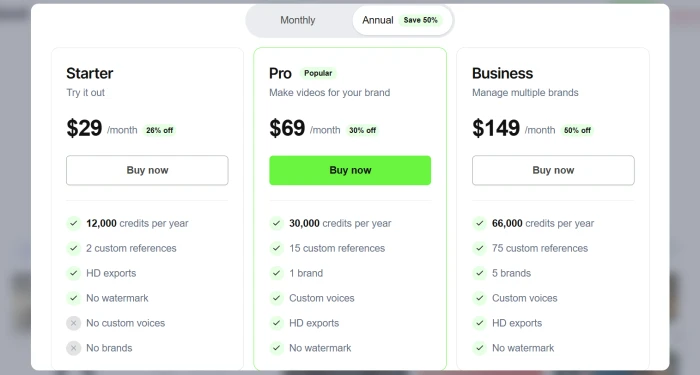
Captured with the Annual toggle active. Monthly billing removes the discount shown on each card.
Pros & cons
Specific conclusions from testing and real user reviews, not generic filler.
✅ Pros
- Composer accepted a full narrative script with no truncation
- Per model credit costs appear at the moment of selection
- Five animation models from 4 to 10 credits, audio support labelled
- Characters resolve to a fixed reference before any frame renders
- Logo saved to the Logos panel on a zero credit account
- Custom style built from six uploaded reference portraits
- Image First mode animates only the scenes you pick
- App Store rating sits at 4.8 across 608 ratings
⛔ Cons
- New account opened with 0 credits and generated nothing
- Google Play advertises four free videos, the app gave none
- Help centre states Hypernatural is available on paid plans only
- Pricing page still headlines "Start for free"
- Support bot cited a seven day rule absent from documentation
- Two accounts, one over two months old, showed no invite section
- Email to [email protected] went unanswered before publication
- Style builder discarded the name I typed and wrote its own
- Products panel and custom voice slots are fully gated
- No 4:5 aspect ratio for Instagram feed posts
Synthesized from real reviews on the App Store, Google Play & published hands-on reviews · paraphrased, not quoted
Hypernatural scorecard
Rated against what a script to video platform is sold to do, and what a new account can reach.
| Dimension | Verdict | Score |
|---|---|---|
| Character consistency & references Resolving a cast before rendering | Good |
7.5
|
| Model choice & credit controls Per model pricing and generation modes | Good |
7.5
|
| Script to storyboard workflow Composer, @ mentions, timeline | Good |
7.0
|
| Asset & brand management Logos, styles, products, voices | Good |
7.0
|
| Output quality Scored from user reviews, not tested here | Average |
6.5
|
| Export & format options Resolutions, aspect ratios, publishing | Average |
5.0
|
| Credit economics & predictability What a finished video actually costs | Average |
3.5
|
| Support accuracy & responsiveness Bot answers, email turnaround | Average |
2.5
|
| Pricing & documentation accuracy Do the published claims match reality | Average |
2.0
|
| Free tier access What a new account can reach unpaid | Average |
1.5
|
| Scrutool Score Equal-weight average of all 10 dimensions |
5.0
|
What users say about Hypernatural
The themes reviewers raise most often, by share of analysed reviews.
% = share of analysed reviews mentioning each theme (App Store, Google Play & published hands-on reviews)
Good engineering behind a door that would not open
Everything I could reach in Hypernatural was well made. The composer swallowed a full script without complaint, the model picker priced each of its five animation engines at the moment of choosing, and the refusal to invent a character until you resolve one is exactly the discipline that keeps faces stable across a long video. Users who pay rate the results highly, and a 4.8 App Store average across 608 ratings is not nothing. But this account never generated a frame. It opened with zero credits while Google Play advertised four free videos and the pricing page headlined a free start, and the only official channel that matched reality was a help article stating the product is paid plans only. The support bot filled that gap with a seven day referral rule that appears in no documentation and did not hold on a two month old account, and an email to the published support address went unanswered. Teams already committed to a subscription, producing recurring branded video with a fixed cast, will find a capable and unusually disciplined tool here. Anyone who expects to test before they buy should treat the free start as marketing rather than a plan, and budget against the company's own figure of up to 508 credits for one fully animated minute.
Discussion
Join the discussion and share your perspective.