
Jungle AI
Jungle AI turns lecture slides, PDFs, recordings and YouTube links into practice questions, flashcards and image occlusion cards. Its study view keeps the original document open beside your notes so every answer can be traced to its source page.

The best source checking of any AI study tool, sitting on top of a free tier that hides its own limits until after you spend them.
Should you use Jungle AI?
Students working through dense source material in medicine, law or engineering who want practice questions they can trace back to the exact page.
You want whole textbooks turned into decks , or you need your cards in CSV or any format other than Anki.
Free is three generations a month, each capped at 30 pages. Regular use means Pro at $72 for the year , which is the $6/mo rate, or $12 a month if you pay monthly.
Limits appear after processing finishes , not before, and lag or freezing is the most repeated complaint on both app stores.
What is Jungle AI?
Jungle will not teach you anything. That is worth settling first, because everything else about the product follows from it. You give it material you already have, a slide deck, a PDF, a recording, a YouTube link, and it hands back practice questions: multiple choice, free response, case questions, and image occlusion cards built from diagrams. It works after the lecture, as a way of finding out what actually stuck.
The feature that separates it from Quizlet, Anki and the rest of the AI flashcard pile is the study view. Your generated notes sit on the left, the complete original document sits on the right, and checking a claim against its source page takes a couple of seconds instead of a tab hunt. Built by Mindflow Inc, formerly known as Wisdolia, it runs on web, iOS and Android, and it is aimed squarely at students in content-heavy fields who are drowning in reading rather than casual learners.
Key features & how they perform
Each feature rated from hands-on testing and aggregated review sentiment.
Wide material intake
PDF, PowerPoint, Word, audio, video, images and pasted links all go in through one panel, with a separate route for Anki imports.
Split-screen source viewer
The full original document stays open next to your notes, searchable and zoomable, so verifying a generated claim is a glance rather than a task.
Question generation
Questions track the actual lecture content rather than generic subject trivia, though reviewers repeatedly hit near duplicates inside larger sets.
Mistake explanations & chat
A wrong answer returns written reasoning, and a chat tab offers analogies, mnemonics or a voice tutor call when the explanation does not land.
Gamified spaced repetition
A daily review session pushes weak topics back at you and grows a tree as you go. Motivating for some, thin on actual progress data.
Diagram & image occlusion
Labels on a diagram get hidden automatically to build recall cards, useful for anatomy and circuits, but rationed hard on the free plan.
Feature ratings blended from App Store, Google Play, Trustpilot & GeniusFirms review patterns + hands-on testing.
What Jungle Did With My Files
One long PDF, one video link, and the point where the free plan stops.
Getting material in
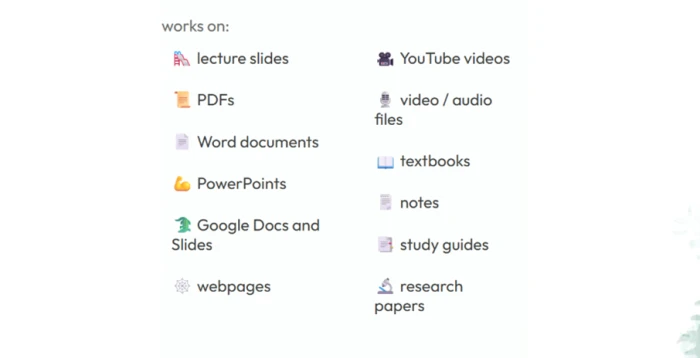
Jungle advertises a wide intake. The marketing page lists lecture slides, PDFs, Word documents, PowerPoints, Google Docs, webpages, YouTube videos, media files, textbooks, notes, study guides and research papers.
That breadth is the reason to pick this over a plain flashcard app. Video and audio in particular are unusual in the category, and they turn a recorded lecture into something you can be tested on.
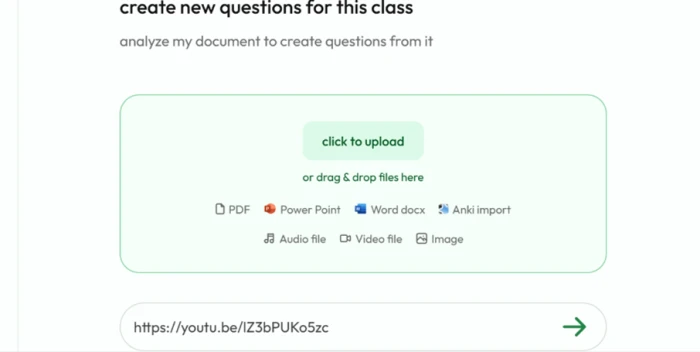
The upload panel inside the app is narrower than the marketing copy suggests, though still broad. It takes PDF, PowerPoint, Word, audio, video and image files, with a separate Anki import option, and a field underneath accepts links.
"https://youtu.be/lZ3bPUKo5zc"
What came back, and the page count that changed
The result was 29 questions. The review screen said they were drawn from the first 15 pages of the document.
This screen is also the one good gate in the flow. Questions arrive grouped by topic with counts beside each group, and you can delete any of them before they enter your deck.
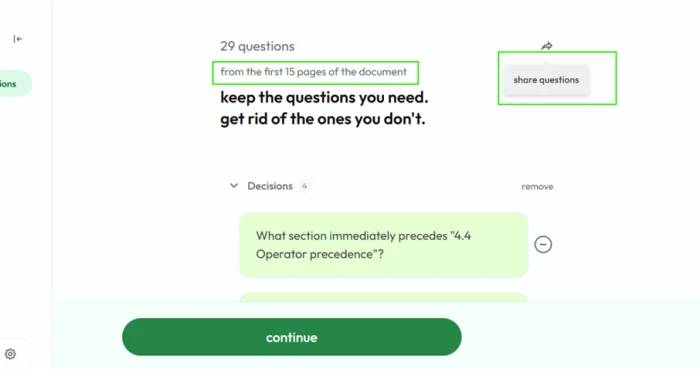
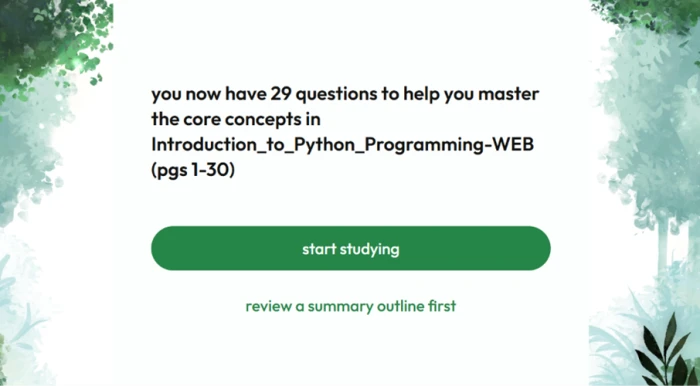
One click later, the confirmation screen described the same set as covering pages 1 to 30.
Studying with the original open
This is where the product is at its strongest.
The study view splits in two. Generated summary notes sit on the left. The complete source PDF sits on the right, all 397 pages of it, scrollable and searchable at whatever zoom you like.
Nothing else in this category treats the original document as a first-class citizen. Most tools swallow your file and hand back cards you have to trust.
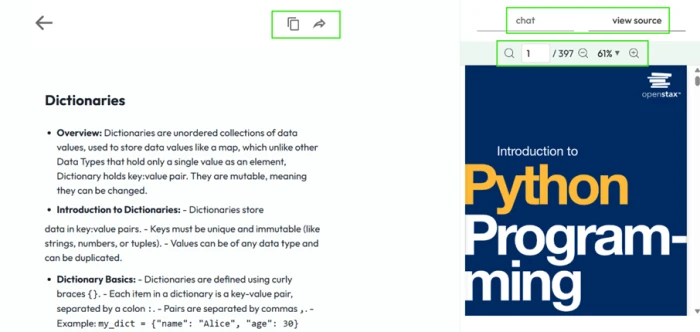
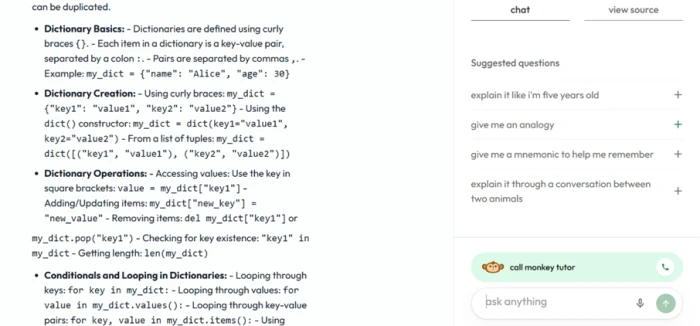
A chat tab sits behind the same panel, with canned prompts for an analogy, a mnemonic, a five year old explanation or a dialogue between two animals. There is also a voice option labelled monkey tutor.
Where the free plan stops
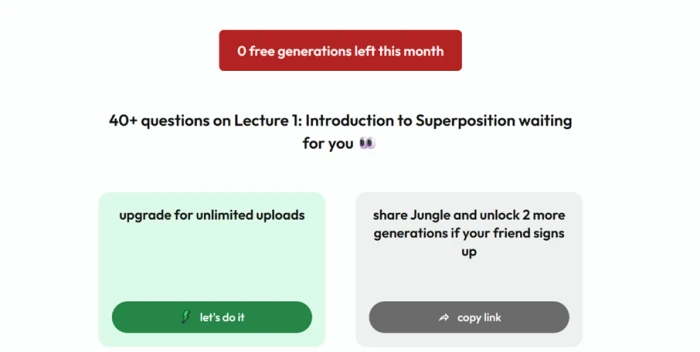
Generations are the currency here, and the free allowance is small enough that a single busy week uses it up.
I spent mine on the textbook, then submitted a link to an MIT lecture on superposition. What came back is the most revealing screen in this review.
One way in, no way out
Anki import sits right there on the upload panel, which sets an expectation about the reverse trip.
Jungle does publish Anki export, but it is a Pro plan feature. On the free plan the option is simply absent rather than locked, so there is nothing on screen telling you it exists at all.
Jungle AI pricing
Plan prices and inclusions taken from Jungle's in-app upgrade panel, free tier limits from the official Jungle pricing page.
| Plan | Price | What's included |
|---|---|---|
| Free | $0 | 3 generations/month · 30 pages per document · 30 minutes per video · 1 diagram question a month · 8 AI explanations and chats an hour |
| Pro Popular | $6 /mo | Billed yearly at $72 ($12 month to month) · unlimited generations on documents of any size · 3x more questions per generation · unlimited advanced question types · unlimited AI explanations · Anki export |
| Elite | $15 /mo | Billed yearly at $179.99 ($30 month to month) · everything in Pro plus unlimited AI voice tutor calls · question style templates like Step 1 · best model for a stated 40% boost in question quality · auto image occlusion |
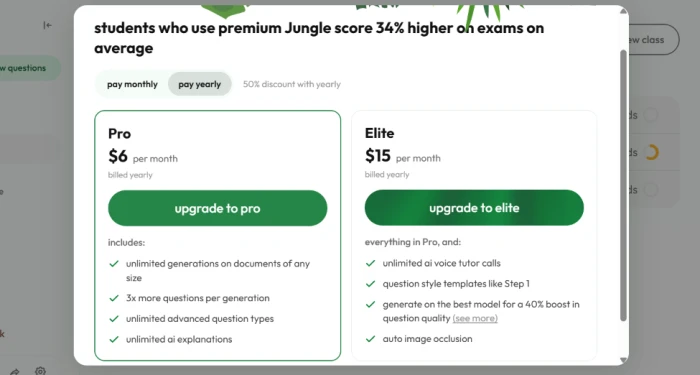
The upgrade panel with the yearly toggle selected. Jungle's website and both app stores call the Pro tier Super Learner.
Pros & cons
Specific conclusions from testing and real user reviews, not generic filler.
✅ Pros
- Reads YouTube links, audio and video files, not only documents
- Keeps the full source PDF open beside the generated study notes
- Wrong answers return written reasoning instead of just a red mark
- Free response grading accepts paraphrases rather than exact wording
- Builds case questions and image occlusion cards, not only Q and A
- Questions can be deleted at review before they enter a deck
⛔ Cons
- Long uploads get truncated, with the page cap disclosed after generation
- Users report dozens of near duplicate questions inside one set
- Lag, freezing and blank loading screens recur across both app stores
- Non-English free response answers have been marked wrong
- No CSV or plain text export, so decks leave only through Anki
- Progress tracking shows trees rather than per topic score trends
- Hourly cap on explanations cannot be spent on chosen questions
Synthesized from real reviews on the App Store, Google Play, Trustpilot & GeniusFirms · paraphrased, not quoted
Jungle AI scorecard
Rated against what an AI study and revision tool is actually built to do.
| Dimension | Verdict | Score |
|---|---|---|
| Input format coverage Documents, media, links, imports | Excellent |
9.0
|
| Source referencing while studying Checking a card against the original | Excellent |
9.0
|
| Question quality & relevance Usefulness and redundancy of output | Good |
7.5
|
| Feedback & AI explanations Rationales, chat, analogies | Good |
8.0
|
| Ease of use Upload, review, study flow | Good |
8.0
|
| Spaced repetition & progress tracking Daily review and what it reports back | Average |
6.5
|
| Coverage of long documents How much of a big file gets used | Average |
5.5
|
| Export & portability Getting decks out of the platform | Average |
5.5
|
| App stability & performance Lag, freezing, loading failures | Average |
5.5
|
| Free tier transparency Limits disclosed before you spend them | Weak |
4.5
|
| Scrutool Score Equal-weight average of all 10 dimensions |
6.9
|
What users say about Jungle AI
The themes reviewers raise most often, by share of analysed reviews.
% = share of analysed reviews mentioning each theme (App Store, Google Play, Trustpilot, GeniusFirms)
The only study tool that shows its working, wrapped in a free tier that hides its own
Jungle gets the hard part right. Questions track the material you actually uploaded rather than generic subject trivia, a wrong answer earns you an explanation instead of a red mark, and the split study view puts the original document beside your notes so any claim can be checked in seconds. That last feature alone is worth more than most of what the category ships. The problems are structural rather than cosmetic: a long PDF gets truncated to its opening pages with no warning until the generation is already spent, decks cannot leave without an Anki export sitting behind the Pro plan, and lag or freezing is the single most repeated complaint across both app stores. Students working through slide decks and chapter-length readings, who care about verifying what the AI produced, will get real value out of this. Anyone planning to feed it whole textbooks, or expecting to walk away with their cards in a portable format, should look at Anki with a different generator in front of it.
Discussion
Join the discussion and share your perspective.