
Lenso AI
Lenso.ai is an AI reverse-image and face search engine that finds where a photo or a person appears online, sorted into People, Duplicates, Related and Similar.

A capable reverse-image and face search with strong coverage and clean category tabs, undercut by a pay-to-see-anything model, thin free tools and face photos quietly sent to a third party.
Should you use Lenso?
People checking their own image footprint, catching catfish, impersonators or photos used without permission, who are ready to pay to see the sources.
You expect a free tool that shows where a match lives. Every source sits behind an unlock, so free Lenso only confirms a match exists.
Seeing sources starts at $19.99/mo for 50 unlocks. Research Mode and advanced filters only arrive at $69.99, and API at $2,800.
Face photos for People search are sent to a third party in Singapore, disclosed only in a settings panel most users never open.
Key features & how they perform
Each feature rated from hands-on testing and aggregated review sentiment.
Categorized results
Matches split into People, Duplicates, Related and Similar tabs, which beats sifting one long grid the way older tools make you do.
Coverage & recall
Reviewers repeatedly say it surfaces hits Google misses, including hard-to-find images and photos used without permission.
Face search
Measures distances between facial features to find the same person across expressions. Good for catfish and impersonator checks.
Source unlocking
Every match on free comes watermarked with an Unlock Sources tag, so you can confirm a hit exists but not see where it lives.
Text search
A typed query works, but matching runs loose. A plain brand word pulled back several unrelated logos in testing.
Sort & filter controls
A full sort menu exists, but only on text search. On image and face search, the mode you actually sift, it never appeared.
Feature ratings blended from Trustpilot review sentiment + hands-on testing of the free plan.
Running real searches through Lenso AI
I tested Lenso as a US visitor would, from a face search to a text query, and found where the free plan stops and where the data goes.
Categorized results, locked behind a paywall
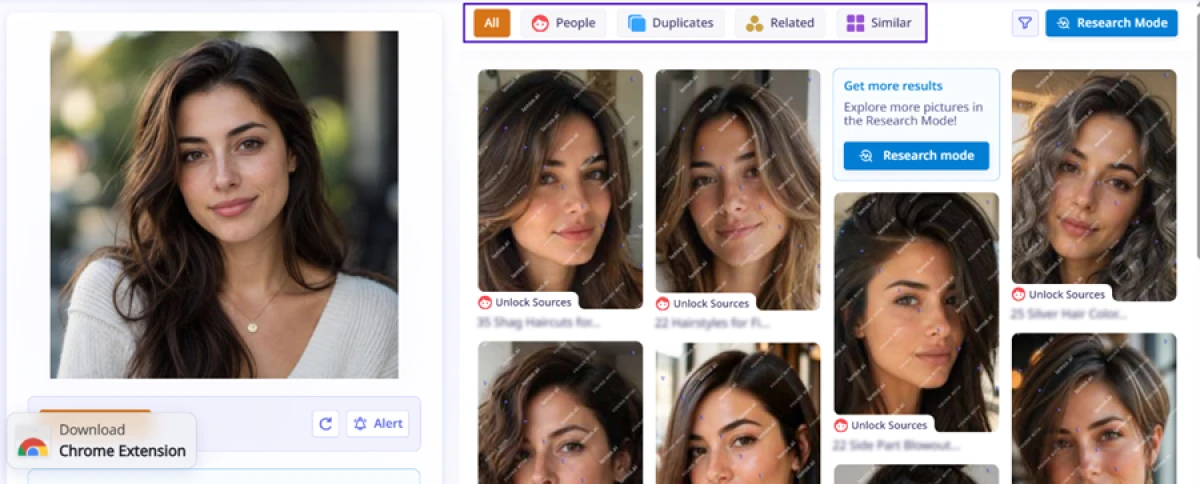
I started with a portrait, and the layout earned a point immediately. Lenso split the matches into five tabs across the top (All, People, Duplicates, Related, Similar), which beats scrolling one messy grid the way older reverse-image tools make you do.
The catch showed up on the thumbnails. Every match came back stamped with a lenso.ai watermark and a red Unlock Sources label. A card pushing Research Mode dropped into the middle of the grid, so part of the results area is actually an ad for the upgrade.
Filters are thin on the free plan
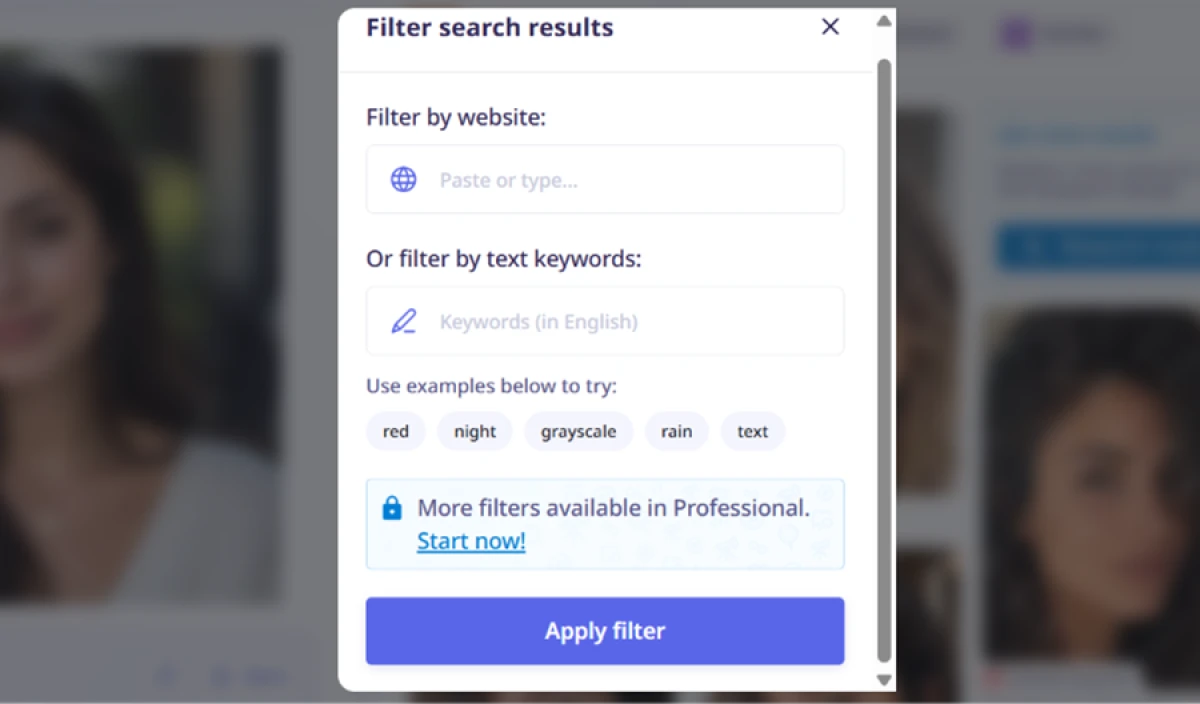
The filter panel gave me two controls I could use without paying: filter by website, and filter by text keywords, with quick example chips like red, night, grayscale and rain. Both did what they promised.
A line at the bottom read More filters available in Professional, so anything past basic website or keyword filtering is walled off.
Text search misreads brand names
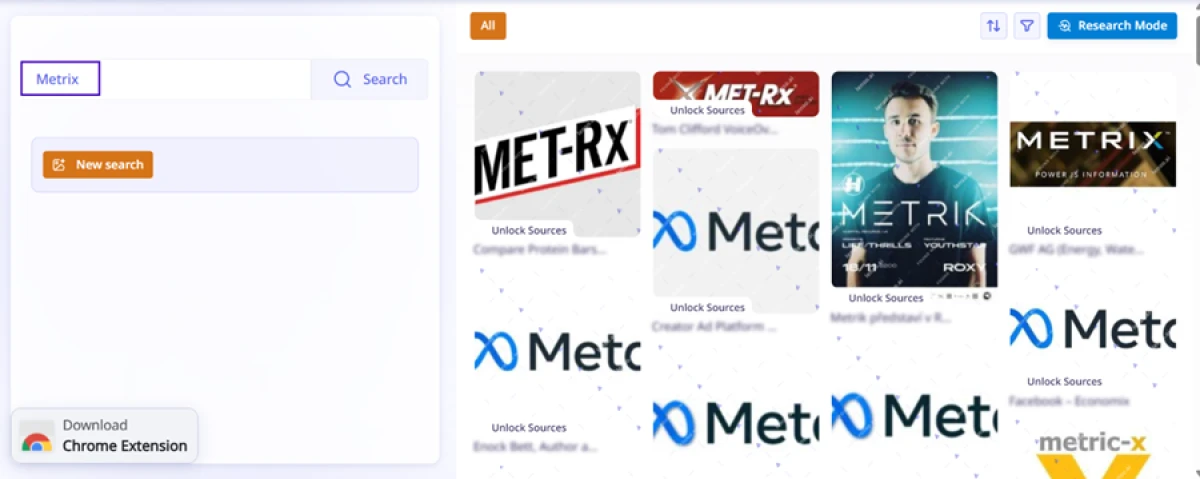
Lenso also takes a typed query, so I searched the word Metrix to check how sharp the matching is. It came back loose.
Instead of the brand I typed, the grid filled with MET-Rx protein branding and a column of Meta-style X logos, with the actual term barely represented.
Sorting shows up for text search, not image search
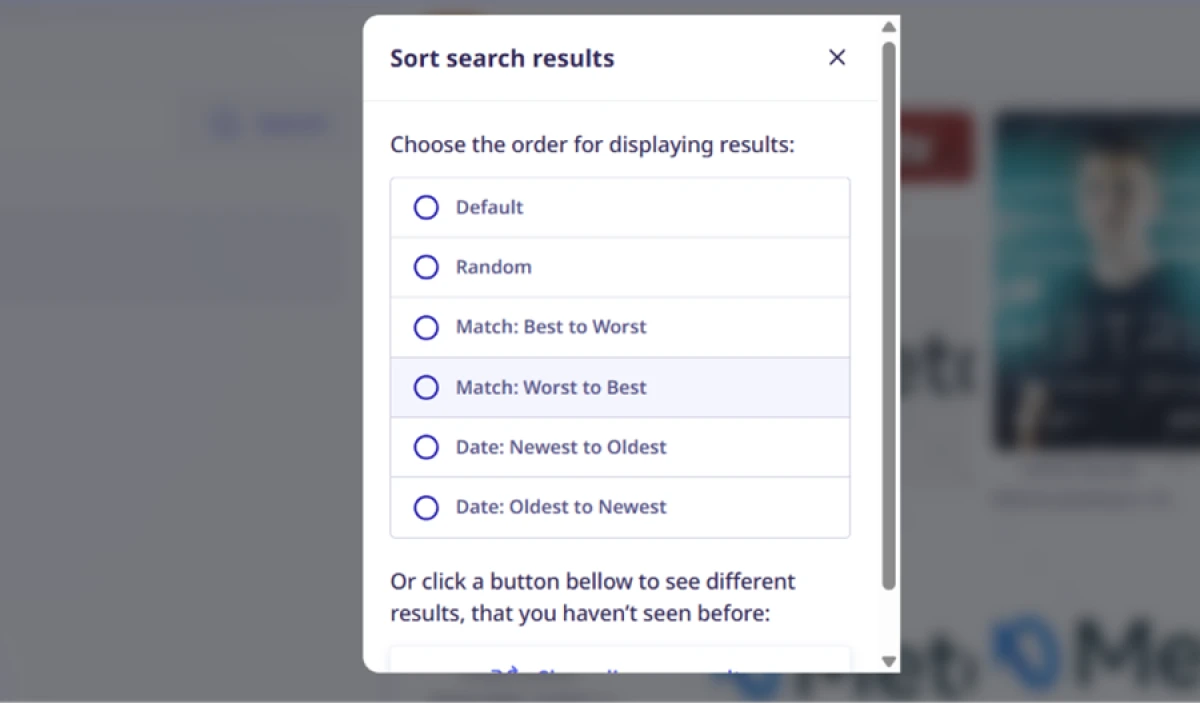
This is where the tool feels half-finished. When I ran a text search, a full sort menu opened with match-quality ordering (best to worst, worst to best) plus date ordering.
The same menu never appeared on any of my image searches. So the sorting controls exist, but only on the weaker half of the product, which is the opposite of what I wanted while sifting face results.
Your face photos go to a third party
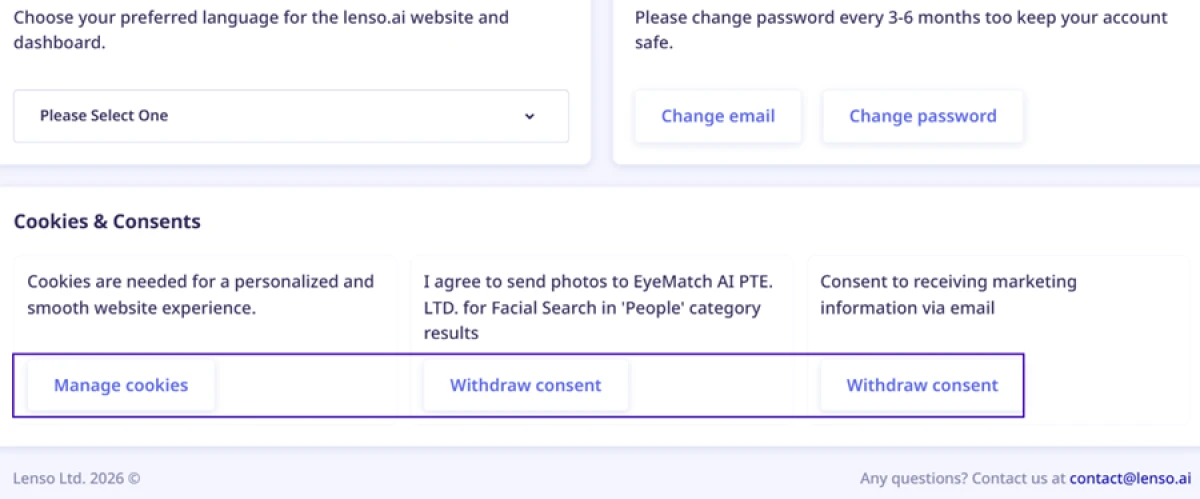
The settings page held the finding I did not go looking for. Under Cookies and Consents, Lenso states that face photos used for the People category are sent to an outside company, EyeMatch AI PTE. LTD., registered in Singapore.
There is a Withdraw consent button sitting right next to it, so the off switch is available if you want it.
The free limit that did not hold
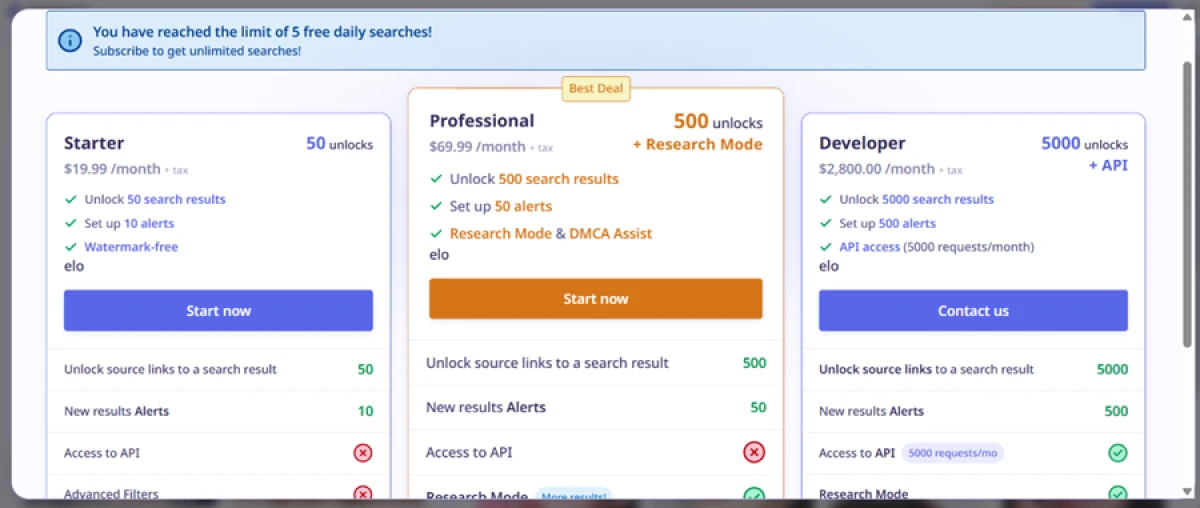
At one point Lenso threw up a popup telling me I had reached the limit of 5 free daily searches and nudging me to subscribe.
Here is the odd part. I kept running image searches after that message appeared, and they went through. The cap did not actually hold the way the popup claims. The popup and the three paid tiers behind it get a closer look, with the screenshot, in the pricing section below.
Lenso pricing
Figures taken from the official Lenso pricing page, shown per month.
| Plan | Price | What's included |
|---|---|---|
| Free | $0 | Nominally 5 searches a day (not enforced in testing) · watermarked thumbnails · sources locked · website and keyword filters only · no source unlocks |
| Starter | $19.99 /mo | 50 source unlocks · 10 alerts · watermark-free view · unlimited searches · no DMCA Assist, Research Mode, advanced filters or API |
| Professional Best Deal | $69.99 /mo | 500 source unlocks · 50 alerts · Research Mode (up to 10,000 results) · DMCA Assist · advanced filters (language, date, size, domain) |
| Developer | $2,800 /mo | 5,000 source unlocks · 500 alerts · API access (5,000 requests/mo) for image and face search · priority support · usage stats |
Pricing is accurate as of 22 October 2026 and was captured from the official Lenso website. Plans, prices and unlock limits change often, so check the official Lenso pricing page for the current figures before you subscribe.
Pros & cons
Specific conclusions from real user reviews, not generic filler.
✅ Pros
- Surfaces matches that Google and older reverse-image tools miss
- Users credit it with exposing catfish and impersonator accounts
- Finds personal photos reused online without permission
- Interface is called simple, intuitive and fast to run
- Face search holds up across different expressions of one person
⛔ Cons
- New matches arrive in bursts, with long quiet gaps between hits
- Results are often close but not fully accurate, some feel random
- Searching by description, like clothing or actions, works poorly
- Preview thumbnails are small, low-resolution and hard to read
- Reaching a result still requires spending an unlock to proceed
- Users report occasional account, navigation and technical glitches
Synthesized from real reviews on Trustpilot, where Lenso holds about 4.4 out of 5 across 170-plus reviews · paraphrased, not quoted
Lenso AI alternatives
Scrutool has not reviewed these competitors yet, so there is no Scrutool score to show. Figures are from each tool's own site and public listings.
| Lenso AIReviewed | PimEyes | FaceCheck.ID | TinEye | |
|---|---|---|---|---|
| Search type | Reverse image plus face, five tabs | Face search only | Face search only | Reverse image only, no faces |
| Free tier | Watermarked thumbnails, sources locked | Thumbnails shown, sources locked | Blurred preview, details locked | Full web search, free |
| Entry paid plan | $19.99 / mo, 50 unlocks | $29.99 / mo, unlocks sources | From $6, 36 credits (credit packs) | Free web, paid API bundles |
| Index focus | Billions of web images | Around 3.5 billion face images | Public web, mugshot and registry sources | Exact and modified image copies |
| Takedown help | DMCA Assist on Professional | Takedown help on higher tier | Not offered | Not offered |
| Best for | Mixed image and face monitoring | Finding where your face appears online | One-off identity and catfish checks | Tracing where an exact image was used |
Who Should Use Lenso AI, and Who Should Avoid It?
Lenso is strong at finding matches and sorting them into categories, but its pay-to-see model, thin free tools and face-data sharing make it a poor fit for some users.
Who Should Use Lenso AI?
Best suited for these workflows
People Protecting Their Own Image
If you want to find impersonators, catfish accounts or photos of you used without permission, the coverage and People tab do the core job well.
Creators Chasing Stolen Work
The Duplicates tab plus DMCA Assist on the Professional plan give photographers and artists a route from a match to a takedown request.
Investigators Who Will Pay to See Sources
If unlocking source links is worth a subscription, the category tabs and alerts make repeat monitoring faster than a plain reverse-image tool.
Who Should Avoid Lenso AI?
Consider an alternative if you need
A Free Tool That Shows Sources
Free Lenso only confirms a match exists. Every source link is locked, so a free TinEye or Google Lens will tell you more for a plain image trace.
Strong Privacy Over Your Face
Face photos for People search are sent to a third party in Singapore, disclosed only in settings, which is a lot to accept for a casual lookup.
Reliable Text or Description Search
Typed queries matched loosely in testing, and reviewers say searching by clothing or action works poorly, so this is not a keyword engine.
Sorting While Sifting Faces
The sort menu only appears on text search, so the image and face results you most need to order arrive in a fixed, unsortable grid.
Our Recommendation
Lenso is worth paying for only if you have a real monitoring need, protecting your own likeness or chasing stolen images, and you accept that seeing sources costs money. Everyone running a one-off image trace should try a free tool first, since Lenso's free plan hides the one thing you want. Before you upload a face, open the settings and decide whether you are comfortable with it being sent to a third party, and before you subscribe, confirm how fast unlocks are consumed.
Lenso scorecard
Rated against what a reverse-image and face search tool is actually built to do.
| Dimension | Verdict | Score |
|---|---|---|
| Match coverage & recall How many real hits it finds | Excellent |
9.0
|
| Result categorization People, Duplicates, Related, Similar tabs | Excellent |
9.0
|
| Face search quality Finding one person across expressions | Excellent |
8.5
|
| Ease of use Upload, run, read results | Excellent |
8.5
|
| Transparency Honest limits and upsell placement | Good |
7.5
|
| Text & keyword search accuracy Typed query matching | Good |
7.0
|
| Value for money Unlock cost against the paywall | Good |
7.0
|
| Sorting & filtering Controls available on the free plan | Good |
7.0
|
| Privacy & data handling Where your face photo goes | Good |
7.0
|
| Free tier usefulness What you learn without paying | Excellent |
8.5
|
| Scrutool Score Equal-weight average of all 10 dimensions |
7.9
|
Finds more than Google, then charges you to see any of it
Lenso does the hard part of reverse-image and face search well. Coverage is strong, reviewers say it surfaces hits other tools miss, and splitting results into People, Duplicates, Related and Similar tabs is a genuine improvement over one undifferentiated grid. The problems are in how the rest of the product is built and sold. Every source sits behind a watermark and an Unlock Sources paywall, so the free plan only confirms a match exists without telling you where, text search matched a plain brand word to several unrelated logos, and the sort menu shows up on text search but not on the image and face results where you actually need it. The finding that should give any US reader pause is buried in settings: face photos for People search are sent to a third party in Singapore, with an opt-out you have to go looking for. People with a real monitoring need, protecting their own likeness or chasing stolen images, and who accept paying to see sources, will get value here. Anyone running a one-off trace, or uncomfortable handing a face photo to an overseas processor, should start with a free tool and keep this one at arm's length.
Discussion
Join the discussion and share your perspective.