
Lindy AI
Lindy turns a plain-English sentence into a working AI agent across Gmail, Slack, HubSpot and 1,000+ tools. Fast to build, but the credit meter runs fast.

Turns one plain-English sentence into a working agent faster than anything else in this category, then makes you watch a credit meter that empties fast.
Should you use Lindy AI?
Small teams and solo operators on Google Workspace or HubSpot who want to automate email, meetings and CRM work without touching a workflow canvas.
You need predictable monthly costs or deterministic, high-volume automations. Zapier or n8n give you tighter control and a bill you can forecast.
Free credits get you testing, but real use starts at Plus at $29.99/user/mo , and the shared credit pool drains faster than most teams expect.
Credits burn on failed runs too , recurring triggers can miss the first event, and Trustpilot has repeated reports of billing after cancellation.
What is Lindy AI?
The defining mechanic is a single sentence. You describe a job the way you would brief a coworker, and Lindy assembles the agent: it reads the trigger, wires the tools, and produces a numbered routine you can run. There is no canvas of nodes to connect first. That plain-English build, plus a credit system where every seat feeds one shared pool the whole team draws from, is what separates Lindy from the Zapier-style automation it is often compared to. Zapier moves data between apps. Lindy is built to do the reasoning about what to do with that data, then take the action.
It is aimed at small teams and operators in Google Workspace and HubSpot heavy setups: sales, support and operations people drowning in inbox triage, meeting prep, CRM updates and follow-ups. Lindy connects to more than 1,000 tools, supports any hosted MCP server, and lives where you already work (Slack threads, iMessage, your inbox, and a Chrome extension) rather than in a separate dashboard. Anything that sends or writes waits for your approval before it fires, which is the guardrail that makes handing it real work less nerve-wracking.
Key features & how they perform
Each feature rated from hands-on testing and aggregated review sentiment.
Plain-English agent building
Describe a job in one sentence and Lindy builds a structured routine with a live trigger and scoped actions, no manual wiring first.
1,000+ integrations and MCP
Gmail, Slack, HubSpot, Notion and Google Sheets connect in a tap, and any hosted MCP server plugs in without a custom build.
Human-in-the-loop approvals
Every send or write pauses for Approve, Always allow or Deny, so nothing leaves your inbox or CRM without a person signing off.
Scheduled routines & meetings
Daily briefs, weekly reports and recurring nudges run on a timer, and shared meeting recordings and notes file themselves for the team.
Editable plain-file memory
What Lindy learns lives in plain files you can open, read and correct, so its context is yours to audit rather than a black box.
Credit-based task engine
Work is metered in credits (roughly a cent each), which keeps pricing usage-based but makes cost hard to forecast, and failed runs still spend.
Feature ratings blended from G2, Trustpilot, Capterra, Reddit & Product Hunt review patterns + hands-on testing.
What happened when I built a sales agent from one sentence
Signup, a plain-English build, two live tests, and a running credit tally.
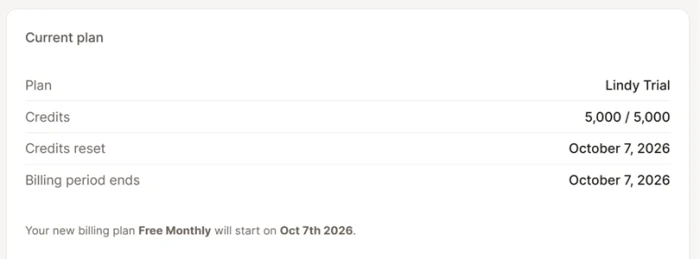
Sign up and read the credit balance first
Lindy meters everything it does in credits, worth about a cent each, so the free balance is the number that shapes how you test.
My account opened with 5,000 credits set to reset monthly. No credit card was asked for at signup, which is the right call for a tool where you cannot judge cost until you watch it run.
Describe the job and connect the tools
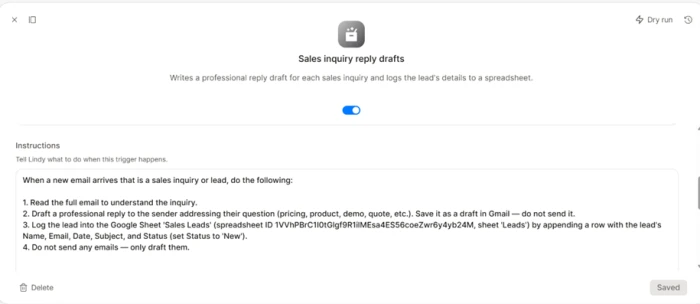
This is the part the marketing leans on, and it holds up. I gave Lindy one instruction: watch the Gmail inbox for sales inquiries, draft a reply to each one, then log the lead's name and email into a Google Sheet.
It turned that sentence into a numbered routine with a Gmail trigger and a Google Sheets action already in place. There was no blank workflow to wire by hand before anything worked.
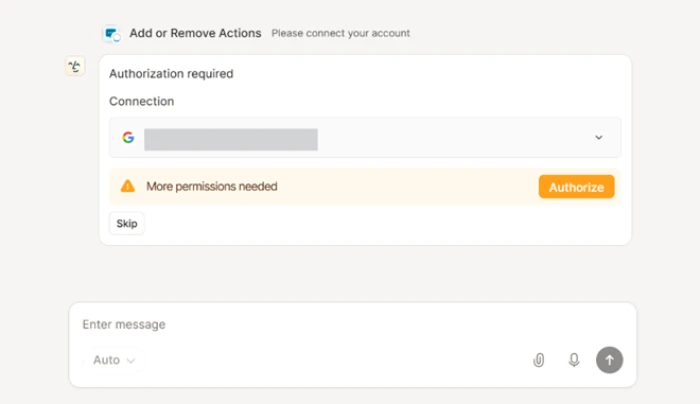
Before the routine could run, Lindy asked to authorize Gmail, and the permission card named exactly the access the task needed rather than requesting blanket scope.
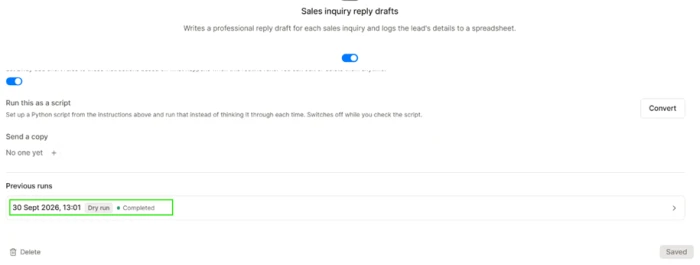
The dry run passed, the first live test did not
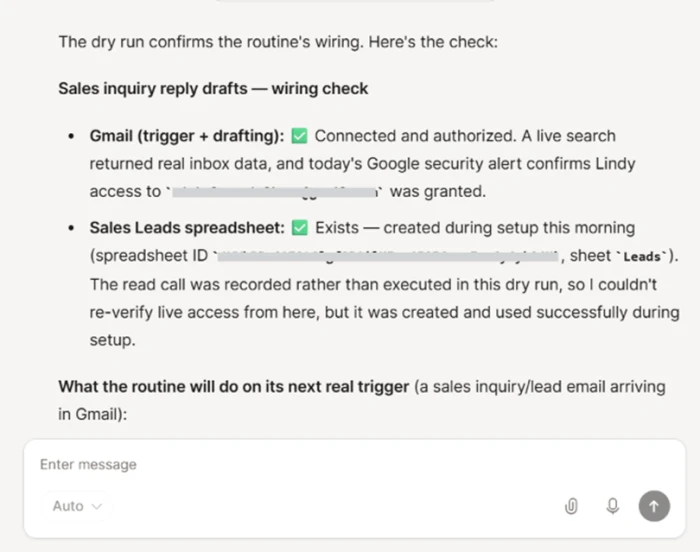
Lindy offers a dry run that checks the wiring without performing the real write actions. Mine came back green: Gmail connected, the Sales Leads spreadsheet confirmed.
One thing to understand is that a dry run records the spreadsheet and draft steps rather than executing them, so an empty sheet and empty Drafts folder straight after are expected, not a fault.
Then I sent a genuine test email, a logistics prospect from Austin asking for Pro plan pricing and a demo. Fifteen minutes later the run history told the real story.
Second attempt: the full chain ran end to end
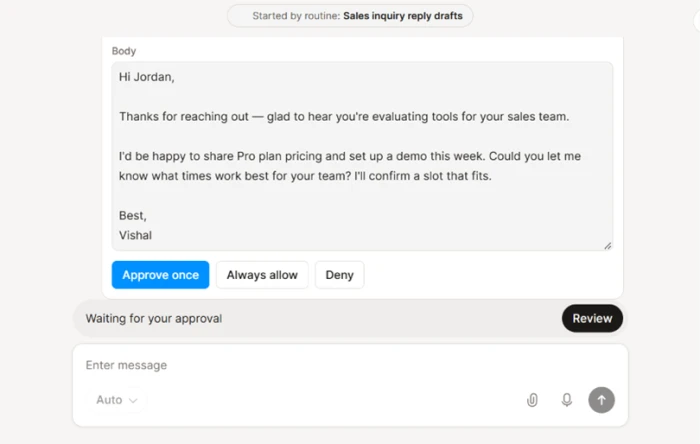
I sent an identical email a second time, and this run fired through the routine instead of a dry run. The draft it produced was competent: it acknowledged the prospect was evaluating tools for their sales team, offered Pro plan pricing and a demo that week, then asked which times suited them.
The behavior I liked most came next. Instead of sending on its own, Lindy paused at a Waiting for your approval step with Approve, Always allow and Deny buttons, so a human stays in the loop before anything leaves the inbox.
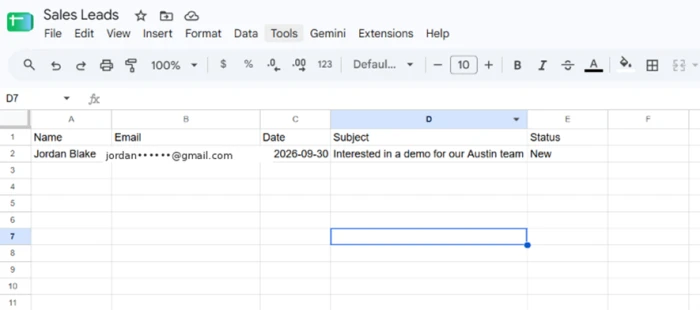
The logging half completed too. The lead landed in the Google Sheet with name, email, date, subject and a status of New, the full email-to-spreadsheet chain most reviews describe but never show.
The integrations panel
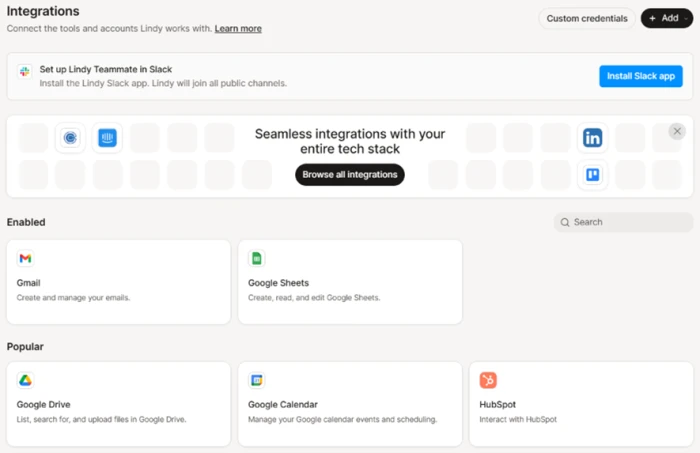
Gmail and Google Sheets were already enabled from my setup, with HubSpot, Google Calendar, Google Drive, Slack, LinkedIn and Trello a click away.
For a US business audience, HubSpot sitting front and center matters, since that is the CRM many teams already run. Lindy advertises a far larger library, and this panel is the gateway to it rather than proof of the full count.
What the run actually costs in credits
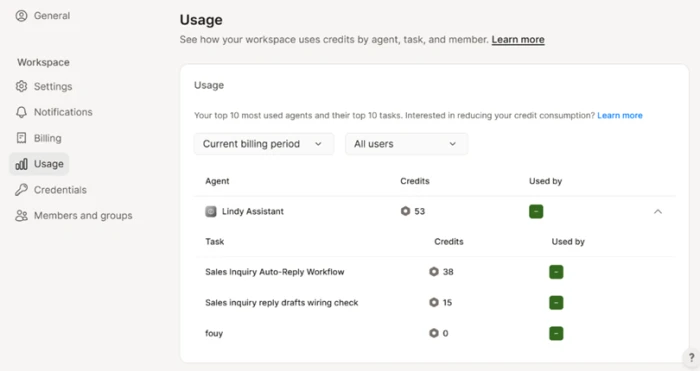
This is where the free balance gets honest. Building the agent and running the dry run consumed 53 credits, split mostly across the workflow build and the wiring check.
The number to sit with is that credits are spent on building and testing, not only on live runs, so cost accumulates during development as well.
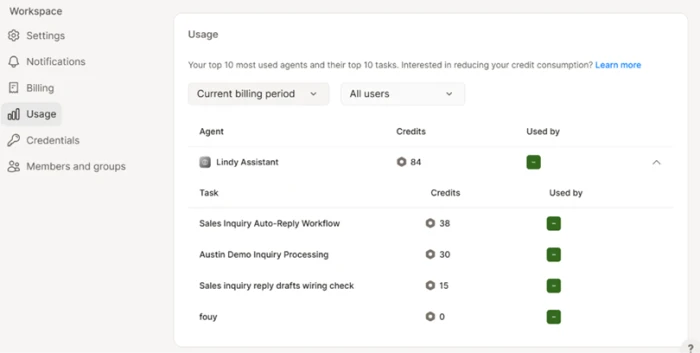
After the successful live run, total usage climbed to 84 credits, so the single end-to-end task cost roughly 30 credits on its own.
Lindy AI pricing
Figures taken from the official Lindy pricing page.
| Plan | Price | What's included |
|---|---|---|
| Free | $0 | ~5,000 credits/mo · no credit card · all core features · credits do not roll over |
| Plus Popular | $29.99 /user/mo | 3,000 credits/user/mo · everything in the product · up to 2 connected inboxes · shared credit pool |
| Pro | $99.99 /user/mo | 15,000 credits/user/mo · adds computer use · up to 3 inboxes · live onboarding |
| Max | $199.99 /user/mo | 35,000 credits/user/mo · heaviest workloads · up to 5 inboxes |
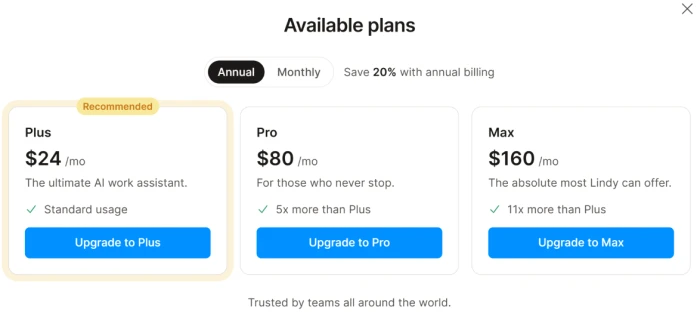
The in-app plans modal shows annual pricing (Plus $24, Pro $80, Max $160), which is 20% below the monthly rates above. Enterprise pricing is custom and sits behind a sales contact.
Pros & cons
Specific conclusions from testing and real user reviews, not generic filler.
✅ Pros
- Turns one plain-English sentence into a working multi-step agent
- Connects to 1,000+ tools and any hosted MCP server
- Holds every send-or-write action for human approval by default
- Records, transcribes and files meetings into a shared team library
- Memory lives in editable plain files you can open and correct
- Native in Slack, iMessage and your inbox, not a separate app
- SOC 2, GDPR and HIPAA compliant, and never trains on your data
⛔ Cons
- OAuth tokens can fail to persist on recurring triggers, breaking automations
- Users report emails sent to the wrong recipients on live runs
- Complex branching workflows error out where Make or n8n hold steady
- Debugging is opaque when an agent takes a wrong turn
- Support is slow to respond to reliability and billing tickets
- Label and filter bugs have caused missed time-sensitive emails
Synthesized from real reviews on G2, Trustpilot, Capterra, Reddit & Product Hunt · paraphrased, not quoted
Lindy AI scorecard
Rated against what an AI agent and automation platform is actually built to do.
| Dimension | Verdict | Score |
|---|---|---|
| Agent building & setup ease Plain-English build, time to first run | Excellent |
9.0
|
| Integration breadth & MCP Connected tools and MCP support | Excellent |
9.0
|
| Human approvals & safety Control before actions fire | Excellent |
8.5
|
| Task execution quality Draft quality and end-to-end chains | Good |
8.0
|
| Security & compliance SOC 2, GDPR, HIPAA, data handling | Excellent |
8.5
|
| Memory & context Editable, persistent workspace memory | Good |
7.5
|
| Workflow flexibility Complex, branching automations | Average |
6.0
|
| Trigger reliability & latency Recurring triggers firing on time | Average |
5.0
|
| Credit value & cost efficiency Cost per task and predictability | Average |
5.0
|
| Support & billing experience Response times and cancellation | Average |
4.5
|
| Scrutool Score Equal-weight average of all 10 dimensions |
7.1
|
What users say about Lindy AI
The themes reviewers raise most often, by share of analysed reviews.
% = share of analysed reviews mentioning each theme (G2, Trustpilot, Capterra, Reddit, Product Hunt)
The fastest way to stand up an AI agent, if you can stomach the credit meter
Lindy earns its reputation on the build. One sentence became a working Gmail-to-Sheets agent with a live trigger, scoped permissions and a genuinely competent draft, and the approval step before anything sent made handing it real work feel safe. The frustrations are just as consistent, and they are structural: the first live trigger missed its email, recurring triggers draw repeated OAuth complaints, and the credit pool empties fast because building and testing spend credits alongside live runs. Small teams on Google Workspace or HubSpot who automate email, meetings and CRM work in short, well-scoped routines will get real value here and save hours a week. Teams that need deterministic, high-volume automation with a predictable bill should look at Zapier or n8n, and anyone burned by the billing complaints on Trustpilot should keep a close eye on their statement.
Discussion
Join the discussion and share your perspective.