
Lovable AI
Lovable turns a plain-English prompt into a working full-stack web app, with a React front end, a wired Supabase backend, and code you can download or push to GitHub.

The best prompt-to-app output on the market, with code you actually own, undercut by unpredictable credit costs and weak security defaults.
Should you use Lovable?
Founders, PMs and designers who can describe an app and want a real, owned full-stack prototype without hand-coding it.
You need predictable monthly spend or production-grade security without reviewing every generated app yourself.
Free is a daily trickle of 5 credits. Real building starts on Pro, from $5/mo , and most people spend more as credits burn.
Debugging loops eat credits , apps publish public by default, and refunds are not given for AI-wasted credits.
What is Lovable?
What you walk away from Lovable with is not a mockup. It is a working full-stack app: a React front end, a Supabase backend wired up with real authentication and a database, and a live URL, all generated from a paragraph of plain English. You can open the code, download it, or push it to GitHub, so nothing is trapped inside the platform. That combination, production-shaped output plus real ownership, is what separates it from the grey template shells most prompt-to-app tools hand back.
It is built for founders, product managers, designers and operators who can describe what they want but do not want to write the code, and it runs on web, desktop and mobile. The mechanic that defines daily use is credits. Every build message costs a fraction of a credit, the free plan grants only 5 a day, and the meter, not the subscription line, is where the real cost and the real frustration live.
Key features & how they perform
Each feature rated from hands-on testing and aggregated review sentiment.
Prompt-to-app generation
One paragraph produces a working, well-designed app. The first pass is consistently the strongest moment in the whole workflow.
Design quality
Layouts come out looking professionally made, with real typography and on-brand color, not the usual Bootstrap-grey starting point.
Built-in Supabase backend
Auth, database and storage are wired automatically. The catch is that default access rules are often left more open than they should be.
Integrations & connectors
Stripe, GitHub and 17 connectors ship ready, plus an MCP server that lets Cursor, Claude Code or VS Code drive your Lovable projects.
SEO & publishing
Metadata, structured data and social cards generate correctly out of the box. The page body is client-rendered, and custom domains are paid.
Code export & ownership
Download the project or sync it to GitHub, and the code is yours to keep. Full export sits on the paid tiers.
Feature ratings blended from Trustpilot, G2, Capterra, Reddit & Product Hunt review patterns + hands-on testing.
Building a studio booking app in Lovable, from prompt to published URL
One real project on the free plan: a class-booking site taken from an empty prompt to a live page.
Write the prompt and pick a mode
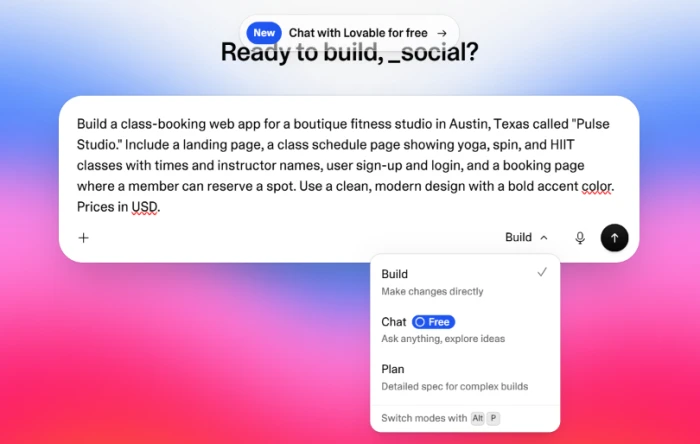
Lovable starts from a single text box. I described the whole app in one paragraph: a landing page, a class schedule with three class types and instructor names, sign-up and login, and a booking page, in a clean modern design with USD prices.
The composer splits into three modes: Build, Chat and Plan. Chat is marked free, which is useful if you want to talk an idea through before any build credits get spent.
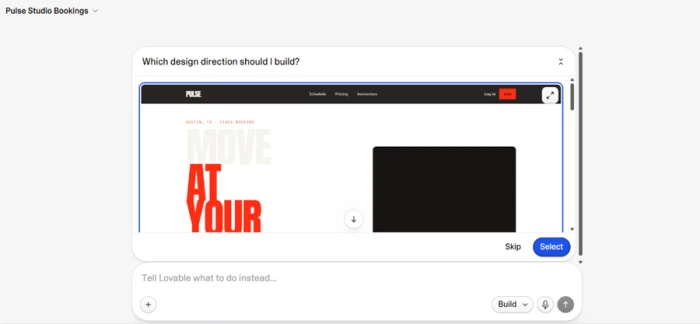
Before it committed to a build, Lovable paused and asked which design direction it should take, offering a bold editorial look with oversized red type.
See the first build
The first generation is where Lovable makes its case. From that one paragraph it returned a landing page that looks like a studio hired a designer for it.
The headline splits "Find your" in heavy black against "pulse." in the accent red, with an Austin location tag, a clean nav and an on-brand photo. No layout fiddling went into getting there.

Open the code and the backend
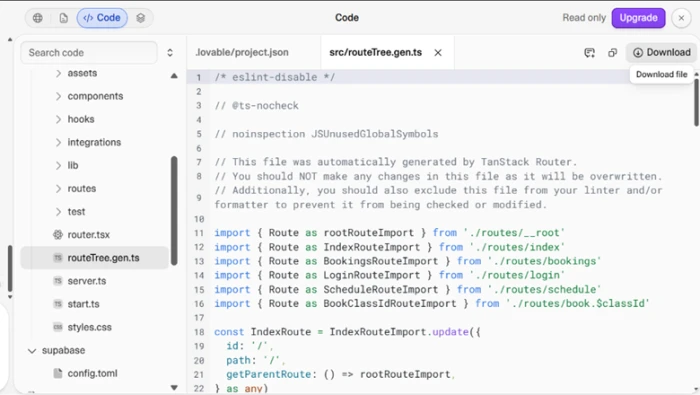
The fair worry with any no-code builder is lock-in, and Lovable answers it in the editor. The code view shows the full project tree and a real routing setup.
A Supabase folder sits right there, which confirms it wired up an actual backend rather than faking one. A Download button means the code can leave the platform with you.
Edit text directly, and meet the sample content
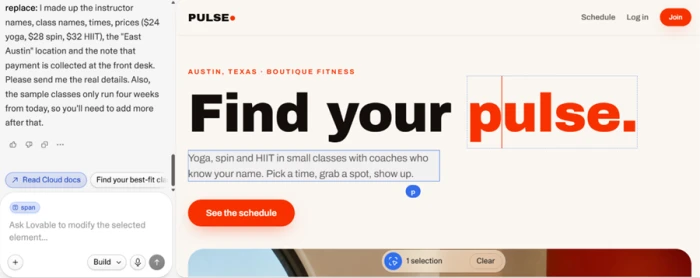
Not every change costs an AI message. For text, you click the element on the page and edit it in place, the way a page builder works, and that edit does not spend a credit.
Heavier changes still go through the agent in plain language, but trivial copy fixes stay fast and free. In the shot below I had the hero subheading selected with the element-level edit box open.
Run the built-in SEO check
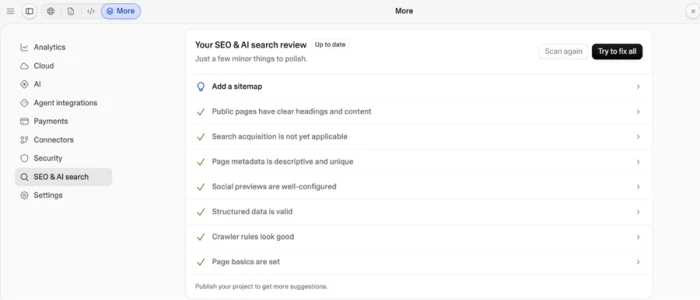
I expected Lovable to flunk on search, since that is what older reviews of this category say. The built-in SEO and AI-search panel told a different story.
Almost every item came back green: clear headings on public pages, descriptive and unique metadata, valid structured data, configured social previews, sensible crawler rules. The one open flag was a missing sitemap.
Publish, and hit the custom-domain wall
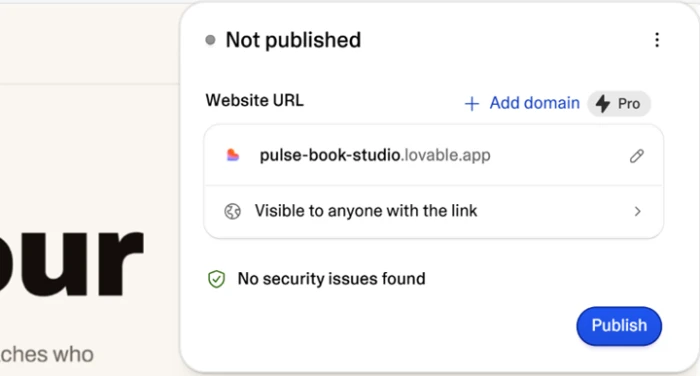
Publishing on the free plan gave me a live lovable.app subdomain and a clean "no security issues found" status on this project.
The catch sits right next to the URL. Connecting your own domain is locked behind a paid tier, so a free prototype is fine but anything carrying your brand stops here.
Check what the crawler actually sees
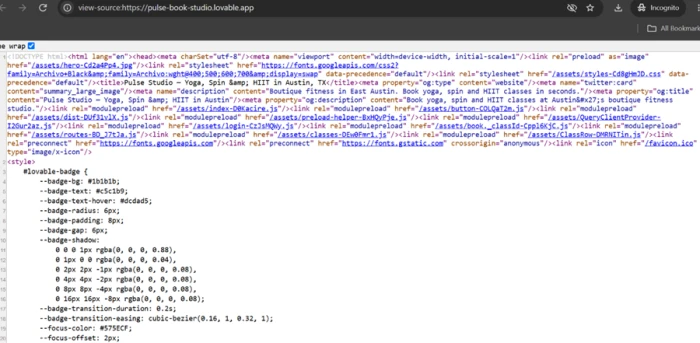
To verify the SEO panel I published the site and opened the page source. The head section is genuinely well built.
There is a real title tag reading "Pulse Studio, Yoga, Spin & HIIT in Austin, TX," a populated meta description about booking classes in seconds, plus Open Graph and Twitter card tags. It matches what the panel claimed.
Measure it on mobile page speed
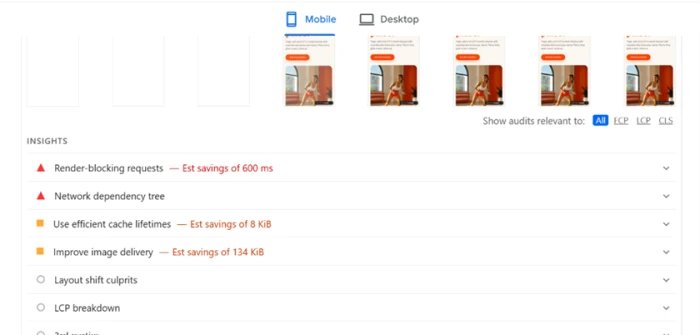
The JavaScript-heavy build has a cost, and a mobile PageSpeed test is where it shows. I ran the mobile tab on purpose, since most US fitness traffic arrives on phones.
The report flagged render-blocking requests worth roughly 600ms, a network dependency tree problem, and two moderate issues: around 134 KiB of unoptimized image delivery and 8 KiB of cache-lifetime savings.
Lovable pricing
Figures taken from the official Lovable upgrade panel and pricing page.
| Plan | Price | What's included |
|---|---|---|
| Free | $0 | 5 build credits/day (about 30/month) · public projects only · lovable.app subdomain · no custom domain |
| Pro Popular | $5 /mo | From 20 monthly credits (adjustable) · rollover credits · private projects · custom domain · code download |
| Business | $50 /mo | From 100 monthly credits · everything in Pro · SSO · team governance · higher limits |
| Enterprise | Custom | Platform fee · scale, flexibility and governance for large orgs · contact sales |
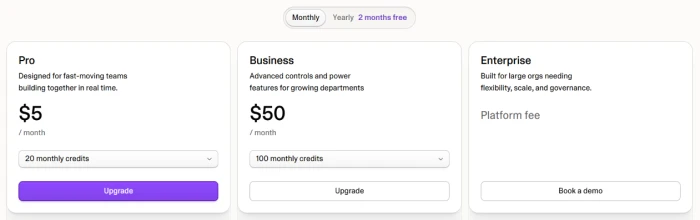
The in-app upgrade panel, with a monthly / yearly toggle (yearly gives two months free) and a credit selector on each plan.
Pros & cons
Specific conclusions from documented behavior and repeated user reports, not generic filler.
✅ Pros
- Generates a React front end with a wired Supabase backend from one prompt
- Design output looks professionally made, not a generic template shell
- Full code downloads and syncs to GitHub, so there is no platform lock-in
- Auth, database, Stripe payments and 17 connectors ship ready to use
- MCP server lets Cursor, Claude Code or VS Code drive projects directly
- Metadata, structured data and social cards are generated correctly automatically
- Users have shipped apps that reached six-figure ARR within months
⛔ Cons
- The AI often loops on one bug, re-running the same fix without solving it
- Generated apps publish public by default, with database rules left too open
- Independent scans repeatedly found exposed user data in live Lovable apps
- Support is email-only; Discord is peer help, not an official channel
- Page body renders through JavaScript, weaker for large content or blog sites
- A 2026 platform flaw left many pre-November-2025 projects exposed for weeks
Synthesized from real reports on Trustpilot, G2, Capterra, Reddit & Product Hunt, plus published security research · paraphrased, not quoted
Lovable scorecard
Rated against what an AI app builder is actually built to do.
| Dimension | Verdict | Score |
|---|---|---|
| First-build quality Prompt to a working, designed app | Excellent |
8.5
|
| Design & UI polish Aesthetics of generated layouts | Excellent |
8.5
|
| Iteration & debugging Follow-up edits and fix reliability | Average |
6.0
|
| Code ownership & export Download, GitHub sync, lock-in | Good |
8.0
|
| Backend & integrations Supabase, Stripe, auth, connectors | Good |
8.0
|
| SEO & publishing Metadata, rendering, custom domain | Good |
7.0
|
| Credit value & cost predictability What real building actually costs | Weak |
4.5
|
| Security & data privacy Defaults, exposure, platform track record | Weak |
4.0
|
| Ease of use Describing, building, publishing | Good |
8.0
|
| Support & billing Help channels and billing handling | Weak |
4.5
|
| Scrutool Score Equal-weight average of all 10 dimensions |
6.7
|
What users say about Lovable
The themes reviewers raise most often, by share of analyzed reviews.
% = share of analyzed reviews mentioning each theme (Trustpilot, G2, Capterra, Reddit, Product Hunt)
The best prompt-to-app output around, if you can manage the meter and the security defaults
Lovable earns its reputation on the first build. From a paragraph of plain English it returns a designed, working full-stack app with a real Supabase backend and code you can download or push to GitHub, which is a genuinely higher starting point than the grey shells most rivals produce. The drawbacks are just as consistent. Credits, not the subscription line, are the real cost, and debugging loops burn them with nothing shipped. Generated apps publish public by default with permissive data rules, independent researchers keep finding exposed user data in live Lovable apps, and support is email-only with recurring billing complaints. Founders, product managers and designers who want a fast, owned prototype and will review the security of what they ship will get real value here. Anyone who needs predictable spend, hands-off security, or a large content site served as plain HTML should look elsewhere.
Discussion
Join the discussion and share your perspective.