
Mistral AI
Mistral Vibe (formerly Le Chat) is a fast, EU-hosted AI assistant and coding agent with chat, image generation, connectors, and a Code Mode. Privacy-first, but limited by hard usage caps and uneven reasoning.

A fast, privacy-first European assistant with real agentic ambition, undercut by a thin free tier, hard usage limits, and a build-to-nowhere Code Mode on the web.
Should you use Mistral Vibe?
Privacy-conscious professionals and EU teams who want fast answers with cited sources, one-click data export, and a contractual opt-out from model training.
You need the strongest multi-step reasoning or a coding agent that hands you a working, downloadable project from the browser. Vibe stumbles on both.
The free tier caps messages, searches and images fast. Real use means Pro at $14.99/mo , or $5.99 if you verify as a student.
Reviewers report hallucinations and hourly caps even on Pro , plus support that goes quiet on refund requests.
What is Mistral Vibe?
Vibe is what you get when a European lab decides its chatbot should be an agent. It is the renamed Le Chat, the French assistant Mistral has run since 2024, now rebuilt around two modes: a Work side that chains multi-step tasks across connected tools, and a Code side that spins up coding agents in the terminal, an IDE, or remote sandboxes. Under the hood it runs on Mistral Medium 3.5, with Devstral driving the coding work, and it reaches you on web, iOS, Android, a CLI, and VS Code or JetBrains plugins.
The reason to look here rather than at ChatGPT or Claude is where your data lives. Vibe is EU-hosted, GDPR-aligned, lets you export everything with one button on the free plan, and gives paid users a contractual promise that their inputs stay out of model training. It generates images through Flux, cites its web sources inline, and answers quickly. What it is not yet is the most reliable reasoner in the room, and its free tier exists mainly to move you toward Pro.
Key features & how they perform
Each feature rated from hands-on testing and aggregated review sentiment.
Fast, sourced answers
Replies land quickly and the web search cites its sources inline, so you can check a figure against the original instead of trusting it blind.
Export-ready tables
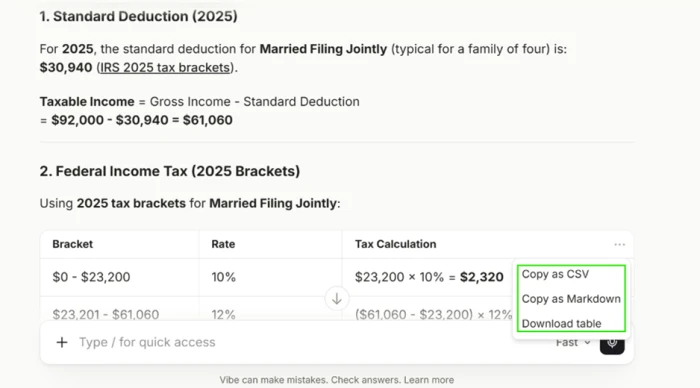
Every generated table carries a built-in menu to copy as CSV or Markdown or download the file, dropping structured output straight into a spreadsheet.
Privacy & data control
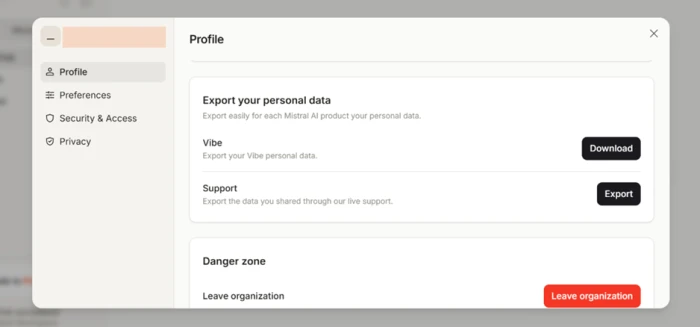
EU hosting, GDPR alignment, one-click export of all your data, and a paid No Telemetry mode that keeps your inputs out of training.
Flux image generation
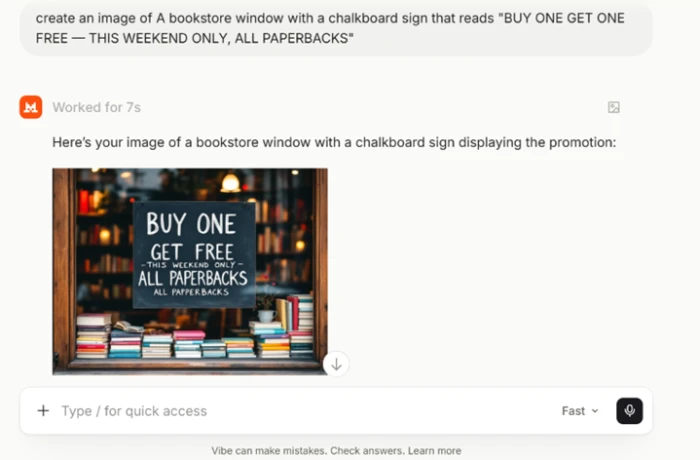
Scenes and short signage render cleanly on the free tier, though the model loses control of any text once the copy on an image runs long.
Code Mode agent
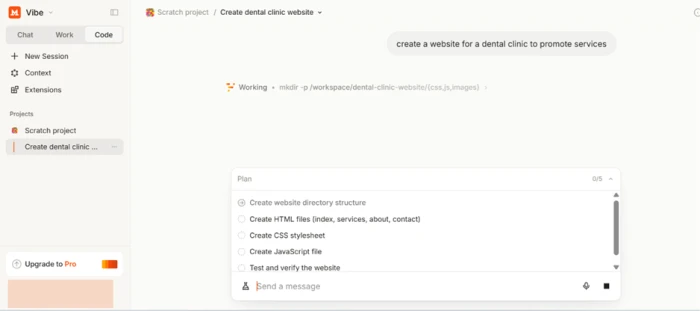
Plans a build in visible steps and writes real multi-file projects, but the free web flow leaves you with files you cannot open without a terminal or repo.
Connectors & scheduling
Over 100 connectors plus MCP support wire in Slack, GitHub, Drive and more, with scheduled tasks that run agents on a trigger.
Feature ratings blended from Trustpilot, App Store, Play Store & reviewer sentiment + hands-on testing.
Four things I pushed Vibe to do on a free account
Exportable output, image text, and a Code Mode build that plans well and exits badly.
Ask a money question and watch the output become portable
My first test was a plain arithmetic ask: estimate take-home pay for a US family of four earning $92,000 in 2025.
Vibe worked through the standard deduction and the 2025 federal brackets, added payroll taxes, and showed the math at each step. It linked the IRS bracket page inline rather than asserting the numbers from memory, which is a small mark of trust.
The part worth a screenshot was the table. Every table Vibe builds arrives with its own export menu.
The same portability shows up in account settings, where a single button exports all of your Vibe data.
Generate two images and find the exact spot it breaks
Image generation runs on the free tier, so I tested the one thing most models fumble: text inside the picture.
The first prompt was a vintage American diner at dusk lit by a neon sign. It came back clean.
"a vintage American diner at dusk, lit by a neon OPEN 24 HOURS sign"

Then I lengthened the copy to a full chalkboard promotion and the board fell apart in three ways at once.
"a bookstore chalkboard reading BUY ONE GET ONE FREE, THIS WEEKEND ONLY, ALL PAPERBACKS"
Hand Code Mode one line and let it plan the whole build
Code Mode was the real surprise. Several published reviews list it as a Pro feature, yet it opened and ran on my free account, with only a small upgrade prompt tucked in the corner.
I gave it a single line of direction and let it decide the rest.
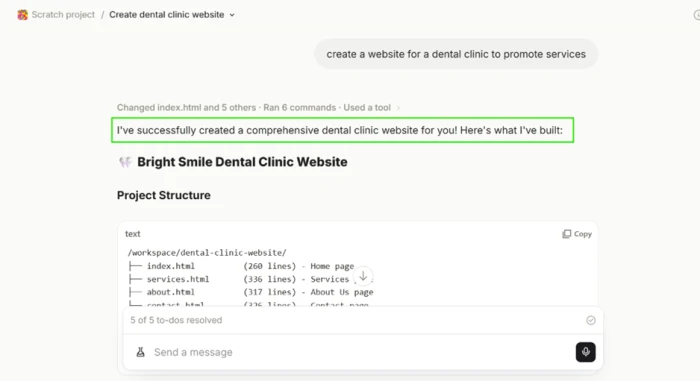
"build a website for a dental clinic to promote its services"
Before writing any code it laid out a five-step plan, starting with folder structure and ending with a verification pass, and ticked off each item as it worked.
It then announced a finished build and printed a full file tree with line counts for every page.
Try to open the finished site, and hit a wall
The build was genuine. The exit was not, at least not on the free browser flow.
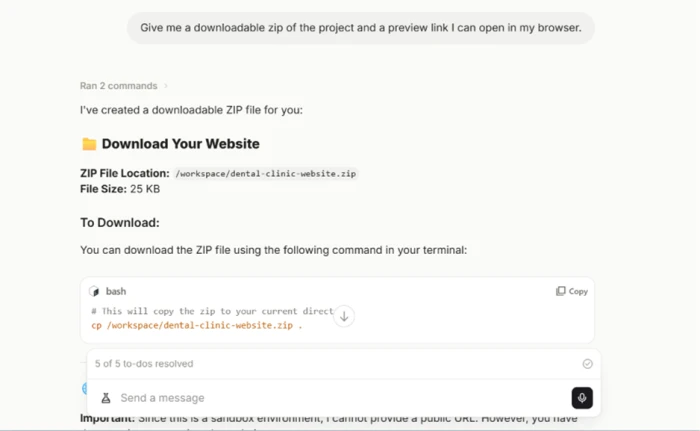
Asking where the files lived returned a path inside the sandbox and nothing clickable. The Context tab only offered to connect a Git repository, so I asked directly for a downloadable zip and a preview link.
Vibe said it had built a 25 KB zip, then handed over a bash command that copies the file between two sandbox folders and admitted it could not provide a public URL.
Mistral Vibe pricing
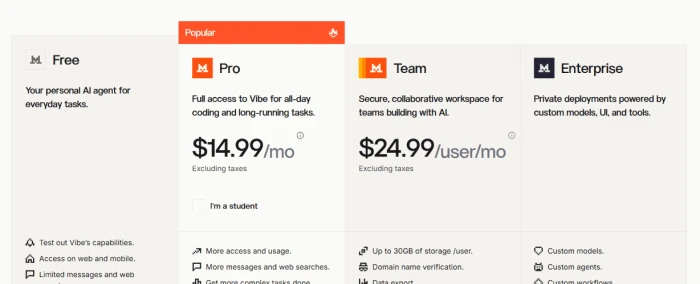
Figures taken from the official Mistral pricing page.
| Plan | Price | What's included |
|---|---|---|
| Free | $0 | Limited messages, searches & coding sessions · image generation · $10/mo API credits · 100+ connectors · up to 5 scheduled tasks |
| Pro Popular | $14.99 /mo | Up to 6x messages · 5x web searches · 40x image generations · all-day coding · $30/mo API credits · chat & email support |
| Team | $24.99 /user/mo | Everything in Pro · up to 30GB storage per user · domain verification · data export · admin controls (min. spend applies) |
| Enterprise | Custom | Custom models, agents & workflows · audit logs · SAML SSO · white label · private/on-prem deployment |
Pros & cons
Specific conclusions from testing and real user reviews, not generic filler.
✅ Pros
- EU-hosted with GDPR alignment and full data residency
- Paid No Telemetry mode contractually keeps inputs out of training
- Web search cites its sources inline, so claims are checkable
- Every table exports to CSV or Markdown without an upgrade
- Runs across web, mobile, CLI and VS Code or JetBrains plugins
- Over 100 connectors plus full MCP compatibility
⛔ Cons
- Reviewers report a hallucination rate near 50% in some sessions
- Hourly response caps hit users even on the paid Pro plan
- Trails ChatGPT and Claude on the hardest multi-step reasoning
- Mobile app is missing features that exist on the web build
- Image text degrades badly once the copy runs past a few words
- Support goes silent on refund and cancellation requests
Synthesized from real reviews on Trustpilot, the App Store, Google Play, Reddit & reviewer coverage · paraphrased, not quoted
Mistral Vibe scorecard
Rated against what an all-in-one AI assistant and coding agent is actually built to do.
| Dimension | Verdict | Score |
|---|---|---|
| Response speed How fast answers come back | Excellent |
8.5
|
| Privacy & data control Residency, export, training opt-out | Excellent |
8.5
|
| Reasoning & accuracy Correctness on multi-step tasks | Average |
6.5
|
| Agentic coding (web) Usable output from the browser flow | Average |
5.5
|
| Image generation Scene quality and text handling | Good |
7.0
|
| Output portability Export of tables, files and data | Good |
8.0
|
| Connectors & automation Tool integrations and scheduling | Good |
7.5
|
| Value vs limits Price against usage ceilings | Average |
6.5
|
| App stability & parity Mobile vs web, bugs, UI changes | Average |
6.5
|
| Support & trust Refunds, responsiveness, moderation | Average |
5.5
|
| Scrutool Score Equal-weight average of all 10 dimensions |
7.4
|
What users say about Mistral Vibe
The themes reviewers raise most often, by share of analysed reviews.
% = share of analysed reviews mentioning each theme (Trustpilot, App Store, Google Play, reviewer coverage)
The privacy-first assistant that plans better than it delivers
Vibe is the easiest major assistant to trust with your data. EU hosting, one-click export on the free plan, inline source citations, and a paid promise to keep your inputs out of training are real advantages, and the speed backs them up. The gap is between ambition and execution. Reasoning trails ChatGPT and Claude on the hardest tasks, reviewers report hallucinations and hourly caps that survive the upgrade to Pro, image text collapses once it runs long, and Code Mode on the free web flow plans a clean build then strands you with files you cannot open. Privacy-conscious individuals and EU teams who want fast, cited answers and portable output will get genuine value here, especially at $14.99 or the $5.99 student rate. Anyone who needs airtight reasoning or a browser coding agent that hands back a working project should keep looking.
Discussion
Join the discussion and share your perspective.