
Muke AI
Muke AI is a browser-based AI photo tool for object removal, background swaps and image to video, sold in one-time credit packs.

Capable at generating a new image, poor at editing the one you upload, and sold through a checkout with no company behind it.
Should you use Muke AI?
Background swaps on images you do not need to match the original , tested on the free credits, where a regenerated result is acceptable.
You need the output to preserve the photo you uploaded . This regenerates rather than edits, so framing, lighting and detail do not survive.
Ten free credits buy about five image edits or one 480p video . Packs run $9.99 to $99.99 as one-time purchases.
Checkout accepts only crypto or card details sent over Telegram . No company name, no refund policy, and three security services flag the domain.
What is Muke AI?
Start with what this will not do, because it reframes everything else. Muke AI does not edit the file you upload. It reads your image, then generates a fresh one that loosely resembles the idea, which means the framing, the lighting and the fine detail of your original are gone from the result. The homepage promises photorealistic detail preservation and background reconstruction. That is not the mechanism at work.
What it is, then, is a browser-based text-to-image tool with an editor's interface bolted on: upload, type a prompt, pick the Standard or nano-banana model and one of seven aspect ratios, spend credits. It covers object removal, background replacement, headshot generation and image to video, and it sells one-time credit packs rather than a subscription. There is no app, no company name published anywhere on the site, and the only two ways to pay are cryptocurrency or sending card details through Telegram.
Key features & how they perform
Each feature rated from hands-on testing and the platform's own published claims.
Speed and interface
Upload, prompt, generate. Results come back quickly and the three-step layout needs no explanation. The cleanest thing about the product.
Background replacement
The one area that delivers. Hair separation held together on loose strands where cheaper cutout tools leave a hard, chewed edge.
Headshot generator
Produces a clean studio backdrop but carries the source lighting onto the face, so an outdoor portrait arrives lit by a sunset that is no longer in the frame.
Image to video
Priced at 10 credits for 480p and 20 for 720p, which means the entire free allowance buys exactly one low-resolution clip and nothing else.
Object removal
The weakest function. One test erased the entire source photograph along with the object; a second returned the object still standing in the frame.
Credits and checkout
One-time packs with no recurring charge, undermined by a checkout offering only crypto or card details over Telegram, with no refund terms anywhere.
Feature ratings from hands-on testing plus the platform's published pricing and documentation. No verified user review corpus exists for this tool.
Three edits, two accounts, and a checkout that stopped me
Every test below ran on the Standard model at the Default aspect ratio.
Setup and the real cost of a free account
Signup gives you 10 credits. The marketing copy stops there, which leaves out the number that actually matters.
Each image edit costs 2 credits. A new account therefore gets five edits before it hits the wall, and the site never states this anywhere.
The history panel below the canvas matters early on: it holds your results for one day and then clears, with no export or archive.
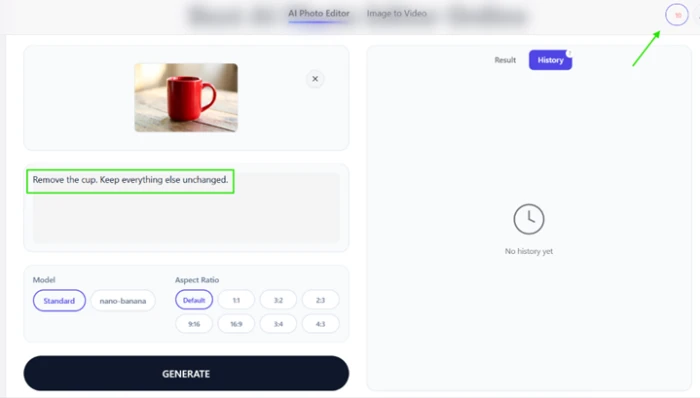
Test 1: removing an object from a plain background
This is the easiest version of the task. A single object, a simple surface, soft directional light from one side.
I uploaded a photo of a red cup on a wooden table lit by a nearby window, and asked for the cup to go and everything else to stay.
"remove the cup, leave everything else alone"

Test 2: replacing a portrait background
Background replacement is the function this tool is genuinely built for, and it shows.
I used an outdoor portrait shot at golden hour with loose hair falling against a bright background, which is the hard case for any cutout algorithm.
"plain light grey studio backdrop, keep the subject unchanged"
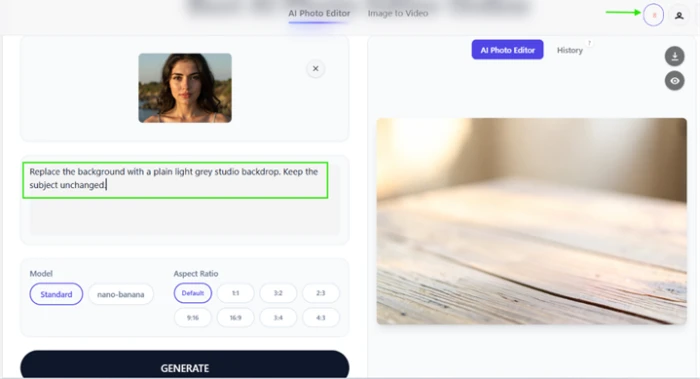
The balance had dropped to 8 by this point. Here is what came back.
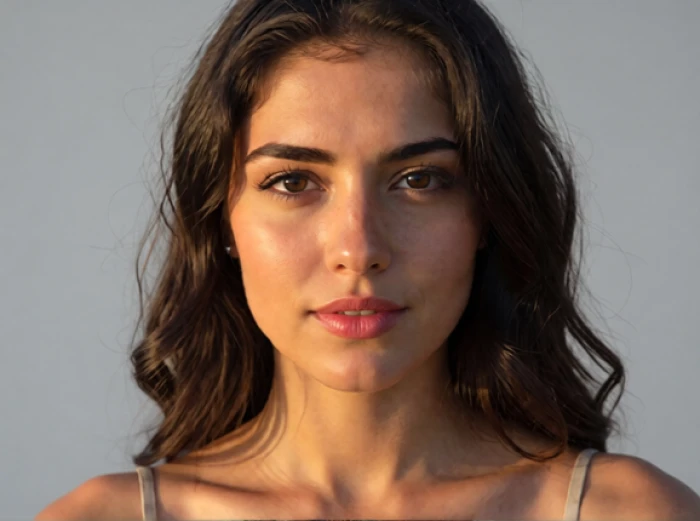
Two problems sit inside that success. The subject did not stay unchanged: my original was a mid-length portrait and what returned is a tight head and shoulders crop, so the model reframed a photo I had explicitly told it to leave alone.
The lighting gives away the composite. Her face still carries the warm orange rim light from the beach, and that face is now against a neutral grey studio wall. No studio produces light like that.
Test 3: removing an object that casts a shadow
Hard sunlight and a cast shadow raise the difficulty, because removing the object means the shadow has to go with it.
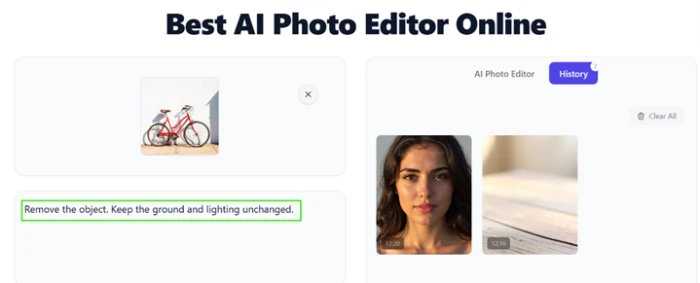
I uploaded a red bicycle leaning against a white wall and asked for it to be removed with the ground and lighting untouched.
The bicycle is still there.
"remove the object, keep the ground and lighting untouched"
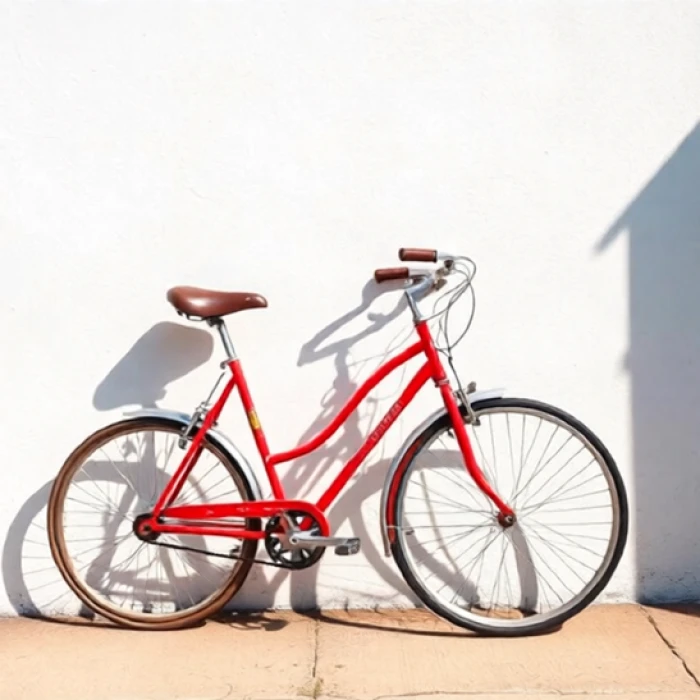
The regeneration shows once you look closely. The front tire is black while the rear tire is brown, and the shadow on the wall does not line up with the bicycle standing in front of it, with a faint second frame ghosted into it.
What 10 credits buys on the video tool
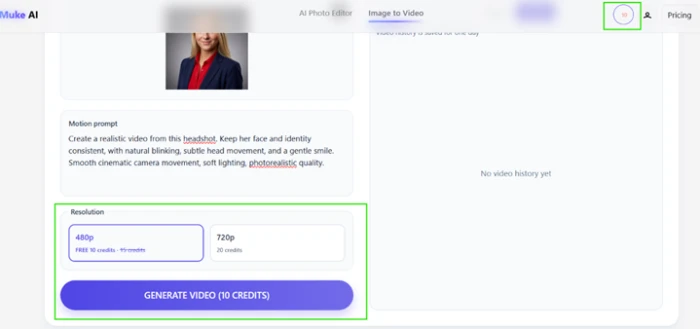
Image to video sits on a separate page and runs on the same credit balance.
I was down to 2 credits, so I created a second account to test it. That account opened with the same 10 credits.
The video tool wanted every one of them for a single 480p clip, with the 720p option priced at 20.
The upgrade wall
Four one-time credit packs run from $9.99 for 100 credits up to $99.99 for 5000. At 2 credits per edit, the entry pack works out to 50 image edits for ten dollars, which reads fairly on paper.
The header on that modal says "Unlock full power for anime creation." This is a product sold as a professional headshot generator and object remover, so that copy belongs to a different tool.
Then there is the checkout itself. The two payment options are Crypto and card via Telegram. Neither routes through a recognized processor, and there is no standard checkout page anywhere in the flow.
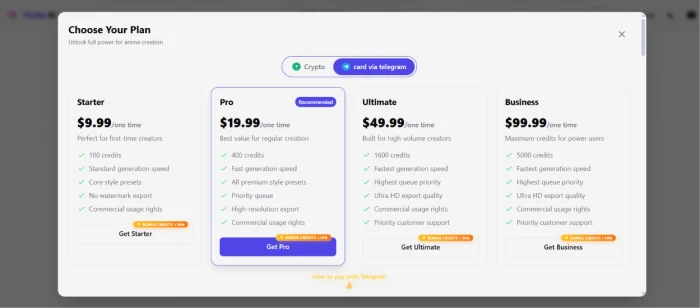
Muke AI pricing
Figures taken from the in-app upgrade panel. All packs are one-time purchases, not subscriptions.
| Plan | Price | What's included |
|---|---|---|
| Starter | $9.99 one time | 100 credits (about 50 image edits) · standard generation speed · core style presets · no watermark export · commercial usage rights |
| Pro Recommended | $19.99 one time | 400 credits · fast generation speed · all premium style presets · priority queue · high-resolution export · commercial usage rights |
| Ultimate | $49.99 one time | 1600 credits · fastest generation speed · highest queue priority · Ultra HD export quality · commercial usage rights · priority customer support |
| Business | $99.99 one time | 5000 credits · fastest generation speed · highest queue priority · Ultra HD export quality · commercial usage rights · priority customer support |
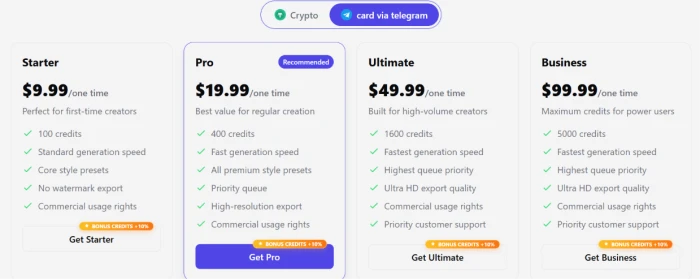
Every pack carries a 10% bonus credit badge. The toggle above the packs is the payment method selector, not a billing period.
Pros & cons
Specific conclusions from testing and the platform's own published documentation.
✅ Pros
- Hair edge separation on background swaps beats most cheap cutout tools
- One-time credit packs with no subscription or recurring charge
- Watermark-free export and commercial usage rights from the entry pack
- Seven aspect ratio presets plus a default, chosen before generation
- Two model options, Standard and nano-banana, on the same canvas
- Terms state uploaded images are not used to train the underlying models
- No card required to test the free credits
⛔ Cons
- Regenerates a new image rather than editing the file you upload
- Object removal returned the subject still in frame during testing
- Reframes and re-crops photos it was told to leave unchanged
- Source lighting carries onto subjects placed on replaced backgrounds
- No company name, address or jurisdiction published anywhere on the site
- Checkout accepts only crypto or card details passed over Telegram
- No refund policy published on any page
- Footer Contact Us link resolves to nothing
- History clears after one day with no export or archive
- Privacy Policy cites payment processors the checkout does not use
Drawn from hands-on testing plus the platform's published Terms, Privacy Policy and pricing panel · paraphrased, not quoted
Muke AI scorecard
Rated against what an AI photo editor is actually built to do.
| Dimension | Verdict | Score |
|---|---|---|
| Interface & ease of use Upload, prompt, generate flow | Good |
7.0
|
| Generation speed Turnaround per request | Good |
7.0
|
| Background replacement quality Edge handling and subject isolation | Good |
7.0
|
| Output quality as a generator Judged as text-to-image, not editing | Average |
6.5
|
| Model & aspect ratio options Control offered before generating | Average |
6.0
|
| Credit value on paper Cost per edit at pack prices | Average |
5.5
|
| Feature breadth Range of tasks covered | Weak |
5.0
|
| Free tier usefulness What 10 credits actually buys | Weak |
4.0
|
| Prompt adherence Doing what the instruction asked | Weak |
2.5
|
| Source image fidelity How much of your photo survives | Weak |
1.5
|
| Scrutool Score Equal-weight average of all 10 dimensions |
5.2
|
What the record says about Muke AI
This tool has no verified user review base, so the picture below comes from security assessments and the platform's own published material rather than customer reviews.
Sample note: mukeai.app has no Trustpilot, G2, Capterra or Product Hunt presence. Sources used were Gridinsoft, Scamadviser, Scam Detector, the platform's own Terms and Privacy Policy, and hands-on testing.
A text-to-image generator wearing the interface of a photo editor
The 5.2 above measures capability only, and on that narrow question Muke AI is a mixed but real product. Background replacement works, the hair edges held up better than most cheap cutout tools manage, the interface takes no learning, and results come back fast. Then you ask it to remove something. One test erased the source photograph along with the cup; another returned the bicycle still leaning against the wall, with mismatched tires and a shadow that does not belong to it. It does not edit your file. It reads your image and generates a new one, which is why framing and lighting keep changing on requests that explicitly asked for them to stay. The wider problem is not in that number at all. The only ways to pay are cryptocurrency or handing card details to someone over Telegram, there is no company name or jurisdiction published anywhere, no refund policy exists, the Contact Us link goes nowhere, and three separate security services currently flag the domain. Spend the free credits on a background swap if you are curious. Do not put a card near this checkout, and do not use it for anything where the output has to resemble the photograph you started with.
Discussion
Join the discussion and share your perspective.