
Perchance AI
Perchance is a free, no-signup browser image generator whose real trick is letting you fork any generator into your own tool. Unlimited output and clean downloads, but it cannot spell and caps at 512×768.

A genuinely free, unlimited image generator you can rewrite into your own tool, let down by broken text rendering and no commercial license.
Should you use Perchance?
Hobbyists, meme-makers and tinkerers who want unlimited free images with no signup, and who like the idea of editing a generator's raw code into their own tool.
You need legible text in images, high resolution or a clear commercial license . None of those are here, and the resolution ceiling is 512×768.
Nothing in money. The cost is ad banners and peak-hour queues that can stretch a single image to several minutes when traffic is high.
The generator cannot spell and occasionally throws a "This page has errors" button mid-render. Text prompts come back as gibberish.
What is Perchance?
Every other image generator hands you a fixed box: type a prompt, get a picture. Perchance hands you the box and an edit button that opens its source code. That is the defining mechanic. Any generator on the platform can be forked, rewritten with a built-in AI helper, and saved as your own tool under your own name, which is why the site is really a generator-building platform that happens to include a strong image generator rather than the other way round.
It runs in the browser with no account, no email and no payment, funded by ad banners, and it places no cap on how many images you generate. The trade-offs are just as clear: output tops out at 512×768 with no upscaler, the model cannot render readable text, and Perchance never surfaces a commercial license for what you make. It suits hobbyists, roleplayers and anyone who wants to experiment for free, not agencies shipping client work.
Key features & how they perform
Each feature rated from hands-on testing and aggregated review sentiment.
Free unlimited generation
No signup, no daily cap and clean downloads with no watermark, funded by ad banners rather than a subscription or credit system.
Fork-your-own generator
An edit button on every generator exposes the raw code, and a built-in AI helper lets you rewrite it and save a new tool under your own name.
Fast rendering
Images typically return in five to ten seconds off-peak, faster than most paid tools, though busy periods stretch that to minutes.
Image-to-character personas
A persona button under each result turns any generated image into a named character with a full profile and a live chat window.
Anatomy handling
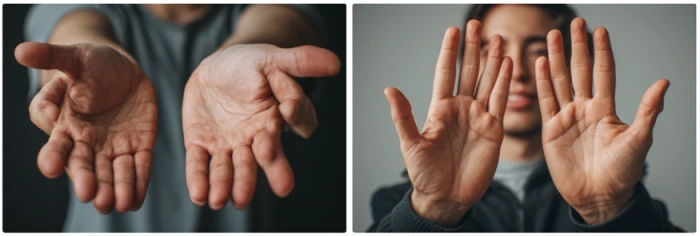
Fingers now render cleanly at five per hand, a real gain over older models, but global logic like thumb orientation still breaks.
Text inside images
Signs, labels and any in-image words come back as unreadable gibberish, the single most reliable failure across every test.
Feature ratings blended from Reddit, Google Play, Product Hunt & independent 2026 benchmark reviews + hands-on testing.
What happened when I built my own generator in Perchance
A plain prompt, an image turned into a character, a generator built from scratch, and where it all broke.
Image quality on a deliberately ordinary prompt
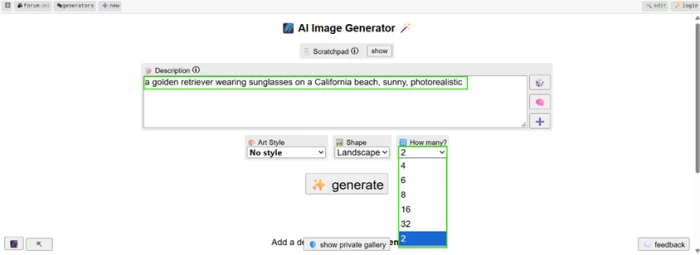
I started with the most generic prompt I could think of, on purpose, because a free browser tool has nowhere to hide on a simple scene.
One quirk shows up before any result does. The "How many?" control starts at 2 and offers no single-image option, so every run spends at least two generations whether you want one image or not.
"a golden retriever wearing sunglasses on a California beach, sunny, photorealistic"
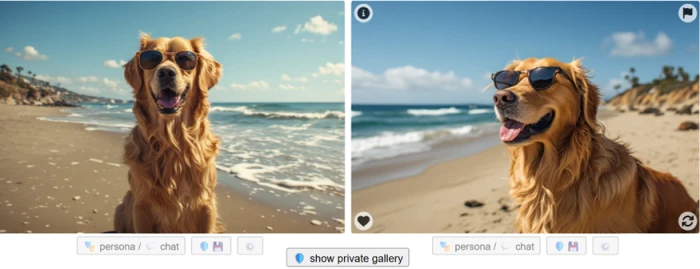
Here is what the two generations actually produced.
Turning a generated image into a character
Perchance does something most free image tools skip. A "persona / chat" button sits under every result, and clicking it hands the image off to a character generator.
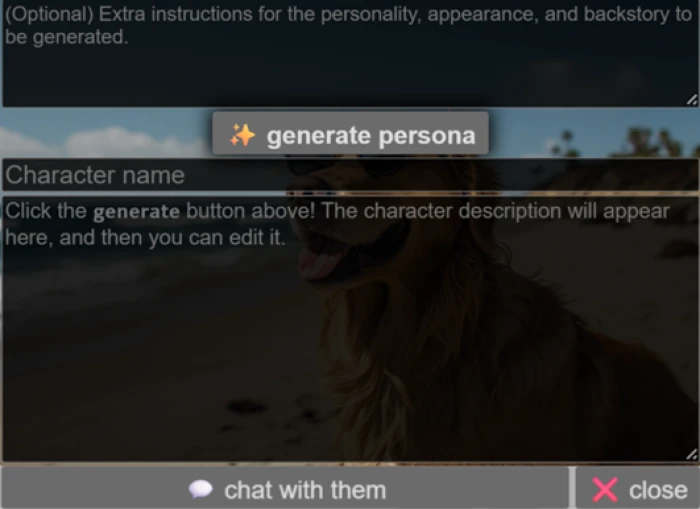
I pressed it on the beach dog to see where it led. The panel opens ready to build a character from whatever you just made.
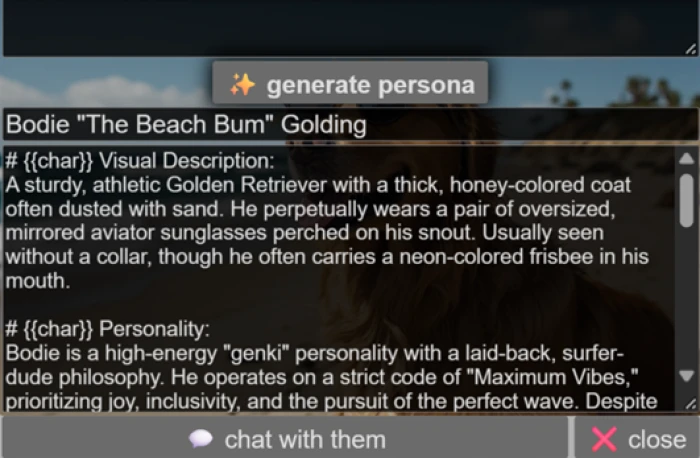
The profile it wrote back carried far more detail than the button implied.
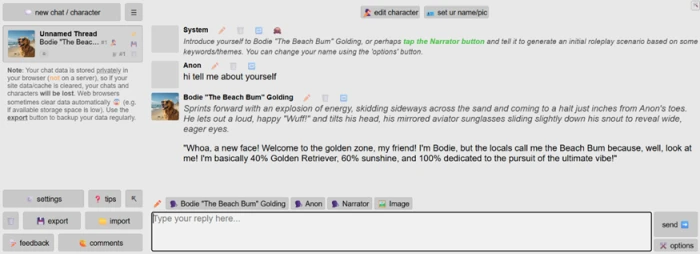
From the profile, the character drops straight into a live chat thread and answers in the voice it was given.
Building a generator from scratch
This is the feature that separates Perchance from its competitors. The edit button in the corner of every generator exposes the raw code and invites you to change it.
Rather than tweak an existing one, I asked the built-in AI helper to build a whole new generator around a single idea, then hit save.
"a Gen Z image generator for trendy, meme-style, social-media-ready images, with styles like Y2K, streetwear, cyberpunk, anime, and cursed"
On save, Perchance offered to fork my edits into a brand new generator under my own name.
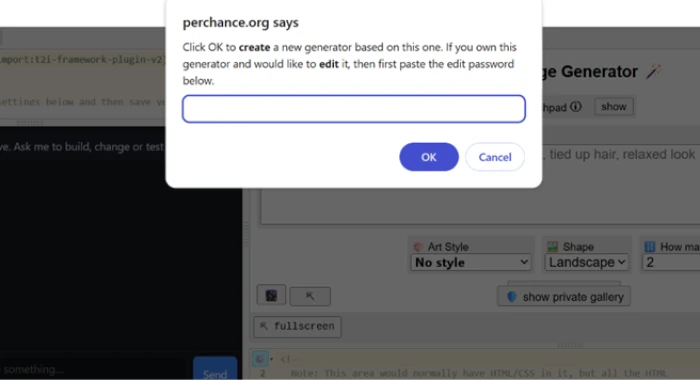
The result was a working tool I named The Gen Z Hub, with its own title, a vibe field, a grid of style buttons, and starter prompt ideas the helper wrote for me.
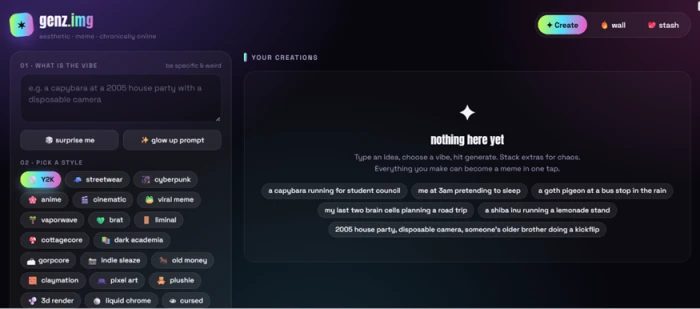
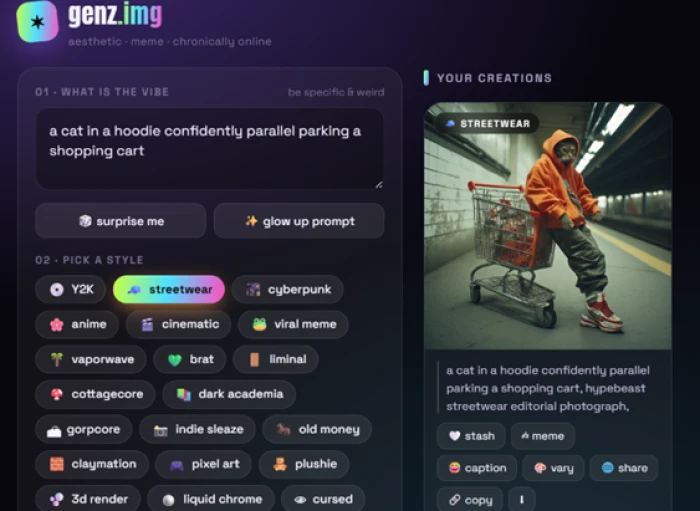
Then I ran my own tool. I picked the streetwear style and gave it a deliberately absurd prompt.
"a cat in a hoodie confidently parallel parking a shopping cart"
Where the cracks show
Two tests broke it in ways worth knowing before you rely on it. The first was text inside an image.
"a storefront with a large sign that reads GRAND OPENING SALE"
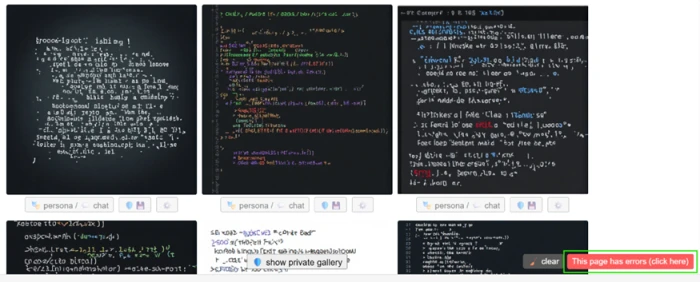
The second was the classic model trap: two hands, palms to camera. The fingers came out clean, so I looked closer at how the hands attach.
Perchance pricing
There is one tier, and it is free. Details reflect what the official site publicly shows.
| Plan | Price | What's included |
|---|---|---|
| Free Only tier | $0 | Unlimited generations · no signup · no watermark · image, character and generator-building tools · ad-supported |
Pros & cons
Specific conclusions from testing and real user reviews, not generic filler.
✅ Pros
- Every generator can be forked and rewritten into your own named tool
- Unlimited generations with no account, email or payment ever
- Clean downloads with no watermark, rare for a free tool
- Off-peak renders land in five to ten seconds, faster than most paid rivals
- Client-side execution keeps prompts off external servers
- One-click persona button turns any image into a chattable character
⛔ Cons
- In-image text renders as unreadable gibberish on every attempt
- Resolution caps at 512×768 with no built-in upscaler
- No inpainting, ControlNet, LoRA support or reliable img2img
- No public API to wire generators into a pipeline
- Peak-hour queues can stretch one image to several minutes
- No commercial license surfaced, a real risk for paid work
- Hand anatomy still breaks on global logic like thumb orientation
Synthesized from real reviews on Reddit, Google Play, Product Hunt, itch.io & independent 2026 benchmarks · paraphrased, not quoted
Perchance scorecard
Rated against what a free, forkable image generator is actually built to do.
| Dimension | Verdict | Score |
|---|---|---|
| Customization & forking Editing generators into your own tools | Excellent |
9.0
|
| Cost & access Free, unlimited, no signup, no watermark | Excellent |
8.5
|
| Ease of use Access, navigation, no barriers | Excellent |
8.5
|
| Generation speed Time per image off-peak | Good |
8.0
|
| Image quality Ordinary scenes and lighting | Good |
7.5
|
| Character & persona features Image-to-character and chat | Good |
7.5
|
| Prompt adherence Matching what you asked for | Good |
7.0
|
| Anatomy & hands Fingers, proportions, global logic | Average |
6.0
|
| Reliability & commercial use Queues, errors, license, resolution | Weak |
5.0
|
| Text rendering in images Legibility of signs and labels | Weak |
3.0
|
| Scrutool Score Equal-weight average of all 10 dimensions |
7.0
|
What users say about Perchance
The themes reviewers raise most often, by share of analysed reviews.
% = share of analysed reviews mentioning each theme (Reddit, Google Play, Product Hunt, itch.io, independent benchmarks)
The most hackable free image generator, if you never need it to spell
Perchance earns its score on freedom rather than fidelity. Unlimited generation with no account, clean unwatermarked downloads, and an edit button that lets you rebuild any generator into your own tool add up to something no paid rival offers, and ordinary scenes come back convincingly at speed. The limits are just as firm: in-image text is unreadable every single time, resolution stops at 512×768 with no upscaler, peak-hour queues can crawl, and there is no commercial license to point to. Hobbyists, roleplayers, meme-makers and anyone who enjoys tinkering with a generator's guts will get a lot here for nothing. Anyone shipping client work, printing large, or needing legible signage should treat it as a sketchpad and finish the job somewhere else.
Discussion
Join the discussion and share your perspective.