
PixVerse AI
PixVerse turns a photo or a text prompt into a short cinematic clip with native audio in about 35 seconds. Fast and face-accurate for vertical short-form, held back by a resolution ceiling and a confusing subscription.

Fast, face-accurate short clips from a single photo, sold through a pricing page that hides its most important limit.
Should you use PixVerse?
Short-form creators animating photos who need a face-accurate five second clip in under a minute and post it vertically.
You need long clips at full quality . The 15 second maximum only exists at 360P. Choose 1080P and the timeline stops at five seconds.
Free gets you watermarked 540P. Removing the watermark starts at $8/mo billed yearly , but 1080P output does not arrive until Pro.
Audio and Multi-Shot ship switched on , so the default setup is the expensive one. Trustpilot carries repeated cancellation and refund complaints.
What is PixVerse?
PixVerse will return a finished clip roughly 35 seconds after you press Create. What it will not return is a long clip at good quality, because length and resolution trade against each other: the advertised 15 second maximum only exists at 360P, and 1080P caps out at five seconds. That single constraint decides whether this tool fits your work. It is built for short-form video, the kind that runs vertically on TikTok and Reels, not for anything you would cut into a longer edit.
The platform runs on web, iOS and Android, with V6 as the current flagship model handling text-to-video, image-to-video, transitions, extension and reference-to-video in one place. Audio generates in the same pass rather than as a second step. A template library sits beside the generator for one-click effects, which is where most of the platform's viral traffic comes from. Everything runs on credits, and the free Basic tier hands out 60 of them a day against a watermarked 540P ceiling.
Key features & how they perform
Each feature rated from hands-on testing and aggregated review sentiment.
Image-to-video on V6
Facial identity survived every run against a single source portrait, including a full head rotation into profile and back with no melting at the edges.
Generation speed
Clips came back in 30 to 40 seconds at 540P, matching what PixVerse advertises and beating the multi-minute waits typical of heavier video models.
Native audio generation
Sound arrives inside the same generation rather than a second pass. Reddit reports flag lip-sync drift on dialogue, and the toggle raises the credit price.
Template library
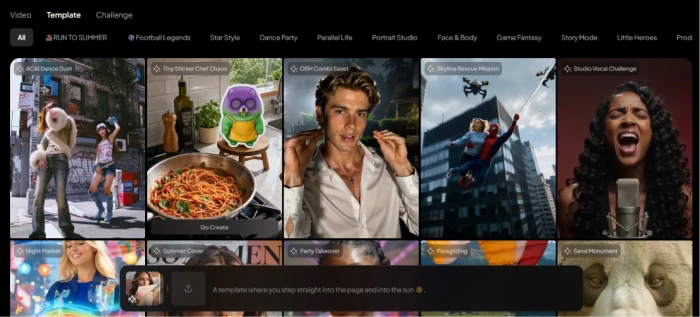
Dozens of one-click effects across dance, food, portrait and story categories. Fastest route to a finished clip, and the reason PixVerse output spreads on short-form feeds.
Resolution & duration controls
Four resolutions and eight aspect ratios, but the two settings are silently linked. Picking 1080P quietly removes every duration option past five seconds.
Upscale, Extend & Multi-Shot
Follow-up actions sit on the result page, so a good five second clip can be pushed longer or cleaner without starting over. Each one spends credits again.
Feature ratings blended from Trustpilot, Google Play, App Store & Reddit review patterns + hands-on testing.
One portrait, six prompts, and the setting PixVerse never explains
A controlled image-to-video test, the prompts written to break it, and what the interface hides.
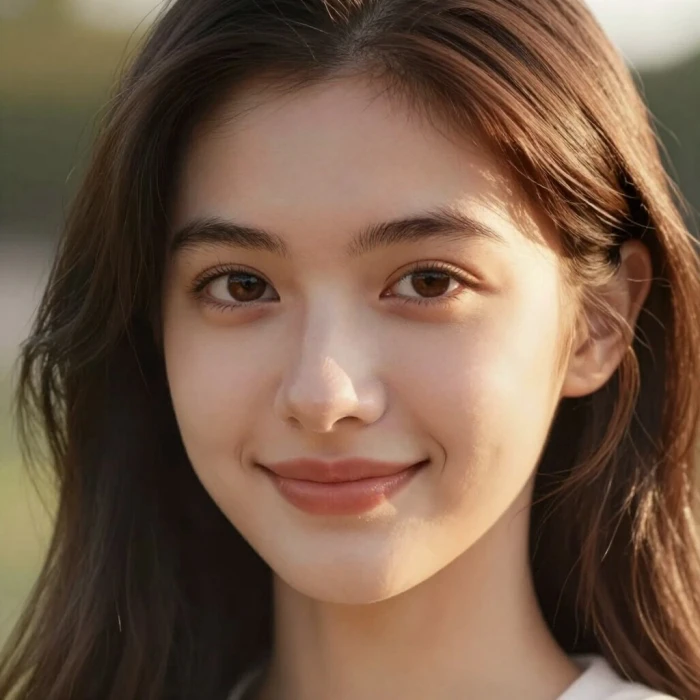
Fixing the source so the variables stay honest
Image-to-video reviews usually swap photos between prompts, which makes the results impossible to read.
One portrait served as the input for every run here. Holding the source constant meant any variation in the output traced back to the prompt or the settings rather than the photo.
The face is centered, evenly lit, and carries no hands or background clutter. That places it close to a best-case input, which is worth remembering when reading the scores below.
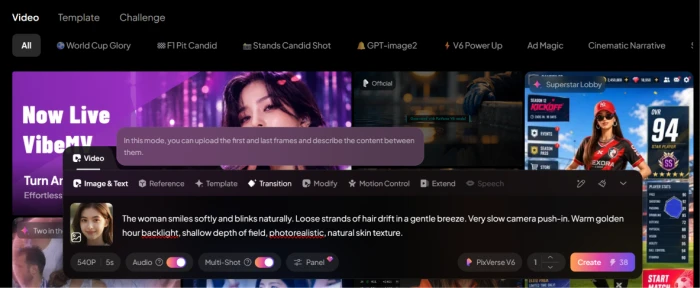
Setting up a generation, and what one clip actually costs
Model, resolution, duration and credit cost all sit in a single row above the Create button, which is genuinely good design. The price updates as you change settings.
The first run used PixVerse V6 at 540P for five seconds. Audio and Multi-Shot were left exactly as found, which is switched on.
That matters more than it looks. Because both toggles ship enabled, the default configuration is the more expensive one, and anyone who never opens the settings pays for audio whether they wanted it or not.
"The woman smiles softly and blinks naturally. Loose strands of hair drift in a gentle breeze. Very slow camera push-in. Warm golden hour backlight, shallow depth of field, photorealistic, natural skin texture."
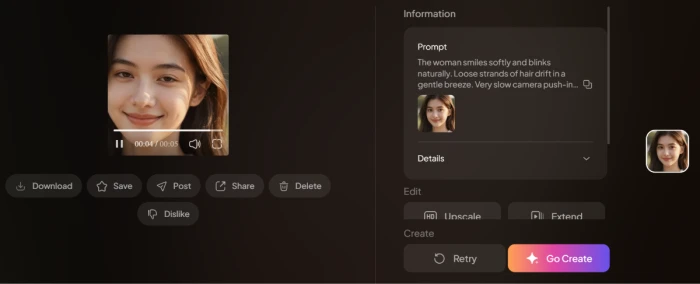
The Create button priced that configuration at 38 credits. Here is what came back.
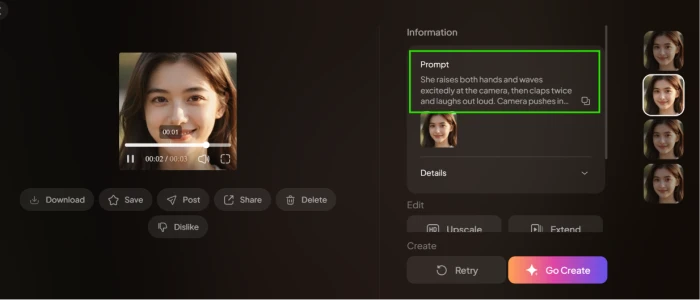
Four prompts written to break it, and the one that worked
Four further prompts targeted the classic failure points of image-to-video: legible text on a held card, hands invented from a headshot, an object picked up and drunk from, and a full head rotation into profile and back.
None produced an obvious defect at these durations, which is a stronger showing than most models in this price range manage.
The fifth prompt was the one that slipped. It asked for both hands raised and waved, two claps, a laugh, and a camera push-in, all inside three seconds.
The watermark, and the wall sitting behind it
Every clip exported from the free tier carries PixVerse branding. There is no setting that turns it off.
Downloading presents two choices, and the second one is bait: the watermark-free option sits directly under the watermarked one, carrying a gem icon that marks it as paid.
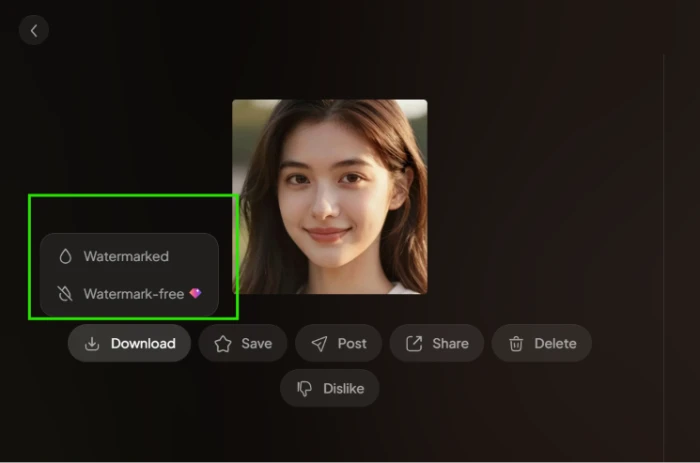
Selecting it opens the subscription wall rather than a download.
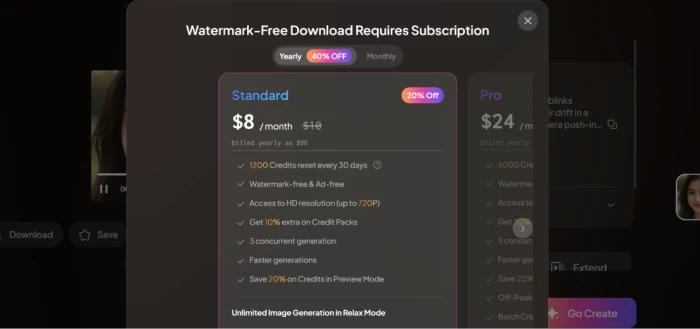
Resolution and duration are quietly linked
This is the finding least likely to appear in other reviews, and the interface never states it anywhere.
With 1080P selected, the duration row ends at five seconds. Nothing explains why. The higher options simply are not rendered.
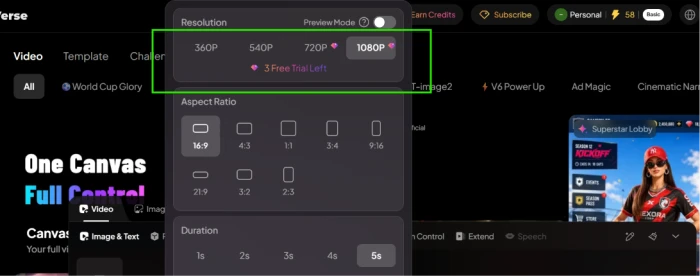
Drop the resolution to 360P and the same row expands. Watch the second half of the duration grid appear.
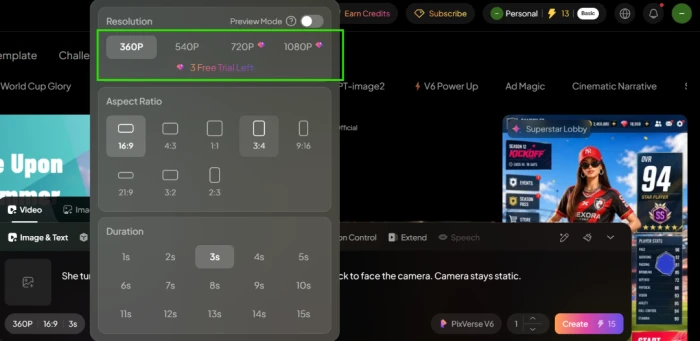
The template library and the rights question attached to it
Templates are the quickest path to a finished clip: pick a tile, drop in a photo, wait. No prompt writing at all.
They are clearly the reason so much PixVerse content spreads on short-form platforms, and the categories run across dance, food, portrait, game fantasy and story modes.
Several entries also reproduce recognizable copyrighted characters, which is worth flagging before anyone builds a commercial workflow on top of them.
PixVerse pricing
Figures taken from the official PixVerse subscription page, yearly billing view.
| Plan | Price | What's included |
|---|---|---|
| Basic | $0 | 60 daily credits · watermarked exports · 540P ceiling · three trial generations each at 720P and 1080P |
| Standard | $8 /mo billed yearly as $96 · $10 monthly | 1,200 credits per 30 days · watermark-free & ad-free · up to 720P · 3 concurrent generations · +10% on Credit Packs · unlimited image generation in Relax Mode |
| Pro Popular | $24 /mo billed yearly as $288 · $30 monthly | 6,000 credits · up to 4K · 5 concurrent generations · +30% on Credit Packs · Batch Create · Off-Peak Mode saves 30% on credits |
| Premium | $48 /mo billed yearly as $576 · $60 monthly | 15,000 credits · up to 4K · 8 concurrent generations · +50% on Credit Packs · Off-Peak Mode saves 50% on credits |
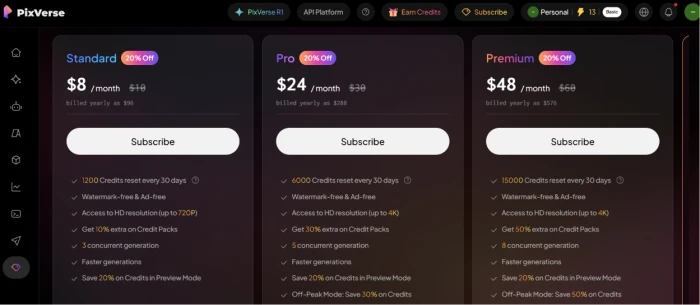
Captured with the yearly toggle active, which is why every headline price carries a 20% discount badge. A further tier sits to the right of Premium, outside this view.
Pros & cons
Specific conclusions from testing and real user reviews, not generic filler.
✅ Pros
- Facial identity held against the source across every image-to-video run
- Clips returned in 30 to 40 seconds at 540P
- Legible text, invented hands and a full head turn all rendered cleanly
- Native audio generates inside the same pass, no second render
- V6 covers text, image, transition, extend and reference in one model
- Credit cost updates live on the Create button before you commit
- Templates turn a photo into a finished clip with no prompt writing
- Basic tier renews 60 credits daily with no expiry date attached
⛔ Cons
- The 15 second maximum only exists at 360P, the lowest setting
- 1080P caps duration at five seconds and the interface never says so
- Audio and Multi-Shot default to on, raising every generation's price
- Standard removes the watermark but stops short of 1080P at 720P
- Numeric instructions slipped: two claps requested, three delivered
- Monthly credits expire at the billing date with no rollover
- Trustpilot reviewers report failed cancellations and refused refunds
- Templates reproduce copyrighted characters, including a Spider-Man scene
Synthesized from real reviews on Trustpilot, Google Play, the App Store & Reddit · paraphrased, not quoted
PixVerse scorecard
Rated against what a short-form AI video generator is actually built to do.
| Dimension | Verdict | Score |
|---|---|---|
| Identity consistency Holding a face across the clip | Excellent |
9.0
|
| Generation speed Queue to finished clip | Excellent |
9.0
|
| Output quality & realism Motion, lighting, artifact rate | Excellent |
8.5
|
| Creative workflows & templates Modes, effects, follow-up actions | Excellent |
8.5
|
| Prompt adherence Following the instruction as written | Good |
8.0
|
| Native audio In-pass sound and sync quality | Good |
8.0
|
| Credit economics Cost per usable clip after retries | Good |
7.5
|
| Resolution & duration ceiling What the top settings actually allow | Good |
7.0
|
| Free tier usefulness What 60 daily credits buy you | Good |
7.0
|
| Billing & subscription transparency Pricing clarity, cancellation, refunds | Average |
5.5
|
| Scrutool Score Equal-weight average of all 10 dimensions |
7.8
|
What users say about PixVerse
The themes reviewers raise most often, by share of analysed reviews.
% = estimated share of analysed reviews mentioning each theme (Trustpilot, Google Play, App Store, Reddit)
A fast, accurate generator wearing a pricing page that works against it
The model is the good part. Facial identity survived every image-to-video run against a fixed source, four prompts written specifically to break it came back clean, and clips landed in 30 to 40 seconds. The one clear miss was numeric: two claps asked for, three delivered, inside a three second window carrying four actions. Everything around the model is harder to defend. The fifteen second maximum only exists at 360P and the interface never mentions the trade. Audio and Multi-Shot ship enabled, so the default configuration is the expensive one. Standard removes the watermark at $8 a month but stops at 720P, which means the resolution the platform advertises starts at Pro. Add the cancellation and refund complaints stacking up on Trustpilot and the subscription is the riskiest part of the product. Short-form creators animating photos for vertical feeds will get a lot out of this and should stay on the free tier until the volume justifies Pro. Anyone who needs long clips at full resolution, or who wants a subscription they can exit cleanly, should look at Runway or Kling instead.
Discussion
Join the discussion and share your perspective.