
QuillBot AI
QuillBot is a freemium AI writing suite built around a paraphraser, with grammar checking, summarizing, AI detection and plagiarism scanning. Strong for polishing drafts, weaker on precision and its free tier.

A polished, easy paraphraser and grammar helper with a huge tool suite, undercut by a thin free tier, a shaky AI detector, and billing that users complain about loudly.
Should you use QuillBot?
Students, writers and professionals who already have a draft and want to reword, tighten grammar and summarize inside one clean workspace.
You need a dependable AI detector or precise rewrites of legal, medical or policy text. Meaning can shift by a single word.
The free tier caps paraphrasing at 125 words and hides plagiarism results. Real use starts at Premium, $8.33/mo billed annually .
Auto-renew and refunds draw the loudest complaints. Refunds are issued only where law requires, and store purchases route back to Apple or Google.
What is QuillBot?
QuillBot is not a tool that writes for you. It is a tool that reshapes text you already have. Paste a rough sentence and it rewrites it, color-coding every change so you can see what moved; click any word and swap the synonym without regenerating the line. Around that paraphraser sit a grammar checker, summarizer, plagiarism checker, AI detector and humanizer, plus a growing pile of PDF, image and citation utilities. It runs on the web, iOS, Android and as browser and Word add-ins, owned by Learneo (formerly Course Hero).
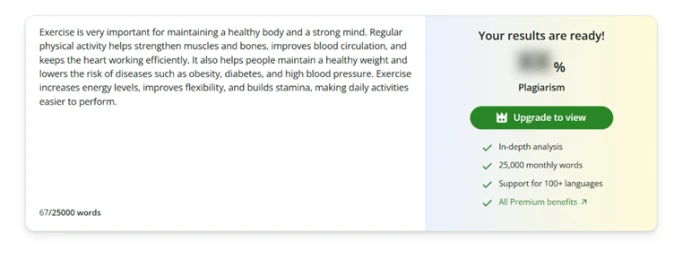
The catch is the free tier. It exists to show you the product, not to be the product. Paraphrasing is capped at 125 words in two of nine modes, the plagiarism score is calculated and then blurred behind an upgrade button, and Formal mode is a locked demo. Regular use pushes you to Premium at $8.33 a month billed annually. It suits students and working writers polishing drafts, and it frustrates anyone who needs precision or a reliable originality check.
Key features & how they perform
Each feature rated from hands-on testing and aggregated review sentiment.
Paraphraser with word-level control
Rewrites sentences and color-codes each change. Click a single word for alternate synonyms instead of regenerating the whole line.
Grammar checker
Catches clear spelling and grammar slips inline, but in testing it evaluated flagged spots one at a time and missed nearby homophone errors.
Summarizer
Condenses passages into a paragraph or bullet points and keeps core claims intact. A one-click button feeds the summary back into the paraphraser.
AI detector
Returns a percentage, but independent tests and user reports point to false positives on human text and scores that shift between runs.
Plagiarism checker
Scans and reports a similarity score, but the free tier runs the check and then blurs the result behind an upgrade prompt.
Cross-platform suite
Chrome, Edge, Safari, Word, macOS, Windows, iOS and Android. The extensions are the reason many users keep it open all day.
Feature ratings blended from Trustpilot, Capterra, Google Play, App Store & PissedConsumer review patterns + hands-on testing.
Eight tests on the free tier, from a clean rewrite to a blurred result
Short inputs you can paste into your own account, run through the paraphraser, grammar checker, summarizer and plagiarism checker.
Paraphrase a bloated sentence in Standard mode
The paraphraser is the front door of the product, and Standard mode is the conservative default that ships on the free tier.
It rewrites your text and color-codes every change, so you can see which words moved and which stayed. That is more useful than it sounds, because it lets you judge the rewrite instead of trusting it blind.
"Due to the fact that we did not have enough time, we were not able to complete the project in a manner that was satisfactory."
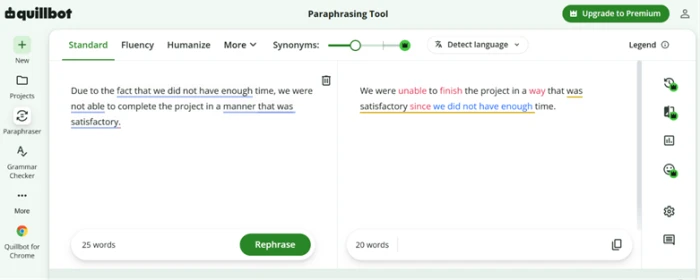
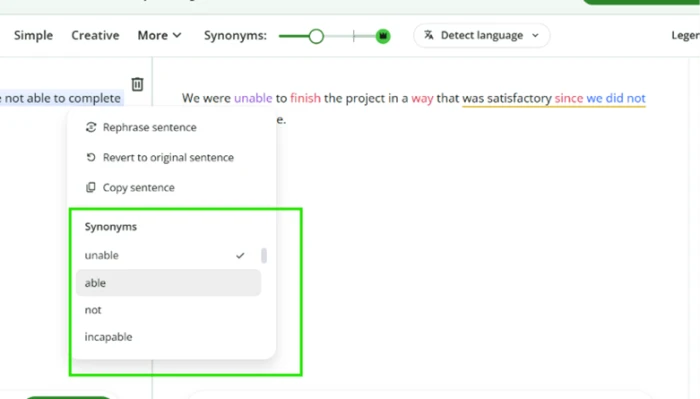
Swap a single word from the synonym menu
This is the feature that separates QuillBot from a plain rewrite button.
Click any highlighted word in the output and a menu of alternate synonyms opens in place. You change one word instead of regenerating the whole sentence and losing the rest of the rewrite.
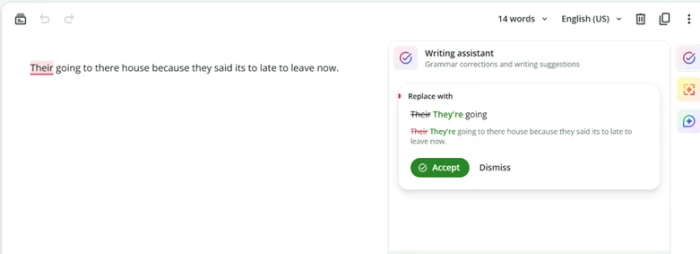
Push the grammar checker with three errors at once
The grammar checker runs inline with an accept-or-dismiss card, the same pattern Grammarly uses.
To see how thorough it is, I fed it one sentence carrying three separate homophone errors rather than three clean sentences.
"Their going to there house because they said its to late to leave now."
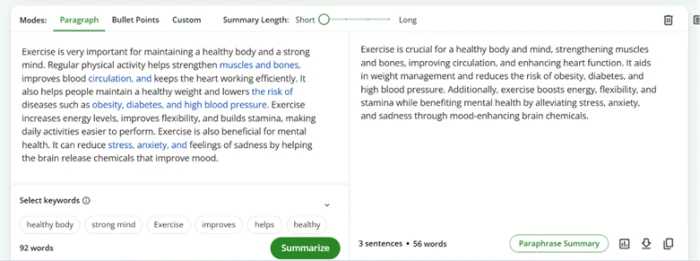
Summarize a paragraph and chain it back in
The summarizer condenses a passage into a paragraph or bullet points, with a slider for summary length and a keyword picker.
It also has a "Paraphrase Summary" button that pipes the output straight into the paraphraser, so you can shorten and reword in a single pass.
Hit the Formal mode wall
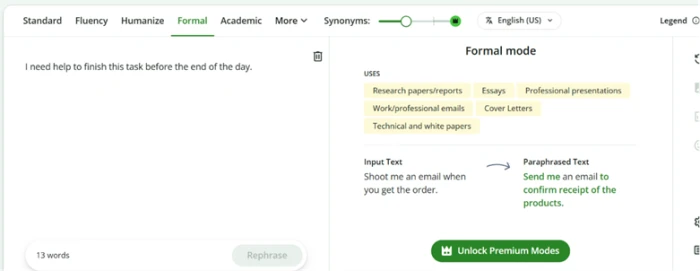
QuillBot ships nine paraphrase modes, but the free tier only unlocks two: Standard and Fluency.
I tried running a plain sentence through Formal mode to see how far it would shift the tone. It never processed my text.
"I need help to finish this task before the end of the day."
Test meaning on a conditional, then a nested clause
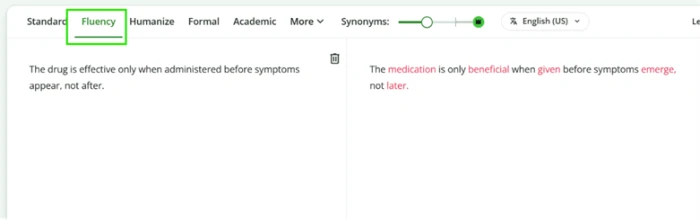
Conditional and exception sentences are where paraphrasers usually lose precision, so I ran two through Fluency mode.
The first was a simple restriction, and the rewrite held it cleanly.
"The drug is effective only when administered before symptoms appear, not after."
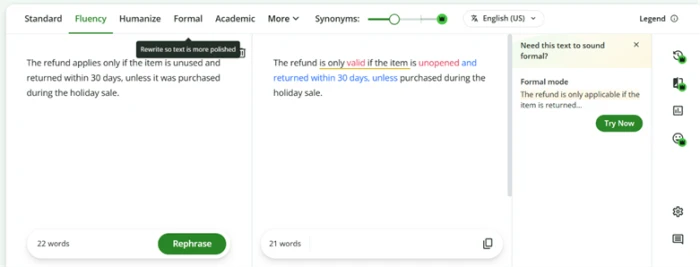
Then I added a nested exception clause, and the rewrite slipped in a way most users would not catch.
"The refund applies only if the item is unused and returned within 30 days, unless it was purchased during the holiday sale."
Run into the word cap and the blurred plagiarism score
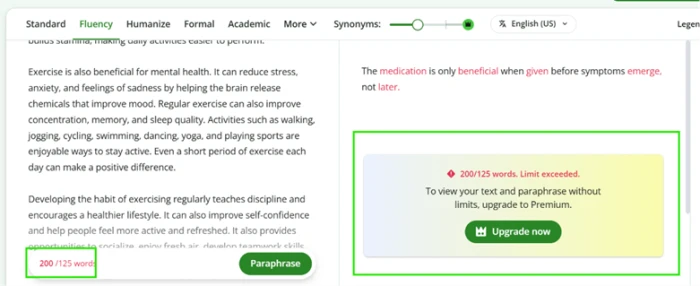
The paraphraser caps free input at 125 words. This is the ceiling that shapes the whole free experience.
I pasted a 200-word passage to see whether it would trim or partly process. It did neither.
The plagiarism checker does the same thing with one extra twist: it finishes the work, then hides the answer.
QuillBot pricing
Figures taken from the official QuillBot premium and upgrade pages.
| Plan | Price | What's included |
|---|---|---|
| Free | $0 | Paraphrase up to 125 words in 2 modes · basic grammar · humanize 125 words, 6 uses/day · 1,200-word summaries · limited AI Detector · plagiarism result blurred |
| Premium Popular | $8.33 /mo | Unlimited paraphrasing · 9 modes plus custom modes · advanced grammar · full AI Detector · plagiarism 25,000 words/mo · 6,000-word summaries · full humanizer |
| Team Plan | Contact sales | Everything in Premium · team usage metrics · user management dashboard · centralized billing · data control · priority support |
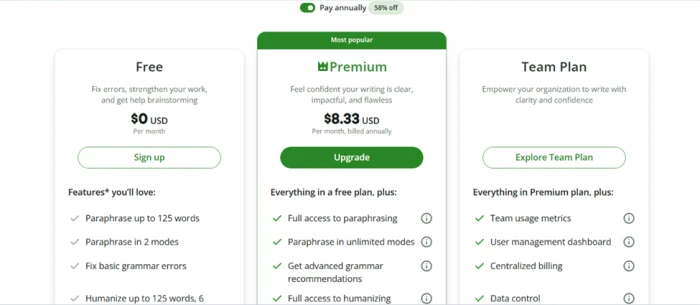
The $8.33 Premium rate is the annual price. The default monthly plan costs more, and the "58% off" applies only when you commit to a year up front.
Pros & cons
Specific conclusions from testing and real user reviews, not generic filler.
✅ Pros
- Standard mode cut a 25-word bloated sentence to 16 without losing meaning
- Word-level synonym menu lets you swap one word, not the whole line
- Summarizer held all core claims condensing 92 words to 56
- Color-coded changes show exactly what the rewrite touched
- Works across Chrome, Edge, Safari, Word, iOS and Android
- Fluency mode preserved a simple conditional restriction intact
⛔ Cons
- Grammar checker caught only 1 of 3 errors in one sentence
- Fluency mode silently swapped "unused" for "unopened" in a refund clause
- Free paraphraser is a hard 125-word wall, no partial run
- Plagiarism scan completes then blurs the score behind an upgrade
- AI Detector reports false positives and scores that shift between runs
- Auto-renew and refund disputes dominate PissedConsumer and BBB filings
- Formal mode is a locked demo, not a limited free version
Synthesized from real reviews on Trustpilot, Capterra, Google Play, PissedConsumer & BBB · paraphrased, not quoted
QuillBot scorecard
Rated against what an AI writing and paraphrasing suite is actually built to do.
| Dimension | Verdict | Score |
|---|---|---|
| Paraphrase quality Fluency and word choice of rewrites | Good |
7.5
|
| Grammar checker accuracy Catching real errors in a pass | Average |
5.5
|
| Summarizer Compression without losing claims | Good |
7.5
|
| AI detector reliability Consistency and false-positive rate | Average |
5.0
|
| Meaning preservation Holding precise terms under pressure | Average |
6.5
|
| Free tier value How usable the unpaid plan is | Average |
4.5
|
| Feature breadth Range of tools in the suite | Excellent |
8.5
|
| Ease of use Interface, clarity, learning curve | Excellent |
8.5
|
| Pricing & billing transparency Clarity of plans, renewals, refunds | Average |
4.0
|
| Multi-platform integration Extensions, apps, add-ins | Good |
8.0
|
| Scrutool Score Equal-weight average of all 10 dimensions |
6.5
|
What users say about QuillBot
The themes reviewers raise most often, by share of analysed reviews.
% = share of analysed reviews mentioning each theme (Trustpilot, Capterra, Google Play, PissedConsumer, BBB)
A strong rewrite-and-polish workspace, as long as you do not lean on the detector or the free plan
QuillBot is at its best when you already have a draft and want to reshape it. The paraphraser rewrites cleanly and its word-level synonym menu is the detail that keeps people loyal, the summarizer compressed 92 words to 56 without dropping a claim, and the whole suite is easy to learn and reaches you through browser and Word add-ins. The weaker spots are real and consistent: the grammar checker caught one error in three, Fluency mode quietly turned "unused" into "unopened" in a refund clause, the AI detector produces false positives and shifting scores, and the free tier is a 125-word wall with a plagiarism result it calculates and then blurs. Billing draws the harshest reviews, with auto-renew and refund disputes filling PissedConsumer and BBB. Students and working writers polishing everyday text will get their money's worth from Premium. Anyone who needs precise legal or medical rewrites, or a trustworthy originality check, should treat its output as a first pass and verify elsewhere.
Discussion
Join the discussion and share your perspective.