
Remaker AI
Remaker AI is a credit-based web suite for AI face swap, image generation and photo editing. Strong on swaps and generated images, weaker on its enhancer, gated video tools and crypto-only checkout.

Genuinely good image generation and face swapping, undercut by a weak enhancer, gated video tools and a checkout that only takes crypto and Telegram.
Should you use Remaker AI?
Casual creators and social content who want quick, clean face swaps and text-to-image results without installing anything or committing to a subscription.
You need real photo upscaling or reliable video face swap. The enhancer only smooths, and video is locked behind VIP.
Free credits get you a few images. Real use means buying a pack, and the cheapest is $5.99 for 200 credits .
Checkout only accepts Card via Telegram and crypto . There is no standard card processor at the web payment screen.
What is Remaker AI?
Nothing here runs on a monthly subscription. Remaker AI is a browser-based bundle of AI image tools that all draw from one pool of credits: you buy a pack once, spend credits per action, and the credits do not expire. A single generated image costs two credits, the photo enhancer costs three per pass, and HD video face swap runs four credits per second. That meter is the thing you watch, because it moves faster than the pricing suggests.
The toolkit spans face swap (single, multiple and batch), a text-to-image generator, a photo enhancer, background removal, upscaling and video face swap, with iOS and Android apps alongside the web version. Face swapping is what put the platform on the map and is still its strongest output. What defines the current version, though, is less the tools and more the changes around them: registration in Anguilla, a web checkout that pivoted to crypto and Telegram in 2026, and a Trustpilot profile the company has never claimed.
Key features & how they perform
Each feature rated from hands-on testing and aggregated review sentiment.
AI image generator
Text-to-image with style presets and resolution options. My test prompt came back sharp and on target at two credits per image.
Photo face swap
Single, multiple and batch modes. Blends inherit the original hair, lighting and pose without the seams cheaper tools leave behind.
Photo enhancer
Labelled as an enhancer but mostly applies smoothing. In testing it stripped fine texture rather than adding real detail, at three credits a pass.
Video & GIF face swap
Presents as ready to use, then gates HD swaps behind VIP at four credits per second for up to 30 minutes of footage.
Background remover & upscaler
Batch background removal is a genuine strength for product shots; upscaling is more modest and over-smooths larger images.
Credits & checkout
Credits never expire, which is fair, but the web checkout only offers Card via Telegram and crypto, with no standard processor at the payment screen.
Feature ratings blended from Trustpilot, G2, App Store & independent review patterns + hands-on testing.
Watching the credit meter across five Remaker tools
Image generation, face swap, the enhancer, gated video, and a checkout that raised an eyebrow.
Generate an image and count the credits
The AI Image Generator takes a text prompt, a model choice and a resolution, with style presets running along the bottom. It is the tool I trusted most going in, so I started here.
The point of this step was not just the picture. I wanted to know what one generation actually costs, so I noted the credit balance before pressing generate.
"A golden retriever wearing sunglasses sitting on a beach at sunset, photorealistic, warm lighting"
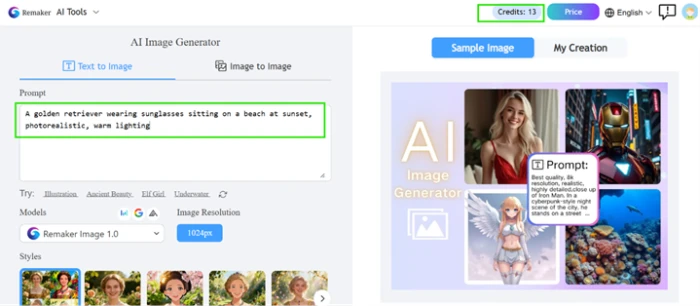
One click later the balance had dropped by two, which pins a single image at two credits. The output showed up in the My Creation tab almost immediately.
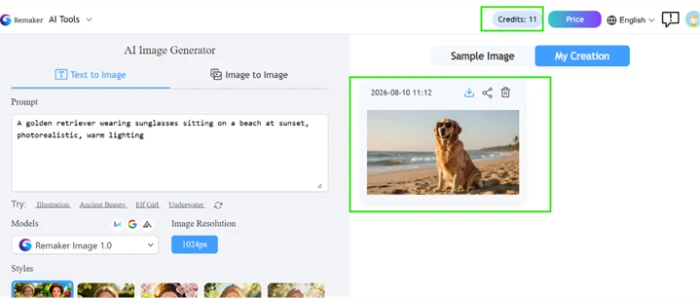
Look at the actual output
A cheap credit cost means nothing if the image is mush, so this is the part that decides whether the generator is worth using at all.
This is where Remaker earns real praise. The fur carries genuine texture, the sunglasses sit correctly on the dog's face, and the sunset light reads naturally across sand and water.

Run a single-face swap
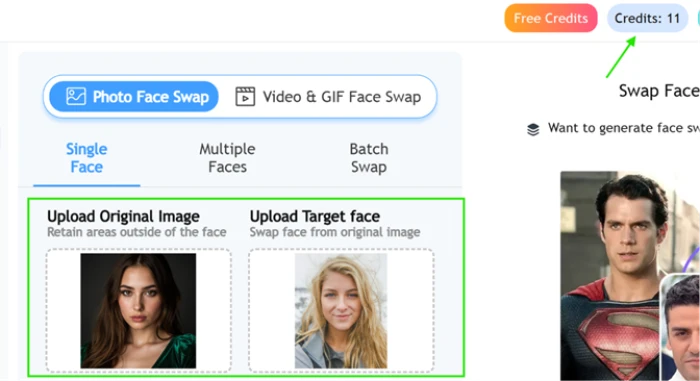
Face swap is the feature that built Remaker's name, so it was next. Single Face mode keeps the layout simple: original image on the left, the face you want on the right.
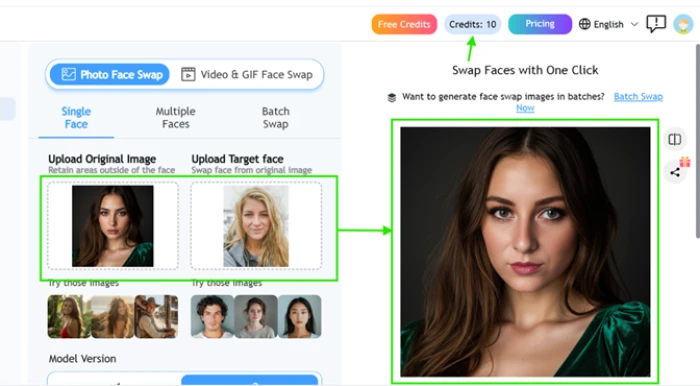
The tool is meant to leave everything outside the face untouched, which is the whole test. A good swap keeps the original hair, lighting and pose and only changes the identity.
The returned image held up. The new face inherited the original's hair and lighting without the seams or color mismatches cheaper tools leave behind.
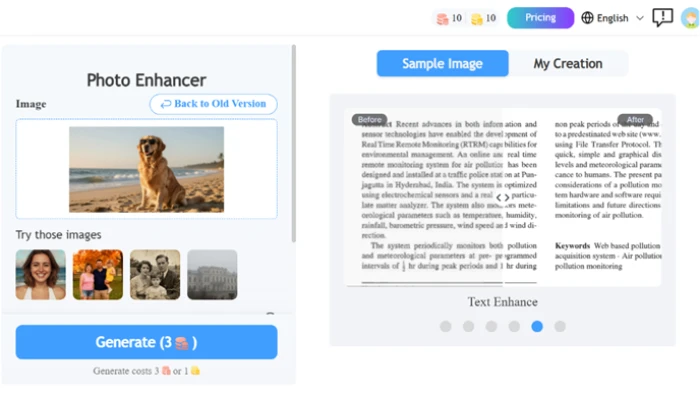
Push the generated dog through the Photo Enhancer
The Photo Enhancer promises to improve an existing image, and it charges three credits per pass to do it. I fed it the dog image I had just generated so I had a clean sharp source to judge against.
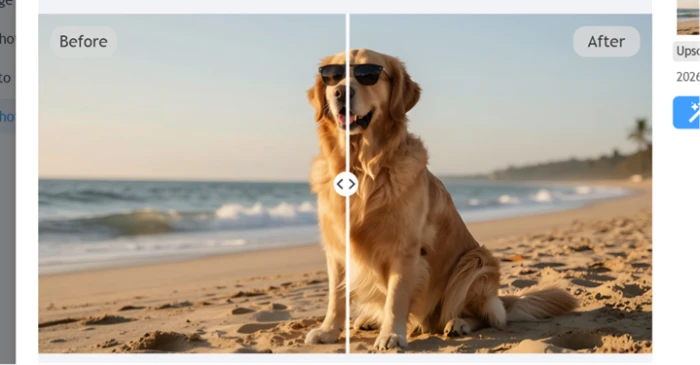
An enhancer should add resolution or recover fine detail. That is the bar, and it is a bar this tool did not clear.
The before and after slider told the real story. The after version mostly added a layer of smoothing.
Set up a video face swap, then hit the VIP wall
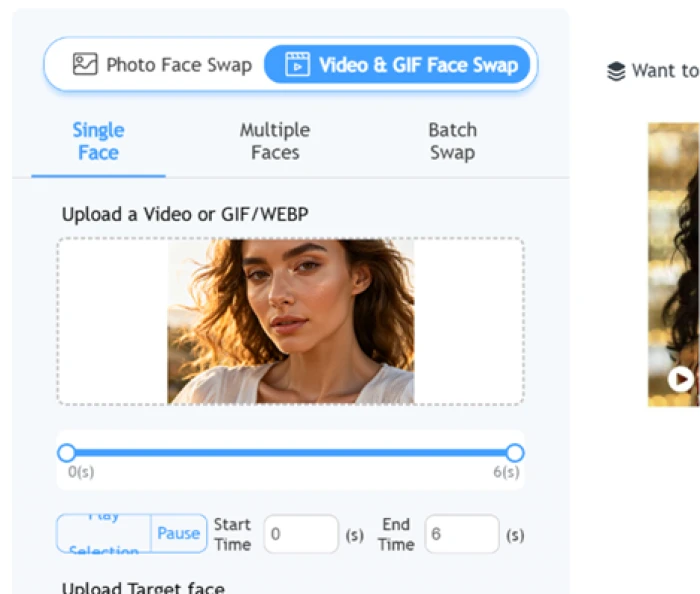
The Video and GIF Face Swap tab looked like a straight upgrade of the photo swap. I uploaded a short clip, trimmed the segment I wanted with the start and end sliders, and got ready to run it.
The setup screen gives no sign that anything is locked. Every control is live right up to the moment you press go.
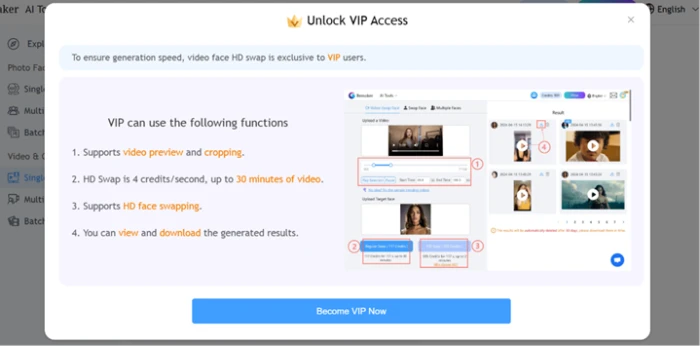
That is where the paywall appeared. HD video face swap is exclusive to VIP, billed at four credits per second for up to thirty minutes of footage.
Open the Buy Credits screen
To understand the pricing I opened the Buy Credits panel, expecting a normal card checkout given the homepage lists Google Pay, Apple Pay and Stripe.
The payment options gave me pause. The only two methods offered were Card via Telegram and Crypto.
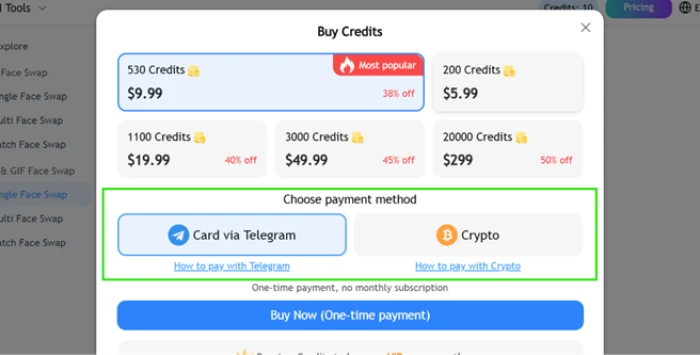
Remaker AI pricing
Figures taken from the Remaker Buy Credits screen captured during testing.
| Pack | Price | What's included |
|---|---|---|
| 200 Credits | $5.99 | Entry pack · roughly 100 image generations · credits never expire · one-time payment |
| 530 Credits Popular | $9.99 | Marked "Most popular", 38% off · unlocks VIP video face swap · credits never expire |
| 1,100 Credits | $19.99 | 40% off · mid pack for regular face swap and enhancer use |
| 3,000 Credits | $49.99 | 45% off · suited to heavier video work at 4 credits/second |
| 20,000 Credits | $299 | 50% off · bulk pack, lowest cost per credit |
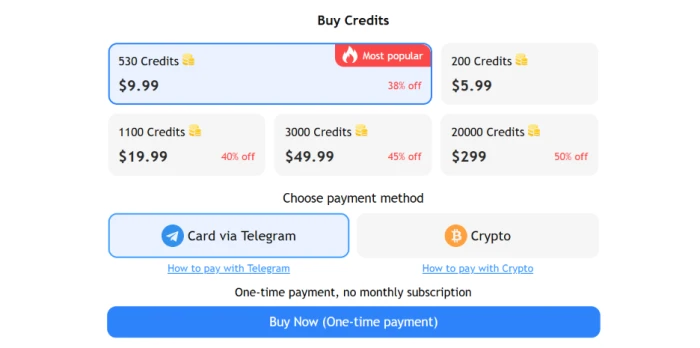
The Buy Credits panel, showing all five packs and the two payment methods.
Pros & cons
Specific conclusions from testing and real user reviews, not generic filler.
✅ Pros
- Single face swap blends hair and lighting with no visible seams
- Image generation nailed the test prompt at two credits per image
- Results return in seconds with no watermark on export
- Purchased credits never expire, unlike subscription time limits
- Batch background removal is a real strength for product shots
- Tools open in-browser with free signup credits, no card required
⛔ Cons
- Photo Enhancer only smooths, stripping fur detail at 3 credits a pass
- HD video face swap gated behind VIP at 4 credits per second
- Web checkout only accepts Card via Telegram and crypto
- Trustpilot sits near 2.5/5 with an unclaimed company profile
- Documented Dec 2025 site outage and slow billing support
- Registered in Anguilla with private WHOIS records
- Credit meter drains fast enough to empty a pack in one afternoon
Synthesized from real reviews on Trustpilot, G2, the App Store, ScamAdviser & independent 2026 tests · paraphrased, not quoted
Remaker AI scorecard
Rated against what a credit-based AI image and face-swap suite is actually built to do.
| Dimension | Verdict | Score |
|---|---|---|
| Face swap quality Blend, seams, likeness retention | Excellent |
8.5
|
| Image generation quality Detail, realism, output usability | Good |
8.0
|
| Prompt adherence Matching the text you type | Good |
7.5
|
| Photo enhancer / upscaling Real detail gain vs smoothing | Weak |
4.5
|
| Feature breadth Range of tools under one roof | Good |
7.5
|
| Ease of use Signup, layout, speed to result | Good |
7.5
|
| Value vs credit burn What credits actually buy | Average |
5.5
|
| Payment trust & transparency Checkout methods, processor, disclosure | Weak |
3.5
|
| Reliability & support Uptime and billing response | Weak |
4.5
|
| Privacy & safety File handling, deepfake safeguards | Average |
5.5
|
| Scrutool Score Equal-weight average of all 10 dimensions |
6.3
|
What users say about Remaker AI
The themes reviewers raise most often, by share of analysed reviews.
% = share of analysed reviews mentioning each theme (Trustpilot, G2, App Store, ScamAdviser, independent 2026 tests)
Strong at what it is known for, shaky everywhere the money changes hands
Remaker AI does two things genuinely well. Face swaps come back clean, inheriting the original hair and lighting without seams, and the image generator handled my test prompt accurately at two credits a shot. If that is all you need, the free signup credits let you confirm the quality before spending anything. The problems cluster around everything else: the Photo Enhancer only smooths and can strip real detail, HD video face swap hides behind a VIP wall you only see after setup, and the credit meter empties faster than the packs suggest. Then there is the checkout, which offers only Card via Telegram and crypto despite a homepage promising Stripe and Apple Pay, on a site registered in Anguilla with an unclaimed Trustpilot profile and a documented outage history. Casual creators who want quick photo swaps and can buy a small pack will get real value. Anyone spending meaningfully, or relying on video, support or a normal card checkout, should treat it with caution.
Discussion
Join the discussion and share your perspective.