Rytr AI
Rytr is a budget AI writing assistant with 40+ copywriting templates and unlimited generation from $9 a month. Fast and fluent on short form, thin on everything around it.

The cheapest unlimited AI writer on the market, fluent and fast, but it writes about your category rather than your product and the workspace around it is bare.
Should you use Rytr?
High-volume short-form work : ad copy, product descriptions, meta titles and outlines, where a fast first draft matters more than a finished one.
You need publishable long-form articles . Reviewers across G2, Capterra and Trustpilot agree output goes repetitive past roughly 300 to 500 words.
The free 10,000 characters is a trial, not a plan. Real use starts at $9/mo for unlimited , or $7.50/mo if you commit to a year.
Drafts come back generic about your category , not specific to your product. Expect to add every name, number and place yourself.
What is Rytr?
Rytr publishes comparison pages against ChatGPT, Jasper, Copy.ai and Grammarly, which tells you exactly where it wants to sit. It is the budget answer to Jasper: 40 plus fill-in-the-blank templates for ads, emails, product descriptions and blog outlines, more than 20 preset tones, and a Chrome extension that drops the same generator into any text field. Unlimited generation costs $9 a month, roughly a fifth of what the marketing-suite tools charge.
The trade for that price is scope. There is no SERP analysis, no research step, no document workflow beyond a single editor pane, and export is HTML or nothing. It is a browser tool aimed at freelancers, small businesses and solo marketers producing short pieces at volume, and it works best when you already know what you want to say and need it typed faster. One piece of history is worth knowing: the FTC sued Rytr in 2024 over a Testimonial and Review generator, and the resulting order was reopened and set aside in December 2025.
Key features & how they perform
Each feature rated from hands-on testing and aggregated review sentiment.
40+ use case templates
Covers ad copy, emails, SEO titles, blog outlines and review replies. Outlines and single paragraphs are where the structure clearly pays off.
Chrome extension
Puts the generator inside Gmail, LinkedIn and any text box on the web, which removes the copy-and-paste round trip for short messages.
Multilingual generation
Output in other languages reads naturally rather than translated, though the full 35 plus language set is reserved for the highest tier.
My Voice tone matching
Trains a custom voice from a writing sample. More useful than the preset tone dropdown, which shifts vocabulary without changing structure.
Built-in plagiarism checks
Saves a separate subscription for anyone publishing marketing copy, but the allowance is metered monthly and absent entirely from the free plan.
Editor & export
A single document pane with no length control and one export format. No Zapier connector, no WordPress plugin, no PDF.
Feature ratings blended from G2, Capterra, Trustpilot & AppSumo review patterns + hands-on testing.
Four documents, one fake lunch brand, and 8,619 characters
A single free-plan session run against one control brief, so every output stays comparable.
Ad copy, run twice, with only the tone changed
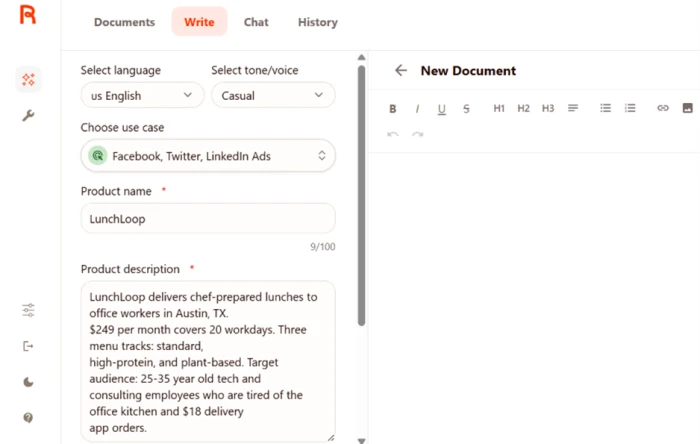
The Facebook, Twitter, LinkedIn Ads template asks for two things: a product name capped at 100 characters, and a product description.
Language and tone sit above the use case picker as separate dropdowns, so you can rerun the same brief on a different tone without retyping anything.
The control brief was a fictional lunch subscription with a name, a city, a price and a target audience, which is more detail than most people give these fields.
"LunchLoop delivers chef-prepared lunches to office workers in Austin, TX. $249 per month covers 20 workdays. Three menu tracks: standard, high-protein, and plant-based. Target audience: 25-35 year old tech and consulting employees who are tired of the office kitchen and $18 delivery app orders."
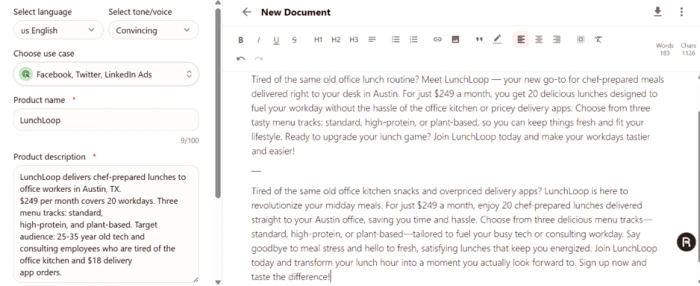
The second run used the identical description with the tone switched from Casual to Convincing. Both landed in the same document, one after the other.
Where the templates actually earn their keep
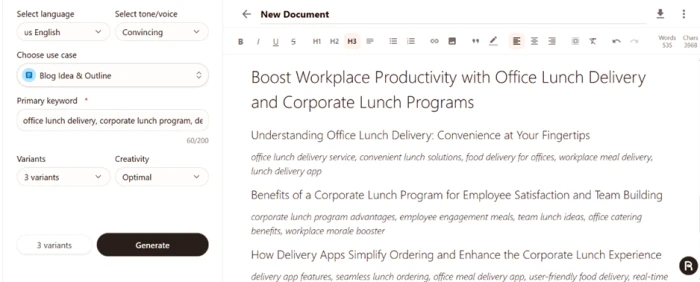
The Blog Idea & Outline template takes a single field marked Primary keyword, plus a variant count and a creativity setting.
The field accepted four comma-separated keywords with no warning, despite the singular label and a 200 character counter.
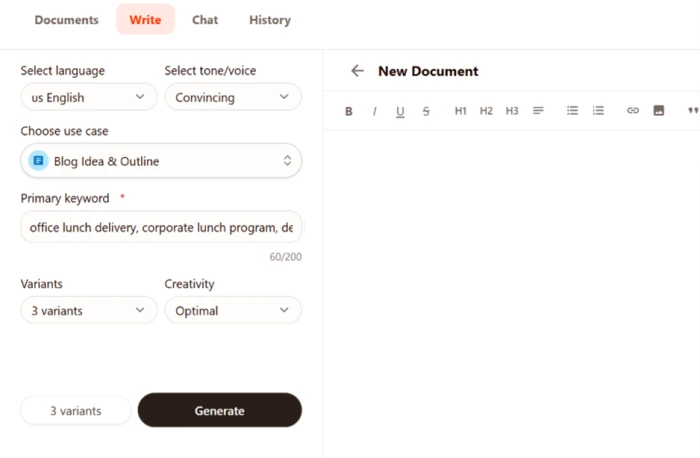
Three variants was the setting. All three arrived stacked into one continuous document rather than a comparison panel, so reading them against each other means scrolling.
Checking it on numbers I could verify
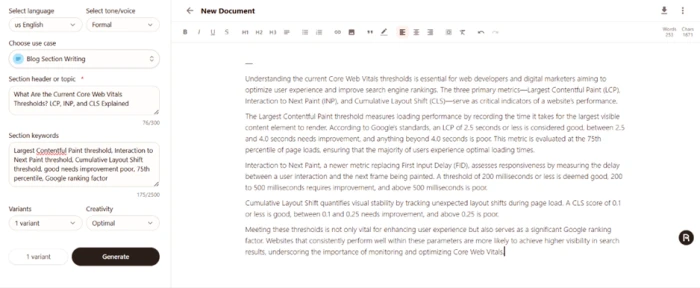
Plenty of reviews assert that Rytr invents facts on technical material without showing the evidence.
Core Web Vitals is a good test because every threshold is published by Google and takes 30 seconds to check. The Blog Section Writing template takes a section header plus optional keywords.
"What Are the Current Core Web Vitals Thresholds? LCP, INP, and CLS Explained"
Switching the language to French
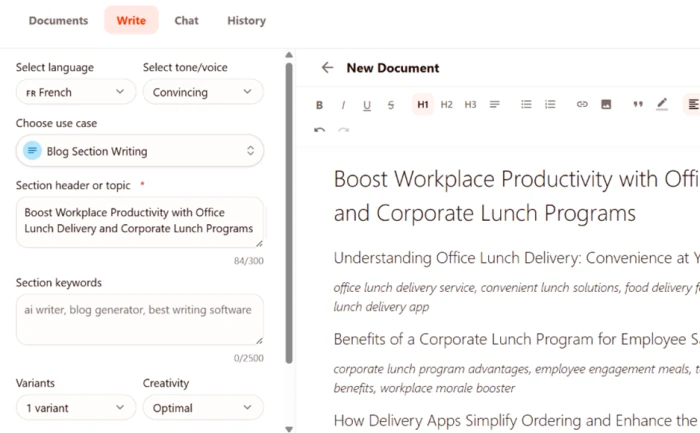
Language is a dropdown at the top of the panel, applied per generation rather than per account, so you can move between languages inside one document.
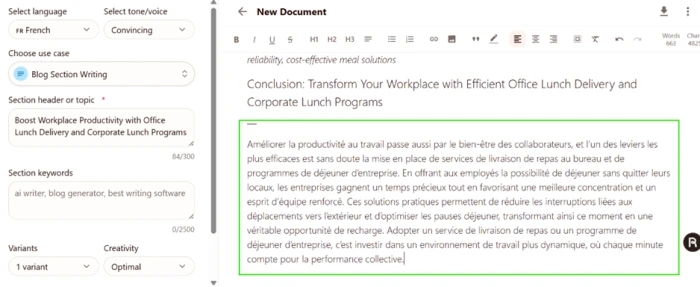
This ran on the free plan, which matters, because Rytr's own pricing table lists the free and mid tiers as single language.
The input was an English section heading lifted straight from the outline generated earlier.
The generated paragraph appended below the English outline in the same document.
What the editor does not give you
The generation quality was better than expected. The workspace around it was thinner than expected.
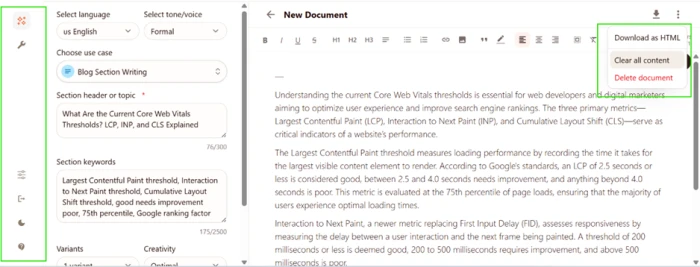
There is no target length control anywhere in the panel. No word count field, no character cap, no short or long toggle. On a product billed by character consumption, that is an awkward pairing.
The document menu is the other surprise, and the screenshot below has it open alongside the full sidebar.
Burning 86 percent of the month in one sitting
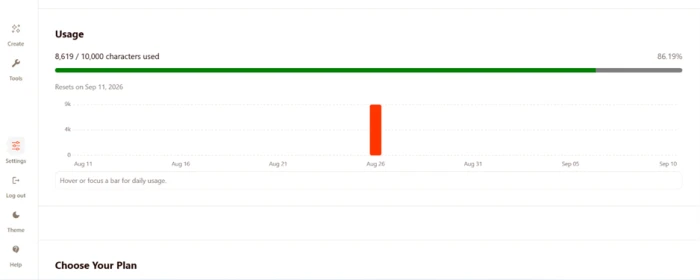
The usage panel lives under Settings and shows a running total against the monthly allowance plus a daily bar chart.
Four documents went into that total: two ad variations, one outline at three variants, one French section, one technical section in English.
Rytr pricing
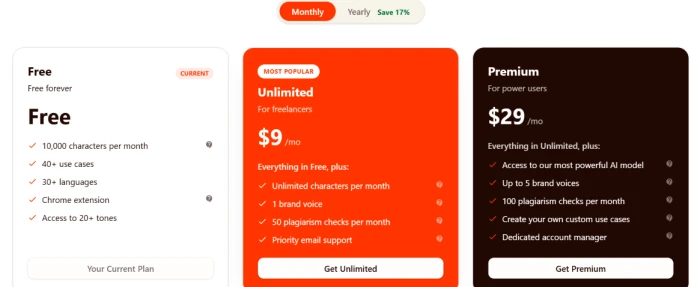
Figures taken from the official Rytr pricing page and the in-app plan panel.
| Plan | Price | What's included |
|---|---|---|
| Free | $0 | 10,000 characters per month · 40+ use cases · 20+ preset tones · Chrome extension · no tone matching · no plagiarism checks |
| Unlimited Popular | $9 /mo | Unlimited generation · 1 custom brand voice · 50 plagiarism checks per month · doubled character input limit · priority email support. $7.50/mo billed yearly ($90) |
| Premium | $29 /mo | Everything in Unlimited · access to the most capable model · up to 5 brand voices · 100 plagiarism checks · 35+ languages · custom use cases · account manager. $24.16/mo billed yearly ($289.92) |
| API | Usage based | 10,000 free API credits to start · pay only for what you use · no contract · documentation published on GitHub |
Pros & cons
Specific conclusions from testing and real user reviews, not generic filler.
✅ Pros
- 40+ templates spanning ad copy, emails, SEO titles and outlines
- Chrome extension generates inside Gmail, LinkedIn and any text field
- Most generations return in 2 to 5 seconds
- My Voice trains a custom tone from a sample of your writing
- Public API with GitHub documentation and usage-based billing
- Plagiarism checking is built in rather than a separate subscription
- Top tier covers 35+ languages for multilingual content teams
⛔ Cons
- Long-form output turns repetitive past roughly 300 to 500 words
- No Zapier connector, WordPress plugin or PDF export
- Reviewers report the underlying model trails current frontier engines
- Output is reliably flagged by AI detection tools before publication
- No SERP analysis step, so nothing grounds the SEO output
- Users report rewriting nearly every draft to add product specifics
- Capterra customer service sub-score sits at 4.0, its weakest category
- Trustpilot reviewers report charges landing after they cancelled
Synthesized from real reviews on G2, Capterra, Trustpilot, AppSumo & Product Hunt · paraphrased, not quoted
Rytr scorecard
Rated against what a template-driven AI copywriting tool is actually built to do.
| Dimension | Verdict | Score |
|---|---|---|
| Template range & coverage Breadth and usefulness of use cases | Good |
8.0
|
| Multilingual output quality Fluency outside English | Good |
8.0
|
| Value for money Output volume against plan cost | Good |
8.0
|
| Short-form copy quality Ads, emails, product descriptions | Good |
7.5
|
| Factual accuracy Verifiable claims on technical topics | Good |
7.0
|
| Tone control effectiveness How much a tone switch changes output | Average |
5.5
|
| Free tier usefulness What the allowance actually buys | Weak |
5.0
|
| Long-form coherence Holding quality past a few paragraphs | Weak |
4.5
|
| Brief adherence & specificity Using the details you supplied | Weak |
4.0
|
| Editor & export tooling Length control, formats, integrations | Weak |
3.5
|
| Scrutool Score Equal-weight average of all 10 dimensions |
6.1
|
What users say about Rytr
The themes reviewers raise most often, by share of analysed reviews.
% = share of analysed reviews mentioning each theme (G2, Capterra, Trustpilot, AppSumo, Product Hunt)
Fluent about your category, silent about your product
Rytr is better than its reputation on the things people assume it fails at, and worse than its price suggests on the things nobody checks. It got every Core Web Vitals threshold right, produced French a native speaker would accept, and turned four keywords into a blog outline good enough for a content calendar. Then the same session produced ad copy that read identically on two different tones, and a French section that never once named the product, the city or the price it had been given. That is the pattern: competent writing about your category, not about your business. Everything around the generator is thin, from the missing length control to HTML being the only way out of the editor, and the free 10,000 characters vanished in a single afternoon. Freelancers and small teams grinding out product descriptions, meta titles and captions at volume will find nothing cheaper that works this reliably. Anyone publishing long articles, or expecting a draft that already sounds like their brand, is buying the wrong tool.
Discussion
Join the discussion and share your perspective.