
Sapling AI
Sapling is an AI writing assistant that bundles a grammar checker, autocomplete and an AI content detector across Gmail, Slack, helpdesks and an API. The writing tools are strong; the detector flags human text as AI too often to trust.

A capable grammar checker and cross-app writing assistant, undercut by an AI detector that brands genuine human writing as machine-made.
Should you use Sapling?
Support and sales teams who want autocomplete, snippets and grammar help inside Gmail, Slack and their helpdesk.
You need a trustworthy AI detector to decide whether writing is human or machine. The false-positive rate makes that unsafe.
Grammar and detection are usable free. Full writing features start at Pro, $12/mo billed yearly , or $25 month to month.
The detector flags human writing as AI , and its headline percentage can contradict its own per-sentence scores.
Key features & how they perform
Each feature rated from hands-on testing and aggregated review sentiment.
Grammar & spelling checker
Flags errors as you type and offers one-click fixes. In testing it caught every planted mistake and suggested a single clean correction, not a guess.
AI content detector
Scores text with a per-sentence breakdown, but the summary figure can mislead and it labels human writing as AI far too often.
Autocomplete Everywhere
Predicts the rest of your sentence in almost any web text field. Reviewers credit it with faster, cleaner typing across the apps they use daily.
Rephrase & tone control
Rewrites a sentence and shifts its tone on demand, useful for tightening support replies and softening or formalising an email.
Snippets text expander
A shared, searchable library of macros that drops canned replies and templates into any field with a short trigger.
Integrations & reach
One extension adds suggestions in Gmail, Microsoft 365, Slack and LinkedIn, plus helpdesk and CRM tools like Zendesk and Salesforce, backed by an API.
Feature ratings blended from G2, Trustpilot & hands-on testing.
Four planted errors and a 2016 essay: what Sapling flagged
A rigged grammar test, an obvious AI sample, and one human essay older than modern AI, run through the free tools with no sign-up.
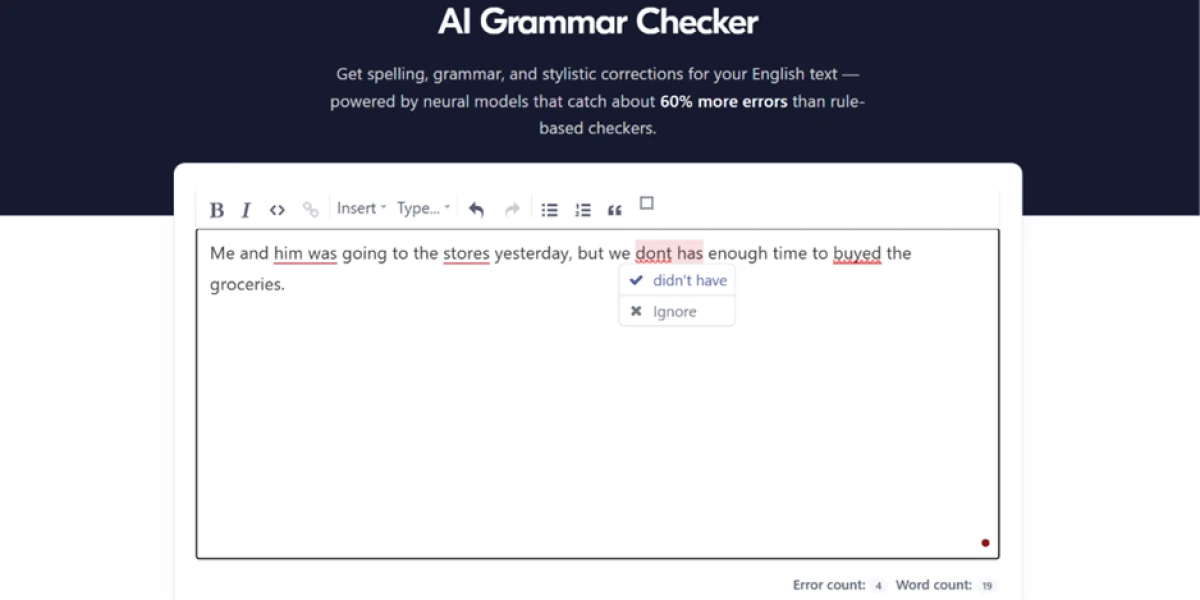
One sentence, four deliberate mistakes
The grammar checker sits on Sapling's own page and runs without a login. A clean typo test proves nothing, so instead of a single slip I wrote one sentence and packed four separate errors into it.
The point was to see whether it would catch all four in one pass, count them correctly, and offer a real fix rather than a half-correction that leaves you guessing.
"Me and him was going to the stores yesterday, but we dont has enough time to buyed the groceries."
Feeding the detector copy I knew was machine-made
The detector was the part I most wanted to stress. The first question was simple: does it spot plain AI writing? I generated a sample in ChatGPT and pasted it straight in.
"Write 120 words of generic marketing copy about cloud storage"
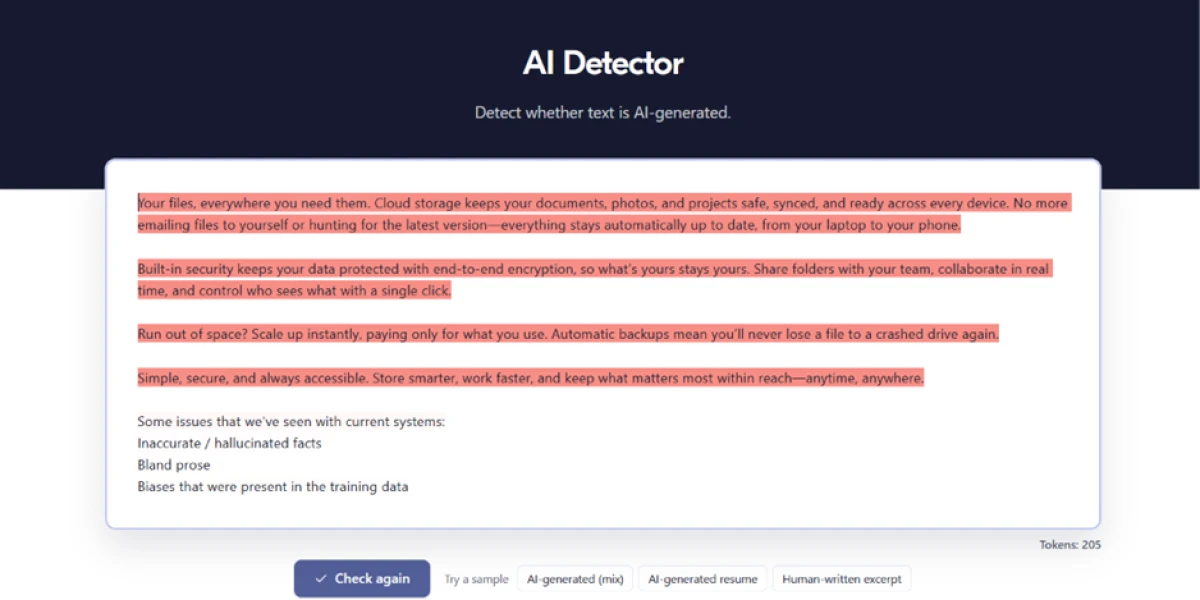
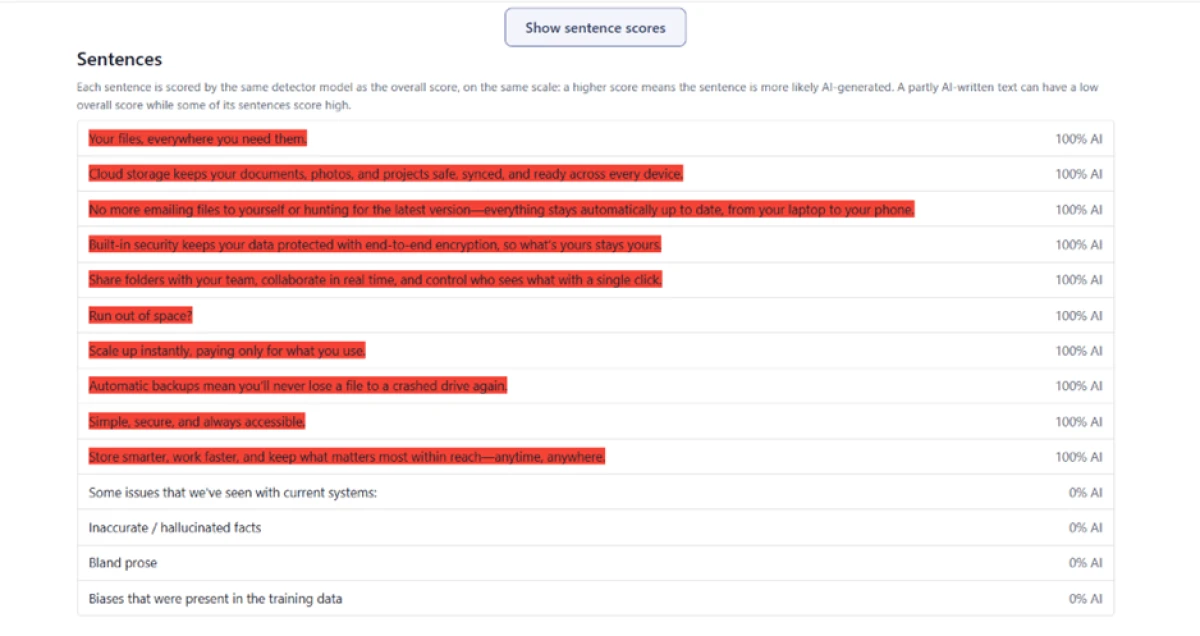
Every sentence of the marketing copy came back highlighted in red, with a token count of 205. The headline number, though, told a different story.

The overall score read 31.9% with the label "Mixed: one passage is likely AI-generated." That looked off for text this obviously machine-made, so I clicked "Show sentence scores" to see where the gap came from.
A human essay from 2016, rated 99.2% AI
A detector's real test is not whether it catches AI. It is whether it leaves human writing untouched. So instead of a paste, I fed it a web page: the URL of a James Clear article, published in 2016 and last updated in 2018.
ChatGPT reached the public in late 2022. An essay that has been online since 2016 could not have been produced by the tools this detector is built to catch. The free version read only the first 2,000 characters, which the banner above the result confirms.

Sapling pricing
Figures taken from the official Sapling pricing page.
| Plan | Price | What's included |
|---|---|---|
| Free | $0 | Basic writing suggestions · AI detector 2,000 characters per check, 5 files per batch · 20 snippets · free domains only · no email or ticket support |
| Pro Popular | $12 /mo | Billed yearly ($25 month to month) · advanced suggestions · Autocomplete Everywhere · Rephrase · detector 100,000 characters per check · unlimited snippets · premium domains · email & ticket support |
| API | Metered | Per-character billing with a one-time $5 minimum · up to 200,000 characters per request · JSON responses, no shareable link · same detector model as Pro |
| Enterprise | Let's talk | Everything in Pro · Chat Assist · custom integrations · self-hosting · team analytics · SSO/SCIM · dedicated support · from 10 seats at $15/seat/mo |
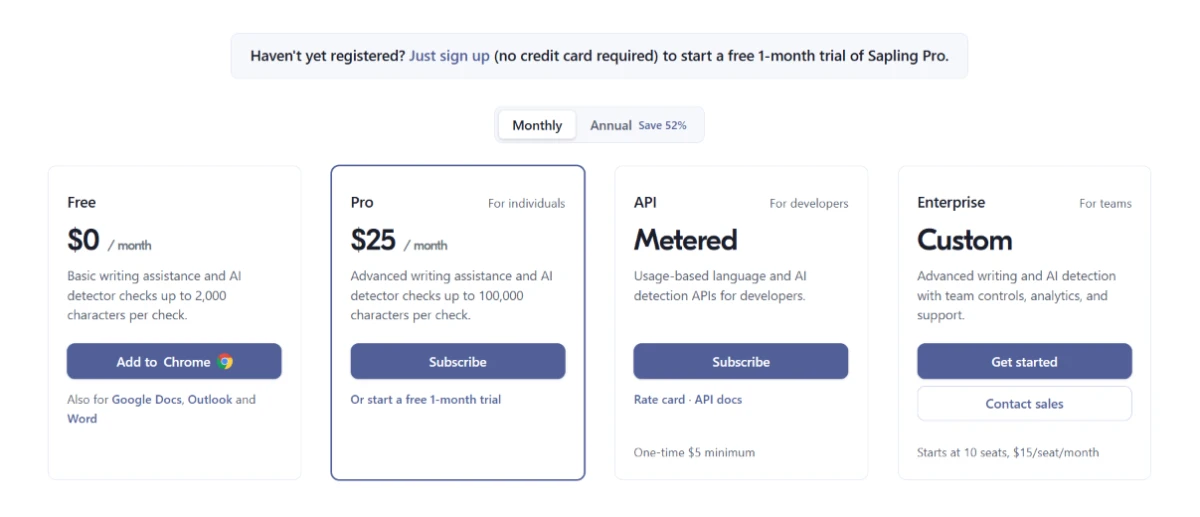
Pricing is accurate as of 4 November 2026 and was captured from the official Sapling website. Plans, prices and character limits change often, so check the official Sapling pricing page for the current figures before you subscribe.
Pros & cons
What real users repeatedly praise and complain about, not generic filler.
✅ Pros
- Autocompletes web text fields; reviewers say it made them faster typists
- One install adds suggestions in Gmail, Microsoft 365, Slack and LinkedIn
- Switchers from Grammarly say it catches more and trims wordiness
- Shared snippet macros speed up repetitive replies across apps
- Suggestions let writers shift between several tones on demand
- Works as a second proofreader that steadies outgoing emails
⛔ Cons
- Detector brands genuine human writing as AI, its top 1-star complaint
- One writer's AI-free manuscript was flagged while rival tools read 0 to 14%
- Users report clean human text scoring higher AI than sloppy text
- Integration with some third-party platforms still needs polishing
- A reviewer reports heavy memory use that slows the browser down
Synthesized from real reviews on G2 & Trustpilot · paraphrased, not quoted
Sapling alternatives
| SaplingReviewed | Pangram AI | Detect AI | |
|---|---|---|---|
| Our Score | 6.4/10 | 7.2/10 | 4.2/10 |
| Free check limit | 2,000 characters per check | About 2,000 words a day, no login | 500 words per check |
| Entry paid plan | $12 / mo, billed yearly | $20 / mo, billed yearly | $15.99 / mo, billed yearly |
| What else it does | Grammar, autocomplete, rephrase, snippets | Also scans images for AI | AI humanizer and content generator |
| Reported accuracy | Weak, false positives common | Lowest verified false-positive rate | Rated weak overall |
| Best for | Writing help with detection on the side | Accuracy-critical AI checks | Cheap detect-and-rewrite |
Who Should Use Sapling, and Who Should Avoid It?
Sapling is strong at writing and proofreading across the apps you already use, but its AI detector is the wrong tool for any decision that rests on one verdict.
Who Should Use Sapling?
Best suited for these workflows
Customer Support & Sales Teams
Autocomplete, snippets and tone suggestions sit right inside helpdesks and CRMs, cutting the time spent drafting repetitive replies.
Professionals Polishing Everyday Writing
Grammar and spelling help follows you across Gmail, Slack and LinkedIn, acting as a quiet second proofreader on outgoing messages.
Developers Building Language Features
The API and SDK expose grammar, rephrase and detection endpoints, with self-hosting and PII redaction for regulated products.
Teams That Need Admin Controls
Enterprise adds SSO, SCIM, team analytics and on-premise deployment for organisations with security requirements.
Who Should Avoid Sapling?
Consider an alternative if you need
A Verdict on Whether Work Is AI
Educators and editors who act on the detector risk accusing people wrongly, since it brands real human writing as machine-made.
A Score You Can Defend
Students and freelancers facing a false flag have little recourse; a confident 99% reading is hard to argue against.
One Reliable Headline Number
The summary percentage can contradict the per-sentence scores underneath it, so it cannot be read on its own.
Detection That Resists Edited AI
Reviews report it missing heavily edited or humanised AI text, so it is weak where obfuscation matters most.
Our Recommendation
Sapling is a capable writing assistant and a risky AI detector, and the two do not carry equal weight. Use it to write, proofread and reply faster across your apps, where it genuinely earns its place. Treat the detector as one weak signal only, never the final word, and before you pay, test the writing tools on your own workflow and confirm the current character limits.
Sapling scorecard
Rated against what an all-in-one writing assistant and AI detector is actually built to do.
| Dimension | Verdict | Score |
|---|---|---|
| Grammar & spelling accuracy Catching and fixing real errors | Good |
8.0
|
| Integrations & platform reach Apps, browsers and CRM coverage | Good |
8.0
|
| Team & enterprise features SSO, analytics, self-hosting | Good |
7.5
|
| Ease of use Setup, dashboard, first check | Good |
7.5
|
| Writing assistance & rephrasing Autocomplete, rephrase, tone | Good |
7.0
|
| AI detection on machine text Catching obvious AI writing | Good |
7.0
|
| Performance & reliability Speed and stability in use | Average |
6.0
|
| Free tier value What the no-cost plan covers | Average |
5.5
|
| Score reliability Headline figure vs sentence scores | Weak |
4.5
|
| False-positive safety Leaving human writing alone | Weak |
3.0
|
| Scrutool Score Equal-weight average of all 10 dimensions |
6.4
|
A sharp writing assistant shipping with a detector you cannot trust
Sapling does the writing side well. The grammar checker caught every error I threw at it, autocomplete and snippets genuinely speed up repetitive work, and the reach into Gmail, Slack, helpdesks and CRMs makes it a natural fit for support and sales teams. Reviewers who moved over from Grammarly back that up. The trouble is the feature splashed across its marketing. The AI detector catches obvious machine text line by line, yet it also stamped a human essay from 2016 as 99.2% AI and served a misleading 31.9% summary on copy that was 100% machine-made. Independent testers and one-star reviewers describe the same pattern: human writing flagged as AI, with the worst of it falling on students and freelancers who cannot fight the score. Use Sapling to write, proofread and reply faster, and it earns its keep. Lean on its detector to judge whether something is human or machine, and you are trusting a number that cannot tell the difference. Anyone who needs that verdict should reach for a detector built around accuracy instead.
Discussion
Join the discussion and share your perspective.