
SeaArt AI
An all-in-one AI art platform with a huge community model library, cloud ComfyUI and video generation. Powerful and free to start, but its token economy and billing need a careful eye.

A huge model library, browser ComfyUI and a genuinely usable free tier, undercut by a confusing token economy and billing that needs watching.
Should you use SeaArt AI?
Tinkerers, anime artists and model collectors who want community checkpoints, LoRA training and browser ComfyUI without buying a GPU.
You need dependable video or predictable billing . Clips wobble past 4 seconds, and one quote in testing hit 675 stamina.
Free gives roughly 130 stamina a day with watermarks. Clean output starts at Beginner, $5.99/mo ; higher tiers run $25.49 to $127.49.
The 3-day trial can charge hours early by SeaArt's own FAQ, and clause 8.8 makes memberships non-refundable once locked.
What is SeaArt AI?
If you ever wanted the local Stable Diffusion hobby without owning the GPU, SeaArt is that whole setup moved into a browser tab: a Civitai-style library of community checkpoints and LoRAs, ControlNet, LoRA training and a full ComfyUI node editor with nothing to install. The same prompt box also reaches the big commercial models, so Veo, Sora, Kling 3.0, Seedance 2.0 and Seedream sit one dropdown away from the anime fine-tunes.
It runs on the web, iOS and Android, and the free tier is real: a daily stamina grant, roughly 130 at the time of testing, covers about 20 watermarked images with no card on file. The economy around the tools defines the platform just as much. Two token types, balances that expire, countdown discounts on most screens, and a membership that clause 8.8 of the terms makes non-refundable once locked. Paid plans start at $5.99 a month.
Key features & how they perform
Each feature rated from hands-on testing and aggregated review sentiment.
Community model library
Hundreds of thousands of community checkpoints and LoRAs covering anime, photoreal, fantasy and furry styles, all remixable straight from any post in the feed.
Big-name model access
Veo, Sora, Kling 3.0, Seedance 2.0, Seedream, Flux, Nano Banana and Qwen Image all answer the same prompt box, though the premium ones burn stamina fast.
Cloud ComfyUI & LoRA training
Full node workflows run in the browser with no GPU or Python setup, and LoRA training is open to every account for a credit fee. Steep for newcomers.
Editing toolkit
Upscaler, AI eraser, background remover, filters and face swap for both images and video sit one click from any generation you make.
Video generation
Short clips from text, image or reference input across StarDream, Kling and friends. Motion gets choppy past 4 seconds, and costs run to hundreds of stamina.
Daily stamina & rewards
A free daily grant plus Lucky Boxes, EXP levels and check-in bonuses keep the tap running. Generous, but everything expires and the gamification is loud.
Feature ratings blended from Trustpilot, Google Play, GeniusFirms & independent AI tool review patterns + hands-on testing.
From four portraits to a 675 stamina video quote
One image run, a video price check, and a close read of the membership terms.
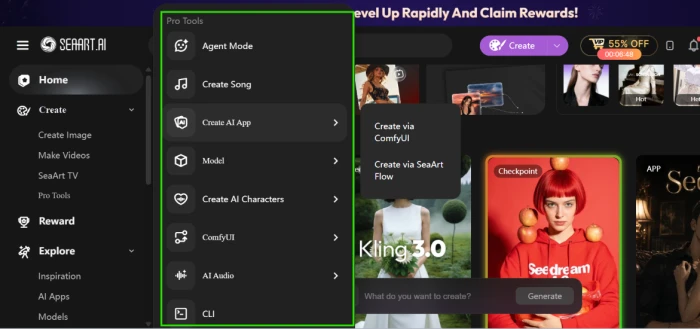
Find your way to the Pro Tools drawer
The left sidebar is the map of how much SeaArt has bolted on. Home and Create cover images, videos and SeaArt TV, then a Pro Tools drawer holds everything else.
Agent Mode, song generation, AI app building through ComfyUI or SeaArt Flow, model training, AI characters, audio tools and even a CLI all live in this one menu.
The header deserves a look too. A VIP discount banner with a live countdown sits beside the create button, and it never really goes away.
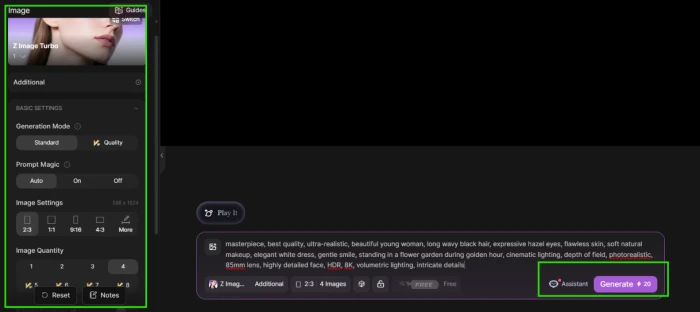
Generate four portraits with Z Image Turbo
The image workspace opens on Z Image Turbo with sensible defaults: Standard generation mode, Prompt Magic set to Auto, a 2:3 ratio and four images per run.
Every one of those settings sits in the left rail and can be changed, including a Quality mode, other aspect ratios and quantities up to eight.
The Generate button quotes the stamina price before you commit, which turns out to matter a lot in the next step.
"masterpiece, best quality, ultra-realistic, beautiful young woman, long wavy black hair, expressive hazel eyes, flawless skin, soft natural makeup, elegant white dress, gentle smile, standing in a flower garden during golden hour, cinematic lighting, depth of field, photorealistic, 85mm lens, highly detailed face, HDR, 8K, volumetric lighting, intricate details"
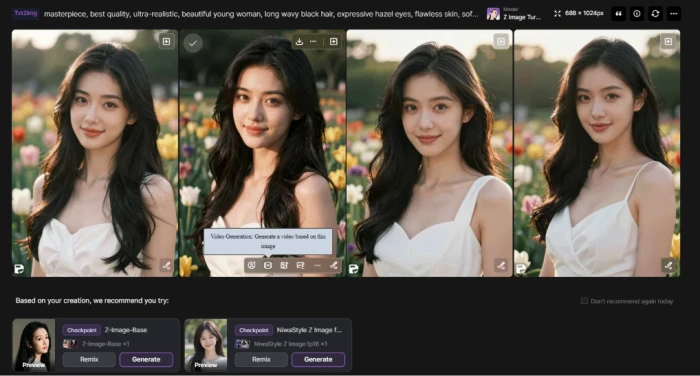
The run came back as a grid of four, with hover controls on each image and model suggestions underneath.
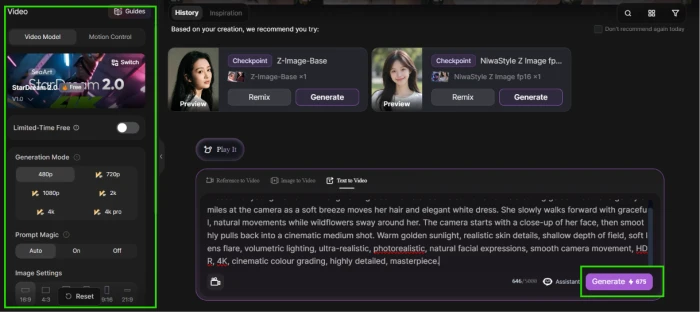
Price a video from the same creation
Choosing the video option on a generated image drops you into the video workspace with StarDream 2.0 selected and a Limited-Time Free toggle at the top of the rail.
Resolution runs from 480p to 4K Pro, and the input tabs cover text to video, image to video and reference to video.
The stamina quote updates live on the Generate button as you change settings, so at least the price is visible before anything runs.
Meet the two currencies
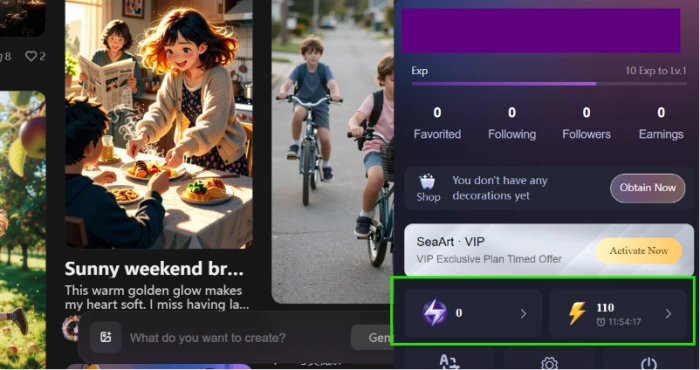
The profile panel is where the economy shows itself. An EXP bar, follower counts, a decoration shop and a timed VIP offer stack above two separate balances with different lightning icons.
The yellow one is daily stamina. It refills each day, gets spent first, and whatever is left disappears when the timer runs out.
The purple one is credits, the pool that comes from purchases and top-up gifts. Nothing on this panel explains the split; you have to find the FAQ on the pricing page.
Read clause 8.8 before paying
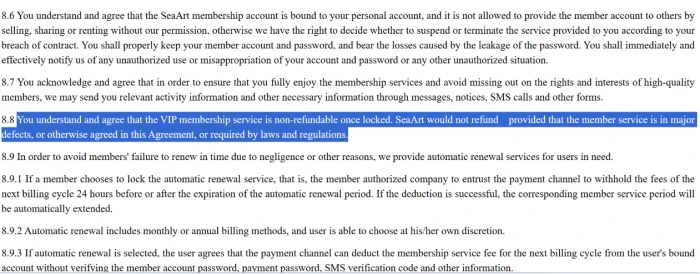
The membership terms live on a plain legal page linked from the footer, and section 8 is the part that matters.
Clause 8.8 makes the VIP membership non-refundable once locked, with exceptions only for major defects in the service or where the law forces one.
Clause 8.9.3 covers renewals: with auto-renew on, the payment channel can deduct the next cycle without asking for your password, payment PIN or an SMS code.
SeaArt AI pricing
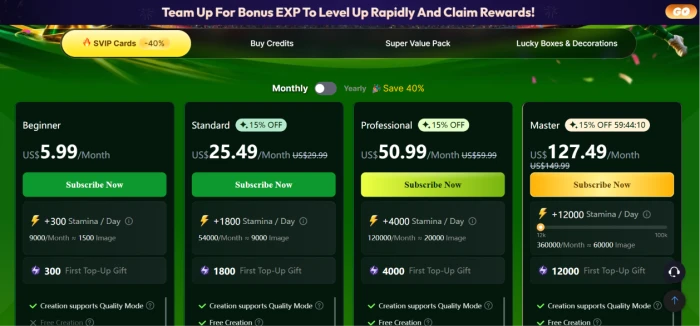
Figures taken from the official SeaArt Mall pricing page during testing.
| Plan | Price | What's included |
|---|---|---|
| Free | $0 | Roughly 130 stamina/day (expires in 24h) · watermarked outputs · 2 queued tasks, 1 at a time · full model browsing |
| Beginner | $5.99 /mo | 300 stamina/day (about 1,500 images/mo) · 300 credit first top-up gift · Quality Mode · 5 queued tasks · no Free Creation perk |
| Standard | $25.49 /mo | 1,800 stamina/day (about 9,000 images/mo) · 1,800 credit gift · Free Creation enabled · listed at $29.99 before the running 15% promo |
| Professional Promoted | $50.99 /mo | 4,000 stamina/day (about 20,000 images/mo) · 4,000 credit gift · 10 queued tasks, 5 at once · listed at $59.99 before promo |
| Master | $127.49 /mo | 12,000 stamina/day (about 60,000 images/mo) · 12,000 credit gift · 20 queued tasks, 15 at once · listed at $149.99 before promo |
Pros & cons
Specific conclusions from testing and real user reviews, not generic filler.
✅ Pros
- Community library with hundreds of thousands of checkpoints and LoRAs
- Veo, Sora, Kling 3.0 and Seedream reachable from one prompt box
- Full ComfyUI runs in the browser, no GPU or install
- LoRA training open to every account, priced in credits
- Free tier grants roughly 130 stamina daily without a card
- Four Z Image Turbo images cost 20 stamina, about 5 each
- Upscaler, eraser, background remover and face swap all included
⛔ Cons
- One video quote hit 675 stamina, 34 times a four-image run
- Membership is non-refundable once locked, per clause 8.8
- Official FAQ admits trial charges can process hours early
- Daily stamina expires every 24 hours, unused balance vanishes
- Credits bought after April 1, 2026 now expire within two years
- Free tier images carry watermarks and cannot be set private
- Moderation swings between over-censoring and leaky Green Mode filtering
- Interface buried under EXP levels, Lucky Boxes and countdown offers
Synthesized from real reviews on Trustpilot, Google Play, GeniusFirms & independent AI tool reviews · paraphrased, not quoted
SeaArt AI scorecard
Rated against what an all-in-one AI image platform is actually built to do.
| Dimension | Verdict | Score |
|---|---|---|
| Model library & variety Community checkpoints, LoRAs, big-name models | Excellent |
9.5
|
| Advanced tools ComfyUI workflows, LoRA training, ControlNet | Excellent |
8.5
|
| Image quality & consistency Output fidelity across runs and models | Good |
8.0
|
| Editing toolkit Upscale, erase, background removal, face swap | Good |
8.0
|
| Generation speed & queue Turnaround and concurrency by tier | Good |
8.0
|
| Free tier value Daily grant, no card, watermark trade-off | Good |
8.0
|
| Video generation value Clip cost, length and motion quality | Average |
5.0
|
| Pricing & billing clarity Token economy, trials, refunds, renewals | Average |
5.0
|
| Ease of use & focus Navigation vs gamification clutter | Average |
6.0
|
| Moderation consistency Filter behavior and NSFW gating | Average |
6.0
|
| Scrutool Score Equal-weight average of all 10 dimensions |
7.2
|
What users say about SeaArt AI
The themes reviewers raise most often, by share of analysed reviews.
% = share of analysed reviews mentioning each theme (Trustpilot, Google Play, GeniusFirms & independent AI tool reviews)
A GPU rig's worth of AI art tools in a browser, billed like a gacha game
SeaArt wins on sheer accumulation. No other image platform hands you hundreds of thousands of community checkpoints, LoRA training, browser ComfyUI and the year's headline commercial models in one place, and the free daily stamina makes all of it testable without a card. The problems sit in everything wrapped around the generator: a two-token economy where even purchased credits now expire, video priced at 675 stamina while four images cost 20, moderation that swings between over-censoring and leaking, and billing terms that charge trials early and refuse refunds once locked. Tinkerers, anime artists and model collectors who read what they are agreeing to will find more raw capability per dollar here than anywhere else. Anyone who wants flat-rate billing, dependable video or a calm interface should pick a smaller tool and keep their card details to themselves.
Discussion
Join the discussion and share your perspective.