
Slides AI
AI presentation maker that works inside Google Slides, PowerPoint, ChatGPT and the web. Fast structured drafts and real charts, with export quirks to watch.

Builds a well-structured draft fast and turns raw numbers into real charts, but the exported file needs cleanup and the billing reputation is rough.
Should you use Slides AI?
People who draft in Google Slides or PowerPoint and want a structured first deck, with real numbers turned into charts, in about a minute.
You need a deck that is ready to present on download . Animations and coloured tables often need fixing by hand afterwards.
Free covers roughly eight decks a month but badges every slide. Regular use means Pro, around $7/mo on the current sale (standard $10).
Reviewers report cancellation and billing friction through the payment processor, and the headline discount is a limited-time offer.
What is Slides AI?
Most AI slide makers pull you into their own web app and hand back a deck you can really only edit there. Slides AI runs the other way around. It lives inside Google Slides, PowerPoint and ChatGPT as well as its own web app, so you generate a presentation in the tool you already present from, then keep editing it as a native file. You give it a topic, pasted notes, a script or an uploaded document, and it builds an editable outline first, then the slides.
It is aimed at students, teachers and working professionals who need a draft deck faster than they can format one from scratch. The two things that define it are reach and the native file: it is one of the few generators that works across all three major slide environments and exports a real, editable .pptx rather than a locked web page. The catch, covered below, is that the exported file does not always match what you saw in the editor.
Key features & how they perform
Each feature rated from hands-on testing and aggregated review sentiment.
Works in Slides, PowerPoint & ChatGPT
Generates and edits in all three environments plus the web app, so there is no round trip of exporting and re-importing a file.
Outline before content
Builds an editable, reorderable outline card per slide before writing any copy, so you fix the structure before committing credits.
Numbers into live charts
Reads data points from your brief and renders them as an interactive chart in the editor rather than flattening them into bullet lists.
46 themes plus brand kit
Styles sorted by audience (educators, marketing, sales, student) and a brand kit that loads your own logo, colours and fonts.
PPTX, PDF & Slides export
Exports to three formats with range and filename control, but formatting fidelity on the downloaded file is where it slips.
In-editor refine with Ask AI
Every block is editable, with paragraph controls, an Ask AI rewrite button, design notes and speaker notes per slide.
Feature ratings blended from Trustpilot, G2, Google Workspace Marketplace & SiteJabber review patterns + hands-on testing.
Building a remote-work deck, free plan start to finish
One brief about US remote work, run all the way through to the downloaded PowerPoint.
Starting credits and the prompt box
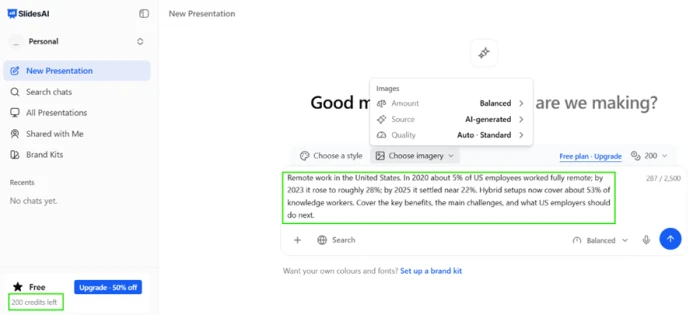
Signing in on the free plan drops 200 credits into the account straight away, which is more headroom than most free tiers give before asking for a card.
The input is a real text area, not a cramped single-line topic field. My brief was one prompt about remote work in the United States with real figures baked in, plus a closing instruction to cover the benefits, the challenges and the employer takeaways.
Image source was already set to AI-generated, with the amount and quality adjustable before anything ran.
Choosing a design
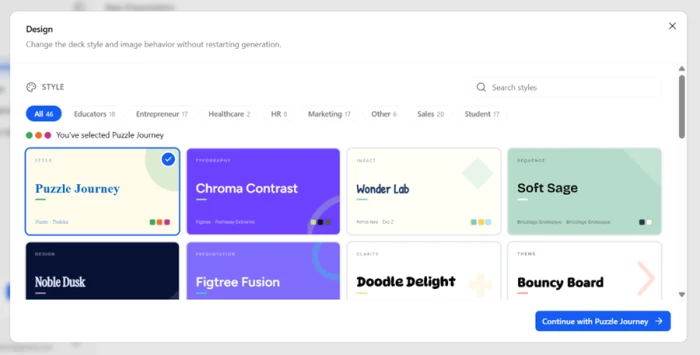
The design step is wider than the usual two-theme AI picker. SlidesAI offered 46 styles sorted by audience type, grouped into categories like Educators, Marketing, Sales and Student.
A visible brand kit link sits alongside the styles. That is where you load your own logo, colours and fonts, so the deck is not locked to the tool's own look.
The editable outline
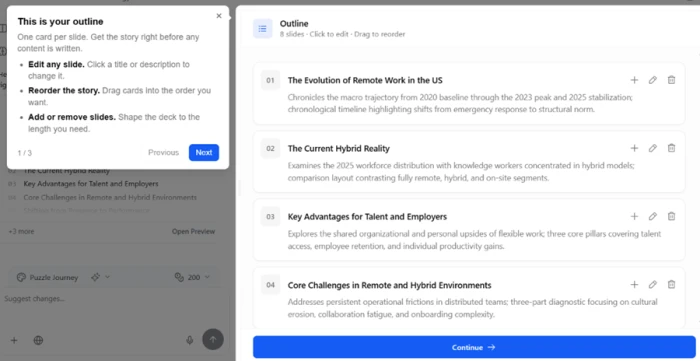
Before writing a word of slide copy, Slides AI built an outline of eight slides, one card each. Every title and description was clickable to rewrite, cards dragged to reorder the story, and slides added or removed to set the length.
This is the stage that separates a usable draft from filler. Getting the structure right here is cheaper than fixing it after the slides are built.
Slide content and what it costs in credits
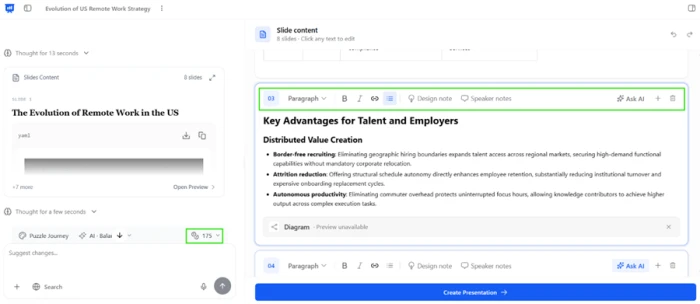
At the content stage the deck is fully editable block by block. Each slide carried paragraph formatting controls, an Ask AI button, design notes and speaker notes, so refining happens inside the editor rather than after export.
This is also where the credit cost became clear, and it matters for anyone planning around the free allowance.
The generated deck and its interactive chart
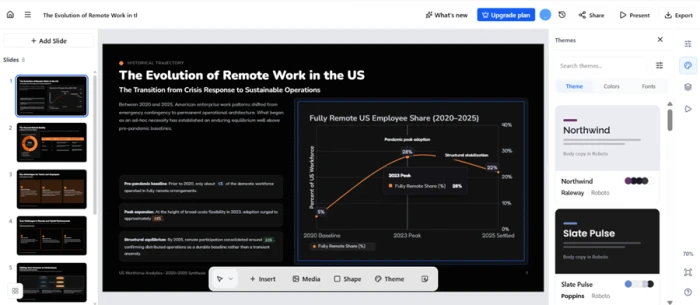
This is where the tool earned real credit. My brief fed it four data points on US remote work, and instead of dropping them into bullets it built a line chart titled Fully Remote US Employee Share.
It plotted the 5 percent in 2020, the 28 percent peak and the 22 percent settling point across a labelled axis, and inside the editor the chart is interactive. Theme, colour and font controls sat docked on the right for restyling after generation.
Sharing, then exporting
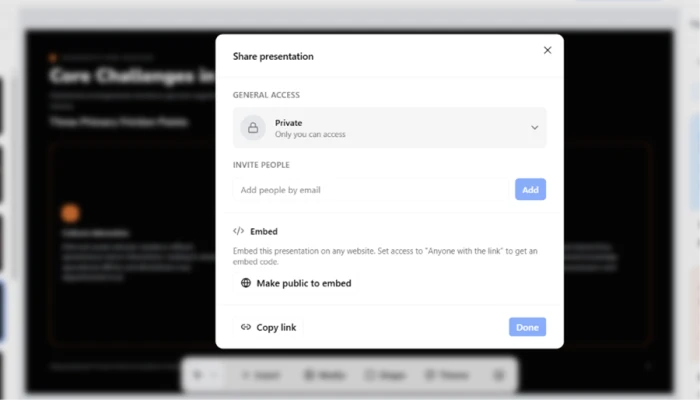
Sharing covered what most teams need. Access defaulted to Private, with options to invite people by email or open it wider, an embed path that generates code once the deck is public, and a copy link button.
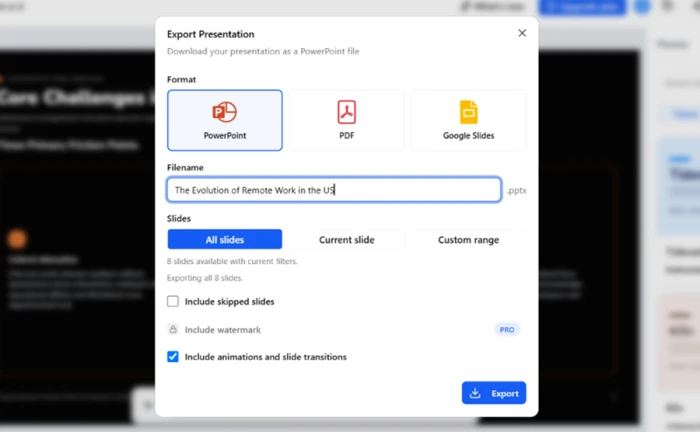
The export panel is the next screen. It offered PowerPoint, PDF and Google Slides, with a filename field and a choice of all slides, the current slide or a custom range. I kept animations and transitions ticked and exported to PowerPoint.
What the downloaded file revealed
Opening the exported PowerPoint is where the free plan showed its limits, and these are the findings worth seeing before committing.
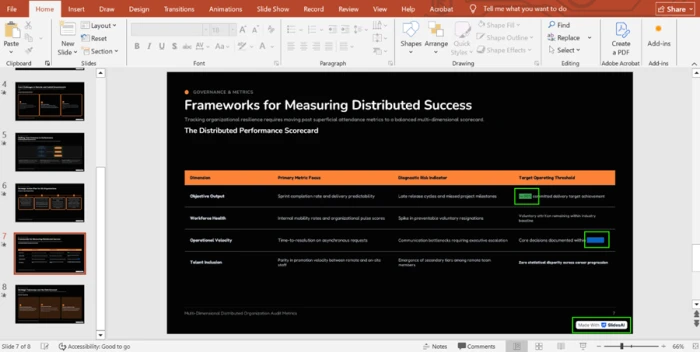
The watermark is real: every slide carried a Made With Slides AI badge in the corner, with no way around it on free. The animations and transitions I had left ticked did not survive the export, and the file opened static.
Colour handling broke too. On the governance slide, several cells that should have held readable coloured text rendered as solid green and blue blocks with the text lost inside them.
Slides AI pricing
Figures taken from the official Slides AI pricing page, Individual plans on yearly billing.
| Plan | Price | What's included |
|---|---|---|
| Basic | $0 | 200 credits/mo · 2,500 characters per deck · Lite & Balanced models · 1 brand kit · topic or notes input |
| Pro Popular | $7 /mo | Billed $84/yr · 30,000 credits/yr · 50,000 characters · Advanced models · PDF & Word upload · 3 brand kits · custom fonts |
| Premium | $10.42 /mo | Billed $125/yr · 84,000 credits/yr · 100,000 characters · every model incl. Ultra · 6 brand kits · custom fonts |
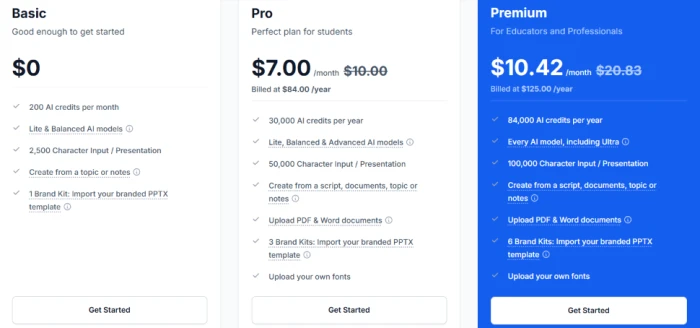
Pro and Premium shown at the current sale price on yearly billing.
Pros & cons
Specific conclusions from testing and real user reviews, not generic filler.
✅ Pros
- Generates inside Google Slides, PowerPoint, ChatGPT and web
- Exports a native, still-editable .pptx, not a locked web deck
- Editable outline stage lets you reorder the story before slides exist
- Reads numeric inputs and renders them as charts, not bullet lists
- 46 audience-sorted themes plus a logo, colour and font brand kit
- Accepts PDF and Word documents as source material
⛔ Cons
- Generated drafts often read generic and need real manual editing
- No advanced chart types like waterfall or Mekko for data decks
- Trustpilot sits around 2.5 with repeated cancellation complaints
- Support runs mainly through a payment-processor bot, slow on refunds
- Several advertised features shipped as "coming soon" for long stretches
- PowerPoint workflow feels secondary to the Google Slides build
Synthesized from real reviews on Trustpilot, G2, SiteJabber, the Google Workspace Marketplace & Reddit · paraphrased, not quoted
Slides AI scorecard
Rated against what an AI presentation generator is actually built to do.
| Dimension | Verdict | Score |
|---|---|---|
| Platform coverage Slides, PowerPoint, ChatGPT, web | Good |
8.0
|
| Outline & structure Editable outline before content | Good |
7.5
|
| Data & chart handling Turning numbers into visuals | Good |
7.0
|
| In-editor editing control Per-block edits, Ask AI, notes | Good |
7.5
|
| Design themes & templates Range and audience fit | Good |
7.0
|
| Export fidelity Does the download match the editor | Weak |
4.0
|
| Brand customization Logo, colours, fonts control | Average |
6.5
|
| Ease of use Signup to first deck | Good |
7.5
|
| Value for credits Decks per allowance and plan cost | Average |
6.0
|
| Support & billing trust Cancellation, refunds, reachability | Weak |
4.0
|
| Scrutool Score Equal-weight average of all 10 dimensions |
6.5
|
What users say about Slides AI
The themes reviewers raise most often, by share of analysed reviews.
% = share of analysed reviews mentioning each theme (Trustpilot, G2, SiteJabber, Google Workspace Marketplace & Reddit)
A fast, capable drafter that you still have to clean up after
Slides AI is better at the hard part than its reputation suggests. It reaches across Google Slides, PowerPoint and ChatGPT, builds an editable outline before committing to copy, and turns raw numbers into a live chart instead of a bullet list. For a first draft, built in about a minute, that is genuinely useful. The weaknesses are just as clear. The exported file does not always match the editor: animations drop, coloured tables can render as solid blocks, and free decks are badged. Around that sits a billing reputation, roughly 2.5 on Trustpilot, built on cancellation and refund complaints routed through a third-party processor. Students, teachers and professionals who want a quick structured draft and are happy to polish it in their own slide app will get value here. Anyone who needs a deck that is presentation-ready the moment it downloads should test the free export first, or look elsewhere.
Discussion
Join the discussion and share your perspective.