
Studley AI
Studley AI turns PDFs, lectures and YouTube links into flashcards, quizzes and solved homework. Flexible inputs, but it quizzes the wrong pages.

A genuinely flexible study-material generator that swallows a 240-page PDF without stalling, let down by cards built from the wrong pages and a web app users say hangs mid-quiz.
Should you use Studley AI?
Students with heavy source material who want flashcards, quizzes and a homework solver built from their own PDFs, lectures and YouTube links.
You expect every card to be on-topic and exam-ready . The AI quizzes the document's front matter as readily as its actual subject.
A full workflow runs free, including big uploads. Unlimited use and essay grading need $14.99/mo or $97.99/yr .
Reviewers report the web quiz generator hanging on large topics, finishing with nothing to open. Small topics are more reliable.
Key features & how they perform
Each feature rated from hands-on testing and aggregated review sentiment.
Three ways to add material
Upload files, images, audio and video, paste a YouTube or website URL, or record a lecture live through the mic. Wider intake than most study apps.
Opt-in output formats
Tick the formats you want: multiple choice, flashcards, fill in the blanks, written tests, tutor lesson, notes and podcast. Nothing is forced on you.
Solve tab with video backup
Subject tabs and a Deep Reasoning toggle return stepped solutions, then attach curated YouTube explainers under the answer. A real differentiator.
Mastery tracking
Every card is sorted into Unfamiliar, Learning, Familiar and Mastered, so progress through a set is visible at a glance as you review.
Source-aware chat
The uploaded document stays open on the left while a chat on the right answers questions about that exact material. Querying while reading is the standout.
Content targeting
The weak link. Generation leans on a document's opening pages, so a share of the cards quiz administrative front matter rather than the subject.
Feature ratings blended from the App Store, Google Play, Trustpilot & Product Hunt + hands-on testing.
Running a Real Study Workflow Through Studley
I pushed a full workflow through a free account, from a 240-page upload to a solved equation, to see where it held and where it slipped.
The three ways material gets in
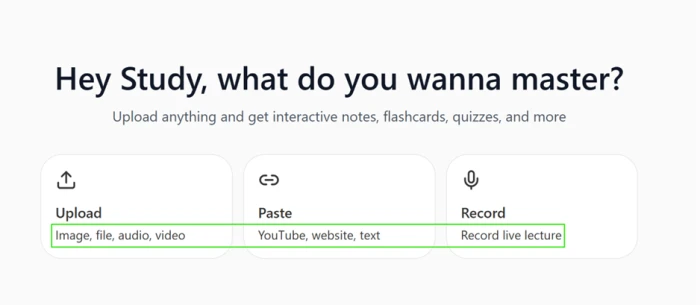
The home screen opens on three routes for feeding content in, rather than a single upload box. Upload takes images, files, audio and video.
Paste accepts a YouTube or website URL, or raw text dropped straight in. Record captures a live lecture through the microphone.
Feeding it a 240-page PDF
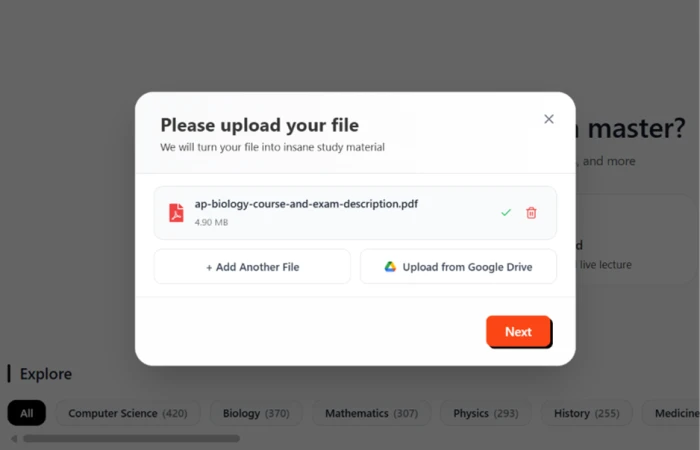
For the first real test I grabbed the complete AP Biology Course and Exam Description. The file came in at 4.90 MB across 240 pages, far heavier than the short handouts these tools usually expect.
Studley took it without stalling, and offered Google Drive as a second source alongside the direct upload.
Choosing what gets built
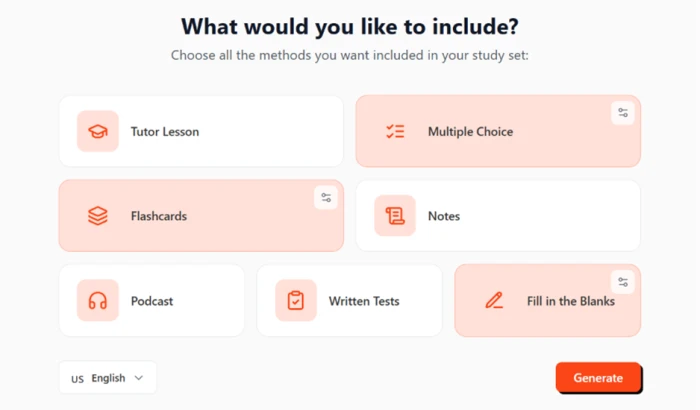
The next screen hands you the decision instead of forcing one format. I checked Multiple Choice, Flashcards and Fill in the Blanks.
Tutor Lesson, Notes, Podcast and Written Tests I left switched off, then pressed Generate. The language was already set to US English.
The split-screen workspace
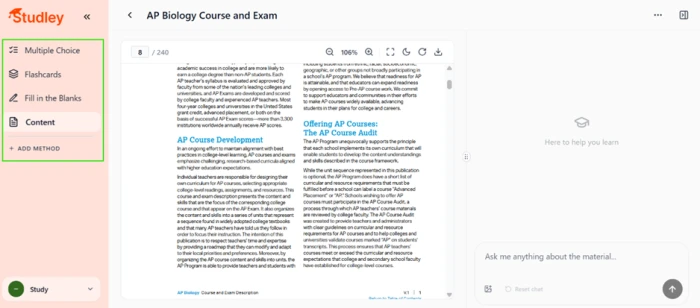
When generation finished, the set opened into a split screen. My PDF stayed on the left, scrollable and sitting on page 8 of 240, so the source never disappears behind the cards.
A chat box on the right invited me to ask anything about the material, with the document still in view.
108 flashcards, and where they went wrong
Studley generated 108 flashcards from the PDF. A bar across the top sorts every card into Unfamiliar, Learning, Familiar and Mastered, and all 108 started in the Unfamiliar column.
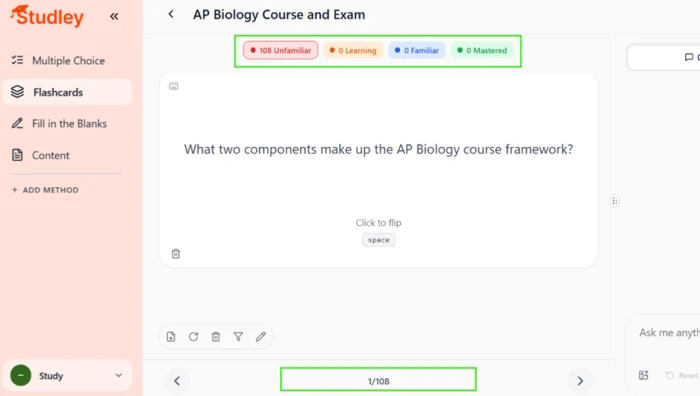
This is where testing turned up a real problem. Card 1 asked which two components make up the AP Biology course framework. The page behind it covered AP Course Development and the AP Course Audit, administrative front matter from the opening pages, not biology.
Studley pulled heavily from the first forty-odd pages before the science even starts, so a slice of the 108 cards quizzes exam logistics rather than cells or genetics.
Pasting a YouTube link
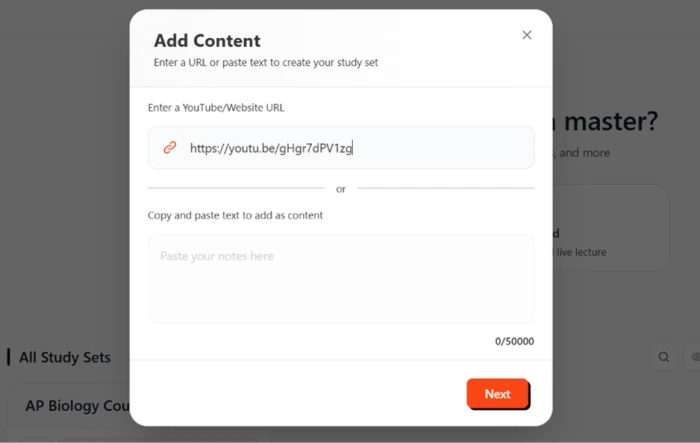
To check the Paste route, I dropped a YouTube URL into the Add Content box. The same field accepts a website address or up to 50,000 characters of pasted notes.
The Solve tab on a math problem
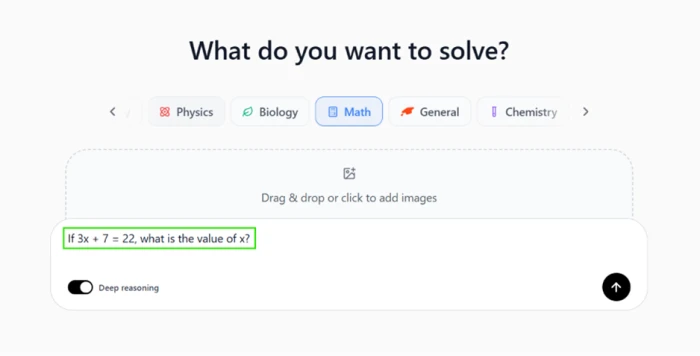
Solve is Studley's homework helper. I opened it, picked Math from the subject row, flipped on Deep Reasoning and typed a short equation.
"If 3x + 7 = 22, what is the value of x?"
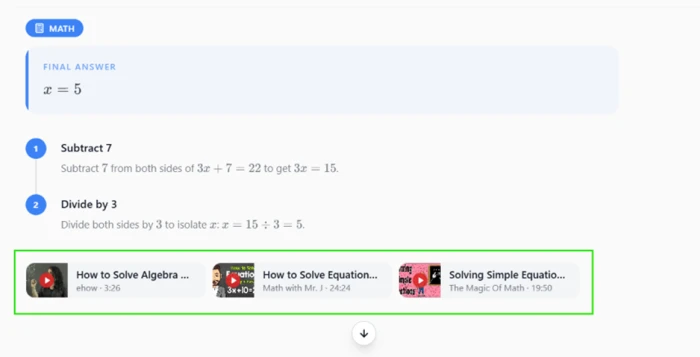
The answer came back correct at x = 5, split into two clean steps: subtract 7 from both sides to reach 3x = 15, then divide by 3. Below the working, Studley attached three YouTube explainer clips on solving equations.
Where the free plan finally stops
Every step above ran on the free tier without a block, covering the 240-page upload and the Deep Reasoning solve. The wall showed up only when I pushed further, as an Upgrade to Unlimited popup.
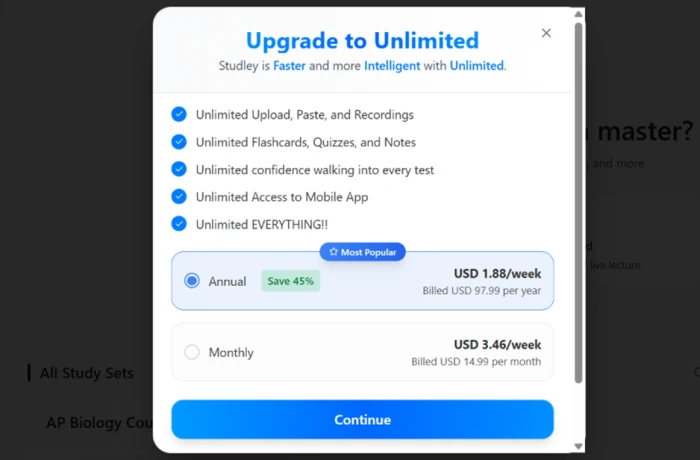
Pricing lands at $14.99 per month, or $97.99 per year on the annual plan, which the screen frames as a 45 percent saving at $1.88 a week. Essay grading and audio lessons sit locked behind that upgrade.
Studley AI pricing
Figures taken from the in-app upgrade screen captured during testing.
| Plan | Price | What's included |
|---|---|---|
| Free | $0 | Upload, paste and record · flashcards, quizzes, fill in the blanks, notes, tutor lessons · Solve tab with Deep Reasoning · source-aware chat · all capped by usage limits |
| Unlimited (Annual) Most popular | $97.99 /yr | Unlimited upload, paste and recordings · unlimited flashcards, quizzes and notes · essay grading · audio lessons · full mobile access · billed as $1.88/week |
| Unlimited (Monthly) | $14.99 /mo | Same unlimited access as annual · billed as $3.46/week · no discount for paying month to month |
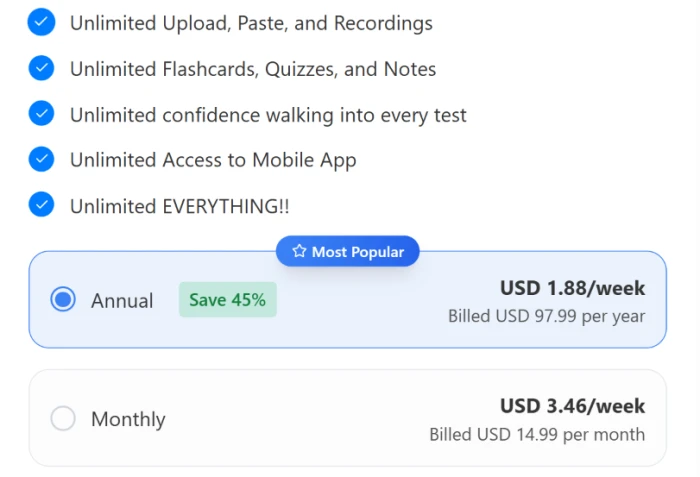
Pricing is accurate as of 14 October 2026 and was captured from the Studley AI upgrade screen during testing. Plans, prices and limits change often, so check the official Studley AI website for the current figures before you subscribe.
Pros & cons
Specific conclusions from real user reviews, not generic filler.
✅ Pros
- Turns lectures, PDFs, slides and YouTube links into cards in seconds
- Solve tab returns stepped answers with curated video explainers attached
- Mastery tags sort every card by how well you know it
- Med and visual learners single out the flashcard and quiz modes
- Active recall and spaced repetition baked into the study modes
- Holds a 4.7-star App Store rating across roughly 2,700 reviews
⛔ Cons
- Quiz generator hangs on large topics, finishing with nothing to open
- Podcast narration runs too fast, and slowing it drags too far the other way
- Several users call the output no better than plain ChatGPT
- Quiz reliability drops sharply once a topic gets big
- Creators report an unpaid UGC contract and a blocked payout
- Subscription cancellation is a recurring question among app users
Synthesized from real reviews on the Apple App Store, Google Play, Trustpilot & Product Hunt · paraphrased, not quoted
Studley AI alternatives
| Studley AIReviewed | StudyFetch | Knowt | Quizlet | |
|---|---|---|---|---|
| Entry paid plan | $14.99 / mo, or $97.99 / yr | Priced after sign-up only | $12.49 / mo, billed yearly | $7.99 / mo (Quizlet Plus) |
| Free tier | Usable, capped by usage limits | Limited, exact caps undisclosed | Generous, unlimited flashcards | Free with ads, two card types |
| Core method | Upload or paste, then pick output formats | Upload into Spark.E tutor and study sets | AI cards from notes, PDFs and lectures | Hand-made cards plus a huge shared library |
| Homework solver | Solve tab with stepped answers plus videos | Spark.E tutor via text, call and visuals | Voice tutor and PDF summarizer | Q-Chat tutor, gated behind Plus |
| Standout strength | Wide input range and curated video backup | Deep all-in-one suite, 7M+ users | One-click Quizlet import, free-first model | Massive ready-made deck library |
| Best for | Students turning heavy source files into sets | Learners wanting one deep study platform | Budget students leaving Quizlet | Anyone needing pre-built decks fast |
Who Should Use Studley AI, and Who Should Avoid It?
Studley is strong at turning big source files into study material, but content targeting and web reliability make it a poor fit for some students.
Who Should Use Studley AI?
Best suited for these workflows
Students With Heavy Source Material
Big textbook PDFs, full lecture slides and long recordings go in without stalling, then come back as cards, quizzes and notes.
Mixed-Media Learners
A YouTube lecture, a scanned worksheet and a pasted article can all feed one study set, no transcript or conversion step needed.
Anyone Stuck on Homework
The Solve tab returns a stepped answer and curated video explainers in one response, useful across math and science problems.
Mobile-First Revisers
The iOS app holds a 4.7-star rating, and med and visual learners single out its flashcards and quizzes for on-the-go review.
Who Should Avoid Studley AI?
Consider an alternative if you need
Cards That Are All On-Topic
Generation leans on a document's opening pages, so part of a large set can quiz front matter instead of the actual subject.
Rock-Solid Web Reliability
Users report the browser quiz generator hanging on big topics and finishing with nothing to open. Small topics fare better.
Polished Audio Output
Reviewers say the podcast narration runs too fast, and slowing it down overshoots into an awkward, dragging pace.
A Free Ready-Made Library
Everything is generated from your own uploads. There is no community deck pool to pull pre-written cards from.
Our Recommendation
Studley earns its place if you study from your own heavy source files and want them turned into cards, quizzes and solved problems fast. If you need a free library of ready-made decks or depend on the web app never stalling mid-quiz, a free-first tool like Knowt or an established library like Quizlet will serve you better. Before you pay, run a real document through the free tier, check how many cards land on your actual subject, and trim the set by hand.
Studley AI scorecard
Rated against what an AI study-material generator is actually built to do.
| Dimension | Verdict | Score |
|---|---|---|
| Input flexibility Upload, paste and record support | Excellent |
9.0
|
| Output format range Cards, quizzes, tests, notes, podcasts | Excellent |
8.5
|
| Homework solver Solve tab accuracy and video backup | Good |
8.0
|
| Mobile experience iOS and Android app quality | Good |
8.0
|
| Study workflow & tracking Split screen, chat, mastery tags | Good |
7.5
|
| Ease of use Signup, navigation, first study set | Good |
7.5
|
| Free tier generosity What you get before the paywall | Average |
6.5
|
| Value for money Price against free and rival tools | Average |
6.0
|
| Content accuracy How on-topic generated material is | Weak |
5.5
|
| Performance & reliability Web stability and generation success | Weak |
5.5
|
| Scrutool Score Equal-weight average of all 10 dimensions |
7.2
|
A capable study engine that needs a human to aim it
Studley does the hard part of studying well. It takes almost anything you throw at it, a 240-page PDF, a YouTube lecture, a scanned page, and turns it into flashcards, quizzes and solved problems in one pass, with a Solve tab that pairs correct working with curated video clips. The free tier is unusually generous, and the mobile app is well liked. The problems are in precision and polish. Generation leans too hard on a document's opening pages, so part of a large set quizzes front matter instead of the subject, and users report the web quiz generator hanging on big topics and finishing with nothing to open. Students who feed it heavy source material and are willing to trim the set by hand will get real value. Anyone who needs every card on-topic out of the box, or a free library of ready-made decks, should look at Knowt or Quizlet first.
Discussion
Join the discussion and share your perspective.