
Suno AI
Suno turns a one-line description or your own lyrics into a complete song with vocals, instrumentation and mix in under a minute. Free tier gives 50 credits a day on the older model; commercial rights and stem export start at $10 a month.

The fastest route from a sentence to a finished song, let down by non-English pronunciation and a billing operation people keep complaining about.
Should you use Suno?
Creators who need a finished track today : video scoring, podcast intros, jingles, demos, or turning lyrics you already wrote into a real song.
You need bar-level control over key, tempo and form , or you write in a language other than English. Pronunciation is baked in at generation.
Free gives you 10 songs a day with no commercial rights, ever . Anything you plan to sell needs Pro at $10/mo, or $8 billed yearly.
Credits are spent on every take, including the ones you delete . The "500 songs a month" figure on Pro is a ceiling, not a plan.
What is Suno?
Type one sentence, wait under a minute, and you are holding a complete song: vocals, lyrics, drums, arrangement, mix. Not a loop, not a backing bed, not a stem you still have to build around. Closing the gap between a plain-English description and something you would actually add to a playlist is the entire product, and no competitor closes it faster.
It runs on web, iOS and Android, and it is aimed at people who cannot play an instrument as much as at producers who can. The free tier hands you 50 credits a day, roughly ten songs, locked to the older v4.5-all model with no commercial rights attached. Paid plans open the v5.5 model, stem export into a real DAW, and a browser workstation called Suno Studio. Two things define it: it is the quickest path from nothing to a listenable track, and it is the most heavily litigated company in AI music.
Key features & how they perform
Each feature rated from hands-on testing and aggregated review sentiment.
v5.5 vocal model
Breath, vibrato and phrasing that most casual listeners no longer clock as synthetic. The consensus across comparison threads is that Suno beats Udio on vocals and loses on stereo separation.
Two takes per generation
Every prompt returns two independent versions of the song, usually at different lengths, so you are picking between options rather than accepting the first result.
Bring your own lyrics
Paste a finished lyric sheet with structure tags like [verse] and [chorus] and Suno sings it as written. This is where it stops guessing and starts performing.
Stem split & Song Editor
Paid plans split a track into as many as 12 time-aligned WAV stems for Ableton or Logic, plus Extend, Replace Section and fades on a waveform view.
Suno Studio
A browser multitrack workstation on Premier with take lanes, mixing controls and MIDI export. Ambitious, genuinely novel, and repeatedly described by producers as pre-beta.
Non-English vocals
It will sing in most languages, but pronunciation is unreliable and cannot be corrected after generation. Hindi, Bulgarian and Spanish all draw the same complaint.
Feature ratings blended from Trustpilot, G2, App Store, Google Play & r/SunoAI review patterns + hands-on testing.
Three prompts, six songs, and the one that finally landed
From a one-line request to a full lyric sheet, testing where the model guesses and where it performs.
One line in, two finished songs out
The create screen splits into Simple and Advanced. Simple is a single description box, and it writes the lyrics, style, structure and vocals from whatever you type.
The model picker sits top right. On the free plan it reads v4.5-all and does not open any further, because v5.5 is gated behind Pro.
The Instrumental toggle next to the Lyrics button strips vocals entirely, which is the setting you want for background beds and video scoring.
"give me music for celebration"
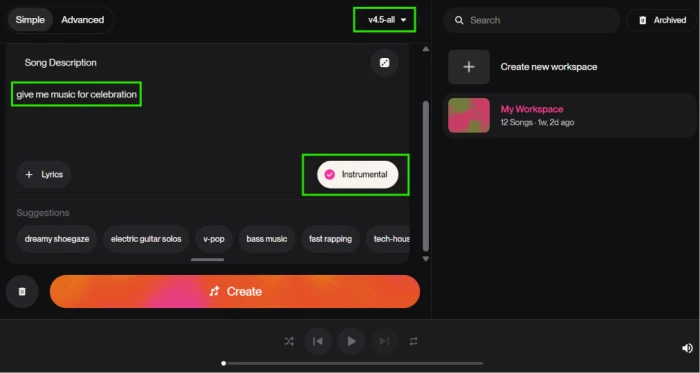
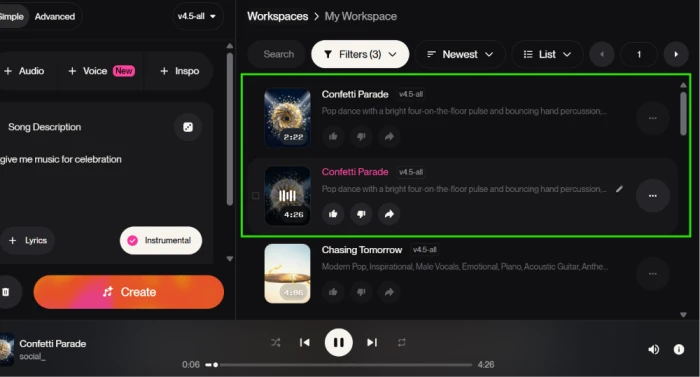
One press of Create returned two separate tracks in the workspace panel, both titled Confetti Parade, at different lengths.
What you can do to a track once it exists
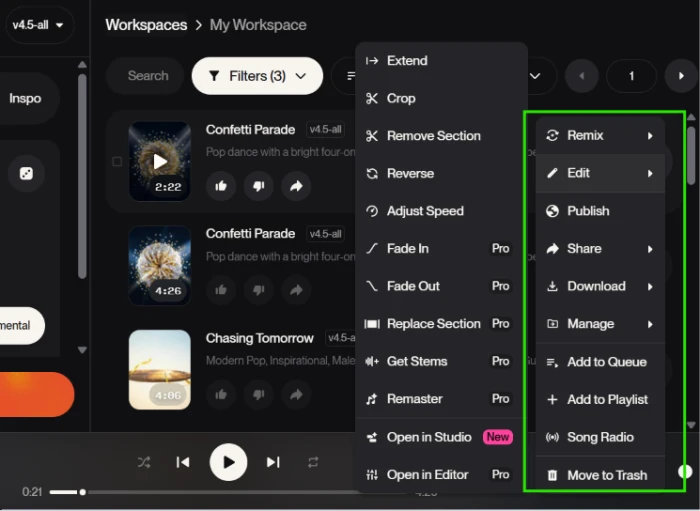
A finished song is a starting point rather than a final file, and the context menu is where that becomes obvious.
Extend, Crop, Remove Section, Reverse and Adjust Speed are open to everyone. Fade In, Fade Out, Replace Section, Get Stems, Remaster and Open in Editor all carry a Pro badge.
The second column is distribution rather than editing: Publish, Share, Download, playlists and Song Radio, which generates a station from the track you just made.
Where it breaks: asking for Hindi
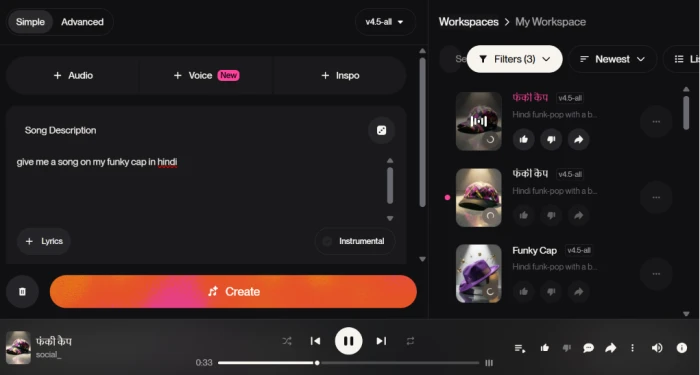
Suno publishes no guaranteed list of supported languages, and the reason becomes clear the moment you leave English.
The model has no dictionary and no phonetic notation to fall back on. It predicts how a word sounds from spelling patterns it has seen before, which works for common English and degrades sharply everywhere else.
This matters more than it first appears, because pronunciation is fixed at the moment of generation. There is no correcting it afterwards.
"give me a song on my funky cap in hindi"
Feeding it a finished lyric sheet
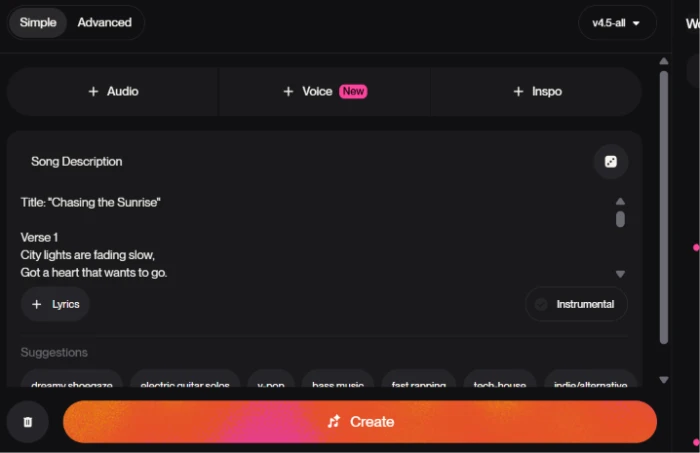
The description box doubles as a lyrics field. Paste a complete song with a title and verse markers and Suno stops inventing words and starts performing yours.
This is the single biggest quality jump available on the free plan, and it costs nothing extra.
It also removes the most common failure mode in the earlier tests, where the model had to guess at both the words and the delivery at the same time.
Title: "Chasing the Sunrise" / Verse 1 / City lights are fading slow, / Got a heart that wants to go......
The finished track opens on its own page with the lyric sheet running down the left, a styles line reading pop and soul, and Remix, Edit and download controls sitting above the comments.
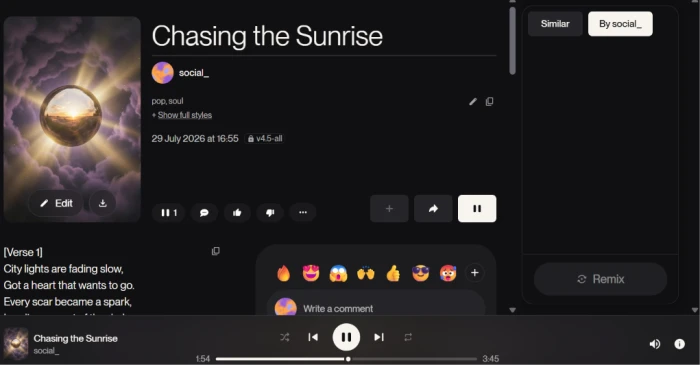
A 3:45 pop and soul track built on the free v4.5-all model. Listen for how closely the phrasing tracks the written line breaks.
Suno pricing
Figures taken from the official Suno pricing page, checked 29 July 2026.
| Plan | Price | What's included |
|---|---|---|
| Free | $0 | 50 credits daily (about 10 songs) · v4.5-all model only · no commercial use · shared queue, 4 at once · upload up to 8 min · no stem separation |
| Pro Popular |
$10
/mo
$8/mo billed yearly
|
2,500 credits monthly (about 500 songs) · full model picker including v5.5 · commercial rights on new songs · personas, Voices, Custom Models · 2 stem separation types · upload up to 30 min · priority queue, 10 at once |
| Premier |
$30
/mo
$24/mo billed yearly
|
Everything in Pro · 10,000 credits monthly (about 2,000 songs) · Suno Studio workstation · 3 stem separation types including Advanced Split |
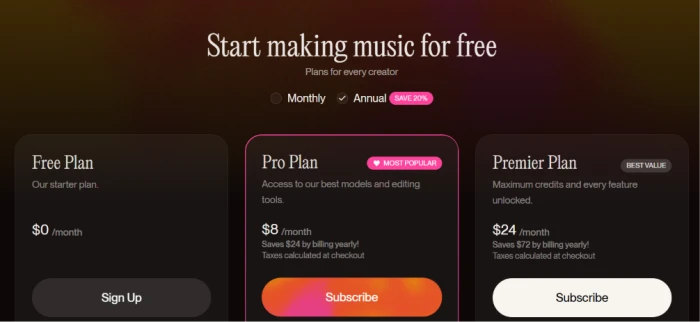
The page loads with the Annual toggle already selected, so the $8 and $24 shown are yearly-billing rates.
Pros & cons
Specific conclusions from testing and real user reviews, not generic filler.
✅ Pros
- Pasted lyrics came back sung correctly on the first attempt
- Every prompt returns two finished takes at different lengths
- v5.5 vocals beat Udio on breath, vibrato and phrasing
- Splits a track into up to 12 time-aligned WAV stems
- 50 free credits daily, roughly 10 songs, no card required
- Custom Models train on six songs you own, three saved
- Pro covers about 500 songs a month for $10
⛔ Cons
- Hindi words mispronounced across both generated versions
- Pronunciation is fixed at generation and cannot be edited after
- Free plan is locked to v4.5-all while paid gets v5.5
- Ignores producer direction on bar count, key, form and tempo
- Suno Studio is Premier-only and widely called pre-beta
- Trustpilot sits at 1.6 out of 5 across 675 reviews
- Charged-after-cancelling reports recur on Trustpilot and G2
- November 2025 breach surfaced via press in July 2026, not Suno
Synthesized from real reviews on Trustpilot, G2, the App Store, Google Play & r/SunoAI · paraphrased, not quoted
Suno scorecard
Rated against what a text-to-music generator is actually built to do.
| Dimension | Verdict | Score |
|---|---|---|
| Audio quality & production polish Mix, arrangement, finished feel | Excellent |
9.5
|
| Vocal realism & performance Breath, vibrato, phrasing | Excellent |
9.5
|
| Generation speed & throughput Time to two usable takes | Excellent |
9.5
|
| Ease of use & onboarding Getting a result with no music training | Excellent |
9.5
|
| Lyrics-to-song fidelity Singing your written words as written | Excellent |
9.5
|
| Model & feature depth Personas, Voices, Custom Models, sliders | Excellent |
9.5
|
| Editing & stem workflow Extend, replace, stems, Studio | Excellent |
9.0
|
| Sharing, publishing & discovery Publish, Song Radio, playlists, Explore | Excellent |
9.0
|
| Non-English pronunciation Diction outside English lyrics | Average |
6.0
|
| Billing, support & transparency Cancellation, refunds, disclosure | Average |
6.0
|
| Scrutool Score Equal-weight average of all 10 dimensions |
8.7
|
What users say about Suno
The themes reviewers raise most often, by share of analysed reviews.
% = share of analysed reviews mentioning each theme (Trustpilot, G2, App Store, Google Play, r/SunoAI) · estimated from sampled reviews, not a full census
Nothing gets you to a finished song faster, and nothing in AI music has more unfinished business
Suno is the clear leader at the thing it set out to do. Two takes come back from a single sentence in under a minute, the v5.5 vocals hold up against real recordings, and feeding it a lyric sheet you wrote yourself produces a track good enough to publish, which is exactly what happened on the third attempt in testing. The editing surface is deeper than anything else in the category, from a twelve stem split into Ableton to a browser workstation that no competitor has matched. The problems are just as consistent. Non-English diction is unreliable and permanent once generated, the free plan is stuck a model generation behind, producers cannot get it to respect key or tempo, and the credit system charges you for every take you discard. Then there is the company: a Trustpilot score of 1.6, a steady stream of charged-after-cancelling reports, an active Universal and Sony lawsuit, and a November 2025 breach that users found out about from journalists in July 2026. Content creators, songwriters with lyrics in a drawer, and anyone scoring video on a deadline should sign up today and stay on the free tier until they need commercial rights. Working producers, non-English lyricists, and anyone whose project cannot absorb legal ambiguity should treat it as a sketchpad and finish the work somewhere else.
Discussion
Join the discussion and share your perspective.