
TensorArt AI
Cloud platform hosting over a million community Stable Diffusion checkpoints, LoRAs and workflows, runnable in a browser with no GPU. Strong on breadth and editing, restrictive on downloads and content.

A million community models you can run in the cloud but often cannot download, wrapped around a generator that gets objects right and counts wrong.
Should you use Tensor.Art?
Stable Diffusion and anime artists without a GPU who want to run community checkpoints, LoRAs and ComfyUI workflows in a browser.
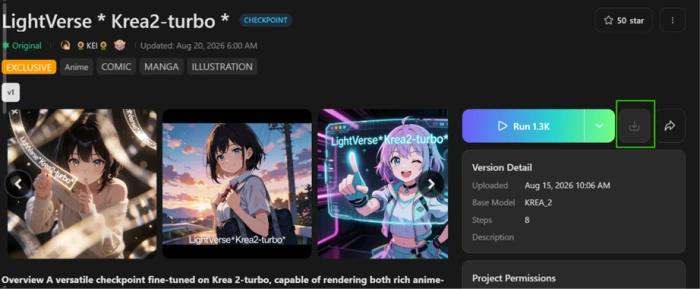
You need to download models for local use . Checkpoints tagged EXCLUSIVE stay locked no matter which plan you are on.
Free is usable. At 0.36 credits per standard image, 50 daily credits is roughly 138 images a day before you hit a wall.
The composer applies a negative embedding you never typed , and Starter storage clears your outputs after seven days.
What is Tensor.Art?
The generator is not the product here. The library is. Tensor.Art hosts more than a million community checkpoints, LoRAs and embeddings and rents you the GPUs to run them, which is the whole pitch: everything a Stable Diffusion hobbyist would normally download, install and troubleshoot locally, executed from a browser tab instead. The Forge composer wraps that library in Text2Img, Img2Img, Edit and Video tabs, with LoRA slots, ControlNet, VAE selection and ComfyUI workflow import sitting alongside. It suits anime and character artists best, because that is where the community has put its work.
Two limits define the experience more than any feature does. Models tagged EXCLUSIVE can be run in the cloud but never pulled down to your own machine, so a subscription buys access rather than ownership. And mature content is no longer generated on the main site at all, having been pushed to a separate domain after a policy change that reshaped a lot of the community. It runs on web, iOS and Android, and the browser build carries the full control set.
Key features & how they perform
Each feature rated from hands-on testing and aggregated review sentiment.
Community model library
Over a million checkpoints, LoRAs and embeddings with visible run counts, so you can judge a model's traction before spending credits on it.
Instruction-based editing
The Edit tab runs FLUX.1 Kontext Dev and handles removal cleanly, which is the exact task prompt-level negation tends to fail at.
Generation controls
LoRA stacking, ControlNet, embeddings, VAE selection and ComfyUI workflow import, all reachable from one panel without a local install.
Cloud LoRA training
Train a style or character model on your own dataset in the browser, then publish it to the marketplace or keep it on your account.
Text inside images
Short words render with correct letterforms and convincing surface texture, a clear step up from older Stable Diffusion checkpoints.
Video generation
Text and image to video sit in their own tab, though users report the moderation filter blocks video jobs more often than image jobs.
Feature ratings blended from Google Play, App Store, Reddit & AlternativeTo review patterns + hands-on testing.
Putting TensorArt to Work
Two generations, one edit pass, and the moment a download button greys out.
A prompt with a number in it
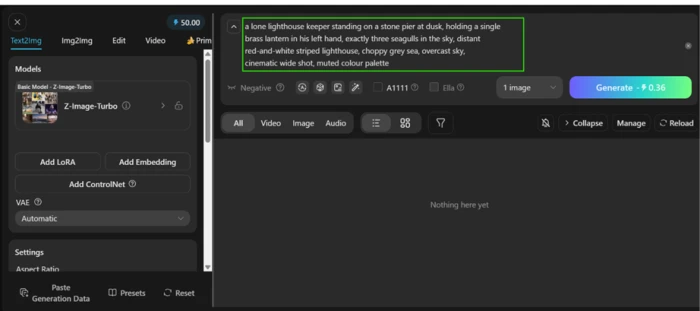
Text2Img is the default tab in the composer. Model picker, LoRA slots, ControlNet and VAE controls run down the left rail while the prompt box stretches across the top.
The Generate button quotes its credit cost before you commit to anything, which is the most useful detail in the whole interface.
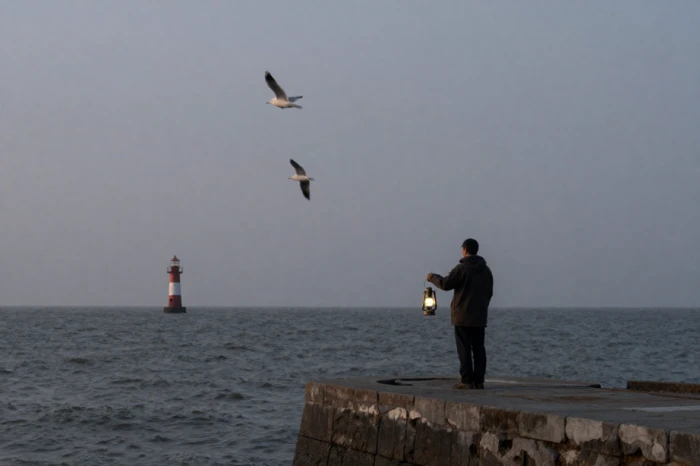
I ran Z-Image-Turbo at 1152x768 and deliberately wrote a countable object into the scene to see whether the number would survive the trip.
"a lone lighthouse keeper standing on a stone pier at dusk, holding a single brass lantern in his left hand, exactly three seagulls in the sky, distant red-and-white striped lighthouse, choppy grey sea, overcast sky, cinematic wide shot, muted colour palette"
What came back matched most of the specification, which is exactly why the miss is easy to scroll past.
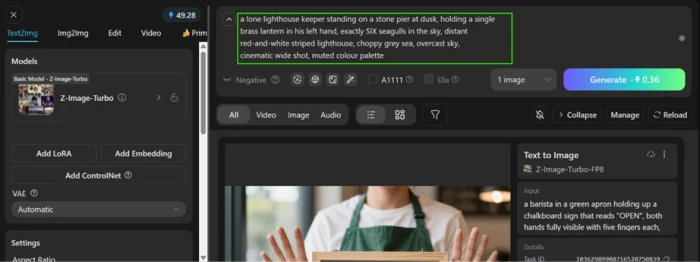
The same prompt with one word changed
A single miss tells you nothing about a model, so I re-ran the scene with one word altered and everything else frozen.
Same checkpoint, same 1152x768 output, no settings touched. Only the number moved.
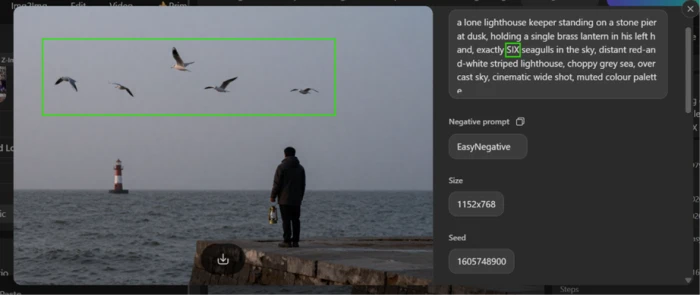
"a lone lighthouse keeper standing on a stone pier at dusk, holding a single brass lantern in his left hand, exactly SIX seagulls in the sky, distant red-and-white striped lighthouse, choppy grey sea, overcast sky, cinematic wide shot, muted colour palette"
Opening the finished job shows the full prompt, the size and the seed in a detail panel on the right, and that panel is where the second surprise turned up.
Chalkboard text and hands that grip nothing
Legible text and hands holding objects are the two things diffusion models fail at most predictably, so I put both into one prompt.
Model and resolution stayed identical to the first two runs, which keeps the comparison honest.
Jobs queue rather than block the interface. A task ID and a submitting state appear while the render works.
"a barista in a green apron holding up a chalkboard sign that reads "OPEN", both hands fully visible with five fingers each, morning light through a café window, shallow depth of field, photorealistic"
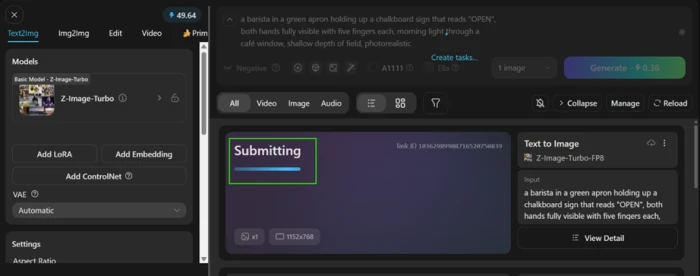
The finished frame splits neatly into one clear pass and one clear failure.

Asking the Edit tab to take something away
The Edit tab swaps the checkpoint for FLUX.1 Kontext Dev and expects an instruction rather than a scene description.
I loaded the six-seagull output and asked for an empty sky. Removal is the harder request, since negation is where prompt-level control usually collapses.
The quote came back at 0.8 credits, a little over twice the cost of a fresh generation.
"clear empty sky, no birds"
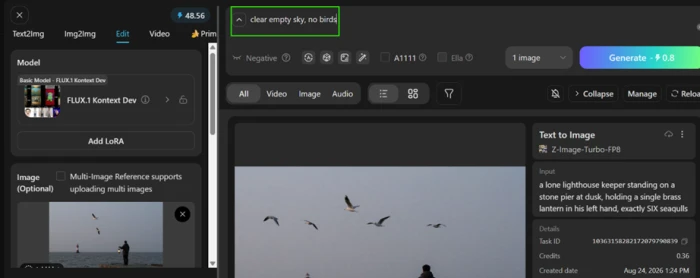
This is the strongest result of the session, and the one that changes how you should approach the platform.
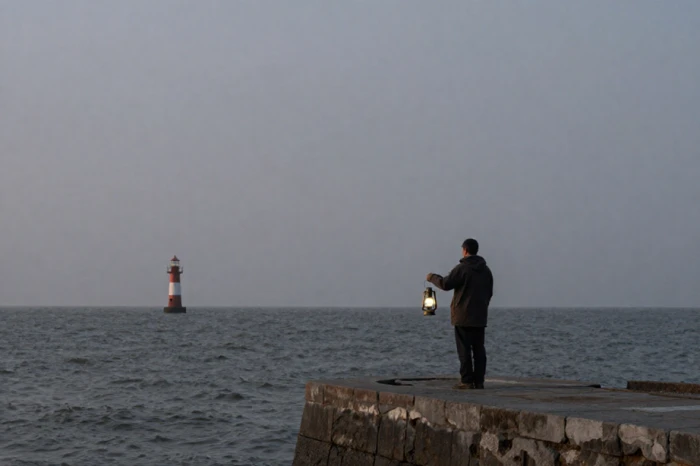
Browsing the library until a button greys out
Models is the other half of the product, and it behaves like a marketplace rather than a menu.
The unfiltered browse view leads with anime and stylized character checkpoints. Category tabs cover anime, beauty, 3D, 2.5D, realistic, game and design, so other styles are reachable, just never the default.
Run counts sit on every card, which is the fastest proxy for whether a checkpoint deserves your credits.
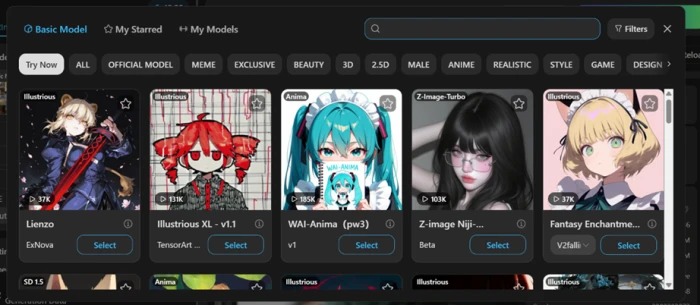
Opening an individual model page is where the platform's defining restriction becomes visible.
Tensor.Art pricing
Figures from the official Tensor.Art plan card and the platform's published Pro membership terms.
| Plan | Price | What's included |
|---|---|---|
| Starter | Free | 50 daily credits · image and video generation · access to over 1 million models and LoRAs · LoRA training · storage up to 7 days |
| Daily Pass | $1 | One-off trial of membership benefits · limited to a single purchase per account |
| Pro Monthly | $9.90 /mo | 300 daily credits · 1,000 permanent bonus credits · priority queue · access to 1,000+ exclusive models and tools · fast generation |
| Pro Quarterly | $19.90 /qtr | Everything in Pro Monthly · 5,000 permanent bonus credits · works out near $6.63 a month |
| Pro Yearly Most popular | $69.90 /yr | Everything in Pro Monthly · 25,000 permanent bonus credits · discounted from a $118.80 list price · about $5.83 a month |

Pros & cons
Specific conclusions from testing and real user reviews, not generic filler.
✅ Pros
- Over a million community models and LoRAs run without local GPU hardware
- ComfyUI workflows import and execute in the browser with no install
- ControlNet, inpainting and upscaling sit in the same generation canvas
- FLUX.1 Kontext Dev handles instruction-based edits on existing images
- Cloud LoRA training builds custom character and style models from your dataset
- Run counts on every model page show traction before you commit credits
⛔ Cons
- Models tagged EXCLUSIVE stay undownloadable at every subscription tier
- Mature content generation is banned and pushed to a separate TensorHub domain
- Users report credits are halved when converted across to TensorHub
- Failed and blocked generations do not reliably return the credits they consumed
- Moderation flags ordinary video jobs as inappropriate with no explanation
- Default browse view skews anime, burying photoreal and product work
- In-app cancellation instructions have appeared untranslated, stalling unsubscribes
- Model quality is uneven and results are hard to reproduce across sessions
Synthesized from real reviews on Google Play, the App Store, Reddit & AlternativeTo · paraphrased, not quoted
Tensor.Art scorecard
Rated against what a cloud model-hosting image generator is actually built to do.
| Dimension | Verdict | Score |
|---|---|---|
| Model library breadth Checkpoints, LoRAs, embeddings, workflows | Excellent |
9.0
|
| Image editing & inpainting Removal, alteration, structure retention | Excellent |
8.5
|
| Generation controls LoRA, ControlNet, VAE, ComfyUI import | Excellent |
8.5
|
| Text rendering in images Letterforms, spelling, surface texture | Good |
8.0
|
| Free tier generosity Daily credits against real per-image cost | Good |
8.0
|
| Credit accounting & value Quote accuracy and plan economics | Good |
7.0
|
| Prompt adherence Counts, atmosphere, object interaction | Average |
6.5
|
| Interface & learning curve Density of controls, discoverability | Average |
6.5
|
| Content policy transparency Hidden defaults, filter behavior, disclosure | Weak |
5.0
|
| Model portability Whether you can take models with you | Weak |
4.5
|
| Scrutool Score Equal-weight average of all 10 dimensions |
7.2
|
What users say about Tensor.Art
The themes reviewers raise most often, by share of analysed reviews.
% = share of analysed reviews mentioning each theme (Google Play, App Store, Reddit, AlternativeTo)
A marketplace that lets you run everything and own nothing
Tensor.Art solves a real problem well. A million community checkpoints and LoRAs, ControlNet, VAE selection and ComfyUI workflow import, all executing on someone else's GPUs, is genuine value for anyone who would otherwise be shopping for a graphics card. The free tier is stronger than its headline number suggests, since 50 daily credits at 0.36 per standard image works out near 138 images. The Kontext edit pass removed a sky full of birds without leaving a mark on anything else, which is the cleanest result I got all session. Against that, the platform is quietly restrictive. Models tagged EXCLUSIVE never come down to your machine, the composer applied a negative embedding I never typed, the model prompt-adhered on objects while undercounting quantities and flattening atmosphere, and the content policy shift has pushed a meaningful slice of the community elsewhere. Anime and character artists who work in the cloud and treat models as rented tools will get plenty out of it. Anyone who needs to own their weights, hit exact specifications, or work on themes the filter dislikes should look at a local setup instead.
Discussion
Join the discussion and share your perspective.