
Udio AI
Udio is an AI music generator with class-leading vocal quality and section-level arrangement tools. Downloads are currently disabled, so nothing you create can leave the platform.

Class-leading audio and the deepest arrangement controls in the category, on a platform that will not let a single file leave it.
Should you use Udio?
Sketching and arranging inside one browser tab. Songwriters testing hooks, section order and vocal tone before rebuilding the idea somewhere else.
You need a file. Downloads of audio, video and stems are disabled on every tier , so nothing reaches YouTube, a DAW or a distributor.
Free covers 10 credits a day. Section editing starts at Standard, $10/mo or $96/year , and still does not restore exports.
The lyric box asks you to stay under 53 words , and every Create or Extend spends credits on two songs, not one.
What is Udio?
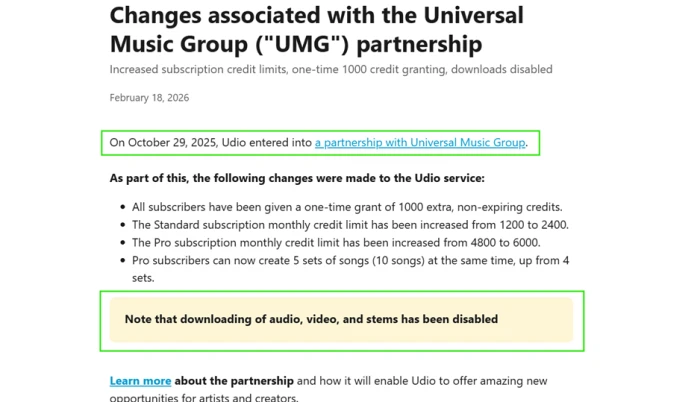
Start with what Udio will not do. It will not give you a file. Following the Universal Music Group partnership signed on 29 October 2025, Udio's own help centre states that downloading of audio, video and stems has been disabled, and that applies to free accounts and to $30 Pro subscriptions alike. Everything you make lives on udio.com, plays on udio.com and shares as a udio.com link.
What sits inside that fence is a text-to-music generator built by former Google DeepMind researchers, running on web and iOS, and widely rated as the best-sounding option in the category. You describe a style or paste lyrics, Udio returns two versions, and a set of arrangement tools let you extend the track section by section, branch alternate takes and (on paid plans) rewrite individual passages. It is a strong writing room. It is currently not a delivery pipeline.
Key features & how they perform
Each feature rated from hands-on testing and aggregated review sentiment.
Audio and vocal quality
The reason people stayed. Long-term users on the App Store consistently rate the vocals as more natural than rival generators, with cleaner instrument separation.
Extend and section placement
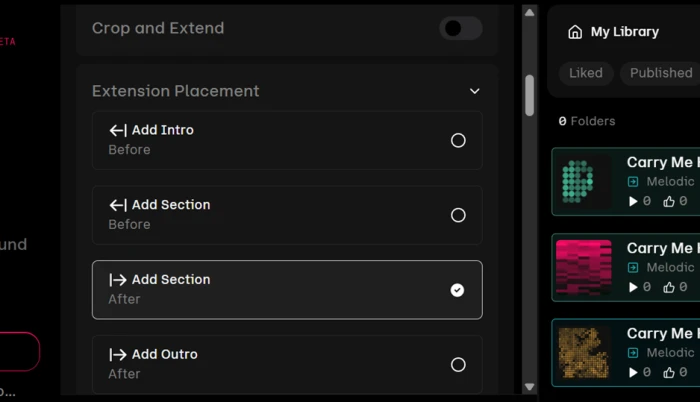
Four insertion points cover intro, outro and sections before or after existing audio, so a track can be assembled out of order rather than in one pass.
Trees version branching
Every generation spawns two variants that hang off their parent as visible branches. Rejected directions stay recoverable instead of being overwritten.
Lyric editor and Write for Me
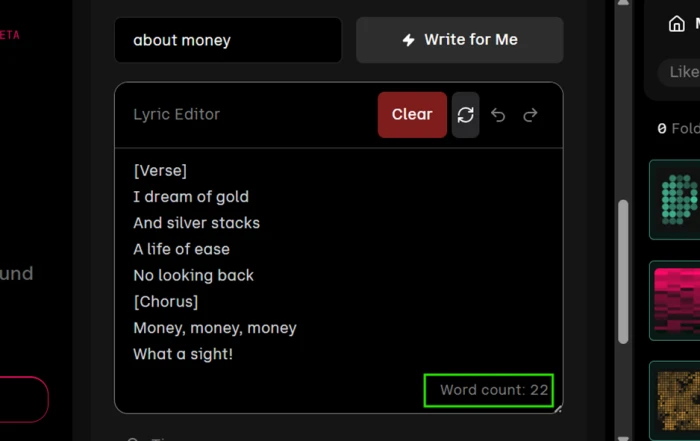
The editor recommends staying under 53 words per generation, and the built-in lyric writer returned 22 words on a simple prompt during testing.
Export and sharing
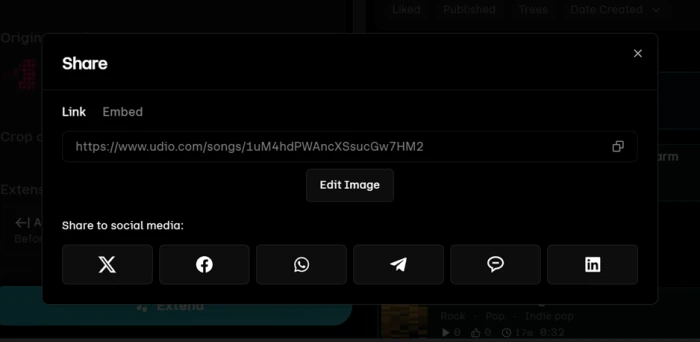
Share and Publish only. The track menu carries no download entry, and sharing produces a udio.com link plus social buttons rather than an audio file.
Playground personas
Browsable synthetic artists with portraits and names, offered as a starting point. A gentler way in than a blank prompt box, though the personas are fictional.
Feature ratings blended from Trustpilot, Apple App Store, Reddit r/udiomusic review patterns and hands-on testing.
Eight generations on a free Udio account, and what each one cost
Signup to publish, tracking credits, clip length and every wall the free tier put up.
Open a free account and read the credit counter
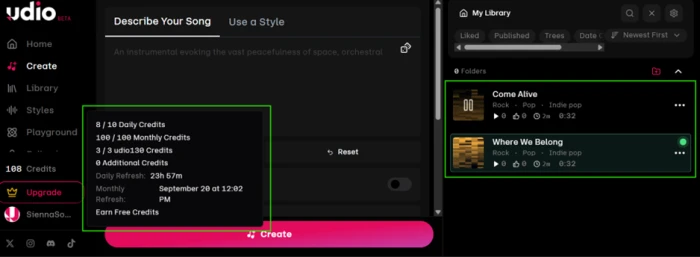
Udio's free tier runs on two pools at once. There is a 10 credit daily allowance, and behind it a separate 100 credit monthly limit you can pull from once the daily one is spent.
Neither pool rolls over. The sidebar counter is the only place both numbers appear together, and it is worth opening before your first generation rather than after.
No card is required to reach this screen.
Hit the 53-word lyric ceiling
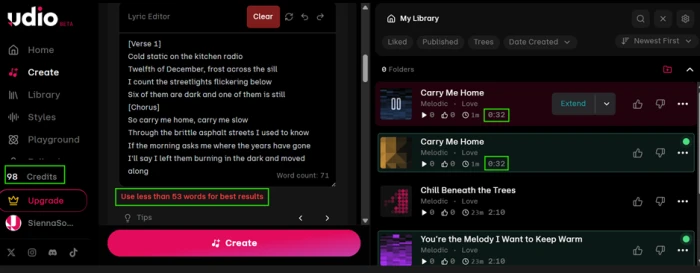
Udio has two input modes. Describe a style and it writes the song for you. Paste your own lyrics and the Lyric Editor takes over, with a live word counter in the corner.
That counter is not decorative. Above a certain length the editor posts a warning, and the number it names is lower than most people expect from a verse and a chorus.
Rebuild the length with Extend
Extend is the route back to a full-length track, and it is the part of Udio that earns its reputation.
The placement panel offers four insertion points, so a section can be added before or after existing audio, with separate handling for intros and outros. Building a track out of order is possible here, which one-shot generators do not allow.
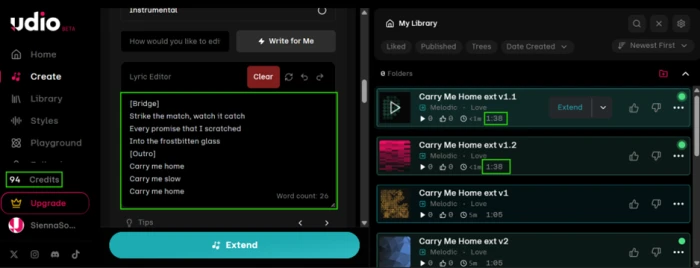
Running two extends back to back shows what each one actually buys, and how the credit counter moves with it.
Find the paywall in the Trees view
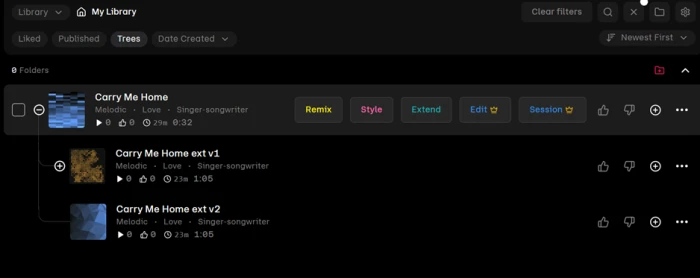
Trees is a filter in My Library that redraws your tracks as a hierarchy instead of a list.
Because every generation returns two variants, each one hangs off its parent as a visible branch. A direction you rejected three extends ago is still sitting there, which is the opposite of how most generators handle iteration.
The row of action buttons on each track is also where the free tier's limits become legible.
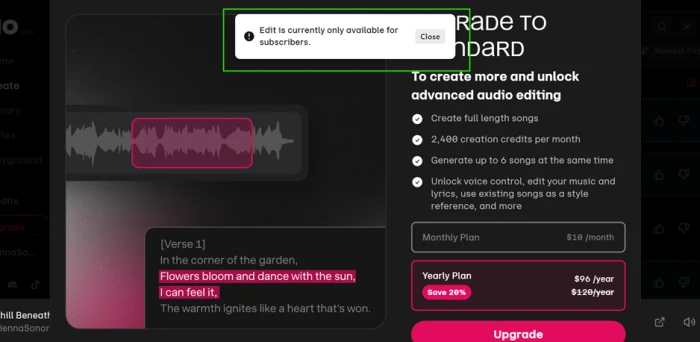
Clicking the crowned Edit button confirms what the icon implies, and drops you somewhere specific.
Let Write for Me handle the lyrics
A lyric assistant sits directly above the editor. You give it a subject in a single line and it fills the box.
It is free to use and does not cost credits, so it is the cheapest thing on the platform to test.
"about money"
Try to get a finished track off the platform
This is the part that decides whether Udio fits your workflow, and it takes about ten seconds to establish.
Open the overflow menu on any generated track. Create, Style, Voice, Edit, View, Share, Move To Folder, Add to Playlist, Report Song and Delete are all present.
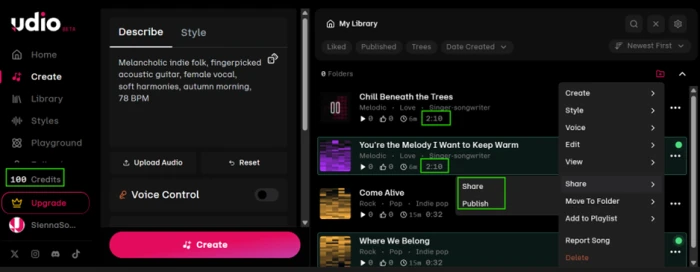
Share is the closest thing to an export, so it is worth opening to see exactly what it hands over.
Udio's help centre explains why, and dates the change precisely.
Two smaller problems: playback and publishing
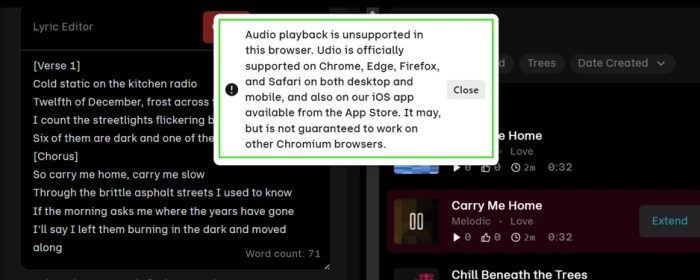
Udio officially supports Chrome, Edge, Firefox and Safari on desktop and mobile, plus its iOS app. Other Chromium browsers get no guarantee.
The support boundary does not land where you would expect it to.
Start from a persona in the Playground
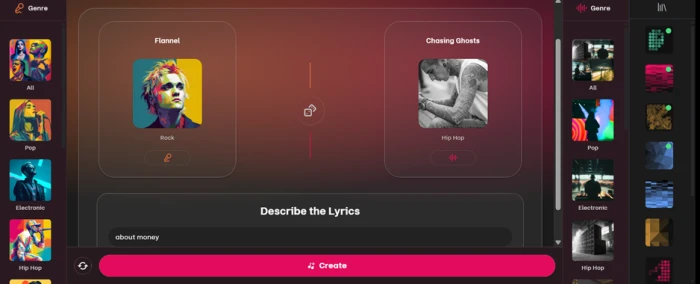
The Playground is Udio's alternative entry point for people who freeze at an empty prompt box.
Instead of describing a style, you browse synthetic artists by genre, pick one, describe the lyrics and generate. The personas come with photorealistic portraits and band names.
Udio pricing
Figures taken from Udio's official pricing page and help centre.
| Plan | Price | What's included |
|---|---|---|
| Free | $0 | 10 credits/day plus 100/month · no rollovers · 3 full-length songs per day · up to 4 songs at once · no card required |
| Standard Popular | $10 /mo | $96/year billed annually ($8/mo) · 2,400 credits/month · uncapped full-length songs · up to 6 at once · voice control, editing, style reference · free trial |
| Pro | $30 /mo | $288/year billed annually ($24/mo) · 6,000 credits/month · up to 10 songs at once · everything in Standard |
| Credit packs | A la carte | Bought separately from the pricing page · these credits never expire, unlike subscription credits |
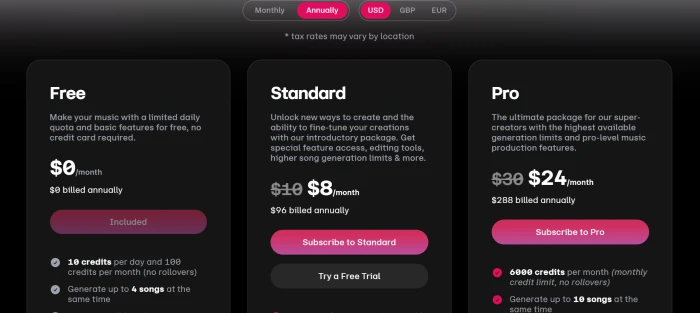
The pricing page opens on the Annually toggle, so the $8 and $24 figures are the discounted annual rate, not the monthly price.
Pros & cons
Specific conclusions from testing and real user reviews, not generic filler.
✅ Pros
- Vocal realism rated above Suno by long-term App Store reviewers
- Four extension insertion points allow sections before existing audio
- Trees view keeps every rejected variant as a recoverable branch
- Extend adds a fixed 33 seconds for 2 credits, so costs stay predictable
- Free tier runs on 10 daily credits with no card required
- Standard offers a trial before the first $10 charge
- Paid subscribers owe no attribution on tracks they generate
⛔ Cons
- Downloads of audio, video and stems disabled on all three tiers
- Lyric editor warns to stay under 53 words per generation
- Custom lyrics returned 0:32 clips against 2:10 with no lyrics
- Write for Me produced 22 words, under half Udio's own guidance
- Section editing requires the $10 Standard plan
- Every Create, Extend or Remix spends credits on two songs
- Playback fails on Chromium browsers outside the supported four
- Publish makes a track public in one click, no confirmation screen
- Trustpilot reviewers report refused refunds after downloads were pulled
Synthesized from real reviews on Trustpilot, Reddit r/udiomusic and the Apple App Store, plus Udio's own help centre · paraphrased, not quoted
Udio scorecard
Rated against what an AI music generator is actually built to do.
| Dimension | Verdict | Score |
|---|---|---|
| Audio quality & vocal realism Naturalness, mix clarity, artifacts | Excellent |
8.5
|
| Song structure & extend control Insertion points, arrangement order | Excellent |
8.5
|
| Version branching & iteration Trees view, recovering rejected takes | Good |
8.0
|
| Ease of use & onboarding Signup, first generation, Playground | Good |
7.0
|
| Playback & browser support Where the app actually runs | Average |
6.0
|
| Free tier usability Credits, daily caps, locked tools | Average |
5.5
|
| Credit value & transparency Cost per finished minute, rollovers | Average |
5.5
|
| Lyric input & control Word ceiling, Write for Me quality | Weak |
4.5
|
| Rights clarity & user trust Mid-subscription changes, refunds | Weak |
4.0
|
| Export & download options Getting a file off the platform | Weak |
1.5
|
| Scrutool Score Equal-weight average of all 10 dimensions |
5.9
|
What users say about Udio
The themes reviewers raise most often, by share of analysed reviews.
% = share of analysed reviews mentioning each theme (Trustpilot, Reddit r/udiomusic, Apple App Store, plus reporting from Billboard and AP)
The best-sounding AI music tool you cannot take home
Udio still wins on the things that are hardest to build. The vocals sound more human than the competition, the four-point extension panel lets you assemble a track out of order, and the Trees view treats every rejected variant as something worth keeping. Then the product hits a wall it built on purpose. Downloads of audio, video and stems have been off since the Universal Music Group deal, the lyric box asks you to work in 53-word chunks that generate 32 seconds at a time, section editing needs a $10 plan, and the review pages are full of people who paid for a feature that vanished afterward. Songwriters who want a fast, good-sounding sketchpad and are happy to rebuild the idea elsewhere will still get value from a free account. Anyone who needs a file at the end, for a video, a client or a distributor, should use something else until the licensed platform arrives with exports turned back on.
Discussion
Join the discussion and share your perspective.