
Viggle AI
Viggle AI maps motion from a video clip onto any character image, turning a still into an animated short-form video. Runs on web, iOS, Android and Discord, with real-time webcam swapping and FBX motion export.

Motion transfer that genuinely holds up, undercut by soft faces, a thin free tier and data terms worth reading before you upload anyone.
Should you use Viggle AI?
Short-form creators and meme makers who already have the motion they want and need a character dropped into it at social playback size.
You need faces that survive a pause , client-grade delivery, or a platform whose data terms you would be comfortable showing a legal team.
Free gives 5 watermarked videos a day and zero credits. Removing the watermark starts at Pro, $9.99/mo or $7.99 billed yearly.
Free storage lasts 7 days , so anything you do not download disappears. Uploaded images also feed model training.
What is Viggle AI?
Viggle does not invent motion. You supply it. Feed the platform a character image and a separate video of someone moving, and it maps the second onto the first, keeping the pose, the timing and the background from the motion clip. That single mechanic explains the whole product: the Mix tool for one character, Multi-Track for several in one scene, Real-Time Swap for a webcam feed, and PINOC for exporting the extracted skeleton as FBX or GLB. It runs on a proprietary model the company calls Joint Space-Time, which is why limbs carry weight and fabric moves against a body instead of sliding over it.
The audience is short-form: TikTok and Reels creators, meme accounts, VTubers who never wanted to commission a rig, and animators using it for scrappy previsualization. It works on the web, on iOS and Android, and through the original Discord bot, and there is a public API for teams wiring character swaps into their own products. What it is not is a text-to-video generator. Ask it for a cinematic scene from a sentence and you are using the wrong tool.
Key features & how they perform
Each feature rated from hands-on testing and aggregated review sentiment.
Mix character swap
The core tool, and the strongest one. Body mechanics, weight shift and clothing behavior survive the transfer even when the two subjects have different builds.
Motion template library
Over 4,000 reference motions, refreshed against whatever is trending. Removes the need to shoot or source your own clip for most social formats.
Real-Time Swap (Live)
Drives a character from your webcam and feeds OBS, Twitch or Zoom as a virtual camera. Stable on lateral movement, unreliable when anything moves toward the lens.
Multi-Track editing
Places several swapped characters into one scene with synchronized timing. Capable, but sessions are capped on the free tier and it is the slowest part of the pipeline.
PINOC motion export
Extracts skeletal animation from a phone clip and exports FBX or GLB into Blender or Maya. The one part of Viggle aimed at a real production pipeline.
Image generation
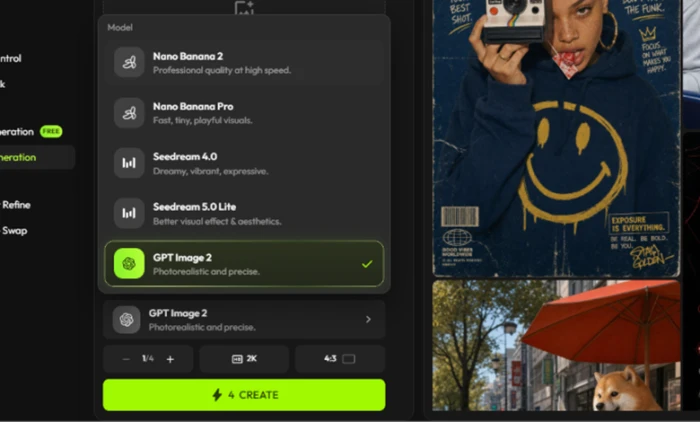
Builds a source character without leaving the app, but routes every request to outside models like GPT Image 2 and Seedream, and bills credits per image.
Feature ratings blended from Google Play, App Store, Reddit & MouthShut review patterns + hands-on testing.
Two renders, one webcam session, and the exact point Viggle broke
A mismatched Mix job, a generated character, and four minutes of Real-Time Swap on a free account.
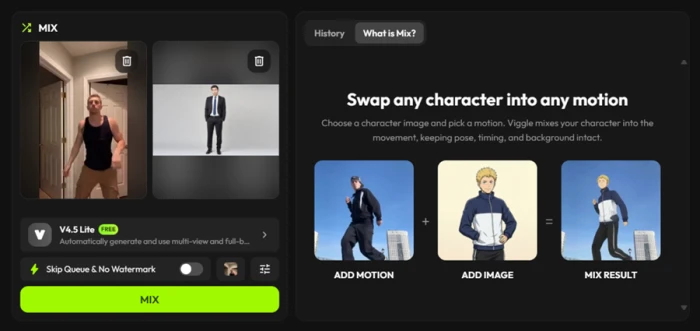
Loading a character and a motion clip into Mix
Mix is the tool the rest of the platform is built around. It takes two inputs, a still character and a video of someone moving, and maps the movement from the second onto the first.
I deliberately mismatched them: a stock photo of a man in a suit against flat grey, paired with a vertical clip of a man in a tank top walking through a doorway. Different builds, different clothing. That gap is where weak motion models fall apart.
The panel makes its promise plainly: the character adopts the motion while pose, timing and background survive the swap.
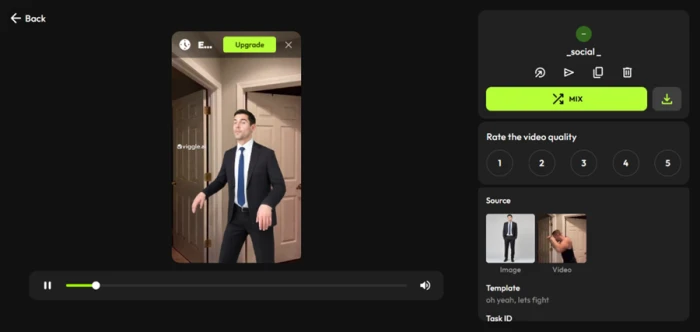
What came back from the free queue
The transfer worked. The suited character picked up the walk, the arm swing matched, and the weight shifted at the right points in the stride.
The hallway from the motion clip carried over intact behind him, and the jacket moved against the body rather than sliding across it as a flat layer. This is the physics-aware part of the model doing its job.
The face is where the free tier shows its edge, and you only see it if you stop the clip.
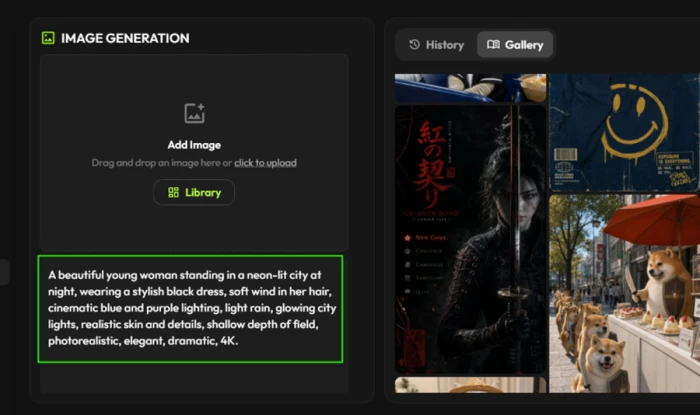
Generating the source character inside Viggle
You do not have to bring your own character image. Viggle will generate one, which means a whole clip can be built without leaving the tool.
I asked for a woman in a neon-lit city at night, and pushed the prompt toward the kind of lighting that usually exposes a weak image model.
"A beautiful young woman standing in a neon-lit city at night, wearing a stylish black dress, soft wind in her hair, cinematic blue and purple lighting, light rain, glowing city lights, realistic skin and details, shallow depth of field, photorealistic, elegant, dramatic, 4K."
The model picker is the more revealing screen, because it shows that Viggle does not run an image model of its own here. Generation is routed to outside providers.
Where the paywall interrupts
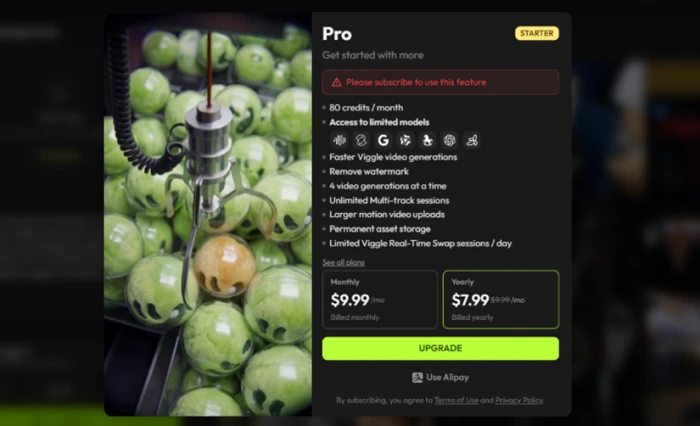
Four credits per image empties a monthly allowance quickly, and hitting any locked control throws up the Pro screen rather than an explanation.
The feature list underneath the price doubles as a map of what free withholds: watermark removal, faster generation, four concurrent videos, larger motion uploads and permanent asset storage.
That last item is the quiet one. If permanent storage is a paid feature, free renders expire.
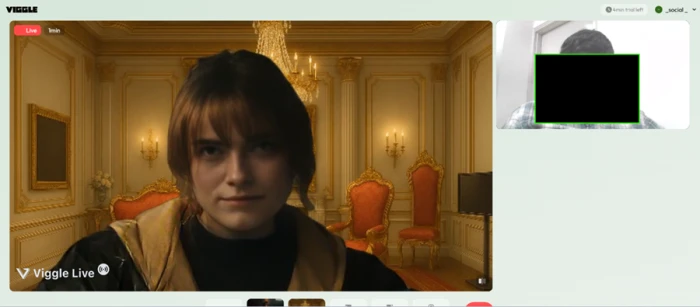
Four minutes inside Viggle Live
Live applies the same mechanic to a webcam feed. Your movement drives the character in real time and the background is replaced around it.
Sitting still, it was persuasive. The character tracked my head, the gilded room behind it held steady while I shifted in my chair, and the lighting on the character adjusted as I moved.
For a real-time render on a free trial, this was well past what I expected going in.
The moment it fell apart
Then I raised one hand toward the camera, and the output gave the character two.
My webcam panel shows a single open palm filling the frame. The render shows two overlapping hands with mismatched finger lengths and different lighting falloff on each, and the character's face has disappeared behind them entirely, replaced by sleeve and shoulder with no head structure underneath.
This reads as a depth problem. Lateral movement across the frame was handled cleanly all session. Movement toward the lens gave the model something it could not resolve, so it invented geometry to fill the gap.
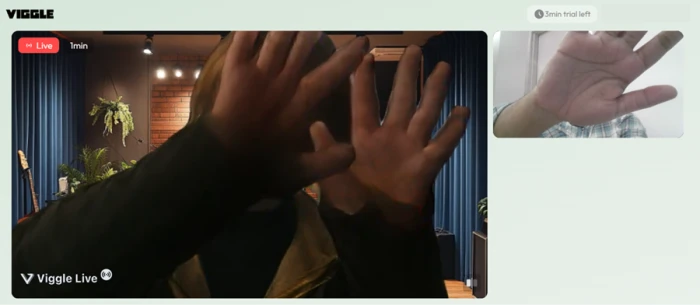
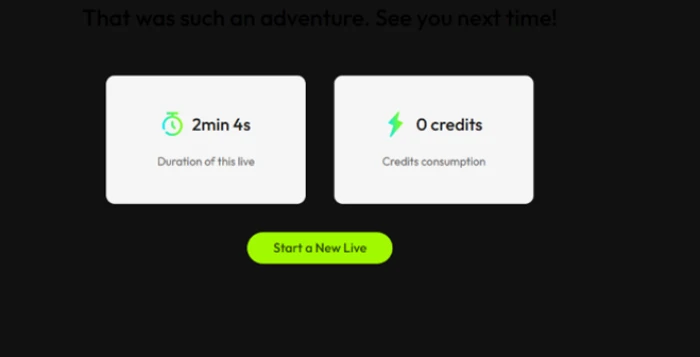
The background stayed perfectly intact throughout, which makes the failure stranger to look at. Closing the session produced a summary card.
Viggle AI pricing
Figures taken from the official Viggle pricing page. Headline rates are the annual billing price; monthly billing is 20% higher.
| Plan | Price | What's included |
|---|---|---|
| Free | $0 | 5 videos/day · 0 credits · 1 generation at a time · watermarked · 1 min max upload · 5 min Real-Time Swap · 7-day storage |
| Pro Starter | $7.99 /mo | Billed yearly, $9.99 month to month · 80 credits/mo · no watermark · 4 at a time · 30 min Real-Time Swap · permanent storage · all models except Seedance |
| Live | $15.99 /mo | Billed yearly, $19.99 month to month · 200 credits/mo · 6 at a time · 6+ hours Real-Time Swap · access to all models including Seedance |
| Max | $63.99 /mo | Billed yearly, $79.99 month to month · 800 credits/mo · 10 at a time · unlimited Real-Time Swap sessions · all models |
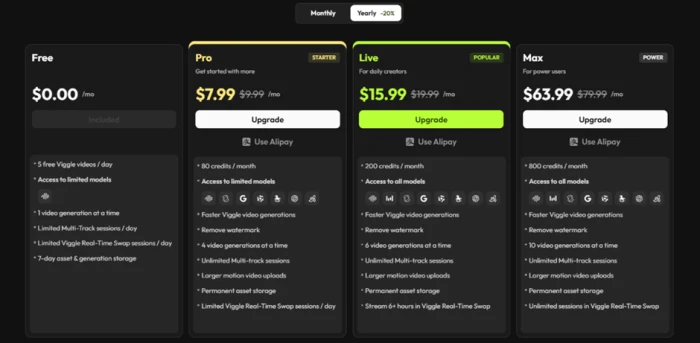
The plans page with the Yearly toggle active, which is how the site loads by default.
Pros & cons
Specific conclusions from testing and real user reviews, not generic filler.
✅ Pros
- JST model keeps limb weight and fabric convincing under fast motion
- PINOC exports extracted skeletons as FBX and GLB for Blender or Maya
- Public API renders at 1 credit per second of output video
- Motion library carries more than 4,000 reference templates
- Multi-Track composes several swapped characters into one synchronized scene
- Real-Time Swap feeds OBS, Streamlabs, Twitch and Zoom as a virtual camera
- Runs on web, iOS, Android and the original Discord bot
⛔ Cons
- Uploaded images feed model training and reportedly persist after account deletion
- Real-Time Swap carries a documented one to two second delay
- Face matching drifts, producing the wrong character on template remixes
- Renders stall for 15 minutes or longer during traffic spikes
- Templates ship with pre-loaded music that draws copyright claims off-platform
- GNET documented extremist propaganda made on the platform in February 2026
- Image generation is outsourced to third-party models, not Viggle's own
- Mobile builds log users out and lose subscription state mid-cycle
Synthesized from real reviews on Google Play, the App Store, Reddit & MouthShut plus published research and Viggle's own documentation · paraphrased, not quoted
Viggle AI scorecard
Rated against what a motion transfer and character animation platform is actually built to do.
| Dimension | Verdict | Score |
|---|---|---|
| Motion transfer accuracy Weight, timing, fabric behavior | Excellent |
8.5
|
| Feature & tool range Mix, Multi-Track, Live, PINOC, API | Excellent |
8.5
|
| Ease of use Signup to first finished render | Excellent |
8.5
|
| Output video quality Resolution, artifacts, export fidelity | Average |
6.5
|
| Generation speed & queue reliability Wait times and failed renders | Average |
6.5
|
| Real-time Live performance Tracking stability and latency | Average |
6.0
|
| Face & identity fidelity Does the character stay recognizable | Average |
5.5
|
| Free tier & credit value What you can do before paying | Average |
5.5
|
| App stability Crashes, logouts, stuck renders | Weak |
5.0
|
| Privacy, rights & safety Data retention, likeness, moderation | Weak |
4.5
|
| Scrutool Score Equal-weight average of all 10 dimensions |
6.5
|
What users say about Viggle AI
The themes reviewers raise most often, by share of analysed reviews.
% = share of analysed reviews mentioning each theme (Google Play, App Store, Reddit, MouthShut)
The best motion transfer in the category, inside a product that asks a lot in return
Nothing else in this price range moves a character as convincingly as Viggle does. Weight, stride and clothing behave the way physical bodies behave, and the transfer holds even when the source character and the motion clip share almost nothing. The problems start once you look closer or stay longer. Faces soften into approximations when a clip is paused, Real-Time Swap invents geometry the moment anything moves toward the lens, renders stall for a quarter of an hour when the servers are busy, and the free tier deletes your work after seven days. The data terms deserve their own paragraph: uploads train the model, retention is reported to outlast account deletion, and researchers documented the platform being used for extremist propaganda in early 2026. Short-form creators making content that lives at playback size on a phone will get real value here and should budget for Pro at minimum. Anyone producing client work, animating a face that has to stay recognizable, or handling images of people who did not consent should look elsewhere.
Discussion
Join the discussion and share your perspective.