
Wava AI
Wava AI is a browser-based generator for faceless short-form video, covering text stories, split-screen clips, ElevenLabs voiceover and an Auto Clipper. A new account starts at zero credits, so nothing generates until you subscribe at $19 a month.

A tidy faceless-video toolkit that will not generate a single frame until you subscribe, sold through a checkout users repeatedly struggle to leave.
Should you use Wava AI?
Faceless channel creators posting daily who want text-story and split-screen clips assembled for them and are willing to pay upfront to find out if the output suits their niche.
You want to test the output before paying . A new account opens at 0 credits and every generator, including the downloaders, is locked until you subscribe.
There is no usable free layer, so the real entry point is Wava Basic at $19/mo for 30 videos, roughly 63 cents each. Pro is $29 and Elite is $69.
Billing runs through Whop, and cancellation is the single most repeated complaint across Trustpilot and Whop reviews, with several users reporting bounced support email.
What is Wava AI?
Free gets you nothing here, and that is the first thing to understand. Wava AI is a browser-based factory for faceless short-form video, and a brand new account arrives with a credit balance of zero. You can open every tool, read every price, type a full prompt, and then watch the Generate button refuse you. Wava Basic at $19 a month is where the product actually starts.
What that $19 buys is a set of purpose-built generators rather than one blank editor: text story videos, split-screen streamer clips, an Auto Clipper that cuts shorts out of long footage, ElevenLabs voiceover with custom voice import, auto captions, an image generator and YouTube and TikTok downloaders. It runs entirely in the browser, so a Chromebook handles it as well as a workstation. The target user is the creator posting daily to TikTok, Reels and Shorts who does not want to open a timeline editor.
Key features & how they perform
Each feature rated from hands-on testing and aggregated review sentiment.
Text story & split-screen videos
The formats Wava is built around. Reviewers consistently report a finished vertical clip in minutes, though the assembled look repeats across uploads.
Auto Clipper for long footage
Cuts shorts out of podcasts and streams automatically. The idea is sound, but the charge follows the source length rather than the clips you keep.
ElevenLabs voiceover
The strongest piece on paper: named voices plus custom voice import on every tier. Reviewers note mispronunciation on niche terms and unusual names.
Custom auto captions
Word-level captions timed to the narration, which is the part most creators would otherwise do by hand. Included at every price point.
Built-in image generator
One prompt box capped at 5,000 characters, one button, and a 1,000-credit charge per image. No style presets, aspect controls or negative prompt field.
YouTube & TikTok downloaders
Convenient to have next to the clipper, expensive to use. Pulling a single file costs the same 1,000 credits as generating an image.
Feature ratings blended from Trustpilot, Whop, Reddit & third-party review patterns + hands-on testing.
What a new Wava AI account can actually do before you pay
A fresh signup, four generators, and the exact point where each one stops.
Signing up and reading the credit counter
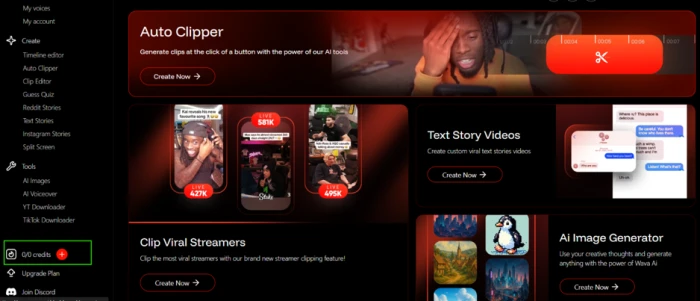
Wava opens on a dashboard rather than an editor. Every generator sits in the left rail and the main panel promotes the featured ones.
The number that matters is tucked into the bottom-left corner. A brand new account reads 0/0.
No starter balance, no trial pool, nothing to spend. The interface stays fully browsable, but the moment an action would produce a file, it stops.
Text to Image, priced at 1,000 credits a shot
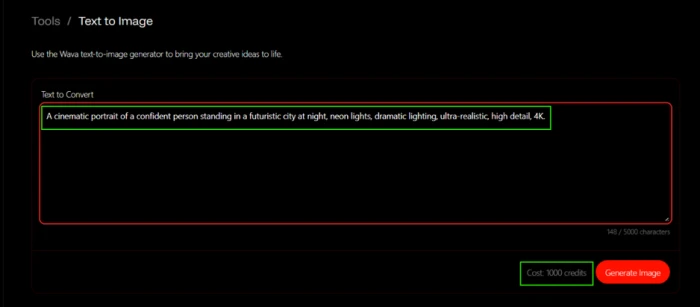
The image tool is about as stripped back as these get: a single prompt box capped at 5,000 characters and a Generate button.
There are no style presets, no aspect ratio control and no negative prompt field. What there is, to Wava's credit, is a price on screen before you commit: 1,000 credits for one image.
"A cinematic portrait of a confident person standing in a futuristic city at night, neon lights, dramatic lighting, ultra-realistic, high detail, 4K."
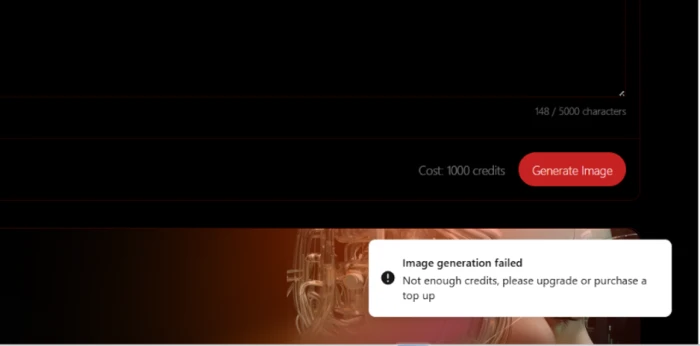
Pressing Generate on an empty balance produces the response every paywalled tool should give.
The Auto Clipper charges for what you feed it
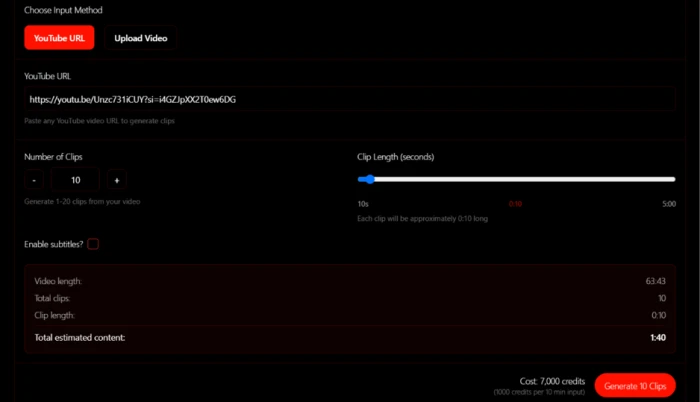
Auto Clipper is the tool with the most genuine pull. Paste a long video, tell it how many short clips you want, and it picks the moments.
The billing is where it turns. The quote is calculated at 1,000 credits per 10 minutes of source video, so the cost tracks the length of the input, not the length of the output.
Pulling three highlights from an hour-long stream costs the same as processing the whole recording. For podcast and livestream repurposing, which is the obvious reason to reach for this feature, that adds up quickly.
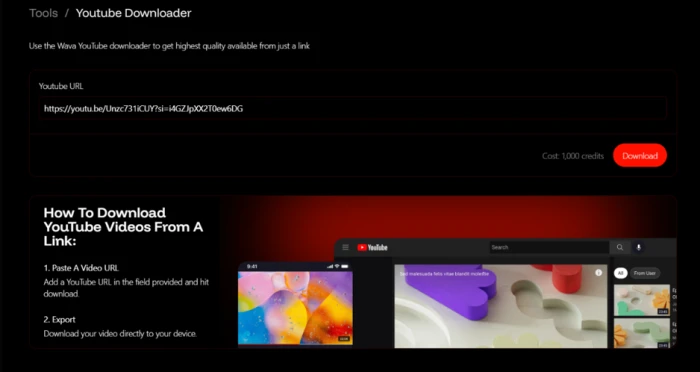
A plain YouTube download costs as much as an image
The downloader sits beside the clipper and does exactly what the name says: paste a link, pull the file.
There is no generation happening here, no model running, nothing being created. It still costs 1,000 credits, the same charge as generating an original image.
Text to Speech fails without telling you why
The voiceover tool holds to the same 1,000-credit rate and the same 5,000-character input cap. Voices come from a character dropdown of named options.
I pasted a short test script and selected the "Bria" voice, which is a complete setup: text in one field, voice in the other.
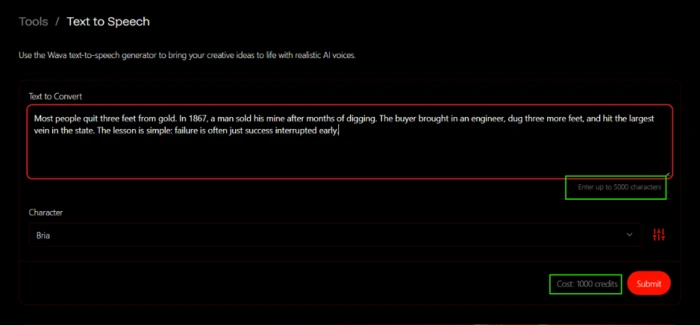
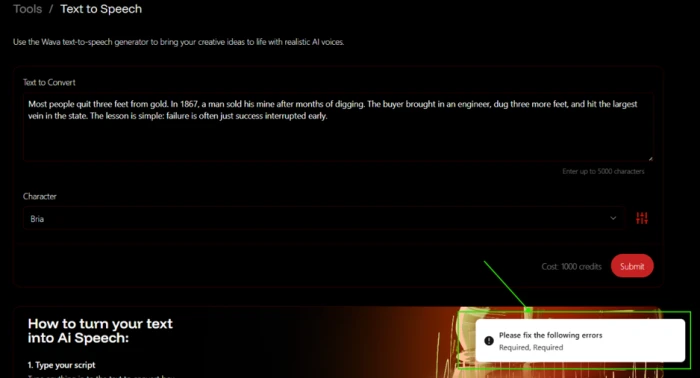
Submit did not return the clean credit warning the image generator had given a few minutes earlier. It returned something else entirely.
Wava AI pricing
Figures taken from the official Wava AI pricing page, monthly billing.
| Plan | Price | What's included |
|---|---|---|
| Free account | $0 | Browse the dashboard and every tool · 0 credits · no generation, no downloads, no exports |
| Wava Basic | $19 /mo | 30 mins of video generation · 30 AI credits ($0.63 per video) · free background clips · ElevenLabs voiceover · custom voice import · image generator · auto captions |
| Wava Pro Popular | $29 /mo | 60 mins of video generation · 60 AI credits ($0.48 per video) · same full feature set as Basic · max AI generation speed |
| Wava Elite | $69 /mo | 150 mins of video generation · 150 AI credits ($0.46 per video) · same full feature set · max AI generation speed |
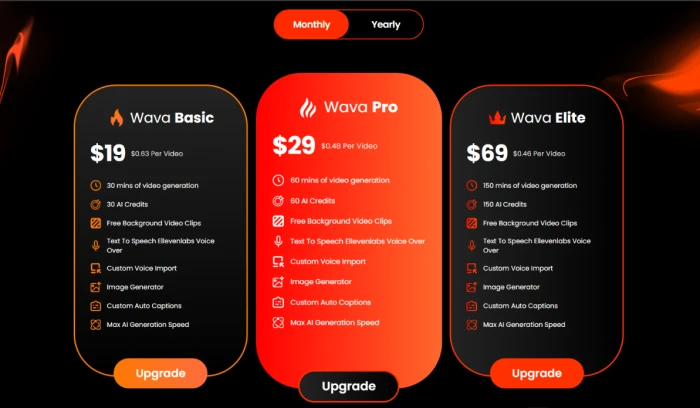
Every tier carries the same feature list. The only thing that scales is how much you can produce.
Pros & cons
Specific conclusions from testing and real user reviews, not generic filler.
✅ Pros
- Every action shows its credit cost before you commit
- The full dashboard stays browsable on a zero-credit account
- ElevenLabs voiceover and custom voice import on all three tiers
- Basic covers 30 videos for $19, about $0.63 each
- Stories, clipping, voice and images live in one workspace
- Runs in the browser, so Chromebooks handle it fine
⛔ Cons
- New accounts open at 0/0 credits with no trial generation
- Text to Speech returns "Required, Required" and names no field
- Auto Clipper billed 7,000 credits for a 63-minute source video
- The YouTube downloader costs 1,000 credits per file
- Cancellation complaints dominate Trustpilot and Whop reviews
- Multiple reviewers report support email bouncing back
- Plan "AI Credits" and in-app credits use different units
- Yearly prices never render on the public pricing page
- Stock background clips repeat across frequent uploads
Synthesized from real reviews on Trustpilot, Whop, Reddit & independent review sites · paraphrased, not quoted
Wava AI scorecard
Rated against what a paid faceless-video platform is supposed to deliver.
| Dimension | Verdict | Score |
|---|---|---|
| Feature range & tool coverage Stories, clipping, voice, captions, images | Good |
7.5
|
| Dashboard & ease of use Navigation, tool layout, learning curve | Good |
7.0
|
| Voiceover & audio ElevenLabs voices, custom voice import | Good |
7.0
|
| In-app cost transparency Per-action prices shown before commit | Average |
6.5
|
| Value for money Cost per finished video against rivals | Average |
5.5
|
| Output variety & originality Repetition across frequent uploads | Average |
5.5
|
| Error handling & reliability Clarity of failure states | Weak |
4.5
|
| Auto Clipper billing model Charged on input length, not output | Weak |
4.0
|
| Billing, cancellation & support Whop checkout, support responsiveness | Weak |
2.5
|
| Free access & trial What you can test before paying | Weak |
2.0
|
| Scrutool Score Equal-weight average of all 10 dimensions |
5.2
|
What users say about Wava AI
The themes reviewers raise most often, by share of analysed reviews.
% = share of analysed reviews mentioning each theme (Trustpilot, Whop, Reddit, independent review sites)
The tools look ready. The checkout is the part to worry about
Wava AI has assembled a sensible kit for faceless video: text stories, split screens, ElevenLabs voiceover, auto captions and an Auto Clipper that solves a real repurposing bottleneck. The interface is clean and, to its credit, quotes every per-action cost before you spend anything. The problem is that you cannot spend anything. A new account opens at 0 credits, so the only way to learn whether the output suits your channel is to hand over $19 first. The failure states are inconsistent too: the image generator explained itself plainly, while Text to Speech threw "Required, Required" at two correctly filled fields and never mentioned the credit wall behind it. Then there is the reason this score sits where it does. Across Trustpilot and Whop, the loudest and most repeated theme is not video quality, it is people who could not cancel, whose support emails bounced, and who found no staff on the Discord or Whop channels they were pointed toward. Creators already producing daily faceless content, comfortable with a $19 gamble and willing to pay through a card they can dispute, may find the workflow saves real time. Anyone who wants to see the output before paying, or who expects a support desk to answer, should look at CapCut, Opus Clip or InVideo first.
Discussion
Join the discussion and share your perspective.