
Webflow AI
Webflow AI turns a prompt into a structured, multi-page site inside the most powerful visual builder going. Fast first draft, placeholder cleanup required.

The most powerful visual builder going, with an AI that hands you a fast, well-structured first draft. That draft just arrives full of placeholders, and the learning curve is real.
Should you use Webflow AI?
Designers, agencies and freelancers who want fine-grained visual control and a fast AI starting point they will refine by hand.
You want a site live this afternoon with zero learning , or a fully automated builder that needs no cleanup. Webflow still demands skill.
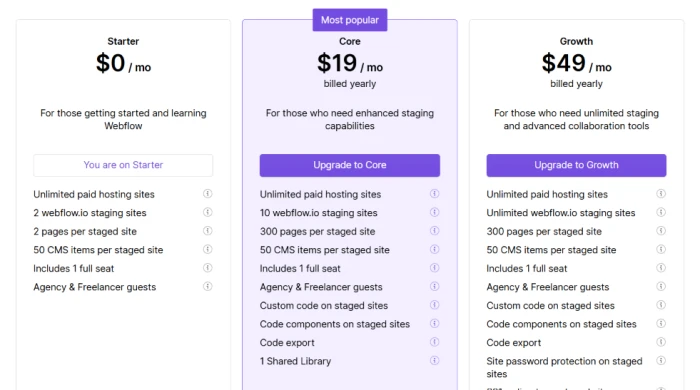
Generation is free. A live site on your own domain needs a paid Site plan (Basic $15/mo) , and code export needs a paid Workspace (Core $19/mo).
The AI output ships with placeholders : a dummy brand name, LOGO blocks, a "Made by Jane Doe" credit, plus generic copy and images.
What is Webflow AI?
Webflow AI does not try to hand you a finished website. It hands you a scaffold. Type a prompt and it generates a multi-page site with a real design system, a structured CMS and responsive layouts, then drops you into the Webflow Designer, the same professional editor that made Webflow the tool agencies and in-house teams reach for. The AI is a faster starting line, not a replacement for the work.
That framing sets the expectations. Webflow runs in the browser, generation is free on the Starter plan, and the output is genuinely well-structured. But the draft arrives full of placeholders, the copy and images are generic, and publishing to your own domain means paying for a separate Site plan. It rewards people who already know their way around a visual builder, and it offers very little to anyone hoping to skip the learning entirely.
Key features & how they perform
Each feature rated from hands-on testing and aggregated review sentiment.
AI site builder
Turns a prompt into a multi-page site with layouts, a design system and populated structure in under a minute, ready to edit in the Designer.
Visual Designer
Pixel-level control over every element with clean, semantic code underneath. This is the reason professionals pick Webflow over simpler builders.
AI image generation
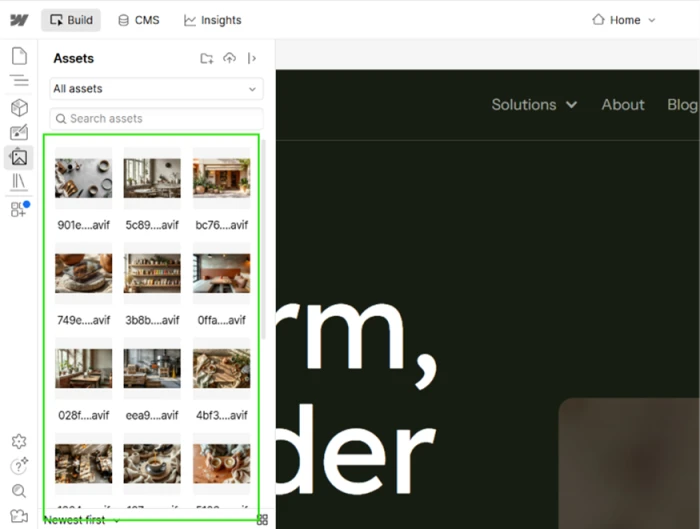
Fills the Assets panel with on-brand photography in the modern .avif format, with no AI credits spent, instead of grey placeholder boxes.
CMS & collections
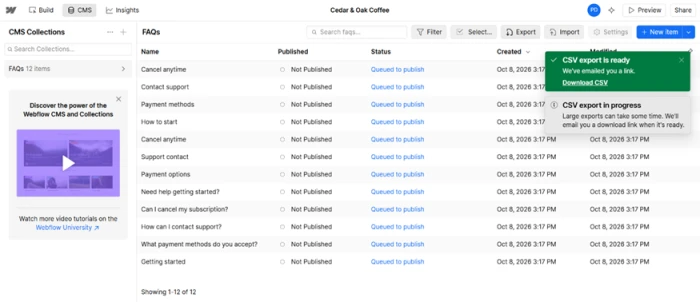
Deep content modeling with AI-generated collection items and CSV export. Handles editorial workflows and dynamic content better than most rivals.
Clean code export
Exports semantic HTML and CSS that developers rate highly, though dynamic CMS content exports collection by collection and code cannot be reimported.
Hosting & scale
Cloudflare-backed CDN hosting that scales automatically, with free SSL and global delivery built in, so you ship without touching infrastructure.
Feature ratings blended from G2, Capterra, Trustpilot & Software Advice review patterns + hands-on testing.
From a one-sentence prompt to a four-page coffee site
A full build on the free Starter plan: signup, generation, and opening the Designer to see what the AI actually left behind.
Starting a project and writing the prompt
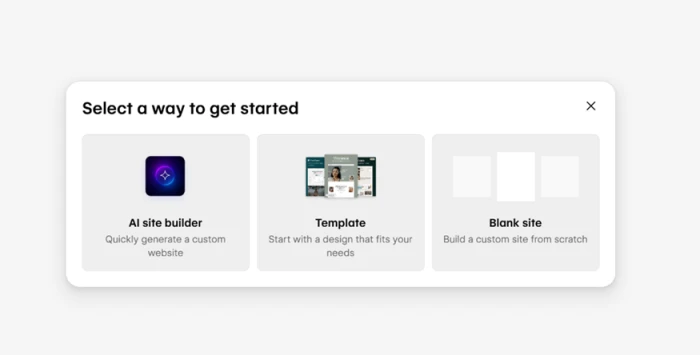
A new Webflow project opens with three ways to begin, and the AI site builder sits first in the lineup, ahead of the template library and the blank canvas. The intent is clear from the first screen: speed over manual setup.
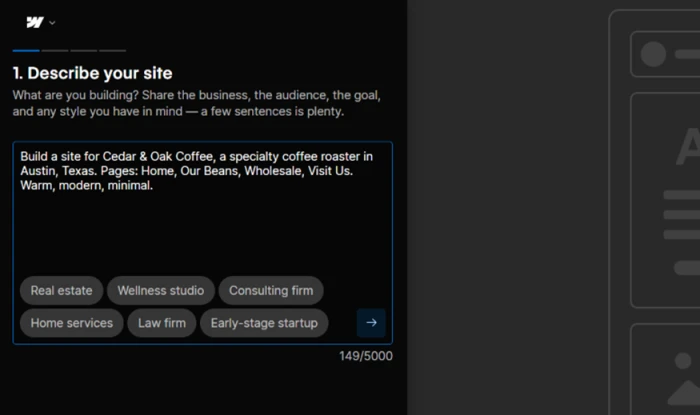
The prompt step keeps things light. I described a specialty coffee roaster, Cedar & Oak Coffee in Austin, and named the four pages I wanted. That was it.
The input box accepts up to 5,000 characters, so there is room to be detailed, but the tool clearly does not need it to get going.
From prompt to sitemap
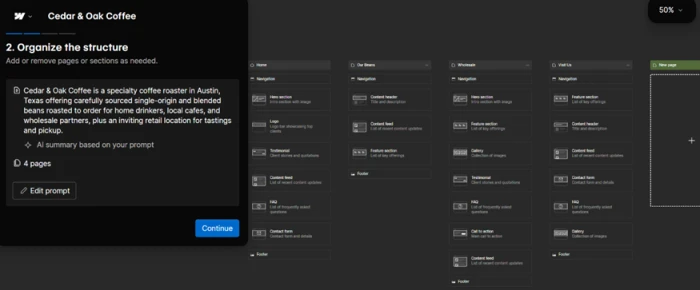
Webflow turned the short brief into a full sitemap in seconds. It generated an AI summary that read the prompt back accurately, describing Cedar & Oak as a roaster serving home drinkers through to wholesale buyers, with a retail spot for tastings and pickup.
It then laid out the four pages and filled each with sections it judged relevant, picking a call-to-action block for Wholesale and content feeds plus testimonials for Our Beans.
Theme, photography and preview
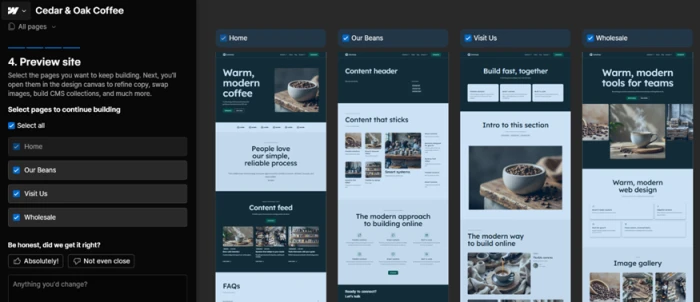
The theme stage is where the tool earned real credit. Webflow applied a warm, dark palette that suited a coffee brand and filled the layouts with genuine coffee photography rather than grey boxes.
All four pages shared a consistent look without any manual styling from me.
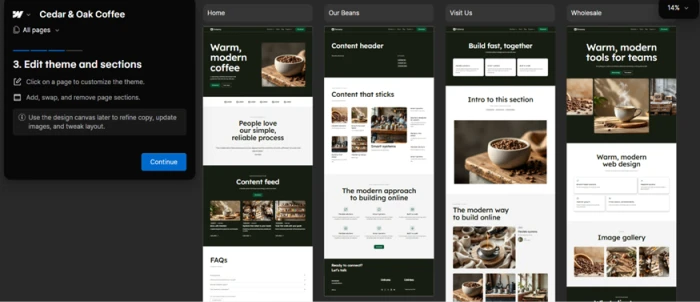
The preview screen then let me choose which pages to carry forward and asked for blunt feedback on whether it had read the brief correctly.
Opening the Designer, where the cracks show
Inside the Designer, the gaps became obvious. The first was a broken headline. The hero was meant to read "Warm, modern coffee," but the word "modern" split across two lines and dropped a lone "n" onto its own row. On a live site, a visitor reads that as careless.
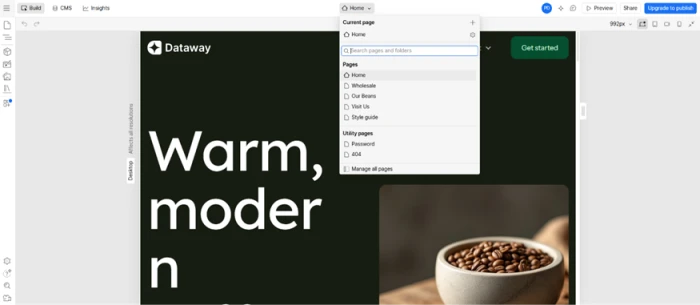
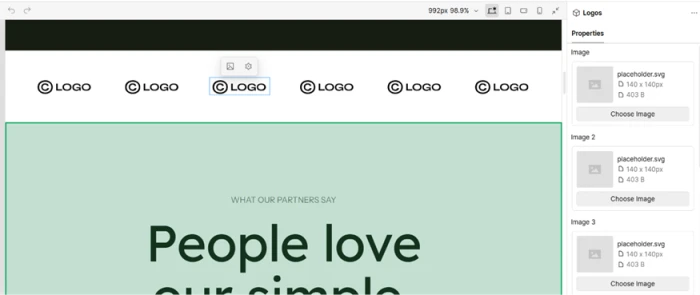
The brand name was wrong too. Even though my prompt named the business Cedar & Oak Coffee, the navigation still showed a placeholder brand called "Dataway." Webflow set the project name correctly in the dashboard, yet never pushed it into the design. The placeholders ran deeper: the partner-logo row displayed six identical "LOGO" graphics, each a 140-by-140 placeholder.svg file weighing 403 bytes.
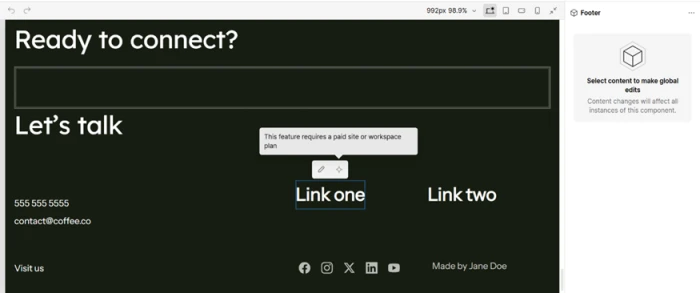
The footer carried the same unfinished feel: a dummy 555 555 5555 phone number, a [email protected] email with nothing to do with my brand, and a credit line reading "Made by Jane Doe." Trying to edit one of those footer links is where the free plan drew its line.
What it got right: images and CMS
Two things stood out as legitimately strong. The image generation was the highlight. The Assets panel filled with on-brand coffee photography in .avif format rather than stock filler, usable shots of coffee settings and interiors that matched the brand I had described, and they arrived without costing any AI credits.
The CMS work impressed me more than the design did. Webflow built a populated FAQs collection with 12 ready-made question-and-answer items already sitting in it.
Webflow pricing
Workspace plan figures taken from the official Webflow pricing page.
| Plan | Price | What's included |
|---|---|---|
| Starter | $0 | 2 staging sites · 2 pages per site · 50 CMS items · 200 AI credits/mo · 1 full seat · webflow.io subdomain only |
| Core Popular | $19 /mo | 10 staging sites · 300 pages · 300 AI credits/mo · custom code · code export · 1 Shared Library |
| Growth | $49 /mo | Unlimited staging · 400 AI credits/mo · site password protection · 301 redirects · site-level roles · publishing permissions |
Pros & cons
Specific conclusions from testing and real user reviews, not generic filler.
✅ Pros
- Turns a prompt into a multi-page site with a real design system in under a minute
- Exports clean, semantic HTML and CSS that developers consistently praise
- Pixel-level visual control in the Designer, far beyond typical AI builders
- AI fills the Assets panel with real .avif photography, not grey boxes
- CMS handles dynamic collections, scheduling and bulk AI-generated items
- Cloudflare-backed hosting scales automatically with free SSL and a global CDN
⛔ Cons
- AI output ships with placeholder brand names, logos and dummy contact details
- Generated copy and images read as generic, risking look-alike sites
- Steep learning curve; non-developers often need weeks or an agency to ramp
- Exported code cannot be reimported, and dynamic CMS export runs collection by collection
- Rollback and version control are restricted to the Enterprise tier
- Email-only support with a 48-hour target frustrates users needing fast help
Synthesized from real reviews on G2, Capterra, Trustpilot, Software Advice, Reddit & Product Hunt · paraphrased, not quoted
Webflow AI scorecard
Rated against what an AI-native website builder is actually built to do.
| Dimension | Verdict | Score |
|---|---|---|
| Visual design control Depth of the Designer and styling | Excellent |
9.0
|
| AI image generation On-brand assets without credits | Excellent |
8.5
|
| CMS & content management Collections, scheduling, CSV export | Excellent |
8.5
|
| Design & theme output Palette, layout, consistency | Good |
8.0
|
| AI site generation Speed and structure from a prompt | Good |
7.5
|
| Hosting & code export CDN scale and export quality | Good |
7.0
|
| Pricing & value Clarity and stacked plan cost | Average |
5.5
|
| AI output polish Production-readiness out of the box | Average |
5.0
|
| Ease of use & learning curve Approachability for non-developers | Average |
5.0
|
| Free tier & publishing access What you can do without paying | Average |
4.5
|
| Scrutool Score Equal-weight average of all 10 dimensions |
6.9
|
What users say about Webflow
The themes reviewers raise most often, by share of analysed reviews.
% = share of analysed reviews mentioning each theme (G2, Capterra, Trustpilot, Software Advice, Reddit)
A professional builder with an AI head start, not an AI shortcut
Webflow AI is the most capable version of the prompt-to-website idea precisely because it does not pretend to finish the job. It generates a well-structured, multi-page site with a real design system, genuinely useful .avif photography and a populated CMS, then drops it into the best visual editor in the category. The catch is everything that draft still needs: placeholder brand names, dummy contact details and generic copy all have to be replaced by hand, the learning curve is steep enough that non-developers often stall, and publishing a real site means paying across more than one plan. Designers, freelancers and agencies who already know Webflow will get a real head start here. Anyone wanting a finished site from a single prompt, with no cleanup and no ramp, should look at a simpler builder.
Discussion
Join the discussion and share your perspective.