
Wix AI
Wix AI builds a complete, hosted business website from one chat prompt, then hands you the most flexible editor in the category. Great structure, generic copy, total platform lock-in.

Fast at building a professional-looking structure and packed with business tools, let down by generic AI copy and a platform you cannot leave once you commit.
Should you use Wix AI?
Small businesses and solo owners who want a professional site plus hosting, bookings and payments in one place, and will rewrite the copy themselves.
You may ever want to move your site elsewhere . There is no export, and you cannot even change template without rebuilding from scratch.
Free publishes with Wix ads and a Wix subdomain. A real business site with a custom domain starts at Light ($17/mo) , and eCommerce needs Core.
The auto-renewal and refund policy draws the loudest complaints. Cancel in writing before renewal, because charges are hard to reverse.
What is Wix AI?
What you end up holding after a Wix AI build is a complete, hosted, business-ready website: a homepage with real navigation, a booking or store module if your business needs one, and copy already written into every section. You describe the business in a chat box, answer a few follow-up questions, wait a few minutes, and the platform assembles the whole thing. This is the newer conversational layer (branded Wix Harmony, with an AI agent called Aria) sitting on top of the same drag-and-drop editor Wix has run for years.
It is aimed at small business owners and non-technical creators who want design, hosting, security, SEO, payments and a CRM in one dashboard rather than stitched together. Two facts define the trade you are making. The editing freedom is genuinely best-in-class, you can move any element to the pixel. But the platform is a walled garden: there is no way to export your site, and you cannot switch templates after publishing without rebuilding. What you build on Wix stays on Wix.
Key features & how they perform
Each feature rated from hands-on testing and aggregated review sentiment.
Conversational AI builder
Aria asks targeted questions before generating, then assembles a full multi-page site. Strong at structure, weaker at anything specific to your business.
Drag-and-drop editor
A free-form canvas with pixel-level control over every element. The most flexible editing in this category, and the reason people stay.
In-place AI text editing
Click any heading or paragraph and rewrite it with a plain instruction. Fast and genuinely useful, though the default copy it starts from is generic.
Built-in business suite
Store, bookings, CRM, email marketing and payments run from one dashboard with no plugins. The eCommerce side caps at 50,000 products.
SEO & AI visibility tools
Native meta tags, sitemaps, Search Console integration and a newer tracker for how LLMs mention your brand. No plugins required.
Templates & component library
Over 2,000 industry templates plus thousands of free components and animations. Note you cannot swap template once the site is live.
Feature ratings blended from G2, Capterra, Trustpilot & Product Hunt review patterns + hands-on testing.
Building a coffee shop site with Wix AI, prompt by prompt
One sentence in, a full site out. We tested it on Cedar & Sage, a fictional Austin coffee shop, entirely on the free plan.
The first prompt, and the questions that followed
Wix no longer opens with a template grid. It opens a chat and asks what your site is about, then builds around your answer instead of dropping you into a pre-made layout.
We described the shop in a single sentence and sent it. The interesting part was what it did next: it did not generate anything yet.
"a cozy neighborhood coffee shop in Austin called Cedar & Sage that roasts its own beans"
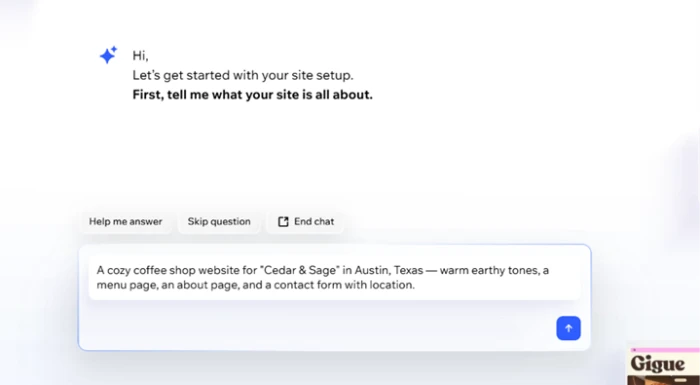
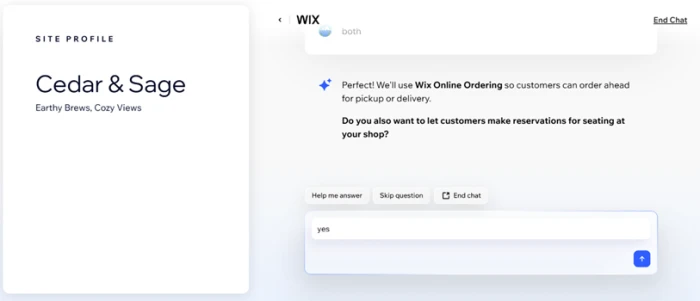
Instead of guessing, it asked follow-up questions. One of them was whether customers should be able to make seating reservations, which is a smart thing to raise with an owner who might not have thought about it.
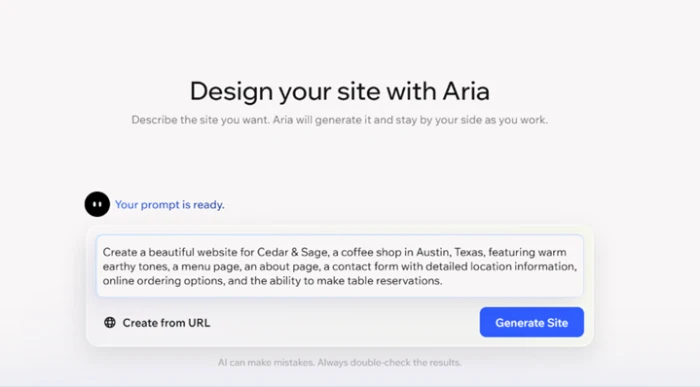
The assembled prompt before it built
Before generating, Wix packed all our answers into one expanded prompt and showed it back for approval. It had quietly added online ordering and table reservations based on the questions we answered.
A small line sat underneath admitting the AI can make mistakes and to double-check the results. Honest, and worth taking literally given what the copy looked like later.
The wait the ads do not mention
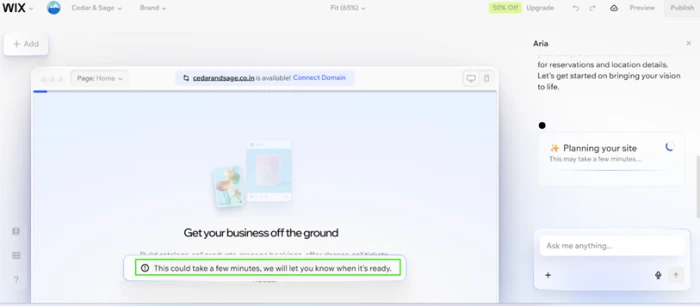
The marketing pitch is a website in under a minute. That is not what happened.
The editor loaded, showed a placeholder, and told us generation could take a few minutes and it would let us know when it was ready. Not a dealbreaker, but reset the expectation before you start.
Editing the homepage by conversation
The first generated homepage was better than expected: warm earthy tones matching the brief, full navigation across Home, About, Contact, Menus, Reservations and Experiences, and a hero reading Artisanal Roasts & Austin's Best.
The refinement loop is where the tool earns its keep. We clicked the hero headline, opened the AI text tool, and typed a plain instruction.
"make this shorter and warmer, like a real neighborhood spot"
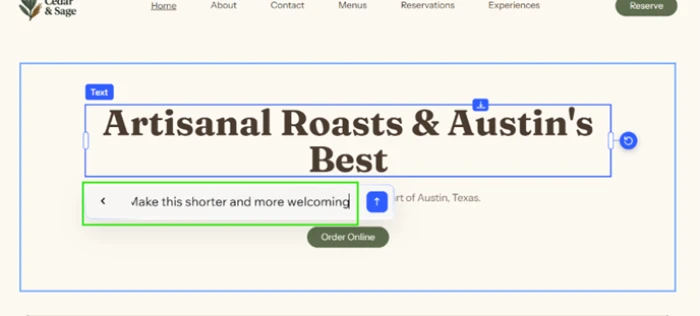
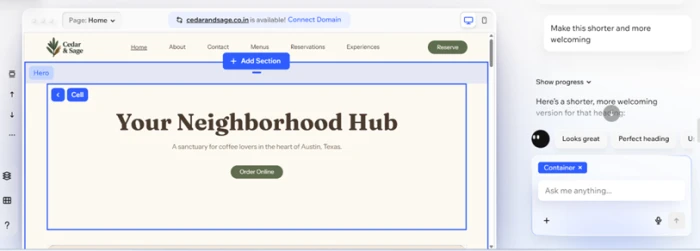
The headline rewrote itself in place to Your Neighborhood Hub, and the AI panel offered follow-up buttons like Looks great and Perfect heading to keep the loop moving.
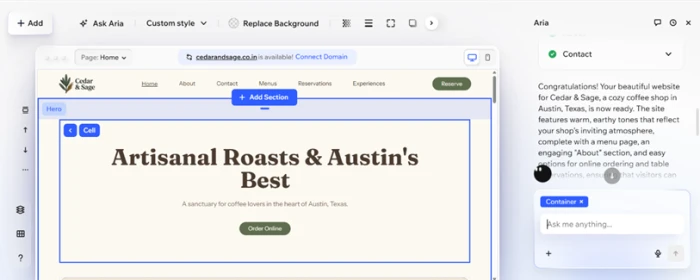
Here is the finished homepage after that one edit: on-brand, fully navigable, and changed without ever opening a settings menu.
Where the AI copy falls apart
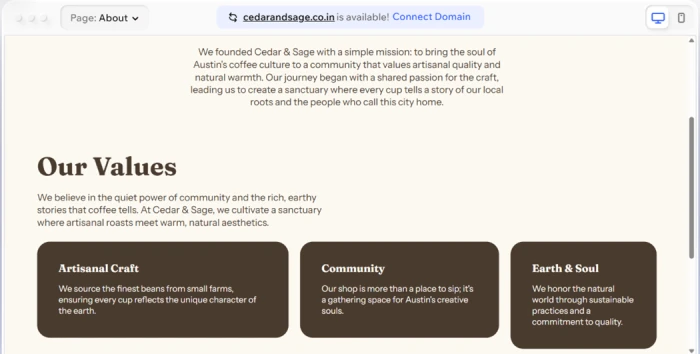
The About page is where the seams showed. Read it once and it sounds finished. Read it twice and it could describe any coffee shop in any city.
The word sanctuary appeared twice in one section. Artisanal turned up three times across the page and hero. There was no founding year, no founders, no origin story, just mood.
Wix pricing
Figures taken from the official Wix plans page (USD reference pricing).
| Plan | Price | What's included |
|---|---|---|
| Free | $0 | Reliable web hosting · drag-and-drop editor · no-code design · 2,000+ templates · Wix branding and ads · Wix subdomain |
| Light | $17 /mo | Free domain for 1 year · 2 GB storage · light marketing suite · 2 site collaborators · ad-free |
| Core | $29 /mo | 50 GB storage · basic marketing suite · accept payments · basic eCommerce · scheduling · 5 collaborators |
| Business Recommended | $39 /mo | 100 GB storage · standard marketing suite · standard eCommerce · scheduling · 10 site collaborators |
| Business Elite | $159 /mo | Unlimited storage · advanced marketing & eCommerce · advanced developer platform · 100 collaborators |
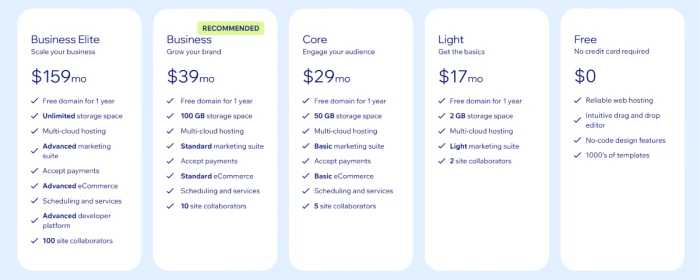
The five published tiers as shown on the official Wix plans page.
Pros & cons
Specific conclusions from testing and real user reviews, not generic filler.
✅ Pros
- Pixel-level drag-and-drop control over every element on a free-form canvas
- AI asks clarifying questions and adds relevant modules before it builds
- Store, bookings, CRM and email marketing run natively with no plugins
- Built-in SEO includes sitemaps, Search Console sync and an LLM-mention tracker
- Multi-cloud hosting with a stated 99.99% uptime, included on every plan
- Over 2,000 industry templates and thousands of free components
⛔ Cons
- No site export, so you can never migrate off the platform
- Cannot switch templates after publishing without rebuilding the whole site
- AI copy is fluent but generic, repeating words like artisanal and sanctuary
- eCommerce caps at 50,000 products, a ceiling for larger catalogues
- Ranks fourth among major CMS platforms on Core Web Vitals performance
- Auto-renewal refunds routinely denied under a non-refundable policy clause
- Support escalations often return copy-paste policy replies, not resolutions
Synthesized from real reviews on G2, Capterra, Trustpilot, ComplaintsBoard & Product Hunt · paraphrased, not quoted
Wix AI scorecard
Rated against what an AI-assisted website builder is actually built to do.
| Dimension | Verdict | Score |
|---|---|---|
| Editing & customization control Freedom to shape every element | Excellent |
9.0
|
| Built-in business tools Store, bookings, CRM, marketing | Excellent |
8.5
|
| Ease of use Setup, onboarding, editing loop | Excellent |
8.5
|
| SEO & marketing features Native tools and AI visibility | Good |
8.0
|
| AI content quality Usefulness of generated copy | Average |
6.0
|
| Generation speed Time from prompt to live draft | Average |
6.5
|
| Performance & load speed Core Web Vitals vs rivals | Average |
6.5
|
| Value for money Free tier and plan pricing | Good |
7.0
|
| Portability & lock-in Export and template switching | Average |
5.0
|
| Billing & support fairness Refunds, renewals, escalation | Average |
5.5
|
| Scrutool Score Equal-weight average of all 10 dimensions |
7.4
|
What users say about Wix AI
The themes reviewers raise most often, by share of analysed reviews.
% = share of analysed reviews mentioning each theme (G2, Capterra, Trustpilot, ComplaintsBoard, Product Hunt)
A brilliant builder wrapped around a platform you can never leave
Wix AI does the hard part well. It asks the right questions, assembles a complete site with working navigation and the business modules you actually need, and then hands you the most flexible editor in the category to refine it. The conversational text tool, where you click an element and rewrite it with one instruction, is the moment the product feels genuinely modern. The weaknesses are just as clear. The generated copy is fluent mood-setting that could belong to any business, so you will rewrite the words yourself. The build takes minutes rather than the advertised seconds, performance trails design-first rivals, and the billing reputation is the ugliest part of the story, with auto-renewal refund disputes dominating review sites. Above all, there is no exit: no export, and no way to change template once you publish. Small business owners who want one dashboard for site, store and marketing, and who treat the AI output as a first draft, will get real value. Anyone who wants to own their site, move it later, or trust a clean cancellation should look at a more portable platform first.
Discussion
Join the discussion and share your perspective.