
Yodayo AI
Anime AI creative platform combining image, video and music generation with Tavern roleplay chat. Every tool draws from one shared YoBean credit balance.

One of the deepest anime model libraries anywhere, with an open community feed that teaches you how every image was made, priced through a credit meter that never stops running.
Should you use Yodayo?
Anime artists who want to learn by copying . Every public image shows its model, seed, CFG scale and full prompt, and one button loads that setup into your own generator.
You want a companion that remembers a long roleplay , or any adult content. Memory is a paid extra that is off by default, and explicit generation is blocked outright.
Fifty free YoBeans a day covers eight images and nothing else. Subscriptions open at Plus at $9.99/mo and run to Platinum at $39.99/mo.
One balance funds everything : images, chat messages, memory summaries and video. Daily credits also vanish two days after you claim them.
What is Yodayo?
Ten creative tools share one wallet. Image generation, roleplay chat, video, music, voice cloning, LoRA training and the rest all draw from a single balance of YoBeans, so a long conversation in Tavern is money not spent on artwork. That design decision shapes everything else about the platform. It is built for anime and vtuber art, it runs on web plus an iOS app and a sideloaded Android APK, and it is operated by YDY AI Limited, which also runs the near identical Moescape AI.
Two things separate it from a plain image generator. The Model Hub carries a catalogue the site puts at more than 105,000 models and Spells, which is what Yodayo calls LoRAs, and the community feed publishes the complete generation data behind every public post. Explicit content is not part of the offer: the content policy caps everything at an R rating and bans nudity and sexually explicit material for both generation and publishing.
Key features & how they perform
Each feature rated from hands-on testing and aggregated review sentiment.
Open generation data
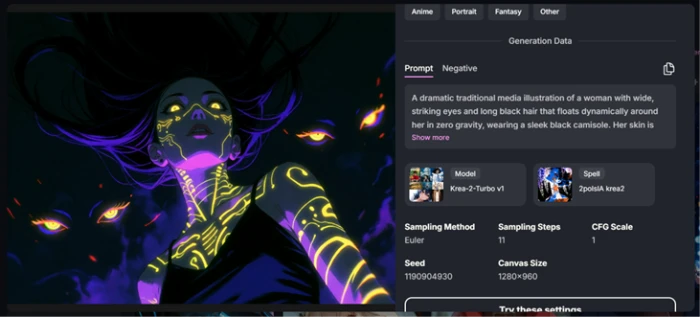
Public posts expose model, Spell, sampler, steps, CFG scale, seed and canvas size, with a button that loads the whole configuration into your generator.
Model Hub & Spells
Over 105,000 models and Spells built on Stable Diffusion, Flux and Illustrious-XL, plus uploads and LoRA training for consistent characters.
Anime image generation
Materials, fabric and lamplight render convincingly on the first try. Hands and small insignia are where the output stops holding together.
Tavern roleplay
System prompt, personas, scenarios and Lorebooks sit behind one panel, and manual character creation takes a JSON card upload from other platforms.
Video, music & voice
Separate generators for animated clips, lyric-driven tracks and speech, all billed from the same YoBean pool as your artwork.
Memory & personas
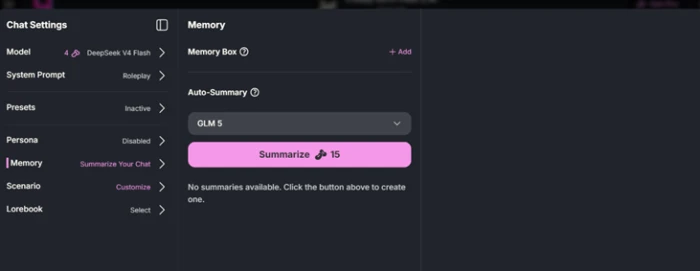
Auto-summary exists but starts empty, costs 15 YoBeans per summary, and reviewers report bots ignoring corrections until they are repeated.
Feature ratings blended from Trustpilot, Apple App Store, APKPure and community review patterns + hands-on testing.
Seven tests on a fresh Yodayo account
Signup, the credit rules, two generations, the prompt reader, the community feed and Tavern.
Signing up and landing on ten tools at once
Account creation asks for no payment details, and there is no onboarding sequence afterwards.
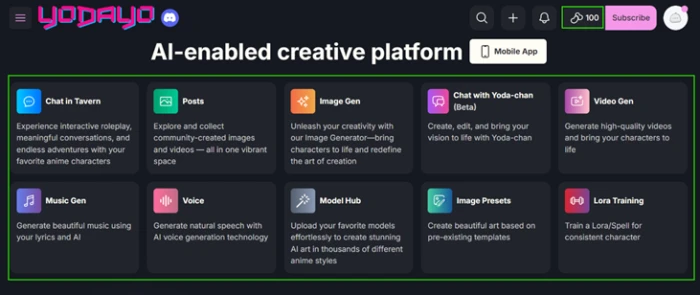
The landing screen is a grid of ten separate products: Chat in Tavern, Posts, Image Gen, Chat with Yoda-chan, Video Gen, Music Gen, Voice, Model Hub, Image Presets and Lora Training.
The balance counter in the top right is the only number that matters on this page, and nothing on the grid explains what any tile costs to run.
YoBeans and the two day clock
The currency is called YoBeans on every screen of the Yodayo interface. Several published reviews still call it Mochi, which is the name used on the Moescape side of the same company.
The rewards page splits your balance into buckets with different rules attached to each one. New User YoBeans carry no expiry. Daily Free YoBeans do.
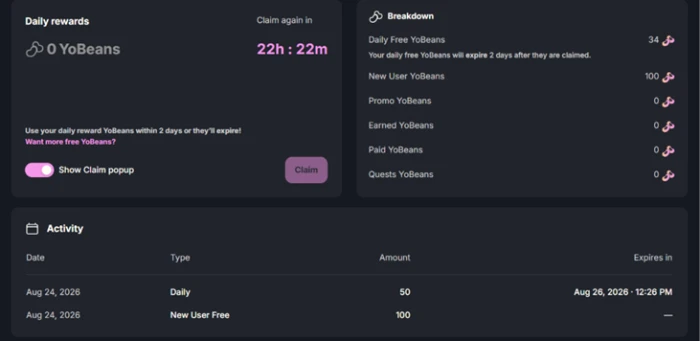
The activity log states it twice: 50 claimed on August 24, expiring 12:26 PM on August 26. That is two days, not the thirty day window several review sites report, and Yodayo's own help documentation says 24 hours.
Spend order does work in your favor. My daily allowance fell from 50 to 34 while the signup 100 sat untouched, so the perishable credits go first.
What each action actually costs
There is no separate chat plan or image plan. Every feature draws from the same balance, so a long roleplay session is artwork you did not generate.
These are the prices I logged on a new account:
One chat message on DeepSeek V4 Flash: 4 YoBeans
One memory summary: 15 YoBeans
A day's 50 credits covers eight images at the default resolution. The same 50 covers twelve chat messages.
First generation: strong style, loose instruction following
I ran one fixed control prompt with a negative prompt attached so both could be reused in later tests.
The negative field came preloaded with the usual defaults: worst quality, low quality, blurry, extra fingers, bad anatomy, watermark, signature, text, jpeg artifacts.
"1girl, solo, silver hair, long braid, amber eyes, navy military coat, gold epaulettes, standing, looking at viewer, upper body, library interior, bookshelves, warm lamplight, detailed background, masterpiece, best quality, highly detailed"
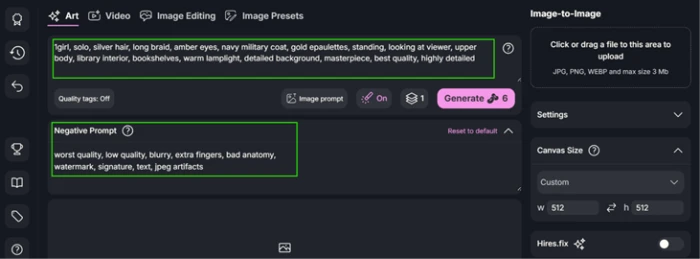
Note the Generate button. It prints its price before you commit, which is more honest than most credit-based generators manage.

The canvas default nobody tells you about
The generator opens at 512x512 and stays there. The size control sits in the Settings panel on the right, collapsed under Canvas Size, and nothing prompts you to open it.
A community image I inspected later in the same session ran at 1280x960, close to five times the pixel area.
New accounts therefore generate at the cheapest and lowest setting by default, and judge the platform's output quality on that basis.
Where the model breaks: the hands test
The second test targeted the classic failure case, with the negative prompt field cleared so nothing was suppressing bad anatomy.
"2girls, holding hands, facing each other, interlocked fingers, close-up on hands"
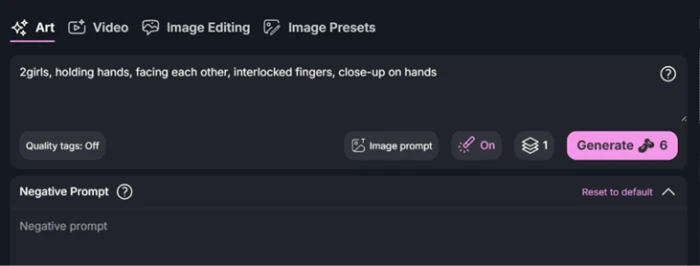
Six YoBeans later, here is what came back.

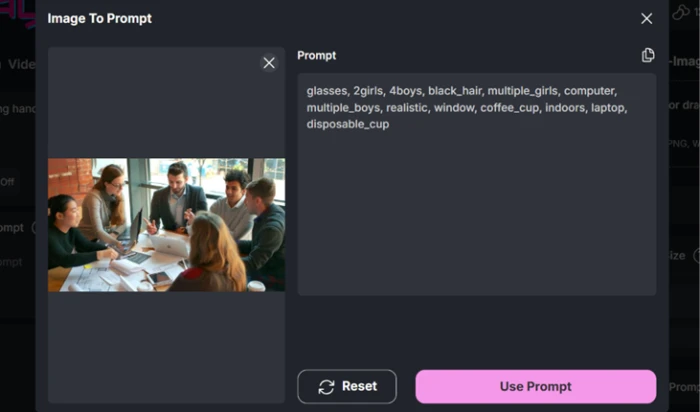
Image-to-Prompt only speaks anime
Image-to-Prompt reads an uploaded picture and writes the prompt that would recreate it, then offers to push that prompt into the generator.
I fed it a stock photograph of six people around a meeting table, deliberately outside the platform's home territory.
The community feed is the real documentation
Every public image on the platform publishes its full generation data, and this is the single strongest reason to use Yodayo over a standalone generator.
Model, Spell, sampling method, steps, CFG scale, seed, canvas size and the complete prompt are all visible. A button below loads that entire configuration into your own generator.
Tavern: deep settings, most of them switched off
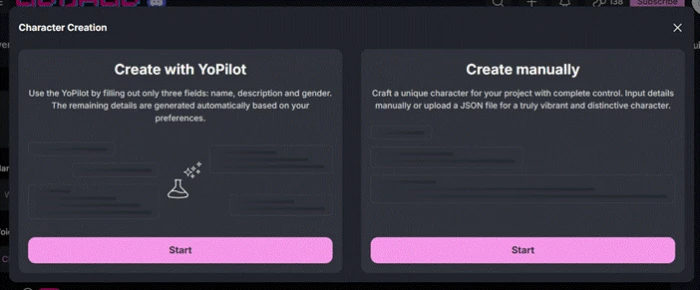
Character creation offers two routes. YoPilot writes a character from three fields: name, description and gender. Manual entry gives full control and accepts a JSON upload.
That JSON import matters more than it looks, because character cards built on other roleplay platforms transfer across intact.
Inside a chat, the settings panel runs deeper than I expected: System Prompt, Presets, Persona, Memory, Scenario and Lorebook, with the language model selector at the top.
Yodayo pricing
Figures taken from the official Yodayo subscription page, monthly billing tab.
| Plan | Price | What's included |
|---|---|---|
| Free | $0 | 100 YoBeans at signup (no expiry) · 50 daily free YoBeans that expire 2 days after claiming · full Model Hub and community feed access |
| Plus | $9.99 /mo | Entry subscription tier · monthly YoBean allowance on top of the daily free credits |
| Pro | $14.99 /mo | Middle tier · larger monthly allowance and a wider model selection than Plus |
| Premium Best Offer | $29.99 /mo | Carries the Best Offer badge on the pricing page · higher tier chat models |
| Platinum | $39.99 /mo | Top tier · access to all Premium plan models |

The monthly tab. A separate One Time tab sells YoBean packs outright rather than on subscription.
Pros & cons
Specific conclusions from testing and real user reviews, not generic filler.
✅ Pros
- Every public image exposes model, seed, CFG scale and full prompt
- One button loads a community post's settings into your generator
- Model Hub lists over 105,000 models and Spells
- Manual character creation accepts JSON card uploads
- The Generate button prints its YoBean cost before you commit
- Perishable daily credits are spent before the non-expiring signup 100
- Fabric, metal and lamplight render convincingly at 512x512
⛔ Cons
- Finger count fails in close-up hand generations
- Dropped "looking at viewer" from a 20 tag control prompt
- Canvas defaults to 512x512 until you find the collapsed control
- Memory summaries cost 15 YoBeans and start switched off
- Daily 50 YoBeans expire two days after being claimed
- Image-to-Prompt returns danbooru tags with no composition data
- Help docs still state a 24 hour credit expiry, not 2 days
- Explicit generation blocked since the August 2025 policy change
- Android app left Google Play in May 2024, APK sideload only
Synthesized from real reviews on Trustpilot, the Apple App Store, APKPure, Reddit & the Yodayo community feed · paraphrased, not quoted
Yodayo scorecard
Rated against what an anime generation and roleplay platform is built to do.
| Dimension | Verdict | Score |
|---|---|---|
| Model & Spell library Catalogue depth, uploads, LoRA training | Excellent |
9.0
|
| Community generation data What you can learn from other people's posts | Excellent |
9.0
|
| Anime image quality Style, materials, lighting | Good |
8.0
|
| Roleplay & character tools Lorebook, scenarios, JSON import | Good |
7.5
|
| Onboarding & ease of use Ten tools, no guidance, hidden defaults | Average |
6.5
|
| Prompt adherence Following every instruction in the prompt | Average |
6.0
|
| Credit value & pricing clarity What 50 daily YoBeans actually buys | Average |
5.5
|
| Documentation & naming consistency Docs versus what the interface says | Average |
5.5
|
| Anatomy & fine detail Hands, insignia, small structures | Weak |
5.0
|
| Chat memory & continuity Recall across a roleplay session | Weak |
5.0
|
| Scrutool Score Equal-weight average of all 10 dimensions |
6.7
|
What users say about Yodayo
The themes reviewers raise most often, by share of analysed reviews.
% = share of analysed reviews mentioning each theme (Trustpilot, Apple App Store, APKPure, Reddit, Yodayo community posts)
The most open anime art community on the web, attached to a meter that never stops running
Yodayo is two products sharing one wallet, and only one of them is excellent. The image side is genuinely strong: a catalogue of more than 105,000 models and Spells, output that nails anime materials and lighting on the first attempt, and a community feed that publishes the seed, sampler, CFG scale and full prompt behind every post along with a button that loads it into your generator. That last feature is a free education, and no standalone generator matches it. The chat side is thinner than the settings panel suggests. Persona and Presets arrive switched off, memory starts empty and costs 15 YoBeans a summary, and at 4 YoBeans per message a 25 message session spends the whole signup bonus. Anatomy remains the weak point in generation, hands especially, and the 512x512 default quietly caps what new accounts see. Anime artists who want to reverse engineer other people's work and build their own Spells will get real value at $9.99 a month. Anyone chasing a companion with long term memory, or any adult content at all, is on the wrong platform.
Discussion
Join the discussion and share your perspective.