
ImagineArt AI
Imagine.art is an all-in-one AI studio with 50-plus image, video and audio models, watermark-free free images, on-image editing tools, and a shared credit system.
One of the deepest model benches in the business, with clean watermark-free images on free, pulled down by locked free video, confusing per-model credits and a wall of billing complaints.
Should you use Imagine.art?
Creators who want many models in one place and mostly make stills, where the free web tier is genuinely usable and exports come out clean.
You need private output or dependable free video . Private is a paid feature, and a free clip generates and then locks behind an upgrade.
Free gives 100 credits a day and public, watermark-free images. Paid starts at Basic, $9 a month on yearly billing , and credits reset every cycle.
Each model sets its own per-run price , generations can fail or get gated after they run, and billing and refund complaints are common.
Key features & how they perform
Each feature rated from hands-on testing and aggregated review sentiment.
Text to image across 50+ models
Pick from more than fifty engines, OpenAI, Google, Kling and ByteDance among them, and switch model mid-workflow without leaving the canvas.
Text inside the image
Renders headlines and short phrases cleanly, even on the free default model, where many tools still garble on-image type.
Text and image to video
Generates clips from text or a still with models like Kling and Seedance, but free playback is gated and the stronger models are PRO-locked.
On-image editing tools
Relight, Camera Angles, Variate, Background Changer, Upscale and Edit rework a result in place rather than forcing a fresh generation.
Studios, workflows & brand kits
Fashion, Ad and Film studios, a node-based workflow canvas for repeatable pipelines, and brand kits that lock colours, fonts and logos.
Plugins and MCP
Connects to Photoshop, Premiere Pro, After Effects, Figma and Shopify, plus MCP links to ChatGPT, Claude and Cursor.
Feature ratings blended from G2, the Apple App Store, Google Play & hands-on testing.
Chasing ImagineArt through images, video and the ledger
Every test ran on the free web plan, with no paid features switched on, on 16 November 2026.
Starting out and the credit math
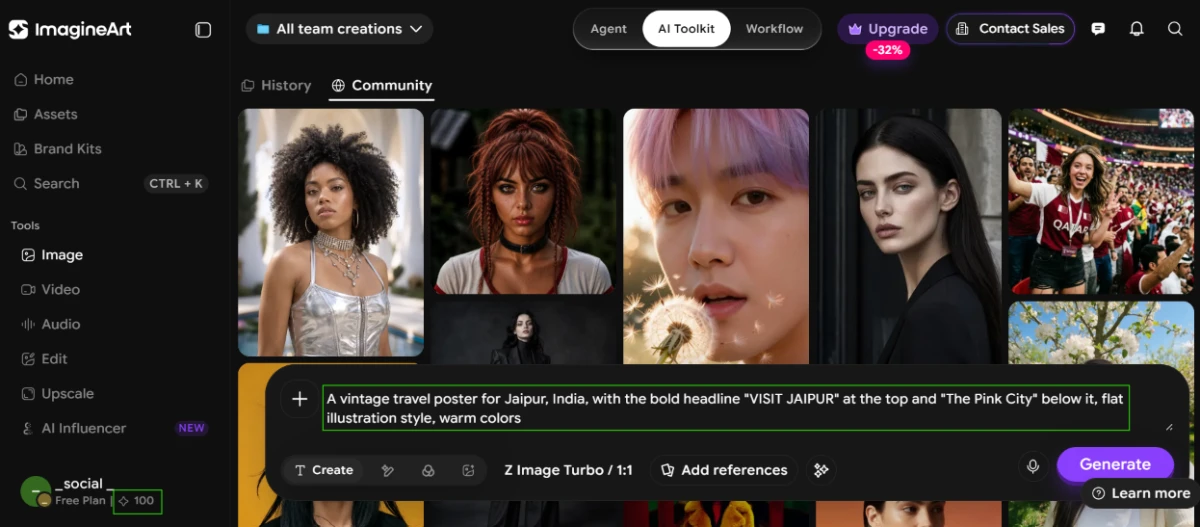
The account opened with 100 credits for the day, and the default image model was Z Image Turbo at a 1:1 ratio. That daily pool is the whole budget a free user works inside.
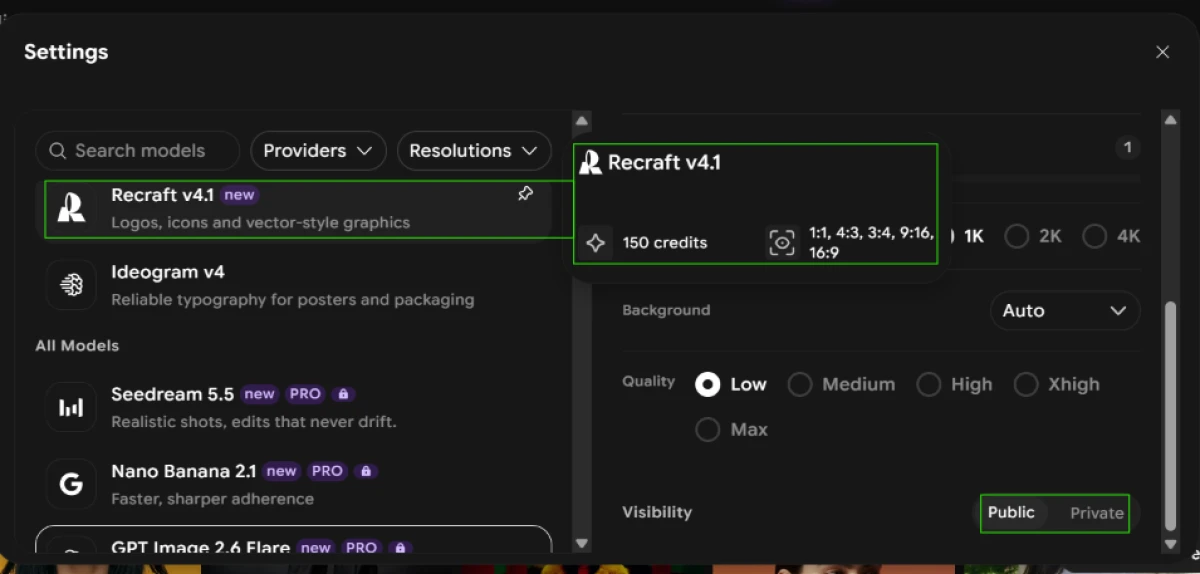
The credit math turned out to be the real story. Opening the model settings showed that every model sets its own price.
Recraft v4.1 asked for 150 credits per run, more than a full day of free credits, so I could not use it once without paying. Several of the stronger models carried a PRO lock, Seedream 5.5 and Nano Banana 2.1 among them.
Text inside the image
Text is where many image tools break down, so I started there, asking for a poster with two lines of type that had to be spelled right.
"A vintage travel poster for Jaipur, India, with the bold headline "VISIT JAIPUR" at the top and "The Pink City" below it, flat illustration style, warm colors"

A product shot and the tools after it
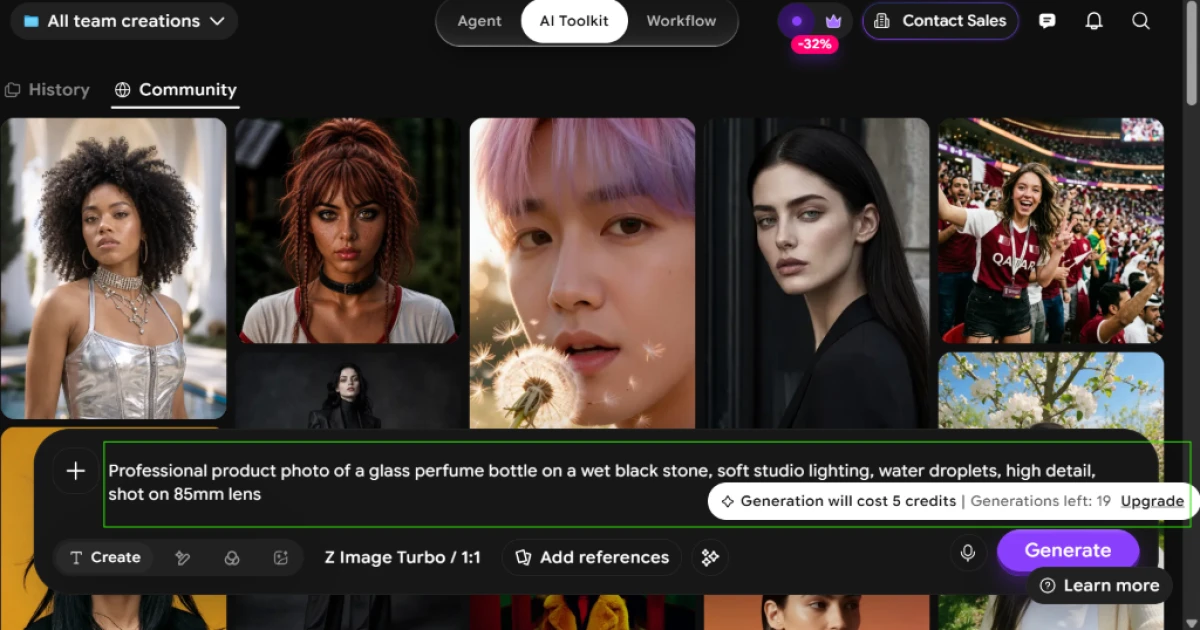
Z Image Turbo charged 5 credits per image, so 100 credits worked out to about 20 images in a day. The counter confirmed it, reading 19 generations left after my first run.
Next I pushed it toward a commercial product photo to see how the default model handled lighting and detail.
"Professional product photo of a glass perfume bottle on a wet black stone, soft studio lighting, water droplets, high detail, shot on 85mm lens"

Pushing a hard prompt
I wrote a prompt with exact counts, a set clock time, a pinned map and a banner, to see how the model tracked instructions it had to hold together.
"A red fox and three white rabbits around a wooden table playing chess, a wall clock showing 3:15, a map of India pinned behind them, a banner reading "GAME NIGHT""


While the image processed, the interface pushed offers: a referral card promoting 1000 credits for every paid referral, and an Upgrade badge fixed at the top. Then the finished image landed.

Testing the video tool
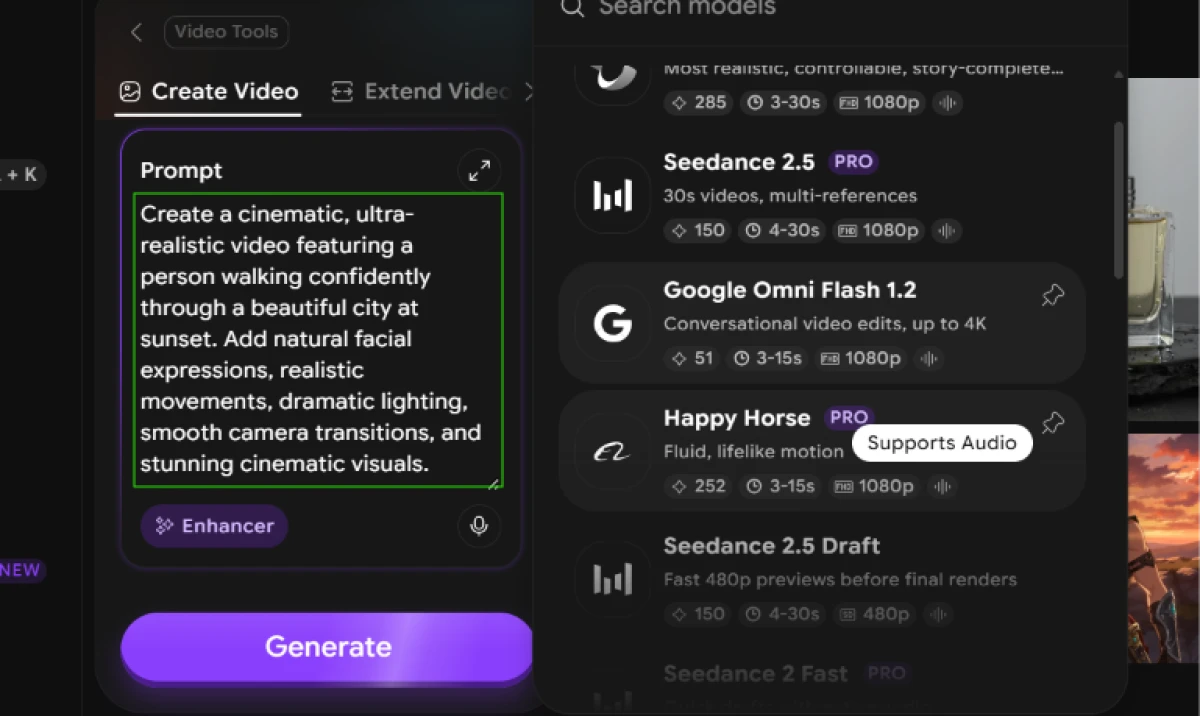
The video side followed the same pattern as the images. The model list showed PRO locks on Seedance 2.5 and Happy Horse, with Google Omni Flash 1.2 priced at 51 credits among the options I could pick.
"Create a cinematic, ultra-realistic video featuring a person walking confidently through a beautiful city at sunset. Add natural facial expressions, realistic movements, dramatic lighting, smooth camera transitions, and stunning cinematic visuals."

Following the credits
The credit log raised a question. My video job recorded as "Image Generation" at 12 credits, which did not match the 51-credit price shown for the video model. The label and the number told two different stories.

I opened the Assets view to confirm the job had actually run.

Imagine.art pricing
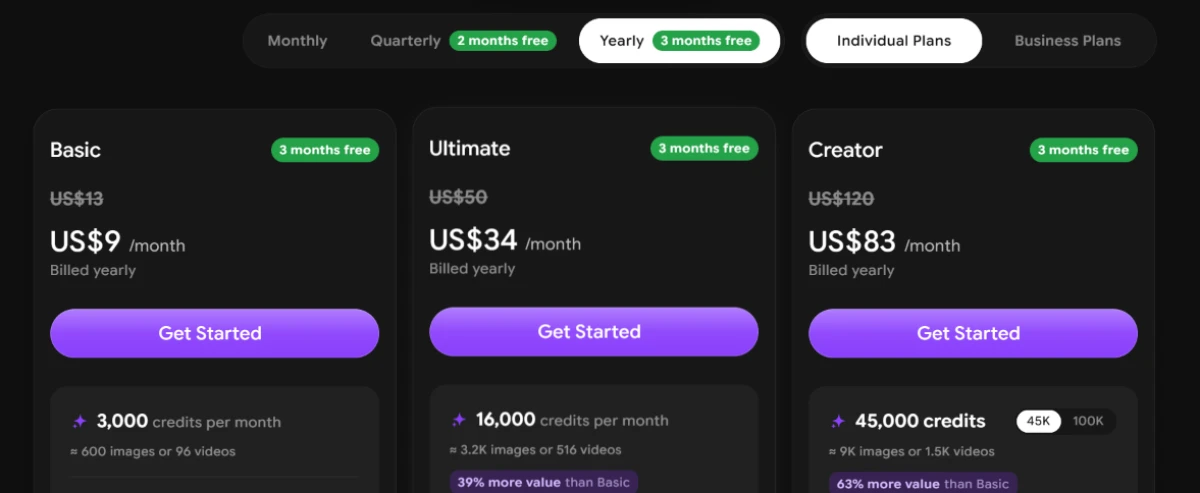
Individual plans from the official Imagine.art pricing page, billed yearly.
| Plan | Price | What's included |
|---|---|---|
| Free | $0 | 100 AI credits per day · PNG and JPEG export with no watermark · public visibility only · premium models stay PRO-locked |
| Basic Popular | $9 /mo | 3,000 credits/month (about 600 images or 96 videos) · private visibility · 3 months free on the annual plan |
| Ultimate | $34 /mo | 16,000 credits/month (about 3.2K images or 516 videos) · marked as 39% more value than Basic |
| Creator | $83 /mo | 45,000 credits/month (about 9K images or 1.5K videos) · optional 100K credit tier · marked as 63% more value than Basic |
| Business | Contact sales | A separate Business Plans tab with no public prices. You have to contact the Imagine.art team for a quote. |
Pricing is accurate as of 16 November 2026 and was captured from the official Imagine.art website. Plans, prices and credit limits change often, so check the official Imagine.art pricing page for the current figures before you subscribe.
Pros & cons
What real users repeatedly report, not generic filler.
✅ Pros
- Beginners and non-technical users find it genuinely easy to pick up
- One subscription spans 50-plus image, video and audio models
- Praised for fast, stunning visuals across many art styles
- Over 2 million creators use it for TikTok-ready clips and portraits
- Image output quality rated highly by app-store reviewers
- Model switching mid-project is a repeatedly named strength
⛔ Cons
- Users report generations failing and returning no usable output
- Content filter over-blocks classical art, fashion and mild-fantasy prompts
- Free mobile app is ad-heavy with most creative tools locked
- Detailed, high-complexity image prompts render slowly
Synthesized from repeated user reviews on G2, the Apple App Store, Google Play and Trustpilot · paraphrased, not quoted
Imagine.art alternatives
| Imagine.artReviewed | Hotpot AI | Genspark AI | Bylo AI | |
|---|---|---|---|---|
| Our Score | 6.6/10 | 6.9/10 | 6.4/10 | 3.8/10 |
| Creates | Images, video and audio | Images and video | Images, slides and research | Images and video |
| Free output | Public, no watermark | Free images, no watermark | Free images, large watermark | Blocked in testing |
| Entry paid plan | $9 / mo, billed yearly | $10 / mo, billed monthly | $19.99 / mo, billed yearly | $6 / mo, billed yearly |
| Model choice | 50+ models, switch mid-flow | Several image models plus editing | Nano Banana for images | Compare GPT Image, Nano Banana, Flux |
| Best for | Many models in one creative suite | Free watermark-free images and logos | Slides, research and data in one tool | Comparing models, if you pay first |
Who Should Use Imagine.art, and Who Should Avoid It?
Imagine.art is strong at giving you many models and clean free stills, but public output, locked free video and tight billing make it a poor fit for some workflows.
Who Should Use Imagine.art?
Best suited for these workflows
Creators Juggling Many Models
One subscription spans more than fifty image, video and audio engines, with switching mid-project instead of hopping tools.
People Who Need Text in Images
The models render headlines and short phrases cleanly, even on the free default, where many rivals still garble type.
Web Free-Tier Still Makers
100 daily credits and clean PNG and JPEG exports make the free web plan genuinely workable for images.
Editors Who Rework Shots
Relight, Camera Angles, Background Changer and Upscale refine a generated image without spending a fresh prompt.
Who Should Avoid Imagine.art?
Consider an alternative if you need
Private Output
Free creations are public to others, and keeping your work private requires a paid plan.
Dependable Free Video
A clip generates, then playback is locked behind an upgrade, so free users cannot watch or download it.
Clear, Predictable Billing
Credits do not roll over, refunds are tightly limited, and billing complaints dominate the negative reviews.
Freedom From a Strict Filter
The content filter over-blocks classical art, fashion and mild-fantasy prompts, users report again and again.
Our Recommendation
Imagine.art is worth a look if you want a single place to try many image and video models and you mostly make stills, where the free web tier is usable and exports come out clean. The value drops if you need private work, dependable video without paying, or billing you can trust. Before you pay, spend the daily free credits first, confirm the models you actually need are not PRO-locked, and read the refund window carefully.
Imagine.art scorecard
Rated against what an all-in-one AI image and video generator is actually built to do.
| Dimension | Verdict | Score |
|---|---|---|
| Model range & choice Number of engines and mid-flow switching | Excellent |
9.0
|
| Image output quality Realism and detail of generated stills | Good |
8.0
|
| Text rendering in images Spelling and legibility of on-image type | Good |
8.0
|
| Editing tools Relight, angles, background, upscale | Good |
8.0
|
| Ease of use How quickly a beginner gets a result | Good |
8.0
|
| Free-plan value Daily credits and free export scope | Average |
6.5
|
| Prompt adherence Tracking counts, text and placement | Average |
5.5
|
| Video generation Free access, playback and model locks | Weak |
5.0
|
| Reliability & stability Whether generations complete as paid for | Weak |
4.5
|
| Credit & billing transparency Clear pricing, logs and refund terms | Weak |
3.5
|
| Scrutool Score Equal-weight average of all 10 dimensions |
6.6
|
A deep model bench and clean free images, undercut by locked video and murky billing
Imagine.art gets the creative part right more often than not. The model bench is the widest I have tested on one account, images look sharp, on-image text comes out spelled correctly even on the free default, and the editing tools let you rework a shot without burning another prompt. For a creator who mostly makes stills, the free web tier is genuinely usable, and watermark-free exports are a real bonus. The problems cluster around money and trust. Each model prices its own run, some cost more than a whole day of free credits, a free video generates and then hides behind an upgrade, and the credit log even labelled my video as an image. Those commercial frictions line up with what users report: failed generations, a strict content filter, credits that never roll over, and a run of billing and refund complaints. Use Imagine.art if you want one place to try many models and you work mostly in images on the free tier. If you need private output, reliable free video, or billing you can trust, look elsewhere first.
Discussion
Join the discussion and share your perspective.