
Parakeet AI
ParakeetAI is a real-time AI interview copilot that detects questions and feeds you answers mid-call, with mock practice, a resume maker and AI headshots. Freemium, paid from $49.99/mo yearly.

A fast, model-flexible real-time interview copilot with a slick job-link setup and honest privacy controls, undercut by a 10-minute free tier, surface-level answers and a steep monthly price.
Should you use ParakeetAI?
Candidates who want a live safety net and are willing to pay, prepping with a real job description and their own uploaded CV for tailored answers.
You expected a usable free trial . The free run is a single 10-minute mock, and every prep tool is locked behind credits.
Month to month, Unlimited is $149.90 . The $49.99 rate only applies if you commit to a full year up front at $599.90.
The smartest models are tagged Slow and Very Slow , so a strong answer and a fast one are not available at the same time.
Key features & how they perform
Each feature rated from hands-on testing and aggregated review sentiment.
Job-link auto-fill
Paste a job post URL and Parakeet pulls the company and full description into the mock on its own. It worked on the first try.
Pick your model
Choose from Gemini, GPT and Claude engines, each tagged by speed. Rare control, but the strong models carry Slow warnings.
Auto Answer
Detects the spoken question and streams an answer with no clicking. The mechanism is clean; the content runs shallow.
Post-call AI notes
Produces an accurate summary, the list of questions asked, a full transcript and an Ask AI panel, plus a one-click delete.
Stealth & privacy mode
Claims to stay hidden from screen sharing and Activity Monitor, with a delete button on every record. Undetectability is self-reported.
Prep tools suite
Resume maker, AI headshots and a company question bank all sit behind credits, so a free account sees them locked.
Feature ratings blended from G2, Trustpilot, Product Hunt & competitor hands-on reviews + testing.
Testing & Evaluating the ParakeetAI
From the free-session counter to the first paywall, every screen tested on a real Product Design mock interview.
Measuring the real free tier
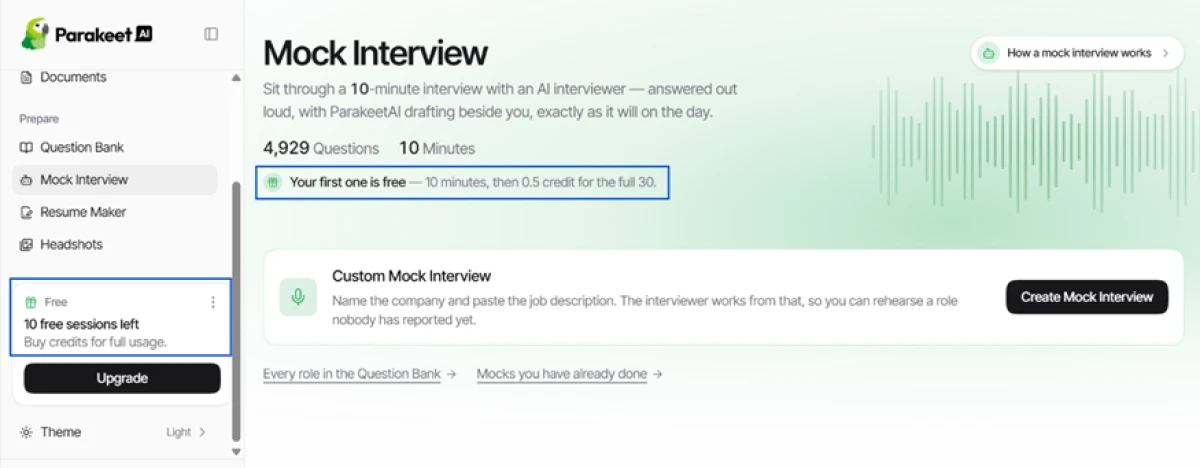
The first thing I checked was the real size of the free tier, because that number decides whether the tool is usable without paying. The dashboard was blunt about it.
The left panel showed 10 free sessions left with a prompt to buy credits, and the Mock Interview page spelled out the catch in one line: the first mock is free for 10 minutes, then it costs 0.5 credit for the full 30.
Setup: pasting a job link worked well
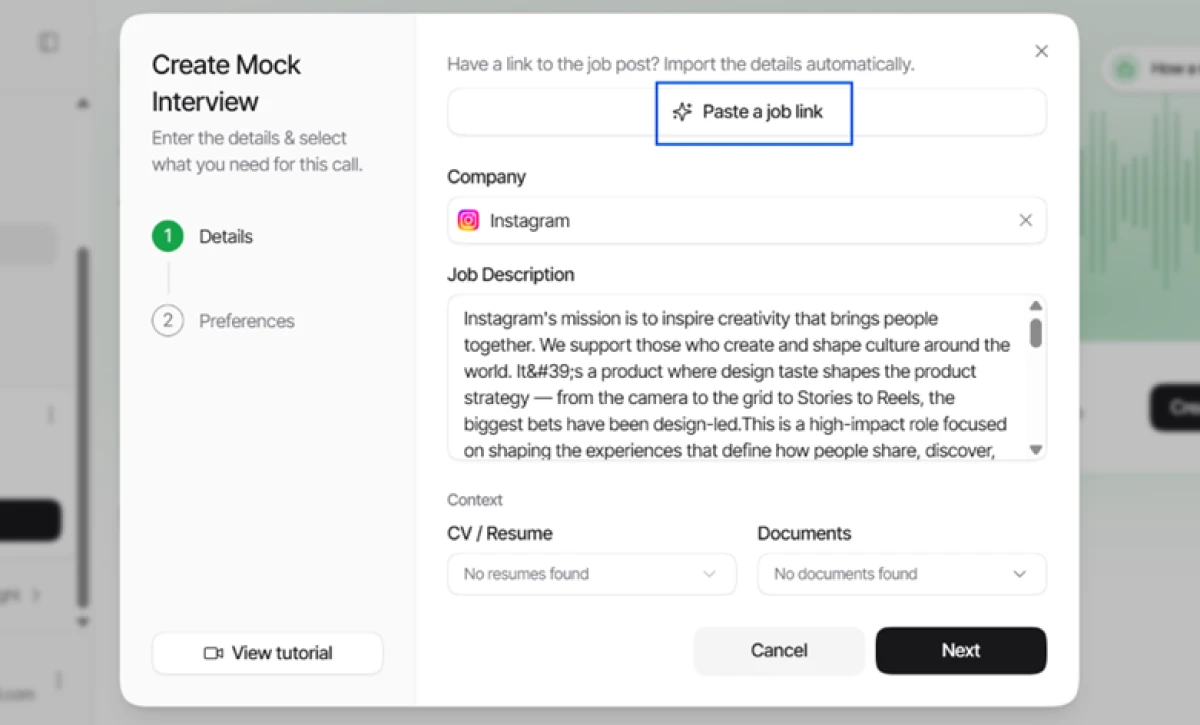
Creating a mock was faster than I expected. I pasted a job post link, and Parakeet pulled the company and the full job description on its own. I dropped in an Instagram Product Design role and the fields filled themselves.
At the same time, the CV slot read No resumes found and the document slot read No documents found. That is a quiet reminder that the personalization Parakeet advertises only kicks in once you upload your own material, so a free user who skips that step gets generic answers.
Model choice is real, with an honest trade-off
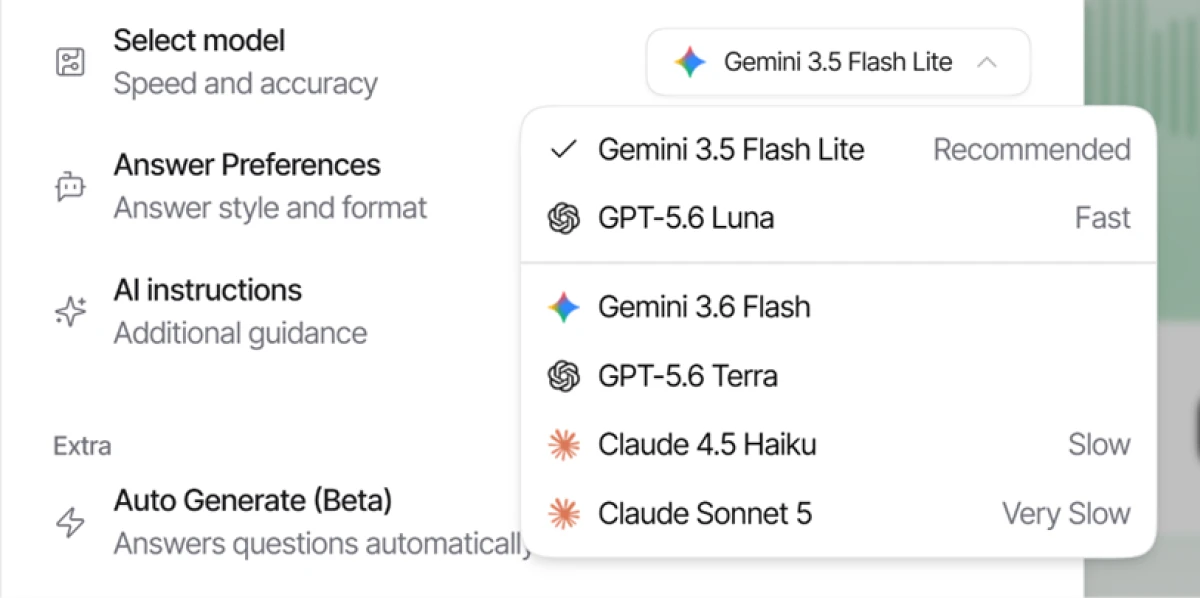
Parakeet lets you pick the engine behind your answers. The dropdown offered models from Google, OpenAI and Anthropic, and each one carried a speed label.
The default is a lightweight Gemini 3.5 Flash Lite marked Recommended. The heavier models sit lower with warnings: Claude 4.5 Haiku is tagged Slow and Claude Sonnet 5 is tagged Very Slow. In a live interview where you need an answer in two seconds, that label matters.
Starting the mock: the one-and-done free gate
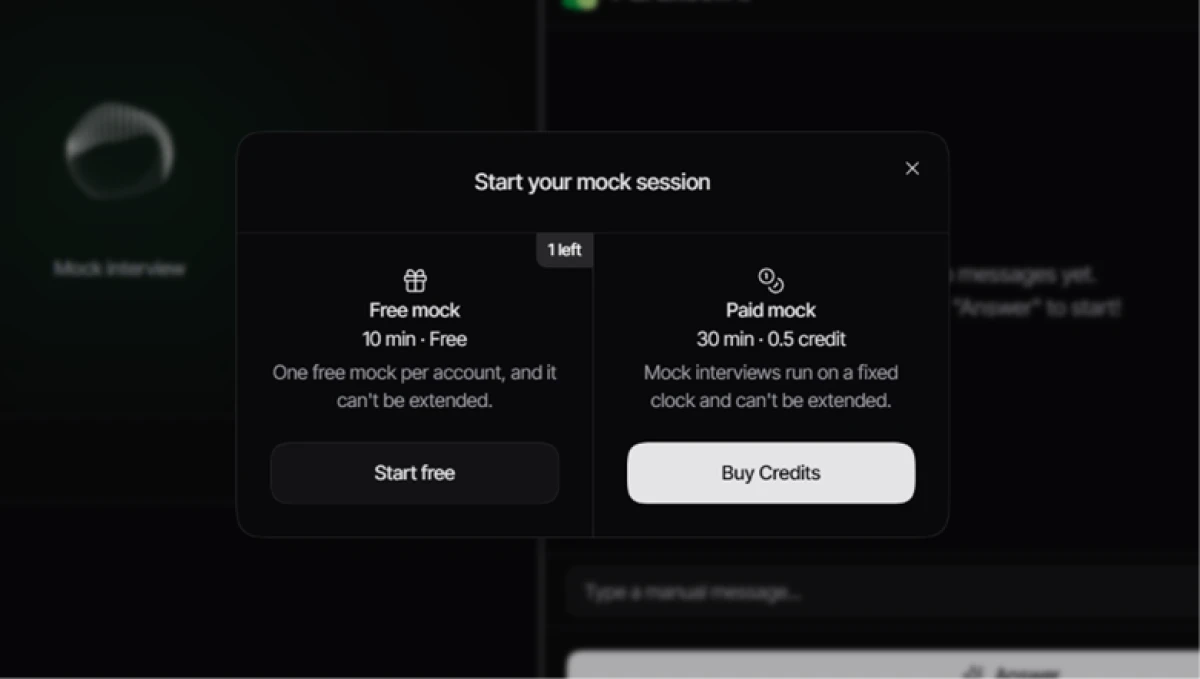
When I started a mock, Parakeet put the free limit right in front of me, and the wording left no room for doubt: one free mock per account, and it cannot be extended.
The paid version runs 30 minutes for half a credit. So the free practice is a single short run, after which every rehearsal costs money.
The live session and the language list
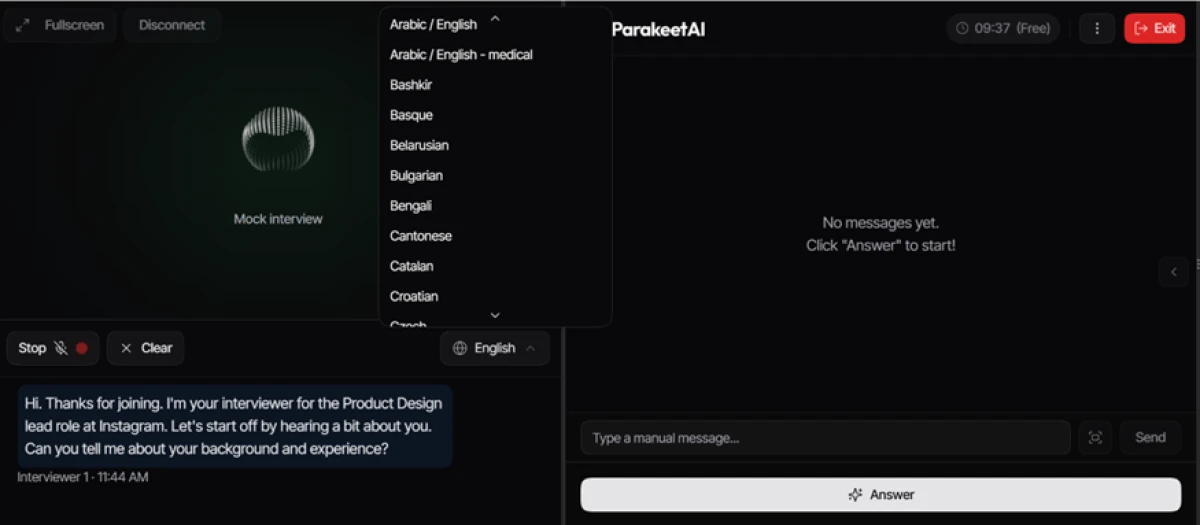
Inside the session the interface split into a transcript on the left and an answer panel on the right. The AI interviewer opened with a background question for the Product Design role, and a timer in the corner read 09:37 with a Free tag, counting down my 10 minutes.
I opened the language dropdown to test the 50-plus language claim, and the list was long and real, running from Arabic and Bengali to Catalan and beyond. For a US audience interviewing in English it is a nice-to-have, though it helps non-native speakers and anyone practicing a second language.
Auto Answer works, but the answers run shallow
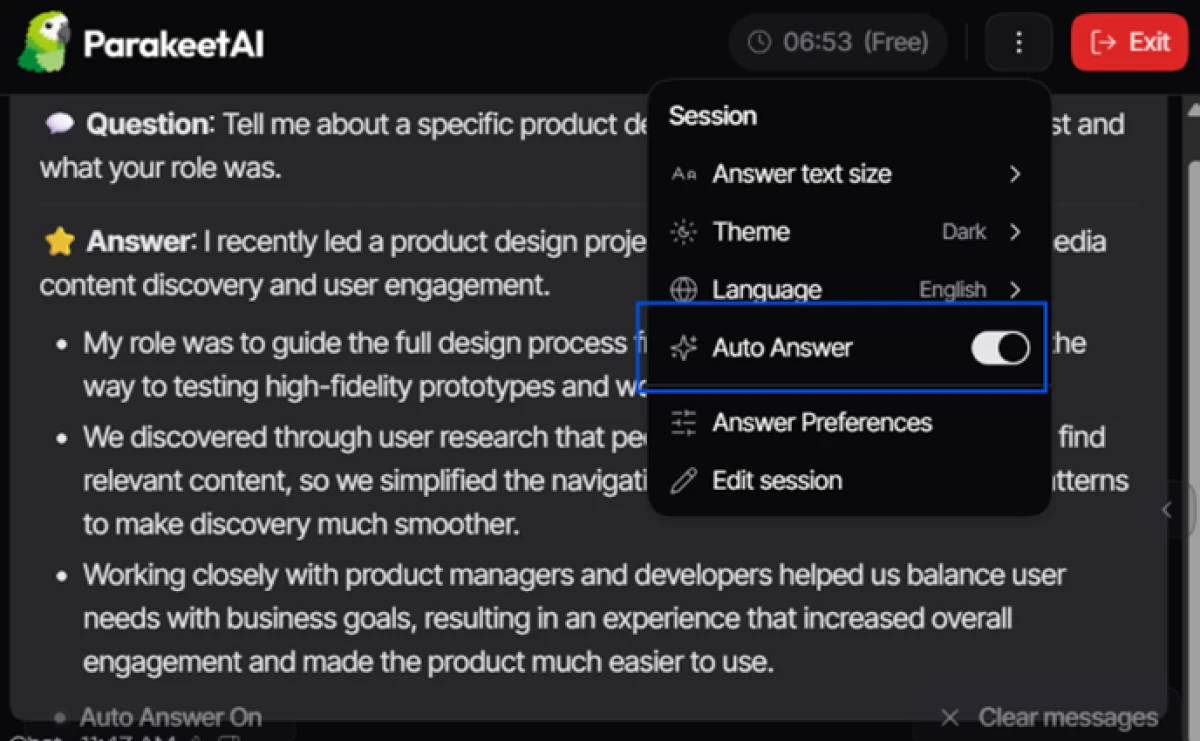
Auto Answer is the headline feature, so I turned it on and let Parakeet detect the question and write without me clicking anything. It did exactly that. The question appeared in the transcript and an answer streamed into the panel on its own.
The mechanism is impressive. The content is where I would temper the marketing. Parakeet advertises 100 percent accurate responses, but the answer I got back was a tidy set of surface-level bullets, thin in the way a real interviewer would notice. There are also no one-click follow-up buttons such as go deeper or simplify, so any refinement means typing a manual message mid-call.
Leaving a session still costs you
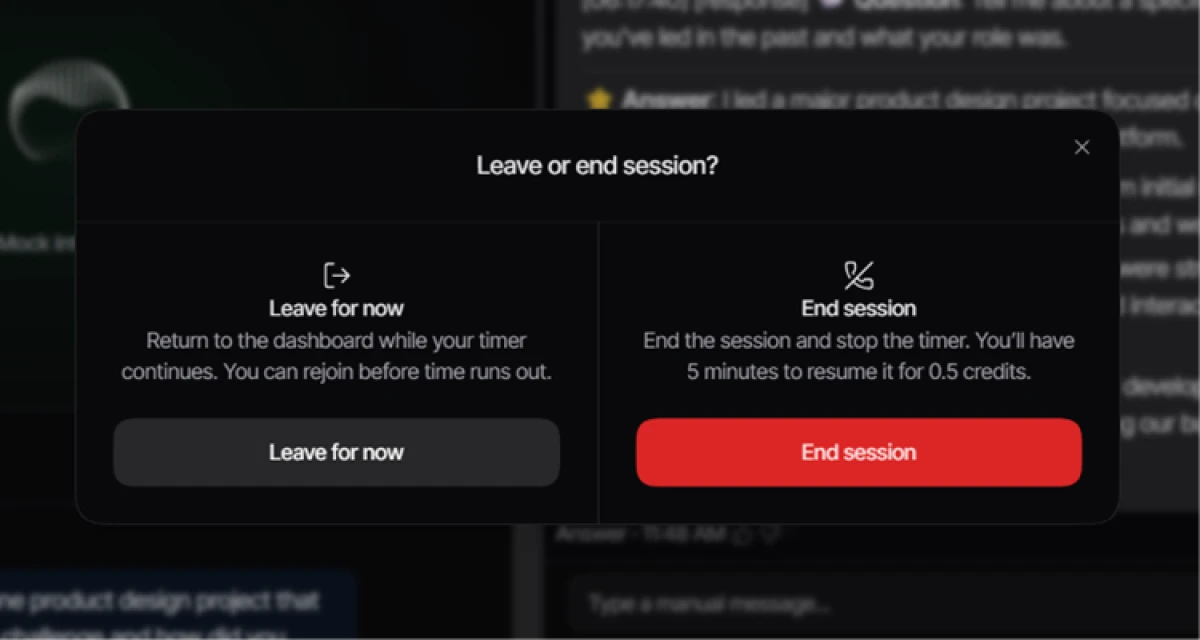
I wanted to see what happened if I stepped away, and the exit prompt surprised me. Leaving for now keeps the clock ticking while you are gone, and ending the session gives you only five minutes to resume before it costs 0.5 credit.
After the call: notes and a delete option
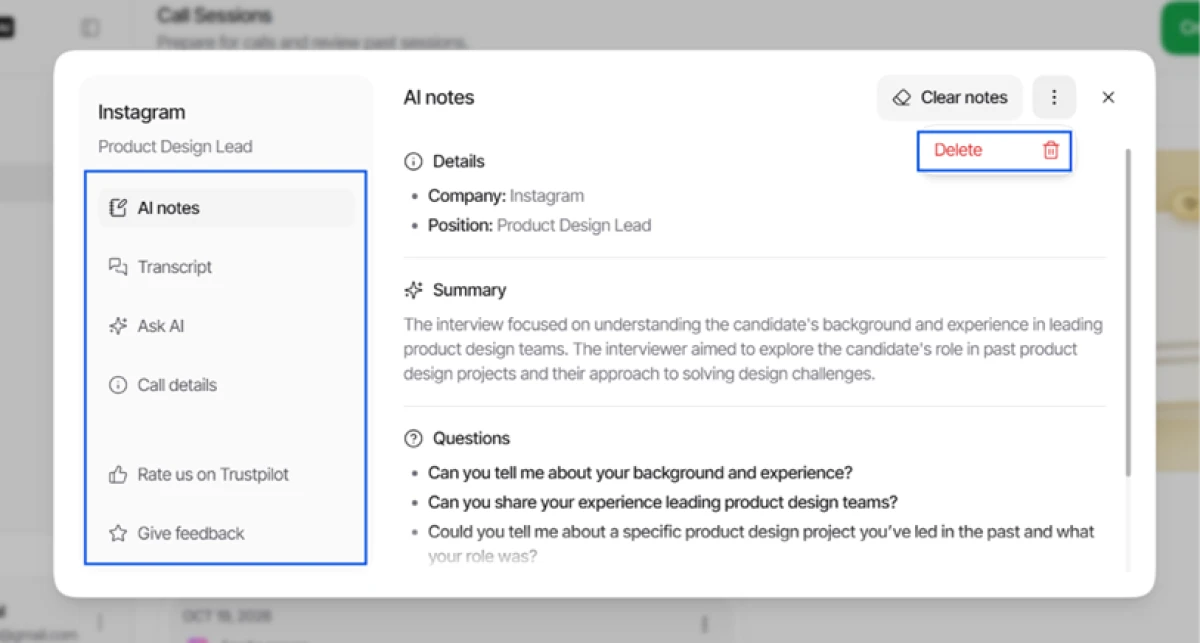
Once the mock ended, Parakeet produced a clean after-action record: a summary, the list of questions asked, the full transcript, and an Ask AI panel to query the conversation. A Delete button sat at the top right.
Where free runs out: the Prepare tools
Parakeet bundles extra Prepare tools beyond live help, so I tried the Headshots feature to see if any of it was free. It was not.
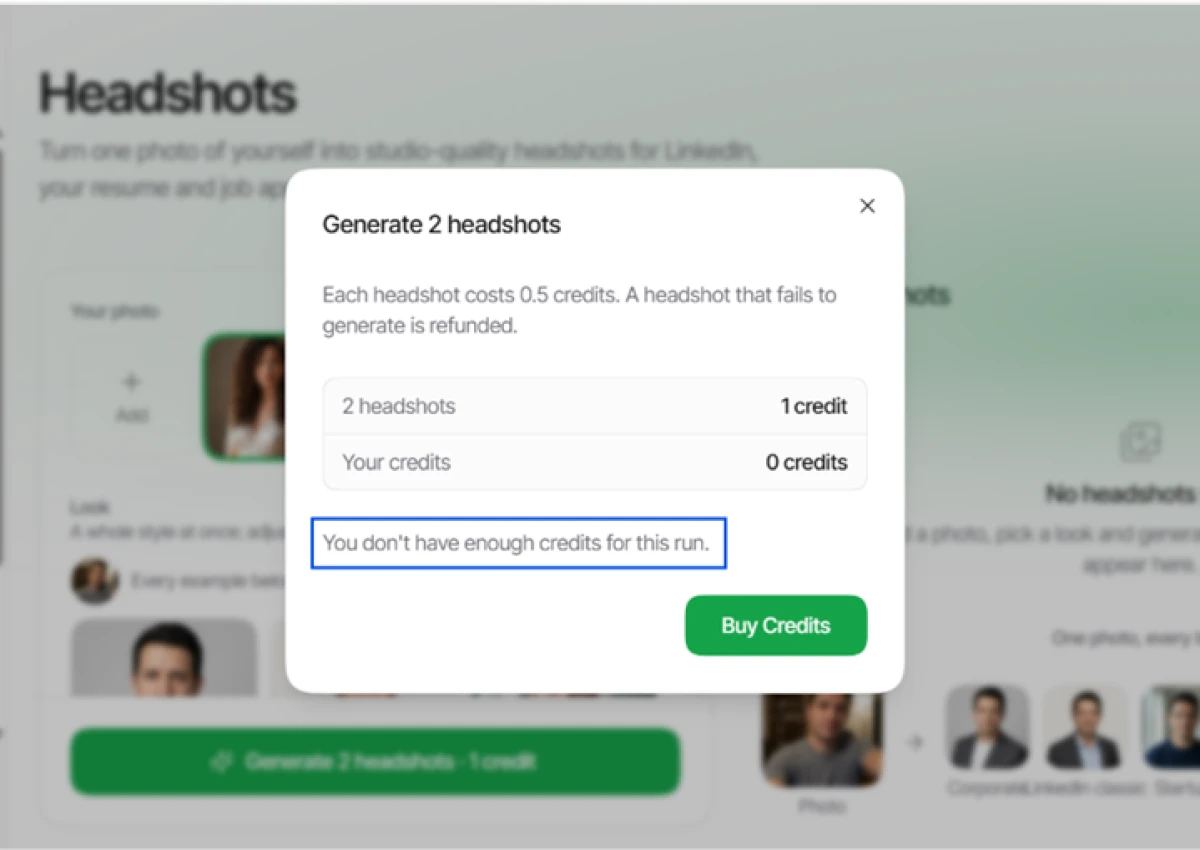
Generating two headshots costs one credit, my account had zero, and the tool stopped me cold. The Resume Maker and the full Question Bank sit behind the same wall, visible but locked.
ParakeetAI pricing
Figures taken from the official ParakeetAI pricing page, across the Unlimited and Credits tabs.
| Plan | Price | What's included |
|---|---|---|
| Free | $0 | One 10-minute live session · one free 10-minute mock · prep tools visible but credit-locked |
| Unlimited Popular | $149.90 /mo | Unlimited call and mock sessions · full privacy mode · unlimited resume PDFs and headshots · full Question Bank access |
| Unlimited (yearly) | $49.99 /mo | Same as Unlimited, billed $599.90 once a year · also sold weekly at $78.00/week |
| Credits | from $11.80/credit | 3 for $59, 8 for $118 (2 free), 15 for $177 (6 free) · 0.5 credit = 30-min session · 0.25 = resume PDF · 0.5 = headshot · 1 = a company's question bank |
| Custom | $22.90 /mo each | Resume Maker, Headshots or Question Bank bought singly · all three $68.70/mo · no call or mock sessions included |
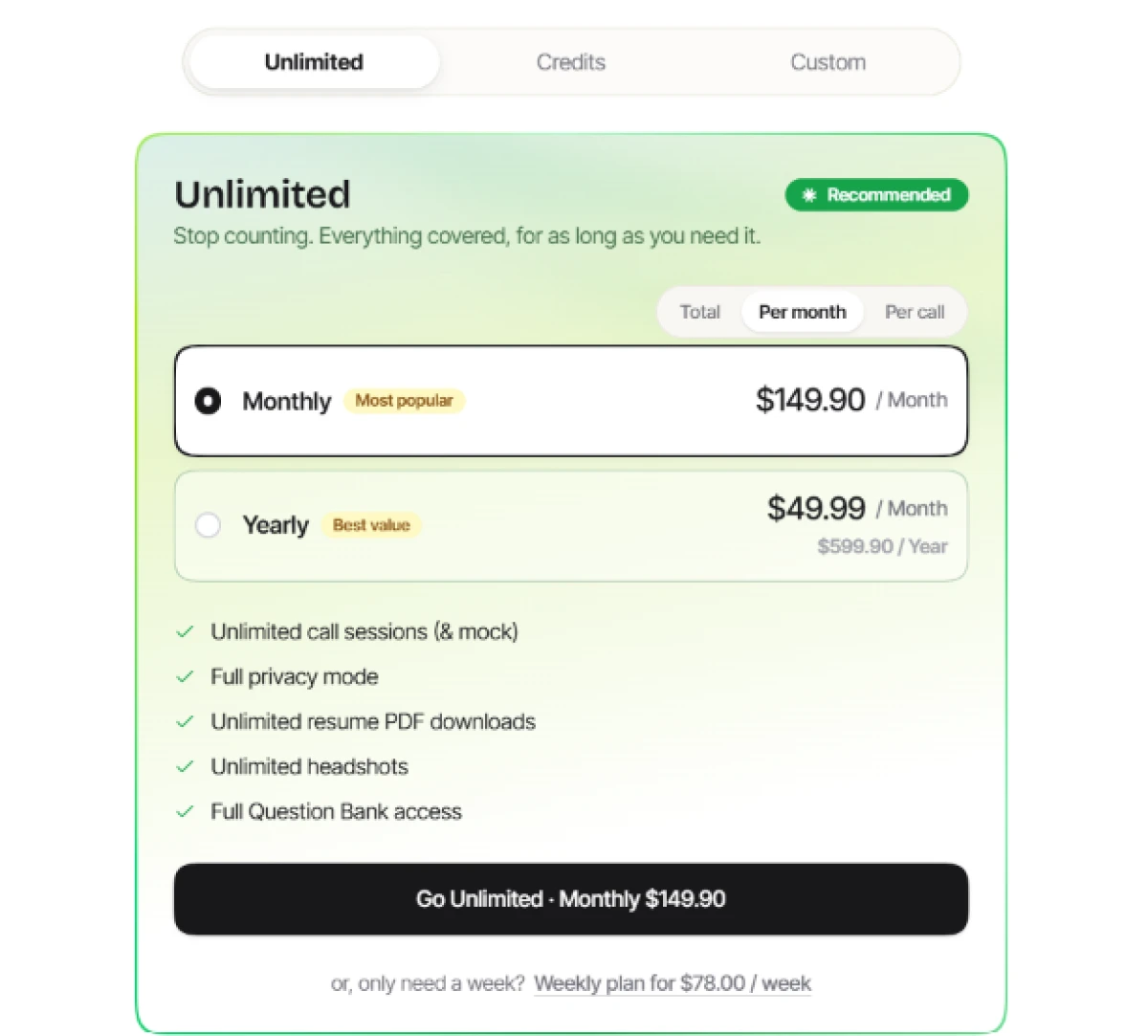
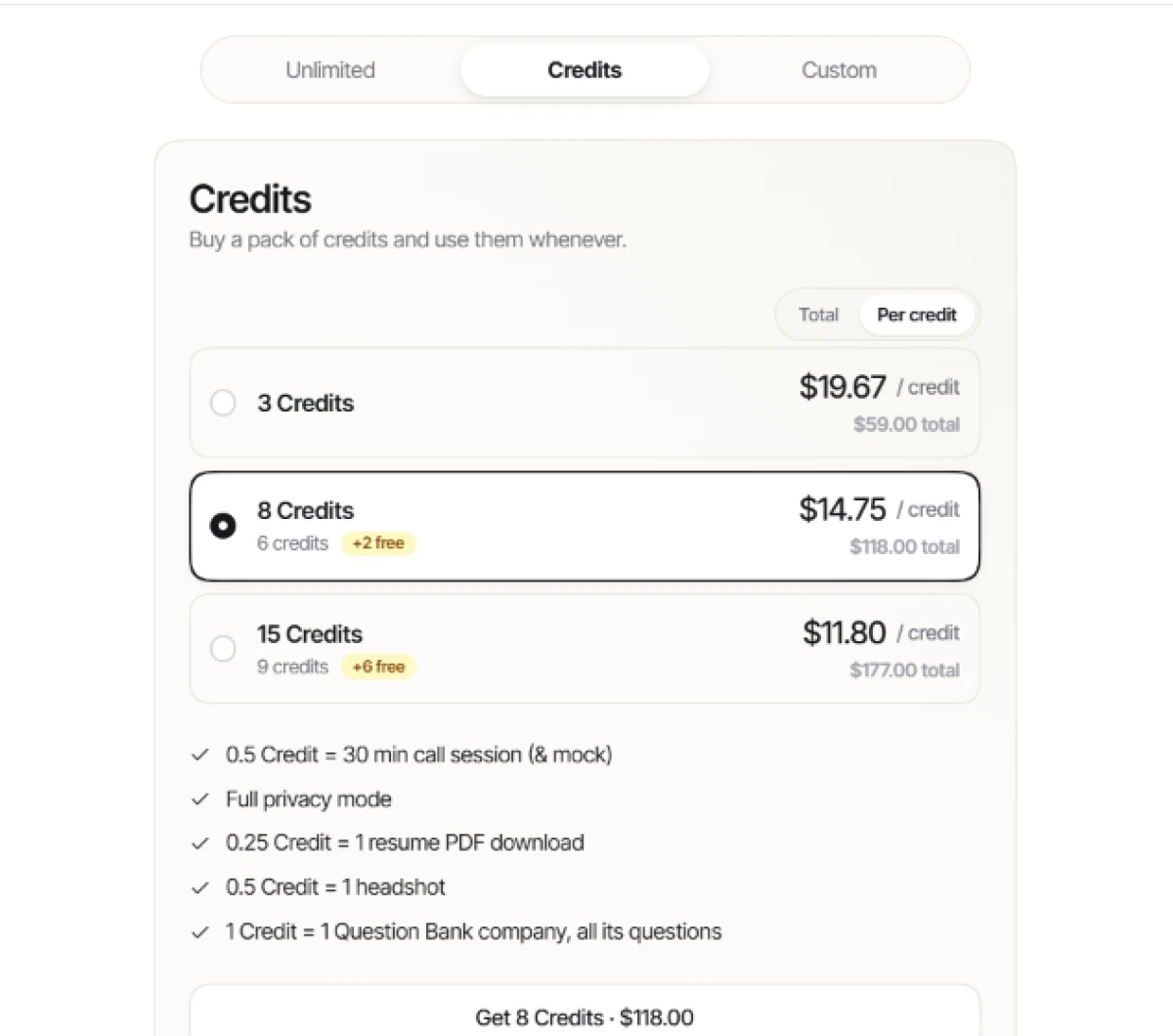
Pricing is accurate as of 19 October 2026 and was captured from the official ParakeetAI website. Plans, prices and credit limits change often, so check the official ParakeetAI pricing page for the current figures before you subscribe.
Pros & cons
Specific conclusions from real user reviews, not generic filler.
✅ Pros
- Real-time answers arrive fast enough to steady nerves mid-interview
- Saved transcript makes reviewing your own answers after the call easy
- Runs in the browser on any OS, with a native Mac app too
- Handles phone interviews through Google Voice, rare among rivals
- Reliable on behavioral and general technical chat questions
⛔ Cons
- Answers stay generic even when you upload a reference resume
- Depth drops on multi-step algorithm problems, fine only on surface ones
- Live responses can lag, landing after the topic has moved on
- Transcription struggles to catch some interview questions correctly
- Performance leans on your own connection speed, not just the tool
- Reviewers report nonsensical answers and freezes mid-interview
Synthesized from real user reviews on Trustpilot & G2 · paraphrased, not quoted
ParakeetAI alternatives
| ParakeetAIReviewed | JobSuit AI | |
|---|---|---|
| Our Score | 6.2/10 | 5.0/10 |
| Free tier | One 10-min session, one 10-min mock | 3 tailorings, analyses and cover letters a month |
| Free download | Transcript and notes, with a delete option | None, resume export is paid only |
| Core method | Real-time answers in live calls and mock interviews | Scores and tailors your resume to a target job post |
| Model choice | Gemini, GPT and Claude, tagged by speed | Not offered, single engine |
| Best for | Live answer support during the interview itself | Fixing a resume before you ever apply |
Who Should Use ParakeetAI, and Who Should Avoid It?
ParakeetAI is a capable real-time answer engine with a slick setup and useful notes, but its thin free tier, shallow answers under pressure and self-reported stealth make it a poor fit for several kinds of user.
Who Should Use ParakeetAI?
Best suited for these workflows
Candidates Who Prepare Properly
Upload your CV and paste the real job post, and the tailored answers and mock practice become genuinely useful rather than generic.
People Who Want a Live Safety Net
For behavioral and general technical chat, a fast suggested answer in the panel can steady nerves and fill an unexpected gap.
Non-Native Speakers
The 50-plus language list and the saved transcript help anyone interviewing in a second language review and improve afterward.
Privacy-Conscious Users
One-click deletion of each session record and the stealth mode appeal to anyone wary of transcripts sitting on a server.
Who Should Avoid ParakeetAI?
Consider an alternative if you need
Anyone Counting on True Invisibility
The vendor's own FAQ admits the pmodule process shows in Activity Monitor, and named detectors now target Parakeet by name.
Hard Technical and Coding Rounds
Answers thin out on multi-step algorithm problems, and users report it describing code at a high level instead of writing it.
A Usable Free Experience
The free plan is one short mock and a 10-minute session, with the resume maker, headshots and question bank all locked.
Rock-Solid Live Reliability
Reviewers report lag, stale answers after the topic moves on, and freezes mid-interview, the two risks you cannot afford live.
Our Recommendation
ParakeetAI earns its keep for prepared candidates who upload their material, stick to behavioral and general technical rounds, and treat it as a backup rather than a script. Anyone facing a hard coding interview, counting on true undetectability, or hoping to get real value from the free tier should look elsewhere. Before paying, test a full mock on your own role, confirm the model speed you can tolerate live, and read the refund terms, since any credit use voids eligibility.
ParakeetAI scorecard
Rated against what a real-time interview assistant is actually built to do.
| Dimension | Verdict | Score |
|---|---|---|
| Setup & job-link import Auto-filling the role and description | Good |
8.0
|
| Model flexibility Choice of engine before you answer | Good |
7.5
|
| Transcription & post-call notes Summary, transcript and Ask AI | Good |
7.5
|
| Stealth & privacy Hidden mode and record deletion | Good |
7.0
|
| Language support Range of interview languages | Good |
7.0
|
| Live answer speed Latency when it matters most | Average |
6.0
|
| Answer quality & depth Substance beyond surface bullets | Average |
5.5
|
| Mock interview practice Depth of free and paid rehearsal | Weak |
5.0
|
| Prep tools suite Resume, headshots, question bank | Weak |
5.0
|
| Value & free tier Free allowance and monthly price | Weak |
3.5
|
| Scrutool Score Equal-weight average of all 10 dimensions |
6.2
|
Fast and clever in the panel, but the two things it sells break first
ParakeetAI gets the plumbing right. The job-link import filled a whole mock on the first paste, the model picker genuinely spans Gemini, GPT and Claude, and the post-call summary, transcript and delete button are the most polished part of the product. For a prepared candidate who uploads a CV and sticks to behavioral rounds, the live panel is a real safety net. The trouble is that speed and stealth, the two things the marketing leans on hardest, are the two that wobble under pressure. The strong models are tagged Slow and Very Slow, so a smart answer and a fast one are a choice, not a given. Reviewers report lag, stale answers and freezes mid-call, the vendor's own FAQ admits the helper process shows in Activity Monitor, and dedicated detectors now name Parakeet directly. Add a free tier that amounts to one short mock, prep tools locked behind credits, and a $149.90 month-to-month price that only drops if you commit to a full year, and the value case narrows. Prepared candidates facing conversational rounds will get something out of it. Anyone banking on true invisibility, facing a hard coding interview, or hoping to try it properly for free should look elsewhere.
Discussion
Join the discussion and share your perspective.