
ResearchRabbit AI
ResearchRabbit turns one seed paper into a visual map of related work, authors and citations across 310M+ papers. Free to use, with smooth Zotero sync, but it discovers the literature rather than reading it.

The best free way to map a research field from a single seed paper, as long as you know it discovers the literature rather than reading it for you.
Should you use ResearchRabbit?
PhD students and researchers who want to discover related papers and map a field out from a seed, not have answers written for them.
You want a tool that reads papers and writes a synthesis . ResearchRabbit maps the literature, it does not summarize it.
The core discovery engine is free forever, capped at 50 seed articles and one project. Large-scale work needs RR+, $10/mo billed yearly .
The network view rewards a good seed paper . Start from a weak or off-topic one and the suggestions wander.
Key features & how they perform
Each feature rated from hands-on testing and aggregated review sentiment.
Seed-to-network discovery
Add one paper, click Grow, and it fans out into related works sorted by Earlier, Later and Similar. This is where it beats a keyword search: it follows citation and co-author links, not spelling.
Citation & co-author maps
Results plot as an interactive graph, spread left to right by publication year and upward by citation count. Author maps lay out a researcher's full output across decades in one view.
Lookup keyword search
The plain keyword search is the weak link. It matches letters over meaning, so a broad term returns millions of hits with off-topic papers near the top. Treat it only as a way to find a seed.
Shared collections
Collections work like playlists, and the Share tab gives a public view link plus invites that let collaborators join as editors. All of this sits on the free plan, no subscription needed.
Export & Zotero sync
Send a selection out as BibTeX, CSV or RIS in one click for Zotero, EndNote or a spreadsheet. The two-way Zotero sync is the smoothest of any tool in this class, and it is free.
Author tracking & alerts
Follow an author to pull their earlier and later work with no new search, and let collections generate recommendations that sharpen as you add papers, with non-spammy update alerts.
Feature ratings blended from hands-on testing plus user sentiment on G2, Product Hunt & the wider research community.
Turning one paper on fasting into a mapped reading list
A full literature search on the free plan, starting from a single seed paper, with the output I saw at each step.
Searching and adding a seed
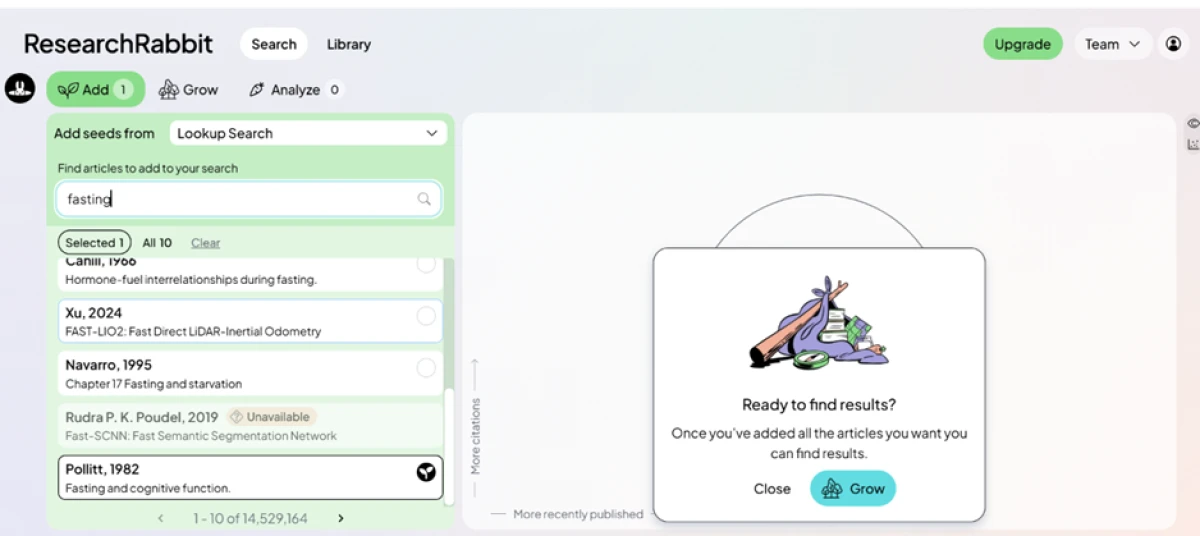
I opened the Add panel, switched it to Lookup Search, and typed one keyword to begin. This is the plainest way into the tool, and it is also the shakiest.
ResearchRabbit returned 14,529,164 matches, a number that looks complete until you read the first page. Two of the top results were Xu 2024 "FAST-LIO2" and Rudra 2019 "Fast-SCNN," both computer-vision papers that matched the letters "fast" rather than the topic of fasting. A third entry came back tagged Unavailable.
"fasting"
One seed, ten results
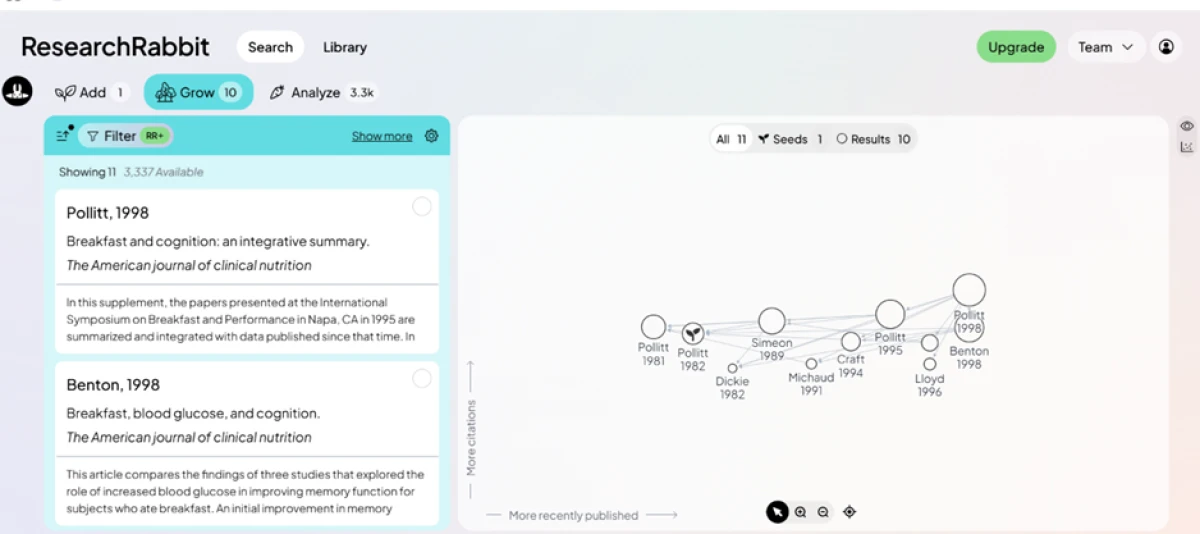
Clicking Grow turned that single paper into a map of ten related works. Pollitt 1982 sat at the center, linked out to Pollitt 1981, Simeon 1989, Craft 1994 and Benton 1998, spread left to right by publication date and upward by citation volume.
These suggestions landed on-topic, a clear step up from the keyword search that produced the seed. One detail stood out on the paid side: the Filter control carried an RR+ badge, so narrowing these results by field or date sits behind the premium tier.
Following an author
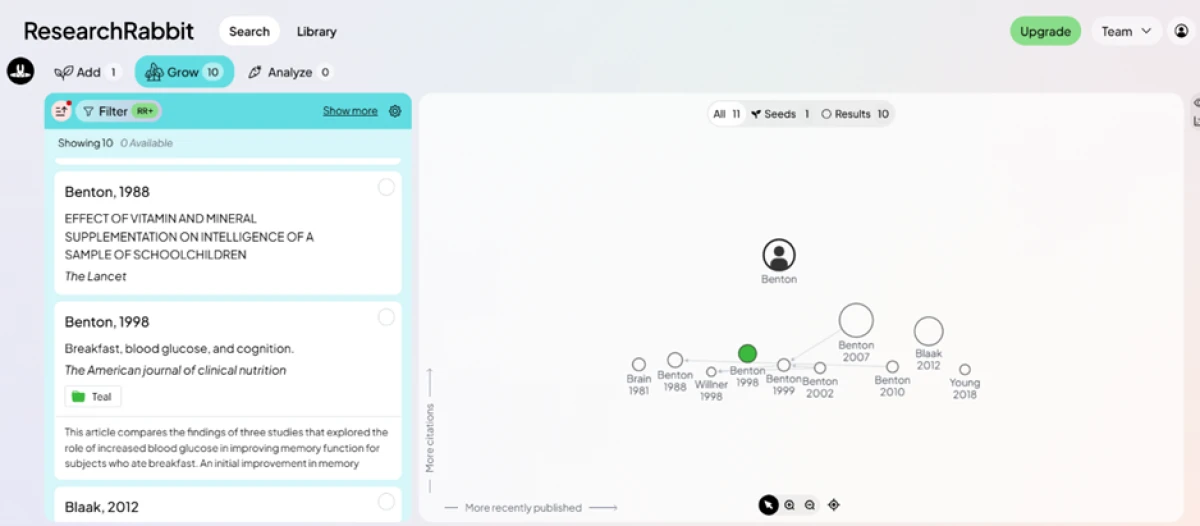
Next I opened the author view for Benton. ResearchRabbit mapped that researcher's work across four decades, from Benton 1981 up to Benton 2018, with the paper already saved in my collection shown in green.
Finding earlier and later work by a central author took no new search. For tracing where a line of thinking came from and where it went, this view does in seconds what a database search makes you piece together by hand.
Sharing a collection
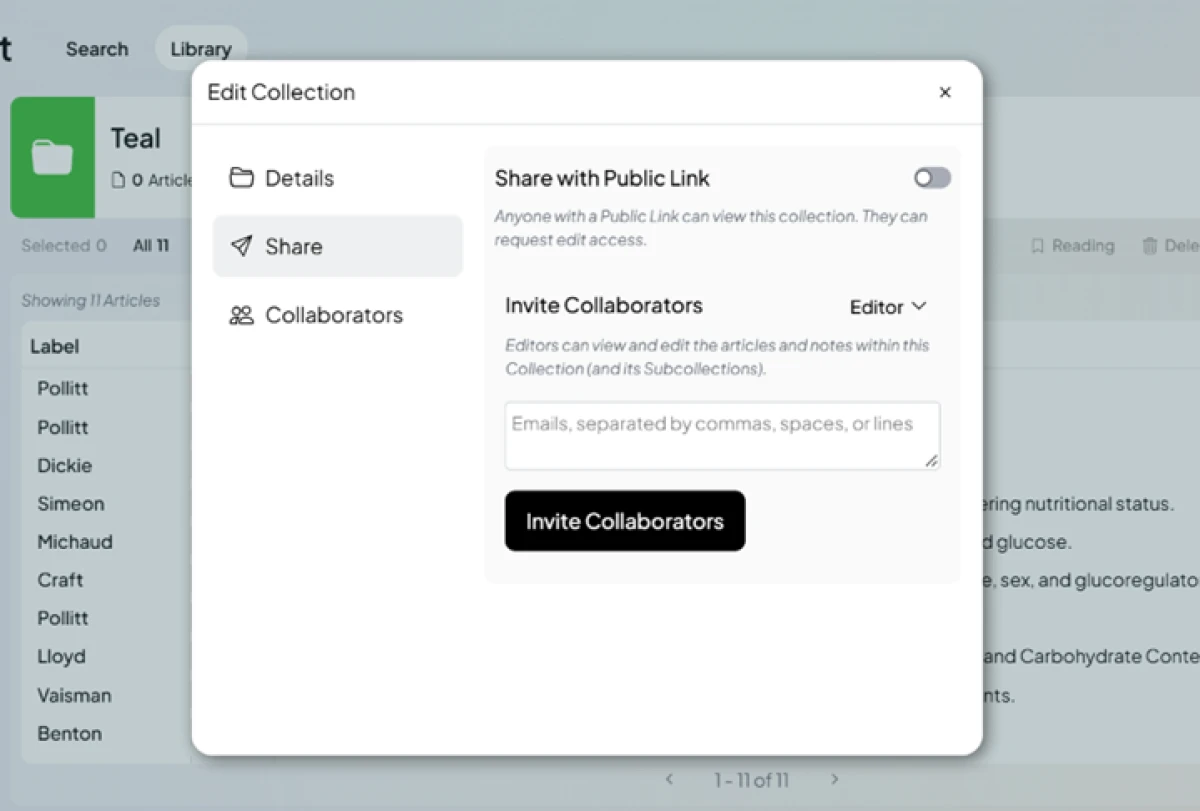
Sharing did not ask for a subscription, which is not something I expected after the Filter paywall.
The Share tab held a public view link alongside an invite box where collaborators join as editors, able to change the articles and notes inside a collection. For a lab or a thesis group building a shared reading list, that is a real feature given away free.
Sorting the library
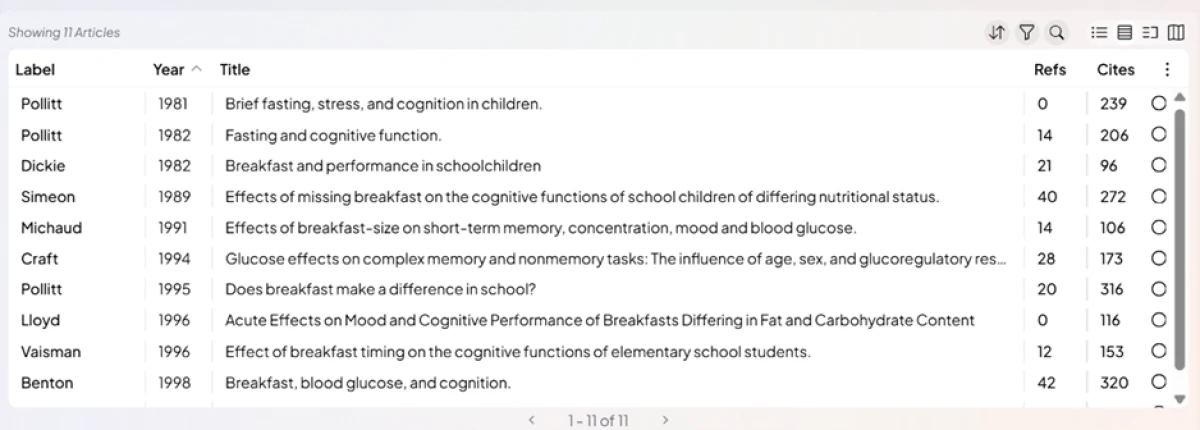
The list view read more clearly than the map when I wanted volume at a glance. I sorted eleven articles by year, with reference and citation counts shown side by side.
Pollitt 1995, "Does breakfast make a difference in school?", carried 316 citations against 20 references, a quick read on which papers the field leans on.
Exporting references
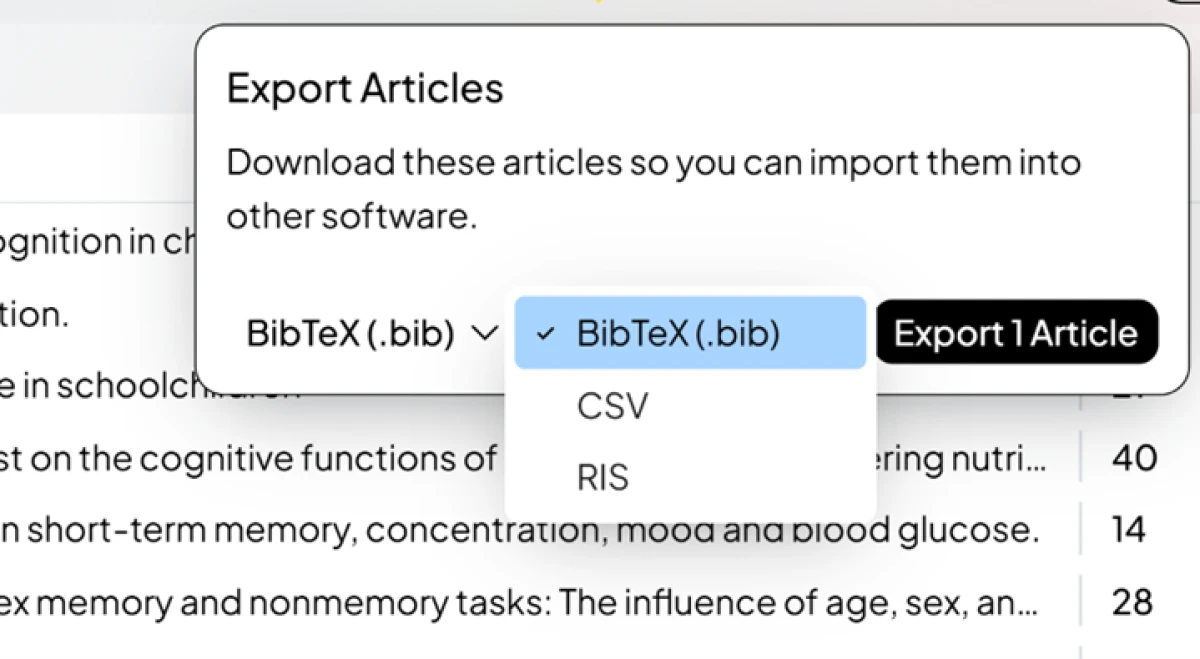
Export closed out the test. I sent my selection as BibTeX for a reference manager like Zotero, and the same dropdown offered CSV for spreadsheets plus RIS for tools such as EndNote.
The handoff took one click, with no upgrade prompt. Getting a clean, formatted bibliography out of the free plan is exactly where some rivals put up a paywall.
Why ResearchRabbit stopped being free forever
The tool built its name on being completely free, and that part of the story changed in 2025.
For years ResearchRabbit ran as a fully free, grant-funded tool, which is rare in academic software and a big part of why researchers trusted it. That changed in 2025. It joined the same group as Litmaps, another citation-mapping product, with reports describing a Litmaps acquisition in May 2025.
Soon after, the free-forever model gave way to the freemium structure it runs today, and the paid RR+ tier arrived. The core discovery engine stayed free, which kept most of the original goodwill intact, and the free plan is still genuinely enough to finish many focused reviews.
The practical takeaway is simple. ResearchRabbit is now a business as well as a research tool, so expect the heaviest, large-scale features to keep drifting toward the paid side over time. If your workflow leans on a specific free feature, it is worth confirming it is still free before you build around it.
ResearchRabbit pricing
Figures taken from the official ResearchRabbit pricing page, paid tier shown with annual billing.
| Plan | Price | What's included |
|---|---|---|
| Free Forever | $0 | Unlimited searches across 310M+ articles · unlimited library and collections · collaborate by sharing a collection · up to 50 seed articles · one project · core search settings · BibTeX, CSV and RIS export · Zotero sync |
| ResearchRabbit+ Popular | $10 /mo | Billed yearly ($120/yr), or $12.50/mo monthly · everything in Free · up to 300 seed articles · advanced search controls · multiple projects · faster support · country-parity discounts for 100+ nations |
| Institution | Custom | Everything in RR+ · greater volume discounts · integrate with your research library (LibKey) · manage thousands of users · usage statistics · contact sales |
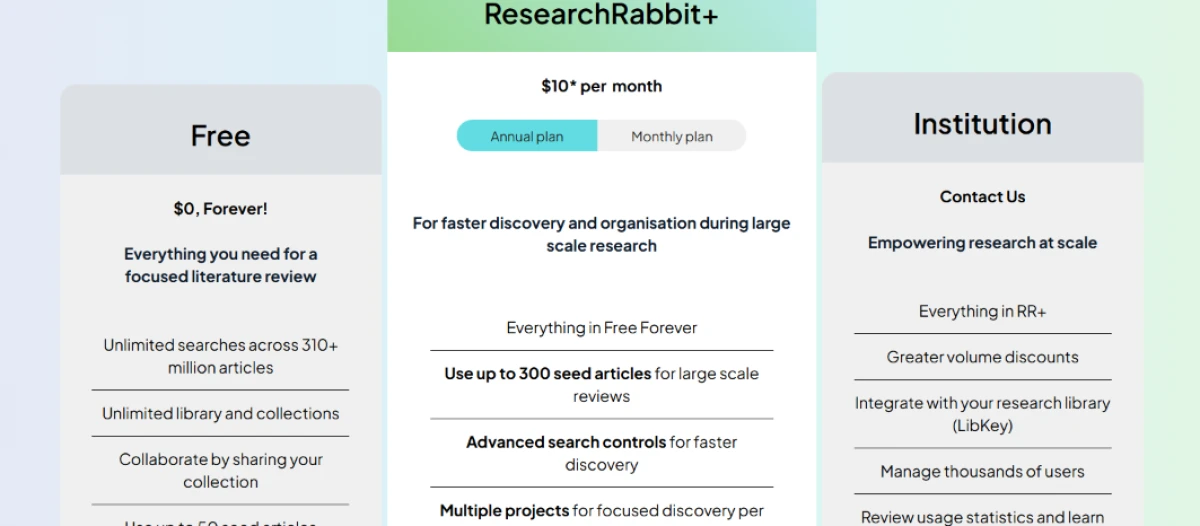
Pricing is accurate as of 14 November 2026 and was captured from the official ResearchRabbit website. Plans, prices and limits change often, so check the official ResearchRabbit pricing page for the current figures before you subscribe.
Pros & cons
What researchers who use the tool praise and complain about, kept separate from my own testing.
✅ Pros
- Visual citation and author maps surface papers that plain keyword search misses
- One seed paper grows into a whole network, with no long query required
- Free two-way Zotero and Mendeley sync keeps an existing library in step
- Recommendations sharpen as you add papers to a collection
- Shared collections let a team explore and annotate the same map together
⛔ Cons
- It maps papers but does not read, summarize or extract findings for you
- The busy network view can overwhelm new users and invites endless rabbit holes
- It depends on a strong seed; a weak starting paper yields weak suggestions
- No mobile app, and no offline access to your collections or recommendations
Synthesized from recurring user and reviewer feedback on G2, Product Hunt & the wider research community · paraphrased, not quoted
ResearchRabbit alternatives
| ResearchRabbitReviewed | Liner AI | Genspark AI | |
|---|---|---|---|
| Our Score | 7.5/10 | 6.7/10 | 6.4/10 |
| Entry paid plan | $10 / mo, billed yearly | $10.99 / mo, billed yearly | $19.99 / mo, billed yearly |
| Free tier | 50 seed articles, one project | 30 credits/mo, ads on answers | Full use, but no exports |
| Core method | Seed paper into a citation map | Ask a question, get cited answers | Live web research agent |
| Reads & summarizes | No, it maps and discovers only | Yes, summarizes with citations | Yes, writes sourced reports |
| Best for | Discovering and mapping a field | Quick sourced answers for students | Slides, research and sheets in one tool |
Who Should Use ResearchRabbit, and Who Should Avoid It?
ResearchRabbit is excellent at discovering and mapping literature, but its map-not-read focus makes it the wrong tool for several common jobs.
Who Should Use ResearchRabbit?
Best suited for these workflows
PhD Students Mapping a New Field
Grow a map from one seed paper and follow the citation trail outward, which is faster than building a search string from scratch.
Researchers Who Already Use Zotero
The free two-way sync keeps your reference library and your map in step, so nothing has to be re-entered by hand.
Anyone Tracing an Author's Work
Author maps lay out a researcher's earlier and later papers in one view, so you can see where a line of thinking came from.
Teams Doing a Shared Review
Collaborative collections and free public links let a lab or thesis group build and annotate one reading list together.
Who Should Avoid ResearchRabbit?
Consider an alternative if you need
Papers Read and Summarized
ResearchRabbit maps the literature but never reads it, so for synthesis or evidence tables you need a tool built for that.
To Start From a Keyword
The network needs a good seed paper to work well, so a plain keyword search alone leaves you wading through off-topic hits.
Large Reviews on a Free Plan
The free 50-seed, single-project cap gets tight fast, so a big systematic review pushes you onto RR+.
Mobile or Offline Access
It is web-only with no mobile app and no offline mode, so a laptop and a connection are the only way in.
Our Recommendation
ResearchRabbit is the strongest free tool for discovering and mapping literature from a seed paper, and for most focused reviews the free plan is all you need. Pair it with a reading-and-synthesis tool if you also want papers summarized, and move to RR+ only when a large review pushes past 50 seeds. Before you rely on it, confirm your field is well covered and start from a strong, on-topic seed.
ResearchRabbit scorecard
Rated against what a literature-discovery and citation-mapping tool is actually built to do.
| Dimension | Verdict | Score |
|---|---|---|
| Discovery & recommendations Relevance of related-work suggestions | Excellent |
8.5
|
| Citation network maps Visualizing links between papers | Excellent |
8.5
|
| Author network mapping A researcher's output across years | Good |
8.0
|
| Keyword search accuracy Finding a seed from a plain term | Average |
5.5
|
| Collections & organization Saving, sorting and grouping papers | Good |
8.0
|
| Collaboration & sharing Public links and editor invites | Excellent |
8.5
|
| Export & reference-manager sync BibTeX, CSV, RIS and Zotero | Excellent |
8.5
|
| Free tier value How much real work the free plan does | Good |
7.5
|
| Interface & learning curve How approachable the map view is | Good |
7.0
|
| Filters & search controls Narrowing by field or date, now RR+ | Weak |
5.0
|
| Scrutool Score Equal-weight average of all 10 dimensions |
7.5
|
A superb map of the literature that stops where the reading begins
ResearchRabbit does one job unusually well: it turns a single seed paper into a living map of related work, authors and citations, and it does most of it on a free plan that still shames paid rivals. The discovery is genuinely strong, the Zotero sync is the smoothest in its class, and sharing a collection with a team costs nothing. The limits are just as clear. The keyword search matches spelling over meaning, the map needs a good seed to shine, and the tool never reads or summarizes a word of what it finds. The 2025 shift to a freemium model added a 50-seed ceiling to the free plan, though the core engine stayed free. Researchers who think in papers and citation trails, especially PhD students scoping a review, will get real value here and may never need to pay. Anyone who wants a tool to read the papers and write the synthesis should bring a second tool, and point it at the reading list ResearchRabbit builds.
Discussion
Join the discussion and share your perspective.