
Wan AI
Wan is Alibaba’s open-weight AI platform for text-to-video, image generation and in-image editing. Strong prompt control and cheap credits, with a watermark on every free export.

An open, cheap video engine with strong prompt control and a surprisingly precise box-select editor, let down by weak fine detail, a watermark on every free export, and a confusing swarm of look-alike sites.
Should you use Wan?
Creators and developers who want open-weight video, careful prompt control, and cheap paid credits, and are happy to iterate.
You need precise, rule-based accuracy (exact object counts, true reflections) or a one-click single image instead of four variants every time.
Free is a daily trickle of watermarked 480p clips. Clean, watermark-free output starts at Pro, $5/mo billed yearly , with 300 credits a month.
The Wan name is everywhere , and many look-alike sites charge more for the same models. The official platform is wan.video.
Key features & how they perform
Each feature rated from hands-on testing and aggregated review sentiment.
Text-to-video
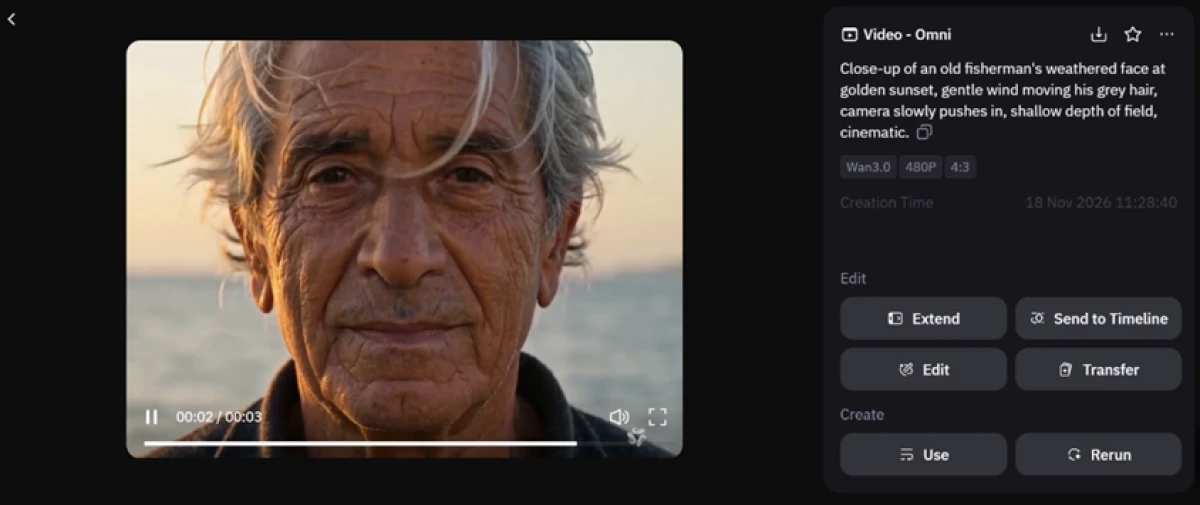
Omni mode turns a written scene into a short clip. Prompt adherence is strong and the camera moves hold steady, though free output caps at 480p.
Image generation
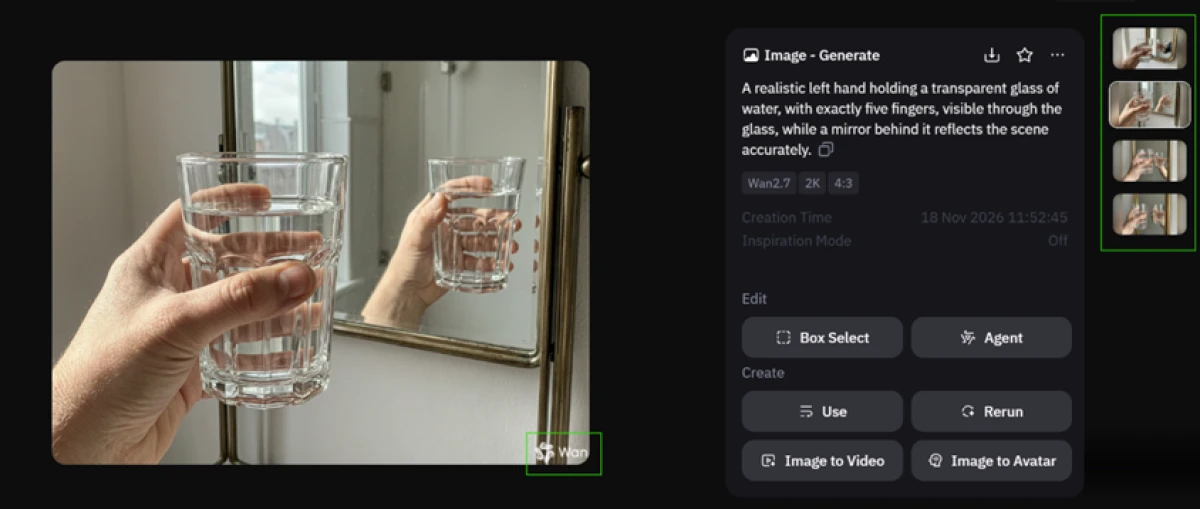
It reads the mood of a scene well, but precise details slip, and one credit always returns four variants with no way to ask for a single image.
Box Select editing
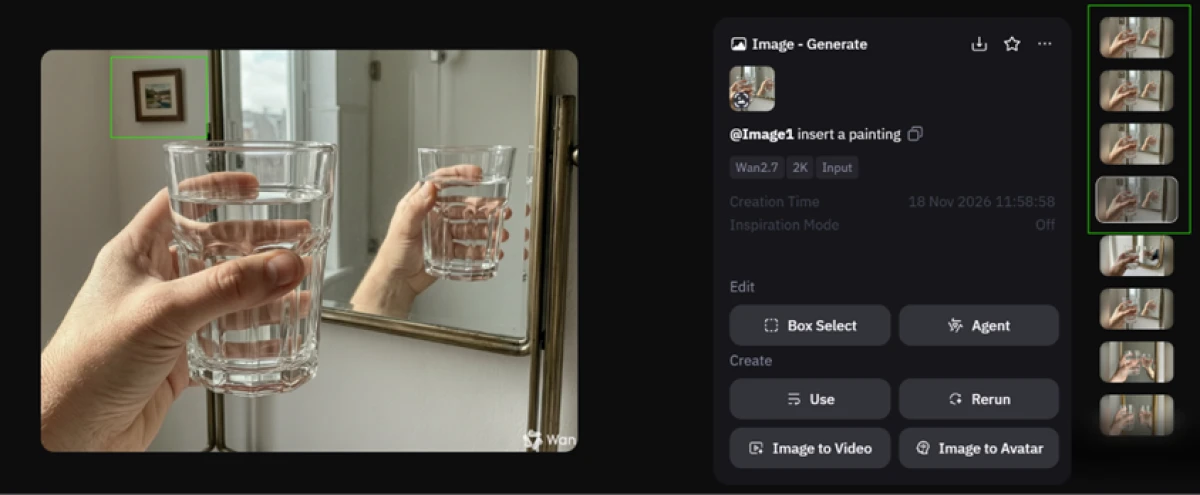
Draw a box, type an instruction, and Wan edits only that region while matching the existing lighting. This is the standout on a free tool.
Open weights
Wan 2.1 and 2.2 ship under Apache 2.0, so developers can download, self-host, and fine-tune the model instead of renting it by the clip.
Native audio
From version 2.5, clips arrive with synchronized ambient sound and basic speech, something most open video models still cannot do.
Model range
You can move between Wan 2.2, 2.5, 2.6, 2.7, and 3.0 plus Omni, each with its own resolution and aspect-ratio options for different jobs.
Feature ratings blended from hands-on testing and aggregated sentiment on Product Hunt, G2 & the open-model developer community.
Testing Wan: video, images, then a box-select edit
One free session, taken from a fisherman clip to a precise in-image edit, watching where the credits and the quality ran out.
Six free credits and the Generate screen
After signing in, I claimed the daily check-in bonus, which dropped six credits into my account. That number sets the ceiling for a free session.
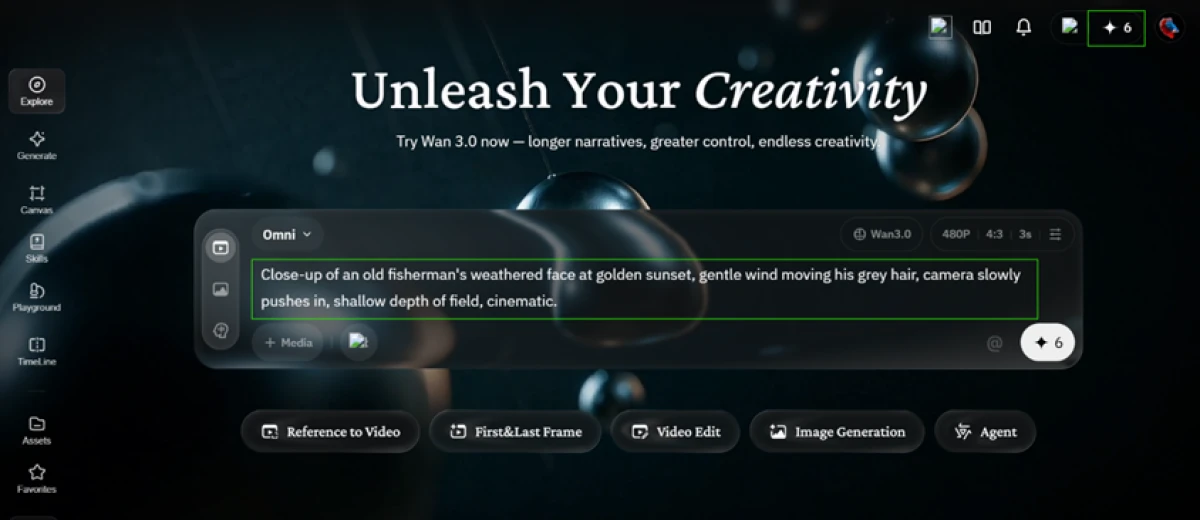
The Generate screen is where everything starts. I had it set to Wan 3.0 in Omni mode at 480p, with the credit counter sitting in the top corner. Video pulls more from the pool than images do, so the plan runs dry after a few clips.
The fisherman test: text to video
The first real test was a text-to-video prompt. I wanted something with texture, motion, and a slow camera move, so I described a close shot of an aging face at sunset.
This is the exact prompt I gave it.
"Close-up of an old fisherman's weathered face at golden sunset, gentle wind moving his grey hair, camera slowly pushes in, shallow depth of field, cinematic."
The mirror and five-finger test: image generation
Next I switched to image generation on Wan 2.7 to see how it handles rules rather than mood. A hand, a glass, and a mirror are a classic trap: exact finger counts and accurate reflections are hard.
Here is what I typed.
"A realistic left hand holding a transparent glass of water, with exactly five fingers, visible through the glass, while a mirror behind it reflects the scene accurately."
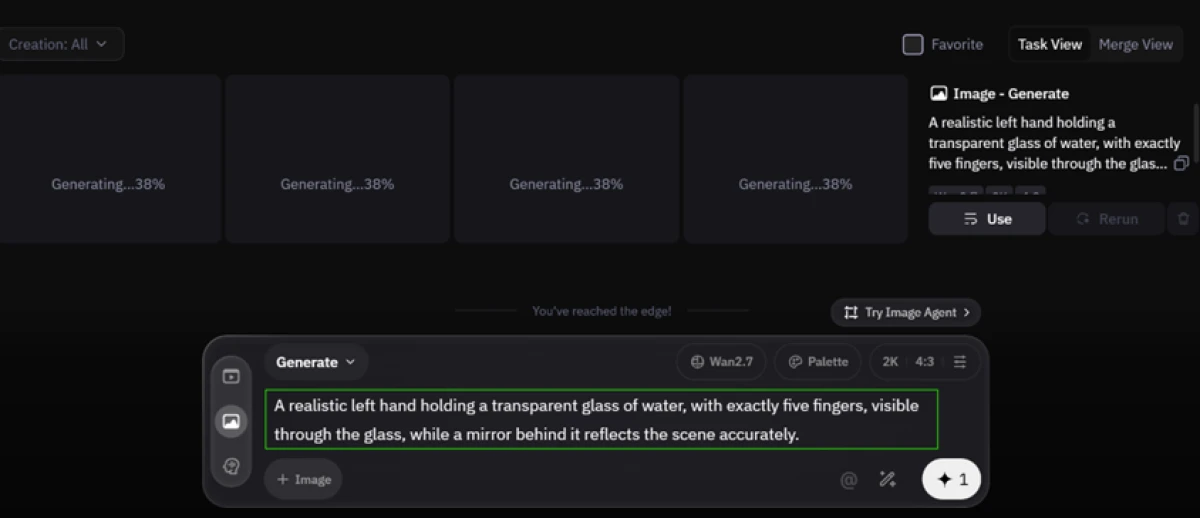
A single credit returned four versions at once, which is fair value, but there is no setting to ask for just one. The finished image below is where the limits showed.
Targeted editing with Box Select
This is the test that changed my view of the tool. Box Select lets you mark one area of an image and edit only that region, leaving the rest untouched.
I drew a box over the top-left corner of the room, then gave it a plain instruction.
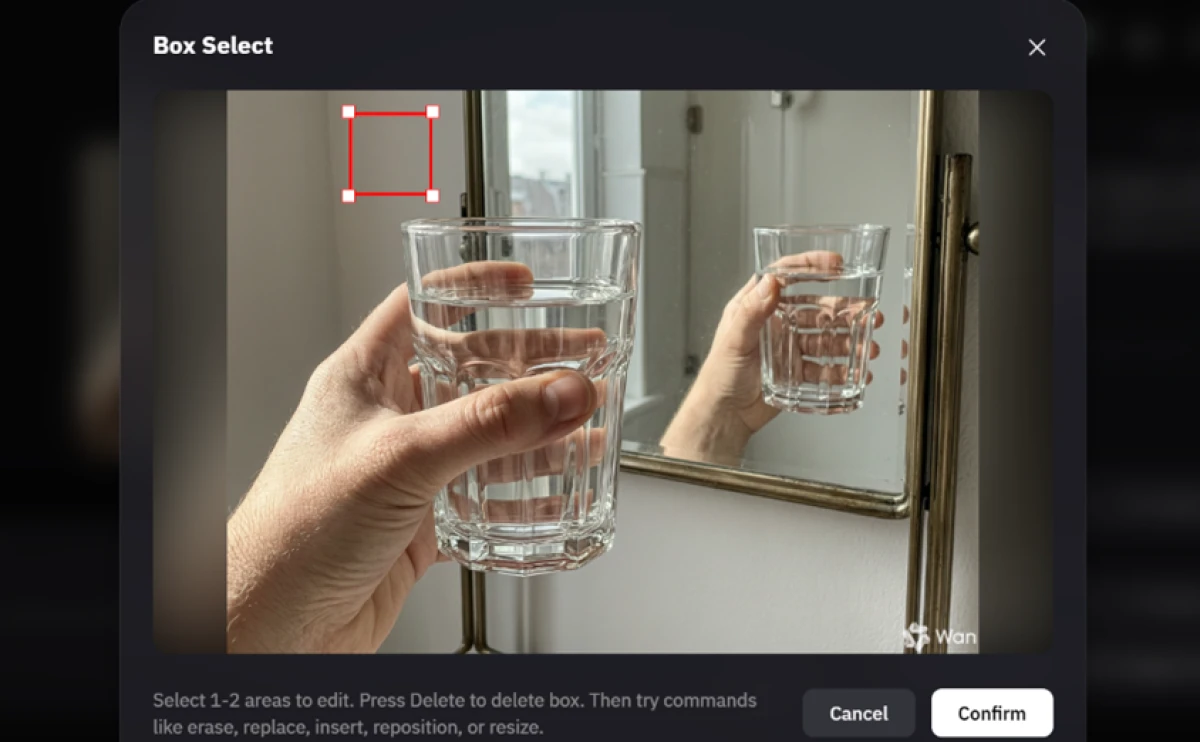
With the area marked, I typed the command and ran it on Wan 2.7.
"insert a painting"
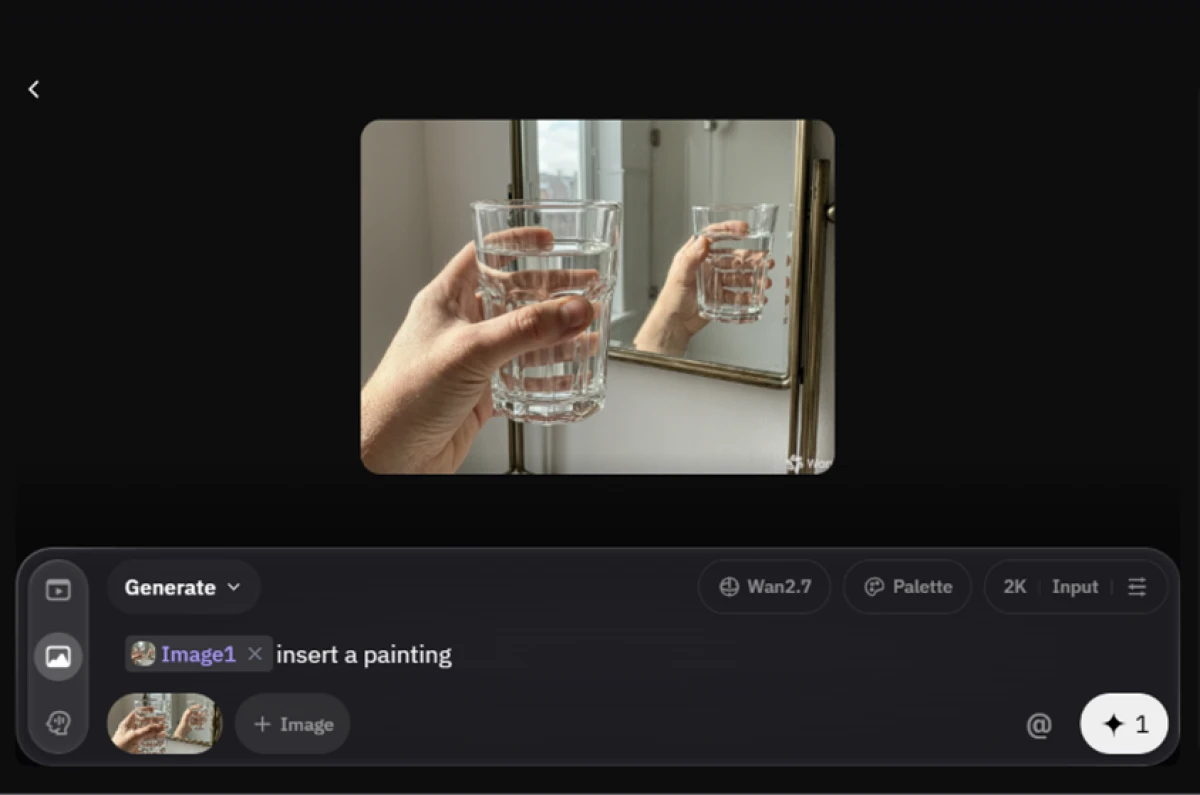
The edit landed cleanly, and the result below shows what came out of that single box.
Wan pricing
Figures taken from the official Wan membership page, billed yearly.
| Plan | Price | What's included |
|---|---|---|
| Free | $0 | Daily check-in credits (six on our test) · submit 1 video at a time · 480p output · Wan watermark on every export |
| Pro Popular | $5 /mo | 300 credits/month · watermark-free image and video exports · higher-resolution output · priority queue · billed yearly ($10/mo on monthly billing) |
| Premium | $20 /mo | 1,200 credits/month · up to 1080p video · multiple concurrent videos · watermark-free · billed yearly ($40/mo on monthly billing) |
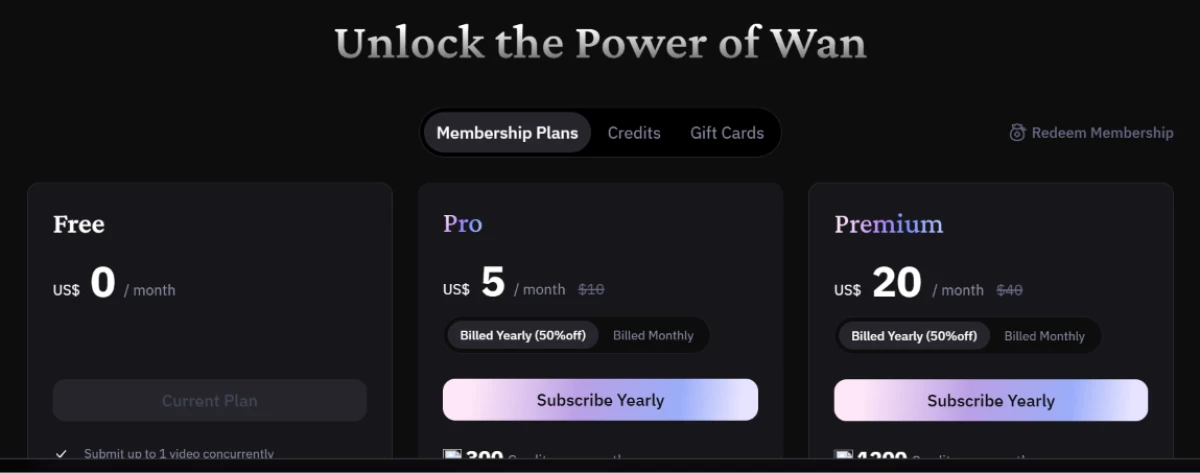
Pricing is accurate as of 18 November 2026 and was captured from the official Wan website. Plans, prices and credit limits change often, so check the official Wan pricing page for the current figures before you subscribe.
Pros & cons
Patterns from real user and developer feedback, not generic filler.
✅ Pros
- Holds complex, multi-element text prompts together across the whole clip
- Native synced audio from version 2.5, which most open models lack
- Open weights on 2.1 and 2.2 let developers self-host and fine-tune
- Motion physics stay competitive with closed commercial models
- LoRA and reference-image support for custom characters and styles
- One model covers several resolutions and aspect ratios
⛔ Cons
- Motion realism and physical consistency lag behind its prompt accuracy
- Characters drift in appearance across longer clips
- Version sprawl (2.1 to 3.0) and look-alike sites confuse new users
- Self-hosting needs heavy GPU VRAM, out of reach for most laptops
- Render and queue times run long at higher resolutions
- Image-to-video results vary from one run to the next
Synthesized from user and developer feedback on Product Hunt & G2 · paraphrased, not quoted
Wan alternatives
| WanReviewed | Mage Space | ImagineArt AI | |
|---|---|---|---|
| Our Score | 6.6/10 | 6.8/10 | 6.6/10 |
| Entry paid plan | $5 / mo, billed yearly | $10 / mo | $9 / mo, billed yearly |
| Free tier | Daily check-in credits | 300 one-time gems | 100 credits per day |
| Free export watermark | Yes, on free video | None on free images | None on free images |
| Open weights | Yes, Apache 2.0 (2.1 / 2.2) | No, hosted only | No, hosted only |
| Video generation | Core focus | Yes, plus lipsync | Yes, weaker area |
| Best for | Open-model video and targeted edits | Multi-model image and video, character reuse | All-in-one studio, image first |
Who Should Use Wan, and Who Should Avoid It?
Wan is strong on open-weight video, prompt control and in-image editing, but weak detail accuracy, a free watermark and version confusion make it a poor fit for some users.
Who Should Use Wan?
Best suited for these workflows
Developers Who Want to Self-Host
Apache 2.0 weights on 2.1 and 2.2 let you run the model locally and fine-tune it, instead of paying per clip.
Creators Who Prompt Carefully
Detailed, multi-element prompts are rewarded here, since adherence is one of the model's most consistent strengths.
Budget Video Makers
Paid credits are among the cheapest in the category, with watermark-free output starting at $5 a month.
Editors Who Need One Small Change
Box Select rewrites a single region of an image and matches the lighting, without disturbing the rest of the frame.
Who Should Avoid Wan?
Consider an alternative if you need
Precise, Rule-Based Accuracy
Exact object counts, true reflections and fine spatial logic are unreliable, so literal instructions often get skipped.
A Single Clean Image
Image generation returns four variants per credit with no option to request one, which clutters the workspace fast.
A Laptop-Only Local Setup
Self-hosting demands heavy GPU VRAM, so the open-weight route is closed to most everyday machines.
One Clear, Official Product
Multiple versions and a crowd of look-alike sites make it easy to land on the wrong one and overpay.
Our Recommendation
Wan earns its place if you value open weights, careful prompting and cheap credits, and the Box Select editor is genuinely good. If your work depends on exact detail or you want a polished beginner path, a closed commercial tool will frustrate you less. Before you pay, run a free session on the real jobs you care about, confirm you are on wan.video, and check the current credit and resolution limits.
Wan scorecard
Rated against what an open AI video and image platform is actually built to do.
| Dimension | Verdict | Score |
|---|---|---|
| Targeted editing (Box Select) Region-locked edits that blend in | Excellent |
8.5
|
| Video output quality Detail, lighting and camera motion | Good |
7.5
|
| Pricing value Cost per credit against rivals | Good |
7.5
|
| Prompt adherence Following complex text prompts | Good |
7.0
|
| Motion & realism Physical consistency over time | Average |
6.5
|
| Generation speed Queue and render time | Average |
6.5
|
| Image generation quality Detail accuracy and control | Average |
6.0
|
| Ease of use & control Setup, options and version clarity | Average |
6.0
|
| Free plan value What a free session actually gets you | Average |
5.5
|
| Watermark & export freedom Clean, unbranded output | Weak |
5.0
|
| Scrutool Score Equal-weight average of all 10 dimensions |
6.6
|
An open, cheap video engine that nails the mood but fumbles the fine print
Wan is one of the most interesting things happening in open video. The text-to-video output looked detailed and steady even at 480p on a free account, prompt adherence is a real strength, and the Box Select editor rewrote a single corner of an image so cleanly that it alone would bring me back. Paid credits are cheap, and the open weights on 2.1 and 2.2 give developers a route no closed tool offers. The weaknesses are just as clear. Precise, rule-based details slip, with reflections and exact counts coming out wrong. Image generation forces four variants with no single-image option. Every free export carries a watermark, motion realism trails the prompt accuracy, and the sheer number of Wan versions and look-alike sites makes the product hard to pin down. Use Wan if you want open-weight video, careful prompting and in-image edits on a budget, and you can live with iteration. If you need exact accuracy or a single polished result first time, a closed commercial generator will serve you better.
Discussion
Join the discussion and share your perspective.