10 Best AI Logo Makers for Brand Identity in 2026 (Compared and Ranked)
Discover the 10 best AI logo makers in 2026. Compare features, pricing, brand kits, vector files, commercial rights, and find the best tool for your brand.
A professional logo used to cost between $500 and $2,000 from a design studio, plus weeks of back-and-forth email. That price collapsed. An AI tool can now hand you dozens of brand-ready concepts in the time it takes to make coffee.
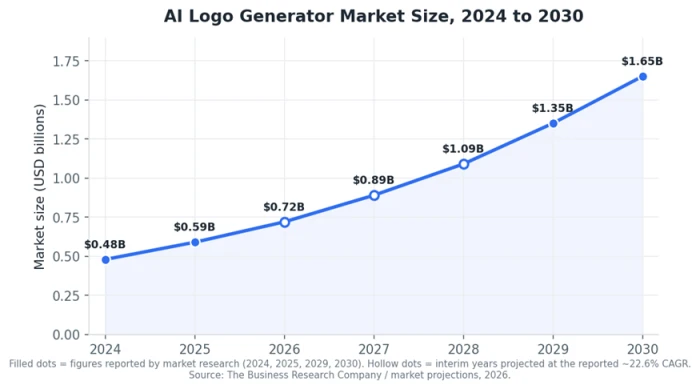
The money behind that shift is not small. The AI logo generator market sat at roughly $0.48 billion in 2024 and reached about $0.59 billion in 2025, and analysts at The Business Research Company expect it to climb past $1.65 billion by 2030. Demand is driving that curve, and the demand comes from founders who need a full identity on day one rather than a single mark.
That last phrase shapes this whole guide. A logo is one asset. A brand identity is the system your logo lives inside: the palette, the typefaces, the business card, the social avatars, the letterhead. So I ranked these ten tools on how much of that system they actually build for you, then split the ones that assemble templates from the newer ones that generate art from scratch. That split decides which tool fits you, and I come back to it two sections down.
How I ranked these ten tools
Four questions shaped every verdict below.
● Does it build a full identity, or just a logo? A mark you cannot turn into a business card and a matching social kit leaves half the job unfinished.
● What files do you actually walk away with? A PNG is fine for a website favicon and useless on a billboard. Vector files such as SVG and EPS scale to any size without blurring.
● Who owns the result, and can you sell under it? Commercial rights and clean ownership are not automatic, and a few tools gate them behind a higher tier.
● What does it actually cost once you need usable files? Several tools are free to design in and only charge at the download step.
I pulled pricing and feature data from each vendor’s current plans and cross-checked it against independent 2026 reviews. Wherever a tool is free to try, capture your own screenshots as you work through it. Those first-hand images do double duty: they show readers the real interface, and they signal to Google that you used the product yourself.
The market behind the boom
The curve above explains why dozens of these tools now fight for the same search results. Building one is cheap and demand is high. Users rarely switch once they hold a finished kit.
That abundance created a subtler problem. These tools are not all the same kind of product, and lumping them into one flat list hides the single most important choice you will make.
Two kinds of AI logo maker in 2026
Here is the split that most “best of” lists skip.
The first group is the brand-kit assemblers: Looka, Brandmark, LogoAI, and Tailor Brands. These walk you through a questionnaire, then combine pre-made icons, fonts, color schemes, and layouts into a polished result. Reviewers in 2026 increasingly call their output template-driven, which is a fair read. You trade a small risk that another business lands on similar building blocks for speed and a complete kit.
The second group is the native image models: Recraft, Ideogram, Adobe Firefly, and general engines such as Google’s Nano Banana Pro and GPT Image. These generate a mark from a text description, so the output feels more distinctive. One caveat runs through the entire category: most of them produce an image of a logo, not a production-ready vector system. Recraft is the exception, and I flag why in its review.
Keep this division in mind as you read the rankings. It lines up almost exactly with one question: do you want a finished kit handed to you, or a distinctive mark you are willing to refine?
The ten tools at a glance
Tool
Best for
Full brand kit?
Vector files?
Commercial rights
Starting price
Looka
All-around identity
Yes (Brand Kit)
Yes (Premium+)
Yes, all paid tiers
$20 one-time
Zoviz
Logo-to-kit pipeline
Yes
Yes (SVG/EPS)
Yes
Free to design
LogoAI
Living brand kit
Yes
Yes
Yes
~$90 / year
Designs.ai
URL-to-brand-kit
Yes
Yes
Yes
Free trial
Brandmark
Distinctive minimal marks
Partial
Yes
$65 plan needed
~$25
Canva
Free starting point
Pro tier only
Pro (SVG)
Yes
Free / $120 yr
Tailor Brands
Launching a business
Yes
Yes
Yes
~$10 / month
Recraft
Scalable vector logos
Brand kits
Yes (native SVG)
Yes
Free tier
Ideogram
Text and wordmarks
No
No (raster)
Yes (free tier ok)
Free tier
Adobe Firefly
Commercial IP safety
No
Yes (Text to Vector)
Yes + indemnity
Free tier
Two free, ecosystem-tied options also deserve a mention: Wix Logo Maker and Shopify’s Hatchful both generate simple logos at no cost and are handy if you already live inside those platforms.
The rankings
1. Looka: best all-around for brand identity
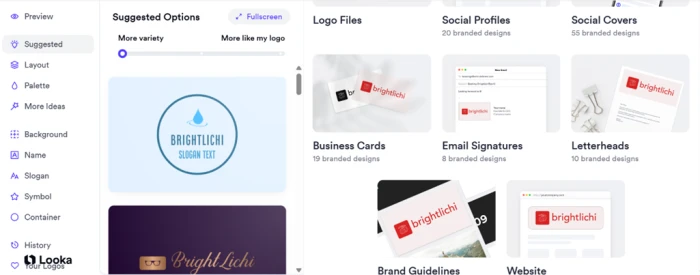
Looka takes the top spot because it does the whole job and prices it plainly. You answer a short questionnaire about your industry and taste, and its AI generates logo options you can refine. Designing is free; you pay only to download. A single PNG costs $20 one-time, the Premium package with vector files and full ownership is $65 one-time, and the Brand Kit subscription runs $96 per year, unlocking 300-plus branded templates for business cards, social profiles, email signatures, and letterheads. A $129 tier adds an AI-built website.
The honest caveat: Looka works more like a smart template engine than a from-scratch generator, so its marks can feel familiar. For a founder who wants a coherent identity today without design skills, that is a fair trade.
2. Zoviz: best logo-to-brand-kit pipeline
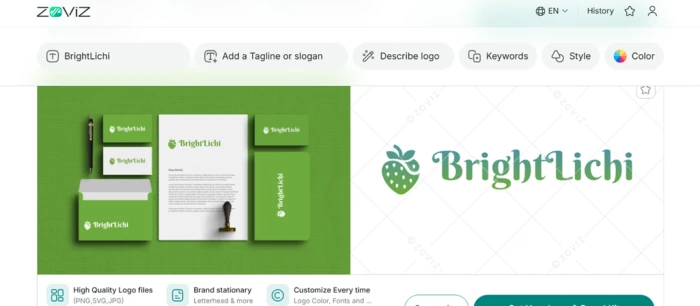
Zoviz is built around one idea: feed it a logo and it generates everything else. Upload an existing mark or make one in its editor, and it returns a kit of 30-plus files that includes business cards, letterheads, email signatures, social covers, favicons, and a brand book. Exports cover PNG, PDF, SVG, and EPS, with color, black-and-white, transparent, and print-ready variations.
Zoviz markets itself as template-free, generating each mark rather than pulling from stock icon sets. It also supports over 100 languages for non-Latin brands. If you already have a logo and need the rest of the identity fast, this is the most direct route on the list.
3. LogoAI: best “living” brand kit
LogoAI’s 2.0 release leans on a concept it calls Brand DNA. It reads your business name, industry, personality, and intent, then matches styles before drawing anything. The payoff is a brand kit that keeps updating as your identity evolves, spanning colors, type, social assets, and even short videos.
Pricing sits at roughly $90 per year for the Pro tier, just under Looka’s Brand Kit. In independent 2026 testing it produced 40-plus concepts with a handful worth keeping, landing competitive with Looka but a notch below the sharper minimal tools. Pick it if you want a per-year cost and a kit that grows rather than a one-time logo purchase.
4. Designs.ai: best URL-to-brand-kit
Designs.ai has the most unusual on-ramp here. Paste your company URL and it pulls your details to build a complete brand kit in seconds, or you describe the business if you are starting fresh. The output is a full system: logo, colors, typography, and reusable guidelines, wrapped inside a broader design suite.
It aims at teams that want brand governance and consistency across departments, not just a solo founder grabbing a logo. A free trial lets you test the flow before committing.
5. Brandmark: best for distinctive minimal marks
Brandmark takes a leaner path. You give it your name and a few keywords, then pick your colors. It returns clean options with no drag-and-drop canvas to wrestle. It needs no sign-in to start, which lowers friction next to tools that gate previews behind an account.
Two things to know before you buy. Its basic download runs about $25, but commercial use requires the $65 Designer plan, unlike Looka, where even the $20 tier includes commercial rights. Its font and graphic range is narrower than its rivals’. In exchange you often get a more original, minimal mark that does not scream “template.” For a brand chasing a thoughtful first impression on a one-time budget, that is the appeal.
6. Canva: best free option
Canva is the default free pick, and for good reason. Its logo maker sits inside a design platform millions already use, so the learning curve is near zero. The free tier downloads basic PNG logos with commercial use allowed, enough to launch a digital-first project at no cost.
Canva Pro, at $120 per year or $15 per month, adds SVG export, the Brand Kit, brand fonts, and 500 AI credits a month. The limitation is real: Canva is a general design tool, not a dedicated brand engine, so it will not spin up a cohesive concept package the way Looka or Zoviz do. As a starting point for a bootstrapped brand, it remains the most defensible free option here.
7. Tailor Brands: best for launching a business with a brand
Tailor Brands sells a bigger idea than a logo. Alongside its AI logo maker it bundles US LLC formation, a registered-agent service, a website builder, and digital business cards, positioning itself as a launchpad rather than a design app. Its questionnaire is the most detailed on this list, asking about shapes, icon-versus-text preference, reference designs, and color leanings.
Plans start at roughly $10 per month, with the real price depending on your commitment and add-ons. If you are forming a company and building a brand in the same week, having both in one dashboard is worth more than a marginally prettier logo bought elsewhere.
8. Recraft: best for scalable vector logos
Now the image models, starting with the one built for real design work. Recraft is the only mainstream AI generator that outputs native, editable SVG vectors, so its logos scale from a 16-pixel favicon to a billboard without going soft. It also supports brand kits and icon sets.
As covered in the two-categories section above, most generative tools hand you a raster image you then have to trace. Recraft skips that step. For anyone who cares about clean files and a design system rather than a single flattened picture, it is the strongest technical pick on the list.
9. Ideogram: best for text and wordmarks
If your logo is mostly your name, Ideogram is the specialist. It renders readable typography more reliably than any general model, with independent 2026 comparisons putting its text accuracy near 95 percent. The garbled letters that plagued early AI logos are largely gone here.
It also has a free tier that permits commercial use, a rare pairing. The catch is the one that applies to the whole image-model group: you get a raster image, so plan to rebuild the final wordmark as a vector before it goes to print.
10. Adobe Firefly: best for commercial safety
Firefly closes the list on the question most guides ignore: legal risk. It is the only major model that offers formal commercial IP indemnification, meaning Adobe stands behind the commercial use of what it generates. For a funded startup or an agency working under client contracts, that protection can outweigh a slightly better-looking draft.
Its Text to Vector feature also outputs scalable art, putting it second to Recraft on file quality. Treat Firefly as your concept-and-coverage tool, then refine the mark in Illustrator.
What these tools actually cost
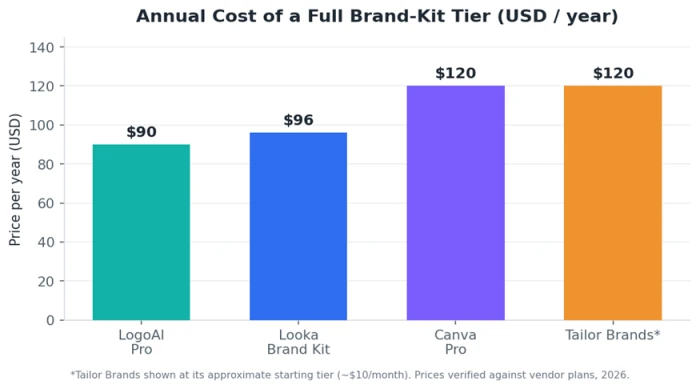
Two patterns jump out of the pricing above. The annual brand-kit tiers cluster tightly between $90 and $130, so cost rarely decides the winner among the assemblers; fit and output quality do. And the cheapest route to a usable logo is often a one-time fee, not a subscription. Looka’s $20 basic and Brandmark’s $25 download beat any yearly plan if the mark itself is all you need.
Watch the download trap. Looka, Brandmark, Tailor Brands, and several others let you design free, then charge the moment you try to leave with your files. Budget for the tier that unlocks vector formats and commercial rights, not the sticker price on the homepage.
AI logo maker versus hiring a designer
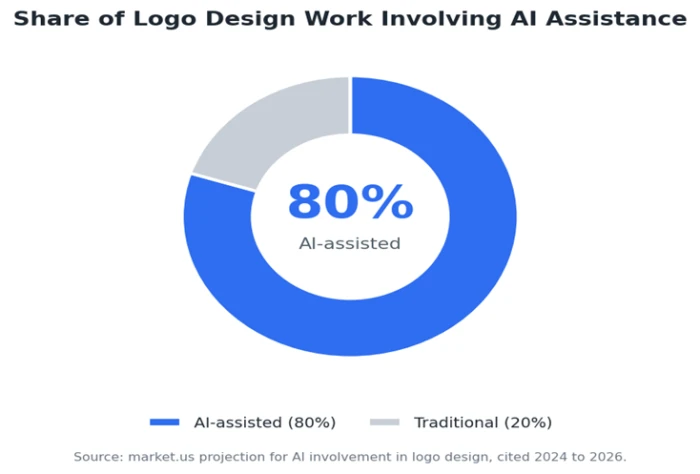
AI has stopped being the underdog option. Market research firm market.us projects that roughly 80 percent of logo design work now involves some AI assistance, the split shown above. So the real question is no longer “AI or human,” it is where each still wins.
AI wins on speed and price. It also throws far more options at you than any freelancer could sketch in a week, letting you explore forty directions before a designer has replied to your first email.
A human designer still wins on strategy and true originality. A good one interrogates your positioning, your audience, your competitors, and your goals, then makes a mark that means something. AI reaches for the nearest attractive pattern instead.
The practical middle path most founders take: generate with AI, then pay a designer an hour or two to refine the winner into clean, trademark-safe files. You get the range of the machine with the judgment of the human.
The vector and rights trap you should not skip
Two failure modes sink more AI logos than bad taste ever does.
The first is file format. As noted earlier, only Recraft and Firefly output true vectors natively. Everything else hands you a raster image. Blow a PNG logo up for a trade-show banner and the edges turn to mush. Before committing to a tool, confirm you can get an SVG or EPS out of it, or budget to have the mark redrawn.
The second is trademark. Because the assembler tools pull from icon libraries shared across thousands of users, two businesses in the same industry can end up with near-twins. Icon-based marks built from shared parts are harder to register; plain wordmarks tend to be more defensible. None of these tools give legal advice, so if brand protection matters, run your final mark past a trademark attorney.
How to build the full identity, not just the mark
A logo is the first 10 percent. Here is the order the best tools push you through, and the order to follow even if yours does not.
● Lock the logo and its variations. A primary version, a stacked version, an icon-only mark for tiny spaces, and a single-color version for stamps and etching.
● Extract the palette. Two or three brand colors with exact hex codes, so every asset matches down to the pixel.
● Set the type. One display face for headlines and one clean face for body copy is enough to look intentional.
● Roll it onto real assets. Business cards, social avatars, email signatures, and letterhead, so the identity shows up consistently wherever a customer meets you.
Tools like Looka, Zoviz, Designs.ai, and LogoAI automate most of these steps. The image models leave them to you, which is the price of their more distinctive output.
Which one should you pick?
Match the tool to your situation rather than chasing a single “best.”
● Bootstrapped and digital-first: start with Canva’s free tier.
● You want a complete kit handed to you: Looka or Zoviz.
● You already have a logo and need the rest: Zoviz’s upload-and-build flow.
● You need files that scale to print: Recraft, for native vectors.
● Your logo is mostly your company name: Ideogram.
● You are forming a company at the same time: Tailor Brands.
● You work under client contracts and need legal cover: Adobe Firefly.
Whichever name you land on, design for free first and pay only at the download step. There is no reason to buy a logo you have not already seen finished on the screen.

Discussion
Join the discussion and share your perspective.