How to Choose an AI Writing Tool That Fits Your Workflow (and Actually Sticks)
Learn how to choose an AI writing tool that fits your workflow and actually sticks. Use this 7-point test, 14-day trial, and workflow audit to find the right tool.
Last March I sat down to reconcile a card statement and counted six AI writing subscriptions. I was opening exactly one of them.
Every one of those six had been a deliberate purchase. I read the reviews. I watched the demo videos. I ran identical prompts through each of them and compared the paragraphs like someone tasting wine. Then I paid, used the tool for roughly nine days, and quietly stopped.
Cancelling took a weekend. Working out the pattern took months.
What follows is the system I built out of that mess: the reason my picks failed, the workflow audit I now run before opening a single pricing page, the seven-point test I score candidates against, a two-week trial protocol, and the factors that decide whether a tool is still open next quarter. Each section leans on the one before it, so the order matters.
The tab graveyard was ordinary, not a discipline problem
My first assumption was that I lacked follow-through. The data says the behaviour is standard.
Abandonment in this category runs on a clock. Consultants who track AI deployments describe the same arc repeatedly: teams stop using purchased AI software once initial enthusiasm fades, usually inside the first 30 to 90 days of rollout. My nine-day drop-off sat comfortably inside that window.
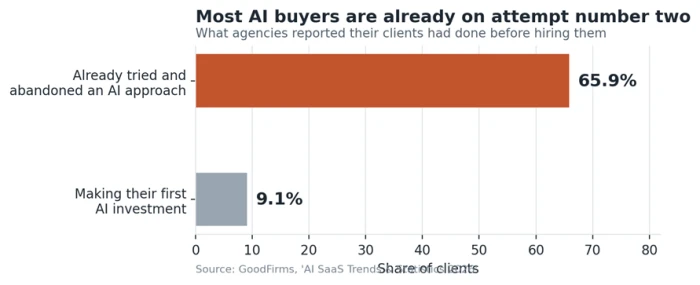
Zoom out to the whole buying market and the picture sharpens. When agencies were surveyed about what their clients had attempted before hiring them, only 9.1% were making a first AI investment. The other 65.9% had already tried and abandoned an earlier attempt, either a commercial AI tool or an internal build.
Read that as a buyer rather than a vendor and it is oddly comforting. Almost everyone shopping for an AI writing assistant right now is on attempt number two.
The speed is what makes this category strange. Product analysts describe AI subscriptions as bought in minutes and abandoned in minutes. Someone signs up to find out whether the thing can do the job, the first real attempt disappoints, and they never file a complaint. They just stop opening the tab. The vendor learns nothing from the silence and neither does the buyer.
So the useful question is what broke on attempt number one, which is where I went digging through my own decisions.
Four traps that killed five of my six subscriptions
Reviewing what I had done, the same four mistakes turned up every time.
Trap one: I tested on a blank page
Every trial began with an empty document and an ambitious prompt. Actual writing looks nothing like that. My working hours go into rescuing a draft that half works, restructuring an argument that lost its thread, or cutting 1,400 words down to 900. I was scoring these tools on the single task I perform least often.
Trap two: I graded output quality, which barely varies any more
Six tools, one head-to-head paragraph contest. The catch is that a large share of writing products are interfaces built over the same small set of underlying models, so the paragraphs land close enough that the comparison decides nothing. I was measuring a variable with almost no spread and treating tiny differences as signal.
There is a way to find the real spread, and the blank page is not it. Hand two tools the same 800 word draft with a structural problem buried in it, then ask each one to diagnose the problem before touching a sentence. The gap opens immediately. Diagnosis is where these products actually differ. Generation is where they converge.
Trap three: I bought a feature list I never opened
Two of the six shipped with template libraries running past 100 entries. I used four templates total across both. The feature count made the purchase feel safe at checkout and made the interface heavier every day afterwards, which is a poor trade.
Trap four: I never actually learned any of them
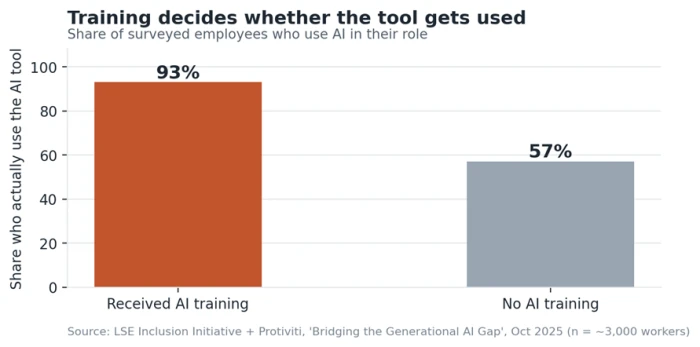
This one stings, because the evidence is blunt. Research from the London School of Economics' Inclusion Initiative, run with the consulting firm Protiviti across nearly 3,000 workers and 240 executives, found that 93% of employees who received AI training use AI in their role, against 57% of those who received none.
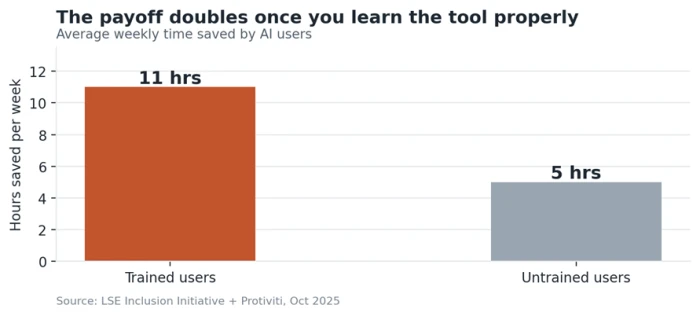
The same study measured the payoff. Trained users saved around 11 hours a week. Untrained users saved around 5.
I had been treating these products as appliances. Plug in, expect output. They behave far more like instruments, and I had never once practised.
If learning the tool is what makes the tool work, then the right purchase is the one you are most likely to spend an afternoon on.
That reframing drives everything below. It also means the evaluation cannot start with the product. It has to start with your own week, which is the audit in the next section.
Audit the workflow you already have
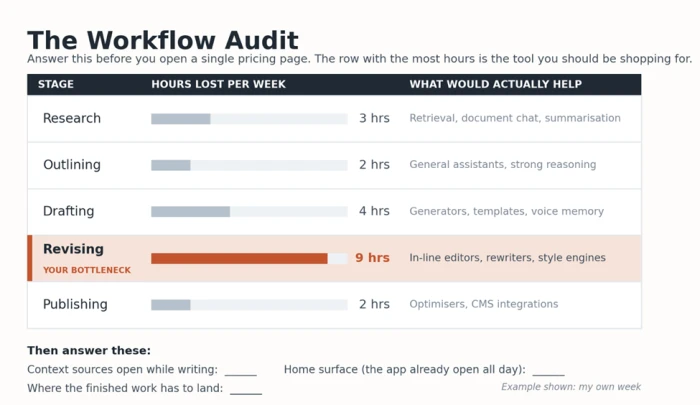
I now spend twenty minutes on this before opening a single pricing page. Four questions, answered honestly, in writing.
Which stage actually eats your time?
Map your process into stages and mark the one where the hours disappear. Most people guess wrong until they look.
Stage
What it looks like
What helps here
Research
Gathering sources, reading, taking notes
Retrieval, summarisation, document chat
Outlining
Deciding the shape of the argument
General assistants with strong reasoning
Drafting
First pass from nothing
Generators, templates, brand voice memory
Revising
Tightening, restructuring, cutting
In-line editors, rewriters, style engines
Publishing
Formatting, SEO, distribution
Optimisers, CMS integrations
Mine is revising. A friend who writes technical documentation loses her week in research. We kept recommending tools to each other for two years and wondering why neither recommendation ever landed.
How many places does your context live?
Count the windows you need open while writing. Notes, a style guide, past published pieces, a client brief, raw interview transcripts. Every one of those is something a tool either absorbs or forces you to paste in again tomorrow.
I counted mine and reached seven windows for a 1,200 word piece. Any product that could swallow four of them was worth more to me than one writing marginally prettier sentences, and that single realisation cut my shortlist in half before I read a review.
What is your home surface?
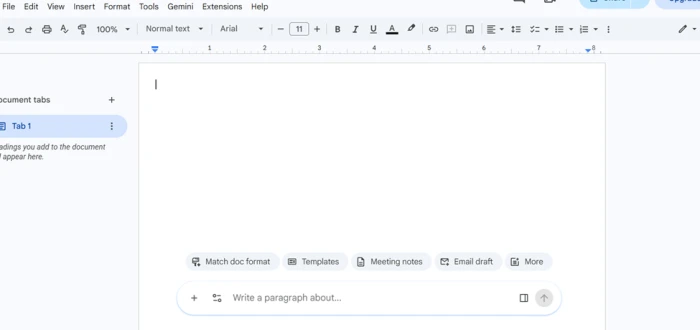
Name the one application you already have open all day. Google Docs, Word, Notion, your CMS, your email client, a code editor. This answer carries more weight than anything on a feature comparison, for reasons covered in point five of the next section.
Where does the finished work have to land?
If your output goes into WordPress with specific heading structures and internal links, a tool that produces beautiful plain text has handed you a second job.
The seven-point fit test
With the audit done, candidates get scored. Each signal below has a test you can run in about five minutes and a red flag that should cost the tool points.
Signal
The five-minute test
Red flag
Distance to draft
Time yourself from cold start to first usable sentence
More than three clicks or a new tab to begin
Context persistence
Close it, return tomorrow, see what it remembers
You re-explain your style every session
Revision strength
Feed it your worst existing paragraph, not a prompt
It rewrites rather than repairs
Voice under load
Give it 500 of your words, ask for 300 more
Drift into generic register by paragraph two
Native home
Check for an add-on inside your home surface
It expects you to visit a separate website
Escape velocity
Export everything on day one
Lock-in, proprietary formats, no bulk export
Ceiling and floor
Ask what a power user does on month six
Nothing left to learn after week one
Score each signal from 1 to 5, giving a maximum of 35. My personal cutoff is 25. Below that I have never kept a tool past two months, and I have now tested this on eleven products.
Why the fifth signal deserves double weight
Native home is the one I underweighted for years, and it is the one the adoption research keeps pointing at. Practitioners who study why AI initiatives fail describe the same quiet killer: a tool gets abandoned when it asks someone to add one more destination to their day, and it gets adopted when it lives inside software people already open. Around 80% of enterprise applications shipped or updated in early 2026 embedded at least one AI agent, which tells you where the vendors themselves have landed on this question.
My surviving subscription is an assistant that runs inside the editor I already used. That is close to the entire explanation for why it survived.
The signal almost nobody tests: escape velocity
Exporting gets tested last, if at all, and it matters most on the day you want out. I now run a full export on day one of every trial. Discovering in month eight that your saved prompts and project history cannot leave is how people end up paying for something they stopped liking in month three. Two of my six had no bulk export at all, and both cost me an afternoon of copying and pasting to escape.
Match the category to the job
The audit tells you the job. This table tells you which family of tools does it. I have deliberately kept named products to a minimum, because the names churn every few months while the categories hold.
Category
Strongest at
Falls apart when
General assistants
Thinking, structure, long-form reasoning
You need brand consistency across a team
Embedded assistants
Low-friction daily editing
You need deep research or citations
Copy platforms
Volume, templates, brand voice memory
The subject is technical or nuanced
SEO content platforms
Briefs, optimisation, ranking work
The writing is creative or narrative
Rewriters
Polishing text that already exists
You are starting from nothing
Persistent workspaces
Multi-session projects with heavy context
You write only occasionally
One question separates most buyers faster than any feature list: are you trying to produce more words, or produce better ones? Generators answer the first. Editors and optimisers answer the second. Buying the wrong side of that split is how people end up with an expensive tool that technically works and never gets opened.
There is a third case worth naming. Some of us are not producing at all, we are thinking, and the value comes from arguing with something that pushes back. General assistants win that job outright.
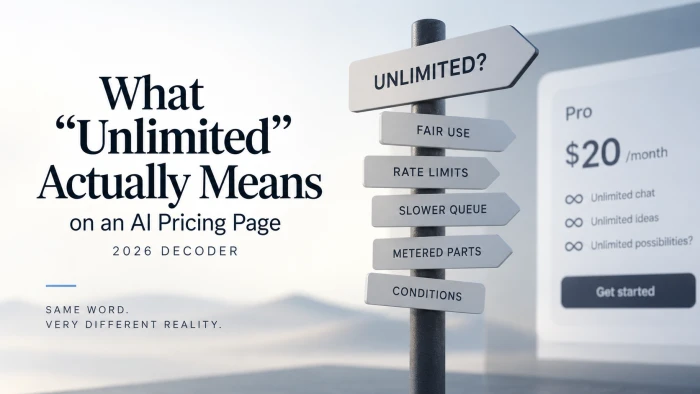
One warning on price belongs here. Free tiers are excellent for the protocol in the next section and risky as a permanent home, because the usage ceiling tends to arrive without warning and usually mid-deadline. Judge a free plan by what happens at the limit, rather than by what the landing page promises below it.
The fourteen-day trial protocol
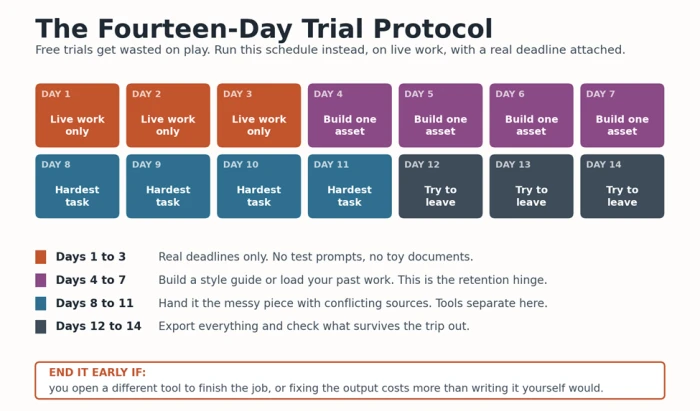
Free trials get wasted on play. This is the schedule I run instead, and it has killed four candidates before they reached my card.
1. Days 1 to 3. Use it on live work only. No test prompts, no toy documents. If it cannot handle a real deadline, the trial has already answered the question.
2. Days 4 to 7. Build one reusable asset inside it: a style guide, a saved instruction set, a project with your past work loaded. This is the retention hinge, and section 7 explains why.
3. Days 8 to 11. Hand it the hardest thing you write. The messy piece with conflicting sources. Tools separate here, and nowhere else.
4. Days 12 to 14. Try to leave. Export everything, check what survives the trip, and see whether the exit is clean.
Two signals end a trial early for me:
• I opened a different tool to finish the job. That happened twice and both products were gone within the hour.
• I found myself editing more than I would have written from scratch. Developers report the same frustration with code that arrives almost right, and the debugging tax it creates. Prose behaves identically.
Surviving all fourteen days is not a decision by itself. Before paying, I re-run the seven-point score from section 4 with two weeks of real evidence behind it, and the numbers move. Distance to draft usually improves once you know the shortcuts. Context persistence usually falls once the novelty of that first impressive conversation wears off. The second score is the one worth trusting.
What makes a tool survive past day 90
Selection is the easy half. Everything in sections 3 through 6 gets you to a good decision. Retention is a separate problem with its own levers, and the trap-four research from section 2 points straight at them.
Anchor it to something you already do
A tool tied to a trigger survives. Mine opens when I paste a finished draft in for a structural pass, every single time, without a decision being made. Tools that require me to remember they exist do not last a month.
The one-asset rule
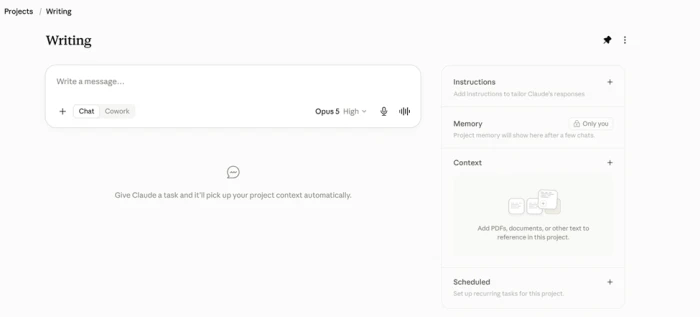
Whatever you built during days 4 to 7 of the trial is the thing that keeps you. A saved style guide, a loaded project, a set of custom instructions that took an afternoon. That afternoon is the training the LSE research measured, and it converts a subscription into a habit. Skip it and you have bought a $30-a-month text box.
Pick a price that survives a slow month
None of my cancelled subscriptions was expensive on its own. They became indefensible in a quiet month, when my output dropped and the invoices did not. Vendors are aware of this asymmetry, which is why annual plans carry the discount: annual net revenue retention runs 10 to 20 points above monthly. Match the billing cycle to the shape of your workload rather than to the size of the saving.
Prefer tools that compound
Ask whether the product gets better as it learns you, or resets to zero every session. Compounding tools are worth paying more for, because their value curve points upward while a stateless one is flat forever.
Watch the trust gap before you renew
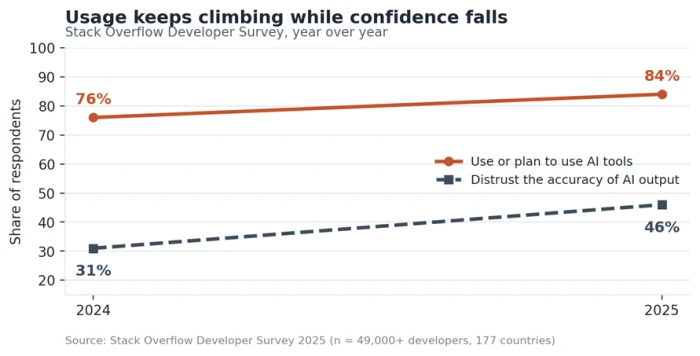
Adoption and confidence are moving in opposite directions across the whole category. Stack Overflow's 2025 survey of more than 49,000 developers found 84% using or planning to use AI tools, up from 76% the year before, while distrust of output accuracy climbed from 31% to 46%.
That gap is the number to keep an eye on in your own usage. A tool you use daily and check obsessively is costing you more than the invoice says. When my editing time on AI output crept past my own drafting time, I switched, and switching for that reason has never once been a mistake.
What I run now
One embedded assistant inside my editor, scored 31 on the seven-point test, with a style guide I rebuilt three times before it worked. One general assistant for thinking and arguing, scored 28, weak on the native home signal and kept anyway because nothing beats it at structure.
Total spend is lower than the six subscriptions cost me, and both get opened daily.
If you want a starting point rather than a framework, take the audit in section 3 and answer the home surface question first. Find what already runs inside the application you keep open, trial that before anything else, and give it the fourteen days properly. The tool that requires the least change to your day has a structural advantage that no feature list will overturn.





Discussion
Join the discussion and share your perspective.