The frightening part of a software shutdown is rarely the shutdown itself. It is the morning your login stops working, your integrations go dark, and years of data sit locked behind an API that no longer answers. Most tools do not vanish overnight. They fade, and they leave a trail of signals for months before the goodbye email arrives. This guide gives you three things: a way to read those signals early, a simple score to turn a bad feeling into a decision, and a plan to get your data out on your schedule instead of the vendor's.
If you already suspect a tool you rely on is closing, skip ahead to the 48-hour data-exit checklist and start there. Everyone else, start at the top: the earliest signs are the ones that buy you the most time.
The 30-second self-check: is your tool at risk right now?
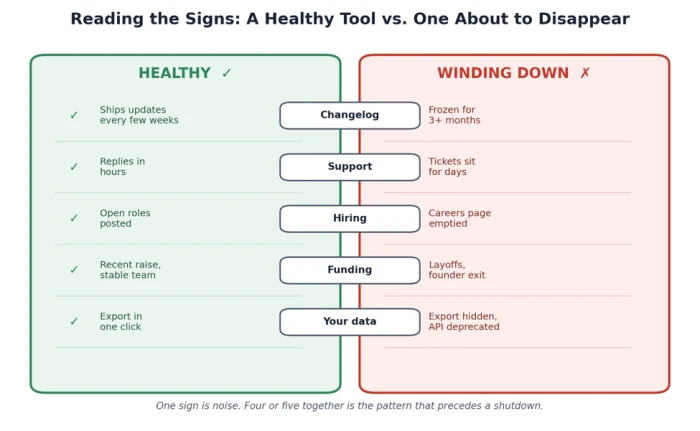
Run down this list. Each item is something you can confirm from the outside in a few minutes, without any inside information.
• The changelog or release notes have not moved in three or more months.
• Support replies have slowed from hours to days, or a live-chat and phone option quietly disappeared.
• The blog, social accounts, and careers page all went silent around the same time.
• You have seen layoff news or a founder or CTO departure in the past year.
• Exporting your data got harder, or an API you use was deprecated with no replacement.
One of these alone means little. Even healthy companies have a slow quarter or a price change. Four or five together is the pattern that precedes a shutdown. The rest of this article explains why each sign matters, how early it warns you, and what to do about it.
Why tools disappear, and why it matters more in 2026
The numbers behind the graveyard
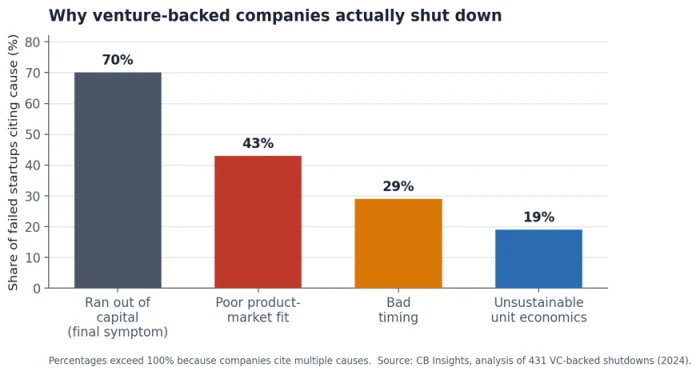
Software death is common, and it is speeding up. CB Insights studied 431 venture-backed companies that shut down and found that 70% cited running out of capital, but the firm is explicit that cash is the final symptom, not the cause. Underneath it, 43% failed from poor product-market fit and 29% from bad timing. The median company had only about 22 months between its last fundraise and its shutdown. Money buys runway; it does not buy a market.
Cash is where the story ends, not why it started. Source: CB Insights analysis of 431 VC-backed shutdowns (2024).
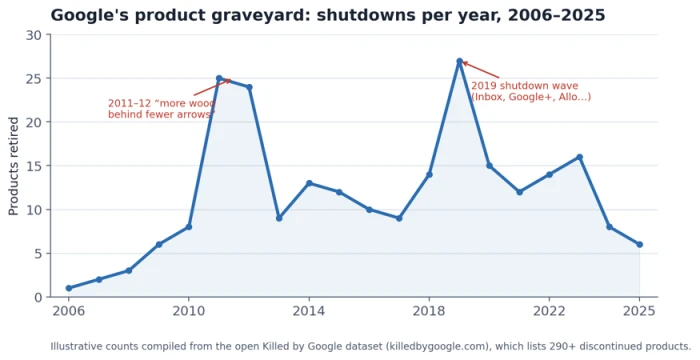
Big, profitable companies retire tools too, and for different reasons. The open Google product graveyard tracked at Killed by Google now lists more than 290 discontinued products, with documented shutdown waves in 2011 to 2012 and again in 2019 that swept away tools people used daily, including Google Reader and Inbox. When a tool is retired here, the reason is usually a strategy shift rather than a failing business, which makes the timing far harder to predict from financial signals alone.
Retirements cluster around strategy resets, not steady decline. Compiled from the open Killed by Google dataset.
There is a newer pressure specific to this decade. Gartner projects that 40% of enterprise applications will embed task-specific AI agents by the end of 2026, up from under 5% in 2025. When a single agent can absorb the job of several single-purpose tools, the smaller point products around it become acquisition targets or shutdown candidates. The category churn you are reading these signs for is likely to increase, not settle down.
The four ways a tool dies
Not every shutdown looks the same, and the tells differ by type. Knowing which one you are watching tells you how much warning to expect.
Shutdown type
How it usually happens
Warning you tend to get
Quiet bootstrapped death
A small team runs out of money or motivation and winds the product down.
Months of leading signs (frozen updates, slow support), often no formal notice.
Strategic sunset
A large, healthy company retires a product that no longer fits its plans.
A clear announcement and a notice period, but little financial warning beforehand.
Acqui-hire wind-down
A buyer mainly wants the team; the product is closed after the deal.
An acquisition press release is the signal. The wind-down follows within months.
Sudden collapse
Bankruptcy or an abrupt cash crisis pulls the plug fast.
The least warning of all. Contractual notice periods may not be honored.
The strategic sunset gives you paperwork; the sudden collapse gives you almost nothing. That range is exactly why you watch the leading signs, which show up regardless of type.
The warning signs, ranked from earliest to latest
Think of the signs in two groups. Leading signs appear early, while you still have room to plan. Lagging signs appear late, when the exit is already narrowing. The goal is to catch the leading ones.
Leading signs: months of warning
The changelog and roadmap go quiet. A healthy product ships changes constantly. When release notes stop for a quarter and a feature marked “coming soon” a year ago is still coming soon, engineering has usually slowed or stopped. This is the single earliest reliable tell. Check the public changelog and ask your account rep for the next six-month roadmap in writing. A vague answer is its own answer.
Marketing and hiring go silent. A company's blog and social feeds are its public heartbeat. A blog that stopped mid-year, dormant accounts, a careers page emptied of open roles, or a lapsed certificate all point to a skeleton crew keeping the lights on. A company that claims to be growing but is not hiring is contradicting itself.
Support quietly degrades. Support costs money, so it is one of the first places a struggling vendor cuts. Response times stretch from hours to weeks, live chat vanishes, and the docs fall behind the product. Send a genuine question and time the reply. Slow, canned answers are an early inbox-level warning that arrives before any news does.
Structural signs: the business is under pressure
Layoffs and key departures. People leave before products do. Watch for layoff coverage, a LinkedIn headcount noticeably smaller than a year ago, and the exit of a founder, CTO, or head of engineering. A founder quietly switching their title to “advisor” after an acquisition is a classic wind-down pattern.
Funding trouble or a fire-sale acquisition. Money problems come before shutdowns. A down round, a long silence since the last raise, or a public line about “exploring strategic alternatives” all raise the risk. Being acquired is not automatically bad, but an acqui-hire, where the buyer wants the team more than the product, frequently ends with the product retired. Check funding timing on a source like Crunchbase and read any acquisition announcement closely.
Monetization signals: they need cash now
Desperate pricing. A vendor short on cash tries to pull future revenue into the present. Sudden steep price hikes, aggressive lifetime-deal promotions, and a hard push toward prepaid multi-year plans all point to a runway problem. A lifetime deal is the clearest example, because it trades a permanent obligation for one lump of cash today, which is what a company does when it needs cash today. A lifetime license is only as durable as the company behind it.
Pushy billing. Related but distinct: watch how they bill. Removing month-to-month options, requiring multi-year commitments, and burying auto-renewal changes in updated terms all lock in cash and customers before trouble becomes public. These terms feel like normal enterprise sales, which is why they are easy to sign without a second thought. Keep terms as short as the vendor allows.
Lagging signs: the exit is already closing
Reliability slips. Fewer engineers means more incidents and slower fixes. The status page fills with outages, performance degrades under normal load, and getting SLA credits turns into a fight. Some vendors take the telling step of removing the public status page rather than let the record speak. Track uptime yourself and keep your own incident log.
Community and public proof thin out. Watch where customers gather: the official forum, the subreddit, and review profiles on sites like G2 and Capterra. When a forum goes read-only, new reviews stop, and customer logos disappear from the homepage, momentum has left. Search the vendor name plus “shutting down” and read the newest posts first.
Data export and API access get harder. This is the flag that actually hurts. Export options get removed or limited to awkward formats, API endpoints get deprecated with no successor, and rate limits tighten. Many contracts define your data narrowly and cut off API access the day your subscription ends, so pipelines break overnight. The only real defense is getting your data out before you need it.
The table below turns those signs into a working reference. It is ordered the way trouble actually unfolds, from the cosmetic tells you can catch early to the contractual traps that cost the most.
Warning sign
How early
Where to check
What to do
Frozen changelog / roadmap
Very early
Release notes, public roadmap
Ask for the next 6-month roadmap in writing
Stale blog & empty careers page
Very early
Blog dates, LinkedIn, jobs page
Note it; start watching other signs
Slower, thinner support
Early
Ticket times, live chat, docs
Test support with a real question
Layoffs / founder or CTO exit
Mid
LinkedIn headcount, news, leadership page
Treat combined exits as a strong warning
Funding trouble / fire-sale
Mid
Crunchbase, press releases
Confirm what happens to your contract
Desperate pricing / lifetime deals
Mid
Pricing page, promo emails
Avoid prepaying a shaky vendor
Reliability slips / status page gone
Late
Status history, your own uptime logs
Log uptime; plan your exit
Thinning community & reviews
Late
Forum, subreddit, G2/Capterra
Read the newest reviews first
Export & API access restricted
Late / critical
Export options, API changelog
Export a full backup now
Score it: the SaaS Shutdown Risk Score
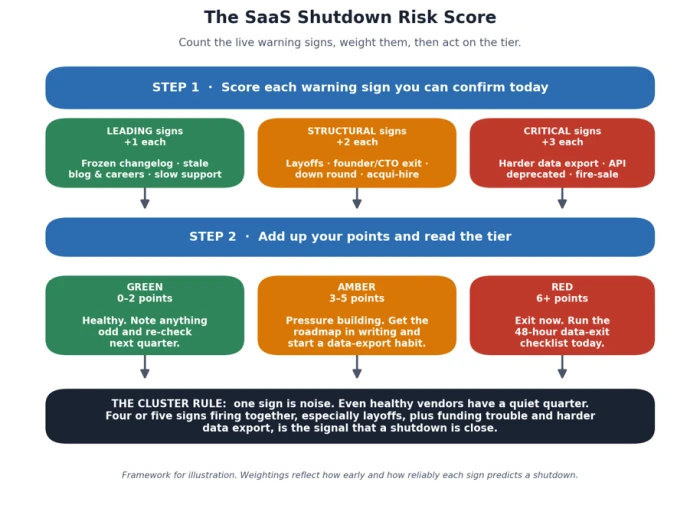
A list of signs is useful, but it does not tell you when to act. This simple score does. Confirm each sign you can actually see, add up the points, and read the tier. It converts a vague unease into a number you can defend to a manager or a co-founder.
Weight the signs by how early and how reliably they predict a shutdown. Leading signs score +1 each, because on their own they are common. Structural signs score +2 each, because layoffs and funding trouble reflect the business, not just the product. Critical signs score +3 each, because restricted data export and a fire-sale mean the exit is closing.
Read your total against three tiers.
• 0 to 2 (Green): healthy. Note anything odd and re-check next quarter.
• 3 to 5 (Amber): pressure is building. Get the roadmap in writing and start a regular data-export habit.
• 6 or more (Red): plan your exit now and run the data-exit checklist below.
The score exists to enforce one rule the listicles gesture at but never operationalize: a cluster beats any single sign. A frozen changelog by itself is a slow quarter. A frozen changelog plus layoffs plus harder data export is a countdown.
Know your rights before you negotiate or panic
Once the score turns amber or red, the next question is what the vendor legally owes you. The honest answer depends on where you are and what you signed.
If you are in the EU or UK
The EU Data Act shifts real power to customers. It gives cloud customers the right to switch providers with a notice period of two months or less, and it obliges providers to make export and porting smooth, with machine-readable formats and clear documentation. This applies to existing contracts, not only new ones, so a multi-year term no longer traps you the way it once did. In the UK, GDPR-style portability rights cover personal data, and a domestic equivalent to the Data Act is in development.
If you are in the US
There is no federal data-portability law equivalent to the Data Act. Your rights come from your service agreement, so the contract is the thing to read. Look for the data-export clause, the data-retention window after termination, and any switching-assistance provision. California's privacy law gives consumers some rights over personal data but is narrower than the EU framework and was not written for business continuity.
What notice periods and “your data” actually mean
Post-termination data retention is commonly 30, 60, or 90 days, and many SaaS agreements specify a window in which the vendor makes your data available for export before deleting it. Treat that window as a floor, not a promise.
Two hard truths sit underneath the paperwork. First, during a bankruptcy or abrupt collapse, contractual timelines are often not honored, because there is no longer a functioning company to honor them. Second, most terms of service cap the vendor's liability at the fees you paid, not the value of the data you lose or the cost of rebuilding it, and collecting a judgment from a defunct company rarely happens. Your practical protection comes from planning ahead, not from legal recourse afterward.
Where you are
What you are entitled to
How to use it
EU
Switch providers on ≤ 2 months' notice; export in machine-readable formats (Data Act)
Invoke the switching right in writing; request the documented export path
UK
Portability rights for personal data under UK GDPR
Submit a portability request; check your contract for wider export terms
US
Whatever your contract grants; no federal portability law
Read the export, retention, and switching-assistance clauses before renewal
The exit plan: what to do at each risk tier
Knowing your score and your rights only matters if it turns into action. Match the action to the tier.
Amber tier: buy yourself time
You are not leaving yet, you are reducing your exposure so a shutdown becomes an inconvenience instead of a crisis.
• Ask for the next six-month roadmap in writing, and note whether the answer is specific or evasive.
• Start a recurring data export, monthly at least, rather than a single one-off backup.
• Keep new contract terms short, and read the auto-renewal and cancellation clauses before signing anything.
• Write down which of your workflows would break first if the tool vanished tomorrow.
Red tier: the 48-hour data-exit checklist
If your score hit red, or you got a shutdown notice, do this within two days. Export first and decide where you are going second, because the export window is the one thing you cannot get back once servers go dark.
1. Export everything now, in a portable format such as CSV or JSON, even before you have chosen a replacement.
2. Mirror live data by setting up webhooks or an API sync into your own database, so you always hold a current copy.
3. Capture what export leaves out, such as workflow logic, settings, and dashboards, with screenshots or documentation.
4. Inventory your integrations, and list every downstream system that breaks when this tool stops sending data.
5. Prioritize the workflows that cannot fail, and rebuild those first rather than trying to move everything at once.
6. Confirm the deletion date in writing, and ask support directly how long data stays available after the shutdown date.
Choosing and migrating to a replacement
Once your data is safe, the pressure is off enough to choose well. Run the old and new tools in parallel for as long as the old one still works, and compare outputs before you switch anything off. A shutdown is also a fair moment to ask whether you want another single-vendor tool or a setup you control more directly. For the mechanics of moving, see a dedicated data-export and migration guide and a SaaS migration checklist as companion resources to this article.
Learn from real shutdowns
Three recent, documented closures show the signals and the timelines behaving exactly as described above.
Pocket (Mozilla). Mozilla announced it was closing the read-it-later app Pocket in 2025. Users could export their saved articles as a CSV file, and that export ability ended on 8 October 2025, after which data was permanently deleted. This was a clean strategic sunset: a clear notice, a defined export window, and a hard deletion date. The lesson is that even a well-handled shutdown gives you a deadline, and the export tool closes before the memory of the product does.
TV Time. The show-tracking app told users all account data would be permanently deleted after 15 July 2026, with no archive to request afterward and no grace period once the servers were switched off. The guidance to users was blunt: export before then, and do not leave it to the final day, when export tools are slowest under migration load. “Not used” and “deleted” both mean you cannot get it back later.
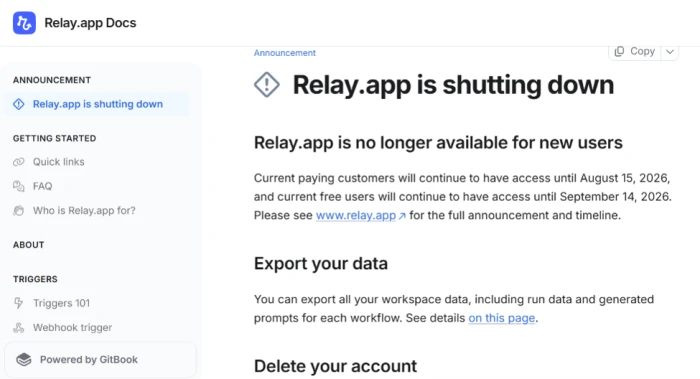
Relay.app. The automation platform confirmed in July 2026 that it was shutting down, disabled new signups, and set staggered deadlines: free accounts deleted after 15 August 2026 and paying customers after 14 September 2026, with workflows, run history, and tables permanently deleted at each cut-off. The disabled signups were the tell that this was a full platform shutdown rather than a pricing change, which meant the usual wait-and-see approach did not apply.
The through-line across all three: the deletion date was fixed, the export window was shorter than the access window, and the users who moved calmly were the ones who exported the week they heard, not the week it closed.
Build shutdown-proof habits so the next one is a non-event
The companies that ride out a shutdown in a hectic but manageable week share one mindset: they treat every cloud tool as something they rent, not infrastructure they own. That belief turns into a handful of habits worth keeping long after the current scare passes.
• Keep a current, independent copy of your business data through scheduled exports or webhooks, so a shutdown never means starting from memory.
• Add a continuity clause at purchase, guaranteeing API and export access for a transition window after termination, before you have any reason to worry.
• Run quick vendor due diligence before you buy, checking funding timing, hiring, and release cadence the same way you would read the signs on a tool you already use.
• Re-score your critical tools each quarter, so an amber vendor never quietly slides to red without anyone noticing.
The vendors that survive will not mind you asking hard questions about their roadmap, their funding, and your data. The ones about to disappear are the ones that dodge them. That single difference, between the vendor who answers and the vendor who deflects, is the most reliable warning sign of all, and it is available to you on any ordinary Tuesday, long before the shutdown email lands.
The Bottom Line
A tool disappearing is rarely a single dramatic event. It is a slow leak that shows up first in a frozen changelog, a slower support reply, a careers page that quietly emptied out. The people who get burned are not the ones who missed some hidden signal. They are the ones who saw the signs, told themselves it was a quiet quarter, and waited for certainty that never arrives until the deletion email does.
So treat this as a standing habit rather than a one-time audit. Score your critical tools each quarter, keep a current export of anything you cannot afford to lose, and read a shutdown notice as a deadline to act on, not a verdict to accept. The single move that separates a calm week from a lost quarter is getting your data out before you strictly need to, while the vendor is still healthy enough to make export easy.
None of this requires inside information or a legal team. It requires paying attention to the things a struggling vendor cannot hide and acting on the cluster before it becomes a crisis. The tools worth keeping will hold up to that scrutiny. The ones about to disappear will show you the exit long before they announce it, and now you know exactly where to look.






Discussion
Join the discussion and share your perspective.