
Monica AI
Monica is an all-in-one AI assistant that puts GPT, Claude and Gemini plus summaries, image, video and podcast tools in one browser side panel. One subscription for many models, if you can read the credit meter.

One of the most complete AI assistants you can buy, with GPT, Claude and Gemini plus image, video and podcast tools in a single browser copilot, let down only by a credit system and plan structure that take real effort to decode.
Should you use Monica?
People juggling several AI subscriptions who want GPT, Claude and Gemini plus summaries and media tools behind one login, right in the browser.
You only need heavy use of one top model . A single subscription to that model is cheaper than feeding Monica's advanced credits.
Free covers chat and summaries. Advanced models and generation start at Starter, about $3.3/mo billed yearly , with credits metered per model.
Credits reset on the 1st of the month, not your billing date , so a mid-month signup loses part of the first allowance.
Key features & how they perform
Each feature rated from hands-on testing and aggregated review sentiment.
Many models, one window
Switch between GPT, Claude, Gemini, Grok and more mid-chat. One subscription stands in for several, which reviewers call the main reason to pay.
Side panel on any page
The Chrome and Edge extension opens beside the page you are reading and answers questions about it without copy-paste. It also lives inside Gmail, Docs and Notion.
Page & video summaries
One click condenses an article or a YouTube video, with timestamped highlights for clips. Long videos can come back shallow, but short reads are quick and accurate.
Podcast generator
Turns a video or link into a two-host audio episode with a cover image and download. The result is a real back-and-forth, though it takes around ten minutes.
Image & video generation
Flux, Nano Banana, DALL-E and Veo sit under one roof. Quality is solid, but each image spends advanced credits, so the free pool runs dry fast.
AI detector & humanizer
Bundles three detectors, but only ZeroGPT runs on free with a 250-word cap. The paired Humanizer rewrites text to dodge detection, which is worth knowing.
Feature ratings blended from G2, Chrome Web Store, Product Hunt, Trustpilot & hands-on testing.
Putting the Monica AI to the Test
I put the browser copilot through a real reading session to see what the free tier actually hands you, and where it stops.
Reading alongside a live web page
I opened a TechCrunch story about OpenAI and clicked the Monica icon. The assistant slid open in a panel on the right while the article stayed on the left. Nothing was copied or pasted.
A Summarize this page button sat at the top of the panel, which is the first thing most people will reach for.

The default model shown at the bottom was Claude Haiku 5.5, a current model, so the free plan is not stuck on something ancient. It is the lightest option though, and an Unlock all advanced models line made clear the stronger engines sit behind payment.
The one-click summary
One click produced a short Page summary in about four seconds. It pulled the main idea accurately and even flagged the article covering shortcomings in timing and privacy controls.
That detail told me it read the body, not only the headline.

Summarizing a YouTube video
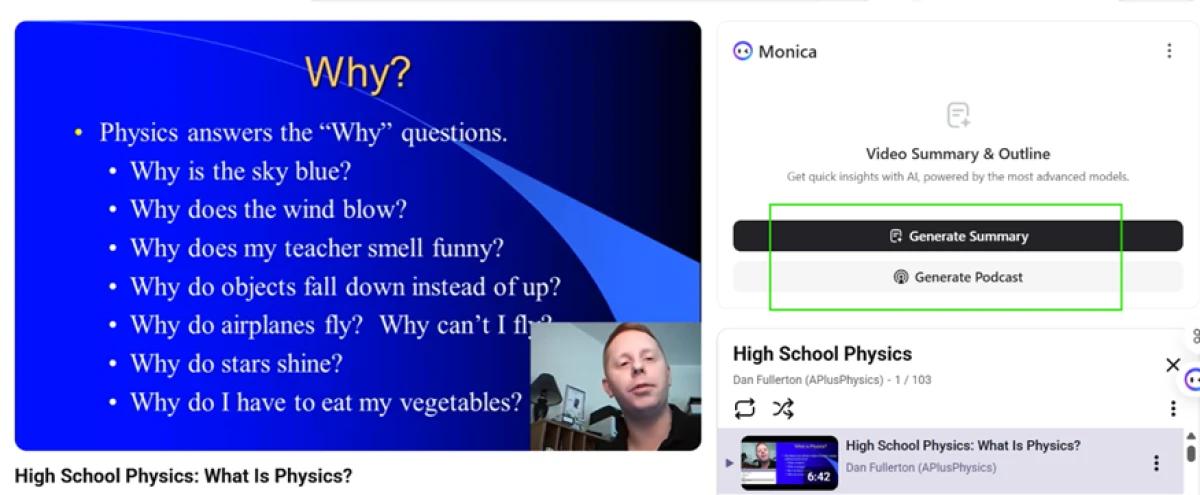
I moved to a YouTube lesson, a high school physics video. Monica detected the video on its own and offered two buttons, Generate Summary and Generate Podcast.
The second one caught my attention, so I tested it next.
Turning a video into a podcast
Clicking Generate Podcast dropped me into Monica's AI Podcast Generator with the video link already filled in. I did not paste anything.
The language was set to American English and two hosts, Emily and Michael, were assigned by default. For a US audience the voice choice is a nice touch.

I pressed Start Generate and hit the one real friction point. A notice said the estimated time was 10 minutes, with an email when it was ready. So this is not instant.

What came back
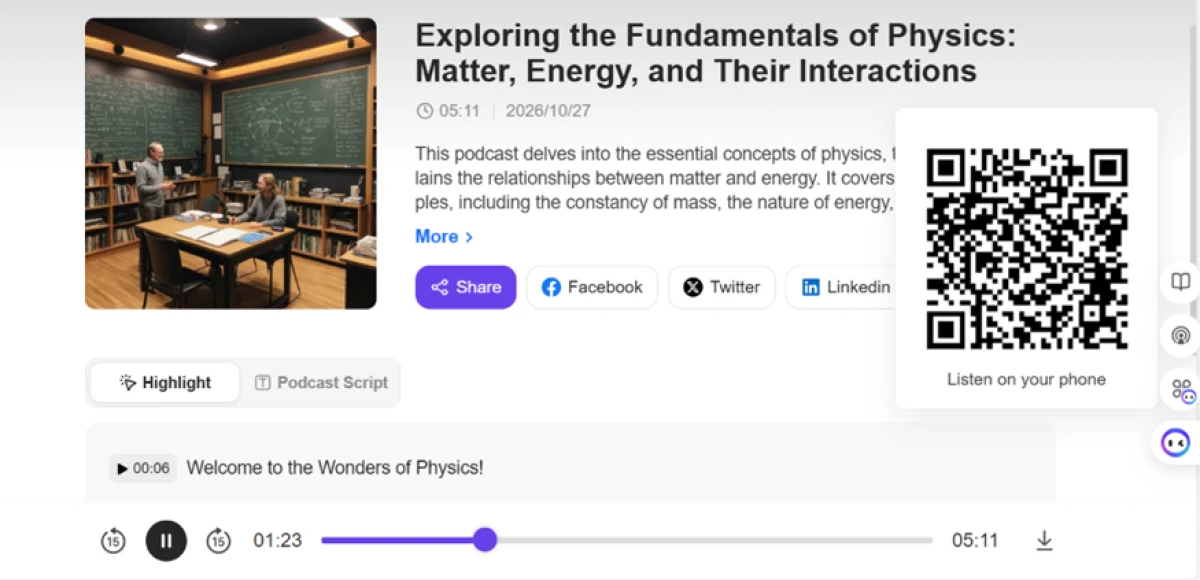
The wait paid off. Monica returned a finished 5 minute 11 second episode built around the fundamentals of physics. It came with a cover image, a written description, and a working play bar across the bottom.
Two voices actually held a back and forth conversation rather than reading a script flatly.
Generating an image, and meeting the paywall
Next I tried the image tool. I picked the Flux Schnell model, set a 4:3 ratio, and wrote a prompt for an ultra-realistic 4K scene with cinematic lighting. The confirm button told the real story: it read Confirm +4, meaning each image costs 4 advanced credits.

The free plan starts with almost no advanced credits, so in practice this is one attempt before the door closes. And close it did. The moment I pushed the generation, an upgrade popup appeared pitching the Max plan, with a Starter tier at about $3.3 a month billed yearly or $4.9 monthly.

The AI content detector
I also ran a block of text through Monica's AI detector. It returned a verdict that the content looked AI-generated. The limitation here is access, not the call it made.
Only one of the three checkers, ZeroGPT, worked on the free plan. GPTZero and Copyleaks both sat behind a lock with an Upgrade to check nudge, and the input was capped at 250 words per check.

Monica pricing
Figures taken from the official Monica pricing page, billed yearly.
| Plan | Price | What's included |
|---|---|---|
| Free | $0 | 40 basic model accesses daily (Claude Haiku 5.5, Gemini 3.5 Flash-Lite, GPT-6 Luna) · limited image and video trial · no advanced credits |
| Starter 33% off | $39 /year | About $3.3/mo · 5,000 basic model queries monthly · 200 advanced model queries monthly (GPT-6.1 Sol, Claude Sonnet 5.5) |
| Max | $149 /year | About $12.4/mo · unlimited access to basic models · unlimited access to advanced models · save 50% with annual billing |
| Ultra | $995 /year | About $82.9/mo · unlimited basic and advanced models · highest advanced credit allowance · built for heavy generation use |
| Credit packs | Add-on | Top up advanced credits separately: 4,000 for $10, 12,000 for $30, 40,000 for $100 · referral credits do not expire |
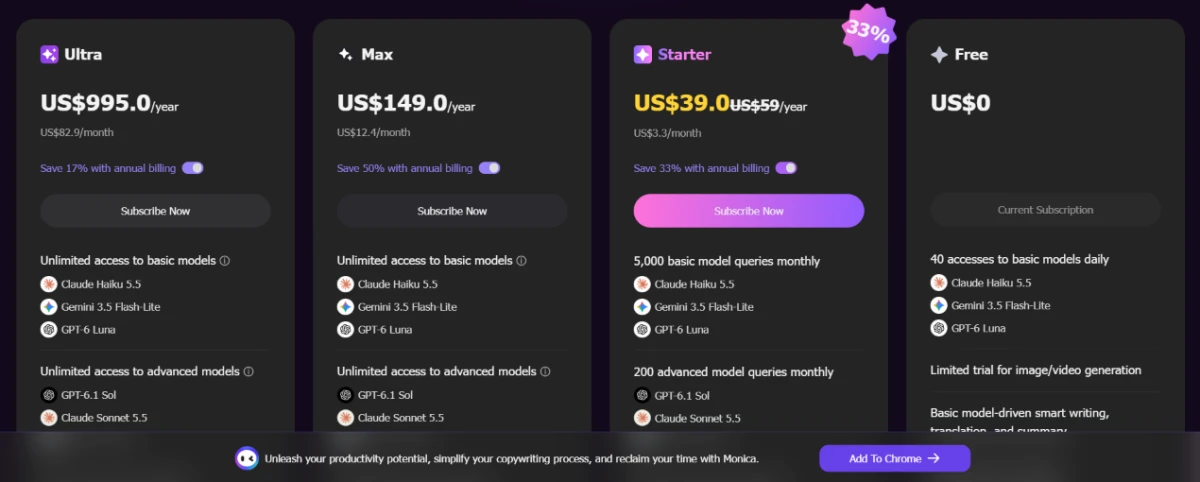
Pricing is accurate as of 27 October 2026 and was captured from the official Monica website. Plans, prices and credit limits change often, so check the official Monica pricing page for the current figures before you subscribe.
Pros & cons
Specific conclusions from real user reviews, not generic filler.
✅ Pros
- One subscription replaces separate ChatGPT and Claude logins
- Side panel answers questions about the open page without copy-paste
- Works inside Gmail, Google Docs, Notion, X and LinkedIn
- Gmail replies offer three tones and land right about 80% of the time
- Summarizes a 30-page whitepaper in under a minute
- YouTube summaries arrive as timestamped highlight points
- Setup takes under two minutes with no learning curve
⛔ Cons
- Extension requires full browser access, with GDPR terms unclear
- Top reasoning models cost up to 200x a cheap model per message
- Long YouTube videos and some PDFs return vague, shallow answers
- PDFs are rejected above 50MB or if they are image-only
- Lacks the deep long-form writing tools of Jasper or ChatGPT
- Credits reset on the 1st UTC, stranding mid-month signups
Synthesized from real reviews on G2, Chrome Web Store, Product Hunt, Trustpilot & Google Play · paraphrased, not quoted
Monica AI alternatives
| Monica AIReviewed | Arena AI | Poe AI | Genspark AI | ChatbotApp AI | |
|---|---|---|---|---|---|
| Our Score | 8.1/10 | 7.8/10 | 6.8/10 | 6.4/10 | 5.3/10 |
| Entry paid plan | $39 / yr (about $3.3/mo) | Free to use | $19.99 / mo, $16.67 yearly | $19.99 / mo, billed yearly | $14.99 / mo (6-month plan) |
| Free tier | 40 basic accesses daily | Free, blind model voting | Daily points, many bots | No-credit mode, no export | 3 messages total, Auto model |
| Model access | GPT, Claude, Gemini, Grok, more | Compare any two models blind | Every model behind points | Routes jobs across 100+ models | GPT, Claude, Gemini, DeepSeek |
| Browser copilot | Yes, Chrome and Edge side panel | No, web platform only | No, web and app only | No, web platform only | No, web dashboard only |
| Best for | All-in-one copilot in the browser | Testing which model answers best | Many models behind one login | Slides, research and data in one | Paying users wanting one dashboard |
| Standout strength | Summaries and podcast on free | Blind leaderboard voting is free | Huge bot library plus custom bots | Live research with citations | Mid-chat model switching |
Who Should Use Monica AI, and Who Should Avoid It?
Monica is a strong all-in-one copilot for everyday browsing and research, but its credit pricing and heavy-use ceiling make it a weak fit for some workflows.
Who Should Use Monica AI?
Best suited for these workflows
People Paying for Several AI Tools
One Monica plan reaches GPT, Claude and Gemini, so it can replace two or three separate chat subscriptions for the price of one.
Heavy Readers and Researchers
The side panel summarizes articles and videos without copy-paste, and it lives inside Gmail, Docs and Notion where the work happens.
Content Repurposers
Turning a video into a downloadable two-host podcast, even on the free plan, is a real time-saver for anyone making audio from existing material.
Light, Mixed-Task Users
Those who dip into chat, translation, a few images and the odd summary get the most from one tool rather than juggling many.
Who Should Avoid Monica AI?
Consider an alternative if you need
Heavy Use of One Top Model
If you live in GPT or Claude all day, a direct subscription to that model is cheaper than burning Monica's advanced credits at up to 200x cost.
High-Volume Image or Video Output
Generation drains credits fast, and a single top video clip can exhaust a whole month's allowance in one render.
Deep Long-Form Writing
Reviewers find it thinner than Jasper or ChatGPT for long documents, so writers who need structured drafts will outgrow it.
Strict Privacy Control
The extension asks for full browser access and its GDPR position is unclear, which matters for anyone handling sensitive pages.
Our Recommendation
Monica earns its score as the most complete browser copilot most people can buy, and the free tier is genuinely usable for chat, summaries and even a podcast. If your work is mixed and lives in the browser, it is worth it. If you pound one model or generate media in volume, price a direct subscription first. Before you pay, sign up at the start of a month so you do not lose credits to the 1st-of-month reset, and pick the plan tier that matches how often you touch advanced models.
Monica scorecard
Rated against what an all-in-one AI assistant is actually built to do.
| Dimension | Verdict | Score |
|---|---|---|
| Model breadth Range of chat engines in one plan | Excellent |
9.0
|
| Browser integration Side panel and in-app presence | Excellent |
9.0
|
| Summarization Page and video condensing accuracy | Excellent |
8.5
|
| Feature breadth Image, video, podcast, writing, detect | Excellent |
8.5
|
| Ease of use Setup, navigation, first tasks | Excellent |
8.5
|
| Output quality & accuracy Reliability of answers and summaries | Good |
8.0
|
| Media generation Podcast, image and video output | Good |
8.0
|
| Pricing clarity & credit value How readable and fair the plans are | Good |
7.5
|
| Free tier usefulness What you can do without paying | Good |
7.0
|
| Generation speed Wait time on heavier jobs | Good |
7.0
|
| Scrutool Score Equal-weight average of all 10 dimensions |
8.1
|
The widest AI toolkit in one browser, if you can read the credit meter
Monica is close to the most you can get from a single AI subscription. GPT, Claude and Gemini sit in one side panel that follows you across the web and into Gmail, Docs and Notion, the summaries are fast and genuinely read the page, and turning a YouTube video into a downloadable two-host podcast on the free plan was the standout moment of testing. The weak spots are all in the meter, not the tools. Advanced credits cost wildly different amounts by model, a single top video clip can wipe out a month, the plan ladder from Starter to Ultra is confusing, and credits reset on the 1st UTC rather than your billing date. People who use a mix of models and live in the browser will get real value here and should probably pay. Anyone who hammers one top model all day, or generates media in volume, will save money with a direct subscription to that model instead.
Discussion
Join the discussion and share your perspective.