
Teal AI
Teal is a job tracker, resume builder and cover-letter tool for active job seekers. A category-leading tracker and generous free plan, let down by robotic AI writing and a weak job search.

A category-leading job tracker and a solid free resume builder, pulled down by an AI job search that reads resumes loosely and an analyzer that locks every fix behind Teal+.
Should you use Teal?
Active job seekers juggling many applications who want one place to track roles, save postings and tailor a resume to each one.
You want the tool to find or submit jobs for you . The AI job search returns weak matches, and Teal applies to nothing on your behalf.
The tracker and PDF export are genuinely free. Unlimited AI and full keyword matching start at Teal+ $29/mo , less on the 3-month and annual plans.
Teal hands you the diagnosis free and charges for the cure . Your resume score and issue list are free, but every fix recommendation needs Teal+.
Key features & how they perform
Each feature rated from hands-on testing and aggregated review sentiment.
Job tracker
A pipeline from Bookmarked to Accepted, with per-job tabs for notes, saved resumes, contacts and email templates. The best tracker in the category.
Chrome extension
Saves postings from 40+ job boards straight into the tracker in a single click, so nothing gets lost across tabs. Free on every plan.
Resume builder
Content on the left, a live preview on the right, section-by-section restyling, and a free unbranded PDF export that stays unlocked.
Keyword matching
Underlines the job-description keywords your resume already hits so you can spot gaps, though free users see only the top 5.
AI writing
Generates achievements, summaries and cover letters. Usable as drafts, but reviewers say the output often reads robotic and needs a rewrite.
AI Job Search
A chat that returns roles with a match score, but the scores run low and the first pass often comes back thin before it widens.
Feature ratings blended from hands-on testing & aggregated review sentiment across Trustpilot, Product Hunt and G2.
From a blank resume to the AI job search
Where the free plan helps, and where the paywall quietly appears.
Building the resume
Teal opens by asking how you want to bring in your history. The quick routes are uploading an existing resume or importing straight from LinkedIn, with a paste-the-text option underneath as a fallback.
I skipped the import and started from a blank resume to judge the editor on its own.


The import choices (left) and the split editor with a live preview (right).
Templates and design controls
The template library filters by style and by layout, which cut down the scrolling. The limit appeared quickly.
A gold teal+ ribbon sits on a large share of the designs, and the Membership filter exists mostly to split the free templates from the paid ones.


The template library (left) with the teal+ ribbon marking paid designs (right).
Resume analysis and the final check
The Analyzer gave my resume a 71% score and flagged 8 issues. Two sat under resume structure and six under measurable results, while keyword usage came back clean.
Then it closed the door. All 8 recommendations that would have told me how to fix those issues were locked behind a Teal+ upgrade, so the free plan handed me the diagnosis and charged for the cure.


The 71% score with 8 locked fixes (left) and the free Final Resume Check (right).
The AI Job Search
Teal's AI Job Search is a separate chat tool, so I gave it a detailed brief.
"Looking for a Senior Product Designer role at a product-led tech company where I can own end-to-end product design, solve complex user problems, and create intuitive, user-centric digital experiences. Seeking opportunities to work on impactful web and mobile products, drive product strategy, build scalable design systems, and collaborate with cross-functional teams."
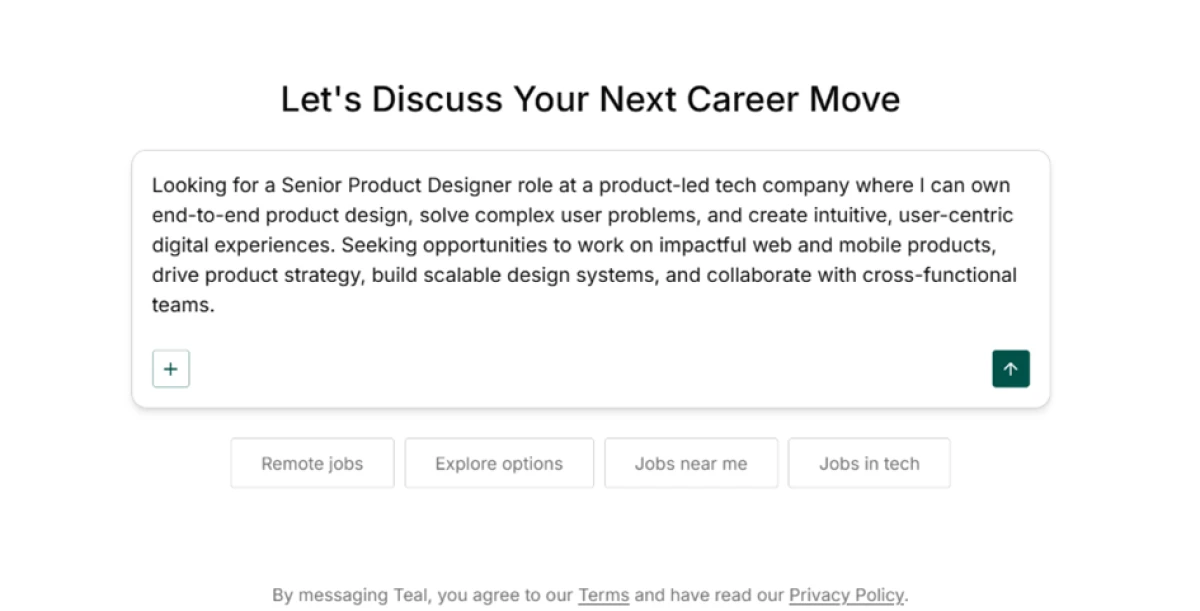
The first pass returned 3 jobs and openly called the results sparse, then widened the net on its own to 66. Clicking a result opened the full posting on the right, with a match score up top and quick buttons to bookmark the role or apply to it.


The widened list of 66 roles (left) and a single posting with its match score and follow-up questions (right).
The standard Job Search
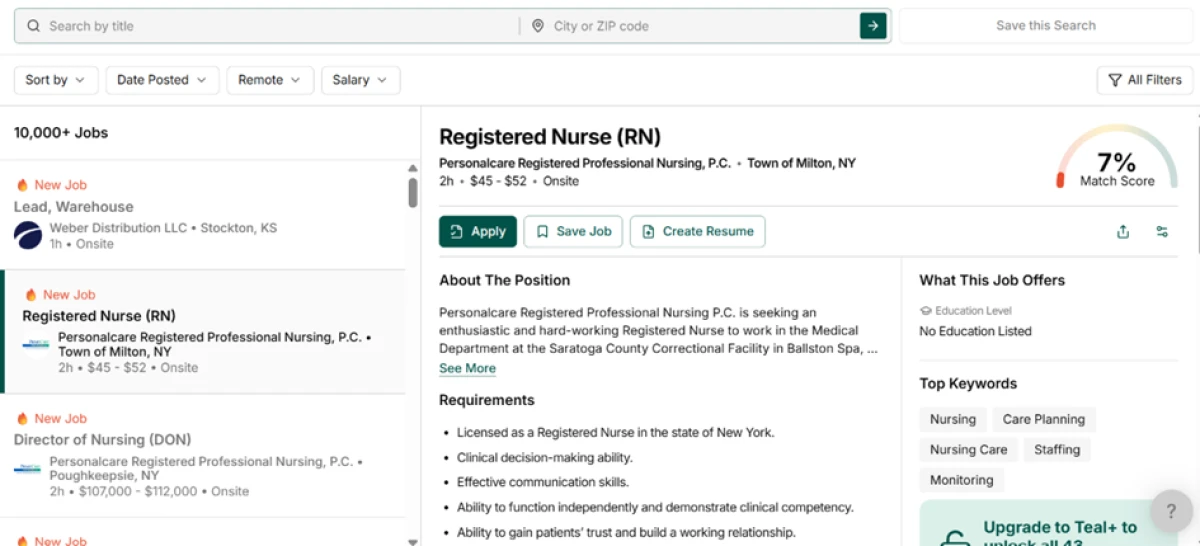
The standard Job Search is a different feature, and it is not personalized. It loaded more than 10,000 listings with no tie to my design background, among them a warehouse lead role and a registered nurse opening.
The match score on that nursing role was 7%. The posting surfaced a short list of top keywords and locked the other 43 behind Teal+.
The Job Tracker
The tracker is the most complete free piece of the product. Saved jobs move along a pipeline that runs from Bookmarked to Accepted, and every job opens tabs for notes, saved resumes, contacts and email templates.
The keyword cap returns here too. The tracker underlines the job-description keywords my resume already hit, then tucks the rest behind a button to unlock 37 more with Teal+.

Teal pricing
Figures from the official Teal upgrade page. Teal+ is one plan sold at four billing cadences; the tracker and PDF export stay free.
| Plan | Price | What's included |
|---|---|---|
| Free | $0 | Unlimited resumes, templates & job tracking · top 5 keywords · 1 email template per stage · limited AI (5 achievements, 2 summaries, 1 cover letter) · free PDF export |
| Teal+ Weekly | $13 /wk | Unlimited AI, advanced analysis & keyword matching, unlimited keywords & email templates, no ads, 24/7 email support |
| Teal+ Monthly Popular | $29 /mo | The same Teal+ features, billed every 30 days |
| Teal+ Quarterly | $79 /3 mo | The same Teal+ features, billed every 90 days, lower per month than weekly or monthly |
| Teal+ Annual | $179 /yr | The same Teal+ features, billed yearly, roughly $14.92 a month and the lowest rate |

Pricing is accurate as of 30 October 2026 and was captured from the official Teal website. Plans and prices change often, so check the official Teal pricing page for the current figures before you subscribe.
Pros & cons
What real users praise and complain about, drawn from public reviews, not from our testing.
✅ Pros
- Job tracker organizes applications by stage and replaces the spreadsheet
- Chrome extension saves postings from 40+ job boards into the tracker
- Keyword matching shows how a resume lines up with a specific posting
- A master resume with reusable bullets speeds up each tailored version
- Support replies to every negative review, usually within a day
⛔ Cons
- Resume builder gives little tailoring guidance, so matching stays manual
- AI cover letters and summaries read as robotic and need rewriting
- Templates look basic and minimal next to rival builders
- Experienced users say the resume AI adds overhead over writing it themselves
- Non-US job seekers find the job search not adapted to their country
- Marketing emails arrive too often for some members
Synthesized from real user reviews on Trustpilot, Product Hunt & G2 · paraphrased, not quoted
Teal alternatives
| TealReviewed | Parakeet AI | JobSuit AI | |
|---|---|---|---|
| Our Score | 6.5/10 | 6.2/10 | 5.0/10 |
| What it does | Job tracker plus AI resume builder | Live interview copilot, plus a resume maker | Resume tailoring and scoring against a job |
| Free tier | Unlimited resumes & job tracking | One 10-min live session, one 10-min mock | 3 tailorings, analyses & cover letters a month, no download |
| Entry paid plan | $29/mo (Teal+) | $49.99/mo, billed yearly | $11.99/mo on the 6-month plan |
| Best for | Tracking and tailoring many applications | Real-time help during live interviews | Sharp, section-level resume feedback |
| Standout strength | The best job tracker in the category | Suggests answers mid-interview | Point-valued fixes with one-click rewrites |
Who Should Use Teal, and Who Should Avoid It?
Teal is the strongest tool in the category for organizing a search, but its AI writing and job matching make it a poor fit for some.
Who Should Use Teal?
Best suited for these workflows
Multi-Application Job Seekers
Running 20 or more roles at once, where the tracker and its per-job notes, contacts and templates keep everything in one place.
Cross-Board Searchers
The Chrome extension saves postings from 40+ job boards straight into the tracker, so nothing slips through the cracks.
Resume Tailorers
Keyword matching shows how a resume lines up with a specific posting, a fast way to spot gaps before you apply.
Self-Directed Writers
People happy to write their own bullets and lean on Teal to organize, format and export rather than to generate the text.
Who Should Avoid Teal?
Consider an alternative if you need
Jobs Found and Sent for You
Teal submits nothing on your behalf, and users report the job matching comes back loose rather than curated.
To Lean on the AI to Write
Generated summaries and cover letters read as robotic and need a rewrite, a complaint reviewers raise often.
Standout Template Design
Reviewers call the templates basic and minimal, so a design-forward resume may need a different builder.
To Job-Hunt on Your Phone
There is no mobile app, so Teal is a desktop workflow built around the browser and its extension.
Our Recommendation
Teal is worth it for the tracker and the tailoring workflow, especially if you are juggling a lot of applications and will do the writing yourself. If you are counting on it to generate polished resumes or surface the right jobs automatically, it will disappoint. Start on the free plan, lean on the tracker and keyword matching, and only pay for Teal+ once the unlimited AI and full keyword lists clearly save you time.
Teal scorecard
Rated against what a job-search and resume platform is actually built to do.
| Dimension | Verdict | Score |
|---|---|---|
| Job tracker Pipeline, notes, contacts, templates | Excellent |
9.0
|
| Chrome extension Saving postings across job boards | Excellent |
8.5
|
| Resume builder & editor Live preview, restyling, free export | Good |
8.0
|
| Keyword matching Lining a resume up with a posting | Good |
7.0
|
| Support & trust Review reputation and responsiveness | Good |
8.0
|
| Value & free plan What free covers against the paywalls | Average |
6.0
|
| Resume analysis & scoring Score and issues free, fixes paid | Average |
5.5
|
| AI writing quality Achievements, summaries, cover letters | Average |
5.5
|
| AI Job Search relevance How well chat matches roles to you | Weak |
4.0
|
| Standard Job Search relevance Personalization of the main board | Weak |
3.5
|
| Scrutool Score Equal-weight average of all 10 dimensions |
6.5
|
The tracker is the reason to stay, not the AI
Teal is two products in one body. The job tracker and the Chrome extension are the best in the category, and the free resume editor, with its live preview and unbranded PDF export, does real work at no cost. If you are running a serious search across dozens of roles, that side alone can replace the spreadsheet and the scattered tabs. The other side is thinner. The analyzer shows a score and counts your issues but locks every fix behind Teal+, the AI writing reads robotic enough that reviewers rewrite it, and the job search, both the chat and the standard board, matched roles so loosely that the strongest result barely registered against a clean design profile. Teal also sends nothing on your behalf and has no mobile app. Use it as a place to organize, track and tailor, with you doing the writing. If you expect it to generate a finished resume or surface the right jobs for you, a different tool will serve you better.
Discussion
Join the discussion and share your perspective.