UrlTestly
UrlTestly is a free website trust scanner that prints the evidence under every score and names the engines behind it. Transparent, with one live-scan gap.

The most transparent website trust checker I have tested, let down by a live scanner that sometimes cannot reach the site it is reviewing.
Should you use UrlTestly?
Anyone who wants to see the evidence behind a safety verdict, not just a colour. Every signal is printed with the raw data under it.
You need guaranteed live scans on hard-to-reach sites. The scanner sometimes cannot load the page and still writes a confident report.
Free covers every check and a shareable report. You only pay at $29/mo for API access and bulk scanning, which most individuals never need.
A written review can describe a homepage the scanner marked "not accessible." Treat the prose as a past manual visit, not the live scan.
Key features & how they perform
Each feature rated from hands-on testing and the evidence shown in real reports.
Evidence-first signal list
Every check prints the raw data: SSL issuer and days to expiry, the actual nameservers, the real domain creation date. Pass, Warning and Fail rows all show their working.
Dual reputation view
Sets real player reviews against paid promotion scores in two columns rather than blending them into one average. The single most useful thing in the report.
Named, isolated engines
The pipeline page lists each source by name and keeps them separate, so one provider failing marks a single signal "not checked" instead of sinking the whole report.
Free correction policy
A site owner who thinks a flag is wrong can ask for a re-review, and the FAQ states corrections and removals are always free. Rare in this category.
AI written summary
An OpenAI-generated write-up puts the signals in plain language. Readable and specific, but it can describe a page the live scan never managed to open.
Permanent shareable report
Each scan gets a fixed URL you can send to someone else, with a comment thread attached. Useful, though reports are cached for up to seven days.
Feature ratings drawn from hands-on testing and the report evidence UrlTestly itself publishes, as the tool has little third-party review history yet.
Reading a clean scan and a risky one line by line
A refurbished-phone retailer, an online casino, and the gap between them.
Scanning a clean site: swappie.com
I started with swappie.com, a refurbished-Apple retailer, because a known-good site is the only way to see whether the tool is reading evidence or just rubber-stamping.
It came back at 88 out of 100 in the "Safe & Secure" band. The summary was not boilerplate: it named the operator as a Finnish company and cited the 4.4 Trustpilot rating.
It even split the sentiment, noting the praise is about buying from them while the criticism is about selling devices back.
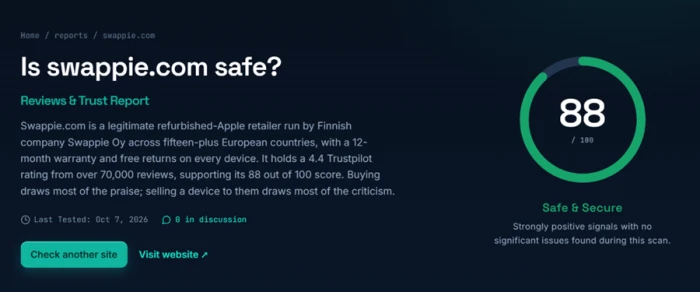
The signal list underneath is where most scam checkers hand you a vague green tick. This one printed the evidence instead.
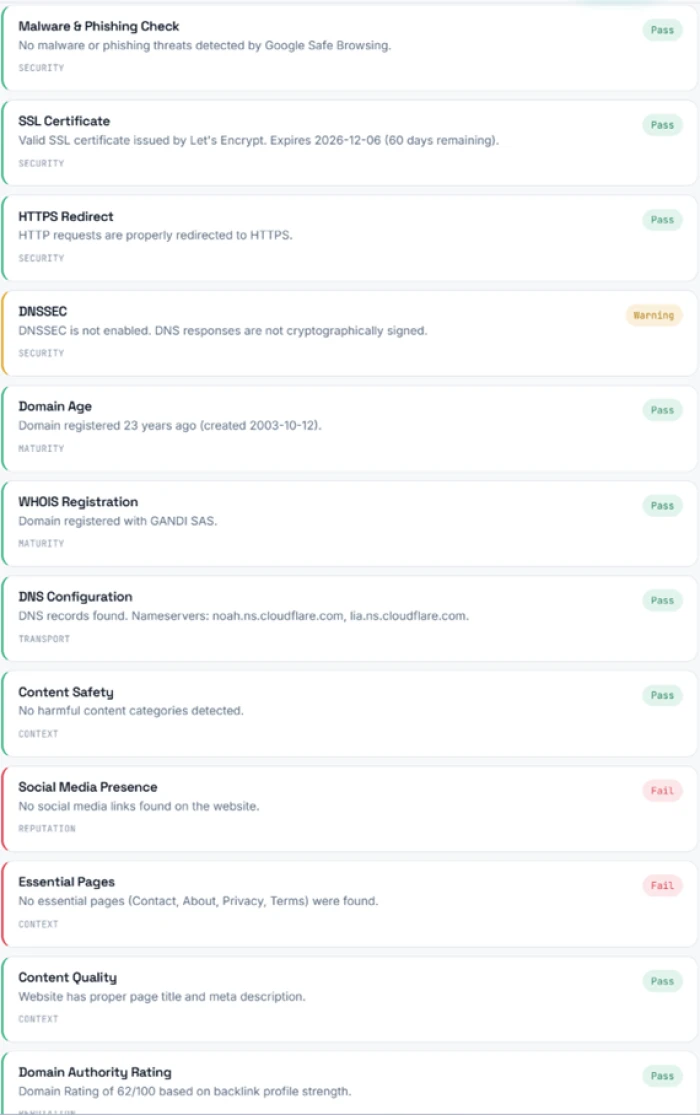
What sits behind each check
UrlTestly is unusually open about where its data comes from. The pipeline page lists the engines by name.
The "Domain, DNS & SSL" group runs on its own infrastructure. Google Safe Browsing handles malware and phishing lookups, Ahrefs supplies the domain-authority figure, and OpenAI writes the summary.
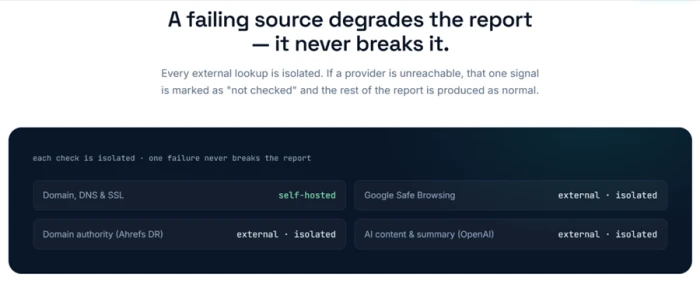
Each source is isolated, so one provider going down marks a single signal "not checked" rather than killing the whole report.
The checklist and the scoring philosophy
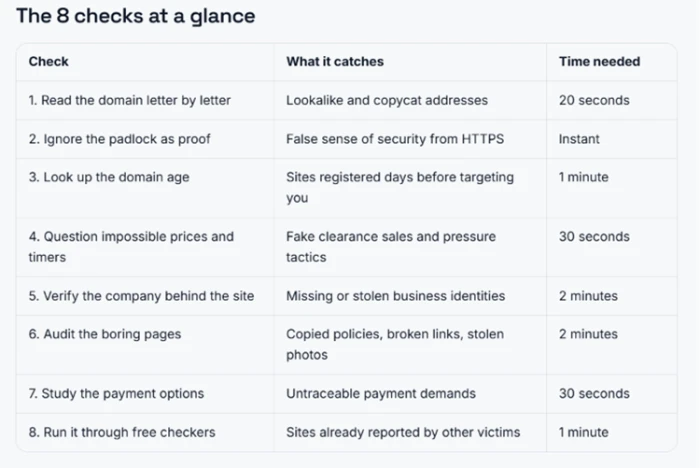
The scanner is not the only thing on the site. The blog runs a practical guide on spotting fake websites, condensed into an at-a-glance table of eight checks with the time each one takes.
It reads like a process the team actually applies, which lines up with the manual reviews attached to the riskier reports.
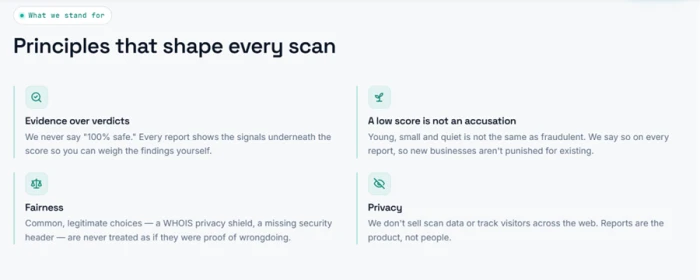
The principles page commits to showing the signals under every score and refusing to call anything "100% safe." It also states that young or quiet sites are not punished for existing, and that a WHOIS privacy shield is never treated as proof of wrongdoing.
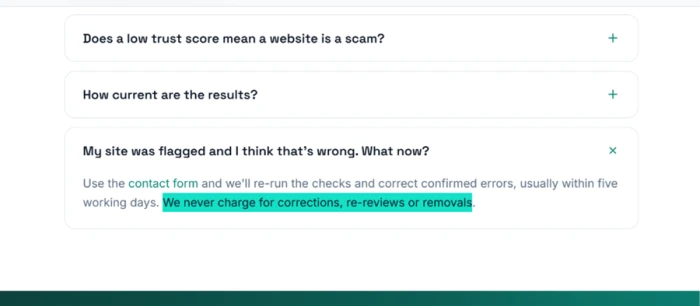
The policy that stood out most sits in the FAQ. If a site owner thinks a flag is wrong, UrlTestly says it will re-run the checks and fix confirmed errors, and that corrections and removals are always free.
A risky site: scanning ole7.io
Next I ran ole7.io, an online casino. The score dropped to 54 out of 100, "Risky." The automated signals told part of the story, but the reputation section is where this tool pulled ahead of anything else I have used.
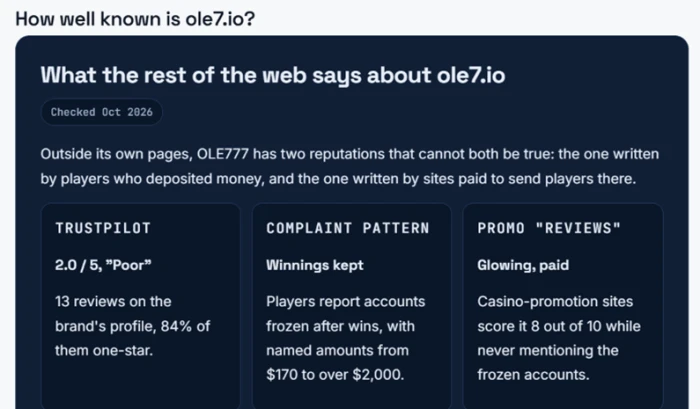
Instead of a single aggregate number, it set two conflicting reputations side by side. The player record on Trustpilot sat at 2.0 out of 5, with 84 percent of reviews at one star and named losses running from $170 to over $2,000.
Against that, it showed paid promotion sites scoring the same casino 8 out of 10 while never mentioning the frozen accounts.
Where the scan broke down
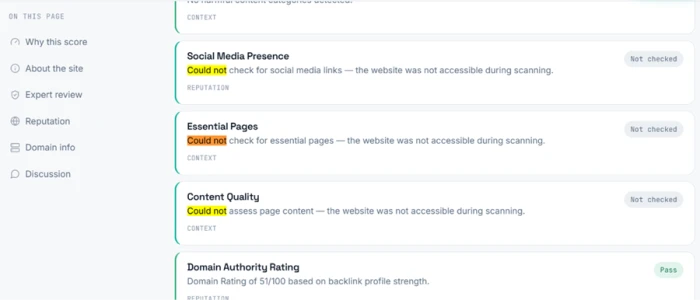
The ole7.io report also exposed the clearest weakness I found. Three checks came back marked "Not checked." The scanner could not verify the social media links, confirm the essential pages, or assess the page content.
The note on all three was identical: the website was not accessible during scanning.
UrlTestly pricing
Figures taken from the official UrlTestly pricing page.
| Plan | Price | What's included |
|---|---|---|
| Free | $0 | Unlimited public scans · full trust report & signals · shareable permanent report URL · report discussions |
| Pro Popular | $29 /mo | Everything in Free · API access (5,000 calls/mo) · priority scan queue · bulk domain scanning · higher rescan limits |
| Business | Custom | Everything in Pro · high-volume & custom limits · premium threat feeds · SLA & dedicated support · invoicing & SSO |
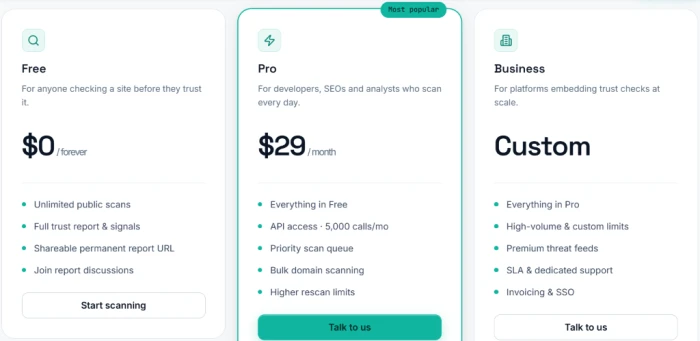
Pricing is accurate as of 15 October 2026 and was captured from the official UrlTestly website. Plans and limits change often, so check the official UrlTestly pricing page for the current figures before you subscribe.
Pros & cons
Specific conclusions from testing and the tool's own published behavior, not generic filler.
✅ Pros
- Prints raw evidence under each check: SSL issuer, nameservers, exact domain age
- Separates real user reviews from paid promotion in two columns
- Names its engines: Google Safe Browsing, Ahrefs, OpenAI, own DNS infrastructure
- Keeps sources isolated, so one failing provider marks one signal, not the report
- Flags DNSSEC and missing pages even on sites it rates Safe
- Published principle not to penalise young domains or WHOIS privacy
- Stated free re-review and removal path for disputed flags
⛔ Cons
- Scanner can return "not checked" when a site blocks its crawler
- AI summary may describe a page the live scan could not open
- No browser extension, so no checking while you browse
- Web only, with no mobile app
- Reports cached up to seven days, so a result can be stale
- Almost no independent review track record to cross-check against yet
Synthesized from hands-on testing and UrlTestly's published pipeline, principles and FAQ · paraphrased, not quoted
UrlTestly alternatives
| UrlTestlyReviewed | ScamAdviser | URLVoid | Scam Detector | |
|---|---|---|---|---|
| Price | Free; Pro from $29/mo | Free, no paid plan listed | Free; paid API via APIVoid | Free |
| What it checks | 1 to 100 trust score from SSL, DNS, WHOIS, Safe Browsing and Ahrefs | 1 to 100 trust score from 40+ data sources | Scans a domain against 30+ blocklist and reputation engines | Trust score from domain age, SSL, blacklists, WOT and spam reports |
| Evidence shown | Full raw data printed under every signal | Score plus a short highlights panel, weighting hidden | Names each blocklist and links its report, plus IP and domain age | A written analysis, stated as informational only |
| Extension / app | None, web only | Chrome, Firefox, Edge, Safari and a mobile app | Chrome and Firefox extension (via APIVoid) | Mobile app; no browser extension |
| Best for | Seeing the evidence behind a verdict | Quick first checks on unfamiliar shopping sites | Threat analysis across many blacklists at once | Shoppers checking if a site is legit before buying |
Who Should Use UrlTestly, and Who Should Avoid It?
UrlTestly is built for people who want the evidence behind a safety verdict, not just a colour. Its live-scan gaps and lack of an extension or app make it a weaker fit for some workflows.
Who Should Use UrlTestly?
Best suited for these needs
People Who Want the Evidence
Every signal is printed with its raw data: the SSL issuer, the real nameservers and the exact domain age.
Shoppers Checking Unfamiliar Sites
The report sets genuine user reviews against paid promotion in two columns, so you can see who is paid to praise a site.
Anyone Who Distrusts Black-Box Scores
It names its engines, Google Safe Browsing, Ahrefs and OpenAI, and isolates them so one failure marks a single signal.
Site Owners Disputing a Flag
The FAQ commits to a free re-review and a free removal path when a flag is confirmed wrong.
Who Should Avoid UrlTestly?
Consider an alternative if you need
A Guaranteed Live Read
When a site blocks the crawler the scan returns "not checked," and the summary may still describe a page it never opened.
Checking While You Browse
There is no browser extension, so you cannot get a verdict on a page without switching to the site and pasting the URL.
Mobile Coverage
It is web only, with no mobile app for checking links on a phone.
A Proven Track Record
Reports are cached up to seven days, and there is almost no independent review history to cross-check against yet.
Our Recommendation
UrlTestly is the most transparent trust checker to keep in your tabs, as long as you read the written summary as context rather than proof. Anyone who needs a guaranteed live scan on sites that block crawlers, or a checker that follows them around the browser, should pair it with a second tool for now.
UrlTestly scorecard
Rated against what a website trust checker is actually built to do.
| Dimension | Verdict | Score |
|---|---|---|
| Signal transparency Showing the evidence under each check | Excellent |
9.0
|
| Reputation analysis depth Real reviews vs paid promotion | Excellent |
8.5
|
| Correction policy Disputing and removing a flag | Excellent |
8.5
|
| Data source openness Naming the engines behind the score | Excellent |
8.5
|
| Ease of use Paste a domain, no account | Excellent |
8.5
|
| Scoring fairness Young and quiet sites not punished | Good |
8.0
|
| Scam detection accuracy Catching genuine risk | Good |
7.5
|
| Platform coverage Web, extension, app, API | Average |
6.0
|
| Live scan reliability Reaching the site it reviews | Average |
5.5
|
| Report consistency Summary matching the live scan | Weak |
5.0
|
| Scrutool Score Equal-weight average of all 10 dimensions |
7.5
|
The scam checker that finally shows its working
UrlTestly gets the hard part right. It prints the evidence under every score, names the engines doing the work, sets real reviews against paid promotion in a way no rival manages, and publishes a scoring philosophy plus a free correction path instead of hiding both. On a clean site it still flagged DNSSEC and missing pages, which is exactly the honesty this category usually lacks. The weakness is mechanical: when a site blocks the crawler the scan returns "not checked," and the AI summary can then describe a homepage the live scan never opened, with no label saying so. There is also no extension, no app, and almost no independent review history to cross-check against yet. Treat the written summary as context rather than proof, and UrlTestly is the most transparent trust checker worth keeping in your tabs. Anyone who needs a guaranteed live read on sites that fight back, or a checker that follows them around the browser, is not served here yet.
Discussion
Join the discussion and share your perspective.