Short answer: You can learn to build AI agents without writing code. The path runs from understanding what an agent is, to designing the workflow you want automated, to running your first task inside an agent mode you already have, then graduating to a no-code builder for repeatable work. Most non-developers reach a working first agent in a few weeks of part-time practice. Start with the agent mode built into ChatGPT, Claude, or Gemini before you touch any platform.
Can a non-developer learn AI agents without coding? Yes, and here is why that changed
A year ago, the honest answer to this question was "sort of, but it will be painful." That is no longer true. The tools matured, the interfaces got friendlier, and the demand for people who understand agents shifted away from engineers.
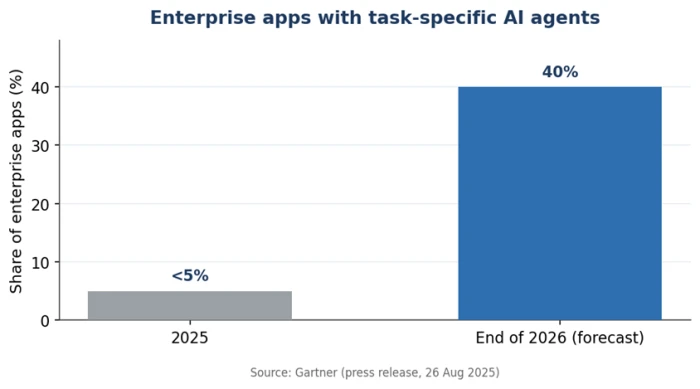
The numbers explain the urgency. Gartner forecasts that 40% of enterprise applications will embed task-specific AI agents by the end of 2026, up from less than 5% in 2025. That is an eightfold jump in a single year, one of the steepest adoption curves enterprise software has seen. By mid-2026, roughly 31% of enterprises were already running at least one agent in production, according to figures compiled from S&P Global Market Intelligence and McKinsey.
Here is the part that matters for you. The bottleneck in most companies is not a shortage of developers. It is a shortage of people who can spot the right task to automate, write clear instructions, judge whether the output is good, and decide when a human needs to step in. Those are business skills, not programming skills. Your experience in operations, marketing, finance, or HR is the advantage, and the code is the part machines now handle.
Data: Gartner press release, 26 August 2025.
What an AI agent actually is, and what it is not
Before choosing a tool, you need a mental model that survives the marketing. Vendors sell chatbots, automations, and agents under the same three-letter label, and buyers routinely pay for the wrong thing. So let us separate them clearly.
Agent vs. chatbot vs. automation vs. generative AI
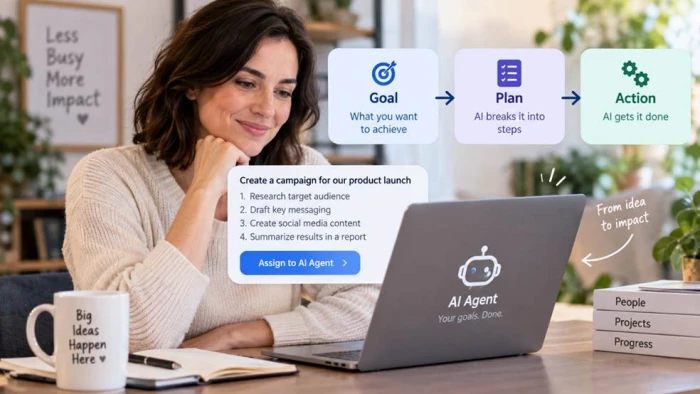
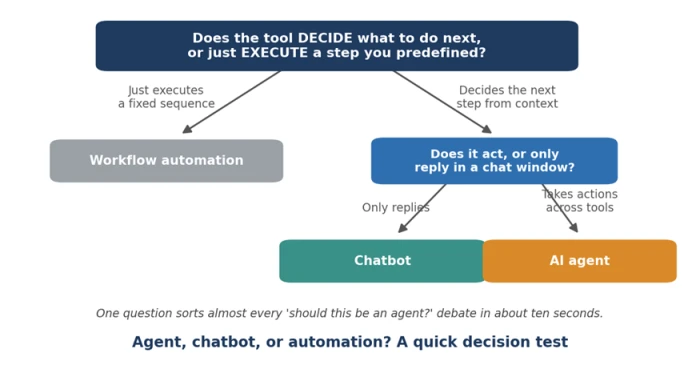
Generative AI is the raw capability: give it a prompt, get back text, an image, or code. A chatbot wraps that capability in a conversation, so it answers what you ask and then waits. Workflow automation runs a fixed sequence you defined in advance, the same way every time. An AI agent is different in one specific way. You give it a goal, and it decides the steps itself, chooses which tool to use for each step, checks its own work, and adjusts when something fails.
The cleanest test is a single question: does the tool decide what to do next, or does it just execute a step you already defined? Decision means agent. Execution means automation. A tool that only talks back is a chatbot.
The anatomy of an agent: goal, brain, memory, tools, and guardrails
Every agent, no matter which platform builds it, has the same five parts. Learn these once and you can read any tool on the market:
• Goal. The outcome you hand it, such as "summarize this inbox and flag anything urgent."
• Brain. The language model that reasons and picks the next step, such as Claude, GPT, or Gemini.
• Memory. What the agent remembers within a task, and sometimes across sessions.
• Tools. The things it can act with: web search, your calendar, a spreadsheet, an email connector.
• Guardrails. The approval steps and limits that keep it from doing something you did not intend.
If you have compared conversational tools before, for example while reading hands-on AI chatbot reviews, the brain and memory pieces will already feel familiar. Agents simply add tools and the ability to act.
What you actually need to learn, and what you can safely skip
Most guides aimed at beginners quietly assume a developer audience and send you toward Python and orchestration frameworks. That path wastes months. Here is the honest split.
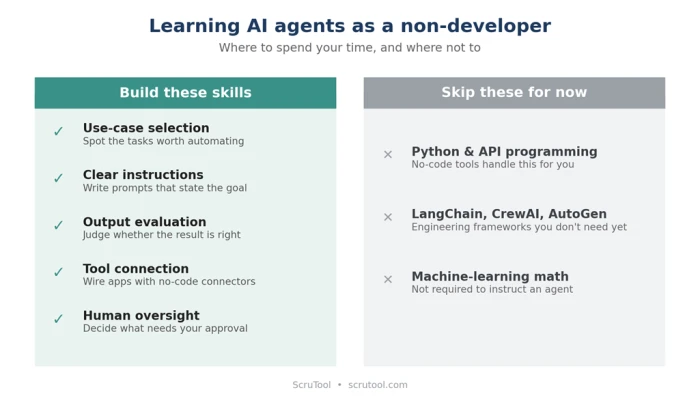
The five skills that matter, none of which are coding
1. Use-case selection. Recognizing which repetitive, rule-based tasks are worth automating.
2. Clear instructions. Writing prompts that spell out the goal, the steps, and what a good result looks like.
3. Output evaluation. Judging whether the agent did the job correctly, and spotting quiet mistakes.
4. Tool connection. Linking the agent to the apps it needs through visual, no-code connectors.
5. Human oversight. Deciding what the agent may do alone and what it must escalate to you.
What to skip for now
Do not learn these yet
Python and API programming. No-code platforms and agent modes handle this for you.
LangChain, CrewAI, and AutoGen. These are engineering frameworks. Learning them now is like learning to manufacture a car when you only need to drive one.
Machine-learning math. You do not need linear algebra to instruct an agent. Learn concepts in context if you ever need them.
The learning path: from zero to a working agent
With the mental model in place and the noise stripped out, the path becomes a short sequence of stages. Each one has a clear signal that tells you when to move on, so you never get stuck polishing the wrong thing.
Stage 1: Build the mental model
Spend a few hours getting the concepts straight before you open any tool. Free, credible starting points include the University of Helsinki's Elements of AI, Google's introductory generative-AI course on Cloud Skills Boost, and the short courses on DeepLearning.AI. Ready to move on when you can explain, in your own words, the difference between a chatbot and an agent.
Stage 2: Learn to think like an agent designer
This stage is process design, not technology. Pick three tasks from your own job that are repetitive and take more than twenty minutes a week. For each, write out three things in plain language:
• The trigger. What event starts the task?
• The decision points. Where does judgment happen?
• The finish line. How do you know it was done well?
That mapping exercise is the real foundation of prompting for business users, and it is more useful than any technical tutorial. Ready to move on when you can describe a workflow tightly enough that a new colleague could follow it.
Stage 3: Start with the agent mode you already have
Here is where most guides send you straight to a platform. Skip that for your first build. ChatGPT Agent, Claude's agentic modes, Gemini Agent, and Microsoft Copilot Agent can already take a goal and complete a multi-step task with no setup. Assign one of the workflows you mapped in Stage 2 and watch how the agent plans and acts. Ready to move on once you have completed one real task end to end this way.
Stage 4: Graduate to a no-code builder for repeatable agents
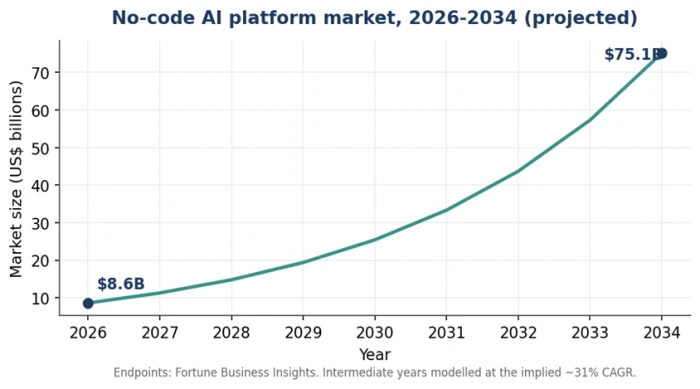
Agent modes are perfect for one-off jobs, but they do not run on a schedule or wire many apps together. When you want an agent that fires every morning or connects several systems, move to a visual builder such as Zapier Agents, n8n, Make, Lindy, or Flowise. Pick one and stay with it for two full weeks before judging it. The market backs this shift: the global no-code AI platform sector is projected to grow from roughly $8.6 billion in 2026 to about $75.14 billion by 2034.
Endpoints reported by Fortune Business Insights; intermediate years modelled at the implied ~31% CAGR.
Stage 5: Add governance from day one
This is the stage beginner guides skip, and it is exactly why so many projects collapse. Gartner expects more than 40% of agentic AI projects to be canceled by 2027, largely due to weak governance and cost overruns. Build in an approval gate, a clear rule for what the agent must escalate, and a quick output check from your first build. Ready to move on when your agent has at least one human checkpoint before it does anything that matters.
The full curriculum in one table
Stage
What to learn
Free starting resource
Move on when…
1. Concepts
How agents differ from chatbots and automation
Elements of AI; Google Cloud Skills Boost intro
You can explain the difference plainly
2. Design
Mapping triggers, decisions, and outcomes
Your own three real workflows
A colleague could follow your map
3. First run
Assigning a goal to an agent mode
ChatGPT / Claude / Gemini agent mode
One task done end to end
4. No-code build
Scheduled, multi-app agents
Zapier, n8n, Make, Lindy, or Flowise free tier
A repeatable agent runs on its own
5. Governance
Approval gates and escalation rules
The platform's built-in approval steps
A human checkpoint guards real actions
Original asset. Downloadable one-page version recommended as a lead magnet.
How long does it take to learn AI agents?
Search results give wildly different answers, from "five minutes" to "nine to eighteen months." They are all describing different goals. Separate the goal and the confusion disappears.
Your goal
If you already work with AI tools
Starting from scratch
Use agent modes well for one-off tasks
A few days
One to two weeks
Build no-code agents that run on their own
Two to four weeks
Six to eight weeks part-time
Engineer custom agents with code
Three to six months
Six to twelve months
For the vast majority of non-developers, the middle row is the target. With five to seven hours a week, a working, governed no-code agent in six to eight weeks is a realistic outcome, not an optimistic one. The "nine to eighteen months" figures you will see elsewhere describe the engineering path, which you do not need.
Choosing your first tool without the overwhelm
Agent modes, no-code builders, or frameworks?
Match the layer to where you are. Agent modes suit your first task. No-code builders suit repeatable work once you know what you want. Frameworks suit engineers and can wait indefinitely. The table below covers the beginner-friendly options and flags the one detail that surprises new builders.
Tool
Ease
Cost model
Best for
ChatGPT / Claude / Gemini agent mode
Easiest
Inside your existing subscription
Your first, one-off multi-step task
Zapier Agents
Easy
Subscription plus task/step usage
People already using Zapier's 7,000+ app connections
Make
Moderate
Subscription plus operations; generous free tier
Visual multi-step logic on a budget
Lindy
Easy
Subscription plus usage
Plain-English business agents with little setup
n8n
Steeper
Free self-hosted, or paid cloud
Flexible, open-source, scheduled workflows
Flowise
Moderate
Free self-hosted, or paid cloud
Conversational agents over your own documents
The cost trap nobody warns you about
Two bills, not one
The subscription pays for the builder, the hosting, and the app connections. It almost never includes the language-model usage itself. OpenAI, Anthropic, or Google API calls usually bill separately, either through the platform's marked-up credits or through your own key. Budget for both lines before you scale, because per-task and per-step pricing climbs fast once an agent runs thousands of times a month.
For a wider view of autonomous tools and how they score on real tasks, independent AI agent tool reviews are a useful sanity check before you commit money to any single platform.
Build your first agent: a worked example
The next step is to make this concrete. Here is a realistic first build a non-developer can finish in an afternoon. Treat it as an illustrative walkthrough rather than a specific product tutorial, since the exact buttons differ by tool.
Goal: every weekday morning, read yesterday's sales-inbox messages, group them by topic, and draft a short summary with anything that needs a reply flagged.
1. Define the goal in plain language inside your chosen tool, exactly as written above.
2. Connect the tools the agent needs: the inbox and a document or message channel for the summary.
3. Write the success criteria: "Group by topic, keep the summary under 150 words, flag only messages that ask a direct question."
4. Add a guardrail: the agent drafts, but never sends a reply without your approval.
5. Run a test on real data and read the output critically.
Expect it to break the first time. In practice the common failure is that the agent over-flags, treating every message as urgent. The fix is not technical: you tighten the instruction to define "urgent" precisely. That single loop, run and refine the wording, is the core skill you are building.
A starter project for your role
Role
A good first agent
HR / talent
Screen inbound applications against a criteria list and flag the strongest for review
Operations
Watch a data feed and alert you only when a threshold is crossed
Finance
Read invoices and flag ones that do not match the purchase order
Marketing
Repurpose one long post into channel-ready drafts for approval
Sales
Draft first-pass follow-ups to recurring client questions
The mistakes that stall most beginners
Nearly every stalled learner trips on the same short list. Knowing them in advance is the cheapest speed-up available.
• Learning frameworks instead of use cases. Start from the task you want done, not the technology stack.
• Building in isolation. Anchor your first agent to a real problem a colleague actually has, so you get feedback and a result you can show.
• Skipping governance. The agents that fail in real settings almost always fail at the oversight layer, not the technical one.
• Tool-hopping. Switching platforms every few days resets your progress. Commit to one for two weeks.
• Over-automating high-stakes calls. Keep a human in the loop wherever a mistake would be expensive.
Is it worth it? Careers, roles, and payoff
The learning has two payoffs, and you do not have to change jobs to collect the second one.
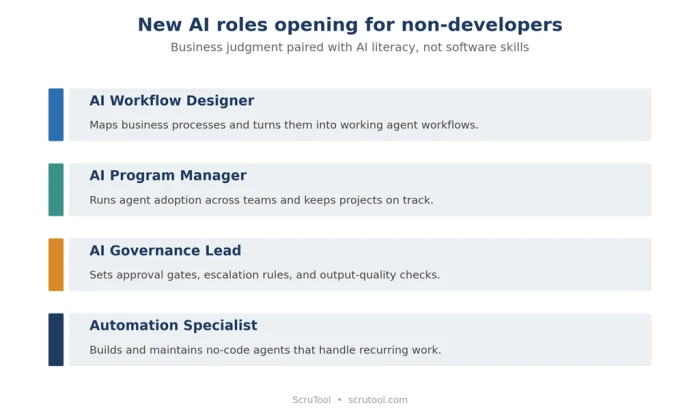
New roles are opening for people who understand agents without coding them: AI workflow designer, AI program manager, AI governance lead, and automation specialist among them. These sit at the seam between business operations and AI systems, and they reward domain expertise paired with AI literacy rather than software skills.
The quieter payoff is bigger for most readers. You do not need any of that to become the most AI-capable person on your team. A few weeks of deliberate practice on tasks you already own turns hours of repetitive work into an agent that handles the first pass while you review. Given that Gartner expects agents inside 40% of enterprise apps by the end of 2026, the people who can direct those agents well will set the pace on their teams.
Your next seven days
Momentum beats planning here, so turn the path into one short week.
1. Day 1–2: Map three repetitive workflows from your own job using the trigger, decision, finish-line format.
2. Day 3: Run the easiest of the three through an agent mode you already have.
3. Day 4–5: Pick one no-code builder and rebuild that agent so it runs on a schedule.
4. Day 6: Add an approval gate and a success check.
5. Day 7: Show it to the colleague whose problem it solves, and note what to tighten next.
That last step is the one that compounds. An agent built for someone else's real problem gets used, gets feedback, and gets better, which is how a first experiment turns into a skill you keep.
The Bottom Line
Learning AI agents as a non-developer comes down to a single reframe: the hard part was never the code. It is knowing which task to hand off, writing an instruction the agent can follow, checking the result, and keeping a human in the loop where a mistake would cost something. Those are the skills you already use at work, sharpened for a new kind of tool.
The path is short and the order matters. Get the concepts straight, map a real workflow from your own job, run it through an agent mode you already have, then rebuild it in one no-code tool with an approval gate from the start. Most people reach a working, governed agent in six to eight weeks of part-time effort, not the nine to eighteen months the engineering guides quote.
The timing is the part worth acting on. With Gartner projecting task-specific agents inside 40% of enterprise applications by the end of 2026, the scarce skill on most teams is no longer building agents. It is directing them well. Pick one repetitive task this week and point an agent at it. The first one you finish is the moment this stops being a topic you read about and becomes something you can do.


Discussion
Join the discussion and share your perspective.